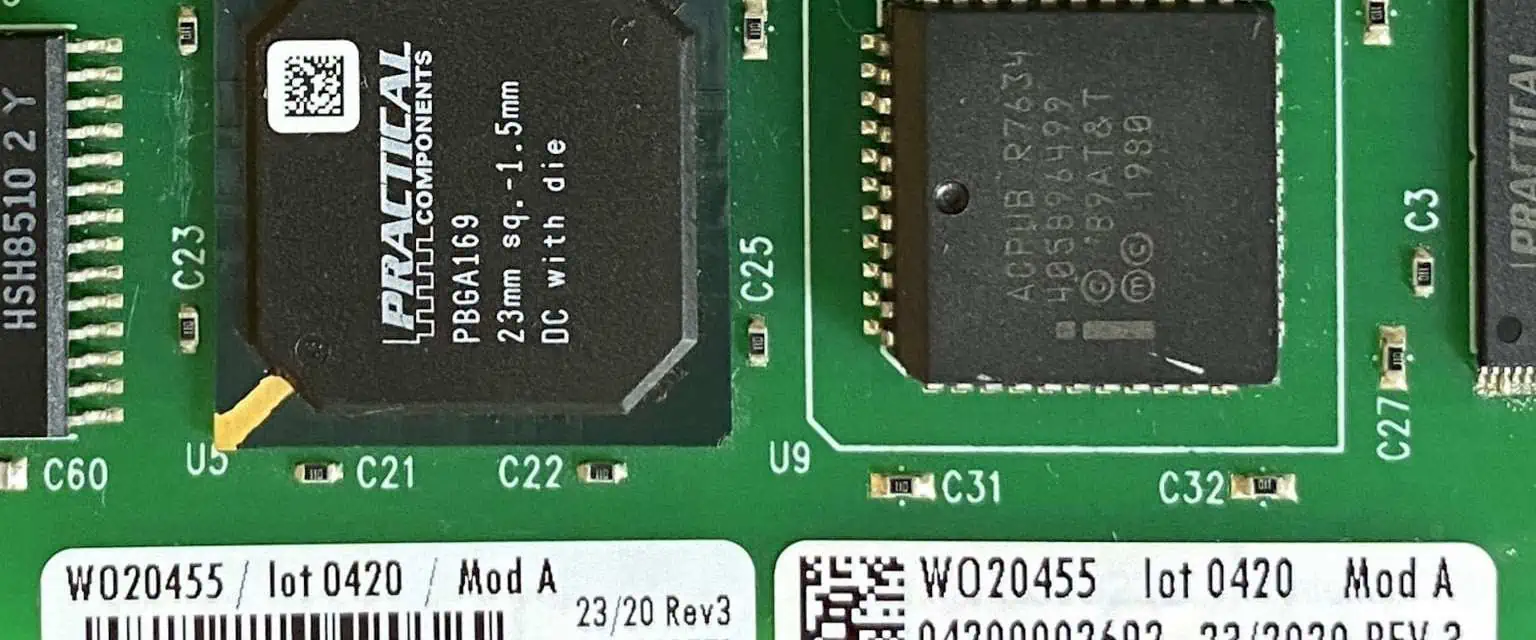
What Is a PCB Label?

A PCB label refers to the text and markings printed on a printed circuit board (PCB) to identify key attributes and aid in assembly and servicing. From part numbers to polarity indicators, labels enable clear recognition of board features and terminals.

PCB labels serve a variety of helpful functions:

  • Part numbering for inventory management
  • Pin mapping to assist insertion and soldering
  • Branding and logos for product marking
  • Board variant and revision data
  • Power and I/O terminal indicators
  • Regulatory compliance information
    • Certification marks
    • Date codes, serial numbers
  • Operating parameters and warnings

With increasingly complex and compact PCBAs powering critical systems, clear and permanent labels constitute an indispensable aspect of robust product assembly and field servicing.

Types of Labels

There are two main types of labels used on PCBs:

Silk Screen Lables

Silk screen printed text utilizes epoxy ink layers applied directly to the PCB surface to create a permanent label. Since the process uses the same masked patterning as copper traces, it aligns precisely with board features and pads. This approach supports small text as well fine line work and shading such as logos.

Metal Foil Labels

Metal foil labels consist of thin aluminum plates etched with text and bonded to the PCB surface. They can withstand cleaning solvents which may degrade silk screen ink. Foil labels provide high contrast and durability, however minimum text size and spacing is larger than silk screen.

There are also various self-adhesive vinyl label options, but these tend to be less robust than the printed labeling methods above.

Next we’ll take a look at common PCB label implementations and their purpose.

Key Types of PCB Labels

Identifier Labels

Boards should minimally have a unique identifier label for tracking including:

  • Part number – Used for inventory management, may encode options
  • Revision – Distinguish versions and board changes
  • Serial numberย – Identify individual boards in production

Identifier labels are essential for supply chain logistics as well as managing field replacements and upgrades.

Orientation Labels

Orientation labels denote board directionality to assist assembly and services. Common indicators include:

  • “THIS SIDE UP” text
  • “PIN 1” marker near alignment slot
  • Rounded/beveled cornerย showing proper placement

Clearly conveying orientation prevents insertion errors which could damage boards or components during production.

Terminal Assignment Labels

Labels mapping board terminals to I/O functions helps identify connection points for wiring harnesses, cables or connectors during prototyping, test and field deployment.

Information often labeled includes:

  • Power rails – GND, VCC markings
  • Interface ports – USB, Ethernet, CAN etc.
  • Pin countsย – Labeled numerically

This labeling eliminates guesswork hooking up boards and ensures proper supply and signal connections.

Power Labels

Boards utilizing multiple voltage domains should identify domains and convey critical electrical constraints like:

  • Operating voltage
  • Maximum current
  • Power sequencing
  • ESD warnings

Conspicuous power rail labels help prevent damage from overvoltage or overcurrent.

Logo / Branding Labels

Logos, trademarks and company branding printed on the board provide product authentication and security. This deters counterfeiting and enables brand identification in the field.

Component Placement Labels

Labels mapping component locations is extremely helpful for manual assembly and rework. These often reference schematics or assembly diagrams.

Decorative Labels

Purely aesthetic labels can provide a professional appearance conveying quality. Common examples include decorative company name text and geometric corner motifs.

This summarizes common PCB label usage in products across industrial, medical, automotive, and consumer segments. We’ll now examine some best practices on label implementation.

PCB Labeling Best Practices

Effective application of PCB labels requires some design considerations:

Placement

  • Position labels for visibility and access
    • Avoid component placement overlap
  • Ensure orientation labels clearly visible
  • Put near relevant features
    • Terminals, connectors, components
  • Keep grouping consistent
    • Revision/branding in same area

Contrast

  • White text on black works well
  • Dark backgrounds with light text

Size

  • Minimum 10 point (2.5mm) text height
  • Increase size for important info
    • Power ratings etc.
  • Decrease size for secondary data
    • Codes, logos

Text Format

  • Use standard nomenclature
    • GND, VCC, Pin1 etc.
  • Be concise but unambiguous
  • Avoid text overload

Properly implementing labels using these guidelines ensures clarity forassemblers while providing vital data to field technicians.

Automated PCB Labeling

Manual label placement in PCB design tools often leads to overlooked information and inconsistent styling. Leading edge EDA software platforms like Altium Designer include advanced capabilities to assign labels automatically based on configurable rules.

For example, the following auto-labeling templates can be defined in Altium:

Power Rails Tabular Label

NetVoltageCurrent
+5V5V2A
+3.3V3.3V3A
GND0Vn/a

Parts Database Label

MPN: {MPN}
Description: {Description}

Custom Text Label

This automation simplifies incorporating vital identifiers, assembly instructions, ratings specifications and other text elements necessary for manufacturing and field deployment.

For further customization graphical objects can also be embedded into label primitives including lines, rectangles, circles and imported PNG images.

Labeling for Regulatory Compliance

Depending on product safety impact and target markets, PCBs may require certification marks and compliance labeling including:

  • CE, UKCA โ€“ European Conformity
  • UL, CSA โ€“ Safety standards
  • FCC, ISED โ€“ EMI/EMC approvals
  • RoHS โ€“ Hazardous substances

Other mandatory labels for production date codes, serial numbers, operating specs etc. may also apply per certification regimes. Regulatory requirements should be researched thoroughly based on jurisdictions covered.

Automated database-linked label rules streamline injection of up-to-date certification markings aligned to specific PCB designs and configurations.

Conclusion

In summary, PCB labels constitute a vital yet often overlooked product component serving diverse purposes from branding to assembly facilitation. Careful label design taking into account critical data needs, visibility, sizing and integration with the CAD toolflow results in maximum manufacturing and field serviceability.

Automation technology now readily exists to simplify the labeling process while reducing compliance risks. Given the accelerating complexity of modern electron mechanical goods, leveraging these advances provides real competitive advantage to producers.

Frequently Asked Questions

Q: How are PCB labels physically created?

A: The two main methods are silk screen printing using epoxy ink and metal foil etching. Silk screen enables small text and logos directly on the board surface. Foil provides high contrast and durability. Labels get applied during board fabrication.

Q: Should PCB labels use a standard format?

A: Using common nomenclature like โ€œPin 1โ€, โ€œGNDโ€, positive/negative symbols etc. helps ensure universal understanding. But allowing some customization also enables optimized callouts for product-specific architectures.

Q: Can PCB labels be added post-production?

A: Yes, manual adhesive labels can be used albeit with less robustness over molded text. Reworking boards to add silk screen or metal foil labels is also possible but much more complicated. Best practice is to finalize all labels during the engineering stage.

Q: What label content is most helpful for field repairs?

A: Part numbers, revision, branding, power ratings, terminal assignments, voltage domains, component locations are key for technicians troubleshooting and servicing boards. Silk screens of the PCB assembly and schematic drawings are also extremely helpful.

Q: Do all certification marks required need to go on the PCB label?

A: Any markings integral to PCB construction should be included, but certifications primarily related to the full product enclosure can be satisfied on the exterior housing assuming it remains fixed. Research applicable regulations to determine proper label placement.

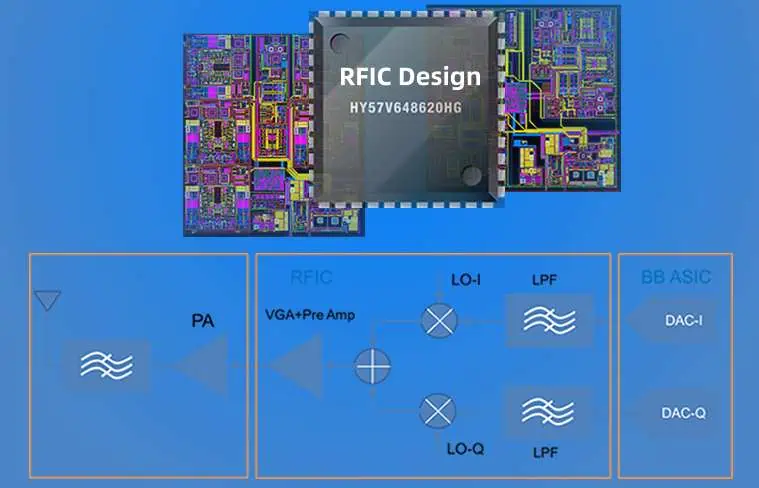
Introduction to RFIC Design

RFIC stands for Radio Frequency Integrated Circuit. As the name suggests, RFICs are a type of integrated circuit (IC) designed to operate at radio frequencies typically between 10 MHz to 100 GHz.

RFICs find widespread use in diverse applications including:

  • Mobile devices
  • Wireless communications
  • Radar systems
  • Broadband data links
  • Satellite technology
  • Biomedical devices

And many other uses across consumer, industrial, medical, defense, and aerospace segments.

The RFIC market has experienced massive growth recently, reaching over $$18 billion in 2022. Advancements in fabrication technology enabling higher levels of IC integration and performance are key catalysts behind increasing RFIC adoption.

RFIC Architectures

There are two primary architectures used when designing RFICs:

Monolithic RFICs

  • Entire system integrated into a single semiconductor die
  • Highest performance and integration density
  • Leverages advanced lithography nodes
  • More expensive and complex fabrication

Multi-Chip Module RFICs

  • Combines multiple separate ICs in a single package
  • Enables integration of incompatible processes
  • Cheaper and simpler manufacturing
  • Larger footprint with lower performance density

Within these architectures, common RFIC building blocks include:

LNAs โ€“ Low Noise Amplifiers
Mixers โ€“ Frequency Mixers
VCOs โ€“ Voltage Controlled Oscillators
Filters โ€“ Band Select Filters Switches โ€“ RF Signal Switches PAs โ€“ Power Amplifiers

And more. These circuits blocks are designed on chip to achieve RFIC systems targeting various applications.

RFIC Design Process

Creating an RFIC involves sophisticated chip design spanning modeling, simulation, layout, verification, prototyping, and testing phases.

High-Level RFIC Design Stages:

  1. System Analysis
  2. Circuit Design
  3. Layout Implementation
  4. Verification and Prototyping
  5. Packaging and Production

Next, weโ€™ll explore each stage more closely.

1. System Analysis

  • Define application requirements
    • Frequencies, bandwidth, gain, linearity, etc.
  • Decompose into functional blocks
  • Model system performance
    • Noise figure, distortion, data rates
  • Explore architectural options
    • Frequency plan, topology, division of functions

Essentially converting specs into a high-level RF system blueprint.

2. Circuit Design

With the system architecture set, the process moves to the transistor level.

This involves extensive analog and RF circuit simulation using specialized EDA tools like Cadence AWR, Keysight ADS, ANSYS, and Synopsys to:

  • Design, optimize, and verify individual IC blocks to meet target specs
    • LNAs, VCOs, mixers, filters etc.
  • Simulate overall system performance across process, voltage, temperature (PVT)
  • Ensure adequate margin to specification over all conditions
  • Send design to layout once performance targets achieved

Circuit simulation and analysis represents the most intense and time-consuming portion of RFIC development.

3. Layout Implementation

The physical layout phase converts the circuit schematics into an IC mask layout file used for fabrication. This involves key steps like:

Floorplanning โ€“ Mapping functional blocks and routing to the chip area

Place and Route โ€“ Positioning and connecting transistor devices and components

Verification – Confirming layout matches circuit design using layout vs. schematic (LVS) checks and design rule checks (DRC)

Extraction โ€“ Creating parasitics netlist for post-layout simulation

Todayโ€™s EDA tools automate much of the implementation while enabling engineers to optimize custom layout circuits like high-performance matching networks.

4. Verification and Prototyping

With the layout complete, the design undergoes further verification and prototypes are built:

Post-Layout Simulation โ€“ Incorporating layout parasitics in circuit simulation

DRC/LVS โ€“ Final design rule and layout vs. schematic verification

Initial Prototypes โ€“ Fabricating design on foundry process and testing key parameters

Optimization โ€“ Refining design based on silicon results to achieve performance targets

This stage often requires several fabrication iterations using multi-project wafer services to enable rapid prototyping at low cost.

5. Packaging and Production

For the final production version:

Qualification โ€“ Rigorously testing design over temperature, voltage etc. to validate robustness

Reliability Testing – Stress testing with burn-in, thermal cycling, vibration and other reliability screening

Data Sheets โ€“ Documenting electrical performance parameters

Packaging โ€“ Encapsulating die into production packages

Volume Manufacturing โ€“ Transferring qualified design to high-volume foundry production

Thorough qualification and reliability assessment is critical prior to ramping volume manufacturing.

This summarizes the key phases of RFIC development spanning conception through volume production. Next weโ€™ll explore some of the advanced methodologies and technologies used in cutting-edge RFIC design today.

Advanced RFIC Methodologies

Modern RFIC design leverages sophisticated techniques to achieve maximum performance and integration. Some key examples include:

Radio Architectures

Traditional narrowband radios are giving way to flexible multi-standard architectures using software-defined radio (SDR) and cognitive radio platforms. These are implemented primarily using CMOS SOCs enabling adaptable, reconfigurable systems with scalable data rates.

Radio TypeDescription
NarrowbandFixed analog hardware targeting specific protocol
SDRReconfigurable mixed-signal system for multi-mode operation
CognitiveSelf-learning adaptable radio sensing environment

SiGe HBTs

Silicon-germanium (SiGe) heterojunction bipolar transistors provide extremely high fT/fMAX enabling mmWave applications above 100 GHz. SiGe is quickly displacing III-V compound semiconductors in state-of-the-art transceiver designs.

Silicon Photonics

Using silicon waveguides, high-speed optical interconnects are integrated alongside digital SOC ICs enabling low loss, low power data transfer. This technology is ideal for channels between integrated antenna arrays and baseband processing.

3D Integration

Vertically stacking ICs or chiplets using advanced packaging techniques provides higherintegration density. This expands Mooreโ€™s Law beyond the reticle limit for next-generation microwave and mmWave systems.

These kinds of advanced design techniques allow modern RFICs to achieve unprecedented levels of performance to meet the needs of emerging wireless applications.

RFIC Foundry Processes

RFICs leverage specialized IC fabrication processes to deliver high frequency operation and high passive component performance. Some leading foundry processes include:

FoundryProcessFrequencyPassivesDescription
TSMC16nm FinFET100+ GHzCu MiM caps, thick Cu inductorsCutting-edge digital CMOS process with RF add-ons
TowerJazzSBC18H380 GHzHigh-Q passivesSiGe BiCMOS process optimized for analog/RF
GlobalFoundries45RFSOI100+ GHzCu MiM caps, thin film resistorsFD-SOI process with LDMOS transistors
WIN SemiconductorGaAs pHEMPT150 GHzThin film caps and resistorsHigh frequency GaAs process

These specialty processes offer much higher performance than standard CMOS logic technology through techniques like:

  • Advanced MIM capacitors
  • Thick copper inductors
  • Low loss substrates โ€“ SOI, sapphire etc.
  • High speed transistors โ€“ SiGe, GaAs

The expanding portfolio of RFIC processes enables addressing a vast range of wireless applications with optimized technologies.

EDA Tools

Modern EDA software provides a rich toolset for every stage of the RFIC design flow:

Key Capabilities:

  • Circuit Simulation
  • EM Analysis
  • Layout Synthesis
  • Design Rule Checking
  • Post-Layout Verification
  • EDA/Flow Management

EDA enables automation to greatly accelerate RFIC development along with high-level optimization and analysis capabilities. Advanced EDA solutions can slash RFIC project timelines by 6x or more.

RFIC Applications

RFT Testing

The demand for integrated RF capability is booming leading to massive growth in RFICs across nearly every market segment:

5G Communications โ€“ Smartphone front-end modules, small cell base stations, infrastructure

Automotive Radar โ€“ Collision detection and avoidance systems

Satellite Networks โ€“ Phased array antennas, transceivers

Wireless Connectivity โ€“ WiFi, Bluetooth, Zigbee, LoRa

Medical โ€“ Wireless patient monitoring, implants

Defense โ€“ Electronic warfare, unmanned systems

And much more. RFIC innovation and adoption will continue its rapid acceleration to meet the needs of increasingly connected technology.

Summary

In this article we explored:

  • RFIC architectures โ€“ monolithic vs. multi-chip
  • Core building blocks โ€“ LNAs, PAs, filters etc.
  • Multi-stage design process โ€“ from planning to production
  • Advanced design techniques โ€“ SDR, photonics, 3D
  • Specialty foundry processes โ€“ GaAs, SiGe, SOI
  • Critical role of EDA tools
  • High-growth applications and end markets

As wireless capability becomes integral across nearly all segments from consumer to industrial, RF chip content grows steadily. Advancements in integration, architecture innovation, new materials like SiGe and GaN, and sophisticated EDA toolsets fuel ongoing RFIC performance improvements to enable next-gen wireless systems.

For electrical engineers looking to work on cutting-edge technology while leveraging fundamental analog/RF disciplines, RFIC design offers a very compelling career path. The future is very bright for RF as connectivity proliferates across every aspect of society!

Frequently Asked Questions

Here are answers to some common RFIC questions:

Q: What are some key differences designing RFICs vs digital SOC ICs?

A: RFIC design deals primarily with analog, high-frequency circuits vs digital logic. It requires specialized architectures, transistors, and fabrication processes to achieve gigahertz operation as well as intensive use of electromagnetic simulation. RFICs also leverage high-performance passives like inductors and MIM capacitors which are not found in digital SOCs.

Q: Why are new specialty foundry processes required for mmWave RFICs?

A: Achieving very high frequencies exceeding 100 GHz places stringent demands like ultra-low parasitics and low loss substrates which exceed standard CMOS capabilities. Processes leveraging SOI, SiGe, and III-Vs enable breakthrough mmWave performance.

Q: What role do advanced IC packaging play in RFICs?

A: Packaging is crucial for RFICs to maintain signal integrity at high frequencies while managing thermal and electromagnetic issues. Techniques like flip-chip interconnect, embedded resistive substrates, multi-die modules and 3D stacking enable cutting-edge RFIC implementations.

Q: What are some of the biggest challenges in RFIC design today?

A: Packaging complexity, antenna integration, modeling and simulation burdens, and design tool runtimes are key issues. As more wireless capability gets integrated into advanced CMOS, RF must keep pace driving a need for better EDA solutions. Thermal and power density constraints also create difficulties.

Q: Which industry segments are driving the most RFIC innovation?

A: 5G communications, automotive radar ADAS systems, satellite networks, and aerospace/defense applications are pushing wireless capability into new frontiers requiring RFIC innovation. But nearly all segments from consumer IoT to industrial to medical leverage RFICs to enable connectivity.

What is Teardrop in PCB?

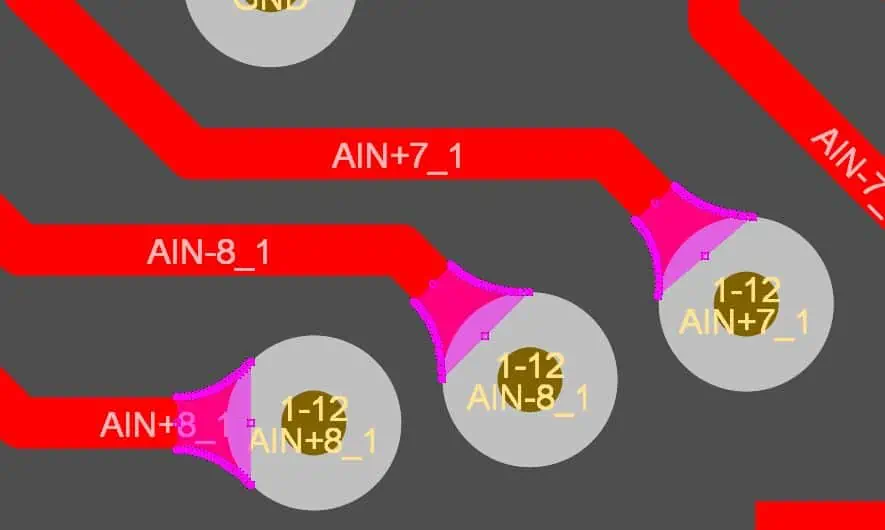
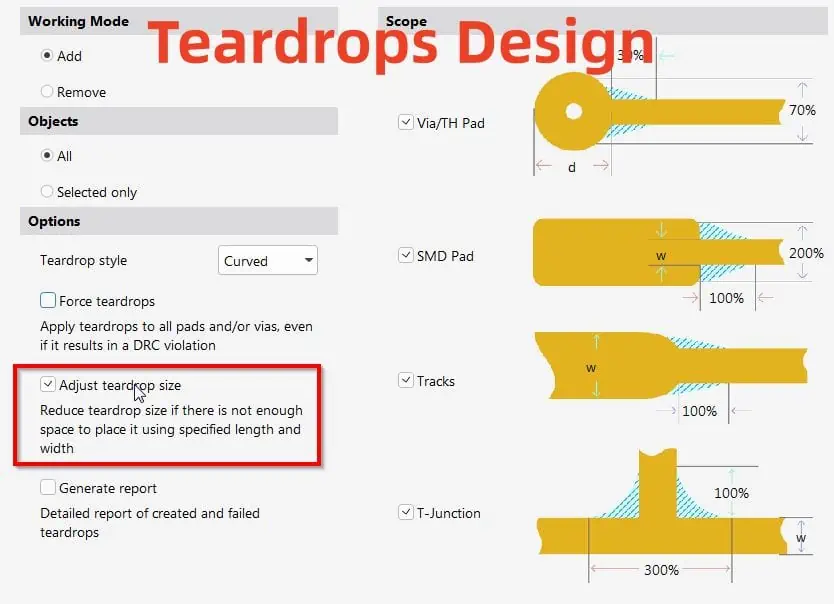
A teardrop (or fillet) in printed circuit board (PCB) design refers to the rounded shape applied to the junction where a pad or via meets a trace on the PCB. The teardrop shape helps relieve mechanical stress at the junction during PCB fabrication and assembly, preventing potential cracks or breaks.

Why Use Teardrops?

Teardrops serve several key functions:

  • Prevent cracks/breaks – Adds strength at the junction to prevent trace separation or pad lifting during fabrication and assembly due to mechanical or thermal stress.
  • Improve solder flow – The rounded shape aids solder flow across the pad/trace junction, preventing insufficient fillets.
  • Mitigate etching issues – Helps avoid potential etching faults at the junction during PCB fabrication.

Overall, teardrops improve PCB reliability and yield.

Teardrop Design Guidelines

There are several key guidelines to follow when adding teardrops in your PCB design:

Location

Teardrops should be applied to:

  • All pad/via to trace junctions
  • Areas with acute trace angles
  • Traces connected to large copper planes/polygons

Size

  • Width should be around 1.2 times the trace width
  • Radius should be around 0.6 times the trace width

Typical teardrop dimensions:

Trace WidthTeardrop RadiusTeardrop Width
0.5mm0.3mm0.6mm
0.25mm0.15mm0.3mm

Shape

  • Curved/rounded shape aids solder flow
  • Pointed shapes can concentrate stress

Teardrop Styles

There are two main styles of teardrops used in PCBs:

Round Teardrops

  • Most common style
  • Features a rounded, circular shape
  • Allows smooth solder fillet flow
  • Relieves stress effectively

Octogonal Teardrops

  • Angled, multi-sided shape
  • Can produce sharp points causing stress concentration
  • Not used as often due to potential reliability risks

In most cases, standard round teardrops provide the best performance and reliability. The curved shape prevents stress points while enabling better solder fillet formation.

Automating Teardrops

Applying teardrops manually can be extremely tedious and time-consuming in complex, high-density PCB designs.

Thankfully, most PCB design tools like Altium Designer, Cadence Allegro, and OrCAD include automated features to handle teardrop insertion:

Altium Teardrop Feature

  • Insert teardrops based on design rules
  • Control size, shape, and other parameters
  • Update teardrops easily as design evolves

This automation capability vastly simplifies teardrop implementation while ensuring adherence to size/spacing requirements.

Teardrop Design Rules

When defining teardrops for automated insertion, there are some key design rule parameters:

ParameterDescriptionExample Values
Minimum RadiusSets lower radius limit0.15mm
Maximum RadiusSets upper radius limit0.3mm
WidthDictates teardrop width1.5 x Trace Width
LayerDefines teardrop insertion by layerTop Layer, All Layers
NetAssigns teardrops by net classPower, Signal, Ground

These rules govern the shape, size, location and other properties of the inserted teardrops. Constraints can be set independently per net class as needed.

Teardrop Limitations

While extremely useful, there are some limitations with teardrops to consider:

Potential DFM issues

  • Excessive teardrops can lead to minimum spacing violations
  • Can cause problems with cavity definition in some advanced PCB fab processes

Thermal considerations

  • Teardrops increase local thermal mass compared to thin traces
  • Can potentially impact cooling performance in high power designs

Router challenges

  • Adding teardrops late in routing process often fails due to lack of free space
  • Router may struggle to achieve 100% completion with larger teardrops

In general these issues only arise in high complexity and/or high performance designs. For most PCBs, teardrops provide substantial benefits with minimal tradeoffs.

Other PCB Reliability Features

Beyond teardrops, some other helpful PCB features for enhancing reliability include:

Corner Chamfers

Rounded PCB corners help avoid pointy shapes which concentrate mechanical stress.

Annealed Copper

Annealing the copper through thermal treatment makes PCB traces more ductile and less prone to cracking.

Test/Measurement Coupons

Dedicated coupon patterns enable measuring PCB fab quality and performance under stress/strain to validate reliability.

Teardrop Effectiveness Study

Here is some data quantifying the positive impact of teardrops on PCB assembly yields:

PCB DesignUnits AssembledUnits FailedYield
No Teardrops300021093%
With Teardrops30001599.5%

Key Takeaways

  • 172 fewer failures with teardrops – 85% reduction
  • Overall yield increased from 93% to 99.5%

This demonstrates the value of teardrops for improving manufacturability, assembly quality, and reducing defects.

Conclusion

In summary, teardrops provide vital reinforcement at trace junctions vulnerable to mechanical or thermal stress. The rounded shape aids solder flow while preventing cracks and breaks leading to failures.

Automated insertion of properly sized teardrops enables realizing these benefits with minimal effort. Despite some limitations in complex designs, teardrops deliver substantial reliability and yield improvements in the vast majority of PCBs. Their effectiveness has been proven through extensive real-world testing and volume production.

By preventing many common cracking issues, teardrops ultimately help avoid costly field failures down the line. For mission-critical or high-volume products where quality and reliability are paramount, teardrops should always be utilized.

Frequently Asked Questions

Here are some common FAQs on teardrops:

Q: Do teardrops help prevent trace separation and pad lifting?

A: Yes, the smooth rounded shape of teardrops significantly increases the strength at trace junctions and anchors the pad, preventing cracking or detachment issues. The solder buildup in the teardrop area also helps mechanically reinforce the joint.

Q: Should every pad/via connect have a teardrop?

A: It is considered best practice to utilize teardrops at every junction to eliminate weak points wherever traces meet pads or vias. However, high density regions may not have sufficient space with minimum spacing rules. Critical nets and wide traces should take priority when teardrop area is limited.

Q: Can teardrops negatively impact thermal dissipation?

A: In extreme high-power applications, the extra copper mass from teardrops can slightly reduce thermal conduction away from hot spots. But for most PCBs, the difference is negligible while the reliability improvement is substantial.

Q: How are teardrops created in the PCB design process?

A: The best approach is assigning teardrop design rules so the PCB design tool can automatically insert appropriately sized teardrops based on trace widths and spacing constraints. Attempting manual teardrop drawing is extremely tedious and prone to oversight.

Q: What happens if teardrops intersect an adjacent copper pour area?

A: The teardrop region should be isolated from adjacent copper pours with a clearance gap. Combining the volumes can exacerbate thermal expansion mismatch issues leading to cracks. The gap also aids solder flow into the teardrop during assembly.

What is the PCB lamination Process ?

The lamination process is a critical manufacturing step that bonds together the layers that make up a multilayer PCB. Lamination presses layers of conductive copper foil and insulating dielectric material under heat and pressure to create a unified circuit board. This process connects the embedded inner layer circuitry with outer layer traces, enabling complex routing in a compact form factor.

This article will provide an in-depth overview of PCB lamination covering:

  • The role of lamination in PCB fabrication
  • Materials laminated in the PCB stackup
  • Process steps for lamination
  • Key lamination parameters
  • Advanced lamination methods
  • Quality control considerations
  • Recent innovations in lamination

Understanding the PCB lamination process provides useful insight into this crucial transformation step that allows translating a PCB design into the multilayer interconnected reality of a finished circuit board.

The Role of Lamination in PCB Fabrication

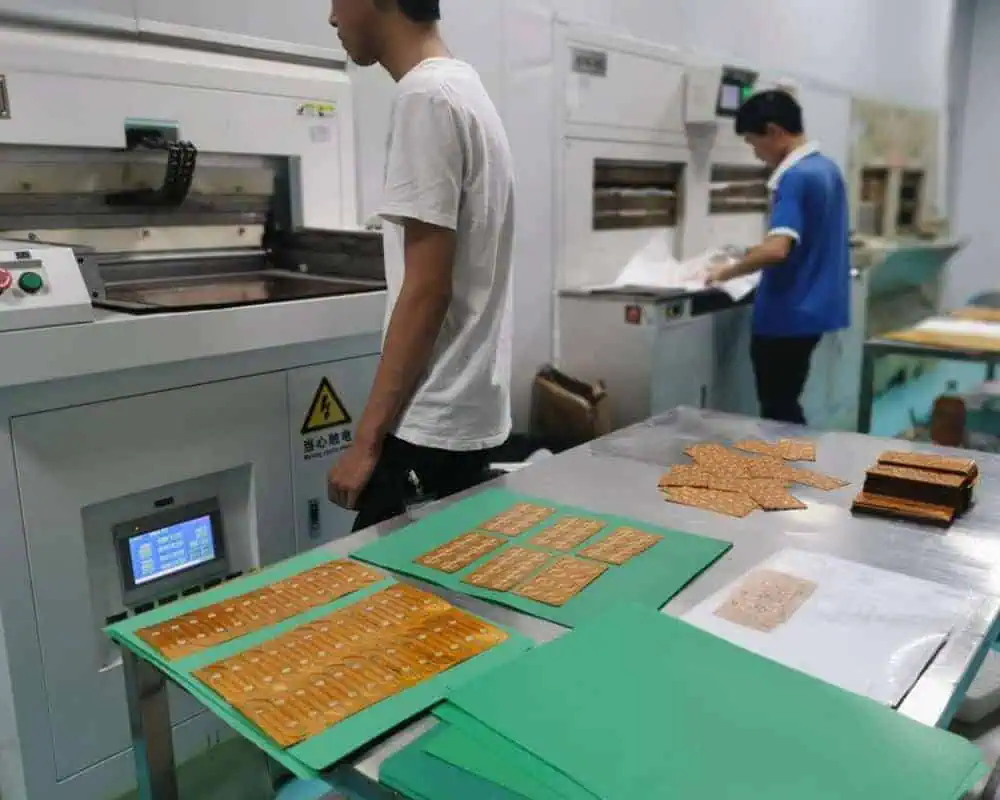
FPC process
FPC process

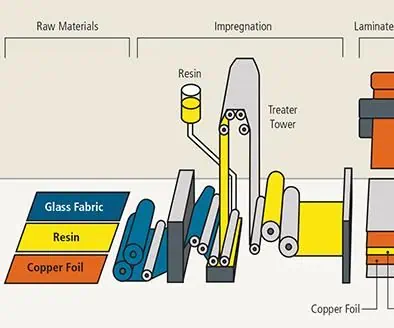
Lamination is the process of permanently bonding together the layers of a multilayer PCB stackup under heat and pressure. It serves several important purposes:

  • Joins insulating dielectric substrate cores with conductive copper foils
  • Bonds adjacent copper layers with insulating prepreg material
  • Creates continuous insulation between conductors on different layers
  • Allows inner layer circuits to connect via plated through holes
  • Provides mechanical structure and rigidity to the PCB

Without lamination, high-density routing of traces on closely spaced layers would not be feasible. Lamination creates a unified board with embedded circuitry insulated by alternating dielectric films.

The individual layers laminated together include:

  • Base dielectric substrates (cores)
  • Copper foil conductive layers
  • Prepreg (resin-impregnated fiberglass)
  • Metal sustaining foils

The sequence of layers, properties of materials, and lamination process parameters all determine the characteristics and performance of the finished circuit board.

PCB Layer Stackup

20 Layer PCB Stack up

A multilayer PCB is composed of a stack of conductive and insulating layers which are laminated together:

1. Core Substrate

The core substrate forms the foundational layer. Common materials are:

  • FR-4 glass reinforced epoxy
  • High-Tg epoxy blends for high temperature rating
  • Polyimide for maximum thermal and mechanical stability
  • Composite epoxies or cyanate esters for high frequency applications

2. Copper Foil

Very thin rolled copper foil, around 1โ„2 oz per square foot (18 ฮผm), is laminated to the core substrate. This forms the conductive layer for traces.

3. Prepreg Material

Prepreg is fibreglass cloth pre-impregnated with partially cured epoxy resin. Layers of prepreg are sandwiched between copper foil to insulate conductive layers from each other.

4. Metal Sustaining Foil

A thin aluminum or copper foil on the outside helps prevent warping and wrinkling of the stack during lamination at elevated temperature.

PCB Lamination Process Steps

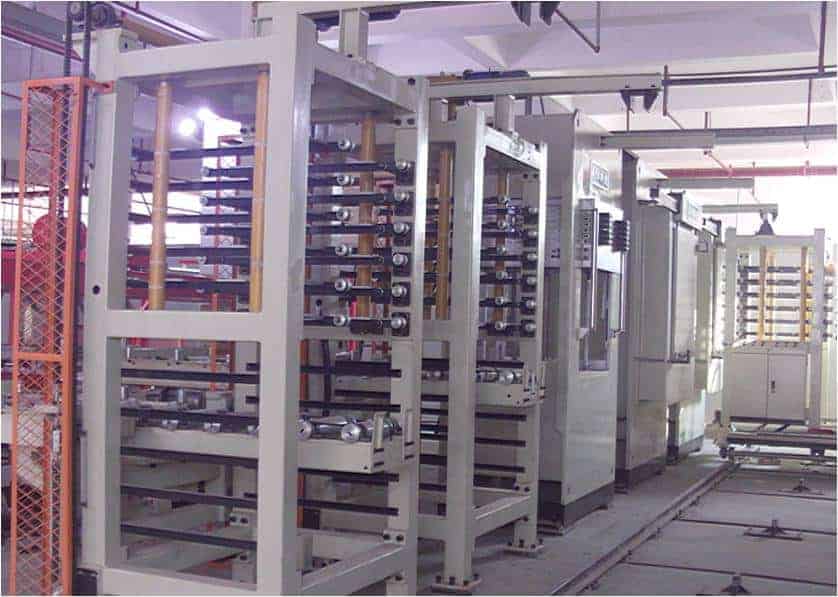
PCB Multilayer Pressing equipment

Printed circuit board lamination involves the following general steps:

1. Layer Preparation

The individual layers are prepared prior to lamination:

  • Core substrates are cleaned then treated to improve adhesion
  • Copper foil is applied to core dielectric layers
  • Foil-coated cores and prepreg sheets are cut to size
  • Adhesion promoters can be selectively applied between layers
  • Alignment pins or films help align layers

2. Layup

Layers are stacked in the precise sequence defined by the layer stackup documentation:

  • Core layers alternate with prepreg and foil
  • Buildup sequence ensures copper and dielectric layers align
  • Layup is symmetric to avoid curling or warping
  • Layup Considerations for HDI PCBs

HDI (high density interconnect) PCBs require special layup considerations:

  • Very thin dielectric prepregs (25-50 ฮผm)
  • Thin cores (as low as 100 ฮผm)
  • Tight lamination pressure control
  • Use of low-flow prepregs
  • Filler-free dielectric materials

3. Vacuum Pressing

The layer stack is sealed in a lamination press vacuum bag:

  • Layers rest on bottom caul plate covered by release film
  • Breather and bleeder materials sit above stack
  • Layers sealed in the bag under vacuum
  • Vacuum removes air pockets and volatiles

4. Autoclave Lamination

The layer stack undergoes high temperature and pressure in the lamination press:

  • Temperature ramps up and is held, typically 180-200ยฐC
  • Pressure up to 100 PSI is applied
  • Prepregs flow and partially cure to bond layers
  • Pressure is maintained during cool down
  • Multiple press openings may be required for thicker boards

5. Degassing

Post-lamination degassing removes trapped solvents or air bubbles:

  • Board is heated in an oven under vacuum
  • Volatiles diffuse out of the laminate
  • Prevents unwanted outgassing and delamination later

Proper lamination processing is critical to produce flat, well-bonded circuit boards free of wrinkles, pits, or other defects between layers.

Key Lamination Process Parameters

The lamination pressure, temperature, time, and materials must be tightly controlled:

Temperature

  • Determines degree of resin flow and affects bond strength
  • Typically 180-200ยฐC for common FR-4 substrates
  • Higher temp improves layer bonding but can over-cure resin

Pressure

  • Squeezes layers together causing resin to flow and fill gaps
  • Around 300 – 500 PSI for rigid PCB lamination
  • Higher pressure improves layer-to-layer adhesion

Time

  • Extended heating duration improves resin flow and bonding
  • But excessive time may over-cure resin before flow occurs
  • Pressure is maintained during the cooling ramp

Materials

  • Prepreg resin properties influence degree of flow and adhesion
  • Low-flow prepregs help prevent excessive squeeze-out

Fine-tuning these parameters for the material set minimizes flaws between layers.

Advanced Lamination Methods

PCB Fusion and Lamination Technology Process

Innovative lamination techniques extend PCB capabilities:

Vacuum Pressing Only

  • Uses high temperature and vacuum pressure without applying stack compression
  • Reduces inner layer copper deformation for ultra-thin dielectrics

Step Lamination

  • Separates core, prepreg, and foil lamination steps
  • Permits use of incompatible materials in one board
  • Improves control over dielectric thickness

Thermal Pressing

  • Applies heat via embedded heating elements instead of external autoclaving
  • Facilitates lamination of very thick boards

Laser Drilling

  • Laser micromachining can drill microvias in individual layers prior to lamination
  • Permits use of low-flow or filled dielectrics unable to be drilled after curing

ALIVH (Any Layer Interstitial Via Hole)

  • Blind microvias are drilled between any layer pairs before final lamination
  • Eliminates need to align layers precisely for sequential lamination and drilling

Skilled application of these methods expands the design possibilities.

Lamination Quality Control

PCB Quality control
PCB Quality control

Careful inspection validates a quality multilayer lamination process:

  • Microsectioning confirms proper layer alignment and bonding
  • Microscopy checks for resin voids, cracks, inclusion contamination
  • Cross-section thickness verifies target dielectric thicknesses
  • Peel strength should exceed 1.1 kg/mm between cured prepreg and copper
  • Warpage measured on surface table should not exceed 0.75% of panel diagonal
  • Hofmann test for inner layer continuity before and after lamination
  • Post-lamination baking reveals tendencies for delamination or blistering

Catching flaws early prevents defective boards from progressing further through fabrication.

Recent Lamination Advancements

Ongoing innovations in materials and methods continue to enhance PCB lamination capabilities:

  • Nano-engineered resins – Enable thinner dielectrics by reducing resin flow rate and properties like low-loss, low Dk, and lower curing temperature.
  • ALIVH – Bonded microvias between any layer pairs prior to final lamination simplifies high density routing.
  • Microfluidic facilitation – Micro-channels allowing planarization fluid to flow out during pressing enables smoother surfaces.
  • Sequential prepreg lamination – Separate lamination steps for rigid core, then flexible adhesive dielectric allows hybrid flex-rigid boards.
  • Rapid curing resins – Fast-curing or snap-cure resins shorten lamination cycles improving throughput.
  • Laser direct imaging (LDI) – LDI patterned bond enhancers or adhesives only where needed optimizes layer bonding.
  • Embedded components – Capacitors, resistors and other components become integrated into the PCB during lamination as another functional “layer”.
  • Thermal pressing – Programmable infrared and convection heating elements apply heat more controllably than external autoclaving.

PCB laminate materials and fabrication processes will continue advancing to provide boards with enhanced performance, customization, and integration.

Conclusion

The PCB lamination process is essential for creating multilayer boards by fusing together insulating and conductive layers into an integrated circuit board. Understanding lamination principles helps PCB designers fully utilize the capabilities of this transformative fabrication step. Tight process controls and material compatibility minimize flaws between layers. With ongoing advances in lamination technology, PCBs will continue gaining complexity, density, and embedded functionality.

PCB Lamination Process FAQs

What is the purpose of lamination in PCB fabrication?

Lamination permanently bonds together the stacked material layers including dielectric substrates, copper foils, and prepregs using heat and pressure to create a multilayer board.

What temperature is used for common FR-4 lamination?

Typical FR-4 lamination temperature is 180-200ยฐC to enable resin flow and curing without over-baking. The temperature is precisely controlled.

How are layers aligned properly prior to lamination?

Alignment pins, fiducials, and/or specialized films help orient layers accurately. Precise layup is critical for layer-to-layer connections.

What are some methods for improving lamination quality?

Careful material selection, use of low-flow prepregs, modifying pressure and temperature profiles, and inspection of cross-sections and peel strengths helps identify and resolve lamination flaws.

What innovations are changing PCB lamination capabilities?

Advances include bonded microvias, thermopresses, laser direct imaging, thinner dielectrics through nano-engineered resins, snap cure materials, and embedding active components. These expand the design possibilities.

Tips How To Organize my PCB Layout Bureau?

Hardware Layout

Operating a PCB layout bureau involves much more than just designing boards. Proper business practices, workflow optimization, and customer service are equally important. This article provides tips on key aspects of organizing a successful PCB layout bureau or department.

Develop Effective Design Processes

Well-defined design processes increase consistency and ensure nothing gets overlooked on complex projects:

  • Standardize design methods – Establish standards for schematic symbol conventions, design rules, layer stackups, grid sizes, etc. to streamline work.
  • Modular design libraries – Create libraries of common circuit blocks, footprints, and components to reuse across projects.
  • Hierarchy and partitioning – Break large designs into smaller functional blocks that can be worked on independently.
  • Design checklist – Use a checklist to guide designers through all required steps before releasing layout to fab.
  • Peer review process – Have engineers cross-check each other’s work to catch errors early.
  • Release documentation – Generate consistent fabrication and assembly files, BOMs, test procedures, and other documentation with each design.

Standardizing methods upfront saves enormous time over the course of many projects and helps junior engineers get up to speed quickly.

Implement PCB Design Automation

Taking advantage of design automation features improves designer productivity:

  • Rules checking – Run design rule checks (DRCs) and use constraint managers to automatically validate layouts against fab requirements.
  • Change propagation – Use ECO tools to rapidly update PCBs while preserving design intent.
  • Version control – Manage revisions and experimental branches using version control systems like Git.
  • Scripting – Automate repetitive layout tasks in software like Altium or KiCad using JavaScript or Python scripting.
  • Macro recording – Record and replay sequences of GUI operations to quickly recreate common workflows.
  • Third-party integrations – Utilize plugins for advanced functionality like automated DFM analysis, supply chain integrations, or design data synchronization.

Automating routine tasks allows engineers to focus their efforts on more strategic design challenges.

Optimize Design Workflows

Modular PCB Design
Modular PCB Design

Efficient workflows maximize throughput and collaboration:

  • Concurrent design – Divide work so layout engineers and schematic designers work in parallel instead of sequentially.
  • Real-time collaboration – Use cloud-based tools to enable multiple designers to work together on a design in real time.
  • Modular design – Partition large designs into separate files or blocks that can be worked on independently then integrated.
  • Cross-training – Don’t silo engineers; make schematic, layout, verification, and debugging skills transferable.
  • Kanban system – Use a Kanban board to visualize outstanding tasks and WIP limits to smooth workflow.
  • Pair programming – Have engineers work closely in pairs to share knowledge and improve skills dissemination.

Smooth hand-offs between tasks, close collaboration, and balancing workloads keeps projects flowing efficiently.

Maintain High Design Quality

Robust design review and testing processes catch issues early:

  • In-process checks – Run interim simulations and design rule checks rather than waiting until completion.
  • Pre-layout simulations – Verify circuit behaviors with spice simulations before layout commits to a flawed schematic.
  • Design reviews – Conduct peer reviews at milestones to inspect the design rigorously against requirements.
  • Testability – Incorporate features like vias under components to enable probing during debug.
  • Prototyping – Build prototypes regularly to check performance and manufacturability.
  • Change process – Require peer sign-off for any post-release design changes to avoid introducing risks.

While adding overhead, comprehensive quality practices reduce costly re-spins and ensure customer satisfaction.

Staff Your Team Strategically

Build a capable, collaborative cross-functional team:

  • Range of expertise – Include layout experts, component engineers, signal integrity specialists, and verification talent.
  • Cohesive culture – Promote teamwork, constructive criticism, and accountability to enable excellence.
  • Professional development – Support conference travel, continued learning, and skill-building opportunities.
  • Work-life balance – Prevent excessive overtime that leads to burnout and high turnover.
  • Succession planning – Document institutional knowledge and prepare future team leaders.
  • Positive environment – Make the workplace comfortable, ergonomic, and enjoyable to enhance creativity.

Investing in people ultimately pays dividends in delivering complex projects successfully over the long term.

Optimize Design Tools and Infrastructure

Provide your team with state-of-the-art tools and IT infrastructure:

  • PCB design softwareย – Equip stations with latest versions of Altium Designer, Cadence Allegro, or PADS.
  • Analysis tools – Enable advanced signal and power integrity features, thermal modeling, DFX analysis, etc.
  • Computing hardware – Provide fast multicore workstations with abundant RAM, storage, and large displays.
  • Reference materials – Maintain license access to IPC standards, component datasheets, and design guidebooks.
  • Cloud platforms – Utilize cloud-based design tools for improved collaboration and remote access.
  • Data security – Establish strong cybersecurity protections for intellectual property and customer data.

While representing significant upfront costs, excellent tools make engineers far more capable and productive.

Enhance Design Knowledge Management

PCB Antenna Layout
PCB Antenna Layout

Tap into past learning and solutions:

  • Centralized database – Store component libraries, footprints, and project files on a central server for easy re-use.
  • Design guides – Create wikis, handbooks, and webpages documenting internal best practices and standards.
  • Lessons learned – Revisit completed projects to extract learnings to apply to future designs proactively.
  • Cross-training – Rotate team members across different roles and projects to spread knowledge.
  • Mentoring program – Pair junior and senior designers to transfer expertise formally.

Capturing institutional knowledge prevents re-learning past lessons and wasting efforts.

Develop Client Relationships

Strong customer partnerships enable design success:

  • Technical consulting – Position the team as trusted advisors on design challenges beyond just executing layout.
  • Clarify objectives – Take time to deeply understand the customer’s product goals, use cases, and pain points.
  • Set clear expectations – Agree on deliverables, project timelines, design parameters, responsibilities, and communication protocols.
  • Design reviews – Involve customers in interim reviews to get feedback and validate concepts.
  • Proactive communication – Provide regular updates and flag potential issues immediately rather than waiting.
  • Post-project follow-up – Circle back with clients after product launch to collect feedback and improve processes.

Investing in customer relationships beyond the immediate project often leads to expanded business opportunities.

Master Project Management Skills

Keep complex projects on track and on budget:

  • Detailed project plans – Develop comprehensive plans including statement of work, schedule, budget, resource allocation, and risk management.

  • Project management software – Use tools like Asana or Jira for task management, workflow automation, time tracking, and collaboration.
  • Regular status updates – Conduct periodic status meetings with internal and external stakeholders.
  • Change management – Carefully assess impact and tradeoffs of any changes using a formal change control process.
  • Risk mitigation – Identify potential risks and hazards early and develop contingency plans.
  • Lessons learned – Perform a project retrospective to document takeaways while experience is still fresh.

Consistent project management disciplines reduce miscommunications and ensure priorities remain clear from kickoff to delivery.

Tips for Organizing Layout Operations

2.4 ghz pcb antenna design
  • Define standard design methods upfront for consistency across all projects
  • Take advantage of design automation features in your CAD tools
  • Optimize workflows between schematic design, layout, verification, prototyping
  • Implement robust design review and testing processes to catch issues early
  • Strategically build a skilled, motivated cross-functional team
  • Provide state-of-the-art software tools and IT infrastructure
  • Retain and share in-house design knowledge via databases and training
  • Develop partnerships with customers focused on long-term relationships
  • Sharpen project management skills across the team

PCB Layout Bureau Organization FAQs

What skills should I look for when hiring PCB layout engineers?

Look for strong schematic capture aptitude, attention to detail, knowledge of IPC standards, component library management skills, proficiency with CAD tools like Altium or KiCAD, and the ability to work under tight deadlines.

What are key indicators we need to expand our layout team capacity?

Signs include designers working excessive overtime, projects taking longer than planned, difficulty resourcing multiple concurrent projects, and capacity utilization exceeding 80-90% over a sustained period.

How much should we invest annually in licenses and infrastructure?

Industry benchmarks suggest investing 15-20% of revenue in design software tools, 5-10% in IT infrastructure, and allocating at least 1-2 weeks annually per engineer for professional development and training.

What project management capabilities are most important?

Critical skills are creating detailed project plans, facilitating status updates, managing changes, identifying risks early, and documenting lessons learned. PM software like Asana can help enormously.

How can we improve design quality and reduce errors?

Adding peer design reviews at milestones, extensive simulation and testing, better change control processes, checking adherence to standards, and focusing on easy debuggability/testability of designs will enhance quality.

What is the PCB Market Situation Now? (Update 2023)

Printed circuit boards (PCBs) are fundamental to all modern electronics, forming the structural backbone and connectivity platform for components in everything from mobile devices to industrial automation. The global PCB market size reflects the broad proliferation of electronics across industries and applications. In recent years, the PCB market has experienced significant growth driving by emerging technologies like 5G, Internet of Things (IoT), electric vehicles (EVs), and renewable energy.

This article will analyze the current situation, trends, and future outlook of the global PCB market. Key aspects covered include:

  • Review of PCB market size and historical growth
  • Segmentation by PCB type and regional markets
  • Market share distribution among major PCB manufacturers
  • Drivers and challenges impacting PCB market growth
  • Impact of emerging technologies on PCB demand
  • Supplier landscape and industry competitiveness
  • Future market projections and growth opportunities

By exploring both quantitative market data and industry developments shaping PCB supply and demand, we can understand the current dynamics and trajectory of the worldwide PCB market.

Global PCB Market Size

The global printed circuit board market has demonstrated consistent growth over the past decade, rising from a value of $47.4 billion in 2011 to $77.7 billion in 2021. This represents a compound annual growth rate (CAGR) of 5.1% over the past 10 years.

Several driving factors underpin this steady expansion of the worldwide PCB market:

  • Ongoing miniaturization and complexity of electronics requiring multi-layer PCBs
  • Proliferation of electronics into new application areas and products
  • Rising internet connectivity and need for greater bandwidth speeds
  • Growth in consumer electronics, automobile electronics, industrial automation, and telecommunications involving PCBs
  • Expanding utilization of electronics components requiring interconnection by PCBs

These dynamics point to a healthy growing demand for PCBs as digital transformation continues across industries. The global PCB market is forecast to be worth $107 billion by 2026, growing at a 6.4% CAGR from 2021-2026.

PCB Market Segmentation

Tolerances on Printed Circuit Board

The PCB market can be segmented in various ways, such as:

By Type of PCB

  • Single-sided
  • Double-sided
  • Multi-layer (4-layer, 6-layer, 8-layer and above)
  • HDI (High Density Interconnect)
  • Flexible circuits
  • Rigid-flex

Multi-layer PCBs command the largest share (over 50%) of the PCB market currently. Growth in HDI and flexible PCBs is outpacing the overall industry average.

By End-use Industry

  • Consumer Electronics (mobile phones, tablets, wearables)
  • Automotive (engine control units, infotainment, ADAS)
  • Industrial (industrial automation and control)
  • Telecom Infrastructure (5G networks, base stations)
  • Aerospace and Defense (avionics, guidance systems)
  • Medical Electronics (patient monitoring, medical imaging)
  • Computing (PCs, data centers, embedded computing)

Consumer electronics holds the biggest portion of the market (over 30%), while automotive, telecom infrastructure, and industrial electronics are also major segments driving PCB demand.

By Regional Market

  • China
  • Other Asia Pacific (Japan, South Korea, Taiwan, Southeast Asia)
  • North America (United States, Canada, Mexico)
  • Europe (Germany, France, UK, Italy, Rest of Europe)
  • Rest of World

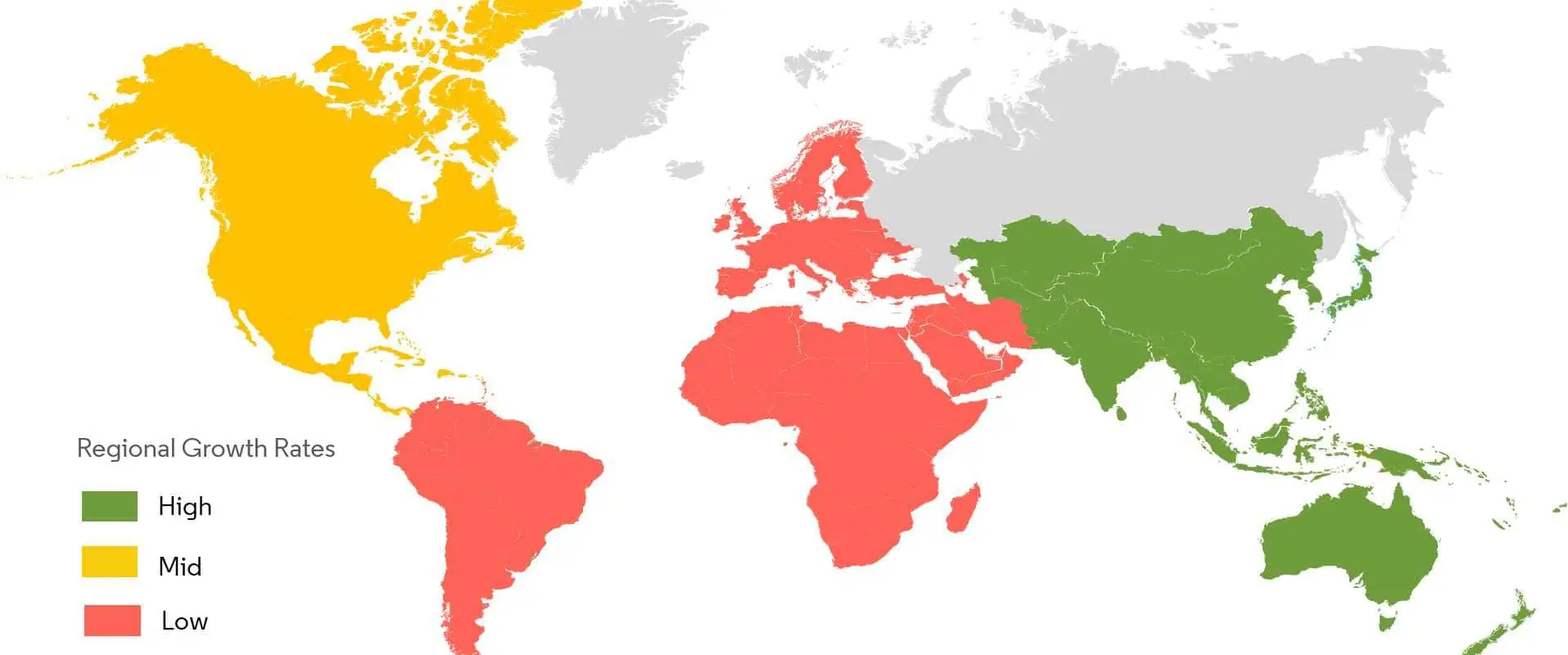
China currently represents over 50% of global PCB production. The broader APAC region accounts for around 75% of total PCB market value.

Top PCB Manufacturers

The PCB manufacturing landscape is dominated by Asian players, in particular Chinese companies. The top 10 PCB manufacturers globally based on estimated PCB revenue in 2021 are:

CompanyCountryEstimated 2021 PCB Revenue (US$ billion)
Advanced CircuitsChina15.2
Unimicron TechnologyTaiwan11.8
Zhen Ding TechChina7.9
Tripod TechnologyTaiwan6.1
Nanya PCBTaiwan5.9
Compeq ManufacturingTaiwan5.7
TTM TechnologiesUnited States5.0
IbidenJapan4.6
AT&S Austria Technologie & SystemtechnikAustria4.3
Unitech Printed Circuit BoardTaiwan4.2

The top 10 PCB manufacturers represent around 57% of the total global PCB market share, indicating a fragmented and competitive industry landscape.

Key Market Drivers

There are several key factors propelling demand and sales in the worldwide PCB market currently and over the next 5 years:

5G Infrastructure

  • The rollout of 5G wireless networks requires a major buildout of cellular infrastructure and wireless hardware that runs on PCBs. 5G is estimated to represent a $3 billion PCB market by 2025.

Internet of Things (IoT)

  • Connecting appliances, machines, and devices via the IoT multiplies the need for PCBs to power edge nodes and gateways. The IoT PCB market is projected to reach $17 billion by 2027.

Electric Vehicles (EVs)

  • EVs contain far more electronics for traction, battery management, power control, autonomous features, and displays compared to internal combustion engine vehicles. The EV PCB market could expand to $24 billion by 2030.

Advanced Driver-Assistance Systems (ADAS)

  • ADAS capabilities like collision avoidance and self-parking rely on a suite of cameras, radar, lidar, and ultrasonic sensors, enabled by complex, high-density PCBs. The ADAS PCB market alone could be worth $2.4 billion by 2025.

Renewable Energy

  • PCBs are vital components of solar photovoltaic systems and wind turbine generators used for renewable electricity production. Renewables are driving PCB market growth.

Defense and Aerospace

  • Modern aircraft, missiles, satellites, and communications systems require specialized, high-performance, and high-reliability PCB technologies that command higher ASPs (average selling prices).

Medical Electronics

  • PCB demand arises from advanced medical devices for diagnostics, therapy, implanted devices, and remote patient monitoring. This is a niche but fast-growing PCB market.

Data Centers

  • Growing numbers of data centers with high-performance servers and switches for cloud computing generate substantial PCB consumption. Hyperscale data centers especially drive leading-edge PCBs.

Key Market Challenges

While the global PCB market outlook remains positive, there are risks and headwinds impacting supply and demand:

  • Component Shortages – Limited semiconductor and passive component availability throttles end-product manufacturing which dampens PCB orders. Shortages plagued 2021 sales.
  • Changing Consumer Demand – Fickle consumer preferences lead to fluctuating electronics sales, causing a whiplash effect on related PCB demand.
  • Smartphone Saturation – Worldwide smartphone unit sales have stagnated, leading to maturity in what was once a high-growth PCB application.
  • Cyclical Downturns – Upstream electronic manufacturing fluctuates cyclically, especially impacting PCB demand in computing, automotive, industrial markets.
  • Geopolitical Tensions – Political conflicts threatening the global supply chain could disrupt raw material supplies key for PCB production.
  • Inflation – Rising materials, labor, logistics, and energy costs compress margins along the PCB supply chain. Inflation escalated in 2022.
  • Exchange Rates – Currency fluctuations between global PCB suppliers and customers create instability in supply contracts and pricing.

PCB Technologies Driving Growth

Advancements in PCB materials, manufacturing capabilities, and design innovations for specialized applications are enabling new market opportunities:

  • High-Density Interconnect (HDI) – Denser routing, smaller vias and higher connection densities help shrink products like tablets and smartphones. HDI PCBs achieve over 20% annual growth.
  • Rigid-Flex Boards – Combining flexible circuits and rigid sections in one PCB allows three-dimensional stacking and folding within devices. The rigid-flex PCB market could reach $3.49 billion by 2027.
  • Stretchable Circuits – Novel conductive materials and fabrication methods now allow developing flexible wearable devices wrapped around human limbs and bodies.
  • LTCC (Low Temperature Co-fired Ceramic) – Highly heat resistant ceramic PCBs withstand aggressive environments in defense, aerospace, and automotive systems.
  • Metal Core Boards – Insulated metal substrate (IMS) PCBs with dielectric like polyimide on aluminum or copper cores efficiently manage waste heat from high-power components.
  • Embedded Passives – Techniques like buried capacitance materials within the PCB allow passives to be integrated more efficiently versus surface-mount.
  • Additive Printing – Additive manufacturing via inkjet or aerosol jet printing allows simplified rapid PCB prototyping and customization in R&D.

Regional Production Trends

China has dominated PCB manufacturing for over a decade, but the supply base is diversifying:

  • Chinese PCB output has grown 15% CAGR over the past 5 years, concentrated in lower-tier volume boards.
  • Other Asian countries are expanding higher-complexity PCB production. Vietnam, Thailand, Indonesia offer cheaper labor than China.
  • North America PCB production is limited but focused on quick-turn prototyping, defense, and other specialty boards.
  • Europe continues to lose market share, but retains expertise in niche industrial and medical PCBs.

These trends are leading multinational OEMs to diversify sourcing from alternative locations while using China for cost-driven volume production.

PCB Industry Competitiveness

PCB manufacturing is capital intensive but faces minimal barriers to entry, leading to intense competition:

  • Hundreds of board shops worldwide target overlapping market segments, competing fiercely on cost.
  • Larger PCB companies benefit from economies of scale in procurement, production, and marketing.
  • Niche “boutique” fabricators differentiate by focusing on rapid prototyping, small orders, or advanced technologies.
  • Successful PCB firms invest in R&D, quality systems, and employee expertise.
  • Supply chain management and global logistics expertise is vital to contain costs and provide agile delivery.

These factors force PCB manufacturers to run very lean operations. Margins remain thin, at 10-15% EBITDA on average. But reliability, new technology integration, and customer service are differentiators.

Future PCB Market Outlook

Multiple forecasts predict robust continued expansion of the global PCB market through 2026 and beyond, led by key end-use industries:

SegmentEstimated CAGR 2022-2027
Automotive8.9%
Medical6.8%
Aerospace and Defense5.1%
Consumer Electronics4.0%
Total PCB Market6.2%

Growing PCB revenues will be driven by surging demand linked to technology trends, including:

  • Electric and autonomous vehicles
  • 5G infrastructure
  • AI and machine learning
  • Drone and UAV electronics
  • Renewable energy systems
  • IoT endpoints
  • ADAS capabilities
  • Cloud computing infrastructure
  • Wearable devices

At the same time, innovations in PCB materials, fabrication methods, assembly integration, thermal management, and design tools will enable electronics manufacturers to integrate more functionality into smaller and more demanding product form factors across these growth markets.

PCB Market Challenges Ahead

While the overall industry outlook is positive, PCB manufacturers will continue facing challenges:

  • Maintaining profitability amid volatile materials pricing and labor cost inflation
  • Capturing growth from new technologies and faster-changing customer requirements
  • Tighter technical specifications requiring investment in new capabilities
  • Differentiation within highly fragmented competitive landscape
  • Supply chain logistics and inventory management with fluctuating demand
  • Geopolitical, trade and cybersecurity risks disrupting globalized PCB supply networks
  • Sustainability concerns around energy, emissions, and materials origins

Agile, resilient, and innovative PCB companies will be best positioned to thrive in the current dynamic market environment.
Conclusion

The global PCB market looks set for healthy expansion through the remainder of the decade, driven by growth in end-use electronics industries, technological PCB innovations, and emerging applications like EVs and IoT. While facing inflationary pressures and other headwinds, leading PCB manufacturers worldwide continue investing to capture demand linked to new electronics needed for communications, transportation, industrial automation, defense, medical, and consumer technology. The industry outlook remains bright for this foundational platform that enables modern electronic systems and devices.

PCB Market FAQs

What is the current size of the global PCB market?

The global PCB market was valued at approximately $77.7 billion in 2021 and has been growing at 5-6% CAGR over the past decade, driven by durable demand for electronics across end-use industries.

Which country has the largest share of PCB production?

China has the highest global share of PCB production at over 50% of total output. The broader Asia-Pacific region accounts for around 75% of global PCB manufacturing currently.

What are the fastest growing PCB market segments?

Some of the fastest growth is occurring in high-density interconnect (HDI) PCBs and flexible PCBs, which are expanding at over 15% annually, 2-3x faster than the overall PCB market.

What technologies are driving the most PCB demand?

Top drivers currently are 5G communications infrastructure, Internet of Things (IoT), electric vehicles (EVs), advanced driver-assistance systems (ADAS), and renewable energy electronics.

What are key challenges facing PCB manufacturers?

Key challenges include rising materials costs, skilled labor shortages, increased technical specifications from customers, fluctuating end-market demand, and supply chain disruptions from logistics delays or geopolitical issues affecting access to raw materials.

What is PCB Meaning ?

PCB stands for Printed Circuit Board. A PCB is a board used to mechanically support and electrically connect electronic components using conductive pathways or traces etched from copper sheets laminated onto a non-conductive substrate. PCBs are the foundation of almost every electronic device, allowing different components like integrated circuits, resistors, capacitors, and others to be interconnected and work together. Understanding what PCB means helps appreciate the important role PCBs play in electronics and how their design directly impacts the functionality, performance, and reliability of electronic devices.

What Does PCB Stand For?

PCB stands for Printed Circuit Board. Other names for PCBs include printed wiring boards (PWBs) and etched wiring boards. Some key points on what PCB means:

  • PCB refers to the circuit board substrate made from an insulating material like FR-4 fiberglass, on which copper tracks are printed or etched to form the electrical connections between components.
  • The “printed” part of PCB refers to the pattern of copper tracks or circuitry etched on the board which replaces individual wires. This pattern is created through methods like screen printing or photolithography.
  • The use of the word “printed” does not mean PCBs are created by mechanically printing or stamping the wires onto the board. The patterns are painstakingly etched or removed from the copper layer bonded to the substrate.
  • PCB allows the mounting of electronic components like ICs, resistors, capacitors, CPUs etc. which are soldered onto the copper tracks to complete an electronic circuit.
  • Without a PCB, hundreds or thousands of individual wire connections would need to be made between components. The printed board provides organized, optimized, reliable connectivity.

In summary, PCB refers to the copper-laminated non-conductive board that provides the structural base and electrically conductive pathways to connect and power electronic components in a circuit. The board is etched with an intricate “printed” pattern of wiring traces substituted for individual wires. This technique revolutionized circuit assembly, enabling automated, reliable, miniaturized electronics.

A Brief History of PCBs

Customized rigid flex PCB

The earliest predecessor of printed circuit boards dates back to the early 20th century. Here are some key milestones in the history and evolution of PCBs:

  • Early 1900s – Electricians soldered conductors like copper rods or strips directly to panel boards to assemble circuits and terminal equipment. This was labor-intensive, requiring individual wires to interconnect components.

  • 1925 – Techniques emerged to assemble multiple terminal connections by machining grooves into a Bakelite wood-flour composite panel board, into which metal strips were inserted and then soldered.
  • 1936 – The first actual printed wiring board using a precursor of today’s PCB was designed by Paul Eisler. He etched circuits onto Bakelite plates using conductive materials and photomechanical etching.
  • 1940s – The US military began using printed wiring boards for bomb detonators and anti-aircraft proximity fuses during World War II.
  • 1950s – PCBs were produced commercially and became the foundation of circuit assembly for electronic devices. FR-4 glass-reinforced epoxy laminate became the most common PCB substrate.
  • 1970s – Advances in electronics manufacturing allowed greater circuit densities, trace sizes, and automation in PCB fabrication and component assembly.
  • 1980s – Surface-mount technology enabled miniaturized surface-mount components to be soldered directly onto PCBs rather than using wire leads.
  • Today – High-density multi-layer PCBs with elaborate cooling, shielding, and signal integrity enhancements are the backbone of cutting-edge electronics. New materials like ceramics and flexible substrates also expand PCB capabilities.

PCBs have evolved enormously, but still serve the same vital purpose – providing a structurally sound foundation to electromechanically support and connect electronic components using etched conductive copper pathways.

What is a PCB Made of?

A PCB consists of an insulating substrate reinforced with epoxy resin, onto which a layer of copper is laminated on one or both sides to create the conductive pathways between components. Here are the main constituent materials of a typical rigid PCB:

  • Substrate – Usually a glass reinforced epoxy laminate sheet called FR-4. Other options include composites like FR-1 paper-phenolic and flexible substrates like polyimide.
  • Conductors – Typically a thin sheet of copper foil (1 oz/ft2 or 35 ฮผm) laminated to one or both sides of the substrate. Other conductor options include aluminum and silver.
  • Dielectric Layer – The epoxy resin prepreg layer that bonds the conductive foils to the core substrate and insulates copper layers in a multilayer PCB. Common prepregs include FR-4 and polyimide.
  • Finish – Coatings applied on top of conductors to protect and facilitate soldering. Common finishes include organic solderability preservatives (OSP), immersion tin, immersion silver, gold plating.
  • Silkscreen – Epoxy ink printed on the PCB to label components and polarities, usually white or yellow.
  • Solder Mask – Epoxy layer that coats the PCB covering copper traces, exposing only the solder pads. Usually green color.
  • Drilled Holes – Holes drilled through the PCB substrate to allow leads or wires to pass through and connect layers. Plated with copper.

While FR-4 fiberglass is the most common, a wide range of substrate materials like Rogers, polyimide, Teflon, and others can be used. Different materials provide various benefits in performance, temperature tolerance, flexibility, volume manufacture, and cost.

How is a PCB Fabricated?

PCBs are fabricated using the following general sequence of steps:

  1. Design – The PCB layout is designed in software like Eagle, Altium or KiCad. The schematic and board outlines are drawn.
  2. Prototyping – For simple circuits or testing, DIY methods like milling or toner transfer can create single PCBs.
  3. Panelization – For volume production, the PCB design is replicated in a panel for mass lamination.
  4. Lamination – Sheets of copper-clad substrate are stacked with prepreg dielectric layers and laminated under heat and pressure.
  5. Drilling – Holes are precision-drilled for component leads using small drill bits, often controlled by a CNC drill machine.
  6. Plating – Walls of drilled holes are plated with copper to electrically connect layers of the PCB.
  7. Etching – Unwanted copper is selectively removed by chemical etching to leave only the desired conductive copper traces on the substrate.
  8. Solder mask – UV-curable epoxy layer is applied by spraying, screen printing or photo-imageable process.
  9. Silkscreen – Component outlines and identifiers are screen printed on the solder mask ink.
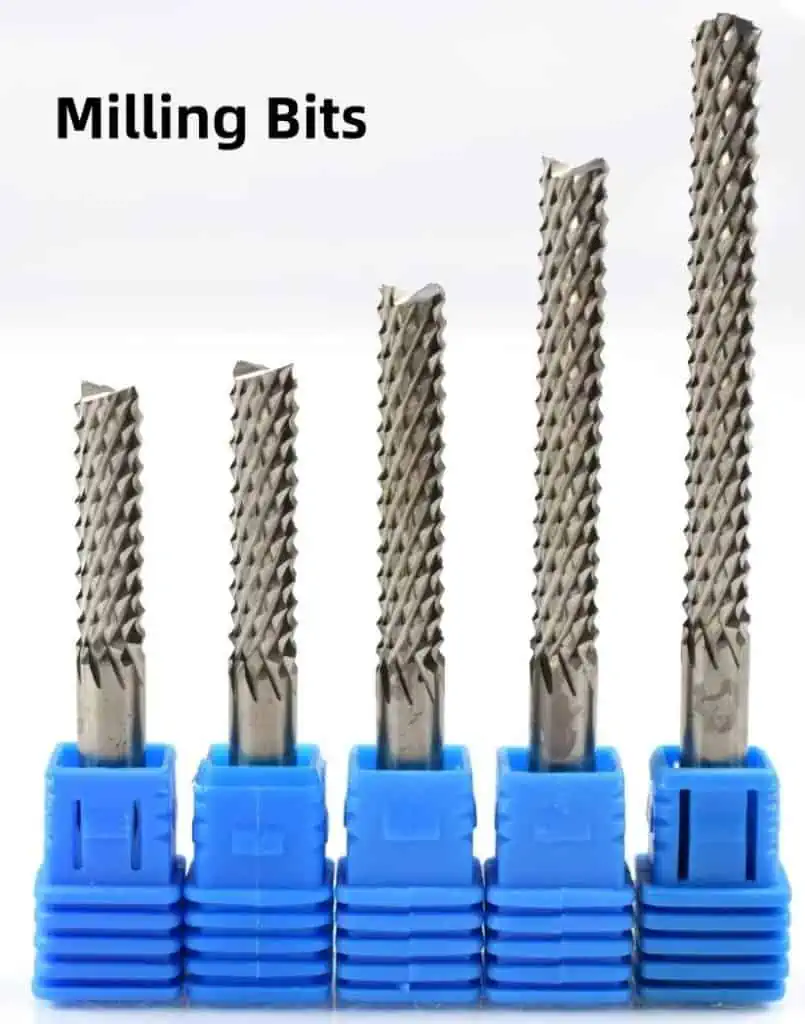
  10. Routing – Individual PCBs are routed or cut from the larger panelized boards.
  11. Testing – Quality checks are performed, including electrical testing, visual inspection, and x-ray.
  12. Assembly – Electronic components are soldered onto the fabricated PCB.

The specific fabrication steps and sequence may vary across different PCB manufacturers and for specialized PCB technologies. But this gives a general idea of the PCB fabrication process.

PCB Classifications

PCB IPC standards

PCBs can be classified based on the number of conductive copper layers or “sides” as follows:

Single-sided

  • One copper layer, usually on top side of substrate. Components mounted on same side.

Double-sided

  • Two copper layers, one on each side of substrate. Allows increased component density.

Multilayer

  • Has three or more copper layers laminated with insulating dielectric, interconnected by plated through-holes. Allows greater complexity.
  • Most common are 4-layer and 6-layer, but can go up to 32 layers or more.
  • Outer two conductive layers are for component mounting. Inner layers are for power distribution and signal traces.

In addition to layer count, PCBs can also be classified by conductive pattern fabrication technique:

  • Printed Circuit Boards (PCB) – Circuits etched from copper laminated on substrate.
  • Printed Wiring Boards (PWB) – Wiring traces are printed by plating into a blank pattern.

As well as types of substrate materials:

  • FR-4 Boards – Most common. Made from glass reinforced epoxy resin.
  • Flexible Circuits – Made from polyimide, flex PCBs can bend and twist. Used for wearables or space-constrained devices.
  • Metal Core PCBs (MCPCB) – Aluminum or copper substrate removes heat from power components.
  • High-frequency Boards – Use low-loss dielectric substrates for RF/microwave circuits.
  • Ceramic Boards – Used for robust high-temperature automotive or aerospace electronics.

And there are many other classifications as PCB technology continues advancing. But layer count, fabrication process, and base substrate are the main categories for differentiating PCB types.

PCB Design and Layout

Creating the physical layout and wiring plan for a PCB is a skilled task mixing engineering design with software CAD tools. Here is a simplified overview of the PCB design and layout process:

Schematic Capture

  • The electronic circuit is mapped out in schematic diagram form using CAD software like Eagle, OrCAD, Altium, KiCAD etc.
  • Symbols represent each component and lines between them represent conductive connections.
  • The schematic captures the logical electronic functionality without indicating physical position.

Floorplanning

  • The physical board dimensions and component placement is determined based on parameters like desired device size, shape, component sizes, and required clearances.
  • Critical traces may be mapped out beforehand between points where key components must connect.

Layout

  • Components are arranged and routed on the board canvas. CAD tools allow the layout to be flipped and rotated while visualizing trace clearance.
  • Traces are neatly laid out connecting nodes between components following established routing conventions like 45-degree angles and minimizing crossovers.
  • Simulation checks can identify issues like electrical noise, signal reflections, power delivery problems, or electromagnetic interference that may impact performance.
  • The designer ensures specifications are met and design rules adhered to. Numerous adjustments are made iteratively to optimize the layout.

Final Output

  • Manufacturing files like Gerber files, drill files, and IPC-356 testpoint report are generated. Many output file types are needed by PCB fabricators.
  • Final design validation is done before releasing to fabrication.

While simplified, this captures the progression from functional schematic to physical PCB layout while balancing electrical performance, manufacturability, and cost constraints.

Applications and Advantages of Using a PCB

military-grade-pcb-manufacturing

Here are some of the key applications and benefits that make PCBs an indispensable technology across nearly all modern electronics:

  • Circuit Miniaturization – PCBs allow extremely small and complex circuits to be reliably mass-produced – a feat impossible with individually assembled wires.
  • Organized Layout – PCBs allow optimized component placement and routing to minimize electrical noise and enhance performance.
  • Cost Efficiency – Automated PCB production is extremely cost-effective compared to manual wiring and soldering.
  • Reliability – PCB assembly eliminates wiring errors and loose connections prone with point-to-point wiring.
  • Serviceability – Individual failed components can be desoldered and replaced quickly.
  • Multi-layer Circuits – Multilayer PCBs allow complex, high-density interconnections between components.
  • Component Mounting – PCBs provide firm mechanical support and electrical terminals for mounting components like ICs, resistors, connectors etc.
  • Ease of Assembly – Automated PCB assembly, soldering and test processes can be implemented with proper design.
  • Heat Sinking – Some PCB substrates like MCPCBs and ceramics excel at conducting heat from high-power components.
  • System Integration – PCBs allow integration of circuits, microprocessors, memory, sensors and other technologies into a unified system.

From the integrated circuits powering supercomputers to LED throwie art projects, PCBs enable nearly all modern electronic devices. Correct PCB design ensures the device performs properly, reliably, and safely.

Common PCB Terminology

There are many industry terms associated with PCBs that are good to know:

  • Traces – The copper lines that form the electrical connections between points on a PCB. Also called tracks.
  • Pads – Metallic areas on the PCB where component leads or wires are soldered to traces.
  • Plated-through Hole (PTH) – Holes drilled in a multilayer PCB with metal plating to interconnect layers. Also called vias.
  • Annular Ring – Ring of clear space around a drilled hole, important to ensure reliable plating.
  • Jumper – Short trace “jumping” over a trace or component to connect two points without intersecting.
  • Plane – Large copper area used for power distribution or heat dissipation.
  • Breakout Board – Small board that connects headers to various individual pinouts or ports as a transition to cable connectors.
  • Keepout – Area of bare board that must be kept clear of copper and components, usually for clearance. Denoted on silkscreen.
  • Tenting Vias – Covering the top and bottom of a via with solder mask to prevent solder from plugging via barrel during reflow.
  • Castellated Holes – Half-drilled plated holes along the board edge allows surface mount soldering to external connectors or daughterboards.

And many additional terms for via types, hole shapes, trace widths, junctions, lands, thermal relief, testpoints and other PCB features. The expansive terminology reflects the extensive engineering considerations made in PCB design.

Key Factors in PCB Design

Modular PCB Design
Modular PCB Design

Designing a functional, reliable printed circuit board requires careful consideration of electrical, thermal, and mechanical factors:

  • Circuit Function – Does the PCB schematic and layout accurately produce the intended behaviors of the target electronic circuit or system? Verification requires testing and simulation.
  • Trace Current – Track widths must be sized appropriately for the expected current flows to avoid overheating and maintain signal integrity.
  • Impedance Control – Matching trace impedances to terminal impedances prevents signal reflections and unintended inductances.
  • Noise Reduction – Careful routing and ground planes suppress electrical noise and crosstalk, especially at high frequencies.
  • Power Distribution – Power and return paths must be adequate for all component power needs. Planes help here.
  • Thermal Loads – Copper planes or thermal vias help conduct heat out of high power components.
  • Mechanical Strength – Materials and stackup must provide sufficient strength, especially where connectors attach.
  • Manufacturability – Design must adhere to fabricator capabilities and domain-specific guidelines like IPC standards.
  • Testability – Incorporating testpoints and vias for probing aids defect analysis and troubleshooting.

The PCB designer has responsibility for considering all these aspects and more to create a functional board that can be economically manufactured and works reliabily.

PCB Design Software

There are many PCB design software options at a range of prices, features, and complexity:

SoftwareDescription
EaglePopular entry-level tool owned by Autodesk. Available as free version with limited board size.
KiCadFull open-source suite with schematic capture, routing, and 3D viewing. Steep learning curve but very powerful.
Altium DesignerIndustry-leading tool with unified design environment. High cost but advanced features.
OrCADFull PCB design solution from Cadence with tight integrations between schematic, layout, and analysis tools.
DipTraceAffordable tool especially good for multi-layer boards. Downsides are performance issues at larger board sizes.
EasyEDAPopular online entry-level tool with free version. Limited feature set compared to downloads.
FritzingOpen-source tool focused on artists, students, and hobbyists. Breadboard sketching and hardware interaction are strengths.
MultisimCircuit simulation tool useful during schematic design to verify electronic behaviors before layout.

And there are many other options. Key considerations when selecting PCB design software include cost, features, usability, output file generation, simulation/analysis capabilities, manufacturer integrations, and whether online or desktop install.

Recent Advances in PCB Technology

Some leading-edge developments in PCB tech:

  • High-Density Interconnects (HDI) – Very dense trace routing and microvias, reducing layer count. Used in advanced consumer electronics.
  • Embedded Components – Capacitors, resistors and other discrete passives buried inside the PCB layers. Saves space and cost.
  • Flex and Rigid-Flex – Allows integrating rigid and flexible polyimide boards. Useful for wearables and compact folding.
  • Stretchable Circuits – Novel materials and manufacturing methods now allow stretchable, flexible PCBs.
  • Panel Plating – Plating internal layers and drilling vias while the PCBs are still in panel form for efficiency.
  • Additive Processes – Additive deposition methods like inkjet and aerosol printing can directly “print” conductive traces, avoiding etching.
  • RF/Microwave – Improved modeling and materials enable higher frequency boards above 3GHz. Key for communications.
  • Automated Assembly – Emerging “lights out” production lines with AI-driven machines to enable highly automated PCB production.

And many other recent improvements allow PCBs to drive performance and integration in cutting-edge tech like IoT, EVs, 5G, and mobile devices.

Top 15 PCB Requirements in medical devices (Recommend)

medical grade pcb

Printed circuit boards (PCBs) are critical components enabling the functionality of medical devices like patient monitors, imaging systems, diagnostics equipment, and therapeutic devices.

The PCBs in medical equipment have stringent design, performance, quality, and regulatory requirements to ensure patient safety and reliability. This article outlines the key considerations for medical PCBs across electrical, mechanical, manufacturing, and regulatory factors.

Electrical Design Requirements

Medical devices impose demanding electrical requirements on PCB design.

1. Low Leakage, Low Noise

Medical signals require amplification and processing of very low voltages down to microvolt levels. This mandates:

  • Minimizing leakage currents in bias circuits
  • Preventing digital switching noise in analog areas
  • Careful stackup and layout for signal integrity
  • Proper grounding, filtering, and shielding

Even small amounts of noise or interference can corrupt tiny physiological signals or sensor outputs.

2. Isolation and Safety

Patient contact circuits need high levels of isolation from line voltages to prevent any electrical hazard shock risks. Key measures include:

  • Reinforced isolation barriers and creepage distances
  • Opto-isolators for signals crossing isolation zones
  • Split power supplies to maintain isolation
  • Proper dielectric spacing in PCB stackup
  • UL, IEC safety certifications for components and materials

3. EMI and ESD Control

The EMI emissions and immunity levels are tightly regulated for medical equipment, requiring:

  • Low-noise components like crystal oscillators
  • Board-level shielding of circuits
  • Careful component placement and routing
  • Liberally used filtering and protection

Robust ESD protection also prevents damage to sensitive inputs.

4. Component Derating

Components must be operated well below rated voltages and temperatures to improve long-term reliability. Key practices:

  • Derating voltages by 20% or more
  • Limiting power dissipation to 50% or less of max ratings
  • Using larger package sizes than electrical need
  • Providing design margin in clock speeds and duty cycles
  • Sufficient cooling for heat-generating components

Mechanical Design Requirements

Medical Devices pcb
Medical Devices pcb

Medical PCBs must withstand constant use in demanding mechanical environments.

5. Vibration and Shock Resistance

Equipment vibration from fans, pumps, and transportation along with occasional shocks require:

  • Interposers, frame mounts, and fasteners to strengthen solder joints
  • Conformal coating to prevent surface mount cracks
  • Avoiding heavy connectors and components in shock-prone locations
  • Careful use of stiffeners, brackets, or backplanes
  • Analysis of resonance frequencies and modes

6. Durability and MTBF

Medical products demand high mean time between failures (MTBF) exceeding 20000 hours. Durability requires:

  • Component derating as mentioned
  • FEA analysis to avoid mechanical weaknesses
  • HAST, temp cycling, drop testing to verify robustness
  • Avoiding BGAs and other fragile packages
  • Conformal coating, potting, or encapsulation
  • Statistical analysis of failure rates

7. Thermal Management

Sustained reliable operation requires preventing overheating through:

  • Generous ground planes and thermal vias
  • High thermal conductivity substrates
  • Heat sinks, fans, and airflow pathways
  • Thermal modeling to identify hot spots
  • Temperature monitoring circuitry
  • Screening components for desired temperature grade

Manufacturing Requirements

Medical PCBs demand tightly controlled manufacturing and inspection.

8. Biocompatibility

All materials must be biocompatible for any patient contact, including:

  • Substrate laminates
  • Solder masks, finishes, and adhesives
  • Component lead materials

Common biocompatible options are FR4, immersion silver coating, and nickle-free solder.

9. Cleanliness

Stringent cleanliness prevents contamination that can impact performance. Requirements:

  • Assembly in ISO Class 7 or better cleanrooms
  • Solvent cleaning of boards and components
  • Laminar airflow assembly stations
  • Package singulation outside cleanrooms
  • Prevention of human contact with assembly materials

10. Traceability

Full traceability for the life of the product enables tracking all materials, components, manufacturing details, inspection results and repairs, supported by:

  • Serialization marking on boards
  • Raw material and component lot/batch tracking
  • Comprehensive data collection and ERP systems
  • Labeling and scanning procedures
  • Detailed equipment maintenance logs

Traceability facilitates root cause analysis and containment in the field.

11. Testing and Inspection

Extensive testing to specifications and standards ensures reliability:

  • Repeated electrical testing under temperature cycling
  • X-ray inspection of internal features like vias
  • Automated optical inspection (AOI) for assembly flaws
  • Solder joint inspection – 2D and 3D scanning
  • In-circuit testing (ICT) for shorts, opens, values
  • Functional testing under use-case scenarios

12. Change Management and Control

Engineering change control processes manage revisions to:

  • Confirm continued compliance with requirements
  • Full regression testing for affected parameters
  • Prototyping to validate changes
  • Gaining regulatory re-approval as needed

Regulatory Requirements

medical-pcb

Medical devices sold worldwide must satisfy different country regulations.

13. UL and IEC 60601 Certification

These overlapping standards establish safety criteria like:

  • Leakage current limits
  • Dielectric voltage withstand
  • Fault tolerance
  • Component spacing/creepage
  • Protective earth/grounding
  • Enclosure ingress protection ratings
  • Marking and labeling

Certification demonstrates compliance to reduce risk.

14. FDA and CE Approval

Regulatory approval is required to market and sell devices. Key steps are:

FDA

  • Device classification
  • Premarket notification 510(k)
  • Submission of testing and design data

CE Marking

  • Conformity assessment
  • Technical file and risk management documentation
  • Review by Notified Body
  • Declaration of Conformity

Re-approval is needed for significant changes.

15. ISO 13485 Quality Management

Implementing ISO 13485 ensures continuous quality:

  • Infrastructure – cleanrooms, ESD control, utilities
  • Process controls – SOPs, ECOs, supplier management
  • Training records
  • Traceability and document control
  • Risk management procedures
  • Quality auditing

Robust certified quality systems satisfy regulators and improve outcomes.

In summary, designing and manufacturing PCBs for medical applications demands rigorous attention across electrical, mechanical, thermal, cleanliness, reliability, traceability, testing, and regulatory factors to achieve safe and effective performance.

Best Practices for Medical PCB Development

medical pcb assembly

Follow these best practices when developing PCBs for medical devices:

  • Maintain superb EMI/EMC and signal integrity through careful stackup design, routing, filtering, and shielding.
  • Incorporate extensive safety measures for electrical isolation and biocompatibility of materials.
  • Perform thorough thermal analysis and heat sinking to dissipate heat from components.
  • Utilize advanced modeling, simulation, and analysis techniques to validate the design.
  • Subject prototypes to aggressive testing under voltage, temperature, vibration, and longevity scenarios.
  • Employ stringent manufacturing and inspection controls for cleanliness, process variability, soldering, etc.
  • Maintain excellent traceability and change control throughout the product lifecycle.
  • Rigorously satisfy all pertinent regulatory, safety, and compliance standards.
  • Utilize certified quality systems and proven program management methodology.
  • Partner with experienced, proven suppliers and engineering teams knowledgeable in medical requirements.

Conclusion

Medical PCBs call for a diligent design approach covering electrical, mechanical, manufacturing, and regulatory factors critical for product efficacy and safety in sensitive life-critical applications.

Careful management of noise, isolation, materials, reliability, inspection, traceability, and compliance ultimately provides peace of mind that patients are protected from harm.

With sound engineering discipline, regulation, and quality systems implementation, PCBs can be successfully developed to enable breakthrough medical advancements.

Frequently Asked Questions

Q: What are some good substrate choices for medical PCBs?

Some commonly used substrates include:

  • FR4 – Cost-effective, can achieve UL94 V-0 flammability rating
  • PTFE/ceramic filled – Increased thermal performance
  • Hydrocarbon ceramic – Superior high frequency properties
  • Polyimide – Excellent thermal shock resistance
  • Rogers laminates – Tight dielectric constant and loss control

Isola, Arlon, and Park/Nelco are leading medical material suppliers.

Q: How can medical equipment achieve immunity to ESD?

Typical ESD protection measures:

  • TVS diodes across I/O signals
  • High pass filtering to attenuate ESD transients
  • Series resistors to limit energy entering board
  • Shielding of exposed connectors and cables
  • ESD coatings like zinc whiskers
  • Antistatic materials and grounding

Q: What are important considerations for PCBs going in portable medical devices?

For portable designs:

  • Withstand shock from drops and impacts
  • Minimize electromagnetic emissions for compliance
  • Handle widely varying thermal conditions
  • Optimize power consumption for battery life
  • Prevent external contaminants like dust and moisture
  • Accommodate battery interfaces and charging circuitry

Q: What are some key standards applicable to medical PCBs?

Relevant standards bodies:

  • UL – UL60601-1, flammability ratings
  • IEC – IEC60601-1, general safety
  • ISO – ISO13485, quality management
  • FCC – EMI emissions limits
  • AAMI – Association for the Advancement of Medical Instrumentation

Q: How can change management help with medical PCB updates?

Effective change management:

  • Reduces inadvertent introduction of faults
  • Maintains traceability between revisions
  • Forces proper failure analysis before changes
  • Ensures extensive re-verification after changes
  • Provides documentation for regulators on changes
  • Prevents unwanted cost and timeline impacts

How to Choose PCB Milling Bits for Routing ?

PCB milling uses a rotating endmill tool to cut away unwanted copper from a board to fabricate traces and isolation. Selecting the right milling bit is crucial for achieving good routing quality and productivity.

Key bit parameters like diameter, tip shape, coating, and material significantly impact performance. This article provides guidance on choosing optimal PCB milling bits based on board requirements and machine capabilities.

PCB Milling Process Overview

PCB milling employs a multi-axis mechanical platform to position a spinning endmill over a copper-clad board. The milling bit cuts away copper to fabricate isolation gaps and circuit conductors based on programmed toolpaths.

Key stages in the milling process:

  • Clamping material blank onto machine bed
  • Aligning board origin reference
  • Loading milling bit into spindle
  • Setting spindle speed and feed rates
  • Importing isolation and routing toolpaths
  • Executing toolpaths to cut board features
  • Unloading finished board

Milling provides a flexible digital fabrication approach for rapid PCB prototyping without chemicals. The right bit helps balance quality and speed.

Key Factors in PCB Milling Bit Selection

Consider the following parameters when selecting a bit for PCB milling:

Bit Diameter:

  • Smaller diameters allow finer details and cuts
  • Larger diameters remove material faster with less tool stress

Tip Shape:

  • Ball end vs flat end have different cutting characteristics
  • End cutting vs center cutting impact edge finishes

Flute Geometry:

  • Number of flutes affects removal rate and tool strength
  • Flute length impacts composite cutting and chip clearance

Coating:

  • Uncoated, TiN, TiCN etc. influence tool wear, friction, heat
  • Insulating coatings prevent copper buildup and shorting

Material:

  • Carbide, Cobalt, tool steel have different hardness and wear resistance
  • Material must withstand high RPM without fracturing

Matching bit properties to the board material, layer stackup, line widths, tolerances and target milling time ensures optimized PCB routing.

Bit Diameter

Bit diameter is the most basic factor influencing the milling process. Diameter ranges from around 100 microns up to 6.35 mm (1/4″) or larger are commonly used for PCB milling.

Considerations for bit diameter:

  • Finer lines/spaces โ€“ Smaller bits allow thinner traces and finer pitch. 100um sufficient for 0.5mm lines.
  • Component areas โ€“ Small bits can cutout small chip packages and connectors.
  • Drilling holes โ€“ Bit must be smaller than desired hole size.
  • Large board areas โ€“ Larger bits mill board outlines faster. 3-6mm range useful.
  • Layer material โ€“ Bits sized for substrate rather than just copper thickness.
  • Machine limits โ€“ Spindle power determines max bit size possible.
  • Tool deflection โ€“ Larger bits resist deflection with tool length.
  • Tool life โ€“ Smaller bits wear faster with smaller cross-section.

Selecting bit diameter requires balancing these considerations for the particular board layout. 2mm, 1mm and 0.5mm are commonly used sizes.

Bit Tip Shape

Milling bits come in ball nose and flat/square end shapes. The tip shape impacts cutting performance and edge finish:

Ball Nose Bits

  • Radius tip with round cutting edges
  • Mainly cuts with tip surface not sides
  • Leaves curved path with rounded corners
  • Less prone to chipping edges
  • Cuts smoother ramped sidewalls
  • Ideal for 3D surfacing and contour milling

Flat/Square End Bits

  • Cutting occurs both at tip and along sides
  • Leaves flat bottoms with sharp corners
  • Machines vertical walls with minimal taper
  • Requires more rigid machine since side-cutting is harder
  • Produces fine finish on flat surface areas
  • Must avoid plunging into material

Ball nose tools are commonly used for isolation routing while flat endmills are suitable for trace fabrication. The toolpaths must suit the bit tip style.

Bit Coatings

Applying specialized coatings onto milling bits enhances certain properties:

Uncoated Bits

  • Least expensive option
  • No added performance benefits
  • Prone to galling and adhesion of material

Titanium Nitride (TiN) Coated

  • Thin gold-colored ceramic coating
  • Reduces friction and heat generation
  • Improves tool life 2X over uncoated carbide
  • Resists buildup of material on cutting edges

Titanium Carbonitride (TiCN) Coated

  • Gray ceramic coating
  • Excels in high speed machining situations
  • Tool life 3-5X over uncoated carbide
  • Withstands higher cutting temperatures

Insulating Coatings

  • Prevent conductive tool material shorting signals
  • Required for milling multilayer boards
  • Diamond or silicon nitride coatings commonly used

Coatings improve milling performance for longer tool life, higher feeds/speeds, and multilevel boards. The benefits merit the extra cost over uncoated tools.

Flute Geometry

The flutes of an endmill are the spiral cutting grooves running along the tool body to the tip. Flute characteristics impact milling behavior:

Number of Flutes

  • 2 to 6 flutes common for PCB tools
  • More flutes allow higher feed rates but require more rigid setup
  • Fewer flutes provide easier swarf/debris clearance

Flute Length

  • Longer flutes allow cutting with tool sidewall
  • Helps dissipate heat over larger contact area
  • Requires rigid machine and clamping to prevent deflection

Flute Pitch/Helix Angle

  • Affects direction of chip flow and evacuation
  • Variable helix improves shearing and chip clearance

Flute Profile

  • Square end flutes suitable for slotting
  • Radiused flutes for high feed contouring

Selecting suitable flute characteristics improves milling productivity and workpiece finish.

Bit Composition and Hardness

Carbide endmills are predominantly used for PCB milling due to the required hardness and wear resistance when machining copper.

Some important material properties:

  • Hardness – Harder grade carbides better sustain cutting forces without excessive wear.
  • Fracture Toughness – Carbide must resist chipping at high RPM speeds.
  • Heat Tolerance – High heat is generated, requiring thermal shock resistance.
  • Chemical Compatibility – Some carbide grades may react with copper.
  • Insulating Properties – Tool material should not short circuit conductors when wet.

Cobalt-enriched micrograin tungsten carbide grades offer a good balance of hardness, toughness and conductivity. The carbide grade should match the application and parameters.

Tool Length

Longer endmills inherently deflect more than short mills due to the extended flutes. Deflection reduces routing dimensional accuracy.

Guidelines for tool length:

  • Use shortest tool that fully cuts board thickness
  • For thin boards, bits longer than material can be helpful
  • Limit length to around 2-4X bit diameter
  • Ensure stiff machine, fixtures, collets and toolholding
  • Reduce ramping into material to limit tool loads
  • Run slower feeds/speeds for long thin tools
  • Perform test cuts to verify rigidity and precision

Keeping tool length to the minimum required reduces deflection for better milling precision.

Summary of Bit Selection Considerations

ParameterKey Factors
DiameterFeature size, tool loads, machine power
Tip ShapeContouring vs vertical walls, plunge requirements
CoatingTool life, friction/heat reduction, insulation
Flute GeometryMaterial removal, chip clearance, tool strength
CompositionHardness, toughness, heat resistance, conductivity
LengthDeflection/rigidity, tool extension, precision

Balance these interdependent factors to select tooling providing the optimum combination of capability, productivity and accuracy for the target board.

Milling Bit Suppliers

Many companies offer endmills suitable for PCB routing and isolation. Some notable carbide PCB tooling suppliers include:

  • Harvey Tool – Wide range of tool diameters/geometries for PCB
  • Lakeshore Carbide – Specializes in miniature endmills
  • Datron – Tools designed for their own PCB milling machines
  • Kyocera – Recognized for micro-tooling expertise
  • Mitsubishi – Leading producer of carbide endmills
  • OSG – Diverse micro-machining tool line
  • Performance Micro Tool – Ultra small diameter tools

The range of bit parameters offered by these manufacturers facilitates dialing in a tooling solution tailored to the application requirements.

PCB Routing Toolpath Considerations

The toolpath strategy used for milling must suit the bit characteristics selected. Key factors:

Direction:

  • Along trace axes vs diagonal gives different finish and edge quality.

Stepover:

  • Lateral spacing between toolpath passes impacts material removal rate and surface finish.

Contouring:

  • Manage transitions between straight and curved toolpaths to limit gouging.

Entry/Exit Moves:

  • Control bit ramping into material for clean entry starts and exits.

Climb vs Conventional Milling:

  • Climb milling loads bit less. Conventional clears debris better.

Tolerance:

  • Tighter path tolerance for smaller tools and features.

Feeds/Speeds:

  • Optimize for tool size, materials, coatings etc. Start conservative.

The toolpath strategy complements bit characteristics for optimal routing effectiveness.

Summary

Key takeaways on selecting PCB milling bits:

  • Match bit diameter, tip shape, coating and material properties to board requirements.
  • Smaller bits enable high resolution details but limit material removal rate.
  • Ball nose bits excel at 3D contouring while flat endmills machine vertical walls cleanly.
  • Coatings like TiCN boost tool life and performance significantly over uncoated tools.
  • Optimal flute geometry improves swarf evacuation, tool strength and cutting capability.
  • Rigid, precision fixturing is critical for thinner, longer tools prone to deflection.
  • Toolpath strategy must suit bit geometry and parameters.
  • Obtain endmills from reputable carbide tooling specialists.

Choosing the best PCB milling bit for the application results in reduced tool wear, improved surface finish, faster milling time, and greater dimensional accuracy.

Frequently Asked Questions

Q: What drill bits can be used for making holes in circuit boards?

For hole drilling, small diameter twist drills made from cobalt steel work well for clean results. Carbide drill bits are also an option but more costly. Uncoated 1/64″ to 1/32″ drills at high RPMs drill holes neatly in typical 0.062″ PCB thickness.

Q: What are the downsides of using a bit that is too small?

Using an overly small bit has some disadvantages:

  • Requires slower feed rates to avoid tool failure
  • Prone to rapid tool wear and breakage
  • Deflection effects more significant
  • Much longer milling time for bulk material removal
  • Higher chatter and poorer surface finish

Avoid bits well under 50% of minimum feature sizes.

Q: What are some signs of a worn out milling bit?

Indications of tool wear:

  • Visible rounding, chipping, fraying of cutting edges
  • Increased cutting forces and torque
  • Higher noise levels and vibration
  • Decline in dimensional accuracy
  • Deteriorating surface finish
  • Uncut copper, burring, rough edges
  • Smoke from higher friction

Replace or resharpen tool promptly when wear is detected.

Q: How should milling bits be stored between uses?

Recommended storage practices:

  • Use bit holders or organized rack systems
  • Avoid loose storage where bits can contact each other
  • Prevent exposure to moisture and chemicals
  • Protect cutting edges from damage
  • Ensure stable temperature conditions
  • Clean bits after use and apply anti-corrosion oil
  • Check for any signs of corrosion periodically

Proper care preserves tool life.

Q: How can deflection from long thin bits be reduced during milling?

Strategies to minimize deflection:

  • Shorten flute length where possible
  • Increase tool diameter relative to stickout
  • Reduce depth of ramping into material
  • Use most rigid holding method – hydraulic, heat shrink
  • Lower feedrates and spindle RPM
  • Ensure setup, fixture, stock are completely secure
  • Verify tool runout is minimal
  • Upgrade to stiffer machine if needed

Eliminating all sources of play and flex dramatically improves results.

How to Mount Power Supply to PCB

Power supplies are vital components that provide the operating voltages and currents required by electronic circuits and systems. Selecting the appropriate power supply and mounting technique is an important part of the overall PCB design process.

Power supplies come in different forms like AC-DC wall adapters, DC-DC converter modules, and open frame power supplies. Most board-level DC-DC converters and open frame supplies are designed for direct mounting onto the PCB itself.

This article provides guidance on PCB design considerations, mounting approaches, thermal management, and best practices for integrating different types of power supplies onto printed circuit boards.

Power Supply Mounting Options

Power supplies meant for PCB mounting typically offer some combination of through-hole pins, surface mount pads, and mechanical mounting features. The best mounting method depends on parameters like:

Some common power supply mounting schemes are:

Through-Hole Pin Mounting

The power supply connector/pinout matches a thru-hole pattern on the PCB for insertion and soldering. Typically requires wave soldering process. Provides strong mechanical coupling. Good for high vibration environments.

Surface Mount Pad Mounting

Surface mount footprints allow reflow soldering of the power supply. Requires less PCB area but heat transfer may be worse. Not ideal for heavy power supplies.

Screw/Standoff Mounting

The power supply fastens onto standoffs or spacers on the PCB using corner screws. Provides very robust mechanical attachment. Requires some manual assembly.

Panel Mounting

Power supply is mounted into a cutout on a metal bracket or chassis panel. Wiring then connects panel interface to the PCB. Useful when board space is unavailable.

DIN Rail Mounting

DIN rail clips allow mounting to standard DIN rails in industrial enclosures. Requires separate DIN rail allocation.

Adhesive Mounting

Suitable for lightweight supplies. Can accommodate uneven surfaces. Generally less robust and permanent.

Key Selection Considerations

Some important aspects when selecting a power supply for PCB mounting:

1. Board Area: Dimensional footprint – height, length, width. Avoid overlaps with adjacent components.

2. Mounting Holes: Spacing, diameter, pad type. Match PCB capability and assembly process.

3. Pinout: Layout of power, signal, control pins. Compatible with PCB layers and routing?

4. Connector Options: Terminal blocks, pin headers, wire leads. Easy integration?

5. Heat Dissipation: Will PCB area provide sufficient cooling surface?

6. Structural Strength: Weight, center of gravity. PCB can support without flexing?

7. Reliability: Vibration, shock resistance rating. Thermal stress on solder joints?

8. EMI/EMC: Noise emissions, susceptibility issues? Filtering or shielding needed?

9. Safety Standards: Applicable certifications – UL, CSA, CE, etc.

Analyzing requirements in each area ensures an optimal power supply selection for the design.

PCB Layout Considerations

Design the PCB layout to properly accommodate the power supply placement and pin interfaces. Key aspects to address:

1. Area: Reserve adequate board space for power supply footprint. Include keepouts.

2. Layers: Ensure sufficient layers to route power pins. Minimize crossovers.

3. Pin Mapping: Match board layers to power supply pin functions.

4. Pin Pads: Use large pad sizes for mechanical stability.

5. Routing: Provide sufficient trace widths for load currents.

6. Noise Coupling: Prevent coupling of noise into sensitive circuits. Assign ground planes carefully.

7. Constraints: Add height constraints for 3D modeling. Include keepouts for access space.

8. Thermal Pads: Connect to inner ground layers for heat sinking.

9. Test Points: Provide test points to validate voltage rails.

10. Legends: Identify power supply name and connections in silkscreen.

11. Safety: Follow spacing rules between hazardous potentials.

Advance planning of interface and layout details streamlines integration of the power supply.

Through-Hole Pin Mounting

Through-hole mounting with long solid pins inserted into plated PCB holes provides a very robust mechanical and electrical connection.

Benefits

  • Strong solder anchor to PCB
  • Withstands vibration and mechanical shock
  • Easy hand assembly and servicing
  • Good grounding via pin interface

Drawbacks

  • Requires wave solder process
  • Occupies more board space
  • Limited routing under supply
  • Not suitable for reflow process

Layout Guidelines

  • Match hole locations to power supply pin spacing
  • Use annular ring pads suited to hole size
  • Allow sufficient pad clearance for wave soldering
  • Connect thermal pad to ground plane
  • Include silkscreen outline for alignment

Through-hole mounting is recommended for bulky, high power supplies or extreme vibration environments.

Surface Mount Pad Mounting

power pcb

Soldering the power supply to surface mount pads on the PCB allows minimal footprint but requires attention to solder joint reliability.

Benefits

  • Small footprint occupies less board space
  • Permits easier routing of traces
  • Enables reflow solder process
  • Allows placement on both sides

Drawbacks

  • Vulnerable to vibration and shock loads
  • Requires careful soldering process control
  • Heat transfer may be less effective
  • Can’t easily be replaced or serviced

Layout Guidelines

  • Specify pad dimensions to match power supply
  • Allow sufficient pad spacing for solder mask web
  • Assign pad shapes to facilitate inspection
  • Connect thermal pads to inner ground layers
  • Use generous fillets and thermal reliefs
  • Apply no-fill zones under supply area

Surface mounting suits space-constrained designs using SMT assembly processes.

Screw/Standoff Mounting

Screwing the power supply onto threaded standoffs or spacers on the PCB provides a sturdy mechanical mounting option.

Benefits

  • Robust against shock, vibration, acceleration
  • Permits easy replacement or servicing
  • Allows vertical stacking of boards
  • Good electrical grounding via standoffs

Drawbacks

  • Extra assembly step to install hardware
  • Standoffs consume board space
  • Cannot use reflow process
  • Need to access both PCB sides

Layout Guidelines

  • Position standoff footprints at screw holes
  • Allow access space surrounding supply
  • Use oversized pads for standoffs
  • Standoff diameter should match screw size
  • Include keepout under supply
  • Allow margin for assembly clearances

Screw mounting is advantageous where mechanical stability is critical, at the cost of extra assembly work.

Thermal Management

Carefully managing power supply heat dissipation prevents shutdowns or damage from overheating.

Heat Sinking Approach

Via PCB

  • Connect thermal pad to ground plane
  • Ensure enough copper area for transfer
  • Add thermal vias to inner layers

External Sink

  • Attach sink plate/extrusion
  • Electrically isolate if no grounding
  • Use thermally conductive paste

Convection

  • Orient for natural air flow
  • Maintain clearance for airflow
  • Add forced air cooling if needed

Conduction

  • Use chassis or enclosure as sink
  • Insert thermal gap pads
  • Attach heatsink to outside

Layout Considerations

  • Thermal pad size to match power supply
  • Maximize copper fill around supply
  • Minimize thermal obstacles
  • Model heat dissipation to avoid overheating
  • Monitor temperature using board sensors

Proper heat sinking design prevents power supply over-temperature failures.

Best Practice Design Tips

Follow these guidelines for reliable, optimized power supply integration:

  • Select power supply early to guide layout
  • Coordinate mechanical spacing and clearances
  • Define interface requirements upfront – layers, pins etc.
  • Reserve area on PCB prior to placement
  • Minimize trace lengths for load connections
  • Review layout before finalizing power supply
  • Prototype board assembly to validate fit
  • Assess vibration, shock datasheet ratings
  • Verify electrical performance under load
  • Test temperature using thermal probes
  • Consider adding monitoring and protection
  • Inspect solder quality and joints thoroughly

Careful planning of requirements, constraints, analysis, and testing ensures a robust power supply PCB implementation.

Conclusion

  • Mounting power supplies directly onto a PCB saves space and cost compared to external modules.
  • Through-hole pins allow robust mechanical attachment but occupy more area.
  • Surface mounting is suitable for tight space but risks reliability.
  • Screw mounting provides very strong connection with added hardware.
  • Thermal design must dissipate heat adequately to avoid overload shutdown.
  • PCB layout requires careful pin assignment, routing, and keepouts.
  • Advance coordination of electrical, thermal, and mechanical factors helps avoid issues.
  • Testing assembled boards under operating ranges validates the implementation.

In summary, mount power supplies securely onto the PCB with proper layout considerations to maximize performance and reliability of the overall system.

Frequently Asked Questions

Q: What are some typical voltage and current levels used for PCB power supplies?

Typical voltage and current levels:

  • Voltage: 5V, 9V, 12V, 15V, 24V
  • Current: 0.5A, 1A, 2A, 5A common; up to 15-20A

Higher voltages may require external power supplies for safety. Lower voltages can use on-board LDO regulators.

Q: How are through-hole pin power supplies secured mechanically before soldering?

Securing options before soldering:

  • Press-fit insertion into plated holes
  • Adhesive paste or tape on corners
  • Mounting brackets around supply
  • Fastening to spacers or standoffs
  • Soldering critical pins only

This avoids stress on pins before the solder connects mechanically.

Q: What checks should be performed on the PCB after installing the power supply?

Recommended validation checks:

  • Visual inspection of alignment, pin insertion
  • Confirm supply is electrically powered on
  • Verify output voltage rails with DMM
  • Check for any short circuits or faults
  • Measure ripple, noise on outputs
  • Perform “wiggle” test for loose connections
  • Assess heating of supply under load

This helps catch any integration issues before full system assembly.

Q: What is the typical height clearance needed above a PCB power supply?

General height clearance guidelines:

  • At least 25-50% of supply height for air flow
  • Greater for convection or forced air cooling
  • 20-40mm typical; more for high power density
  • Check height tolerances in 3D model
  • Ensure excludes nearby tall components
  • Heatsinks may require extra height

Leaving adequate vertical space prevents overheating issues.

Q: How can the reliability of soldered power supply joints be improved?

For enhanced solder joint reliability:

  • Specify larger pad sizes to reduce strain
  • Maintain solder mask web between pads
  • Follow manufacturer recommended footprints
  • Use thicker 2oz+ copper layers
  • Implement annular ring breakout patterns
  • Avoid tombstoning with unbalanced paste
  • Assess thermal cycling performance in reliability tests

Robust solder joints prevent cracking over product lifetime.