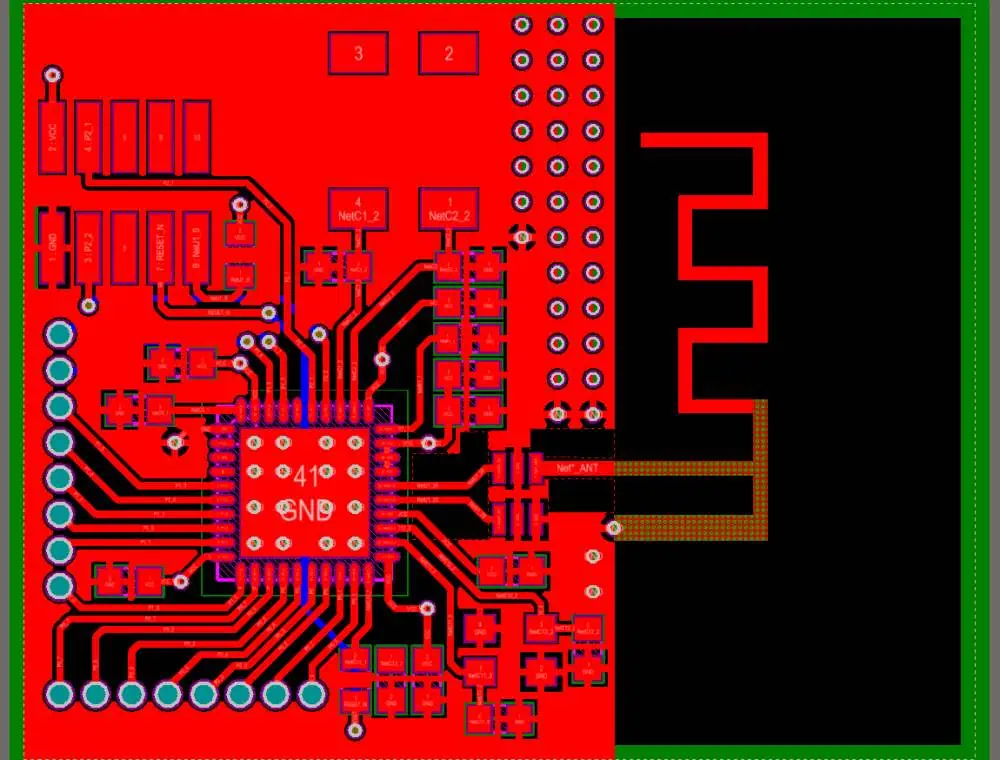
How is IoT used in wireless communication?

4g iot

Introduction

The Internet of Things (IoT) relies heavily on wireless communication technologies to interconnect smart devices and objects. Wireless provides the flexible, low-cost connectivity fabric that enables the wide range of IoT applications transforming homes, cities, industries, transportation and more. This article explores how various wireless technologies are utilized in IoT systems and the considerations around selecting the best approach.

IoT Wireless Communication Requirements

IoT solutions have diverse connectivity requirements that span long range, high bandwidth, mesh networking, low power, and mobility:

  • Range – Connectivity of sensors across a home, factory floor, city grid, agricultural field, etc.
  • Bandwidth – Video security cameras require high throughput wireless links.
  • Mesh Networking – Extending reach by device-to-device multi-hop routing.
  • Low Power – Enabling battery-powered operation for years before maintenance.
  • Mobility – Tracking goods in transit or medical assets in a hospital.
  • Scale – Potentially thousands of nodes even in a local IoT network.
  • Cost – Inexpensive wireless hardware to enable mass deployments.
  • Standards – Interoperability across devices from many vendors.

No single wireless technology optimally meets all of these needs. IoT systems utilize multiple wireless protocols combined in a complementary way.

Wireless Communication Protocols for IoT
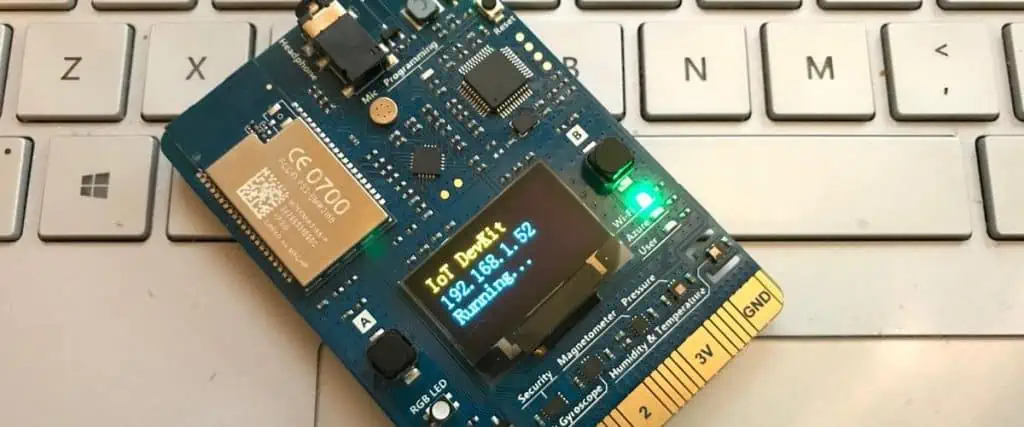
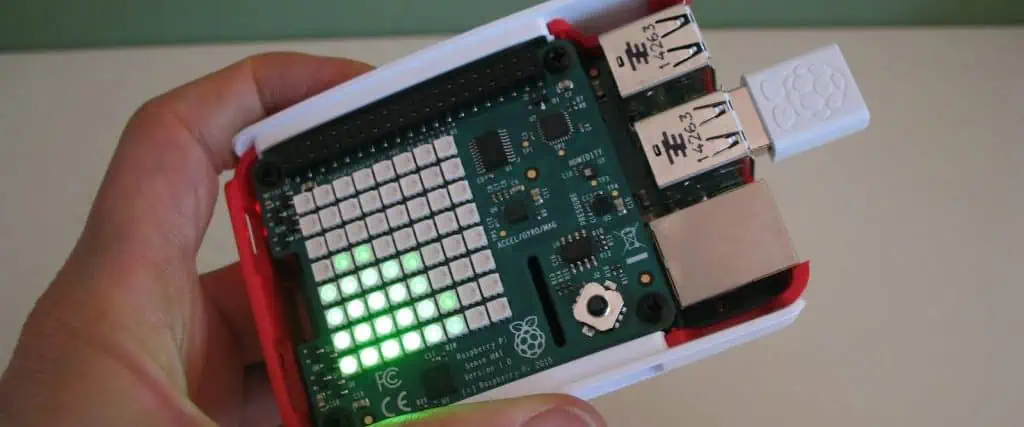
Several wireless technologies are commonly used for IoT connectivity:

Cellular

  • 2G/3G/4G/5G – Provides wide area connectivity using existing cellular infrastructure. IoT-optimized LTE variants called LTE-M and NB-IoT exist.
  • Benefits – Ubiquitous coverage, mobility, security, bandwidth
  • Limitations – Cost, power consumption

WiFi

  • 802.11 – Ubiquitous wireless local area networking technology. IoT uses low power WiFi variants like 802.11ah.
  • Benefits – Commonly available, supports IP networking, high bandwidth
  • Limitations – Power hungry, limited range

Bluetooth

  • Bluetooth LE – Low energy version of Bluetooth ideal for periodic IoT sensor data.
  • Benefits – Ubiquitous, very low power, low cost, standards-based
  • Limitations – Short range under 100m. Low bandwidth.

LoRaWAN

  • LoRaWAN – Long range, low power wireless protocol using LoRa modulation on sub-GHz bands.
  • Benefits – Long range (kms), low power, secure, operates below 1 GHz
  • Limitations – Lower bandwidth, higher module cost

Proprietary RF

  • Proprietary – Custom wireless protocols using freely available ISM bands like 900 MHz or 2.4 GHz.
  • Benefits – Optimized for specific application needs around range, power, cost.
  • Limitations – Vertical integration required. No interoperability.

LPWAN

  • Sigfox, Ingenu – Ultra narrowband, long range technologies for basic IoT data.
  • Benefits – Long range, low power, low cost connectivity
  • Limitations – Very low bandwidth. Limited data.

This variety of wireless options provides flexibility to match the right connectivity to application requirements.

Key Considerations for Wireless IoT

Key factors to evaluate when selecting wireless technologies for an IoT solution include:

Power Consumption

Battery powered devices may need to operate for years before maintenance. Low power wireless like Bluetooth LE, LoRaWAN, and LPWAN reduce power use.

Range Requirements

Sensors spread across large physical spaces require long range wireless connectivity, even km-scale for rural settings. Cellular, LoRaWAN provide this.

Bandwidth Needs

Video security cameras require WiFi or 4G LTE class bandwidth versus simple temp sensors that just need low bandwidth LoRaWAN uplinks.

Cost Sensitivities

Bluetooth LE provides the most cost efficient wireless modules. LPWAN networks have low subscription costs for massive sensor deployments.

Mobility

Tracking assets in motion requires cellular or WiFi. Fixed assets can use LoRaWAN, Bluetooth LE, or other lower power approaches.

Security Concerns

Public networks require proven secure connectivity like LTE/5G. Private networks on proprietary RF or LoRaWAN also enable encryption.

Interoperability Needs

WiFi, Bluetooth LE, and LoRaWAN are standardized for interoperability. Proprietary RF limits to single vendor deployments.

Combining technologies is common to meet varied connectivity needs. For example, sensors could use Bluetooth LE to a gateway, then LoRaWAN backhaul to the cloud.

Wireless Technologies for Common IoT Applications

Different vertical IoT applications impose unique wireless requirements:

Smart Home – Primarily uses WiFi with supplemental Bluetooth LE, ZigBee, or proprietary mesh networks to link low-bandwidth sensors and smart home devices.

Industrial IoT – Requires multi-km range on private networks with combinations of proprietary wireless, LoRaWAN, and cellular for backhaul. Reliability and security are critical.

Smart Cities – Take advantage of existing infrastructure using 4G/5G networks for connectivity of city assets. LoRaWAN also sees adoption in city-scale deployments.

Agriculture IoT – Connectivity of rural agricultural assets is enabled by LoRaWAN, Sigfox, and proprietary wireless which provide range of up to 10 km or beyond.

Connected Vehicles – Leverage 4G LTE, emerging 5G networks, and on-board WiFi hotspots for vehicles. DSRC provides short range vehicle-to-vehicle links. Bluetooth LE connects in-cabin.

Retail and Inventory – Stores use a combination of WiFi, Bluetooth beacons, RFID, and LPWAN to link devices managing inventory, logistics, and merchandise flow.

Healthcare IoT – Hospitals employ WiFi supplemented by proprietary RF for reliable indoor asset tracking of medical equipment, and Zigbee devices for long battery life.

The diversity of vertical applications demonstrates why IoT takes advantage of nearly the full spectrum of wireless technologies today.

Wireless Communication Protocols for IoT – Comparison
ProtocolFrequencyRangeBandwidthPowerSecurity
2G850MHz, <br> 1900MHzWide areaUP to 0.3 MbpsHighStrong
3G850MHz, <br> 1900MHzWide areaUp to 14 MbpsHighStrong
4G LTESub 1 GHz, <br> 2.4GHzWide areaUp to 300 MbpsHighStrong
5G NRSub 6 GHz, <br> mmWaveWide areaMulti-GbpsMediumStrong
WiFi2.4 GHz, <br> 5 GHzUp to 100mUp to 1 GbpsHighWPA2 Encryption
Bluetooth LE2.4 GHzUp to 50mUp to 2 MbpsVery Low128-bit AES
LoRaWANSub 1 GHz2 – 15 km0.3 – 50 kbpsVery LowAES 128 Encryption
SigfoxSub 1 GHz3 – 50 km100 bpsVery LowProprietary
Proprietary ISM RF315/433/868/915MHz, <br> 2.4GHzUp to 2 kmUp to 1 MbpsLowCustom Security

Optimizing Wireless Coexistence

With various wireless technologies potentially deployed in proximity, steps must be taken to minimize interference between protocols sharing frequency bands:

  • Proper RF site survey and planning of wireless coverage areas
  • Frequency channelization optimization and allocation
  • Transmit power level adjustments to minimize overlap
  • Scheduling of transmission activity windows
  • Prioritizing co-located traffic based on quality of service needs
  • Adding physical isolation between nearby wireless infrastructure
  • Leveraging directional antennas and spatial separation

Testing and adjustments after deployment can optimize coexistence and performance.

The Role of LP-WAN for IoT Wireless Connectivity

LP-WAN (Low Power Wide Area Network) technologies like LoRaWAN and Sigfox provide a uniquely optimized combination of long-range wireless connectivity and low power operation:

  • Enable battery lifetimes up to 10 years from a single AA battery
  • Provide wireless coverage across entire cities, agricultural areas, and industrial sites
  • Operate in license-free sub-1GHz frequency bands
  • Leverage a star network topology with distributed gateways
  • Offer strong security and interference resistance
  • Support millions of end node devices
  • Enable low cost connectivity at approximately $5 per node
  • Sustain excellent range even in urban areas and indoor locations
  • Provide sufficient thoughput for typical IoT sensor data
  • Maintain robustness at very low transmit power levels

LP-WAN fills a technology gap between short range protocols like Bluetooth LE and wide area cellular networks. This drives adoption for water metering, asset tracking, agricultural monitoring, and smart city applications.

Future Outlook for Wireless IoT Connectivity
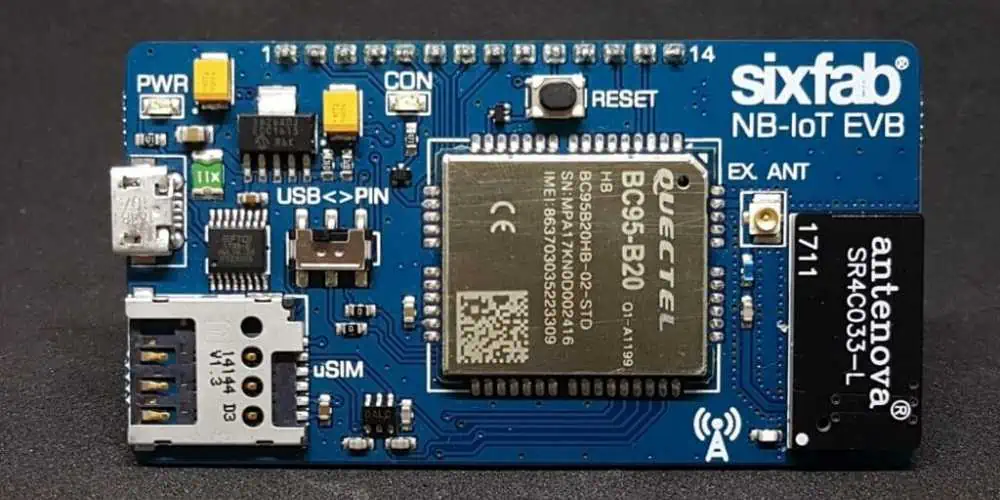
The landscape of wireless technologies for IoT continues to rapidly evolve:

  • 5G will provide higher performance cellular connectivity especially benefiting high bandwidth video and mobile IoT uses
  • WiFi 6 increases speed, density, and efficiency of wireless local networking for IoT
  • Bluetooth 5 improves range, broadcasting, and mesh capabilities of Bluetooth LE
  • Thread and Zigbee will gain adoption in smart home and building automation
  • NB-IoT and LTE-M extend cellular capabilities for low power wide area IoT
  • Carrier aggregation across multiple wireless protocols to enhance reliability and throughput
  • Edge computing will distribute intelligence into the IoT network lowering wireless data needs
  • New spectrum like CBRS and 6 GHz bands will expand available wireless capacity

Conclusion

IoT is driving adoption of a diverse palette of wireless technologies to serve the connectivity needs of smart objects. Factors around power, range, bandwidth, mobility, scale, and cost dictate the optimal wireless approach for specific applications. Ongoing enhancement of wireless protocols and spectrum availability will support the growth of IoT innovations transforming our infrastructure, industries, homes and cities. Comprising the communication fabric tying everything together will be standards-based, IP-connected wireless networks enabling the promise of the Internet of Things.

IoT Wireless Communication – Frequently Asked Questions

What is the difference between LPWAN and WAN?

LPWAN refers to Low Power Wide Area Network technologies designed specifically for wireless IoT sensors. This includes LoRaWAN and Sigfox. WAN more broadly means any wide area network including cellular networks.

Which wireless technology has the longest range for IoT?

Sigfox and LoRaWAN can provide wireless connectivity exceeding 50km in rural areas. Proprietary sub-GHz networks can also attain multi-km ranges suitable for wide area IoT.

Do IoT devices support WiFi?

Some do – WiFi provides high bandwidth wireless connectivity suitable for IoT video cameras, gateways, and devices requiring faster data rates. Low power WiFi variants help address high power consumption.

What is 5G NR?

5G NR stands for Fifth Generation New Radio. It defines the global standard for upgraded 5G cellular networks with benefits like multi-Gbps speeds, ultra low latency, and improved support for massive IoT device density.

Which wireless protocol offers the lowest power consumption?

Bluetooth LE currently enables the lowest power wireless communication, allowing IoT sensors to run for years on small batteries. However, new LPWAN technologies like NB-IoT are competitive on power usage.

What is Pulsonix PCB Design Software

Pulsonix Tutorial:

Introduction

Pulsonix is a printed circuit board (PCB) design software tool from WestDev. It provides an integrated, configurable environment for schematic capture, PCB layout, and manufacturing. Pulsonix is considered an affordable and easy to use option for electronics design teams. This article will provide an overview of Pulsonix and its key capabilities.

Pulsonix Background

Pulsonix was first released in 1991 by a UK-based team that had previously worked on the PADS PCB toolset. It was designed from the ground up to be an integrated, scalable PCB design system that was both powerful and inexpensive compared to competitive tools.

Now on its 11th major version, Pulsonix has grown from its roots to be a full-featured PCB design platform serving over 9000 users worldwide. It combines ease of use with modern features expected in current EDA tools.

Some of the major benefits Pulsonix aims to provide are:

  • Low cost of ownership compared to other commercial PCB design tools
  • Short learning curve for new users to become productive quickly
  • Environment customizable for specific design needs and workflows
  • Scalable to handle designs from simple to extremely complex
  • Constant enhancement with new features and updates

Pulsonix continues to meet the PCB design needs of small workgroups, startups, makers, and large enterprises alike.

Schematic Capture Overview

Pulsonix provides robust schematic editing capabilities for defining circuit connectivity. Features include:

  • Real-time electrical rules checking (ERC)
  • Component library with 50,000+ industry standard parts
  • Drag-and-drop part placement from library browser
  • Spreadsheet-style editing of component properties
  • Virtual pin swapping for easy part variants
  • Automatic wire routing and cleanup
  • Busses for conveying groups of signals
  • Hierarchical and multi-channel design re-use
  • Multi-level flat or hierarchical netlisting
  • Complex equation parsing for parameters
  • Import/export of netlists from other EDA tools

These features allow electrical engineers to quickly draft schematics following best practice design rules. Integration with the layout environment enables smooth transfer of the schematic into PCB realization.

PCB Layout Overview

The Pulsonix PCB layout editor contains advanced tools for board design:

  • Direct import of netlists from Pulsonix schematic or external tools
  • Intelligent component placement with real-time DRC
  • High-speed multi-threaded autorouter
  • Sketch routing with timing-driven length tuning
  • Curved traces and servo traces for control over routing paths
  • Dynamic copper fill connected to nets
  • Design-for-manufacturing checking integrated into layout
  • Automatic backdrilling and via stub management
  • Alternating pair routing for differential signals
  • Length matching, phase tuning, and delay management
  • Real-time 3D clearance checking
  • STEP import/export for mechanical integration
  • Revision control and design variant management
  • Native support for rigid-flex boards
  • Full design rules and constraint management

This extensive toolset allows PCB designers to turn schematics into routable board layouts with verification at each step. Integration of schematic and layout in one tool avoids data translation errors.

Library and Supply Chain Features

Pulsonix includes extensive capabilities to leverage component libraries and connect with the manufacturing supply chain:

  • Unified library format for symbols, footprints, 3D models
  • Drag-and-drop parts from supplier component catalogs
  • Library lifecycle workflows with revision history
  • Automated BOM generation from layout
  • One-click design submission from Pulsonix to PCB fabs
  • Model download from Ultra Librarian store of over 500M parts
  • Direct library partnership with distributors like DigiKey
  • Library ์ƒ์„ฑ/editing tools for custom footprints
  • Import libraries from existing CAD systems
  • Interfaces with MRP/ERP systems for BOM integration

Using Pulsonix, designers can easily access supplier component data to accelerate design-through-manufacturing handoff.

Design Flow and Environment

Pulsonix provides a streamlined, configurable environment for PCB design:

  • Unified single-executable design framework
  • Customizable ribbon interface for tool access
  • Docking windows and panels for contextual information
  • Report generation for BOM, netlist, etc.
  • Batch output of manufacturing and documentation files
  • Multi-level undo and redo for change history
  • 64-bit multi-threaded operation
  • Distributed processing across multiple servers
  • Scripting and automation using API or Tcl/TK
  • Revision control integration with SVN or Git
  • Project templating for re-use and standardization
  • Drop-in integration with CAM software

The flexible architecture allows large engineering teams to tailor Pulsonix to their specific organizational needs and tool flows.

Add-on Modules and Options

Optional add-ons enhance Pulsonix with specialized functionality:

Analysis Tools – Hyperlynx SI/PI for signal/power integrity analysis and DFM Pro for manufacturability checks

3D PCB Visualization โ€“ Micro Magic 3D modeling and visualization

DFM Checks – Automated Test for fabrication shop testing and view simulation

CAM Tool Output – Optimized data handoff to various CAM software

Reverse Engineering – Imports from Gerber and ODB++ data to recover/update existing boards

Motion Control – Advanced interconnect design for electronics in motion systems

FPGA Integration – Native bidirectional interface with FPGA tools like Altera Quartus

These advanced modules customize Pulsonix capabilities for specialized applications beyond standard PCB layout requirements.

Pulsonix PCB Design Features

To understand Pulsonix capabilities in more detail, here are some key features supported in the core platform and add-ons:

Physical PCB Design

  • Any layer count and stackup
  • Split power planes
  • Rigid-flex boards
  • Curved and spiral traces
  • Blind/buried vias
  • Via fencing
  • Length tuning
  • Automatic backdrilling
  • Dynamic copper fill
  • Assembly variants

Electronics Data Management

  • Unified database repositories
  • Lifecycle workflows
  • Revision control
  • Design reuse
  • Batch processing
  • Reporting and analysis

Manufacturing Integration

  • Bidirectional library linking
  • Built-in DFM analysis
  • Fabrication documentation
  • Tooling generation
  • Data export to CAM systems
  • Panelization and breakout

High Speed Design

  • Differential pairs routing
  • Constraint management
  • Phase tuning
  • Length matching
  • IBIS modeling
  • SI/PI analysis
  • DDRx memory routing

Advanced Technologies

This range of advanced to specialized capabilities makes Pulsonix well suited for usage across various industry verticals including telecom, military, industrial, and consumer electronics.

Pulsonix PCB Design Flow

esp32 pcb design

A typical design flow using Pulsonix would involve:

  1. Schematic Capture – Draft schematics with electrical connectivity. Run ERC checks.
  2. Netlisting – Generate netlist or import netlist from external tools.
  3. Library Creation – Build symbol and footprint libraries for components used.
  4. Board Layout – Import netlist and place components. Route board.
  5. Verification – Run design rule, signal integrity, thermal checks.
  6. Documentation – Generate manufacturing and assembly outputs.
  7. Fabrication – Submit Gerber, NC drill, and test files to board fabrication.
  8. Assembly – Send pick-and-place and test/inspection files to contract assembler.
  9. Manufacturing Data Management – Share build data across supply chain.
  10. Revision Control – Track layout changes and release new versions.

This process is streamlined in Pulsonix through integration between schematics and PCB layout in one tool. Data can also be imported/exported at various stages to interface with external electronics workflows.

Pulsonix PCB Design – Frequently Asked Questions

Here are some common questions regarding using Pulsonix for PCB design:

How good is the autorouter in Pulsonix?

The multi-threaded autorouter in Pulsonix is quite advanced. It can route even complex designs quickly with tuning of strategy parameters. Manual clean-up is still required but minimized.

What DFM checks are included in Pulsonix?

Pulsonix has real-time DRC during placement and routing along with extensive pre-processing design-for-manufacturing checks through add-on DFM Pro module.

Does Pulsonix include version control?

Yes, native integration with Subversion and Git repositories is provided to enable managed revisions and collaboration across designers.

What manufacturing outputs are generated?

Pulsonix supports generation of all needed fabrication and assembly outputs including Gerbers, NC drill files, IPC-2581, assembly drawings, pick-and-place, and more.

Can Pulsonix import/export data with other EDA tools?

Standard formats like ODB++, IPC-2581, STEP, and IDF can be imported/exported. Native two-way interface with some tools like Mentor Xpedition is also available.

Conclusion

Pulsonix provides a scalable, configurable PCB design solution with capabilities spanning schematic capture, layout, library management, and manufacturing.Integration throughout the tool ensures efficient schematic-to-layout handoff. Ongoing enhancement along with accessible licensing makes Pulsonix an appealing option for organizations with advanced PCB design needs.

The Pulsonix is the classic software available online with free trial version 10.5. This include schematic capture, spice simulator, PCB layout, auto router, chip packaging toolkit, library integration toolkit, embedded components, Micro-Vias, Interactive high speed, Spirals and Database Connection (PDC) Trial. Please visit pulsonix.com to download your own copy.

YouTube video

Software Interface:

As we open the software, it shows the window with Design, Technologies + Profile and Wizard options. Choose File >> New >> Design >> Schematic Diagram Design

You can open the example schematic from

File >> Open >> User >> Documents >> Example.sch

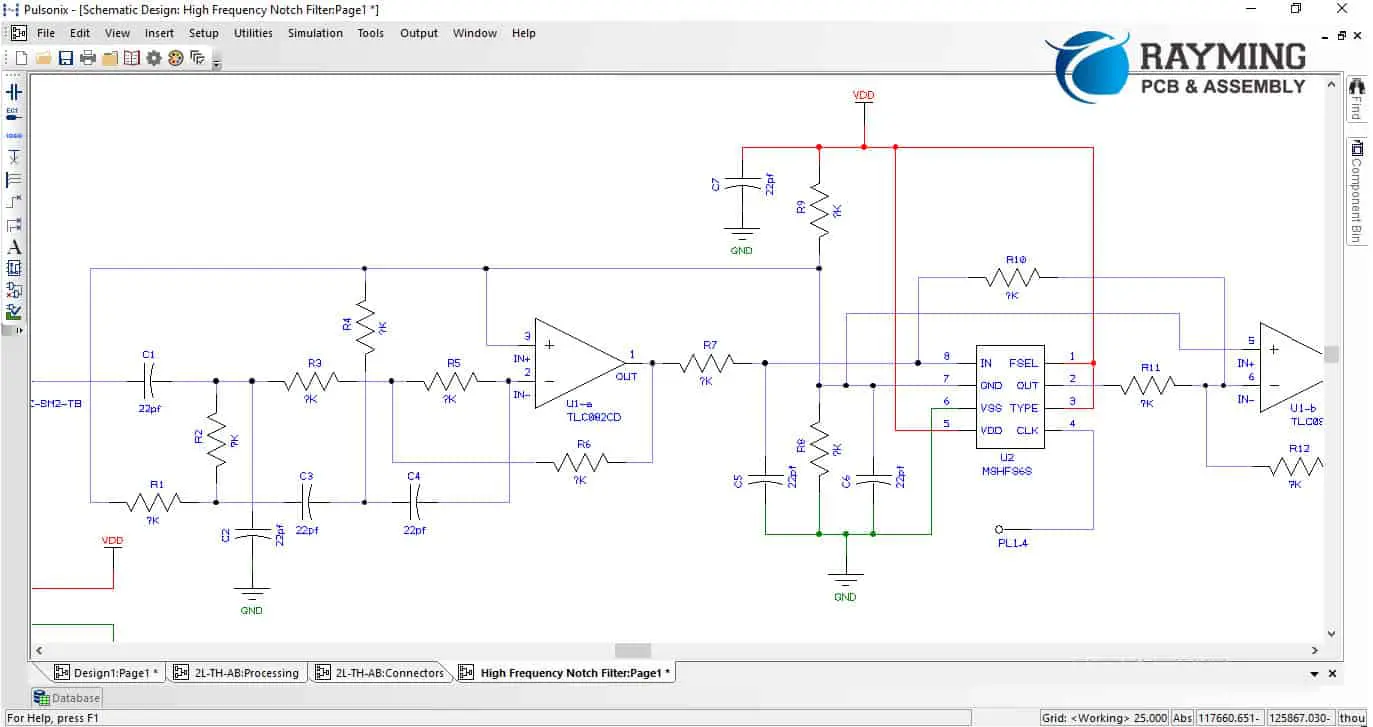
I opened the notch filter schematic and it look like this

Pulsonix Tutorial:

Here we can see many tool available.

On the left hand side, there is a vertical tool bar.

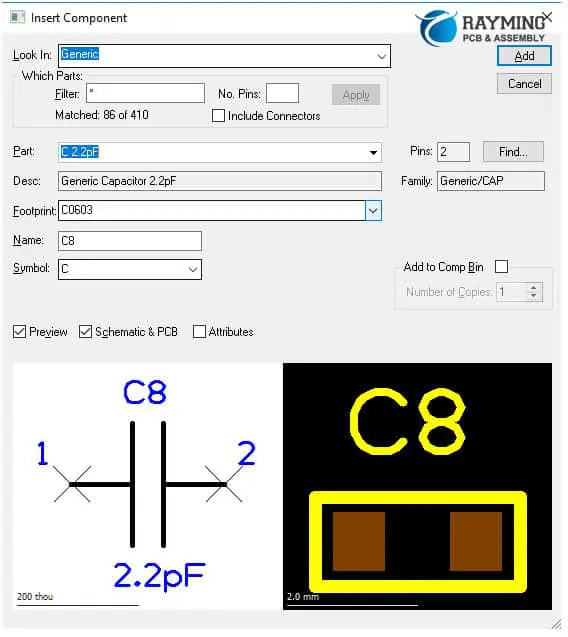
This symbol  is the electronic component library placement. Left click on this and library window will appear.

The โ€œFilterโ€ option with asterisk mark gives you flexibility to enter the keyword for the component you are looking for. Click โ€œApplyโ€ to activate the filter. In the โ€œlook inโ€, a drop down menu will show the list of all manufacturers available with their libraries. The manufactures are listed A to Z and in โ€œGenericโ€ you will find generic capacitor, resistors, diodes, transformer, fuse, crystal and zener diodes. The special thing is that the component footprint is also mentioned in the box and component designator and component symbol is also shown.

Pulsonix Tutorial:

You can click on the โ€œPreviewโ€ check mark to show or hide the component symbol and you can also check mark the Schematic & PCB to hide or show the component footprint. This is very useful to see what footprint will be used in PCB layout designใ€‚

Panning / Zooming:

Left click and depressed and move your computer mouse to โ€œPanโ€. Scroll Up to zoom in and scroll down to zoom out

Inserting Connector Pin

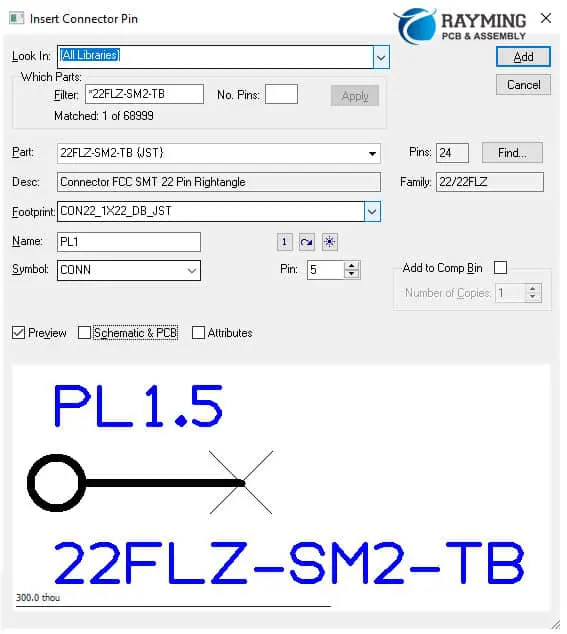
You can insert the connector pin same as the component. Part number, description, total number of pins, family, footprint, symbol and name are shown in the window. You can use filter to select the connector pin of your choice. You have to click โ€œAddโ€ to place the pin on the schematic sheet.

You can change the pin number from here. The pin placed on the schematic is pin number 5 of the connector part number shown in below diagram. The connector however is 24 pin total.

Pulsonix Tutorial:
Pulsonix Tutorial:

Insert Document Symbol:

You can insert the page border and symbol with description with various sizes like A, A1, A2, A3 and A4 and B, C and D landscape borders.

Pulsonix Tutorial:

Click Add to place the symbol.

Pulsonix Tutorial:
Pulsonix Tutorial:

Inserting the Signal Reference:

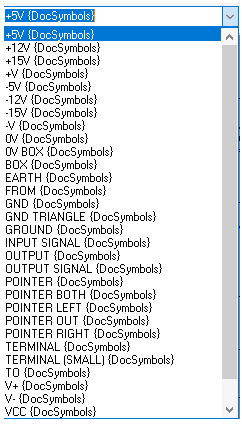
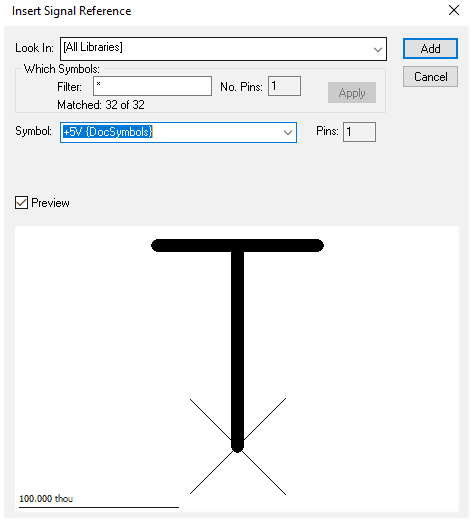
The signal references like +5V, 12V, 15V, Ground, common, earth, box, input, output, pointer, terminal, VCC, VDD and VSS.

These signal reference are very important in any circuit design hence can be placed by clicking here  on left menu.

The symbol in previous section can be placed by clicking here  on left menu

The connector pin can be placed by clicking here  on left menu.

The bus bar can be placed by clicking here  on the left menu

The bus bar is used commonly in microprocessor or memory circuits where I/O s are too many.

Pulsonix Tutorial:
Pulsonix Tutorial:

Connecting the Components Together:

You can connect your components by clicking here  on the left menu. This is the wiring connection. When you connect the nodes together or connect nets then a confirmation prompt will occur. Click OK to continue.

Place Text:

You can also place text on current sheet by clicking here

Pulsonix Tutorial:

Electrical Rule Check: (ERC)

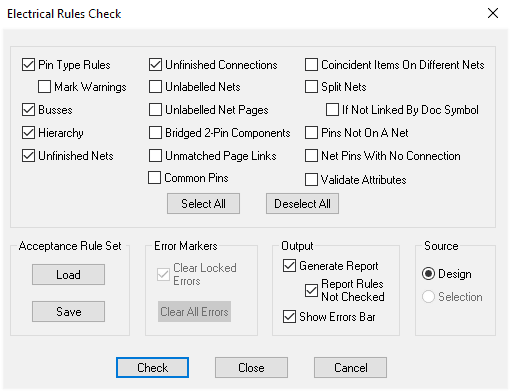
You can run the electrical rule check on the schematic you design and check the following parameters. Pin type rules, busses, hierarchy, unfinished nets and unfinished connections. There are other checks that you can mark according to your requirements

Pulsonix Tutorial:

Click on Check to run the ERC. A report file in text document will be generated showing errors and warnings if any.

Pulsonix Tutorial:

Test Point:

You can insert the test points Insert >> Test Point

Click on any point/wire/junction in the circuit and a green color line will appear then click anywhere on the schematic to drop the test point.

Page Link:

If your schematics is on more than 1 page, then you can insert page link by Insert >> Page Link

Changing Units:

Setup >> Units >> Imperial or Metric

Grids:

Setup >> Grids >> Basic Step, Multiplier, Divisor, Step and display

Top Menu:

This menus has the new, open, save, print, setup folder, library, technology, colors and options in the sequence from left to right as shown.

Pulsonix Tutorial:
Pulsonix Tutorial:

Simulation:

As we know that Pulsonix offers schematic capture, simulation and PCB layout. So here we discuss simulation aspect.

Simulation >> Set Netlist Spice Type

Here you can set the netlist spice type form different options Basic Spice, LTSpice, PSpice, Pulsonix Spice and SIMetrix. Select the Pulsonix Spice.

Pulsonix Tutorial:

Insert Source:

For simulation we know that the circuit needs inputs source. Go to Simulation >> Insert Source, a drop down menu will show many options like power supply, waveform generator, AC voltage source, DC current source, CCCS, CCVS, VCCS and VCVS.

Insert Part Using Model:

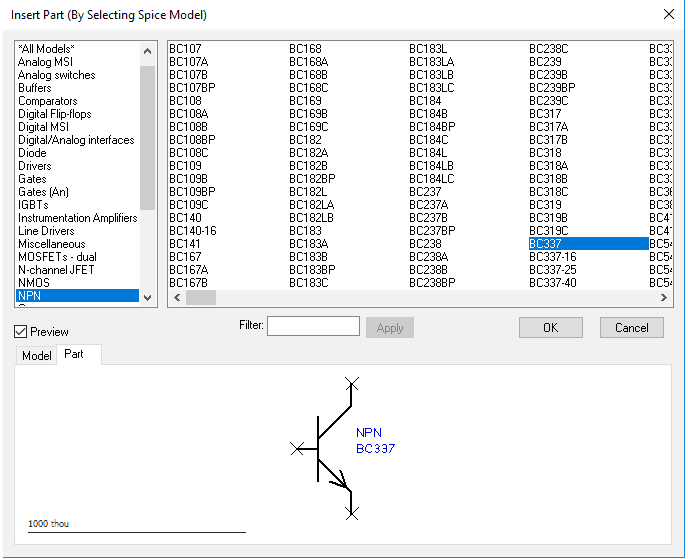
There are parts that do not have spice models and many others have. So you can choose only those components definitely having spice models.

Simulation >> Insert Part using Model

Pulsonix Tutorial:

This window will open. You can choose the type of component from left panel and select the part number and component symbol is also shown in bottom.

Insert Probe:

You can insert the fixed probe in your schematic to run the transient or AC analysis parameters. Go to Simulation >> Insert Fixed Probe

Pulsonix Tutorial:
Pulsonix Tutorial:

A drop down menu will open showing the options shown in this figure. There are various types of probes like voltage probe, differential voltage probe, current probe, bus probe, voltage dB and Voltage phase probes etc.

Simulation Parameters:

You can change the simulation parameters from

Simulation >> Simulation Parameters

This has transient, AC, DC, Noise. Transfer Function (TF), Options and Safe Operating Area (SOA)

Pulsonix Tutorial:

Like for AC analysis, you can set the start, stop and points per decade for simulation. Method can be decade or linear. Check mark the simulation type on the right side you want to run. Then press F9 to simulate the circuit

The Complete Guide to Conformal Coating on PCBs: Techniques, Materials, and Best Practices

PCB COATING

Conformal coating is a critical process in the manufacturing and protection of printed circuit boards (PCBs). This guide explores everything you need to know about conformal coating, including its purpose, materials, application techniques, and best practices to ensure optimal performance and longevity of your PCBs.

What is Conformal Coating for PCBs?

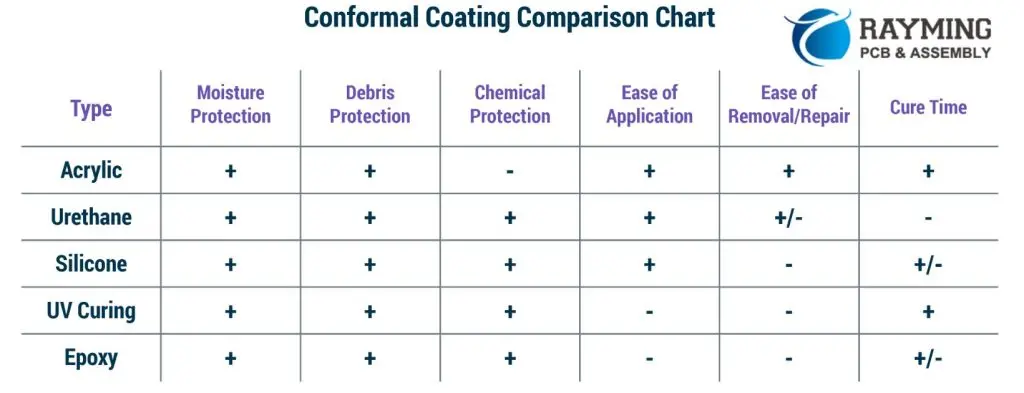
Conformal coating is a thin, protective layer of polymer applied to a PCB to safeguard the board and its components from environmental damage and corrosion. This film seamlessly conforms to the contours of the PCB, covering solder joints, component leads, exposed traces, and other vulnerable areas, ensuring comprehensive protection.

YouTube video

What is Conformal Coating Made Of?

Conformal coatings are typically composed of polymeric resins, sometimes diluted with solvents or water to improve application and flow. The choice of resin depends on the required level of protection, environmental conditions, application method, and ease of repair.

Types of Conformal Coatings:

  1. Acrylic Resin (AR):
  • Economical and easy to apply/repair.
  • Good moisture and abrasion resistance.
  • Easily removed with solvents.
  • Less effective against solvent vapors (e.g., jet fuel).

2. Silicone Resin (SR):

  • Excellent protection across a wide temperature range.
  • High flexibility and vibration resistance.
  • Ideal for high-humidity environments.
  • Challenging to remove, requiring specialized solvents.

3. Urethane Resin (UR):

  • Excellent moisture and chemical resistance.
  • High abrasion and solvent resistance.
  • Difficult to remove, often used in aerospace applications.
Conformal Coating Printed Circuit Boards
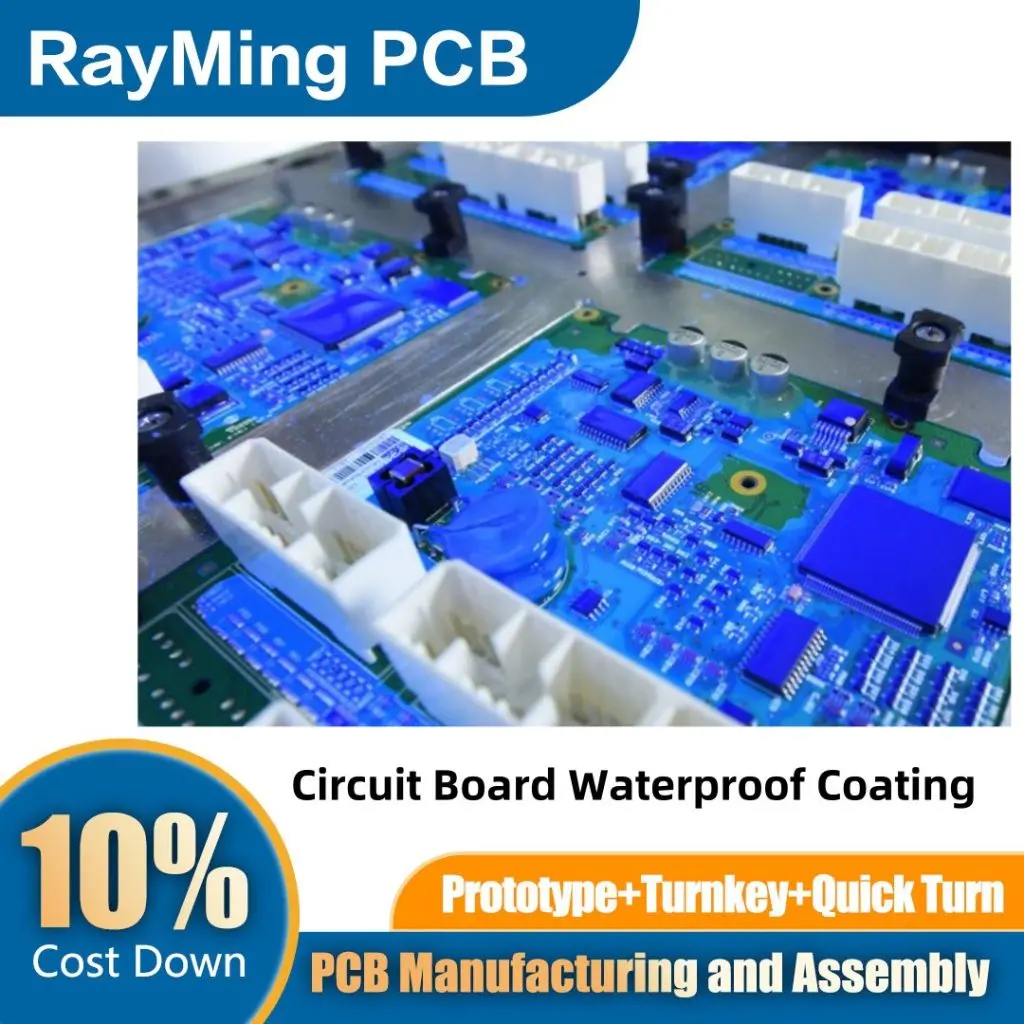
Circuit Board Waterproof Coating
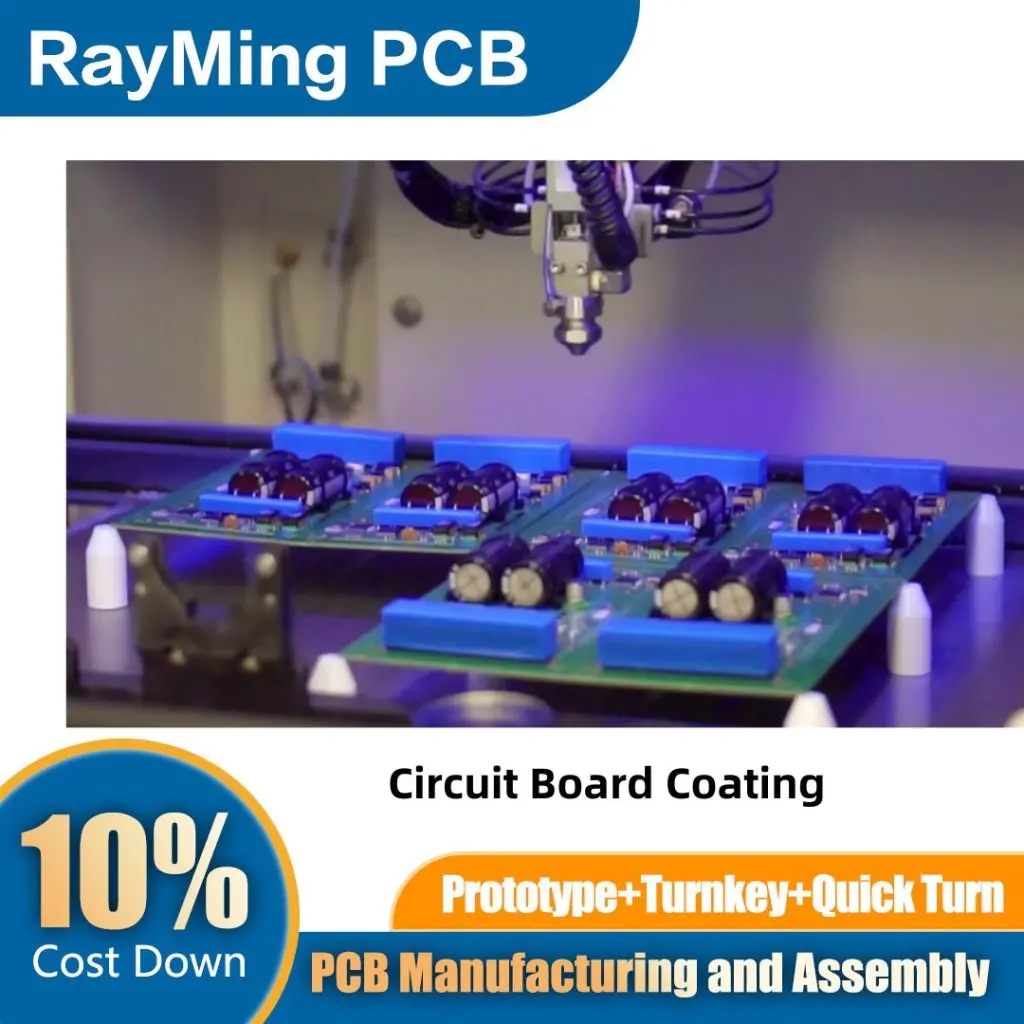
Circuit Board Coating
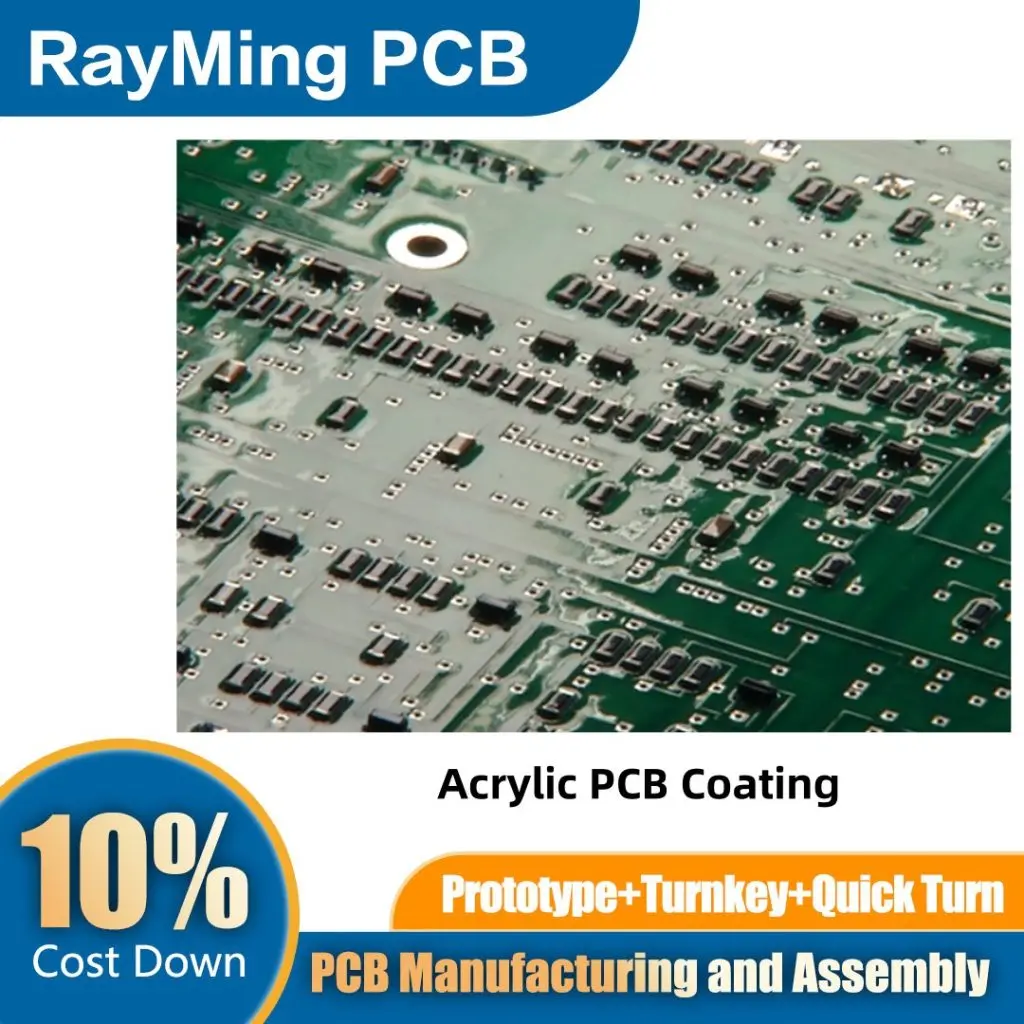
Acrylic PCB Coating

Why is Conformal Coating Necessary?

Conformal coating extends the operational lifespan of PCBs by protecting them from environmental hazards such as moisture, salt spray, chemicals, and extreme temperatures. It also enables higher voltage gradients and reduced track spacing, helping designers meet industry standards.

Top 13 Reasons to Use Conformal Coating:

  1. Enhanced reliability.
  2. Corrosion inhibition.
  3. Resistance to fluids and humidity.
  4. Temperature resistance.
  5. High abrasion and chemical resistance.
  6. Arc prevention.
  7. Coverage of sharp edges.
  8. Ease of application.
  9. Specialized formulas for uniform films.
  10. Extended product lifespan.
  11. Breathable protection.
  12. Improved insulation.
  13. Minimal weight impact.

How Do You Apply Conformal Coating?

Conformal Coating

The application process depends on production throughput, board design, and quality requirements. Here are the most common methods:

Application Methods:

  1. Manual Spraying:
    • Suitable for low-volume production.
    • Requires masking and is operator-dependent.
  2. Automated Spraying:
    • Uses conveyor systems for consistent results.
    • Ideal for medium to high-volume production.
  3. Selective Coating:
    • Robotic systems apply coating to specific areas.
    • Eliminates the need for masking in high-volume production.
YouTube video

PCB Cleanliness Prior to Coating

Pre-cleaning PCBs is essential to ensure proper adhesion and avoid defects. Skipping this step can compromise reliability. Common cleaning methods include:

  • Ion chromatography.
  • Temperature/humidity/bias testing.

Common Coating Defects from Poor Cleaning:

  • Dewetting (Fisheyes): Caused by oil, wax, or silicone residues.
  • Cracks and Ripples: Result from improper coating mixtures or thermal shock.
  • Orange Peel: Uneven texture due to improper drying or application.
  • Bridges or Webs: Thick coatings trapping bubbles.
  • Dendrite Growth: Moisture absorption leading to surface contamination.

How Thick Should Conformal Coating Be Applied?

PCBA Conformal coating

Conformal coatings are typically applied between 1 to 5 mils (25 to 127 microns). Thickness can be measured using:

  1. Wet Film Thickness Gauge: For quick, on-the-spot measurements.
  2. Micrometer: For hard coatings that donโ€™t deform under pressure.
  3. Eddy Current Probes: For non-destructive, accurate measurements (requires a metal backplane).
  4. Ultrasonic Thickness Gauge: For non-destructive testing without a metal backplane.

How Long Does It Take for Conformal Coating to Dry?

Drying times vary based on the resin type, curing method, and coating thickness:

  • Evaporative Cure: Handling time within an hour; full cure in days.
  • Moisture Cure: Reacts with ambient moisture; full cure in days.
  • Heat Cure: Accelerates polymerization; cure time varies with temperature.
  • UV Cure: Near-instant curing in exposed areas; shadowed areas may take days.
YouTube video

How Do You Remove Conformal Coating?

Coating removal is sometimes necessary for rework or repairs. Common methods include:

  1. Solvent Removal: Effective for acrylic, silicone, and urethane coatings.
  2. Peeling: Suitable for certain silicone and flexible coatings.
  3. Thermal/Burn-Through: Using a soldering iron to burn through the coating.
  4. Microblasting: For precise removal of tough coatings like Parylene.
  5. Grinding/Scraping: A last resort for hard coatings like epoxy.

Step-by-Step Design Guide for Conformal Coating

Conformal Coating
Conformal Coating

To ensure successful coating, follow these design considerations:

  1. Group coated components together with 2.5mm clearance.
  2. Provide 2.03mm spacing around components for coating prep.
  3. Avoid placing parts near larger devices that block access.
  4. Group connectors for easier dip coating.
  5. Tent via holes to prevent coating flow.
  6. Use sealed SMT connectors to avoid contamination.
  7. Coat only necessary areas.
  8. Avoid using coating as underfill.
  9. Leave PCB edges uncoated or use handling strips.
  10. Account for robotic coating limitations.
  11. Clear mounting holes and grounding areas with 2.5mm spacing.

Common Conformal Coating Defects: Identification and Prevention

Common Defects:

  1. Dewetting: Caused by surface contamination.
  2. Delamination: Due to insufficient tack time or contamination.
  3. Air Bubbles: From improper mixing or application.
  4. Fisheyes: Resulting from oil or water contamination.
  5. Orange Peel: From uneven atomization or rapid evaporation.
  6. Cracking/Crazing: Due to excessive thickness or high curing temperatures.

Prevention Tips:

  • Ensure thorough cleaning before coating.
  • Follow manufacturer guidelines for thickness and curing.
  • Maintain application equipment properly.
  • Control environmental conditions during application.

Conclusion

Conformal coating is an essential step in protecting PCBs from environmental hazards and ensuring their long-term reliability. By understanding the materials, application methods, and best practices outlined in this guide, you can optimize your coating process and achieve superior results. Whether you’re working on consumer electronics or mission-critical aerospace systems, conformal coating is a key factor in maintaining the performance and durability of your PCBs.

By following this comprehensive guide, youโ€™ll be well-equipped to implement conformal coating effectively, ensuring your PCBs are protected and perform reliably in even the most demanding environments.

How to Design PCB Fiducial Mark and Alignment

PCB fiducial

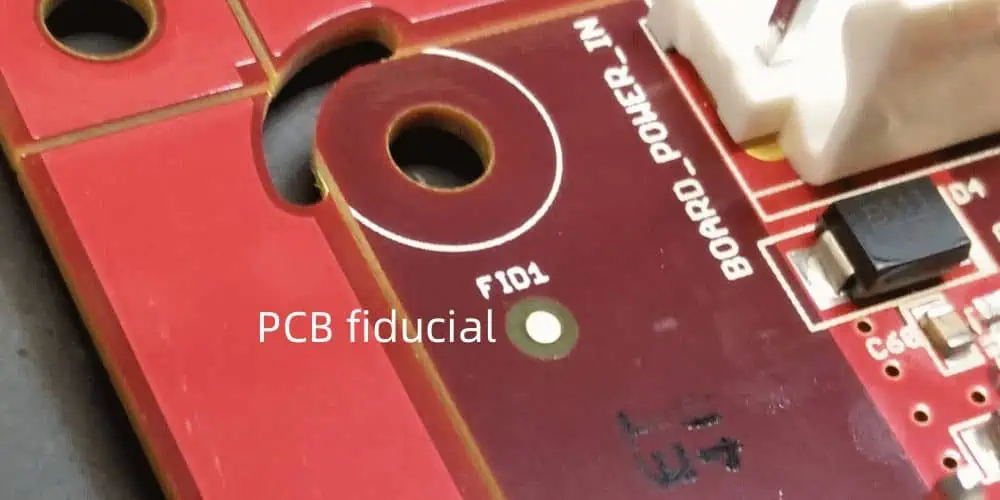
In PCB design, a fiducial marker is a small, rounded copper feature that serves as a reference point for automated pick-and-place assembly machines. These markers enable machine vision systems to accurately detect the PCBโ€™s position and orientation as it moves through Surface Mount Technology (SMT) assembly lines. By comparing the PCBโ€™s alignment with the pre-programmed orientation of components on reels, the machine can adjust part placementโ€”including rotationโ€”to ensure precise positioning on their designated land patterns.

Why Use Fiducial Markers?

Fiducials are a simple yet critical feature that should be incorporated into PCB designs whenever possible, particularly for square or rectangular boards. They enhance assembly accuracy and reduce misalignment errors, which is especially important for:

  • High-density designsย (e.g., fine-pitch components likeย QFPs, BGAs, or QFNs)
  • High-volume productionย (where consistency is crucial)

Placement Guidelines

  1. Global Fiducialsย โ€“ Typically placed near theย PCB cornersย to provide overall board alignment.
  2. Local Fiducialsย โ€“ Positioned nearย critical componentsย (e.g., fine-pitch ICs) to improve placement precision for specific parts.

The choice between global and local fiducials depends on:

Component pitchย (smaller pitches often require additional fiducials for accuracy)

Production volumeย (high-volume runs benefit from both types)

Assembler requirementsย (some may demand local fiducials for tight-tolerance components)

YouTube video

Powered By EmbedPress

Fiducial Markers in PCB Manufacturing: Types and Critical Functions

Fiducial markers are essential reference points in PCB manufacturing that enable precise component placement during automated assembly. These copper landmarks guide pick-and-place machines by providing exact positional data, ensuring accurate alignment of surface-mount components.

Two Key Types of Fiducial Markers

  1. Global Fiducial Markers
    • Positioned near the PCB edges to establish the boardโ€™s overall orientation.
    • Help machines determine the PCBโ€™sย X-Y axis alignmentย and correct for anyย skew or misplacementย when clamped.
    • Critical for ensuringย panel-level accuracyย in high-volume production.
  2. Local Fiducial Markers
    • Placed adjacent toย high-precision components, such as quad flat packages (QFPs), BGAs, or fine-pitch ICs.
    • Provideย component-specific alignment, minimizing placement errors for sensitive parts.
    • Particularly vital for:
      • Fine-pitch componentsย (โ‰ค0.5mm lead spacing)
      • Large ICsย requiring exact positioning (e.g., processors, FPGAs)

Why Are Fiducial Markers Crucial?

  • Improve Placement Accuracy:ย Prevent misalignment in automated SMT assembly.
  • Reduce Defects:ย Minimize soldering errors and tombstoning.
  • Support High-Density Designs:ย Essential for modern PCBs with micro-BGAs and ultra-fine-pitch components.

By strategically using global and local fiducials, manufacturers can achieve higher yields, lower rework costs, and more reliable PCB assemblies.

PCB Fiducial Mark and Alignment

Read more about:

How can I add a fiducial mark to my PCB?

Creating a fiducial.

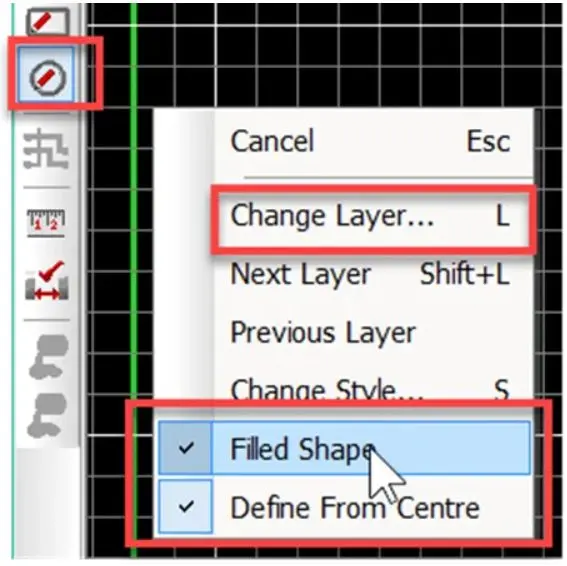
The use of the “Add Shape Circle” provides the required flexibility for this.

When creating a fiducial marker, proper grid configuration ensures accurate alignment and simplifies the design process. For a standard 1mm copper pad with a 3mm solder mask opening, follow these steps:

  1. Set Your Design Grid to 1mm
    • This establishes a consistent reference scale for precise element placement.
  2. Enable Snap-to-Grid at 0.25mm or 0.5mm Increments
    • Allows finer control when positioning the fiducial while maintaining alignment to the primary grid.
    • Ensures perfect centering of the copper pad within the solder mask aperture.
  3. Implementation Benefits
    • Guaranteed concentricityย between copper and mask layers
    • Efficient editingย with automatic alignment to design rules
    • Manufacturing-friendly outputย that avoids tolerance stacking issues

Pro Tip: For high-density designs, combine this approach with a 45ยฐ rotated grid when placing diagonal fiducial arrays to maintain optical recognition reliability.

This methodology is particularly valuable when working with:

  • Laser-cut solder mask openings
  • HDI designs requiring tight registration tolerances
  • Panels with multiple fiducial marker arrays

Using this structured approach eliminates guesswork and ensures your fiducials meet IPC-7351 standards for machine vision recognition.

Key Advantages:

  • Precision:ย Maintains perfect geometric relationships between layers
  • Efficiency:ย Reduces design time with intelligent snapping
  • Reliability:ย Produces manufacturing-ready fiducials in 3 quick steps

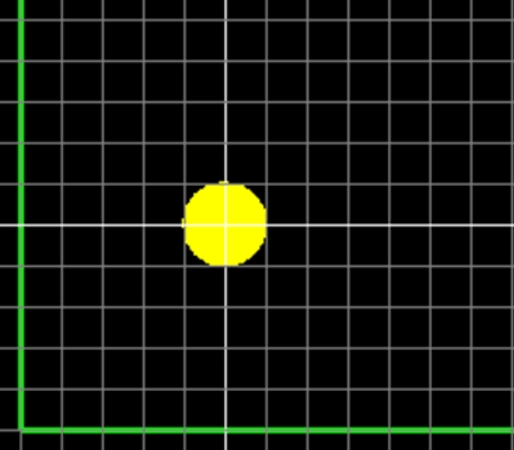
Select the “Add Shape Circle” and right-click before placing and ensure “Filled Shape” is set, you may also select the Layer or change layers after placing as shown.

Place the circle shape and expand to the next half-grid line. Note grid setting in this example are 0.5mm.

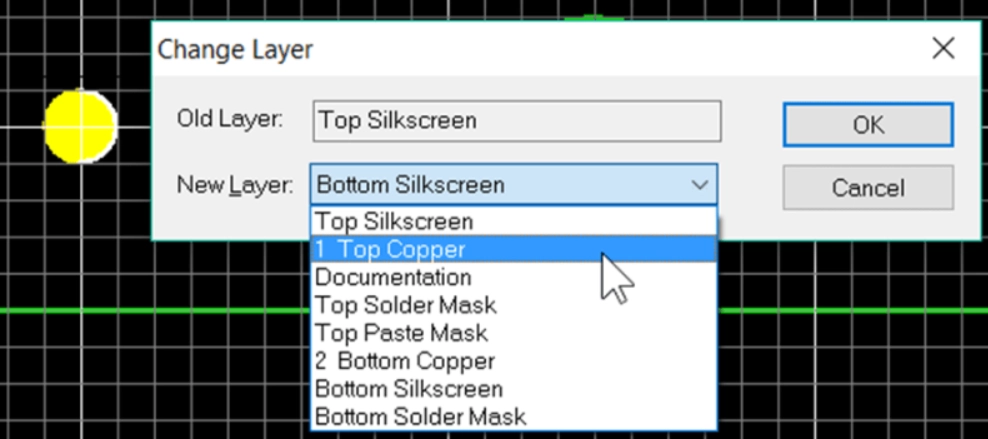
If required then change the layer using the “L” key shortcut or select the object, right-click and select “Layers”. Change the layer to Top Copper.

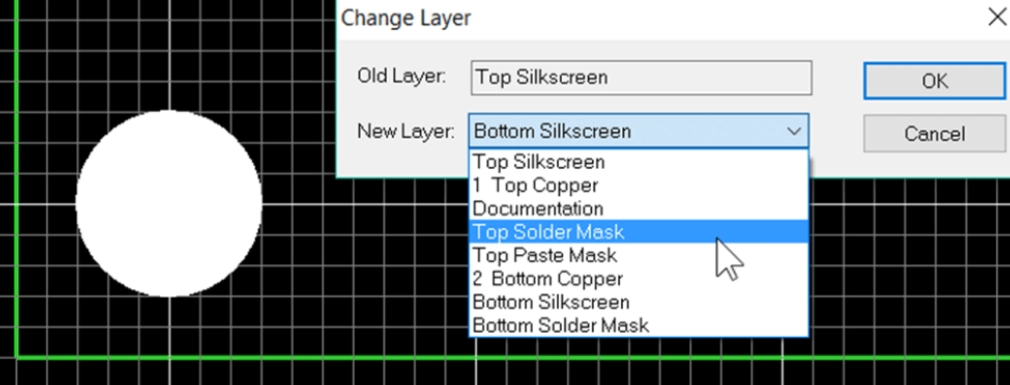
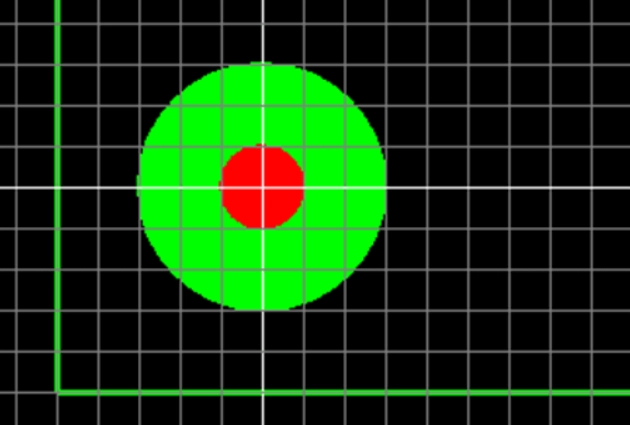
Repeat for solder mask exclusion area by adding another closed circle shape over the copper shape and change the layer to Top Solder Mask. The solder mask is a negative image, the shape will correspond to the excluded area of solder resist.

The fiducial is now created, use F5 to redraw the view.

At this point it is good practice to select the fiducial, right click and select ‘Group’, this will prevent the copper circle and solder mask from becoming misaligned.

Further fiducials can be simply placed by selecting the fiducial and copying by CTRL+C and pasting by CTRL+V.

Although the fiducial cannot be saved as a library component a quick and easy solution for future use is to save the fiducial as a PCB design with the fiducial. When working on a new design also open this PCB design and you can copy and paste the fiducial to your current design as shown below.

PCB Fiducial Design Guidelines: Essential Rules for Machine Vision Accuracy

Fiducial markers require careful design to ensure reliable detection by assembly equipment. Follow these critical guidelines to optimize fiducial performance in your PCB layout.

1. Keep-Out Area Requirements

  • Minimum Clearance Radius:ย At leastย 2ร— the fiducial diameterย (perย SMEMA 3.1)
    • Example:ย Aย 1mm fiducialย needs aย 2mm clearance radiusย from copper traces/pours.
  • Concentric Alignment:ย Fiducial and keep-out zones must share the same center point.
  • Edge Clearance:ย Maintainย >4.75mm (187 mils)ย from board edges to avoid pick-and-place clamp interference.

Why?

  • Nearby copper or traces canย reduce contrast, confusing machine vision.
  • Clamps covering fiducials lead toย assembly misalignment.

2. Fiducial Size & Consistency

Diameter Range:ย 1.00mm (40 mils) to 3.00mm (118 mils)ย (SMEMA standard).

  • Size Matching:ย Fiducials must match withinย ยฑ25ยตm (1 mil)ย across the PCB.
    • Best Practice:ย Reuse the same fiducial padstack from your library to ensure uniformity.

3. Surface Finish & Protection

  • Avoid Bare Copper:ย Oxidized/tarnished copper reduces optical contrast.
  • Recommended Finishes:
    • ENIG (Electroless Nickel Immersion Gold)ย โ€“ Best for long-term reliability.
    • HASL (Hot Air Solder Leveling)ย โ€“ 5โ€“10ยตm thickness (maxย 25ยตm).
  • Solder Mask:
    • Must be openedย over the fiducial (no coverage).
    • Glossy solder mask can causeย reflections, interfering with machine vision.

4. Placement & Design Considerations

  • Location:ย Typically placed inย corners (global fiducials)ย or nearย high-precision components (local fiducials).
  • Internal Layers:ย Suppress fiducial pads on non-essential layers (e.g., no inner-layer pads needed).
  • Copper Pours:ย Allowed beneath fiducials (no electrical impact).

5. Best Practices for Manufacturing (DFM)

โœ… Verify fiducial consistency in final design reviews.
โœ… Use plated finishes (ENIG/HASL) to prevent oxidation.
โœ… Avoid solder mask coverageโ€”ensure proper mask opening.
โœ… Check edge clearance to prevent clamp obstruction.

By following these rules, you ensure high assembly accuracy, fewer defects, and smoother automated production.

A Comparative Ranking of Via in Pad PCB Technologies: Performance, Reliability, and Manufacturing Considerations

Blind Via & Buried Via

As consumer electronics demand increasingly compact, lightweight designs, PCBs must adapt to support high-density interconnects (HDI) and complex layouts. This miniaturization trend drives semiconductor manufacturers to develop finer-pitch packages like QFNs, BGAs, and flip-chip arrays. To maintain routability and signal integrity in these constrained designs, PCB engineers now strategically combine VIPPO (Via-in-Pad Plated Over) technology with traditional approaches – including dog-bone fanouts, microvias, skip vias, and routed solder pads. This hybrid methodology enables robust PCB layouts that meet modern performance requirements while accommodating shrinking form factors

Understanding Via Types: The Foundation of PCB Interconnects

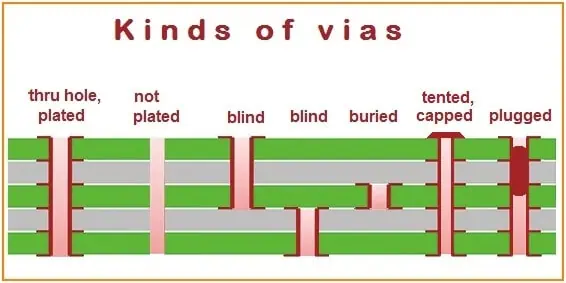
Before we dive into the specifics of Via in Pad technology, it’s essential to understand the various types of vias used in PCB design. Vias are crucial components in multilayer PCBs, providing electrical connections between different layers of the board.

Through-hole Via

The most common and traditional type of via is the through-hole via. These vias extend through all layers of the PCB, connecting components on the top layer to traces on inner layers or the bottom layer. While simple and reliable, through-hole vias consume significant board space and limit the potential for high-density designs.

Blind Via

Blind vias connect the outer layer of a PCB to one or more inner layers but do not extend through the entire board. These vias are visible on one side of the PCB but not the other, hence the term “blind.” Blind vias allow for higher component density and improved signal integrity compared to through-hole vias.

Buried Via

Buried vias are internal connections between inner layers of a multilayer PCB. They are not visible from either the top or bottom of the board. Buried vias offer excellent signal integrity and allow for even higher component density than blind vias, but they increase manufacturing complexity and cost.

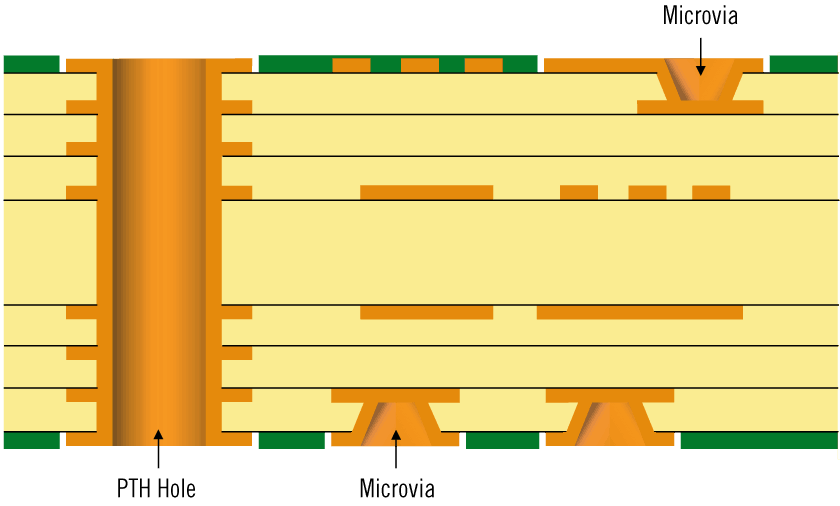
Microvia

Microvias are small-diameter vias, typically less than 150 micrometers, used in high-density interconnect (HDI) PCBs. They can be either blind or buried and are essential for ultra-compact electronic devices like smartphones and wearables.

What is a Via in Pad?

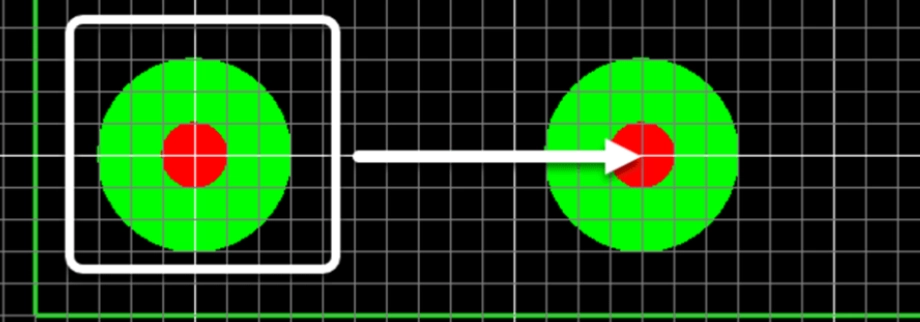
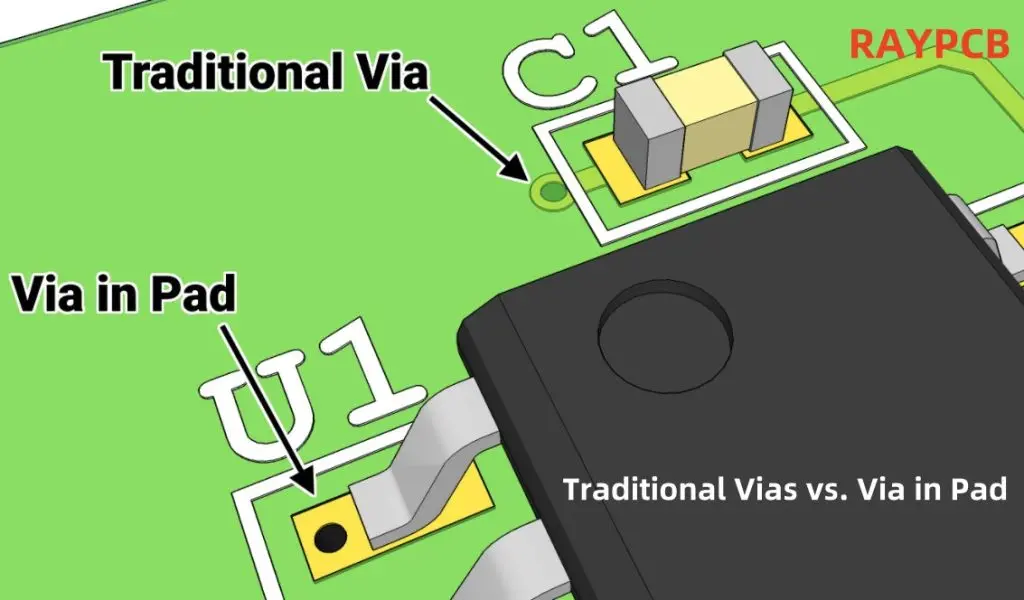
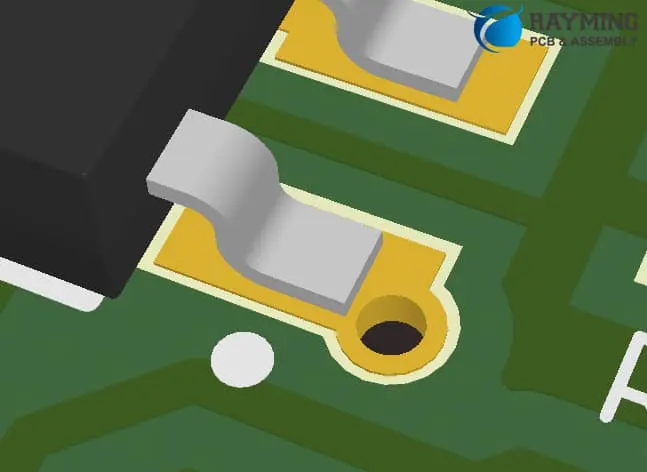
Via in Pad (VIP) technology, also known as Via in Pad Plated Over (VIPPO), is an advanced PCB manufacturing technique where vias are placed directly within the surface mount pads of components. This approach differs from traditional designs where vias are typically placed adjacent to the pads.

In VIP designs, the vias are filled with a conductive or non-conductive material and then plated over, creating a flat surface for component placement. This technique allows for direct connections between the component leads and inner PCB layers without requiring additional routing space around the pad.

Benefits of PCB Via in Pad Technology

The adoption of Via in Pad technology offers several significant advantages:

  1. Increased Routing Density: By placing vias directly in the pads, designers can dramatically increase the available routing space on the PCB. This is particularly beneficial for complex, high-density designs.
  2. Improved Signal Integrity: Shorter trace lengths between components and inner layers reduce signal degradation, leading to better overall performance, especially in high-speed designs.
  3. Enhanced Thermal Management: VIP can improve heat dissipation by providing a more direct path for thermal energy to travel from components to inner layers or heat sinks.
  4. Reduced PCB Size: The space-saving nature of VIP allows for smaller overall PCB dimensions, crucial for compact electronic devices.
  5. Better EMI Performance: Shorter trace lengths and reduced loop areas contribute to improved electromagnetic interference (EMI) performance.
  6. Increased Reliability: Properly implemented VIP can enhance the mechanical strength of solder joints, potentially improving the overall reliability of the PCB.

Powered By EmbedPress

When to Use Via-in-Pad in Design?

While Via in Pad technology offers numerous benefits, it’s not always the best choice for every PCB design. Here are some scenarios where VIP is particularly advantageous:

  1. High-Density Designs: For PCBs with a high component density or complex routing requirements, VIP can provide the necessary space savings and routing flexibility.
  2. High-Speed Applications: In designs where signal integrity is critical, such as high-frequency circuits or high-speed digital interfaces, VIP can help maintain signal quality.
  3. Ball Grid Array (BGA) Components: VIP is especially useful for routing connections from BGA packages, where space under the component is at a premium.
  4. Size-Constrained Designs: When miniaturization is a primary goal, such as in wearable devices or compact consumer electronics, VIP can help achieve the desired form factor.
  5. Thermal Management Challenges: In designs where heat dissipation is a concern, VIP can provide improved thermal paths for critical components.

Read more about:

Design Considerations for Via-in-Pad

Implementing Via in Pad technology requires careful consideration of several factors to ensure successful manufacturing and reliable performance.

Size and Spacing

The size of the via and its placement within the pad are critical considerations. Designers must balance the via size with the pad size to ensure sufficient copper remains for soldering. Additionally, the spacing between vias and pad edges must be carefully controlled to prevent solder wicking and ensure reliable connections.

Material Compatibility

The choice of via fill material is crucial in VIP designs. Conductive and non-conductive materials each have their advantages and challenges. Designers must consider factors such as thermal expansion, adhesion to copper, and compatibility with the soldering process when selecting fill materials.

Drilling Precision

VIP requires extremely precise drilling to ensure vias are correctly positioned within pads. High-quality drilling equipment and processes are essential to maintain the necessary accuracy and consistency across the PCB.

Soldering and Plating

The plating process for VIP is more complex than traditional vias. The via must be filled, planarized, and then plated over to create a flat surface for component placement. This process requires careful control to ensure a smooth, void-free surface that’s suitable for reliable soldering.

Cost Considerations

While VIP technology offers significant benefits, it also comes with increased manufacturing costs. The additional processing steps, specialized materials, and tighter tolerances all contribute to higher production expenses. Designers must weigh these costs against the benefits to determine if VIP is the most cost-effective solution for their specific application.

Traditional Vias vs. Via in Pad: A Comparative Analysis

To fully appreciate the advantages and trade-offs of Via in Pad technology, it’s helpful to compare it directly with traditional via techniques.

Non-conductive Epoxy Via Fill

Traditional vias are often left unfilled or filled with a non-conductive epoxy for structural support. This approach is simpler and less expensive than VIP but has several limitations:

  • Requires additional space for via placement adjacent to pads
  • Can lead to longer trace lengths and potential signal integrity issues
  • May result in larger overall PCB dimensions

In contrast, VIP addresses these issues but requires more complex manufacturing processes.

Via-in-Pad Generation

The process of creating VIP differs significantly from traditional via generation:

  1. Traditional Vias:
    • Drilled during the initial PCB fabrication process
    • May be plated or unplated
    • Often left unfilled or filled with non-conductive material
  2. Via in Pad:
    • Requires precise drilling within component pads
    • Must be filled with conductive or non-conductive material
    • Requires planarization to ensure a flat surface
    • Plated over to create a solderable surface

The VIP process is more complex and time-consuming but results in a more compact and potentially higher-performing PCB.

Guidelines for Via-in-Pad Routing

Routing guidelines for VIP differ from those for traditional vias:

  1. Traditional Vias:
    • Typically placed adjacent to pads
    • Require fanout traces to connect to inner layers
    • May use teardrops for improved mechanical strength
  2. Via in Pad:
    • Placed directly within component pads
    • Allow for direct connections to inner layers without fanout
    • Require careful consideration of via size and placement within the pad

VIP routing can significantly simplify PCB layout, especially for complex, high-density designs.

Challenges of PCB Via in Pad Technology

While Via in Pad technology offers numerous benefits, it also presents several challenges that designers and manufacturers must address:

  1. Manufacturing Complexity: VIP requires more sophisticated manufacturing processes, including precise drilling, via filling, planarization, and plating. This complexity can lead to longer production times and higher costs.
  2. Potential for Voids: If not properly filled and plated, VIP can develop voids or air pockets that may compromise reliability. These voids can lead to issues such as solder joint failures or moisture ingress.
  3. Thermal Management: While VIP can improve thermal performance in some cases, the filled vias may not conduct heat as effectively as solid copper. Designers must carefully consider thermal requirements when implementing VIP.
  4. Rework Challenges: Reworking components on VIP can be more difficult than with traditional designs. The filled and plated vias may complicate component removal and replacement processes.
  5. Increased Inspection Requirements: The complex nature of VIP necessitates more rigorous inspection processes to ensure quality and reliability, potentially increasing production time and costs.
  6. Material Selection: Choosing the right via fill and plating materials is crucial for VIP success. Incompatible materials can lead to reliability issues or manufacturing defects.
  7. Design Tool Limitations: Some PCB design software may not fully support VIP technology, requiring workarounds or manual adjustments in the design process.

Manufacturing Process for Via-In-Pad

The manufacturing process for Via-In-Pad PCBs involves several specialized steps:

  1. Drilling: Precision drilling of via holes within component pads.
  2. Plating: Initial plating of the via holes to create an electrically conductive surface.
  3. Filling: Filling the vias with conductive or non-conductive material, depending on the design requirements.
  4. Planarization: Smoothing the filled vias to create a flat surface flush with the pad.
  5. Over-plating: Applying an additional layer of copper over the filled and planarized vias.
  6. Surface Finishing: Applying the final surface finish (e.g., ENIG, HASL) to prepare the pads for soldering.

Each of these steps requires careful control and specialized equipment to ensure high-quality results. The complexity of this process contributes to the higher cost of VIP PCBs compared to traditional designs.

Applications of PCB Via in Pad

What is Via in Pad..?

Via in Pad technology finds applications in various industries and product types, particularly where high performance and compact design are critical:

  1. Mobile Devices: Smartphones, tablets, and wearables benefit from the space-saving and signal integrity improvements of VIP.
  2. Aerospace and Defense: High-reliability electronics for aerospace applications often utilize VIP for its performance and durability benefits.
  3. Medical Devices: Compact medical devices, such as hearing aids or implantable devices, can leverage VIP to achieve miniaturization without compromising functionality.
  4. High-Performance Computing: Servers and high-end computing systems use VIP to manage high-speed signals and dense component placement.
  5. Automotive Electronics: Advanced driver assistance systems (ADAS) and infotainment systems in modern vehicles often incorporate VIP technology.
  6. Telecommunications: 5G infrastructure equipment and high-speed networking devices benefit from the signal integrity improvements offered by VIP.
  7. Consumer Electronics: High-end audio/video equipment and gaming consoles use VIP to manage complex routing in compact form factors.

Conclusion: The Future of Via in Pad Technology

As electronic devices continue to demand higher performance in smaller form factors, Via in Pad technology is likely to become increasingly prevalent in PCB design and manufacturing. While it presents certain challenges in terms of manufacturing complexity and cost, the benefits of increased routing density, improved signal integrity, and enhanced thermal management make it an attractive option for many applications.

The future of VIP technology will likely see advancements in materials and manufacturing processes to address current limitations. Innovations in via fill materials, plating techniques, and inspection methods will contribute to improved reliability and potentially lower production costs.

For PCB designers and manufacturers, staying abreast of developments in Via in Pad technology and building expertise in its implementation will be crucial for remaining competitive in the rapidly evolving electronics industry. As with any advanced technology, successful adoption of VIP requires a thorough understanding of its benefits, limitations, and best practices to ensure optimal performance and reliability in the final product.

By carefully considering the trade-offs and applying VIP technology where it offers the most significant advantages, designers can create more compact, higher-performing electronic devices that meet the demanding requirements of modern applications.

What is Digital Signals ?

Digital Signals and Gates

Introduction

Digital signals are a fundamental concept in electronics and communications. In contrast to analog signals which can vary continuously, digital signals have discrete stepped levels representing binary logic states. Understanding the nature of digital signals is key to working with digital circuits and systems. This article provides a comprehensive overview of digital signals, covering digital signal fundamentals, bit representations, timing parameters, transmission methods, noise effects, and applications.

Digital Signal Basics

A digital signal represents information using discrete voltage or current levels. The two main properties of digital signals are:

  • Discrete levels – A finite number of defined states (not continuous)
  • Binary representation – Each level encodes one or more binary bits

This contrasts with analog signals which have continuous variation over a range. Digital signals provide advantages such as noise immunity, precision, and compatibility with digital processing.

Binary Levels

The most common type of digital signaling uses two discrete levels to represent binary 1s and 0s. Some examples are:

  • Logic voltage levels – 0V and 5V for TTL logic
  • CMOS levels – 0V and VDD like 3.3V or 5V
  • ECL levels – -1.75V and -0.9V

Using only two distinct levels minimizes errors and enables simple digital logic functions. Multi-level signaling is possible but is less common.

Waveform Shapes

Digital waveforms can take on different shapes depending on the transmission method:

  • Square waves – Fast switching between levels
  • Rectangular pulses – Defined high and low duration
  • Triangular pulses – Linear slope transitions

The important aspect is distinguishable levels, not necessarily the slope between transitions. Noise margin defines the minimum separation.

Binary Encoding

Groupings of binary 1s and 0s can encode alphanumeric characters, control signals, multimedia data, and any other information in digital form. Common encodings include:

  • ASCII – 7-bit alphanumeric characters
  • Unicode – Expanded multilingual encoding
  • Ethernet – Network packet framing
  • JPEG – Image compression encoding
  • MPEG – Video and audio compression
  • Manchester – Synchronized clock encoding

Digital Signal Characteristics

digital circuit

Key characteristics help define a digital signal:

Amplitude – Voltage or current level for each state

Timing – Duration of each high/low state

Transition speed – Rise/fall time between states

Waveform – Shape and allowable overshoot/undershoot

Noise margin – Minimum separation between levels

Bit rate – Bits transmitted per second

Encoding – Definition of each pattern of bits

These interdependent parameters determine the quality and integrity of digital signal transmission and reception.

Digital Bit Representation

A bit is the fundamental unit of a digital system, representing a binary 0 or 1. Bits are combined into groupings called bytes or words for convenience:

Bits

  • A single 0 or 1 value
  • Smallest unit of data
  • Transmitted as a discrete signal level

Bytes

  • Group of 8 bits
  • Represents a character or data unit
  • Used for memory addressing and data organization

Words

  • Larger groups like 16 or 32 bits
  • Match data types like integers
  • Improve transmission efficiency

In serial transmission, bits are sent one after the other. In parallel transmission, multiple bits simultaneously travel on separate lines.

Digital Signal Timing Parameters

Key timing parameters define digital signal behavior:

Bit Time (T) – Duration of a single bit

Bit Rate (R) – Number of bits per second (1/T)

Rise/Fall Time (Tr/Tf) – Transition duration between levels

Pulse Width – Width of high or low level durations

Duty Cycle – Ratio of pulse width to period

Propagation Delay – Delay through a logic gate

Clock Period – Time between clock edges

These interdependent timings must meet specifications for proper generation, transmission, and reception of digital signals. Violating the timing margins will result in errors.

Digital Signal Transmission

Digital signals can be conveyed from source to destination by various methods:

Wired Connections

Twisted pair cabling, coaxial cable, stripline traces, and other guided media provide point-to-point connections for digital signals. Common standards define signal characteristics.

Optical Fiber

Pulses of light convey binary 1s and 0s through total internal reflection in glass fibers. Provides noise immunity and isolation.

Wireless

Digital modulation allows encoding data on radio waves for transmission over the air through space. Used in WiFi, cellular, Bluetooth and other wireless technologies.

Buses

Shared parallel wired buses convey multiple digital signals between components like a processor, memory, and peripherals in a system.

Digital Signal Integrity

Maintaining signal integrity from source to destination is critical for error-free transmission. Key factors impacting integrity include:

Noise Immunity

Noise margin defines the minimum separation between signal levels to prevent errors. Wider margins provide better noise immunity.

Distortion

Degradation of rise/fall times and amplitude from dispersion and nonlinearities must be minimized through shaping and equalization.

Interference

Cross-talk coupling from nearby signals can cause interference exceeding the noise margin and corrupting data.

Jitter

Timing variations of signal transitions from noise, interference or drift can cause synchronization issues.

Loss

Amplitude attenuation from skin effect, reflections, or media losses should be compensated with gain.

Careful engineering of margins, filtering, shielding, termination, and repeaters ensures robust digital signal transmission.

Applications of Digital Signals

signal integrity PCB

Digital signaling is utilized across practically all modern electrical engineering disciplines:

  • Computing – CPUs, memory, peripherals, interconnects
  • Communications – Digital radio, telephony, streaming media
  • Control Systems – Logic control, relays, sensors, actuators
  • Instrumentation – Digital oscilloscopes, logic analyzers, spectrum analyzers
  • Consumer Electronics – Phones, media, IoT, gaming, VR
  • Transportation – Automotive, aviation, rail, navigation systems
  • Power Systems – Smart grid, converters, protection relays

The proliferation of digital electronics drives the need for disciplined digital signal design, analysis, and debugging across nearly every industry.

Conclusion

In summary, digital signals represent information using discrete logic levels in contrast to continuous analog signals. Key parameters like amplitude, timing, rise/fall times, noise margin, and encoding define signal characteristics critical for reliable generation and transmission. Careful engineering ensures digital signal integrity across wired, optical, wireless, and bus-based interconnects. Digital signaling enables the complex systems underlying modern computing, communications, instrumentation, consumer products, transportation, and infrastructure. Understanding digital signals is therefore essential for any electrical engineering role interfacing with digital electronics or networks.

Frequently Asked Questions

How are digital signals different from analog signals?

Digital signals have discrete stepped logic levels vs continuous variation over a range for analog signals. Digital can precisely represent binary data while analog has noise susceptibility.

What are the two main levels used in standard binary digital signaling?

Most common binary digital signals use two levels like 0V and 5V, 0V and 3.3V, or -1.75V and -0.9V to distinctly represent logic 0 and logic 1 values.

What digital signal timing parameters are important for proper transmission?

Critical timings are bit time, bit rate, pulse width, rise/fall time, duty cycle, clock period, and propagation delay. Maintaining margins between these interdependent timings prevents errors.

What are three common methods for transmitting digital signals?

Digital signals can be conveyed over guided media like wire or fiber optic cabling, or wirelessly through modulation on carrier waves, or over shared parallel buses between internal computer components.

What factors can degrade digital signal integrity?

Key concerns are noise, distortion, interference, jitter, and amplitude loss. Careful engineering of margins, filtering, shielding, termination, and repeaters is needed to ensure robust transmission.

Blind Vias vs. Buried Vias: A Comparative Analysis for PCB design and Manufacturing

blind via pcb and buried via pcb

Vias serve as vital electrical interconnections between layers in a PCB stack-up. They create conductive pathways that allow components and traces to transmit signals across different board layers. Blind and buried vias enhance connectivity while minimizing the space required, making them particularly valuable in modern circuit design.

Various via types can be implemented in PCB manufacturing, each offering specific advantages for different design requirements. These specialized interconnections enable more complex and compact electronic designs by efficiently routing signals through the board’s structure.

Understanding Vias in PCB Design

PCB Vias
PCB Vias

Before we dive into the specifics of blind and buried vias, it’s essential to understand what vias are and their role in PCB design.

What are Vias?

Vias are small holes drilled through a PCB that are plated with conductive material. They serve as electrical pathways between different layers of a multi-layer PCB, allowing signals to travel vertically through the board. Vias are crucial for creating complex circuit designs in a compact space.

Types of Vias

There are three main types of vias used in PCB design:

  1. Through-hole vias
  2. Blind vias
  3. Buried vias

Each type has its unique characteristics and applications, which we’ll explore in detail throughout this article.

Read more about:

Blind Vias: Connecting the Surface to Inner Layers

Blind vias are one of the advanced via types used in modern PCB design. Let’s examine their characteristics, advantages, and applications.

What are Blind Vias?

Blind vias are holes that connect an outer layer (top or bottom) of a PCB to one or more inner layers, but not to the opposite outer layer. They are called “blind” because they are visible from only one side of the board.

Characteristics of Blind Vias

  • Depth: Typically extend through 1-3 layers
  • Visibility: Visible from one side of the PCB
  • Diameter: Generally smaller than through-hole vias
  • Fabrication: Require specialized drilling and plating processes

Advantages of Blind Vias

  1. Space-saving: By not extending through the entire board, blind vias free up valuable real estate on inner and opposite outer layers.
  2. Improved signal integrity: Shorter signal paths reduce signal degradation and electromagnetic interference.
  3. Increased routing density: Allow for more traces on inner layers, enhancing design flexibility.
  4. Better RF performance: Shorter vias have less inductance, improving high-frequency signal transmission.

Applications of Blind Vias

Blind vias are particularly useful in:

Buried Vias: Hidden Connections Between Inner Layers

Buried vias offer another approach to increasing PCB density and complexity. Let’s explore their unique features and uses.

What are Buried Vias?

Buried vias are holes that connect two or more inner layers of a PCB but do not extend to either outer layer. As the name suggests, they are completely “buried” within the board.

Characteristics of Buried Vias

  • Location: Entirely within inner layers of the PCB
  • Visibility: Not visible from the outside of the board
  • Fabrication: Require sequential lamination processes
  • Layer span: Can connect multiple inner layers

Advantages of Buried Vias

  1. Maximized surface area: Both outer layers remain free for component placement or routing.
  2. Enhanced signal integrity: Shorter signal paths and reduced crosstalk between layers.
  3. Improved reliability: Less exposed to environmental factors and mechanical stress.
  4. Design flexibility: Allow for complex interconnections between inner layers.

Applications of Buried Vias

Buried vias are commonly used in:

  • High-layer count PCBs
  • Aerospace and defense electronics
  • Medical devices
  • Advanced computing systems

Comparing Blind and Buried Vias

Now that we’ve examined both blind and buried vias individually, let’s compare them directly to understand their relative strengths and weaknesses.

Design Flexibility

Both blind and buried vias offer increased design flexibility compared to traditional through-hole vias. However, they differ in how they provide this flexibility:

  • Blind viasย excel in connecting surface-mount components to inner layers, making them ideal for designs with numerous surface components.
  • Buried viasย shine in creating complex interconnections between inner layers, benefiting designs with intricate internal routing requirements.

Space Utilization

When it comes to maximizing PCB real estate:

  • Blind viasย free up space on inner layers and the opposite outer layer.
  • Buried viasย leave both outer layers completely available for component placement or routing.

Fabrication Complexity

The manufacturing processes for both types of vias are more complex than those for through-hole vias:

  • Blind viasย require precise depth control during drilling and special plating techniques.
  • Buried viasย necessitate sequential lamination processes, which can increase manufacturing time and cost.

Signal Integrity

Both via types can improve signal integrity compared to through-hole vias:

  • Blind viasย offer shorter paths for signals traveling from outer to inner layers.
  • Buried viasย provide optimal paths for signals traveling between inner layers.

Cost Considerations

Generally, both blind and buried vias increase PCB manufacturing costs:

  • Blind viasย typically have lower fabrication costs compared to buried vias but may still be significantly more expensive than through-hole vias.
  • Buried viasย often incur higher costs due to the complex sequential lamination process required.

Implementing Blind and Buried Vias in PCB Design

blind holes pcb
buried hole pcb

Successfully incorporating blind and buried vias into your PCB design requires careful planning and consideration. Here are some key factors to keep in mind:

Design Rules and Constraints

When working with blind and buried vias, it’s crucial to adhere to specific design rules:

  • Aspect ratio: The ratio of via depth to diameter should typically not exceed 8:1 for reliable plating.
  • Layer pairing: Plan which layers will be connected by blind or buried vias early in the design process.
  • Via stacking: Consider stacking vias to connect multiple layers while minimizing the number of drill operations.

CAD Tool Considerations

Modern PCB design software typically supports blind and buried vias, but designers should:

  • Ensure their CAD tool can accurately represent and validate designs with these via types.
  • Use layer stack managers to define and manage complex layer structures.
  • Utilize design rule checks (DRC) specific to blind and buried vias.

Manufacturability Considerations

To ensure your design can be reliably manufactured:

  • Consult with your PCB fabricator early in the design process to understand their capabilities and limitations.
  • Consider the impact on yield and cost when deciding between blind and buried vias.
  • Be aware of minimum via sizes and maximum depths that can be reliably produced.

The Future of Blind and Buried Vias

As electronic devices continue to shrink while increasing in complexity, the use of blind and buried vias is likely to become more prevalent. Several trends and developments are shaping the future of these advanced via types:

Miniaturization

The ongoing drive towards smaller, more powerful devices will push the limits of via technology:

  • Expect to see even smaller diameter blind and buried vias.
  • Higher aspect ratios may become possible with advances in drilling and plating technologies.

Enhanced Materials

New PCB substrate and plating materials may improve the performance and reliability of blind and buried vias:

  • High-frequency laminates optimized for blind and buried vias in RF applications.
  • Advanced plating materials to improve conductivity and reliability in high-aspect-ratio vias.

Automation and AI in PCB Design

Artificial intelligence and machine learning are poised to revolutionize PCB design:

  • Automated via placement and optimization for blind and buried vias.
  • AI-driven design rule checking and signal integrity analysis.

3D Printed Electronics

As 3D printing technology advances, it may offer new possibilities for creating blind and buried vias:

  • Additive manufacturing of PCBs with integrated blind and buried vias.
  • Potential for more complex three-dimensional interconnect structures.

Conclusion: Choosing Between Blind and Buried Vias

The choice between blind vias, buried vias, or a combination of both depends on various factors specific to your PCB design requirements. Here are some key takeaways to guide your decision:

  • Use blind viasย when you need to connect surface components to inner layers while maximizing inner layer space.
  • Opt for buried viasย when you require complex inner layer connections and want to keep both outer layers free for components or routing.
  • Consider a combinationย of both types for maximum design flexibility in high-density, complex PCBs.
  • Always balanceย the benefits of these advanced via types against the increased manufacturing complexity and cost.

In conclusion, both blind vias and buried vias offer powerful solutions for increasing PCB density and performance. By understanding their characteristics, advantages, and applications, PCB designers can make informed decisions to create more efficient, compact, and high-performing electronic devices. As technology continues to advance, mastering the use of blind and buried vias will become increasingly important for staying at the forefront of electronic design.

What is a Series Circuit?

pcb design tips

Introduction

A series circuit is a type of electrical circuit in which the components are connected end-to-end in a single loop. The same current flows through each element in a series circuit, but the voltage drops across each component can be different. Understanding series circuits is fundamental for analyzing DC and AC networks. This article provides an in-depth overview of series circuit fundamentals, analysis methods, characteristics, applications, and related concepts.

Series Circuit Basics

A basic series circuit consists of a voltage source, like a battery, connected to two or more electrical elements like resistors, inductors, capacitors, etc. The elements are chained together with wires in a single path for current flow.

Simple series circuit with battery and three resistors

Some key properties of ideal series circuits:

  • Single loop – Only one path for current to flow around the circuit.
  • Same current – The current is the same at every point due to single path configuration.
  • Voltage divider – Total voltage equals the sum of the individual voltage drops.
  • Series resistance – Total resistance is the sum of individual resistances.
  • Power distribution – Total power from source is distributed across each element.

These concepts allow systematic analysis of series circuits using basic circuit theory principles.

Series Circuit Analysis

Several important methods are used to analyze series circuits:

Kirchhoff’s Voltage Law (KVL)

This fundamental law states that the algebraic sum of all voltages in a loop must equal zero. This is applied to find unknown voltage drops:

Copy code

Vs = V1 + V2 + V3 + ... + Vn

Where Vs is the total source voltage and V1 to Vn are the individual voltage drops across each element.

For example, in a circuit with a 45V battery and three resistors with voltages V1, V2, and V3, KVL gives:

Copy code

45V = V1 + V2 + V3

If two of the voltages are known, the third can be found by subtracting the known values from the total.

Voltage Divider Rule

The voltage divider rule is a short-cut method to determine the voltage across an individual element using its resistance relative to the total series resistance:

Copy code

Vx = (Vx/RT) * Vs

Where Vx is the voltage across element X, RT is the total series resistance, and Vs is the source voltage.

For example, if R2 is 220ฮฉ, and the total series resistance is 1500ฮฉ, with a 120V source, the voltage across R2 is:

Copy code

V2 = (220/1500) * 120V = 18V

This avoids having to find every intermediate voltage drop.

Current Calculation

For an ideal series circuit, the current is the same through every element, and can be found from Ohm’s Law:

Copy code

I = Vs / Rt

Where I is the constant current in Amps, Vs is the source voltage, and Rt is the total resistance from adding all individual resistances.

Power Ratings

The power dissipated in each element is calculated as:

Copy code

P = I2 * R

Where P is power in Watts, I is the series current, and R is the element’s resistance.

The total power dissipated is the sum of the individual powers.

Characteristics of Series Circuits

Beyond the basic principles, series circuits exhibit some key characteristics:

Current is Constant Everywhere

Due to the single path configuration, current cannot vary within a series circuit. Each passive component must have the same current flowing through it. This makes analysis using a single loop current straightforward.

Voltage Divider Effect

The total source voltage is divided up across each element proportional to its resistance, according to the voltage divider rule. Elements with lower resistance have larger voltage drops than high resistance components.

Resistance Adds in Series

For the overall circuit, series resistances simply add together. This holds true even for nonlinear devices like diodes or lamps, when their incremental resistances are added.

Impedances Add in General Series Connections

When reactive elements like inductors or capacitors are connected in series, their impedances add together rather than just resistances. For example, three impedances Z1, Z2 and Z3 in series have a total impedance of:

Copy code

Ztotal = Z1 + Z2 + Z3

Current Leads Voltage in Inductive Series Circuits

In a series L-R circuit, the current leads the voltage across the inductor due to its reactance. The opposite happens with a series C-R circuit, where current lags voltage.
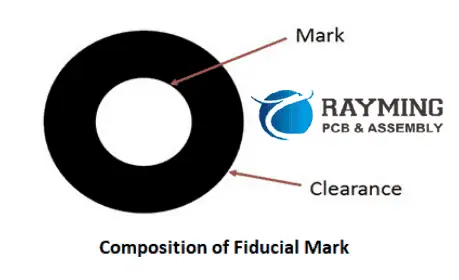
Parallel Resistances Concept

Any branch resistance in parallel can be reduced to an equivalent series resistance using:

Copy code

Rseries = (R1*R2)/(R1+R2)

This allows simplification of branches to a single equivalent resistor.

Simple Series Circuit Examples

Example 1

Simple series circuit with two resistors

  • Vs = 10V
  • R1 = 5ฮฉ
  • R2 = 15ฮฉ

We can directly analyze this circuit as:

  • Total resistance:
    • Rt = R1 + R2 = 5ฮฉ + 15ฮฉ = 20ฮฉ
  • Circuit current:
    • I = Vs/Rt = 10V/20ฮฉ = 0.5A
  • Voltage drops:
    • V1 = I*R1 = (0.5A)(5ฮฉ) = 2.5V
    • V2 = I*R2 = (0.5A)(15ฮฉ) = 7.5V
  • Total voltages:
    • V1 + V2 = 2.5V + 7.5V = 10V = Vs

Using KVL and Ohm’s law gives the same results, verifying the analysis.

Example 2

  • Vs = 120V
  • R1 = 10ฮฉ
  • R2 = 30ฮฉ
  • R3 = 15ฮฉ
  • R4 = 20ฮฉ
  • Total resistance:
    • Rt = R1 + R2 + R3 + R4 = 10ฮฉ + 30ฮฉ + 15ฮฉ + 20ฮฉ = 75ฮฉ
  • Circuit current:
    • I = Vs/Rt = 120V/75ฮฉ = 1.6A
  • Individual voltage drops:
    • V1 = I*R1 = (1.6A)(10ฮฉ) = 16V
    • V2 = I*R2 = (1.6A)(30ฮฉ) = 48V
    • V3 = I*R3 = (1.6A)(15ฮฉ) = 24V
    • V4 = I*R4 = (1.6A)(20ฮฉ) = 32V
  • Total voltages:
    • V1 + V2 + V3 + V4 = 16V + 48V + 24V + 32V = 120V = Vs

Again, methodical analysis using series concepts matches the expected results.

Advanced Series Circuit Analysis

More complex scenarios involve combined resistance and reactance, or nonlinear elements like diodes:

Series RLC Circuit

  • Analysis involves vector addition of complex impedances
  • Impedances must consider both resistive and reactive parts
  • Allows determining overall circuit resonance and current

Series Diode Circuit

  • Must consider diode IV curve and nonlinear resistance
  • Resistance changes with current flow due to diode conduction voltage
  • Allows analyzing diode biasing and turn-on based on series resistance

These advanced tools enable thoroughly analyzing complex series circuits with diverse elements.

Common Applications of Series Circuits

Some typical applications that leverage series circuits:

Voltage Dividers

One of the most common uses of series connections is for creating voltage dividers. For example, measuring a high voltage using two resistors in series, where the lower resistor converts the high voltage into a lower measurable value.
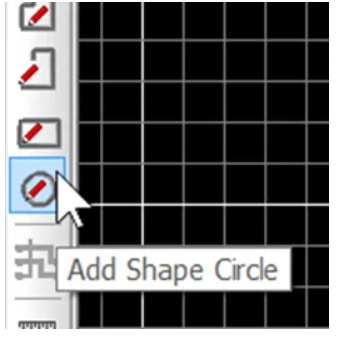
Current Limiting

A resistor or inductor in series can purposely limit the current in part of a circuit. This protects components from excessive currents.
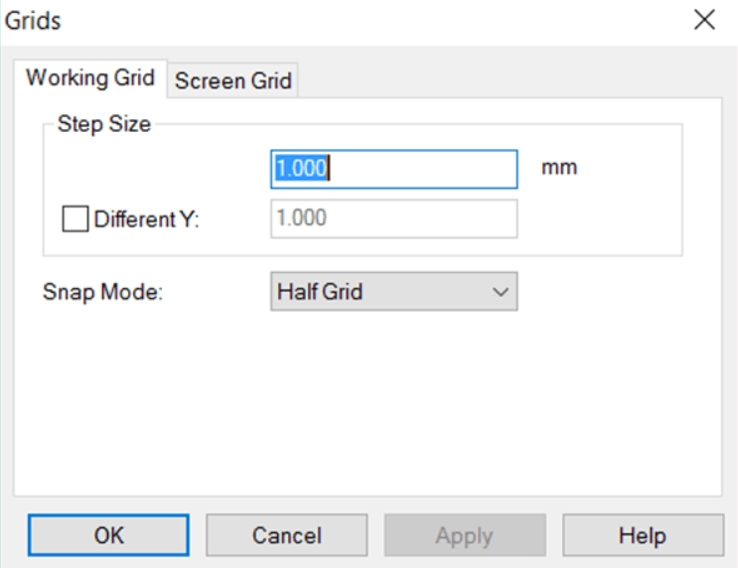
Impedance Matching

Inserting series inductors or capacitors allows matching the impedance looking into a circuit to the desired source/load impedance for maximum power transfer and efficiency.

Voltage Regulation

A series linear regulator uses a voltage sensing resistive divider combined with a series pass transistor to maintain a steady DC output voltage even with variations in supply voltage or load current.

EMI Filtering

Series inductors and capacitors can filter out electromagnetic interference by blocking high frequency noise while allowing lower frequency signals to pass through.

Signal Coupling

A series capacitor can couple AC signals from one stage to another while blocking DC voltages, allowing simple isolation of AC amplified signals.

Related Concepts

Open Circuit

If a break occurs in a series circuit, it becomes an open with no current flow. This is equivalent to a series element with infinite resistance blocking current.

Short Circuit

When two nodes in a series circuit contact each other, a “short circuit” occurs that bypasses part of the series loop. This often leads to excessive currents and is to be avoided in most cases.

Parallel Circuits

In contrast to series, parallel circuits provide multiple paths for current flow. Complex networks combine series and parallel connections, which are analyzed with techniques like nodal analysis or mesh current methods.

Series-Parallel Circuits

Some circuits contain both series and parallel combinations within an overall network. These compound connections can be reduced to simplified series-parallel equivalents for analysis.

Series Resonance

In series RLC circuits, resonance occurs when the total series impedance is minimized at the resonant frequency. This creates a bandpass filter effect around this frequency.

Series DC Motors

DC motors have the field and armature windings connected in series. This results in high starting torque since the initial current is limited only by the total resistance.

Conclusion

In summary, series circuits provide a fundamental topology for analyzing electric networks and understanding key concepts including current, voltage division, resistance addition, and load power distribution. While ideal series connections represent the basics, practical circuits require considering complex impedances, nonlinearities, and combined series-parallel networks. Facility with series circuit techniques forms the foundation for more advanced circuit analysis and design for electronics and power systems.

Frequently Asked Questions

What are the main characteristics of an ideal series circuit?

The key characteristics are: single loop topology, same current throughout, total voltage divides across elements, total resistance is the sum of individual resistances, and total power from source distributes among the components.

Why is current constant at every point in a series circuit?

Due to the single path configuration, charge carriers have no alternative route to flow so the current cannot change within a series circuit. Each element must pass the same current in steady state.

What happens if one resistor opens in a series circuit?

If one resistor opens, creating infinite resistance, current flow would stop. An open resistor is equivalent to disconnecting that part of the loop, so the circuit becomes open and voltage drops across the remaining components go to zero.

How do you calculate total resistance in a series circuit?

The total resistance is simply the arithmetic sum of the individual resistances. This holds true for any passive linear resistive elements. For nonlinear components, incremental resistances must be summed at the operating point.

Why is voltage division important in series circuits?

The voltage divider effect allows finding voltages across individual components from their resistances and the total voltage. This avoids tediously finding voltage drops across each preceding resistor to determine the voltage across a specific element.

Basics of How to Solder Circuit Boards

Soldering Circuit Boards

The electronic circuits are made of PCB, components connected to each other in a meaningful way to function as per the design specifications.

These connections between the components is achieved by wiring or by PCB tracks. For a circuit prototype on Vero Board, the multiple and single strand wires are commonly used and soldered with electronic components in through hole package to form electrical connection. PCBs do use soldering of through and SMT type components by means of pads, vias and holes. However the breadboard do not require soldering because of all ready built in electrical tracks inside.

YouTube video

What is soldering..?

A soldering is the process of creating an electrical joint between components by melting the solder wire through applying heat and pouring that melted solder wire on leads/terminals of component to make a joint.

The Tools Required For Soldering:

The following tools are required for proper prototype PCB assembly

A soldering iron is device that is electrical 220/110V operated and is like pen and its tip/end is made of heating element. The soldering iron works simply. Plug into AC220V/110V outlet and starts to heat up. When you feel the heat and smoke starts then apply solder wire to โ€œTinโ€ the tip.


                                                                                                                                                                                                                                                                         Tinning:

Tinning the solder iron tip is also good, it helps the iron to grasp the solder quickly.

The tinning of copper wire is made so that the copper wire catches the solder and it will not break or bend and have the ability to create good electrical joint.

The solder sucker is used in โ€œDe-Solderingโ€ process. When removing components from PCB or removing any leg/terminal of component from PCB then the solder sucker will remove the solder and relieves the component to pull out of PCB. Be careful while using solder sucker because some low quality PCB hole pads are weak and can breakout due to high vacuum of sucker thus rendering the hole useless.

  • Tweezers:

The tweezer can be used as a tool to remove components from Vero board or PCB.

  • Solder Wire:

There are many types of solder available in market. The solder that is lead free, is a combination of tin 96.3%, copper 0.7% and silver 3% is a good option. Gauge # 21 is 0.032โ€ณ dia. The best melting point temperature for this type is 217OC โ€“ 221OC.

  • Solder Flux:

The flux is very important in soldering process. It reduces the oxidation and used to chemically clean the metal surface joint before and during soldering. The flux used in electronic circuits soldering is basically rosin flux or ammonium chloride. The flux helps enhance the soldering and โ€œwettingโ€ process. Flux prevent the formation solder balls by dissolving the oxide from metal joint surface.

Wetting is the adhesive force between the molten solder and solid copper wire that causes the molten solder drop to spread-out across the surface to form strong electrical joint. Cohesive force on the other hand causes the formation of solder balls and hinders the contact with metal/copper surface.

  • Soldering Station:

The temperature of soldering iron can be controlled by means of a โ€œRegulatorโ€ which has the internal regulatory electronic printed circuit board to control the amount of current flowing through heating element. This is possible only in โ€œSoldering Stationsโ€. There are numerous soldering stations manufactures like Weller QB, and others. The have the โ€œControl Knobโ€, โ€œToggle Switchโ€, โ€œTemperature Display Unitโ€ on the front panel and is operated by AC 220/110 V.

  • Soldering Iron Stand:

The solder stand is the place where you can put your iron at rest when not in use.

  • Soldering Gun:

The soldering gun is actually gun shape tool used for soldering purpose. It has a trigger when pressed to initiate soldering and when released to stop.

It is normally very difficult to handle wires that are being soldered. So there are clamp stands having crocodile clips to hold the wire. They also have PCB holding vise to ease soldering.

  • Wet cloth for cleaning iron tip

This is very important. It is the wet sponge or cloth to clean the iron tip regularly.

Soldering Tips.

  • Use the thinnest, 60/40 solder wire if you are a beginner
  • Select the appropriate size of solder iron tip. The thinner the tip the lesser the wattage and vice versa. 12Watt, 40Watt and 60 Watt irons have different applications. For precise SMT soldering use thinner tip and for THT use large tip iron.
  • Typical solder iron tip temperature is 330OC to 350O Allow iron to achieve this temperature. If iron do not attain this temperature then the cold solder joint will result. The cold solder joint is due to insufficient heat or movement of joint when cooling.
  • Keeping the iron ON will damage the soldering iron tip. Turn it off when not in use.
  • The plastic or wooden body side of solder iron is for holding. This is the cool side and hold it by your hand.
  • Touch the iron to the connection/joint/lead first, then apply solder and spread it. Look out for the drenched solder.
  • Too much solder is not useful. Appropriate solder is sufficient for good joint.
  • Do Tinning before making joint/connection
  • On regular basis check your soldering iron tip for any oxidation or residual flux. This hinders the soldering process. Try to clean it using wet sponge.
  • While cooling the solder joint, do not move.
  • Practice on scrap boards before working on actual board
  • Select the place of soldering where there is proper air ventilation.
  • Wear mask to avoid hazardous solder smoke
  • Be calm while soldering. Try not to shiver your hand while soldering.

Temperature Sensitive Components:  Some of the components are sensitive to heat and high temperature, applying iron for longer time will damage the components. So to avoid thermal shock or high temperature, proper heat sinks in form of sheet metal clips may be clamped to dissipate the excessive heat away from PCB and components.

Solder Bridge:  The solder bridge can form due to insufficient amount of solder mask on PCB. The solder bridge is the connection between the two points on PCB that were not meant to be connected. This solder bridge is formed accidently during soldering PCB components because of inappropriate solder mask 

28ghz 5G mmw Band Filters and Antennas

RF PCB

Introduction

The deployment of 5G networks requires new spectrum bands to support increased data rates and connectivity. One of the key frequency bands being utilized for 5G is the 28GHz millimeter wave (mmW) band. This high frequency range allows for multi-gigabit data speeds, but also presents design challenges particularly related to radio components like filters and antennas. This article provides an overview of 28GHz mmW filters and antennas for 5G networks.

28GHz mmW Band Overview

The 28GHz band, from 27.5-28.35GHz, is being used for 5G deployments worldwide. Some key advantages of 28GHz:

  • Large amount of spectrum available – up to 850MHz depending on the region
  • High bandwidth channels to support multi-Gbps data rates
  • High frequency allows antenna arrays for beamforming and spatial multiplexing

However, the higher frequency also results in increased path loss and sensitivity to blockages. Omnidirectional coverage is difficult, so highly directional beamforming antennas are required. The small wavelength also leads to more challenging filter and antenna designs.

Spectrum Allocations

The 28GHz band plan varies regionally:

  • North America: 27.5-28.35GHz (850 MHz)
  • Europe: 24.25-27.5GHz (3.25 GHz)
  • Asia: 26.5-29.5GHz (3 GHz)

The amount of spectrum directly impacts the maximum data rate per user or cell, making the North American allocation most attractive for operators.

Propagation Characteristics

Due to the high frequency, 28GHz signals experience higher free space path loss and atmospheric absorption compared to sub-6GHz 5G bands. The Small wavelength also leads to diffraction loss around obstructions.

Typical path loss exponents range from 2.5 to over 4 depending on the environment. Signals can be blocked by buildings, foliage, human bodies, etc.

This leads to shorter communication range, on the order of a few hundred meters cell radius in urban areas. More cell sites are required to maintain coverage compared to lower frequencies.

Beamforming and MIMO

To compensate for the reduced range, 28GHz systems utilize beamforming and MIMO antenna arrays. Highly directional beams between the user and base station maintain link budget. Phased array antennas allow rapid beam steering and tracking.

MIMO techniques like spatial multiplexing are employed to increase data capacity using multiple streams. The small wavelength allows dozens of antenna elements to be integrated into a compact array. 5G specifications target up to 256-element arrays for mmW systems.

28GHz Filter Requirements

2.4 GHz PCB

Filters play a critical role in the 28GHz radio front end to reject out of band interference and noise. The small wavelength places strict demands on filter performance and technology.

Insertion Loss

Minimum insertion loss is critical to maintain link budget. Each 1dB of loss cuts the effective communication range. Target specifications are 2dB or less over the passband.

Bandwidth

The filter must have sufficient bandwidth to pass the full 28GHz spectrum allocation, up to 850MHz for North America 5G bands. Minimum fractional bandwidth is >3%.

Rejection

Strong rejection of adjacent frequency bands is needed to avoid interference and blockers. >30dB rejection should be maintained within 100MHz of band edges. >50dB rejection further away.

Power Handling

Transmitted power is limited for 28GHz, but filters must handle at least 30dBm transmit power levels without distortion. Higher power handling reduces insertion loss.

Size

Extremely compact size is required to integrate filters into the RF front end. Surface mount packaging with <5mm footprint is typical. Size is driven by manufacturability.

Cost

Low cost is needed for wide adoption in mmW products and infrastructure. Simple architectures with easy manufacturing are preferred. Tuning and adjustment must be minimal.

28GHz Filter Technologies

Many filter technologies have been researched and developed for 28GHz applications:

LC Resonator Filters

  • Advancements in MEMS and lithography enable miniaturized LC filters up to 30GHz
  • Low loss, moderate rejection, compact size
  • Parallel plate/overlay capacitors and spiral inductors are commonly used
  • Bandwidth control can be challenging

Cavity Filters

  • Waveguide or dielectric resonator cavities for high Q, low loss
  • Excellent rejection and power handling
  • Bulky size and higher cost
  • Limited tuning flexibility

Surface Acoustic Wave (SAW) Filters

  • Very compact footprint suitable for mmW
  • Low cost, simple manufacturing
  • Moderate insertion loss and bandwidth
  • Power handling limited to ~25dBm

Bulk Acoustic Wave (BAW) Filters

  • Low loss, good power handling
  • Narrow bandwidth 2-4% typical
  • Requires matching to 50 ohms
  • High Q resonators limit frequency tuning range

Acoustic Waveguide Filters

  • Low loss, wide bandwidth 3-5%
  • Compact planar or thin film designs
  • Moderate rejection and power handling
  • Narrow passband requires precise manufacturing

Summary:

  • LC filters provide the best combination of low loss and wide bandwidth but require advanced MEMS or semiconductor fabrication.
  • SAW and BAW suitable for low cost, moderate performance filters up to 30GHz. Limitations on loss and bandwidth.
  • Cavity and acoustic waveguide filters for high performance, but higher cost and larger sizes.

5G 28GHz Antenna Requirements

Like filters, antennas operating at 28GHz mmW face stringent demands for 5G performance. Key parameters include:

Gain

High gain is essential to counter path loss and close the link budget. Required EIRP reaches up to 55dBm with base station antenna gains over 30dBi.

Beam Steering

Electrically steered directional beams for capacity and range. Wide azimuth and elevation scanning range supports beamforming and spatial multiplexing.

Bandwidth

Antenna bandwidth must cover the full 28GHz band up to 850MHz. Impedance matching required over the band. Gain variation < 3dB.

Efficiency

Minimize loss mechanisms like conductor and dielectric loss. 70%+ radiation efficiency needed to support high EIRP levels.

Size and Weight

Compact size and low weight desired to enable dense deployments on poles, rooftops, etc. Size under 8″ diameter x 4″ depth typically required.

Reliability

Robustness for outdoor operation in harsh environments. Stable performance over temperature and humidity extremes.

Cost

Making 5G mmW deployments commercially viable requires low cost antenna arrays and components, without sacrificing performance.

28GHz Antenna Technologies

PCB Antenna Layout
PCB Antenna Layout

Similar to filters, meeting these specs requires advanced antenna technologies and architectures:

Substrate Integrated Waveguide (SIW) Arrays

  • Low loss propagation in integrated waveguide form
  • Beam scanning via frequency tuning or phased array
  • Moderate bandwidth, gain up to ~25dBi
  • Integration with PCB and semiconductor manufacturing

Microstrip Patch Arrays

  • Low profile, lightweight, low cost
  • Gain up to 30dBi with 1000+ elements
  • Limited scan range and bandwidth
  • Dielectric and conductor losses increase with frequency

Reflectarrays/Transmitarrays

  • Parabolic reflector performance made planar
  • Extremely high gain and efficiency
  • Steered beams with tunable phase shifters
  • Narrow bandwidth and limited scan range
  • Complex feed array required

Dielectric Resonator Arrays

  • Very low loss, high radiation efficiency
  • Moderate bandwidth and gain up to 28dBi
  • Complex feeds and power distribution
  • High Q resonance limits steering agility

Summary

  • Microstrip patches optimal for low cost phased arrays with moderate performance
  • SIW arrays combine high performance with easier manufacturing
  • Advanced architectures like reflect/transmit-arrays provide highest gain and beam control

MIMO and Multi-Beam Arrays

MIMO spatial multiplexing at 28GHz uses multi-beam antennas or arrays mounted in various orientations to provide diverse spatial channels for multiple data streams.

Typical configurations utilize:

  • 4 to 16 antenna arrays per base station
  • Each array may have up to 256 dual-polarized antenna elements
  • Arrays distributed to provide 360 degree azimuth coverage
  • Antenna mounting directions optimized to maximize channel separation

Multi-beam arrays allow simultaneous transmission/reception with multiple UEs to increase capacity. Each array generates multiple fixed or steerable beams using sub-arrays with phase shifters or tuning elements.

Conclusion

mhz PCB Antenna Design

The shift to 5G in mmW bands like 28GHz brings formidable challenges in designing radio components like filters and antennas. High performance, small size, and low cost need to be simultaneously achieved. A variety of filter and antenna architectures show promise in targeting the demanding requirements for 28GHz operation. Ongoing research and product development continue to optimize mmW components and arrays to make high frequency 5G commercially viable worldwide. Careful selection of filter and antenna technologies allows balancing performance, size, and cost.

Frequently Asked Questions

What is the main driver for using the 28GHz band in 5G?

The large amount of spectrum available in the 28GHz range, up to 850MHz in some regions, enables very high data rates up to multi-Gbps speeds per user. The wide bandwidths support high capacity 5G networks.

Why are highly directional antennas needed at 28GHz?

Due to the high free space path loss at such high frequencies, directional antennas with high gain are essential for closing the link budget and achieving reasonable range. Omnidirectional coverage is very difficult. Directional beamforming maintains signal strength.

How does beam steering work for 28GHz antennas?

Phased array antennas are commonly used for beam steering at 28GHz. By adjusting the phase of the signal at each antenna element, the beam direction can be electronically pointed without mechanically moving the antennas. This allows fast adaptation of the beams for capacity and coverage optimization.

What is a typical data rate achievable with 28GHz 5G?

Using advanced modulation up to 256QAM and large channel bandwidths allocated at 28GHz, data rates up to 2Gbps may be achievable with 28GHz NR. This supports applications like 4K/8K video streaming, mobile broadband, and fiber-like wireless connectivity.

Why is filter rejection important for 28GHz?

Strong out-of-band rejection is critical for 28GHz filters to avoid interference from adjacent frequency bands and blockers that could desensitize the receiver. The filter must provide high isolation from nearby spectrum to maintain sensitivity. 30dB rejection within 100MHz of the band edge is typical.