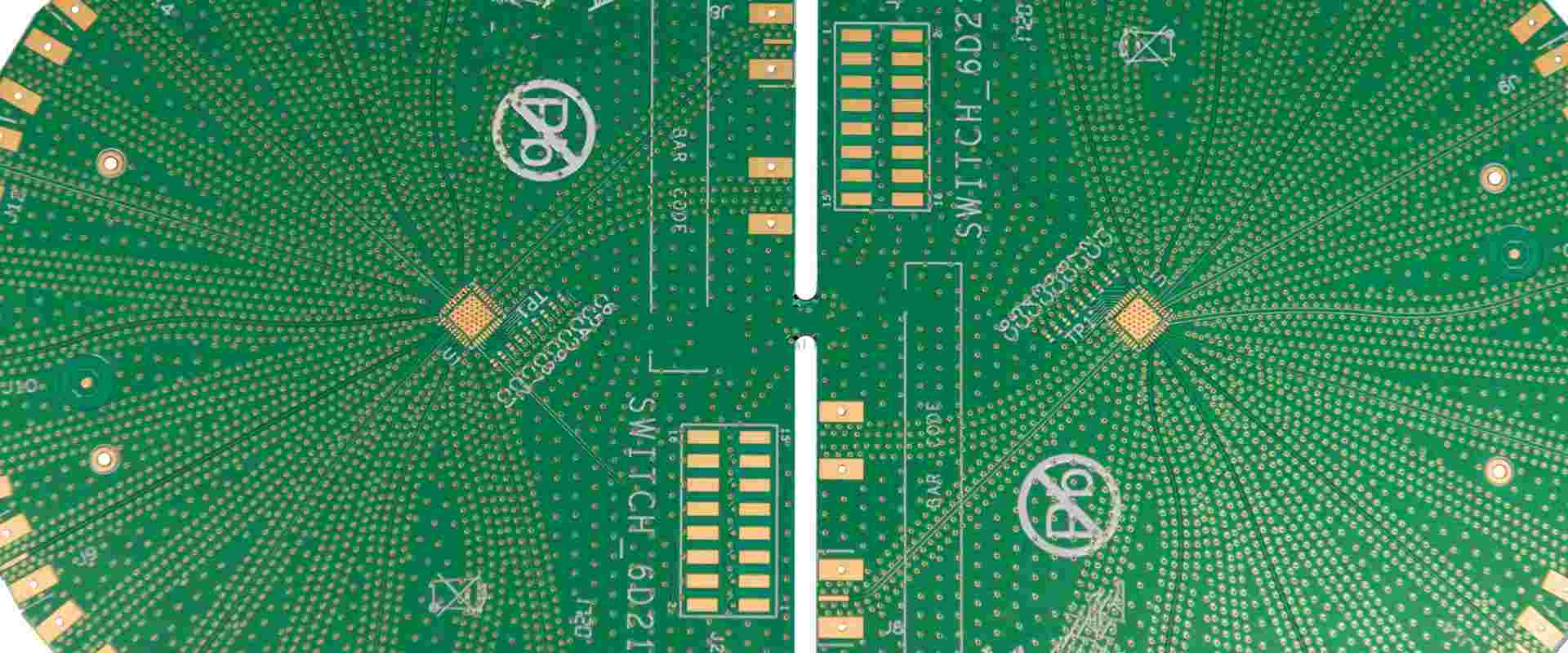
Standard 8 Layer PCB Stackup Design and Suggestion

As electronic devices become smaller and signal speeds increase, multilayer PCBs have become increasingly important. Among these, the 8-layer PCB stackup offers a balance between complexity and performance for many advanced applications. This article explores the reasons for using an 8-layer PCB, its typical structure, and best practices for design.

Why Use a Standard 8 Layer PCB Stackup?

  1. Space Efficiency: With at least 4 layers for signal traces, more space is available on outer layers for components.
  2. Improved Signal Integrity: Power and ground planes between signal layers reduce crosstalk.
  3. Better EMI Control: Multiple layers allow for better electromagnetic interference (EMI) management.
  4. Thermal Management: Increased layers provide more options for heat distribution.
8-Layer PCB Stackup Selector

8-Layer PCB Stackup Selector 8L

Configure layer thicknesses for high-density 8-layer PCB designs

Quick Presets

Copper Layers

Prepreg Layers

Core Layers

Total Board Thickness
1.600mm
1600 ยตm
vs 1.6mm
+0 ยตm
Copper (8L)
280 ยตm
Prepreg (4L)
598 ยตm
Core (3L)
600 ยตm

Stackup Visualization

L1 – Top SignalSIG 35ยตm
Prepreg 1 (PP1) 114ยตm
L2 – GND PlaneGND 35ยตm
Core 1 (FR-4) 200ยตm
L3 – Inner SignalSIG 35ยตm
Prepreg 2 (PP2) 185ยตm
L4 – PWR PlanePWR 35ยตm
Core 2 – Center (FR-4) 200ยตm
L5 – GND PlaneGND 35ยตm
Prepreg 3 (PP3) 185ยตm
L6 – Inner SignalSIG 35ยตm
Core 3 (FR-4) 200ยตm
L7 – PWR PlanePWR 35ยตm
Prepreg 4 (PP4) 114ยตm
L8 – Bottom SignalSIG 35ยตm
SOLDER MASK (BOTTOM)
Outer Signal
Inner Signal
GND Plane
PWR Plane
Prepreg
Core
๐Ÿ’ก Common 8-Layer Targets
1.0mm: High-density mobile/wearable
1.6mm: Standard multilayer (most common)
2.0mm: Industrial, automotive
2.4mm: Power systems, thick copper
โšก 8-Layer Design Tips
Signal Integrity: L3 & L6 are shielded by adjacent planes – ideal for high-speed signals.
Power Distribution: L4 & L5 form a tightly-coupled power/ground pair – excellent for decoupling.
๐Ÿ“ Impedance Control
Outer layers (L1, L8): Microstrip impedance
Inner layers (L3, L6): Stripline impedance
Adjust PP thickness to tune impedance values.

Typical Structure of an 8 Layer PCB Stackup

A standard 8-layer PCB stackup usually consists of the following layers:

  1. Top Layer (Signal)
  2. Prepreg
  3. Ground Plane
  4. Core
  5. Inner Layer 1 (Signal)
  6. Prepreg
  7. Power Plane
  8. Core
  9. Ground Plane
  10. Prepreg
  11. Inner Layer 2 (Signal)
  12. Core
  13. Power Plane
  14. Prepreg
  15. Bottom Layer (Signal)

This arrangement separates signal layers with power or ground planes to reduce EMI susceptibility and emission.

YouTube video

Design Techniques and Challenges

1. Routing Direction

  • Route signal traces on adjacent layers perpendicularly to minimize crosstalk.
  • Maintain different routing directions on subsequent layers, even when separated by power or ground planes.

2. Return Path

  • Visualize and optimize the return path for high-speed signals, even on inner layers.
  • Ensure short return paths to minimize interference with other components.

3. Ground Plane Management

  • Avoid split ground planes to prevent impedance discontinuities.
  • Ensure low-impedance connections from outer layer components to inner ground planes via vias.

4. Via Usage

  • Consider using buried or blind vias to increase routing space.
  • Verify manufacturer capabilities for producing complex via structures.

5. Material Selection

  • Choose appropriate prepreg and core materials.
  • Consider how material properties affect impedance control for transmission line design.

6. Manufacturer Capabilities

  • Ensure your PCB manufacturer can produce the specified 8-layer stackup.
  • Discuss any special requirements, such as impedance control or via structures, with your manufacturer.

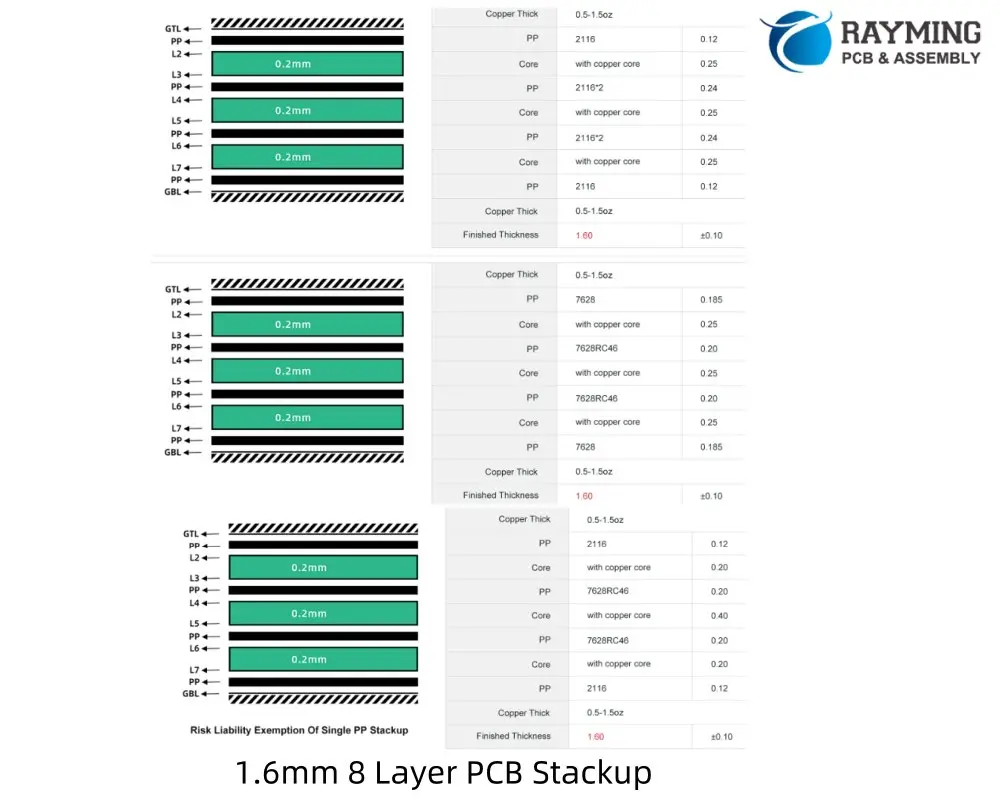
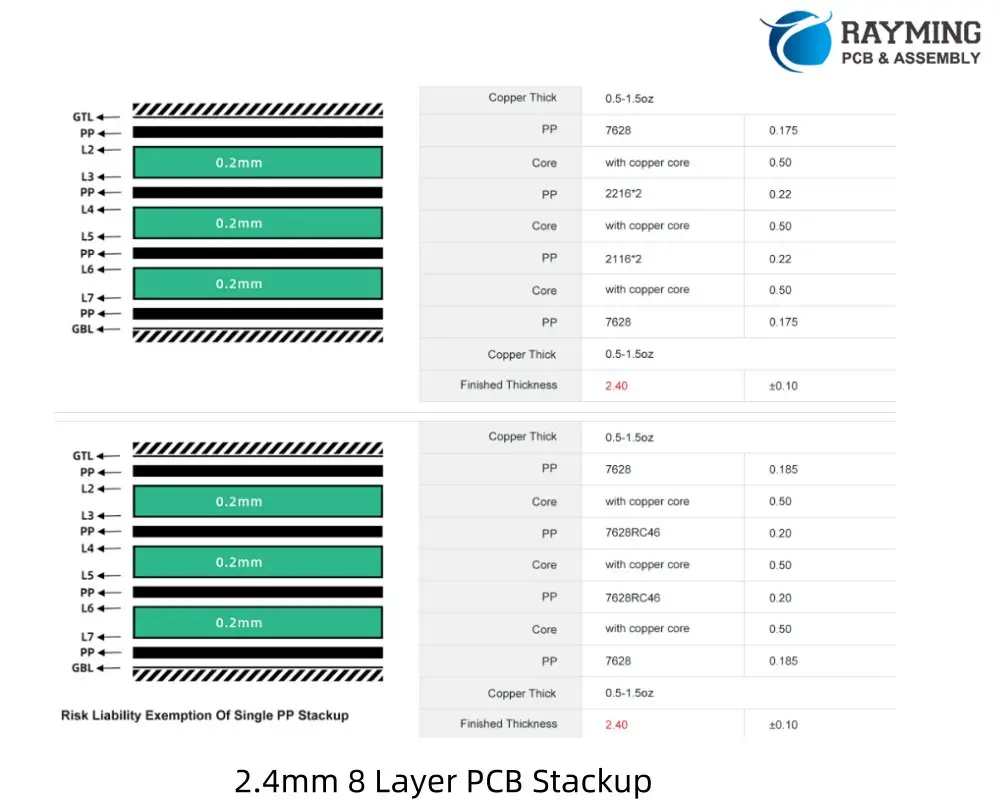
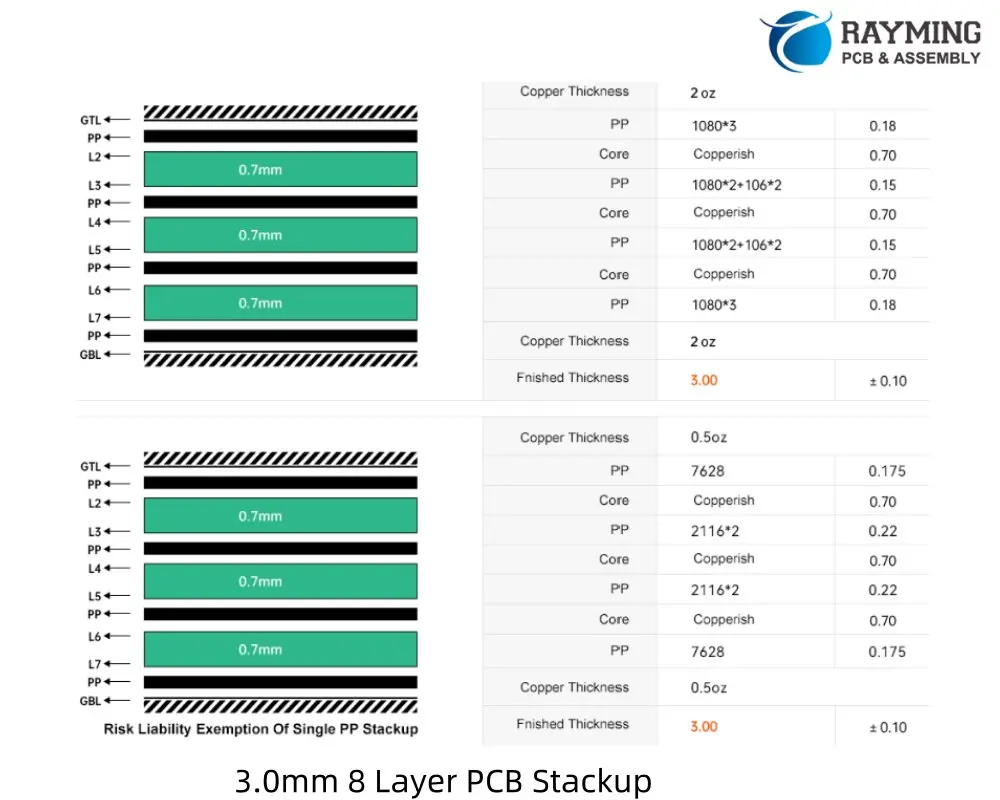
8 Layer PCB Stackup reference for different thickness design

1.2mm 8 Layer PCB Stackup
1.6mm 8 Layer PCB Stackup

Conclusion

While an 8-layer PCB stackup offers numerous advantages, it also presents unique challenges. Adhering to best practices and using appropriate design tools are crucial for success. Remember that an 8-layer stackup isn’t a universal solution to all EMI problems โ€“ proper design techniques remain essential.

Designers should leverage advanced PCB design software, such as OrCAD PCB Designer, which offers features like Cross Section Editor for layer stackup control, strong DRC tools, and reliable analysis and simulation capabilities. These tools can significantly simplify the complex task of designing an 8-layer PCB.

If you need Stackup suggestion for your 8 layer PCB design, Welcome to send email to sales@raypcb.com .

6 Layer PCB Stackup Design Guidelines and Reference

24 layer pcb

Why Upgrade to 6 Layers?

When a 4-layer PCB no longer suffices, it’s time to consider a 6-layer board. The additional layers offer several benefits:

  1. More signal routing space
  2. An extra plane pair
  3. Flexibility in conductor arrangement

The key to success lies in the PCB stackup arrangement and routing strategy.

6-Layer PCB Stackup Selector

6-Layer PCB Stackup Selector 6L

Configure layer thicknesses for your 6-layer PCB stackup

Copper Layers

Prepreg Layers

Core Layers

Total Board Thickness
1.200mm
1200 ยตm
vs 1.2mm target: +0 ยตm
Component Thickness
Copper (6 layers) 210 ยตm
Prepreg (3 layers) 456 ยตm
Core (2 layers) 400 ยตm

Stackup Visualization

L1 – Top SignalOUTER 35ยตm
Prepreg 1 (PP1) 114ยตm
L2 – GND PlanePLANE 35ยตm
Core 1 (FR-4) 200ยตm
L3 – Inner SignalSIGNAL 35ยตm
Prepreg 2 (PP2) 228ยตm
L4 – Inner SignalSIGNAL 35ยตm
Core 2 (FR-4) 200ยตm
L5 – PWR PlanePLANE 35ยตm
Prepreg 3 (PP3) 114ยตm
L6 – Bottom SignalOUTER 35ยตm
SOLDER MASK (BOTTOM)
Outer Copper
Plane (GND/PWR)
Inner Signal
Prepreg (PP)
Core (FR-4)
Solder Mask
๐Ÿ’ก Common 6-Layer Targets
1.0mm: High-density, compact designs
1.2mm: Standard thin multilayer
1.6mm: Most common thickness
2.0mm: Power applications, thermal management
โšก Layer Arrangement Tips
L2 (GND) & L5 (PWR): Place planes adjacent to outer signal layers for better impedance control and EMI shielding.
L3 & L4: Inner signal layers – route high-speed signals here for protection.

Reasons to Choose a 6-Layer Board

  1. More surface space: Moving power and signal layers inside frees up room for components on the surface.
  2. Mixed-signal boards: Dedicate a surface layer to analog interfaces and use an internal layer for slower digital routing.
  3. High-speed, high I/O count boards: Separate signals into different layers for better organization.

Typical 6-Layer PCB Stackup

A common 6-layer stackup arrangement:

  1. Signal (Top)
  2. Ground
  3. Power
  4. Signal
  5. Ground
  6. Signal (Bottom)

Signal Routing Guidelines

  • Use top and bottom layers for impedance-controlled signals.
  • Thin dielectrics (โ‰ค10 mil) are preferable for these outer layers.
  • For digital interfaces with differential pairs, reduced trace width allows routing to fine-pitch components.

Power Routing Strategies

  • Dedicate an internal layer to power distribution.
  • Break up the power plane into rails for multiple voltages if needed.
  • You can still route power on signal layers using copper pour or thick traces when necessary.

High Current Considerations

For high current applications:

  • Use two internal power layers interleaved with ground.
  • Consider using the back layer as an additional power plane for increased current handling.

3-Core vs. 2-Core Stackup

A 3-core (or 1 thick central core with thin outer layers) arrangement is often superior:

  1. Increases PDN plane capacitance
  2. Reduces spreading inductance
  3. Minimizes radiated emissions from PCB edge
  4. Provides more consistent impedance for signals on L4
6 Layer PCB Sackup 3 Cores or 2 Cores

Best Practices

  1. Get your stackup approved by a fabrication house before layout and routing.
  2. Apply EMC strategies used in 4-layer and 8-layer boards.
  3. Consider DFM (Design for Manufacturing) guidelines throughout the process.

Remember, the stackup arrangement significantly impacts EMC and signal integrity, so choose wisely based on your specific application needs.

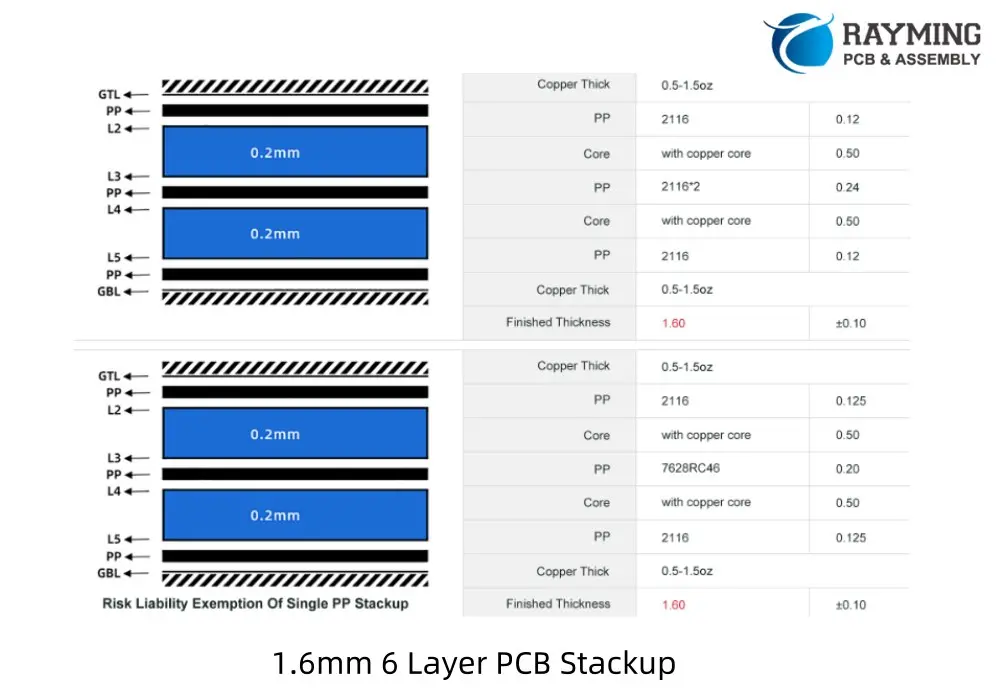
6 Layer PCB stackup reference for different thickness:

1.0mm 6 layer PCB Stackup
4 Types 1.2mm 6 Layer PCB Stackup
1.6mm 6 Layer PCB Stackup
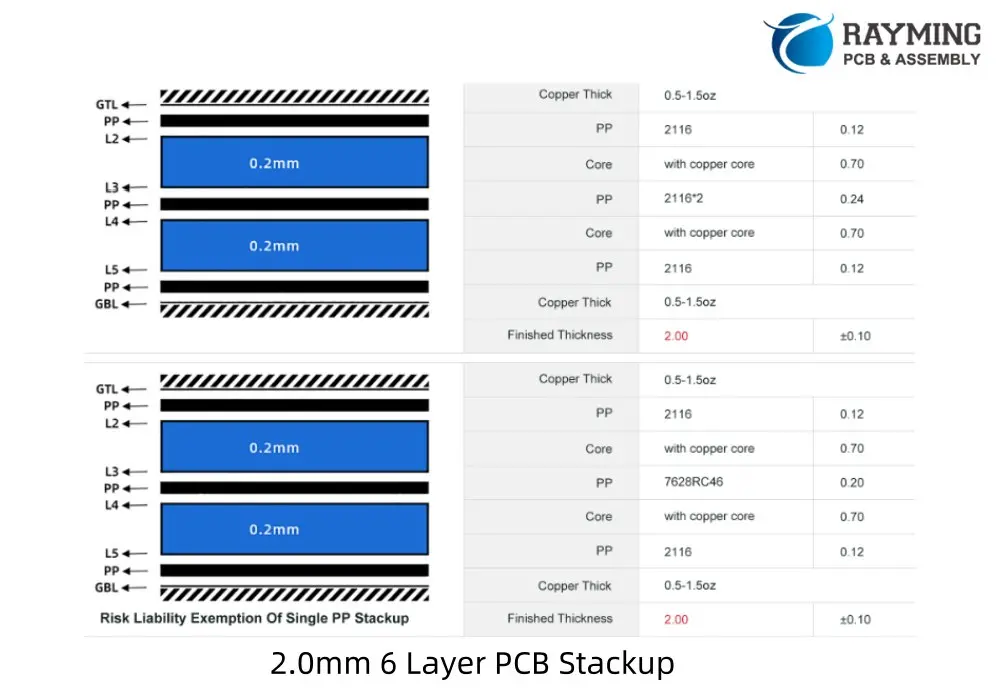
2.0mm 6 Layer PCB Stackup
2.4mm 6 Layer PCB Stackup
3.0mm 6 Layer PCB Stackup

If you need stackup suggestion for your 6 layer PCB design, welcome to contact us.

PCB Panelization Guidelines for Assembly

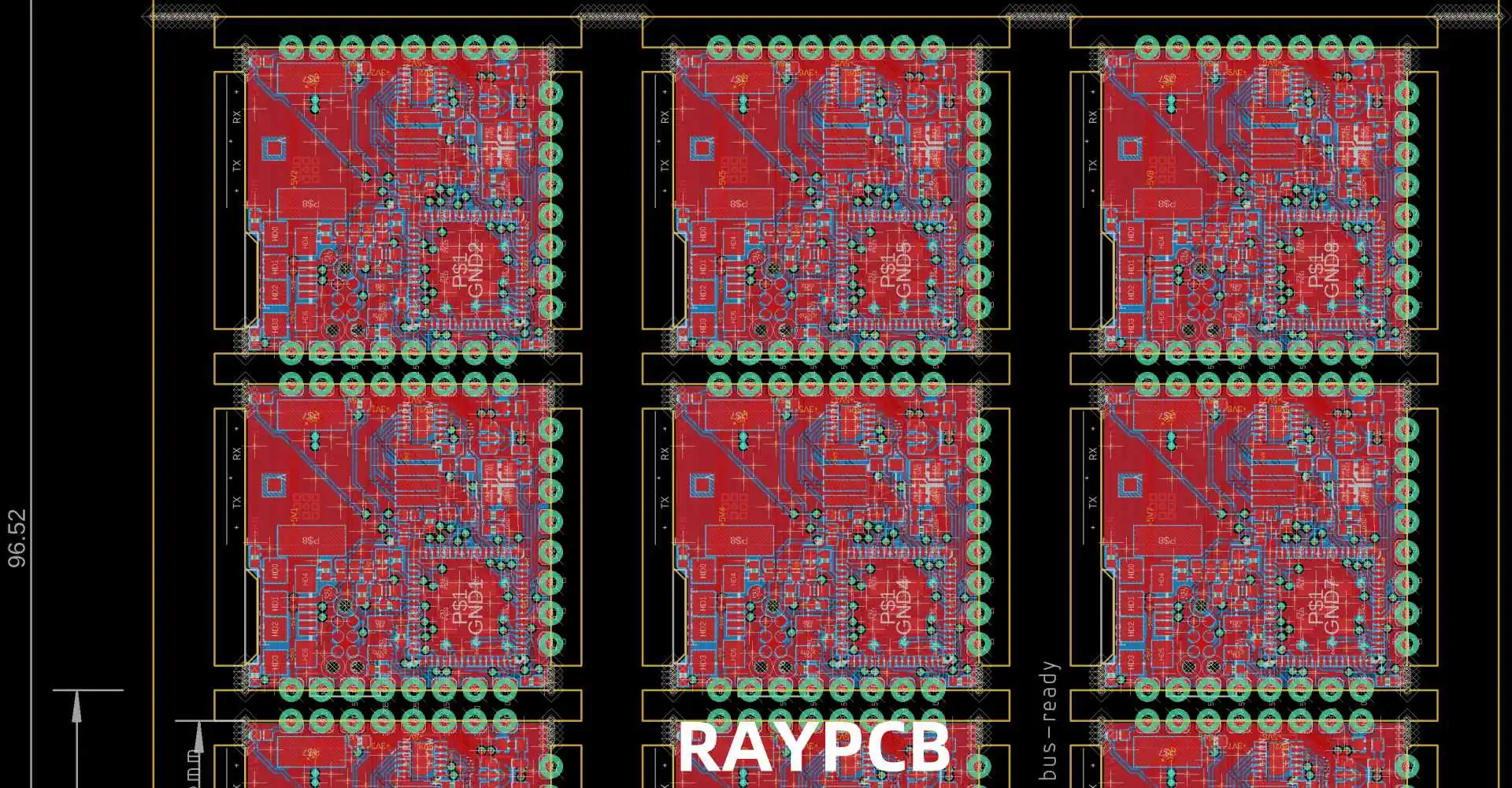
To enhance the efficiency of PCB manufacturing and assembly, we highly recommend utilizing panel designs. Panelization not only streamlines the production process but also helps reduce assembly costs.

The minimum panel size for assembly is 50x50mm, while the maximum can go up to 330x530mm. You have the option to provide your own panel design, or we can create one for you based on your specific requirements. When submitting a new order on PCBWay, simply include your panel design preferences in the message section.

YouTube video

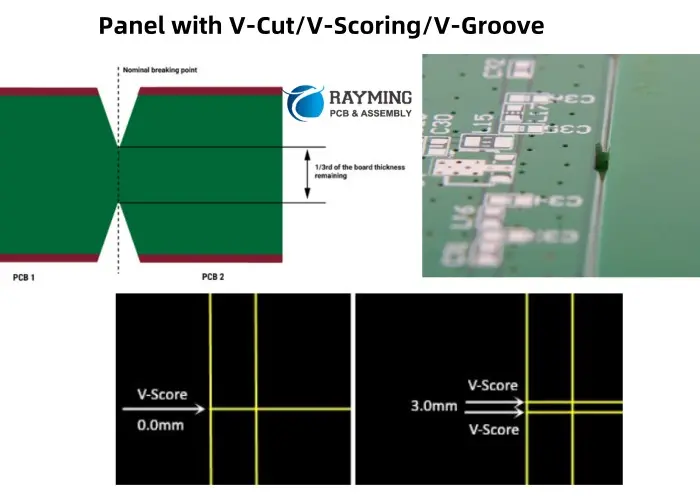
Panel with V-Cut/V-Scoring/V-Groove

For V-scoring panelization, the spacing between boards can be either 0mm or 3mm. Below are reference images for your guidance:

By opting for panelization, you can significantly improve production efficiency and cost-effectiveness. Let us know your panel design needs, and weโ€™ll ensure your PCBs are manufactured and assembled to the highest standards.

Panel with V-Cut,V-Scoring,V-Groove

V-scoring has to be continuous and can not be stopped in panel, if you have many different boards like following image to be panelized, we suggest add tab routes between boards instead of V-scoring.

Panel with Tab Routing

For panels utilizing tab routing, a 1.6mm spacing is required between boards. There are two types of tab routing commonly used in panelization:

  1. Tab routing with breaking holes (stamp holes)
  2. Tab routing with tabs (no holes)

1. Tab Routing with Breaking Holes (Stamp Holes)

  • The diameter of the breaking holes should be โ‰ฅ0.45mm, with a typical range of 0.55mm-0.6mm.
  • The spacing between holes must be โ‰ฅ0.35mm.
  • Typically, 5-6 holes are added to each tab for optimal strength and ease of separation.
  • Refer to the following image for a visual example:
Tab route with breaking holes

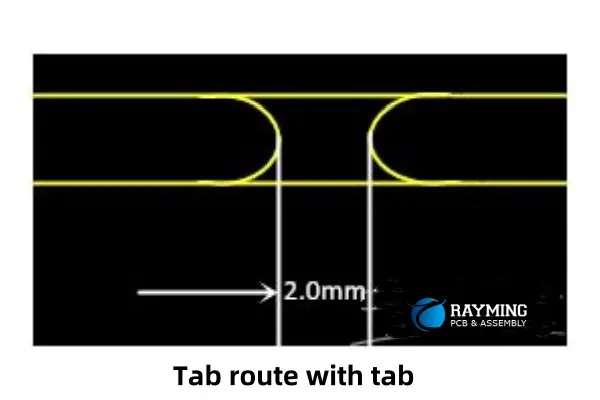
2. Tab Routing with Tabs (No Holes)

  • The width of each tab must be at least 2mm.
  • Refer to the following image for a visual example:
Tab route with tab(no holes)

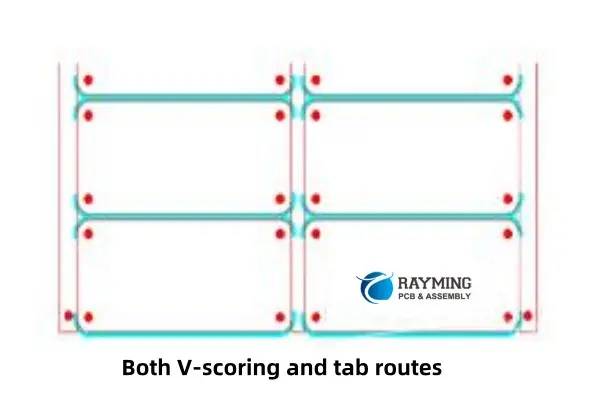
Panel with Both V-Scoring and Tab Routing

For panels combining V-scoring and tab routing:

  • The spacing in the V-scoring area should be 3mm.
  • The spacing in the tab routing area should be 1.6mm.
  • Refer to the following image for a visual example:
Panel with both V-scoring and tab routes

Fiducial Marks and Mounting Holes in Panels

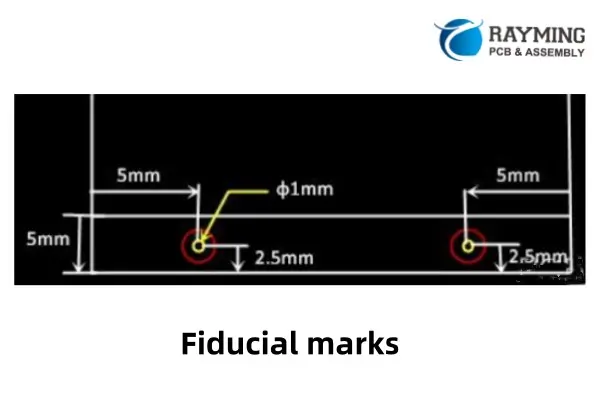
Fiducial Marks

  • Fiducial marks are essential for assembly alignment.
  • Typically, 3 fiducial marks are added to each panel.
  • Each mark has a 1.0mm diameter with a 1.7mm soldermask opening.
  • They are placed in the middle of the edge rails.
  • Refer to the following image for more details:
Fiducial marks in panel

Mounting Holes

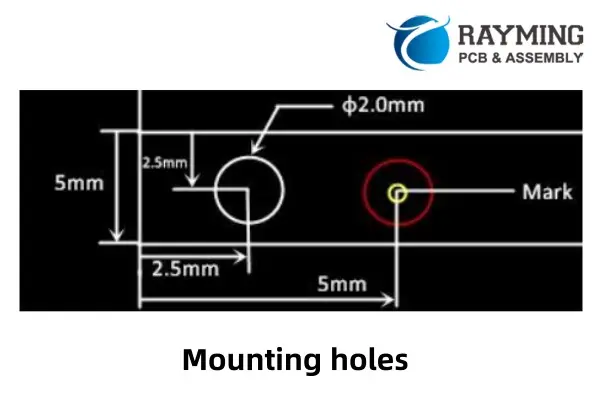
  • In addition to fiducial marks, mounting holes are also required for panel design.
  • Typically, 4 mounting holes are added per panel.
  • The diameter and location of the holes are shown in the following image:
Mounting holes in panel

Benefits of Panelization

Panelization offers several advantages for PCB production, including:

  • Streamlined Production Process: Enhances manufacturing efficiency.
  • Improved Yield and Quality Control: Reduces errors and improves consistency.
  • Simplified Component Sourcing: Makes handling and assembly easier.
  • Efficient Testing and Debugging: Facilitates faster and more accurate testing.

For high-volume PCB assembly, array panelization is an excellent choice. Partnering with a trusted PCB assembly service provider like RayMing PCB can ensure your project meets the highest standards. Contact us today to discuss your panelization needs or to learn more about the benefits of array panelization for high-volume PCB assembly.

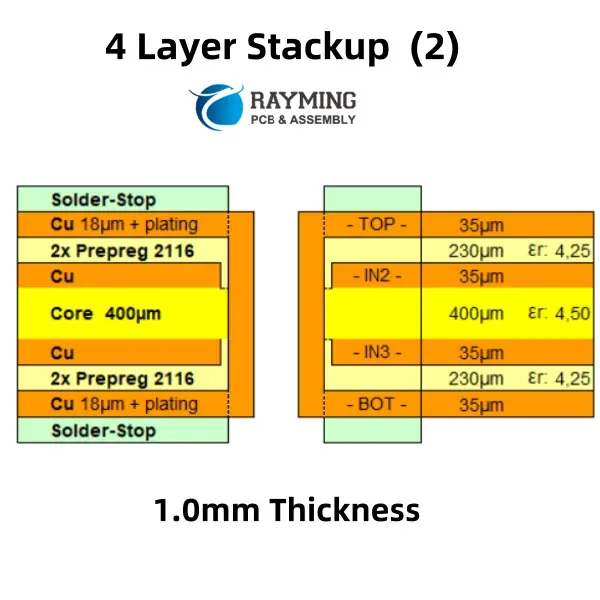
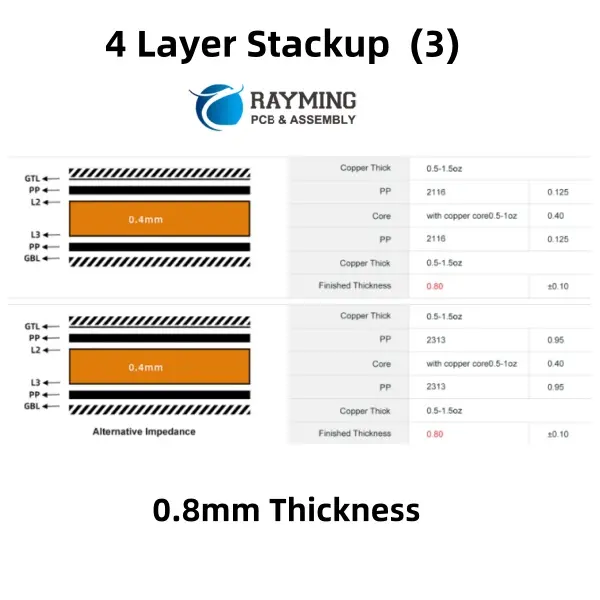
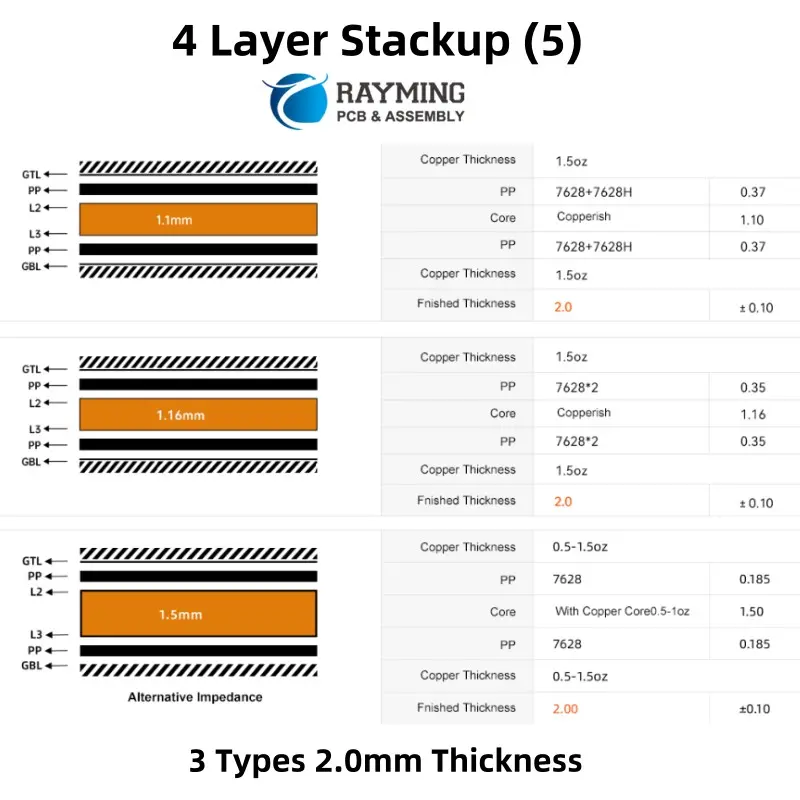
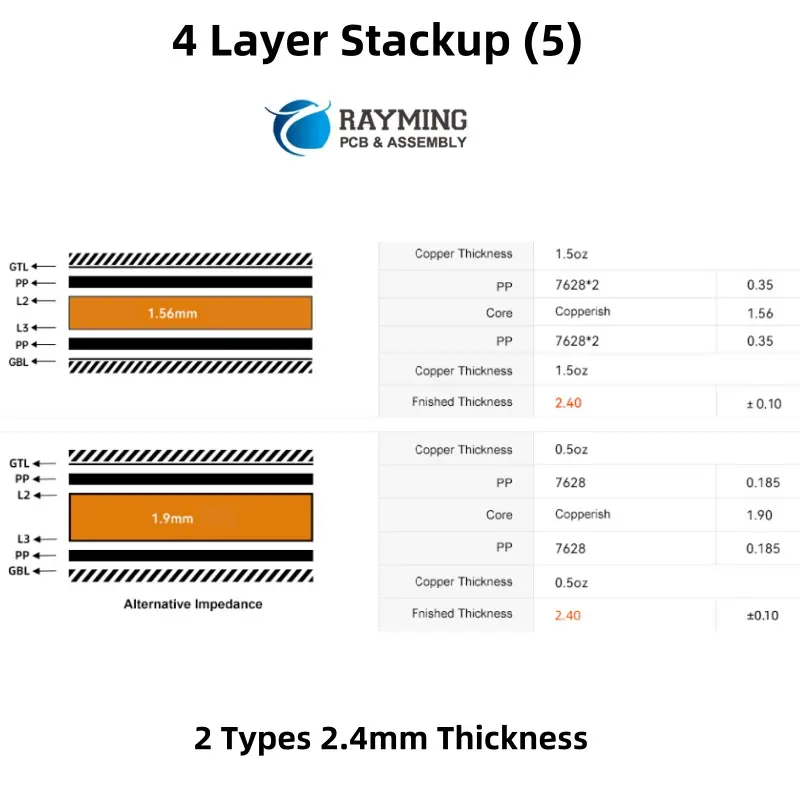
4 layer PCB Stackup of 0.8, 1.0, 1.2, 1.6, 2.0mm Thickness laminated structure

40 Layer PCB

A 4 layer PCB stackup is a common configuration used in printed circuit board design, offering a good balance between complexity, cost, and performance. It typically consists of two signal layers and two plane layers (power and ground). Here’s a standard 4-layer PCB stackup:

Typical 4-Layer PCB Stackup

  1. Top Layer (Layer 1): Signal layer (outer layer)
    • Used for component placement and routing high-speed or critical signals.
    • Often includes components, traces, and pads.
  2. Inner Layer 1 (Layer 2): Ground plane (GND)
    • Provides a low-impedance return path for signals.
    • Helps reduce electromagnetic interference (EMI) and improves signal integrity.
  3. Inner Layer 2 (Layer 3): Power plane (VCC)
    • Distributes power to components.
    • Can be split into multiple voltage regions if needed.
  4. Bottom Layer (Layer 4): Signal layer (outer layer)
    • Used for additional routing and component placement.
    • Often used for less critical signals or general-purpose routing.
4-Layer PCB Stackup Selector

4-Layer PCB Stackup Selector

Configure layer thicknesses and visualize your PCB stackup

Layer Configuration

Total Board Thickness
1.238mm
1238 ยตm
vs 1.2mm target: +38 ยตm

Stackup Visualization

L1 – Top Copper 35ยตm
Prepreg (PP) 114ยตm
L2 – Inner Copper 35ยตm
Core (FR-4) 800ยตm
L3 – Inner Copper 35ยตm
Prepreg (PP) 114ยตm
L4 – Bottom Copper 35ยตm
SOLDER MASK
Copper Layer
Prepreg (PP)
Core (FR-4)
Solder Mask
๐Ÿ’ก Common Stackup Targets
0.8mm: Thin boards, mobile devices
1.0mm: Compact designs
1.6mm: Standard thickness (most common)
2.0mm: Power electronics, ruggedized

Advantages of a 4-Layer Stackup

  • Improved signal integrity due to dedicated ground and power planes.
  • Better EMI shielding and noise reduction.
  • Simplified routing with two signal layers.
  • Suitable for moderate-speed digital and analog designs.

Stackup Thickness

The total thickness of a 4-layer PCB depends on the dielectric material (e.g., FR-4) and the desired impedance. A common total thickness is around 1.6 mm, but this can vary based on design requirements.

Impedance Control

For high-speed designs, controlled impedance traces are often required. The stackup can be designed to achieve specific impedance values (e.g., 50 ฮฉ for single-ended signals or 100 ฮฉ for differential pairs) by adjusting the dielectric thickness and trace width.

Example Stackup Configuration

LayerMaterial/DescriptionThickness (example)
Top LayerSignal Layer (L1)0.035 mm (1 oz Cu)
PrepregDielectric (e.g., FR-4)0.2 mm
Inner LayerGround Plane (L2)0.035 mm (1 oz Cu)
CoreDielectric (e.g., FR-4)0.8 mm
Inner LayerPower Plane (L3)0.035 mm (1 oz Cu)
PrepregDielectric (e.g., FR-4)0.2 mm
Bottom LayerSignal Layer (L4)0.035 mm (1 oz Cu)

Design Considerations

  • Place high-speed signals on the top or bottom layers adjacent to the ground plane for better EMI performance.
  • Use vias to connect signals between layers, but minimize via stubs for high-speed designs.
  • Ensure proper decoupling capacitors are placed near power pins to stabilize the power distribution network.
YouTube video

4 Layer Stackup reference for designers:

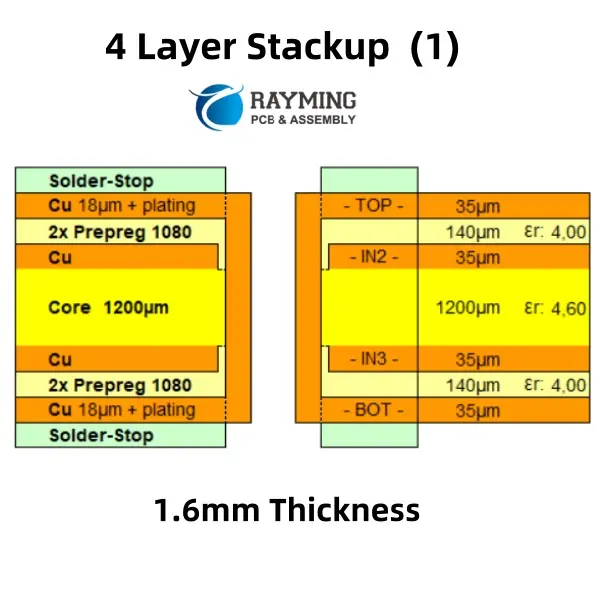
1.6mm Thickness 4 Layer Stackup
1.2mm Thickness 4 Layer Stackup
2 Types 0.8mm Thickness 4 layer PCB stackup
3 Types 1.2mm Thickness 4 layer PCB stackup
3 Types 2.0mm Thickness 4 layer PCB Stackup
3 Types 2.0mm Thickness 4 layer pcb stackup
2 Types 2.4mm Thickness 4 layer pcb stackup

Common 4-Layer Stackups

In 4-layer PCB designs, the arrangement of plane and signal layers is crucial, as it involves balancing power distribution, grounding, and signal routing. While 4-layer boards have limited space compared to higher-layer counts, they are often chosen when the routing complexity or grounding requirements exceed what a 2-layer PCB can handle. These stackups can accommodate diverse functionalities, such as combining power and RF circuits or integrating digital and RF sections. Several layer configurations are possible, each enabling a variety of design applications.

wo Internal Ground Planes

One common 4-layer stackup features two internal ground planes beneath the outer signal layers. This configuration is particularly useful for digital routing, including high-speed digital signals. It is often employed when routing is required on both outer layers and when controlled impedance is necessary for high-speed signal integrity. This is why many computer motherboards and other high-speed digital devices are built using this type of 4-layer stackup.

New designers might question where the power is placed in this arrangement. Interestingly, a dedicated power plane is not always necessary. Power can be routed on the surface layers using traces or large copper pours, providing flexibility in design.

Applications:

  • Double-sided high-speed PCBs
  • Mixed-signal PCBs (combining analog and digital circuits)

Two External Ground Planes

This stackup is essentially the inverse of the previous configuration, with the signal layers moved to the interior and the ground planes placed on the outer layers. While this arrangement may not be ideal for high-speed routing due to potential crosstalk between signals on the internal layers, it offers unique advantages for certain applications. The external ground planes provide excellent shielding, making this stackup suitable for specialized low-noise systems, such as sensitive analog circuits that require minimal interference.
Applications:

  • Low-noise PCBs
  • Specialty mixed-signal PCBs (combining analog and digital circuits with noise sensitivity)

This configuration is particularly useful in scenarios where noise suppression and shielding are critical, even if it sacrifices some of the benefits of high-speed signal routing.

4-layer PCB stackup with two external planes

Signal-Ground-Power-Signal

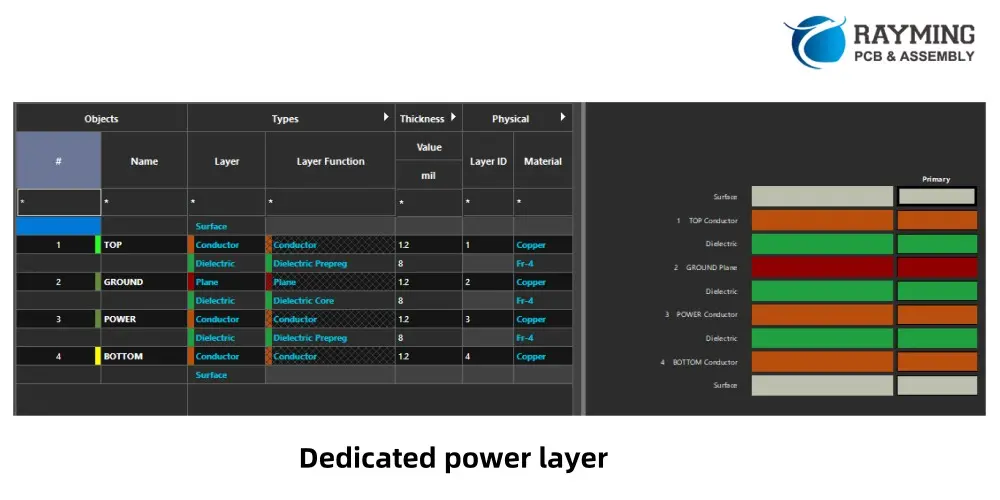
This 4-layer stackup integrates both signal and power domains into a single design by incorporating a dedicated power layer. The power layer can function as a full power plane or accommodate multiple power rails at different voltages, depending on the design requirements. This configuration is particularly useful when a PCB needs to support a high number of signals alongside significant power delivery, necessitating the inclusion of a dedicated power layer.

However, the presence of the power layer can limit the bottom signal layer's ability to handle high-speed signals effectively unless it is maintained as a plane layer. Despite this, the bottom layer can still be utilized for routing lower-speed signals or miscellaneous connections without encountering significant signal integrity (SI) or electromagnetic interference (EMI) issues.

Applications:

  • Single-sided high-speed PCBs
  • Power electronics PCBs

This stackup is ideal for designs that require a balance between signal routing and power distribution, making it a practical choice for applications involving power electronics or systems with mixed signal and power requirements.

4-layer PCB stackup with dedicated power layer

Signal-Ground-Ground-Power

This 4-layer PCB stackup is commonly used when a design requires a robust ground plane to support signal integrity while also needing significant power routing capabilities. The additional ground plane on the third layer is often redundant for grounding purposes, so it can alternatively be utilized for routing some signals if necessary.

This configuration is particularly suited for designs with a lower signal count, where all signals can be accommodated on a single layer, but the power delivery demands justify a dedicated power layer. The power layer can be configured to handle multiple voltage rails or a single large plane for high-current applications, making it a practical choice for power-intensive designs.

Applications:

  • Power electronics with a digital control section

This stackup is ideal for applications that combine power delivery requirements with digital signal processing, offering a balance between grounding, signal routing, and power distribution.

4-layer PCB stackup with bottom-side power layer and internal grounds

This stackup is widely used in consumer electronics, industrial controls, and communication devices. For more complex designs, higher layer counts (e.g., 6-layer or 8-layer PCBs) may be required.

Low Volume PCB Manufacturing: Your Complete Guide to Small-Batch Production

Looking for reliable low volume PCB solutions? Whether you’re developing prototypes, testing new designs, or serving niche markets, low volume PCB manufacturing offers the perfect balance of cost-effectiveness and flexibility for your electronic projects.

What is Low Volume PCB Manufacturing?

Low volume PCB manufacturing refers to the production of printed circuit boards in smaller quantities, typically ranging from 10 to 1,000 units. This approach bridges the gap between prototype development and mass production, making it ideal for businesses that need quality PCBs without committing to large-scale orders.

YouTube video

Why Choose Low Volume PCB Production?

Cost-Effective Solution for Small Orders

Low volume PCB production eliminates the need for massive upfront investments. You only pay for what you need, making it perfect for:

  • Startups with limited budgets
  • Research and development projects
  • Custom electronics applications
  • Market testing initiatives

Faster Time-to-Market

Unlike high-volume manufacturing that requires extensive setup time, low volume PCB production offers:

  • Shorter lead times
  • Quick turnaround options
  • Rapid prototyping capabilities
  • Immediate production flexibility

Quality Without Compromise

Despite smaller quantities, professional low volume PCB manufacturers maintain strict quality standards:

  • Rigorous testing procedures
  • Advanced quality control measures
  • Industry-standard certifications
  • Consistent performance across all units

When Should You Consider Low Volume PCB Manufacturing?

Perfect Scenarios for Low Volume PCB Orders

Prototyping and Testing Low volume PCB manufacturing excels when you need to validate designs before full-scale production. This approach allows you to identify potential issues early and make necessary adjustments without significant financial impact.

Customized Projects For specialized applications requiring unique specifications, low volume PCB production offers the flexibility to create tailored solutions without the constraints of mass production minimums.

Niche Market Products If your target market has limited demand, low volume PCB manufacturing ensures you don’t overproduce and tie up capital in excess inventory.

Iterative Design Development When your PCB design is still evolving, low volume production enables cost-effective iterations and improvements without the burden of large-scale changes.

Industries That Benefit from Low Volume PCB

  • Medical Devices: Specialized equipment with strict regulatory requirements
  • Aerospace: High-reliability applications with limited production runs
  • Industrial Automation: Custom control systems and specialized machinery
  • IoT Devices: Innovative products testing market viability
  • Research Institutions: Academic and commercial R&D projects

Key Advantages of Low Volume PCB Manufacturing

Financial Benefits

  • Reduced upfront investment compared to high-volume orders
  • Lower inventory costs and storage requirements
  • Minimized financial risk for new product launches
  • Competitive per-unit pricing from experienced manufacturers

Operational Advantages

  • Scalable production that grows with your demand
  • Faster response times to market changes
  • Enhanced quality control through smaller batch monitoring
  • Greater design flexibility for unique requirements

Strategic Benefits

  • Risk mitigation for unproven designs
  • Market validation opportunities
  • Competitive advantage through faster innovation cycles
  • Resource optimization for maximum efficiency

Choosing the Right Low Volume PCB Manufacturer

Essential Criteria for Selection

Manufacturing Capabilities Look for manufacturers that offer:

  • Advanced production equipment
  • Multiple layer capabilities
  • Various PCB types (rigid, flexible, rigid-flex)
  • Surface finish options
  • Component assembly services

Quality Assurance Ensure your low volume PCB manufacturer provides:

  • ISO certifications
  • IPC standards compliance
  • Comprehensive testing procedures
  • Quality documentation
  • Traceability systems

Service Excellence Priority features include:

  • Responsive customer support
  • Technical consultation services
  • Design for manufacturability (DFM) analysis
  • Flexible order quantities
  • Reliable delivery schedules

Cost Optimization Strategies

Design Considerations

  • Optimize panel utilization
  • Standardize hole sizes and spacing
  • Minimize layer count when possible
  • Choose common materials and finishes
  • Consider assembly complexity

Order Planning

  • Batch similar designs together
  • Plan for reasonable lead times
  • Consider volume break points
  • Evaluate total cost of ownership
  • Factor in shipping and handling

Low Volume PCB vs. High Volume PCB: Making the Right Choice

When Low Volume PCB is Ideal

  • Order quantities under 1,000 units
  • Prototype development phases
  • Custom or specialized applications
  • Market testing scenarios
  • Limited budget constraints

When to Consider High Volume PCB

  • Proven designs with established demand
  • Order quantities exceeding 10,000 units
  • Cost per unit is the primary concern
  • Long-term production contracts
  • Stable, standardized designs

Getting Started with Low Volume PCB Manufacturing

Preparation Steps

Design Documentation Ensure you have complete:

  • Gerber files
  • Bill of materials (BOM)
  • Assembly drawings
  • Fabrication notes
  • Special requirements

Specification Requirements Define your needs:

  • PCB dimensions and layer count
  • Material specifications
  • Surface finish requirements
  • Electrical testing needs
  • Assembly services required

Working with Your Manufacturer

Communication Best Practices

  • Provide detailed specifications
  • Ask questions about capabilities
  • Discuss timeline expectations
  • Clarify quality requirements
  • Establish clear communication channels

Quality Assurance Process

  • Review DFM feedback carefully
  • Approve prototypes before production
  • Monitor production milestones
  • Conduct incoming inspection
  • Maintain quality records

Future Trends in Low Volume PCB Manufacturing

Technology Advancements

  • Automated production systems reducing setup times
  • Advanced materials enabling new applications
  • Improved testing methods ensuring higher reliability
  • Digital manufacturing streamlining processes

Market Evolution

  • Increased customization demands driving low volume needs
  • Shorter product lifecycles requiring flexible production
  • IoT proliferation creating diverse PCB requirements
  • Sustainability focus optimizing resource utilization

Conclusion: Maximize Your Success with Low Volume PCB

Low volume PCB manufacturing offers an ideal solution for businesses seeking quality, flexibility, and cost-effectiveness in their electronic projects. Whether you’re developing innovative products, serving specialized markets, or testing new concepts, choosing the right low volume PCB manufacturer can significantly impact your success.

The key to maximizing your low volume PCB investment lies in selecting an experienced manufacturer who understands your unique requirements and can deliver consistent quality at competitive prices. With proper planning, clear communication, and strategic partnerships, low volume PCB manufacturing becomes a powerful tool for innovation and growth.

Ready to explore low volume PCB solutions for your project? Contact experienced manufacturers who specialize in small-batch production and can provide the expertise, quality, and service you need to bring your electronic designs to life efficiently and cost-effectively.

Raspberry Pi 2 PiGRRL Pack 2.0 and Custom Gamepad PCB

The world of retro gaming has seen a resurgence in recent years, with enthusiasts seeking ways to relive their favorite classic games while leveraging modern technology. The Raspberry Pi 2 PiGRRL Pack 2.0, combined with a custom gamepad PCB, offers an exciting solution for DIY gaming enthusiasts. This article will explore the components, assembly process, and customization options for creating your own portable gaming device using the Raspberry Pi 2 PiGRRL Pack 2.0 and a custom gamepad PCB.

YouTube video

Understanding the Raspberry Pi 2 PiGRRL Pack 2.0

What is the PiGRRL Pack 2.0?

The PiGRRL Pack 2.0 is a comprehensive kit designed to transform a Raspberry Pi 2 into a portable gaming console. It builds upon the success of the original PiGRRL project, offering improved features and easier assembly.

Components of the PiGRRL Pack 2.0

The PiGRRL Pack 2.0 typically includes the following components:

| Component | Purpose | |———–|———| | 3D printed case | Houses all components | | 3.5″ TFT display | Serves as the game screen | | PowerBoost 1000C | Manages power and charging | | 2000mAh LiPo battery | Provides portable power | | Mini speaker | Outputs game audio | | Tactile buttons | Used for game controls | | Various wires and connectors | For internal connections |

Advantages of the PiGRRL Pack 2.0

  1. Compact design
  2. Improved battery life
  3. Better screen quality
  4. More ergonomic button layout
  5. Easier assembly process

The Custom Gamepad PCB

Why Use a Custom Gamepad PCB?

A custom gamepad PCB offers several advantages over traditional wiring methods:

  1. Cleaner internal layout
  2. Reduced wiring complexity
  3. Improved reliability
  4. Easier maintenance and troubleshooting
  5. Potential for additional features

Designing the Custom Gamepad PCB

Key Considerations

When designing a custom gamepad PCB for the PiGRRL Pack 2.0, consider the following:

  1. Button layout and ergonomics
  2. Compatibility with Raspberry Pi 2 GPIO pins
  3. Integration with PiGRRL Pack 2.0 components
  4. Potential for future upgrades or modifications

Essential Components

A typical custom gamepad PCB for the PiGRRL Pack 2.0 might include:

| Component | Purpose | |———–|———| | Microcontroller | Manages button inputs | | Tactile switches | Serve as game buttons | | Resistors | For button debouncing | | Connectors | Interface with Raspberry Pi and other components | | LED indicators | Provide visual feedback |

PCB Manufacturing Process

  1. Schematic design
  2. PCB layout
  3. Gerber file generation
  4. PCB fabrication
  5. Component sourcing
  6. PCB assembly

Assembling the Raspberry Pi 2 PiGRRL Pack 2.0 with Custom Gamepad PCB

Preparation

Before beginning the assembly process, ensure you have the following tools:

  1. Soldering iron and solder
  2. Wire strippers
  3. Screwdrivers
  4. Multimeter
  5. Heat shrink tubing
  6. Tweezers

Step-by-Step Assembly Guide

1. Prepare the 3D Printed Case

  • Clean up any 3D printing artifacts
  • Test-fit components to ensure proper alignment

2. Install the Display

  • Carefully mount the 3.5″ TFT display in the case
  • Secure with appropriate screws or mounting brackets

3. Prepare the Raspberry Pi 2

  • Install the required operating system (typically RetroPie)
  • Configure GPIO pins for gamepad input

4. Install the Custom Gamepad PCB

  • Mount the custom PCB in the designated area of the case
  • Connect to Raspberry Pi GPIO pins using appropriate cables

5. Power Management Setup

  • Install the PowerBoost 1000C
  • Connect the LiPo battery
  • Wire power to Raspberry Pi and display

6. Audio Installation

  • Mount the mini speaker
  • Connect audio output from Raspberry Pi

7. Final Assembly

  • Carefully route all wires
  • Secure components with screws or mounting brackets
  • Close up the case

Software Configuration

Operating System Setup

  1. Download and install RetroPie
  2. Configure RetroPie for the 3.5″ display
  3. Set up Wi-Fi (if applicable)

Gamepad Configuration

  1. Access RetroPie configuration menu
  2. Navigate to “Input” settings
  3. Follow on-screen instructions to map buttons

ROM Installation

  1. Prepare a list of legally owned game ROMs
  2. Transfer ROMs to Raspberry Pi using Wi-Fi or USB
  3. Organize ROMs into appropriate folders

Customization Options

Case Modifications

  • Custom paint jobs
  • Additional button holes
  • Improved ventilation

Hardware Upgrades

  • Larger battery for extended playtime
  • Improved audio amplifier for better sound
  • Bluetooth module for wireless controllers

Software Enhancements

  • Custom emulator configurations
  • Overclocking for improved performance
  • Customized boot screens and themes

Troubleshooting Common Issues

Display Problems

| Issue | Possible Solution | |——-|——————-| | No display output | Check connections, verify GPIO configuration | | Distorted image | Adjust display settings in config.txt | | Flickering screen | Ensure stable power supply |

Control Issues

| Issue | Possible Solution | |——-|——————-| | Unresponsive buttons | Verify PCB connections, check GPIO configuration | | Ghost inputs | Improve button debouncing in software or hardware | | Incorrect button mapping | Reconfigure input settings in RetroPie |

Power Problems

| Issue | Possible Solution | |——-|——————-| | Short battery life | Check for power-hungry processes, consider larger battery | | Failure to charge | Verify PowerBoost connections, check USB cable | | Sudden shutdowns | Ensure stable power supply, check for overheating |

Performance Optimization

Overclocking

  • Carefully adjust CPU and GPU clock speeds
  • Monitor temperatures to prevent overheating
  • Test stability with demanding games

Emulator-Specific Tweaks

  • Research optimal settings for each emulator
  • Balance performance and accuracy
  • Consider using lower resolution for smoother gameplay

System Optimization

  • Disable unnecessary services
  • Use lightweight themes
  • Regularly update software for bug fixes and improvements

Community and Resources

Online Forums

  • RetroPie forums
  • Raspberry Pi forums
  • 3D printing communities

Video Tutorials

  • YouTube channels dedicated to Raspberry Pi projects
  • Step-by-step assembly guides
  • Troubleshooting walkthroughs

Documentation

  • Official Raspberry Pi documentation
  • RetroPie wikis
  • Custom gamepad PCB design resources

Future Developments

Potential Upgrades

  • Integration with newer Raspberry Pi models
  • Support for more advanced displays
  • Improved power management systems

Emerging Technologies

  • Incorporation of mini HDMI for external display support
  • USB-C for faster charging and data transfer
  • Potential for cloud game streaming integration

Conclusion

The Raspberry Pi 2 PiGRRL Pack 2.0, combined with a custom gamepad PCB, offers an exciting platform for DIY gaming enthusiasts. By following the steps outlined in this article, you can create a unique, portable gaming device that blends retro charm with modern technology. The customization options and active community support ensure that your PiGRRL project can continue to evolve and improve over time.

Frequently Asked Questions (FAQ)

1. Can I use a different Raspberry Pi model with the PiGRRL Pack 2.0?

While the PiGRRL Pack 2.0 is designed specifically for the Raspberry Pi 2, it may be possible to use other models with some modifications. However, this could require changes to the case design, power management, and software configuration. It’s generally recommended to stick with the Raspberry Pi 2 for the best compatibility and performance with this particular pack.

2. How difficult is it to design and manufacture a custom gamepad PCB?

Designing and manufacturing a custom gamepad PCB requires some knowledge of electronics and PCB design. For beginners, it can be challenging, but there are many resources available online to help. You’ll need to learn how to use PCB design software, understand basic circuit design, and familiarize yourself with the PCB manufacturing process. Alternatively, you can start with existing open-source designs and modify them to suit your needs.

3. What’s the typical battery life of a completed PiGRRL 2.0 project?

The battery life of a PiGRRL 2.0 project can vary depending on several factors, including the efficiency of your components, the types of games you’re playing, and any additional features you’ve added. With the standard 2000mAh LiPo battery, you can typically expect 2-4 hours of gameplay. This can be extended by using a larger capacity battery or implementing more aggressive power-saving measures.

4. Can I add additional features like Wi-Fi or Bluetooth to my PiGRRL 2.0?

Yes, it’s possible to add features like Wi-Fi or Bluetooth to your PiGRRL 2.0 project. The Raspberry Pi 2 has built-in support for these technologies, so it’s mainly a matter of configuring the software and ensuring you have the necessary antennas or modules. Keep in mind that adding these features may impact battery life and could require modifications to the case design to accommodate any additional hardware.

5. Is it legal to play ROMs on the PiGRRL 2.0?

The legality of playing ROMs is a complex issue that varies by jurisdiction. Generally, it’s considered legal to play ROMs of games you own physical copies of, for personal use. However, downloading ROMs of games you don’t own is typically not legal. It’s important to research and comply with the copyright laws in your area. Many retro gaming enthusiasts choose to focus on open-source or homebrew games to avoid legal issues.

PCB Manufacturing FAQs

Shengyi Autolad1 PCB
Q1. What PCB file format do You need?

For PCB fabrication, we require PCB design file in Gerber RS-274X format (most preferred), *.PCB/DDB (Protel, inform your program version) format or *.BRD (Eagle) format.

Q2. Is there any Minimum quantity (MOQ) requirement for the PCB order?

Generally, there is no minimum order quantity (MOQ) requirement for the pcb order.

Q3. How quickly will I receive a response to my quotation request?

We guarantee a response to all quotation requests within 24 hours.

Q4. How do you keep costs affordable for PCB manufacturing services?

We utilize the latest and most efficient manufacturing technologies, ensuring both time and cost savings for your projects.

Q5. How many years of experience do you have in the PCB manufacturing industry?

With over 20 years of combined expertise, we specialize in delivering advanced PCB assembly and manufacturing services.

Q6. What is the smallest trace width and spacing you can manufacture?

Trace width: 3 mils
Trace/line spacing: 3 mils
When working with narrower traces, the tolerance becomes tighter, which can lead to over-etching. However, our controlled etching process ensures accurate trace widths are achieved.

Q7. What solder mask colors do you offer?

We can use nearly all solder mask colors. The most frequently used options include Red, Green, Black, Blue, and White.

Q8. What surface finish options do you provide?

We offer a variety of surface finishes, including HASL, Lead-free HASL, ENIG, Immersion Silver, Immersion Tin, OSP, Soft Wire Bondable Gold, and Hard Gold.

Q9. What is the smallest hole size you can produce?

Mechanical drilling: 6 mils
Laser drilling: 4 mils
Including various hole sizes in a PCB design necessitates the use of additional drill bits during manufacturing, which can lead to higher costs and longer production times.

Q10. Does my board require impedance control and stack-up design?

Yes, we offer free impedance control calculations and stack-up design using industry-leading field solvers. Impedance control involves aligning PCB trace dimensions and placements with the substrate material’s properties to ensure signal strength remains within the desired range. By adhering to best design practices, many potential signal integrity issues can be prevented or minimized.

Q11. Can you manufacture a panel with different types of boards?

Yes, we can produce panels containing multiple board types. However, we will need to review your design files before providing a final confirmation.

Q12. Do you provide peelable solder mask services?

Yes, we do.
A peelable solder mask is used to protect specific areas of a PCB during the assembly process, particularly during wave soldering. It ensures that solder does not come into contact with the designated protected regions.

Q13. Can you produce flex boards?

Yes, we specialize in manufacturing both flexible and rigid-flex PCBs.

Q14. What electrical testing methods do you employ?

We utilize two primary testing methods:
1. Flying Probe
2. Test Fixture

Q15. Can you manufacture PCBs for high RF applications?

Yes, we are equipped to produce PCBs designed for high-frequency and RF applications.

Q16. Do you provide metal core PCBs?

Yes, we offer metal core PCBs with support for up to 6 layers

Q17. Can you bevel hard gold fingers?

Yes, we have the capability to bevel hard gold fingers.

Q18. Do you charge for PCB panelization?

No, we offer PCB panelization free of charge.

Q19. Can you manufacture High-Density Interconnect (HDI) PCBs?

Yes, we are capable of producing HDI PCBs. For further details, please visit our PCB Fabrication page. HDI PCBs achieve greater circuit density compared to traditional PCBs by incorporating advanced features and technologies, including blind/buried vias, laser-drilled stacked micro-vias, via-in-pad techniques, and more.

Q20. Can you produce PCBs with castellation holes (plated half-holes on the PCB edge)?

Yes, we offer castellation hole services.
We recommend using the largest hole size feasible for optimal results.

Q21. Do you offer V-scoring services?

Yes, we provide V-scoring for bare PCB orders as needed.

Q22. What factors influence PCB manufacturing costs?

1. Board quantity
2. PCB thickness
3. Number of layers
4. Copper weight
5. HDI features
6. Routing complexity
7. Impedance control requirements

Q23. Do you provide special milling or controlled-depth routing services?

Yes, we offer both controlled-depth routing and special milling.

Q24. What types of laminates do you use for PCB fabrication?

We utilize a wide range of laminates, including FR4, High TG FR4, Rogers, Arlon, Aluminum Base, Polyimide, Ceramic, Taconic, Megtron, and more.

Q25. Are your PCBs RoHS Compliant?

Yes. But we also offer leaded PCBs.

PCB Assembly FAQs

As a leading provider of cost-effective and high-quality PCB fabrication and assembly services, we support over 1000+ engineers in their research and development projects. Every day, we address questions from customers worldwide about our PCB and assembly solutions. To help new customers better understand our products and services, weโ€™ve compiled these frequently asked questions for your reference.

Q1. Who is RayMing PCB?

RayMing PCB is a trusted and professional provider of PCB fabrication and PCBA services. With years of experience in the industry, RayMing specializes in delivering high-quality, cost-effective solutions for a wide range of applications, including consumer electronics, industrial equipment, medical devices, and research projects.
The company is known for its commitment to precision, reliability, and customer satisfaction. RayMing PCB offers comprehensive services, from PCB prototyping to full-scale production, including turnkey assembly, component sourcing, and testing. Their advanced manufacturing facilities, skilled engineering team, and dedication to innovation make them a preferred partner for engineers, businesses, and researchers worldwide.
Whether you’re working on a small prototype or a large-scale production run, RayMing PCB provides tailored solutions to meet your specific needs, ensuring high-quality results and on-time delivery.

Q2. Is there any MOQ requirements for the PCB Assembly order ?

Generally, there is no minimum order quantity (MOQ) requirement for the pcb assembly order.

Q3. Can you assemble boards not manufactured by RayMing?

At this time, we do not offer assembly services for PCBs manufactured by other companies. Our process is designed to provide a seamless and integrated experience, combining PCB fabrication, component sourcing, and assembly under one roof. This approach ensures efficiency, quality control, and cost-effectiveness, ultimately saving our customers time and money. By handling the entire production process internally, we can guarantee consistent results and a smoother workflow for your projects.

Q4. What files and documents are required for my PCBA orders?

For your PCBA orders, we require the following files:ย Gerber files,ย Centroid data, and aย BOM (Bill of Materials). If youโ€™ve already placed your PCB order with us and your Gerber files include the essential layersโ€”silkscreen,ย copper track, andย solder pasteโ€”you only need to provide the Centroid data and BOM.
However, if your Gerber files are missing any of these three critical layers, please resend the updated files, as these are the minimum requirements for assembly.
For the best possible results, we also recommend submitting additional documents such asย assembly drawings,ย special instructions, andย photosย of your project. While these are not mandatory, they help us better understand your requirements, avoid ambiguities, and prevent potential errors in component placement. Providing these details ensures a smoother and more accurate assembly process.

Q5. What is a Centroid File?

A Centroid file is a specialized file used in the assembly process to program automated assembly machines efficiently. It is also referred to asย Insertion,ย Pick-and-Place, orย XY Data. This file provides detailed information about the placement and orientation of all surface-mount components on the PCB.
The Centroid file includes:
Reference Designator
X and Y Coordinatesย (position on the board)
Rotationย (orientation of the component)
Board Sideย (Top or Bottom)
While some CAD tools automatically generate this file, others may require manual adjustments before the Centroid file can be created. Itโ€™s important to note that only surface-mount components are listed in the Centroid file, as it is specifically designed for automated placement of these parts.
Providing an accurate Centroid file ensures precise and efficient assembly of your PCB.

Q6. How should parts be shipped and marked for consigned or kitted orders?

For consigned or kitted orders, we kindly request that you mark each individual package or box with the following details:
Line Numberย (as listed in the BOM)
Manufacturerโ€™s Part Numberย orย Customerโ€™s Part Number
Quantities
Additionally, please include aย detailed packing listย with your shipment. This list will help us efficiently count, verify, and organize the parts upon receipt. Clear labeling and documentation ensure a smooth and accurate assembly process, minimizing delays or errors.

Q7. What are your requirements for parts overages in consigned/kitted PCBA orders?

For consigned or kitted PCBA orders, please note the following guidelines regarding parts overages:
Return of Unused Parts:
Unused or excess parts provided by you or purchased by us will not be returned by default. If you wish to have these parts returned with your assembled boards, please inform your service representative or add a note to your order specifying which parts should be sent back.
Packaging for SMT Parts:
SMT parts not supplied on reels must be provided on one continuous strip of tape.
If the same SMT part is used across multiple boards, do not cut them into strips. Keep them on a continuous strip of tape or on reels.
Minimum and Excess Quantities for Common Components:
Resistors, Capacitors, Diodesย (0603, 0805, 1206, 2225, SOT, SOD, MELF packages):
Minimum: 50 pieces
Excess: 30 pieces over the required quantity
Example: For an assembly quantity of 40 pieces, provide 70 pieces (50 minimum + 30 excess).
Resistors, Capacitors, Diodesย (0201, 0402, miniMelf, miniature packages):
Minimum: 100 pieces
Excess: 50 pieces over the required quantity
Example: For an assembly quantity of 80 pieces, provide 130 pieces (100 minimum + 50 excess).
Expensive Components (ICs, BGAs, QFPs, Connectors, etc.):
A small excess (1-5 pieces, depending on the total assembly quantity) is recommended to ensure smooth assembly and timely delivery of your boards.
If you are unsure about the quantity, feel free to provide additional extras or contact us for clarification.
Adhering to these guidelines helps us maintain efficiency and ensures your project is completed on time and to the highest standards. If you have any questions, please donโ€™t hesitate to reach out to us.

Q8. Can you source components for my assembly?

Yes, we can! This service is known asย Partial Turn-Key. You have the option to supply some of the components yourself, and we will source the remaining parts on your behalf. During the process, if we encounter any uncertainties regarding part specifications or availability, we will seek your approval before proceeding.
In cases where parts are unavailable or substitutions are required, we will contact you for final confirmation to ensure the selected alternatives meet your requirements. This approach allows us to maintain transparency and ensures your assembly aligns with your expectations.

Q9. Do you assemble BGAs? Are there any special requirements for this?

Yes, we are fully equipped to assemble BGAs, including those with a fine pitch ofย 0.25mm, and we provideย X-ray testingย to ensure quality and reliability.
For BGA assembly, there are two common design approaches:ย via on padย andย via near padย (connected by shorter traces). Each design has specific requirements to ensure optimal soldering quality:
Via Near Pad:
Vias located near the BGA pads must beย tented and filled with solder maskย to prevent solder wicking and ensure proper soldering.
Via on Pad:
Vias directly on the BGA pads must beย filled with resinย to create a flat surface, ensuring excellent soldering quality and preventing voids or defects.
By adhering to these guidelines, we guarantee high-quality BGA assembly and reliable performance for your PCBs. If you have any specific requirements or questions, feel free to reach out to us!

Q10. How do you handle excess and unused parts?

Excess parts are common because we typically request a percentage of overage forย consigned/kitted ordersย or purchase additional quantities forย Turn-Key ordersย to ensure smooth assembly. Once your order is complete, you have two options for handling the unused parts:
Ship them back to you: We can return the unused parts along with your assembled boards.
Store them for future use: We can keep the parts in our inventory for your next order.
The choice is entirely yours! Let us know your preference, and weโ€™ll accommodate accordingly.

Q11. How is the total price for PCBA services calculated?

Ourย online instant quote systemย provides a preliminary estimate of the PCBA cost, covering essential elements such asย tooling,ย laser-cut steel stencils, andย labor. Forย Turn-Keyย orย Partial Turn-Key PCBAย services, the cost of components will also be included in the final price. This ensures transparency and helps you understand the breakdown of expenses for your project.
Q12. When does the turnaround time begin?

Determining the turnaround time for PCBA services can be complex due to various factors. As per our policy, theย turnaround time officially beginsย only after the following conditions are met:
All requiredย parts and PCBsย are ready.
All necessary files and documents are submitted, including:
PCB filesย (Gerber files or other formats)
Centroid fileย (Pick & Place/PNP file, XY Data, or equivalent)
BOM (Bill of Materials)
Any additionalย data, documents, images, or photosย essential for the assembly process.
Once all these elements are complete and in place, we initiate the assembly process and the turnaround time starts. This ensures a smooth and efficient workflow for your project.

Q13. Is your assembly RoHS compliant?

Yes, our assembly services areย RoHS compliant, ensuring adherence to environmental and safety standards. However, we also provideย leaded PCBA servicesย for projects that require traditional soldering methods. Let us know your specific requirements, and weโ€™ll accommodate accordingly!

Q14. Why is panelization necessary for my boards?

Panelization is required in the following scenarios:
If your PCB dimensions areย smaller than 50mm x 100mm.
If your PCB has aย non-rectangular shapeย (e.g., circular or irregular).
In such cases, your boards must be arranged in an array (panelized) to facilitate the assembly process. Since we also handle PCB fabrication, once we begin manufacturing your boards, we will generate theย panelization fileย (including solder paste data). This file is then shared with our PCBA department to create a stencil that matches the panelized PCB layout, ensuring precise and efficient assembly. Panelization streamlines production and ensures consistency across your boards.

Q15. Why do I need to design break-away rails (break-away tabs)?

Break-away rails (or tabs) are necessary in the following situations:
If theย clearance between the boardโ€™s edge and copper featuresย is less thanย 3.5mm (138 mil).
If your boards requireย panelizationย for assembly or other reasons.
These rails must be added along theย two longer parallel edgesย of the boards to ensure they can be properly handled and processed by the SMT (Surface Mount Technology) machines. Break-away rails provide structural support during assembly, enabling smooth machine processing and ensuring the boards remain stable throughout the manufacturing process. Once assembly is complete, the rails can be easily removed.

Q16. What should I do if I find defects or issues with the assembled boards after receiving them?

While PCBA is a complex process involving numerous details, defects or issues can occasionally occur. If you encounter any problems, please notify usย immediately. We will thoroughly evaluate and review the situation to determine the best course of action. Depending on the issue, we will eitherย repair/reworkย the boards orย remakeย them entirely.
In some cases, we may request that you return the defective boards to us for further analysis. Rest assured, our goal is to ensure you receiveย fully functional boards, and we stand by our commitment to resolving any issues promptly and effectively. Your satisfaction is our priority!

Q17. What are your PCB Assembly standards?

Our PCB assembly services adhere to theย IPC-A-610 Class 2ย standard. This ensures that your boards meet high-quality reliability and performance criteria, suitable for a wide range of applications where extended product life and uninterrupted service are essential.

Q18. What is the turnaround time for a Turn-Key order?

For Turn-Key orders, the turnaround time primarily depends on the time required toย source all the necessary components. We will keep you updated throughย daily email communicationsย regarding the progress of part sourcing and overall timelines.
While waiting for the parts to arrive, we will proceed withย PCB fabricationย andย stencil preparation. This allows us to begin the assembly process immediately once all components are in hand, ensuring an efficient and streamlined workflow. Rest assured, we prioritize minimizing delays and keeping you informed every step of the way.

Q19. How should I provide special instructions?

You can share your special instructions by either:
Sending us anย emailย detailing your requirements, or
Including aย readme fileย with your specifications when submitting your order.
This ensures we clearly understand your needs and can accommodate any specific requests during the assembly process.

Q20. What types of testing is done on my assembled boards?

a) Visual Inspection b) AOI Inspection c) X-Ray inspection (for BGAโ€™s and fine pitch parts) d) Functional testing (if required by customer)

Q21. Do you provide IC programming and functional testing services?

Yes, we offer both IC programming and functional testing.
For IC programming, we will need the hex file.

For functional testing, please provide the test procedure and the required hardware.
Q22. Do you provide conformal coating services?

Yes, we offer conformal coating services. For further details, feel free to reach out to us at:ย Sales@raypcb.com.

Q23. What factors influence the cost of PCB assembly?

Several key factors directly affect the cost of PCB assembly, such as the technology employed, whether the board is single or double-sided, the number of component placements, coating requirements, testing procedures, shipping needs, and more.

Essential Files for PCBA (Printed Circuit Board Assembly)

To ensure successful completion of your PCBA project, we require specific documentation files that enable accurate and efficient assembly. This guide outlines the mandatory files and recommended documents needed for different order types.

File Submission Guidelines

Submission Methods:

Email Requirements:

  • Subject line format: “Files for Order Number [Your Order Number]”
  • Include all required files as attachments
  • Specify your order type (Consigned, Turn-Key, or Partial Turn-Key)

Required Files

1. Bill of Materials (BOM)

The BOM is a comprehensive inventory of all components needed for your PCB assembly. This critical document ensures we have complete part information for procurement and placement.

Accepted Formats: .xls, .xlsx, or .csv

For Consigned/Kitted Orders

Your BOM must include:

  • Line Number – Sequential numbering for each component
  • Quantity – Number of parts needed per assembly
  • Reference Designator – Component identifier (e.g., R1, C5, U3)
  • Part Number – Your internal part number
  • Description – Clear component description
  • Package TypeSurface Mount, Through-Hole, or Hybrid

For Turn-Key and Partial Turn-Key Orders

Include all above information plus:

  • Manufacturer NameComponent manufacturer
  • Manufacturer Part Number – Official MPN
  • Distributor Part Number – Supplier-specific part number

Download Sample BOM Template

2. Gerber Files

Standard RS-274X format Gerber files identical to those used for PCB fabrication are required for assembly reference.

Minimum Required Layers:

  • Silkscreen Layer – Component outlines and reference designators
  • Copper Layers – All conductive tracks and pads
  • Solder Paste Layer – Stencil data for surface mount components

Important: Thoroughly review all Gerber files before submission. Our team will perform additional verification to ensure completeness and accuracy.

3. Centroid File (Pick and Place Data)

The Centroid file contains precise positioning data for automated assembly equipment. Also known as Insertion, Pick-N-Place, or XY Data file.

Required Information:

  • Reference Designator – Component identifier
  • X/Y Coordinates – Exact placement position
  • Rotation AngleComponent orientation
  • Board Side – Top or Bottom layer placement

Note: This file only includes surface-mount components. Through-hole components are placed manually using assembly drawings and silkscreen references.

Download Sample Centroid Template


Recommended Additional Documentation

While not mandatory, these supplementary documents significantly improve assembly quality and reduce potential errors:

Assembly Drawings

  • Clear visual representation of component placement
  • Special assembly notes and requirements
  • Critical dimension callouts

Special Assembly Instructions

  • Unique handling requirements
  • Component orientation specifications
  • Testing or programming instructions

Reference Images

  • High-resolution photos of assembled PCBs
  • Close-up images of critical areas
  • Before/after assembly comparisons

File Review Process

Your Responsibility:

  • Verify all files are complete and accurate
  • Ensure file formats are compatible
  • Include all required information for your order type

Our Quality Check:

  • Comprehensive file review before assembly begins
  • Cross-reference BOM with Gerber and Centroid data
  • Flag any discrepancies or missing information
  • Communicate with you to resolve issues promptly

Contact Information

File Submissions: Sales@raypcb.com

Questions or Support: Contact our technical team for assistance with file preparation or formatting requirements.

We’re committed to delivering flawless PCBA results and look forward to partnering with you on your project.

RO4000 Laminates RO4003C and RO4350B Data Sheet PDF, Price

Rogers RO4360

RO4003C and RO4350B are high-performance laminates from Rogers Corporation’s RO4000 series. These materials offer excellent electrical properties for RF and microwave applications. The data sheet PDF provides detailed specifications, including dielectric constant and loss tangent. Pricing varies based on thickness and quantity, typically ranging from $100 to $300 per sheet. These laminates balance cost-effectiveness with superior performance for antenna arrays and high-speed digital designs.

Download RO4000 Laminates RO4003C and RO4350B Data Sheet:

Powered By EmbedPress

Introduction to Rogers RO4000 Series

Overview of Rogers Corporation

Rogers Corporation is a global leader in engineered materials solutions, specializing in advanced laminate materials for high-frequency circuit applications. With a rich history dating back to 1832, Rogers has established itself as a pioneer in developing innovative materials for the electronics industry.

The RO4000 Series: A Game-Changer in PCB Materials

The RO4000 series represents a significant advancement in PCB (Printed Circuit Board) laminate technology. These materials bridge the gap between traditional FR4 materials and high-performance PTFE-based laminates, offering a unique combination of performance, reliability, and cost-effectiveness.

RO4003C: High-Performance Laminate

Key Features of RO4003C

RO4003C is a glass-reinforced hydrocarbon/ceramic laminate designed for high-frequency applications. Its key features include:

  1. Low dielectric constant (Dk) of 3.38 ยฑ 0.05 at 10 GHz
  2. Low loss tangent of 0.0027 at 10 GHz
  3. Excellent thermal stability
  4. Compatible with standard FR4 manufacturing processes

Applications of RO4003C

RO4003C finds widespread use in various high-frequency applications, including:

  1. Antenna arrays
  2. Power amplifiers
  3. LNAs (Low Noise Amplifiers)
  4. Filters and couplers
  5. Base station infrastructure

RO4003C Data Sheet Highlights

The RO4003C data sheet provides comprehensive information about the material’s properties. Key highlights include:

  1. Electrical properties across various frequencies
  2. Thermal and mechanical characteristics
  3. Dimensional stability data
  4. Processing guidelines

To access the full RO4003C data sheet PDF, visit the official Rogers Corporation website or contact their sales representatives.

RO4350B: High-Performance Alternative

Key Features of RO4350B

RO4350B is another member of the RO4000 series, offering slightly different properties compared to RO4003C:

  1. Higher dielectric constant (Dk) of 3.48 ยฑ 0.05 at 10 GHz
  2. Low loss tangent of 0.0037 at 10 GHz
  3. Excellent thermal stability
  4. Compatible with standard FR4 manufacturing processes

Applications of RO4350B

RO4350B is suitable for various high-frequency applications, including:

  1. Power amplifiers
  2. Phased array antennas
  3. Satellite communications systems
  4. High-speed digital boards
  5. RF/microwave circuits

RO4350B Data Sheet Highlights

The RO4350B data sheet provides detailed information about the material’s properties. Key highlights include:

  1. Electrical properties across various frequencies
  2. Thermal and mechanical characteristics
  3. Dimensional stability data
  4. Processing guidelines

To access the full RO4350B data sheet PDF, visit the official Rogers Corporation website or contact their sales representatives.

Read more about:

Comparing RO4003C and RO4350B

Dielectric Constant and Loss Tangent

One of the primary differences between RO4003C and RO4350B lies in their dielectric constants:

  1. RO4003C: Dk = 3.38 ยฑ 0.05 at 10 GHz
  2. RO4350B: Dk = 3.48 ยฑ 0.05 at 10 GHz

The loss tangent also differs slightly:

  1. RO4003C: 0.0027 at 10 GHz
  2. RO4350B: 0.0037 at 10 GHz

These differences make each material suitable for specific applications and design requirements.

Thermal and Mechanical Properties

Both RO4003C and RO4350B offer excellent thermal stability and mechanical properties:

  1. Coefficient of Thermal Expansion (CTE):
    • RO4003C: X-axis: 11 ppm/ยฐC, Y-axis: 14 ppm/ยฐC, Z-axis: 46 ppm/ยฐC
    • RO4350B: X-axis: 10 ppm/ยฐC, Y-axis: 12 ppm/ยฐC, Z-axis: 32 ppm/ยฐC
  2. Thermal Conductivity:
    • RO4003C: 0.64 W/m/K
    • RO4350B: 0.62 W/m/K
  3. Flexural Strength:
    • RO4003C: 241 MPa
    • RO4350B: 255 MPa

These properties ensure reliable performance across a wide range of operating conditions.

Choosing Between RO4003C and RO4350B

When deciding between RO4003C and RO4350B, consider the following factors:

  1. Frequency range of your application
  2. Required dielectric constant for impedance matching
  3. Thermal management requirements
  4. Mechanical stress expectations
  5. Cost considerations

Consulting with Rogers Corporation representatives can help in making the best choice for your specific project needs.

Manufacturing Processes for RO4000 Series

PCB Fabrication Compatibility

One of the significant advantages of the RO4000 series is its compatibility with standard FR4 manufacturing processes. This compatibility offers several benefits:

  1. Reduced fabrication costs compared to PTFE-based materials
  2. Familiar processing techniques for PCB manufacturers
  3. Shorter lead times for prototyping and production

Special Considerations in Manufacturing

While RO4000 series materials are compatible with standard processes, some special considerations include:

  1. Drill bit selection and speed optimization
  2. Copper foil treatment and adhesion
  3. Lamination pressure and temperature control
  4. Proper handling to prevent contamination

Following Rogers Corporation’s recommended processing guidelines ensures optimal performance and reliability of the finished PCBs.

Pricing Information for RO4000 Series Laminates

Factors Affecting Price

The cost of RO4000 series laminates can vary based on several factors:

  1. Material thickness
  2. Copper foil weight
  3. Panel size
  4. Order quantity
  5. Market demand and raw material costs

Pricing Ranges

While exact pricing can vary, general price ranges for RO4000 series laminates are as follows:

  1. RO4003C: Typically ranges fromย 50to50to150 per square foot
  2. RO4350B: Generally priced slightly higher, ranging fromย 60to60to180 per square foot

These prices are approximate and can fluctuate based on market conditions and specific requirements. For accurate pricing, it’s best to contact Rogers Corporation or authorized distributors directly.

Cost Comparison with Other Materials

When comparing costs, consider the following:

  1. RO4000 series vs. FR4: Generally more expensive than FR4, but offers superior high-frequency performance
  2. RO4000 series vs. PTFE-based materials: Usually more cost-effective while maintaining good high-frequency characteristics
  3. Total system cost: Consider potential savings in processing and improved yield when calculating overall project costs

Obtaining RO4000 Series Data Sheets and Samples

Accessing Data Sheet PDFs

To obtain the latest data sheet PDFs for RO4003C and RO4350B:

  1. Visit the official Rogers Corporation website (www.rogerscorp.com)
  2. Navigate to the “Products” section and select “Advanced Connectivity Solutions”
  3. Find the RO4000 series page
  4. Download the respective data sheet PDFs

Alternatively, you can contact Rogers Corporation’s customer service or sales representatives for direct access to these documents.

Requesting Material Samples

For engineers and designers interested in evaluating RO4000 series materials:

  1. Contact Rogers Corporation’s sales team or local distributors
  2. Provide details about your project and specific requirements
  3. Request sample materials for testing and prototyping

Many suppliers offer sample programs to help customers make informed decisions before large-scale purchases.

Design Considerations for RO4000 Series Laminates

Impedance Control

Achieving precise impedance control is crucial in high-frequency circuit design. When using RO4000 series laminates:

  1. Use accurate Dk values provided in the data sheets
  2. Consider frequency-dependent Dk variations
  3. Account for copper foil roughness in impedance calculations
  4. Utilize impedance calculation software for complex structures

Signal Integrity Optimization

To maximize signal integrity in your designs:

  1. Minimize transmission line discontinuities
  2. Use proper via design and placement
  3. Implement effective grounding techniques
  4. Consider stripline configurations for critical signals

Thermal Management Strategies

For high-power applications, consider the following thermal management approaches:

  1. Utilize the material’s inherent thermal conductivity
  2. Implement proper copper plane design for heat spreading
  3. Consider embedded heat sinks or coin attachment for localized cooling
  4. Use thermal vias in multilayer designs to improve heat dissipation

Case Studies: Successful Applications of RO4000 Series

5G Infrastructure

The RO4000 series has been widely adopted in 5G infrastructure development:

  1. Base station antennas utilizing RO4003C for its low loss characteristics
  2. Power amplifiers benefiting from the thermal stability of RO4350B
  3. Reduced size and weight of equipment due to the materials’ electrical properties

Satellite Communication Systems

RO4000 series laminates have proven invaluable in satellite communication applications:

  1. Low orbital satellites using RO4003C for lightweight antenna arrays
  2. Ground station equipment leveraging RO4350B for high-power transmitters
  3. Improved reliability in harsh space environments due to the materials’ stability

Automotive Radar Systems

The automotive industry has embraced RO4000 series materials for radar applications:

  1. 77 GHz automotive radar using RO4003C for its consistent performance
  2. ADAS (Advanced Driver Assistance Systems) benefiting from the materials’ reliability
  3. Cost-effective solution compared to traditional PTFE-based materials

Future Trends and Developments

Evolving Material Science

Rogers Corporation continues to invest in research and development:

  1. Exploring new formulations to further improve electrical performance
  2. Investigating environmentally friendly manufacturing processes
  3. Developing materials optimized for emerging technologies like 6G and beyond

Integration with Advanced Manufacturing Techniques

The future of RO4000 series may include:

  1. Compatibility with 3D printing technologies for rapid prototyping
  2. Advanced lamination processes for ultra-thin, high-layer count PCBs
  3. Integration with flexible and stretchable electronics

Conclusion

The Rogers RO4000 series, particularly RO4003C and RO4350B laminates, represents a significant advancement in high-frequency PCB materials. By offering a balance of performance, reliability, and cost-effectiveness, these materials have become indispensable in various cutting-edge applications.

As the demand for high-frequency and high-speed circuits continues to grow, the importance of choosing the right laminate material becomes increasingly critical. The RO4000 series provides engineers and designers with versatile options to meet the challenges of modern electronic systems.

By understanding the properties, applications, and manufacturing considerations of RO4003C and RO4350B, professionals in the electronics industry can make informed decisions to optimize their designs and stay ahead in a rapidly evolving technological landscape.

For those looking to push the boundaries of high-frequency circuit design, the Rogers RO4000 series offers a solid foundation for innovation and excellence.