The Advantages of FPGA Technology

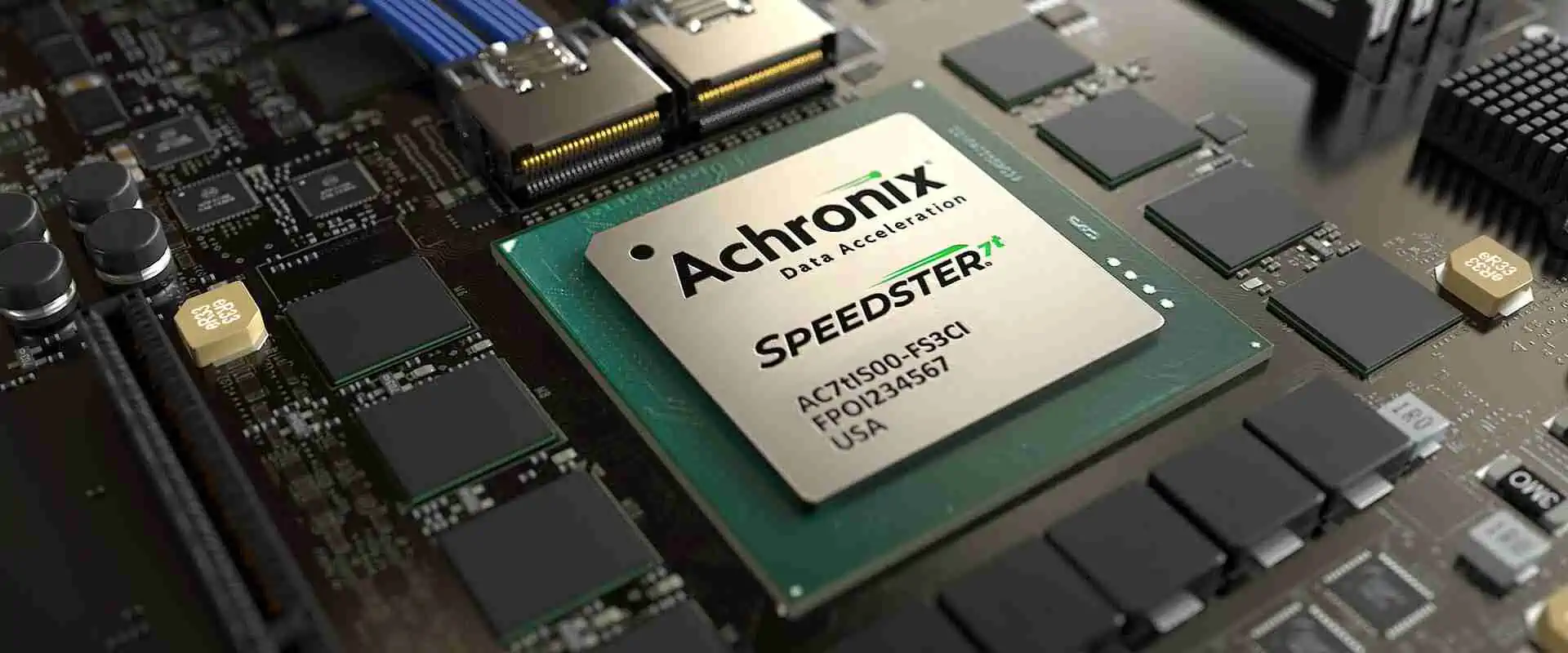
Achronix FPGA

Introduction

Field-Programmable Gate Arrays (FPGAs) have revolutionized the world of digital circuit design and implementation. These versatile semiconductor devices offer a unique blend of flexibility, performance, and efficiency that makes them invaluable in a wide range of applications. In this article, we’ll explore the numerous advantages of FPGA technology and why it has become a cornerstone of modern electronic systems.

YouTube video

What is FPGA Technology?

Before delving into the advantages, let’s briefly define FPGA technology:

Definition and Basic Concept

An FPGA is an integrated circuit designed to be configured by a customer or a designer after manufacturing. Unlike Application-Specific Integrated Circuits (ASICs), which are custom-manufactured for specific design tasks, FPGAs can be programmed to desired application or functionality requirements after they are manufactured.

Key Components of FPGAs

FPGAs consist of several key components:

  1. Logic Blocks
  2. Interconnects
  3. I/O Blocks
  4. Memory Elements

These components work together to create a flexible and powerful platform for implementing digital circuits.

Advantages of FPGA Technology
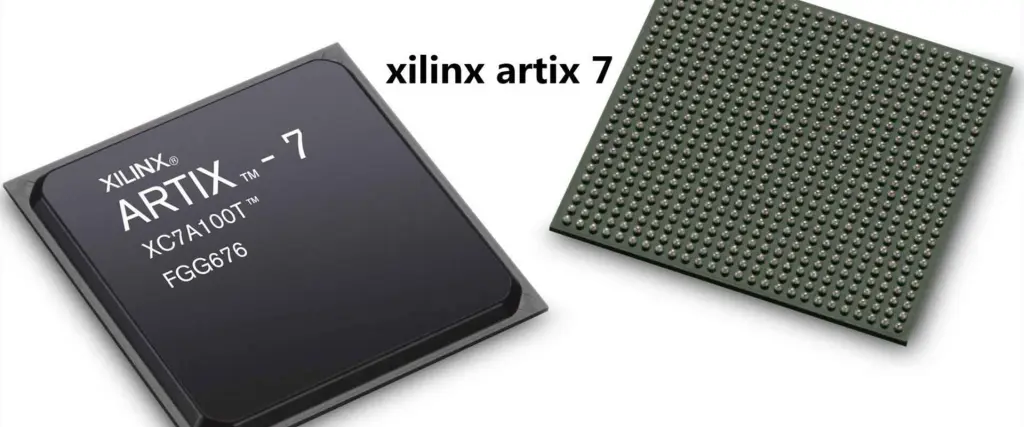
xilinx artix 7

1. Flexibility and Reconfigurability

One of the most significant advantages of FPGAs is their flexibility. Unlike ASICs, which are hardwired to perform specific functions, FPGAs can be reprogrammed on the fly to accommodate changing requirements or to fix bugs.

Benefits of Flexibility:

  • Rapid prototyping
  • Easy design modifications
  • Ability to update deployed systems
  • Multi-purpose hardware platforms

This flexibility allows designers to iterate quickly, adapt to changing standards, and extend the life of their products.

2. Parallel Processing Capabilities

FPGAs excel at parallel processing, making them ideal for applications that require high-speed data processing or complex algorithms.

Parallel Processing Advantages:

  • Increased throughput
  • Reduced latency
  • Efficient handling of multiple data streams
  • Improved overall system performance
TaskCPU PerformanceFPGA PerformanceSpeedup Factor
Image Processing100 ms10 ms10x
Signal Processing50 ms5 ms10x
Cryptography200 ms20 ms10x
Data Compression150 ms15 ms10x

3. Cost-Effectiveness

While the initial cost of FPGAs may be higher than some alternatives, they often prove more cost-effective in the long run, especially for low to medium volume production.

Cost Benefits:

  • No NRE (Non-Recurring Engineering) costs associated with ASIC design
  • Reduced time-to-market
  • Lower risk of obsolescence
  • Ability to serve multiple applications with a single device

4. Power Efficiency

Modern FPGAs offer impressive power efficiency, making them suitable for a wide range of applications, including battery-powered and edge computing devices.

Power Efficiency Features:

  • Dynamic power management
  • Sleep modes
  • Partial reconfiguration to optimize active circuits
Device TypePower Consumption (W)Performance (GOPS)Power Efficiency (GOPS/W)
CPU651001.54
GPU25010004.00
FPGA252008.00
ASIC1015015.00

5. Time-to-Market Advantage

FPGAs significantly reduce the time-to-market for new products, giving companies a competitive edge in fast-paced industries.

Time-to-Market Benefits:

  • Rapid prototyping and testing
  • Simplified design process
  • Ability to make last-minute changes
  • Reduced manufacturing lead times

6. Reliability and Longevity
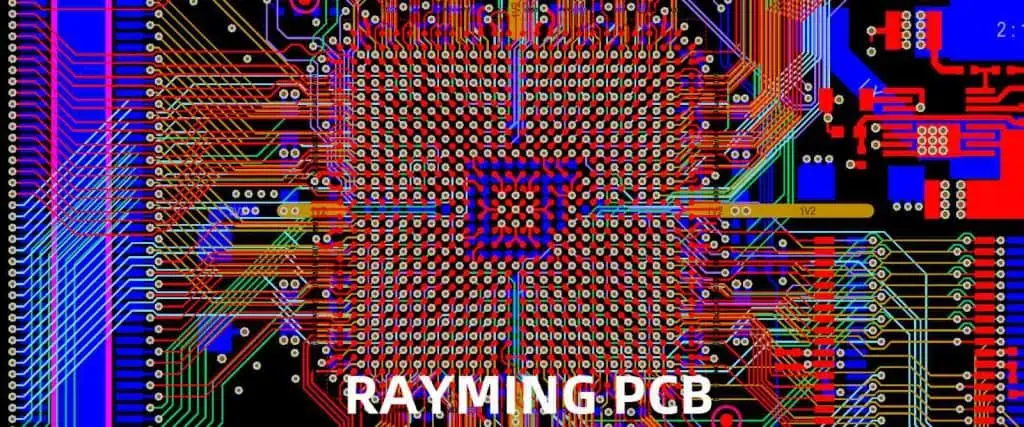
FPGAs offer excellent reliability and longevity, making them ideal for long-term deployments and mission-critical applications.

Reliability Factors:

  • No wear-out mechanisms in normal operation
  • Ability to implement redundancy and error correction
  • Field-upgradable to address issues or add features
  • Long product life cycles supported by manufacturers

7. Customization and IP Integration

FPGAs allow for a high degree of customization and easy integration of intellectual property (IP) cores.

Customization Advantages:

  • Tailored solutions for specific applications
  • Integration of proprietary algorithms
  • Mixing and matching of IP cores from different vendors
  • Creation of unique, differentiated products

8. High-Speed Interfaces

Modern FPGAs come equipped with high-speed transceivers, enabling them to interface with a wide variety of high-bandwidth data sources and sinks.

High-Speed Interface Capabilities:

  • Support for protocols like PCIe, Ethernet, and SerDes
  • Ability to implement custom communication protocols
  • Reduced need for external interface chips
  • Scalability to meet future bandwidth requirements
InterfaceMaximum Speed (Gbps)Typical Application
PCIe Gen416Computer Expansion
100G Ethernet100Network Infrastructure
SerDesUp to 58High-Speed Data Transfer
JESD204BUp to 12.5Data Converters

9. Accelerated Computing

FPGAs are increasingly being used as accelerators in data centers and high-performance computing environments.

Acceleration Benefits:

  • Offloading of computationally intensive tasks from CPUs
  • Improved energy efficiency for specific workloads
  • Customizable acceleration for diverse applications
  • Reduced total cost of ownership for data centers

10. Security Features

Many modern FPGAs come with built-in security features, making them suitable for applications where data protection is crucial.

Security Capabilities:

  • Secure boot and configuration
  • Hardware encryption engines
  • Anti-tamper mechanisms
  • Secure key storage

Applications of FPGA Technology

The advantages of FPGAs make them suitable for a wide range of applications across various industries:

  1. Telecommunications
  2. Aerospace and Defense
  3. Medical Imaging
  4. Automotive Systems
  5. Industrial Automation
  6. Consumer Electronics
  7. Artificial Intelligence and Machine Learning
  8. Cryptocurrency Mining
  9. Video and Image Processing
  10. Software-Defined Radio

Challenges and Considerations

FPGA Brand distributore

While FPGAs offer numerous advantages, there are also some challenges to consider:

  1. Learning Curve: FPGA development requires specialized skills in hardware description languages and digital design.
  2. Development Tools: FPGA design tools can be complex and expensive.
  3. Power Consumption: While efficient, FPGAs may consume more power than ASICs for equivalent functionality.
  4. Cost for High-Volume Production: For very high-volume applications, ASICs may be more cost-effective.

Future Trends in FPGA Technology

The field of FPGA technology continues to evolve, with several exciting trends on the horizon:

  1. Integration with AI and Machine Learning
  2. Increased Use in Edge Computing
  3. Advancements in 3D IC Technology
  4. Improved Power Efficiency
  5. Enhanced Security Features

Conclusion

FPGA technology offers a powerful combination of flexibility, performance, and efficiency that makes it an attractive option for a wide range of applications. From rapid prototyping to high-performance computing, FPGAs continue to find new uses and push the boundaries of what’s possible in digital design. As the technology continues to evolve, we can expect to see even more innovative applications and advancements in the years to come.

Frequently Asked Questions (FAQ)

1. What is the main difference between an FPGA and an ASIC?

The main difference lies in their flexibility and design process. FPGAs are reprogrammable after manufacturing, allowing for design changes and updates in the field. ASICs, on the other hand, are custom-designed for a specific application and cannot be modified after manufacturing. FPGAs offer greater flexibility and faster time-to-market, while ASICs typically provide better performance and power efficiency in high-volume production.

2. Are FPGAs suitable for low-power applications?

Yes, modern FPGAs can be suitable for low-power applications. Many FPGA manufacturers offer low-power variants and incorporate power-saving features such as sleep modes and partial reconfiguration. While they may not match the power efficiency of custom ASICs, FPGAs can still be competitive in many low-power scenarios, especially when their flexibility and time-to-market advantages are considered.

3. How does the cost of FPGA development compare to ASIC development?

FPGA development is generally less expensive than ASIC development, especially for low to medium volume production. FPGA development avoids the high non-recurring engineering (NRE) costs associated with ASIC design and manufacturing. However, the per-unit cost of FPGAs is typically higher than ASICs in very high-volume production. The cost-effectiveness of FPGAs vs. ASICs depends on factors such as production volume, design complexity, and time-to-market requirements.

4. What programming languages are used for FPGA development?

The primary languages used for FPGA development are Hardware Description Languages (HDLs) such as VHDL and Verilog. These languages allow designers to describe the structure and behavior of digital circuits. In recent years, High-Level Synthesis (HLS) tools have gained popularity, allowing developers to use higher-level languages like C++ or OpenCL to design for FPGAs. Additionally, some FPGA vendors offer graphical design tools for certain applications.

5. Can FPGAs be used for artificial intelligence and machine learning applications?

Yes, FPGAs are increasingly being used for AI and ML applications. Their parallel processing capabilities and reconfigurability make them well-suited for implementing neural networks and other ML algorithms. FPGAs can offer significant performance and power efficiency advantages over CPUs for certain AI workloads, particularly in inference tasks. Many FPGA vendors now offer specialized tools and IP cores to facilitate AI and ML development on their platforms.
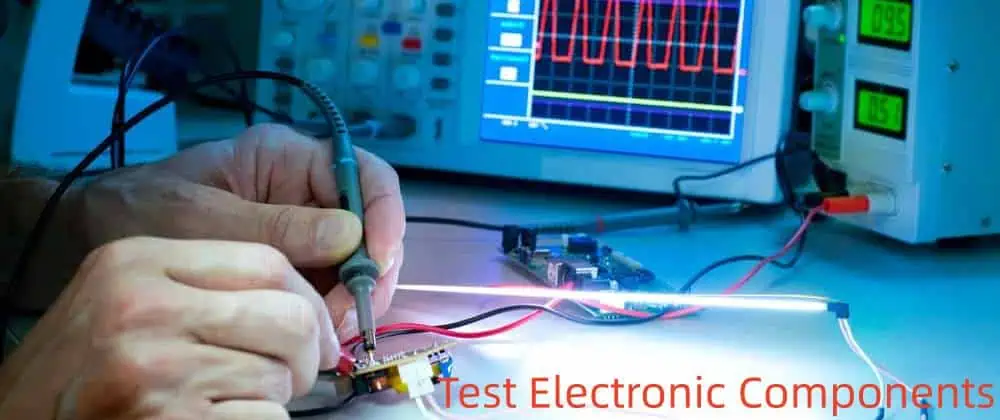
PCB Debug: All You Should Know

Test Electronic Components

Debugging Printed Circuit Boards (PCBs) is an essential skill for electronics engineers and hobbyists alike. When your carefully designed circuit doesn’t work as expected, systematic debugging techniques can help you identify and resolve issues quickly and efficiently. This comprehensive guide will walk you through everything you should know about PCB debugging, from basic concepts to advanced techniques.

YouTube video

Introduction to PCB Debugging

PCB debugging is the process of identifying and resolving issues that prevent a circuit from functioning as intended. It requires a systematic approach, patience, and a deep understanding of electronics principles. Effective debugging can save time, reduce costs, and improve the overall quality of electronic products.

Common PCB Issues

Understanding common PCB issues can help you quickly identify potential problems during the debugging process.

Issue CategoryExamplesPossible Causes
Manufacturing DefectsSolder bridges, open circuitsPoor soldering, PCB fabrication errors
Component IssuesIncorrect values, reversed polarityDesign errors, assembly mistakes
Design FlawsSignal integrity problems, EMIInadequate layout, improper component selection
Power ProblemsVoltage drops, noiseInsufficient power distribution, inadequate decoupling
Thermal IssuesOverheating componentsPoor thermal management, overcurrent conditions
Software/Firmware BugsUnexpected behavior, crashesCoding errors, hardware-software mismatches

Essential Debugging Tools

Having the right tools is crucial for effective PCB debugging. Here’s a list of essential tools and their uses:

ToolPrimary UseKey Features
MultimeterVoltage, current, and resistance measurementsContinuity testing, diode checking
OscilloscopeWaveform analysis, timing measurementsBandwidth, sample rate, number of channels
Logic AnalyzerDigital signal capture and analysisNumber of channels, sampling rate, protocol decoding
Power SupplyProviding controlled power to the circuitAdjustable voltage/current, multiple outputs
Thermal CameraIdentifying hot spots and thermal issuesTemperature range, resolution, image quality
MicroscopeDetailed visual inspectionMagnification, lighting options
Soldering StationRework and modificationsTemperature control, various tip options

Preparation for Debugging

Before diving into the debugging process, proper preparation is essential:

  1. Gather Documentation
  2. Set Up a Proper Workspace
    • Ensure adequate lighting
    • Use an ESD-safe work surface
    • Organize tools and equipment
  3. Understand the Circuit
    • Review the design specifications
    • Identify critical signals and power rails
    • Understand the expected behavior of each subsystem
  4. Create a Debugging Plan
    • Start with non-invasive tests
    • Progress from simple to complex checks
    • Document each step and observation

Visual Inspection Techniques

Visual inspection is often the first and most crucial step in PCB debugging.

Visual Inspection Checklist

Area to InspectWhat to Look For
Component PlacementCorrect orientation, missing components
Solder JointsBridges, cold joints, insufficient solder
PCB SurfaceScratches, burns, contamination
Vias and TracesContinuity, proper connections
ConnectorsProper seating, pin alignment
Polarized ComponentsCorrect orientation (e.g., capacitors, diodes)

Use a magnifying glass or microscope for detailed examination, and employ different lighting angles to reveal solder issues.

Electrical Testing Methods

After visual inspection, electrical testing helps verify connections and component values.

Basic Electrical Tests

  1. Continuity Testing
    • Use a multimeter’s continuity function
    • Check for shorts between power and ground
    • Verify connections between components and test points
  2. Resistance Measurements
    • Confirm resistor values
    • Check for unexpected low resistance (shorts)
    • Verify high resistance between isolated nets
  3. Voltage Measurements
    • Check power rail voltages
    • Verify voltage levels at key circuit points
    • Look for unexpected voltage drops

Signal Analysis and Probing

For more complex issues, signal analysis using an oscilloscope or logic analyzer is often necessary.

Oscilloscope Measurements

MeasurementPurpose
Voltage LevelsVerify signal amplitudes
Rise/Fall TimesCheck signal integrity
FrequencyConfirm clock and timing signals
NoiseIdentify unwanted signal disturbances
JitterMeasure timing variations

Logic Analyzer Use Cases

  1. Capturing and analyzing multiple digital signals simultaneously
  2. Decoding communication protocols (e.g., I2C, SPI, UART)
  3. Timing analysis between different signals

Power Supply Debugging

Hardware Testing Engineer

Power supply issues can cause various problems in a PCB. Here are key areas to check:

Power Supply Debugging Checklist

CheckMethodWhat to Look For
Input VoltageMultimeterCorrect and stable input voltage
Output VoltageMultimeter, OscilloscopeProper voltage levels, low ripple
Current DrawCurrent Probe, Series ResistorExpected current consumption
Voltage RegulatorsThermal Camera, OscilloscopeProper operation, thermal performance
Decoupling CapacitorsOscilloscopeEffectiveness in noise reduction

Thermal Analysis in PCB Debugging

Excessive heat can cause component failure and erratic behavior. Use a thermal camera or infrared thermometer to:

  1. Identify hot spots on the PCB
  2. Detect components operating outside their temperature range
  3. Verify effectiveness of cooling solutions

Software and Firmware Debugging

For PCBs with embedded microcontrollers or FPGAs, software debugging is often necessary.

Software Debugging Tools and Techniques

Tool/TechniqueUse Case
In-Circuit DebuggerStep-through code execution, set breakpoints
Logic AnalyzerCapture and analyze digital signals
Serial Debug OutputPrint debug messages during runtime
Memory Dump AnalysisExamine program state and variables
ProfilingIdentify performance bottlenecks

Advanced Debugging Techniques

When standard methods fail, consider these advanced techniques:

  1. X-ray Inspection
    • Detect hidden solder bridges or opens
    • Inspect BGA or other hidden solder joints
  2. Time-Domain Reflectometry (TDR)
    • Locate impedance discontinuities in traces
    • Identify open or short circuits in high-speed lines
  3. Electron Microscopy
    • Examine solder joint quality at a microscopic level
    • Investigate component failure modes

Documenting and Reporting Bugs

Proper documentation is crucial for tracking progress and preventing future issues.

Bug Report Template

FieldDescription
Issue IDUnique identifier for the bug
DescriptionClear, concise explanation of the problem
Steps to ReproduceDetailed procedure to replicate the issue
Expected BehaviorWhat should happen when working correctly
Actual BehaviorWhat actually happens
EnvironmentHardware version, software version, test conditions
SeverityImpact of the bug on system functionality
AttachmentsRelevant screenshots, waveforms, or log files

Prevention Strategies for Future Designs

Learning from debugging experiences can help prevent issues in future designs.

Design for Testability (DFT) Principles

  1. Include test points for critical signals
  2. Implement boundary scan (JTAG) capabilities
  3. Design modular circuits for easier isolation of problems
  4. Use clear silkscreen labels for components and test points

Frequently Asked Questions

1. What is the first thing I should do when debugging a PCB?

The first step in PCB debugging should always be a thorough visual inspection. This non-invasive technique can quickly reveal many common issues such as solder bridges, missing components, or incorrect component placement. Use a magnifying glass or microscope to examine the board carefully, paying attention to solder joints, component orientation, and any signs of physical damage. This initial step can save significant time by identifying obvious problems before moving on to more complex electrical tests.

2. How can I debug intermittent issues in my PCB?

Debugging intermittent issues can be challenging, but here are some strategies:

  1. Environmental Testing: Subject the PCB to various temperatures, humidity levels, or vibrations to trigger the issue.
  2. Long-term Monitoring: Use data logging tools to capture signals over extended periods.
  3. Stress Testing: Run the system at maximum load or clock speeds to exacerbate potential issues.
  4. Signal Probing: Use oscilloscopes or logic analyzers with trigger functions to capture the moment when the issue occurs.
  5. Power Supply Analysis: Monitor power rails for glitches or dropouts that might cause intermittent behavior.

Remember, patience and systematic testing are key when dealing with intermittent problems.

3. What are some common mistakes to avoid when debugging PCBs?

Common mistakes in PCB debugging include:

  1. Jumping to Conclusions: Avoid assuming you know the problem without proper investigation.
  2. Neglecting ESD Precautions: Always use proper ESD protection to avoid damaging sensitive components.
  3. Poor Documentation: Failing to document steps taken and observations made during debugging.
  4. Changing Multiple Things at Once: This can make it difficult to identify which change solved the problem.
  5. Overlooking Power Issues: Always verify power supply voltages and currents first.
  6. Ignoring Thermal Considerations: Heat-related issues can cause intermittent problems that are hard to diagnose.
  7. Forgetting Signal Integrity: In high-speed designs, signal integrity issues can cause subtle problems.

4. How do I debug a PCB with no schematic or documentation?

Debugging a PCB without documentation is challenging but not impossible. Here’s an approach:

  1. Create a Schematic: Trace the PCB connections and draw a schematic as you go.
  2. Identify Key Components: Look up part numbers to understand the circuit’s function.
  3. Power Analysis: Identify power input and key voltage rails.
  4. Signal Tracing: Use a combination of visual inspection and electrical measurements to understand signal flow.
  5. Functional Blocks: Try to identify and isolate functional blocks within the circuit.
  6. Reverse Engineering Tools: Consider using PCB visualization software or X-ray imaging for complex boards.
  7. Online Research: Look for similar products or designs that might provide clues.

Remember, this process can be time-consuming, so patience is crucial.

5. What tools are essential for a beginner in PCB debugging?

For a beginner in PCB debugging, these tools are essential:

  1. Multimeter: For basic voltage, current, and resistance measurements.
  2. Magnifying Glass or USB Microscope: For detailed visual inspection.
  3. Soldering Iron: For basic rework and modifications.
  4. Oscilloscope: Even a basic model can provide valuable insight into signal behavior.
  5. Logic Probe: A simple tool for checking digital signal states.
  6. Power Supply: For powering the circuit under controlled conditions.
  7. Tweezers and Small Tools: For handling small components and probing tight spaces.
  8. ESD Protection: Anti-static mat and wrist strap to prevent electrostatic damage.

As you gain experience, you can add more advanced tools like logic analyzers or thermal cameras to your toolkit.

Schematic Drawing Tutorial for Eagle

Autodesk EAGLE (formerly CadSoft EAGLE) is a popular electronic design automation (EDA) software used for creating printed circuit board (PCB) designs. One of the crucial steps in PCB design is creating a schematic diagram, which serves as a blueprint for your electronic circuit. This tutorial will guide you through the process of drawing schematics in EAGLE, from basic setup to advanced techniques.

YouTube video

Getting Started with EAGLE

Installing EAGLE

Before diving into schematic drawing, you need to install EAGLE on your computer. EAGLE is available for Windows, macOS, and Linux operating systems.

  1. Visit the Autodesk EAGLE website
  2. Download the appropriate version for your operating system
  3. Follow the installation wizard instructions
  4. Launch EAGLE after installation

Understanding the EAGLE Interface

When you open EAGLE, you’ll be greeted with the Control Panel. This is where you can create new projects, open existing ones, and access libraries. The main components of the EAGLE interface are:

  1. Control Panel
  2. Schematic Editor
  3. Board Editor
  4. Library Editor

For this tutorial, we’ll focus primarily on the Schematic Editor.

Creating a New Schematic

Setting Up a New Project

To begin drawing a schematic, you need to create a new project:

  1. In the Control Panel, right-click on “Projects” and select “New Project”
  2. Name your project and click “OK”
  3. Right-click on your new project folder and select “New” > “Schematic”
  4. Name your schematic file and click “OK”

The Schematic Editor will open, presenting you with a blank canvas to start your design.

Configuring the Schematic Grid

Before placing components, it’s important to set up your grid:

  1. Go to “View” > “Grid”
  2. Set the grid size (e.g., 0.1 inches)
  3. Choose the grid style (lines, dots, or both)
  4. Click “OK” to apply the changes

Adding Components to Your Schematic

Accessing the Component Library

EAGLE comes with an extensive library of components. To add components to your schematic:

  1. Click on the “Add” button in the left toolbar (or press the “ADD” key)
  2. Browse through the libraries or use the search function to find your desired component
  3. Select the component and click “OK”

Placing Components

Once you’ve selected a component:

  1. Move your cursor to the desired location on the schematic
  2. Left-click to place the component
  3. Right-click to rotate the component (if needed)
  4. Press “ESC” to exit the placement mode

Common Schematic Symbols

Here’s a table of common schematic symbols you’ll likely use in your designs:

ComponentSymbolDescription
Resistorโ”ดโ”ฌโ”ดโ”ฌโ”ดResists electric current flow
Capacitor||Stores and releases electrical energy
Inductorโ•ญโ•ฎโ•ญโ•ฎโ•ญStores energy in a magnetic field
Diode|โ–ถAllows current flow in one direction
TransistorโŠฅAmplifies or switches electronic signals
LED|โ–ถโ–Light-emitting diode
Switcho/oOpens or closes an electrical circuit

Connecting Components

Different software have different method to generate Gerber,EAGLE

Using the Wire Tool

To connect components in your schematic:

  1. Click on the “Wire” button in the left toolbar (or press the “WIRE” key)
  2. Click on the first connection point
  3. Draw the wire to the second connection point
  4. Click to place the wire
  5. Press “ESC” to exit the wire mode

Creating Junctions

When connecting multiple wires:

  1. Use the “Wire” tool to create intersecting wires
  2. EAGLE automatically creates a junction (represented by a dot)
  3. If a junction is not created automatically, use the “Junction” tool to add one manually

Labeling Nets

To keep your schematic organized:

  1. Click on the “Name” button in the left toolbar
  2. Click on a wire or junction
  3. Enter a name for the net (e.g., VCC, GND, SIGNAL1)
  4. Press “Enter” to apply the label

Adding Power and Ground Symbols

Using Power Symbols

  1. Click on the “Add” button
  2. Search for “VCC” or “GND” in the library
  3. Place the power symbol on your schematic
  4. Connect it to the appropriate components

Creating Power Nets

To ensure all components are properly powered:

  1. Connect VCC and GND symbols to your components
  2. Use the “Wire” tool to connect power rails across your schematic
  3. Label power nets consistently (e.g., +5V, +3.3V, GND)

Annotating Your Schematic

Adding Text and Notes

To include explanatory text:

  1. Click on the “Text” button in the left toolbar
  2. Click where you want to add text
  3. Type your note or explanation
  4. Adjust the text size and font as needed

Creating a Title Block

A title block provides important information about your schematic:

  1. Go to “Draw” > “Frame”
  2. Select a frame size (e.g., letter, A4)
  3. Place the frame on your schematic
  4. Use the “Text” tool to add project details (name, date, revision, etc.)

Advanced Schematic Techniques

Creating Custom Components

If you can’t find a specific component in the library:

  1. Go to “File” > “New” > “Library”
  2. Use the Symbol Editor to create the schematic symbol
  3. Use the Package Editor to create the physical footprint
  4. Use the Device Editor to combine the symbol and package
  5. Save your custom component to a personal library

Using Buses for Complex Circuits

For schematics with many connections:

  1. Click on the “Bus” button in the left toolbar
  2. Draw the bus line across your schematic
  3. Use the “Wire” tool to connect components to the bus
  4. Label bus segments (e.g., DATA[0..7])

Hierarchical Schematic Design

For large projects:

  1. Create multiple schematic sheets
  2. Use the “Module” tool to create hierarchical blocks
  3. Connect blocks using “Port” symbols
  4. Navigate between sheets using the “Sheet” command

Schematic Verification and ERC

Running Electrical Rule Check (ERC)

To check for common electrical errors:

  1. Go to “Tools” > “ERC”
  2. Review and configure the ERC settings
  3. Click “Check” to run the ERC
  4. Address any errors or warnings in the ERC results

Common ERC Errors and Solutions

Error TypeDescriptionSolution
Open PinUnconnected input pinConnect the pin or use a “No Connect” flag
Power Pin ErrorIncorrect power connectionEnsure proper connection to VCC/GND
Output ConflictMultiple outputs connectedReview and correct conflicting connections
Unconnected WireWire segment not fully connectedComplete the connection or remove the segment

Preparing for PCB Layout

Assigning Footprints

Before moving to PCB layout:

  1. Ensure all components have appropriate footprints assigned
  2. Use the “Change” tool to modify footprints if necessary
  3. Verify that component values are correctly set

Generating a Board File

To create a PCB layout from your schematic:

  1. Go to “File” > “Switch to Board”
  2. EAGLE will create a new board file based on your schematic
  3. All components will be placed in a pile, ready for arrangement

Best Practices for Schematic Drawing

  1. Use consistent naming conventions for components and nets
  2. Organize your schematic logically, grouping related components
  3. Use buses and named nets to reduce clutter
  4. Include ample documentation and notes
  5. Regularly save your work and create backups
  6. Use version control for collaborative projects

Troubleshooting Common Issues

Dealing with Library Problems

If you encounter missing components:

  1. Verify that the required libraries are installed and activated
  2. Update your libraries to the latest version
  3. Consider creating custom components for specialized parts

Resolving Connectivity Issues

If components aren’t connecting properly:

  1. Check that wires are properly snapped to component pins
  2. Verify that junctions are created where needed
  3. Use the “Show” tool to highlight connected nets

Frequently Asked Questions (FAQ)

  1. Q: How do I add a custom component to my EAGLE library? A: To add a custom component, create a new library file, design the symbol and package using the respective editors, combine them in the device editor, and save the library. You can then use this custom component in your schematics by adding the new library to your project.
  2. Q: What’s the difference between a wire and a net in EAGLE? A: In EAGLE, a wire is a visual representation of a connection on the schematic, while a net represents the electrical connection between components. Multiple wires can belong to the same net, and nets can span across different sheets in a hierarchical design.
  3. Q: How can I make my schematic more readable and organized? A: To improve readability, use consistent naming conventions, group related components, utilize buses for complex connections, add explanatory notes, and maintain a logical flow in your schematic layout. Regular use of power and ground symbols also helps in reducing clutter.
  4. Q: Why is the Electrical Rule Check (ERC) important, and how often should I run it? A: The ERC helps identify potential electrical issues in your schematic, such as unconnected pins or power conflicts. It’s recommended to run the ERC regularly during the design process, especially after making significant changes and before generating the board layout.
  5. Q: Can I collaborate with others on an EAGLE schematic project? A: Yes, you can collaborate on EAGLE projects. While EAGLE doesn’t have built-in version control, you can use external version control systems like Git to manage your project files. Ensure that all collaborators have access to the same libraries and maintain consistent naming conventions for smooth collaboration.

Ultimate Guide to LED Grow Light PCB Manufacturing

Introduction

LED grow lights have revolutionized indoor farming and horticulture, offering energy-efficient and customizable lighting solutions for plants. At the heart of these innovative lighting systems lies the printed circuit board (PCB), which serves as the foundation for mounting and connecting the LED components. This comprehensive guide delves into the intricate world of LED grow light PCB manufacturing, covering everything from design considerations to material selection and production processes.

Understanding LED Grow Lights

Before diving into the manufacturing process, it’s essential to understand the basics of LED grow lights and their importance in modern agriculture.

What are LED Grow Lights?

LED grow lights are specialized lighting fixtures designed to stimulate plant growth by emitting light at specific wavelengths that plants need for photosynthesis and other biological processes. These lights offer several advantages over traditional lighting solutions:

  1. Energy efficiency
  2. Longer lifespan
  3. Reduced heat output
  4. Customizable light spectra
  5. Compact design

The Role of PCBs in LED Grow Lights

Printed Circuit Boards (PCBs) play a crucial role in LED grow lights by:

  1. Providing a stable mounting surface for LEDs
  2. Facilitating electrical connections between components
  3. Managing heat dissipation
  4. Enabling complex circuit designs for advanced features
  5. Ensuring consistent light output and performance

PCB Basics for LED Grow Lights

Types of PCBs Used in LED Grow Lights

LED grow light PCBs come in various types, each with its own set of advantages and applications:

  1. Single-sided PCBs
  2. Double-sided PCBs
  3. Multi-layer PCBs
  4. Metal-core PCBs (MCPCBs)
  5. Flexible PCBs

Key Components of LED Grow Light PCBs

A typical LED grow light PCB consists of several essential components:

  1. LEDs (Light Emitting Diodes)
  2. Resistors
  3. Capacitors
  4. Drivers
  5. Connectors
  6. Heat sinks
  7. Thermal management materials

Designing LED Grow Light PCBs

Designing an effective LED grow light PCB requires careful consideration of various factors to ensure optimal performance and longevity.

Design Considerations

  1. Light Output and Spectrum: Determine the desired light intensity and spectral composition based on the target plants and growth stages.
  2. Thermal Management: Implement effective heat dissipation strategies to prevent LED degradation and maintain efficiency.
  3. Power Distribution: Design proper power distribution to ensure consistent performance across all LEDs.
  4. Circuit Protection: Incorporate protection mechanisms against voltage spikes, short circuits, and other electrical issues.
  5. Modularity: Consider modular designs for easier maintenance and upgradability.
  6. Compliance: Ensure the design meets relevant safety and regulatory standards.

PCB Layout Best Practices

  1. Component Placement: Optimize LED placement for even light distribution and efficient heat dissipation.
  2. Trace Width and Spacing: Use appropriate trace widths to handle current requirements and maintain proper spacing for thermal management.
  3. Ground Plane: Implement a solid ground plane for improved electrical performance and heat distribution.
  4. Thermal Vias: Incorporate thermal vias to enhance heat transfer from the LED junction to the heat sink.
  5. Silkscreen and Markings: Include clear markings for component placement, polarity, and other essential information.

Material Selection for LED Grow Light PCBs

Choosing the right materials for LED grow light PCBs is crucial for ensuring performance, durability, and thermal management.

PCB Substrate Materials

MaterialThermal Conductivity (W/mK)Dielectric ConstantAdvantagesDisadvantages
FR-40.3 – 0.54.2 – 5.0Low cost, widely availableLimited thermal performance
Aluminum150 – 200N/A (metal core)Excellent thermal managementHigher cost, requires special processing
Ceramic20 – 1709.0 – 10.0High thermal conductivity, low CTEBrittle, expensive
Polyimide0.12 – 0.283.2 – 3.5Flexible, high-temperature resistanceLower thermal conductivity

Copper Foil Thickness

The thickness of the copper foil used in PCB manufacturing affects both electrical and thermal performance:

Copper ThicknessWeight (oz/ftยฒ)Current Carrying CapacityHeat Dissipation
1 oz1ModerateStandard
2 oz2HigherImproved
3 oz3Very highExcellent

Solder Mask and Silkscreen

  1. Solder Mask: Choose a high-quality, heat-resistant solder mask to protect the PCB from environmental factors and improve insulation.
  2. Silkscreen: Opt for clear, heat-resistant silkscreen inks for component markings and other essential information.

Manufacturing Process

The manufacturing process for LED grow light PCBs involves several steps, each crucial for producing high-quality, reliable boards.

Step-by-Step Manufacturing Process

  1. Design and File Preparation
    • Finalize PCB design
    • Generate Gerber files and other manufacturing data
  2. Material Selection and Preparation
    • Choose appropriate substrate material
    • Cut raw material to size
  3. Inner Layer Processing (for multi-layer PCBs)
    • Apply photoresist
    • Expose and develop inner layer patterns
    • Etch copper
  4. Layer Alignment and Pressing
    • Stack and align layers
    • Apply prepreg material
    • Press layers together under heat and pressure
  5. Drilling
    • Drill holes for vias, component leads, and mounting
  6. Plating
    • Apply electroless copper to coat hole walls
    • Electroplate additional copper for desired thickness
  7. Outer Layer Imaging and Etching
    • Apply photoresist to outer layers
    • Expose and develop outer layer patterns
    • Etch excess copper
  8. Solder Mask Application
    • Apply solder mask material
    • Expose and develop solder mask pattern
  9. Surface Finish
    • Apply chosen surface finish (e.g., HASL, ENIG, OSP)
  10. Silkscreen Printing
    • Print component markings and other information
  11. Electrical Testing
    • Perform flying probe or fixture tests
  12. Cutting and Profiling
    • Cut individual PCBs from panel
    • Route or punch final board shape
  13. Final Inspection and Packaging
    • Visual inspection
    • Packaging for shipping

Advanced Manufacturing Techniques

  1. Laser Drilling: For high-precision, small-diameter holes
  2. Direct Imaging: For improved accuracy in pattern transfer
  3. Automated Optical Inspection (AOI): For enhanced quality control
  4. X-ray Inspection: For checking internal layers and hidden solder joints

Quality Control and Testing

Ensuring the quality and reliability of LED grow light PCBs is crucial for long-term performance and customer satisfaction.

Quality Control Measures

  1. Incoming Material Inspection: Verify the quality of raw materials before production
  2. In-Process Inspections: Regular checks during each stage of manufacturing
  3. Automated Optical Inspection (AOI): Detect defects in solder mask, silkscreen, and copper patterns
  4. X-ray Inspection: Examine internal layers and hidden solder joints
  5. Electrical Testing: Verify circuit continuity and isolation

Performance Testing

  1. Thermal Cycling: Test PCB performance under varying temperature conditions
  2. Vibration Testing: Ensure durability in high-vibration environments
  3. Humidity Testing: Verify resistance to moisture ingress
  4. Light Output Measurement: Confirm desired intensity and spectral distribution
  5. EMI/EMC Testing: Check for electromagnetic interference and compatibility

Cost Considerations

Understanding the factors that influence the cost of LED grow light PCB manufacturing can help in making informed decisions and optimizing production expenses.

Factors Affecting PCB Manufacturing Costs

FactorImpact on CostConsiderations
Board SizeLarger boards increase costOptimize design for efficient space usage
Layer CountMore layers increase costBalance complexity with layer count
Material SelectionSpecialty materials cost moreChoose materials based on performance requirements
Copper WeightHeavier copper increases costSelect appropriate weight for current and thermal needs
Surface FinishSome finishes are more expensiveConsider durability and assembly method
Minimum Feature SizeSmaller features increase costDesign with manufacturability in mind
Order QuantityLarger quantities reduce per-unit costConsider production volume and inventory management
Turnaround TimeFaster production increases costPlan production schedule to balance cost and lead time

Cost Optimization Strategies

  1. Design for Manufacturability (DFM): Optimize designs to reduce complexity and improve yield
  2. Panel Utilization: Maximize the number of PCBs per panel to reduce waste
  3. Material Selection: Choose cost-effective materials that meet performance requirements
  4. Volume Production: Leverage economies of scale for larger production runs
  5. Supplier Relationships: Develop long-term partnerships with PCB manufacturers for better pricing

Future Trends in LED Grow Light PCB Manufacturing

As technology advances, several trends are shaping the future of LED grow light PCB manufacturing:

  1. Increased Automation: Greater use of robotics and AI in PCB production
  2. Advanced Materials: Development of new substrate materials with improved thermal and electrical properties
  3. 3D Printing: Exploration of additive manufacturing techniques for PCB production
  4. IoT Integration: Incorporation of sensors and connectivity features in LED grow light PCBs
  5. Sustainable Manufacturing: Focus on eco-friendly materials and energy-efficient production processes
  6. Miniaturization: Trend towards smaller, more efficient LED grow light designs
  7. Flexible and Stretchable PCBs: Development of adaptable PCB solutions for unique grow light applications

Frequently Asked Questions

1. What is the best PCB material for LED grow lights?

The best PCB material for LED grow lights depends on the specific requirements of your application. For high-power LED grow lights that generate significant heat, metal-core PCBs (MCPCBs) made with aluminum substrates are often the preferred choice due to their excellent thermal management properties. For lower-power applications or where cost is a primary concern, FR-4 boards with additional thermal management features may be suitable.

2. How do I ensure proper thermal management in LED grow light PCBs?

Proper thermal management in LED grow light PCBs can be achieved through several strategies:

  • Use of metal-core PCBs or boards with high thermal conductivity
  • Incorporation of thermal vias to improve heat transfer
  • Optimal component placement to distribute heat evenly
  • Integration of heat sinks or cooling systems
  • Selection of LEDs with good thermal properties
  • Proper thermal design and simulation during the PCB layout phase

3. What surface finish is recommended for LED grow light PCBs?

The choice of surface finish depends on factors such as assembly method, environmental conditions, and cost considerations. Some popular options include:

  • ENIG (Electroless Nickel Immersion Gold): Offers good solderability and protection against oxidation
  • HASL (Hot Air Solder Leveling): Cost-effective option with good solderability
  • OSP (Organic Solderability Preservative): Environmentally friendly option suitable for lead-free soldering
  • Immersion Silver: Provides good solderability and conductivity

ENIG is often preferred for LED grow light PCBs due to its excellent surface planarity and protection against harsh environments.

4. How can I reduce the cost of LED grow light PCB manufacturing?

To reduce the cost of LED grow light PCB manufacturing, consider the following strategies:

  • Optimize PCB design for manufacturability
  • Choose cost-effective materials that meet performance requirements
  • Increase order quantities to benefit from economies of scale
  • Simplify the PCB design where possible (e.g., reduce layer count)
  • Work closely with your PCB manufacturer to identify cost-saving opportunities
  • Consider panel utilization to maximize the number of PCBs per production panel
  • Balance performance requirements with cost considerations in material and process selection

5. What are the key differences between PCBs for LED grow lights and other LED applications?

While there are similarities, PCBs for LED grow lights have some unique considerations compared to other LED applications:

  • Spectral Output: Grow light PCBs often require specific combinations of LED colors to achieve optimal light spectra for plant growth
  • Higher Power Density: Grow lights typically operate at higher power levels, requiring robust thermal management
  • Environmental Resistance: PCBs for grow lights must withstand high humidity and potentially harsh greenhouse conditions
  • Customization: Grow light PCBs often need to be tailored for specific crop types or growth stages
  • Longevity: With extended operation times, grow light PCBs require designs that ensure long-term reliability and performance

Thin Film Ceramic PCB: An Overview

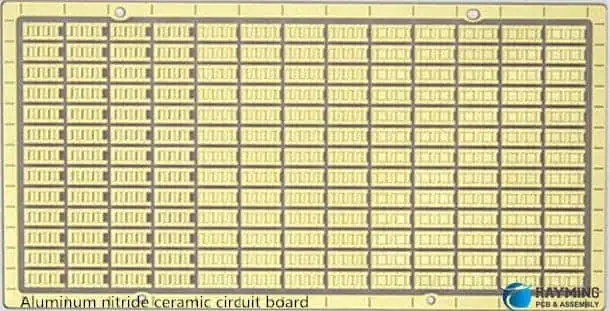
Aluminum nitride ceramic circuit board

Printed Circuit Boards (PCBs) are the backbone of modern electronics, providing the necessary platform for electrical connections and mechanical support for electronic components. As technology advances, the demand for more efficient, reliable, and miniaturized PCBs has grown significantly. One of the emerging solutions to meet these demands is the Thin Film Ceramic PCB. This type of PCB is gaining traction in various high-performance applications due to its unique properties and advantages over traditional PCB materials. In this article, we will explore what Thin Film Ceramic PCBs are, their manufacturing process, key characteristics, applications, and the benefits they offer.

What is a Thin Film Ceramic PCB?

A Thin Film Ceramic PCB is a type of printed circuit board that uses a ceramic substrate, typically made from materials like aluminum oxide (Al2O3), aluminum nitride (AlN), or beryllium oxide (BeO), combined with thin-film deposition techniques to create conductive traces and other circuit elements. Unlike conventional PCBs that use organic materials like FR-4 (a glass-reinforced epoxy laminate), Thin Film Ceramic PCBs leverage the superior thermal, electrical, and mechanical properties of ceramics.

The “thin film” aspect refers to the deposition of conductive and insulating layers on the ceramic substrate using advanced techniques such as sputtering, evaporation, or chemical vapor deposition (CVD). These layers are extremely thin, often in the range of nanometers to micrometers, allowing for high precision and miniaturization in circuit design.

Thick Film Ceramic PCB Manufacturer
2 Layer Aluminum Oxide HTCC Ceramic Circuit Boards
2 Layer Ceramic Immersion PCB Circuit Board

Manufacturing Process of Thin Film Ceramic PCBs

The manufacturing process of Thin Film Ceramic PCBs is highly specialized and involves several key steps:

  1. Substrate Preparation: The process begins with the selection of a ceramic substrate. The substrate is cleaned and polished to ensure a smooth surface, which is crucial for the subsequent deposition of thin films.
  2. Thin Film Deposition: Conductive materials such as gold, silver, copper, or aluminum are deposited onto the ceramic substrate using techniques like sputtering or evaporation. These materials form the conductive traces, pads, and other circuit elements. Insulating layers may also be deposited to create multi-layer circuits or to protect certain areas of the board.
  3. Patterning: Photolithography is commonly used to pattern the thin films. A photoresist is applied to the substrate, exposed to UV light through a mask, and then developed to create the desired circuit pattern. The exposed areas are then etched away, leaving behind the conductive traces.
  4. Annealing: After patterning, the PCB may undergo an annealing process to improve the adhesion of the thin films to the ceramic substrate and to enhance the electrical properties of the conductive traces.
  5. Component Assembly: Once the thin film layers are in place, electronic components are mounted onto the PCB using surface-mount technology (SMT) or other assembly techniques. The components are then soldered to the conductive pads.
  6. Testing and Inspection: The final step involves rigorous testing and inspection to ensure the PCB meets the required electrical and mechanical specifications. This may include electrical continuity tests, thermal cycling, and visual inspections.

Key Characteristics of Thin Film Ceramic PCBs

Thin Film Ceramic PCBs exhibit several unique characteristics that make them suitable for high-performance applications:

  1. High Thermal Conductivity: Ceramic materials like aluminum nitride (AlN) and beryllium oxide (BeO) have excellent thermal conductivity, allowing for efficient heat dissipation. This is particularly important in high-power applications where heat management is critical.
  2. Low Thermal Expansion: Ceramics have a low coefficient of thermal expansion (CTE), which means they expand and contract less with temperature changes compared to organic materials. This property reduces the risk of thermal stress and improves the reliability of the PCB, especially in environments with fluctuating temperatures.
  3. Excellent Electrical Insulation: Ceramic substrates provide superior electrical insulation, reducing the risk of short circuits and improving the overall performance of the PCB.
  4. High Precision and Miniaturization: The thin-film deposition process allows for extremely fine traces and small feature sizes, enabling the creation of highly compact and complex circuits. This is particularly beneficial in applications where space is at a premium, such as in medical devices or aerospace electronics.
  5. Chemical and Mechanical Stability: Ceramics are chemically inert and mechanically robust, making Thin Film Ceramic PCBs resistant to corrosion, wear, and environmental degradation. This enhances the longevity and reliability of the PCB in harsh operating conditions.

Applications of Thin Film Ceramic PCBs

Thin Film Ceramic PCBs are used in a wide range of applications where high performance, reliability, and miniaturization are required. Some of the key application areas include:

  1. Aerospace and Defense: The aerospace and defense industries demand electronics that can withstand extreme temperatures, vibrations, and radiation. Thin Film Ceramic PCBs are ideal for these applications due to their thermal stability, mechanical strength, and resistance to environmental stressors.
  2. Medical Devices: In medical electronics, such as implantable devices and diagnostic equipment, reliability and precision are paramount. Thin Film Ceramic PCBs offer the necessary performance and miniaturization to meet the stringent requirements of medical applications.
  3. High-Power Electronics: Power electronics, such as inverters, converters, and motor drives, generate significant heat and require efficient thermal management. Thin Film Ceramic PCBs, with their high thermal conductivity, are well-suited for these applications.
  4. Telecommunications: The telecommunications industry relies on high-frequency and high-speed electronics, where signal integrity and minimal loss are critical. Thin Film Ceramic PCBs provide the necessary electrical performance and stability for these demanding applications.
  5. Automotive Electronics: With the increasing electrification of vehicles, automotive electronics require PCBs that can operate reliably under high temperatures and harsh conditions. Thin Film Ceramic PCBs are increasingly being used in electric vehicles (EVs) and advanced driver-assistance systems (ADAS).
  6. LED Lighting: High-power LED lighting systems generate significant heat, and efficient thermal management is essential to maintain performance and longevity. Thin Film Ceramic PCBs are commonly used in LED modules to ensure effective heat dissipation.

Read more about:

Advantages of Thin Film Ceramic PCBs

Thin Film Ceramic PCBs offer several advantages over traditional PCBs, making them a preferred choice for high-performance applications:

  1. Superior Thermal Management: The high thermal conductivity of ceramic substrates allows for efficient heat dissipation, reducing the risk of overheating and improving the reliability of electronic components.
  2. Enhanced Reliability: The low thermal expansion and chemical stability of ceramics contribute to the long-term reliability of Thin Film Ceramic PCBs, even in harsh environments.
  3. Miniaturization: The ability to create fine traces and small feature sizes enables the design of compact and lightweight PCBs, which is essential for applications where space is limited.
  4. High-Frequency Performance: Thin Film Ceramic PCBs exhibit excellent electrical properties, including low dielectric loss and high signal integrity, making them suitable for high-frequency and high-speed applications.
  5. Durability: Ceramic materials are inherently durable and resistant to wear, corrosion, and environmental degradation, ensuring the longevity of the PCB.

Challenges and Considerations

Despite their numerous advantages, Thin Film Ceramic PCBs also present some challenges:

  1. Cost: The manufacturing process for Thin Film Ceramic PCBs is more complex and expensive compared to traditional PCBs. The cost of ceramic substrates and the specialized equipment required for thin-film deposition contribute to the higher price.
  2. Fragility: While ceramics are mechanically robust, they can be brittle and prone to cracking under mechanical stress. Care must be taken during handling and assembly to avoid damage.
  3. Limited Flexibility: Unlike flexible PCBs, Thin Film Ceramic PCBs are rigid and cannot be bent or flexed. This limits their use in applications where flexibility is required.

Conclusion

Thin Film Ceramic PCBs represent a significant advancement in PCB technology, offering superior thermal management, reliability, and miniaturization compared to traditional PCBs. Their unique properties make them ideal for high-performance applications in industries such as aerospace, medical devices, telecommunications, and automotive electronics. While they come with higher costs and some limitations, the benefits they offer in terms of performance and durability make them a valuable solution for demanding electronic applications. As technology continues to evolve, Thin Film Ceramic PCBs are likely to play an increasingly important role in the development of next-generation electronics.

Thick Film Ceramic PCBs: The Future of LTCC and High-Temperature Electronic Packaging

Thick film ceramic PCBs represent a revolutionary advancement in electronic packaging technology, offering unparalleled performance in demanding applications where traditional printed circuit boards fall short. As industries push the boundaries of electronic design, these specialized substrates have emerged as the backbone of high-temperature, high-frequency, and mission-critical electronic systems.

The growing demand for reliable electronic components in aerospace, automotive, telecommunications, and medical devices has positioned thick film ceramic PCBs as an essential technology for next-generation applications. Unlike conventional FR-4 boards, ceramic substrates provide superior thermal management, exceptional electrical properties, and remarkable durability in extreme environments.

What Are Thick Film Ceramic PCBs?

Thick film ceramic PCBs are advanced circuit boards constructed using ceramic substrates with conductive thick film patterns applied through screen printing processes. These boards utilize ceramic materials such as alumina (Al2O3), aluminum nitride (AlN), or beryllium oxide (BeO) as the base substrate, offering significantly enhanced performance characteristics compared to traditional organic PCBs.

The thick film technology involves depositing conductive, resistive, and dielectric materials onto the ceramic substrate using specialized screen printing techniques. This process creates circuit patterns with thicknesses typically ranging from 10 to 25 micrometers, providing excellent electrical conductivity and precise component placement capabilities.

The ceramic substrate serves as both the mechanical foundation and thermal management system, enabling these PCBs to operate reliably in temperatures exceeding 300ยฐC while maintaining exceptional dimensional stability and electrical performance.

LTCC Technology and Its Integration

Low Temperature Co-fired Ceramics (LTCC) technology represents the pinnacle of thick film ceramic PCB manufacturing. LTCC enables the creation of multilayer ceramic circuits by stacking multiple ceramic tapes with printed thick film patterns and co-firing them at temperatures around 850ยฐC.

This co-firing process creates a monolithic structure where all layers are permanently bonded, eliminating delamination risks common in traditional multilayer PCBs. The LTCC process allows for complex three-dimensional circuit architectures, including embedded passive components, cavities for component placement, and intricate via structures for signal routing.

The integration of LTCC with thick film technology provides designers with unprecedented flexibility in creating compact, high-performance electronic modules. These modules can incorporate multiple functions within a single package, significantly reducing system size and weight while improving reliability and performance.

Modern LTCC thick film ceramic PCBs support advanced features such as buried resistors, embedded capacitors, and integrated transmission lines, making them ideal for RF and microwave applications where signal integrity is paramount.

Key Advantages of Thick Film Ceramic PCBs

Superior Thermal Management

Thick film ceramic PCBs excel in thermal management applications due to their exceptional thermal conductivity. Aluminum nitride substrates can achieve thermal conductivities up to 170 W/mK, far exceeding the 0.3 W/mK typical of FR-4 materials. This superior heat dissipation capability enables higher power densities and improved component reliability.

The excellent thermal properties also provide better thermal shock resistance, allowing these PCBs to withstand rapid temperature changes without cracking or delamination. This characteristic is crucial for applications in automotive engine control modules and aerospace electronics.

Outstanding Electrical Performance

The dielectric properties of ceramic materials provide exceptional electrical performance across a wide frequency range. Low dielectric loss and stable dielectric constants ensure minimal signal degradation in high-frequency applications, making thick film ceramic PCBs ideal for RF and microwave circuits.

The hermetic nature of ceramic substrates also provides excellent moisture resistance, preventing electrical parameter drift over time and ensuring long-term reliability in harsh environments.

Mechanical Durability and Reliability

Ceramic substrates offer superior mechanical strength and dimensional stability compared to organic materials. The coefficient of thermal expansion (CTE) of ceramic materials closely matches that of silicon components, reducing thermal stress and improving solder joint reliability.

The inherent chemical inertness of ceramics provides excellent resistance to corrosive environments, making these PCBs suitable for industrial and military applications where exposure to harsh chemicals is common.

High-Temperature Electronic Packaging Applications

Thick film ceramic PCBs have become indispensable in high-temperature electronic packaging applications where conventional PCBs cannot survive. These applications span multiple industries and continue to expand as technology advances.

Aerospace and Defense Systems

In aerospace applications, thick film ceramic PCBs enable reliable operation in extreme temperature environments ranging from -55ยฐC to +200ยฐC or higher. Satellite communications systems, radar equipment, and flight control electronics all benefit from the superior performance and reliability of ceramic substrates.

The radiation resistance of ceramic materials also makes these PCBs suitable for space applications where exposure to cosmic radiation would degrade organic substrates over time.

Automotive Electronics

Modern automotive systems require electronics capable of operating reliably in engine compartments where temperatures can exceed 150ยฐC. Thick film ceramic PCBs enable the deployment of advanced engine control modules, transmission control units, and hybrid vehicle power electronics directly in these harsh environments.

The trend toward electric vehicles has further increased demand for ceramic PCBs in power electronics applications, where efficient thermal management is critical for system performance and reliability.

Industrial and Medical Applications

Industrial process control systems often operate in high-temperature environments where conventional electronics fail. Thick film ceramic PCBs enable reliable operation in furnace control systems, petrochemical processing equipment, and power generation facilities.

In medical applications, these PCBs support implantable devices and surgical instruments that require biocompatibility and long-term reliability in the human body environment.

Manufacturing Processes and Quality Control

The manufacturing of thick film ceramic PCBs requires specialized processes and stringent quality control measures to ensure consistent performance and reliability.

Screen Printing and Firing

The thick film deposition process begins with screen printing of conductive pastes onto the ceramic substrate. Multiple printing and firing cycles create the desired circuit patterns, with each firing step performed at temperatures typically ranging from 850ยฐC to 1000ยฐC.

Quality control during this process includes paste viscosity monitoring, screen tension verification, and print registration accuracy checks to ensure consistent film thickness and pattern fidelity.

Inspection and Testing

Advanced inspection techniques, including automated optical inspection (AOI) and X-ray analysis, verify the integrity of thick film patterns and via structures. Electrical testing validates circuit continuity, insulation resistance, and impedance characteristics.

Environmental testing simulates real-world operating conditions, including thermal cycling, humidity exposure, and mechanical stress tests to verify long-term reliability.

Design Considerations and Best Practices

Successful implementation of thick film ceramic PCBs requires careful attention to design considerations that differ from conventional PCB design practices.

Thermal Design Optimization

Effective thermal design requires strategic placement of heat-generating components and optimization of thermal via patterns. The high thermal conductivity of ceramic substrates must be leveraged through proper heat sink attachment and thermal interface material selection.

Signal Integrity Planning

High-frequency signal routing requires careful impedance control and minimization of parasitic effects. The stable dielectric properties of ceramics enable more predictable signal behavior, but proper transmission line design remains critical.

Component Selection and Attachment

Component selection must consider the CTE mismatch between silicon devices and ceramic substrates. Proper die attach materials and wire bonding techniques ensure reliable interconnections over the operating temperature range.

Future Trends and Innovations

The thick film ceramic PCB industry continues to evolve with advancing technology requirements and manufacturing capabilities.

Advanced Materials Development

Research into new ceramic compositions focuses on improving thermal conductivity while reducing material costs. Silicon carbide and diamond-like carbon substrates represent emerging alternatives for the most demanding applications.

Integration with Emerging Technologies

The integration of thick film ceramic PCBs with technologies such as 5G communications, Internet of Things (IoT) devices, and artificial intelligence accelerators drives continued innovation in substrate design and manufacturing processes.

Sustainability and Environmental Considerations

Environmental consciousness is driving development of lead-free thick film pastes and recycling processes for end-of-life ceramic substrates, ensuring sustainable manufacturing practices.

Conclusion

Thick film ceramic PCBs represent the cutting edge of electronic packaging technology, offering unmatched performance in high-temperature, high-frequency, and mission-critical applications. The integration of LTCC technology with advanced thick film processes has created opportunities for innovative electronic designs that were previously impossible with conventional PCB technologies.

As industries continue to demand higher performance and greater reliability from electronic systems, thick film ceramic PCBs will play an increasingly important role in enabling next-generation technologies. The superior thermal management, exceptional electrical properties, and outstanding reliability of these advanced substrates make them essential components in the future of electronic packaging.

The continued evolution of manufacturing processes, materials science, and design methodologies ensures that thick film ceramic PCBs will remain at the forefront of high-performance electronics for years to come, supporting the most demanding applications across aerospace, automotive, industrial, and emerging technology sectors.

How to Export Gerber Files from Protel 99se

Protel PCB

Here’s a brief overview of the process export gerber files from protel 99se:

YouTube video

Generating Gerber Files

  1. Open your PCB project in Protel 99se.
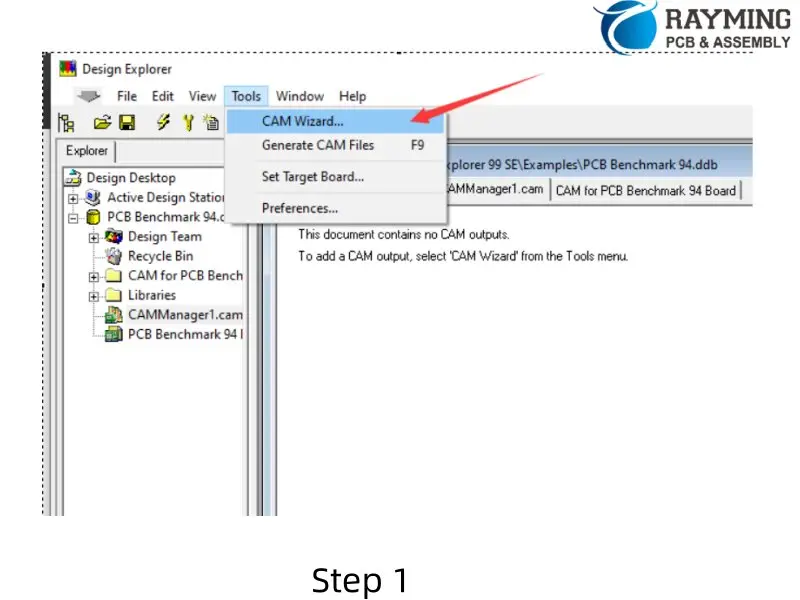
  2. Select Tools > CAM Wizard from the menu bar.

3. Follow these steps in the CAM Wizard:

  • Click “Next” on the first screen.
  • Select “Generate Gerber files” and click “Next”.
  • Name your Gerber files as desired and click “Next”.
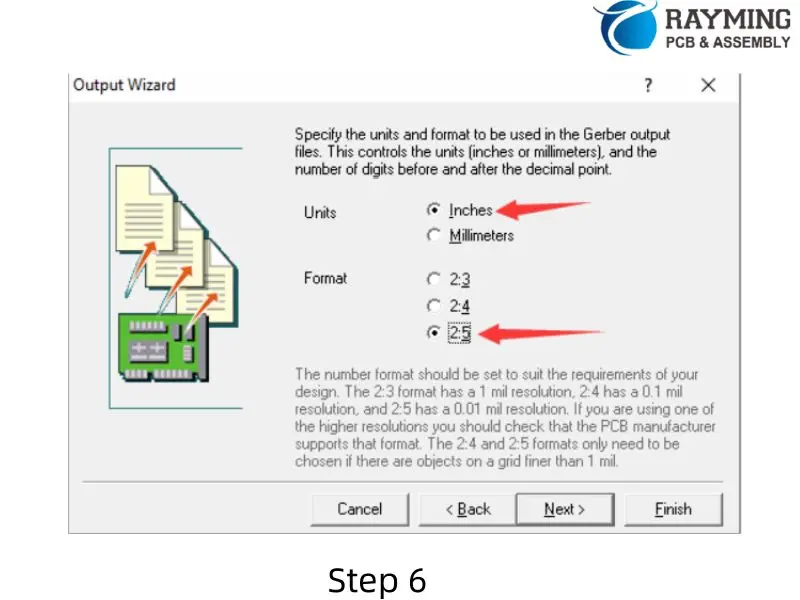
  • For units, select “Inches” (default).
  • Choose the appropriate format (Bittele supports the highest resolution, so 2.5 is recommended).
  • Click “Next”.
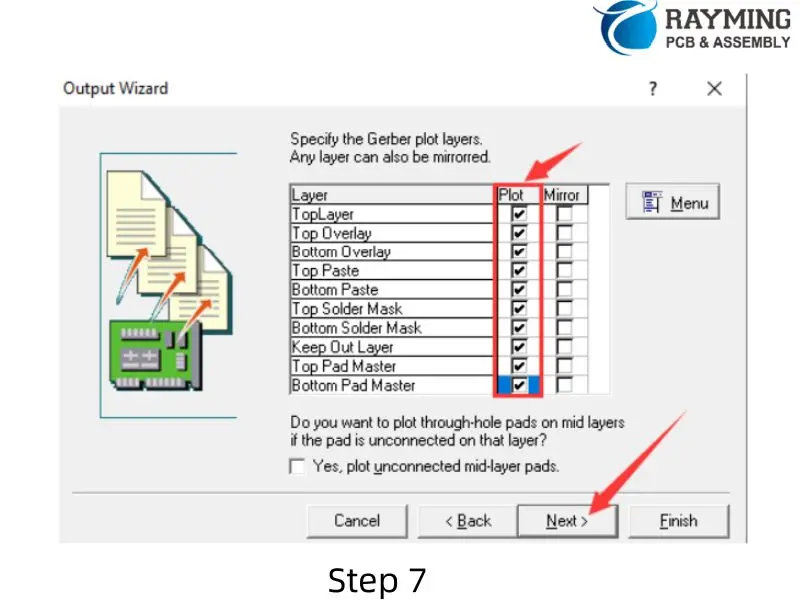
  • On the next screen, select all options under “Plot”.
  • Ensure all options under “Mirror” are unselected to avoid producing upside-down board layers.
  • Click “Next”.
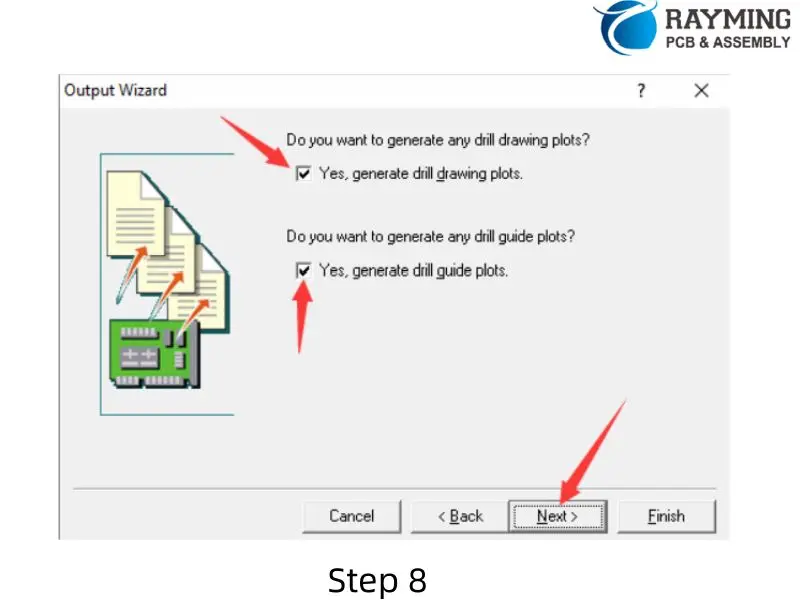
  • On the following screen, leave the default boxes checked and click “Next”.
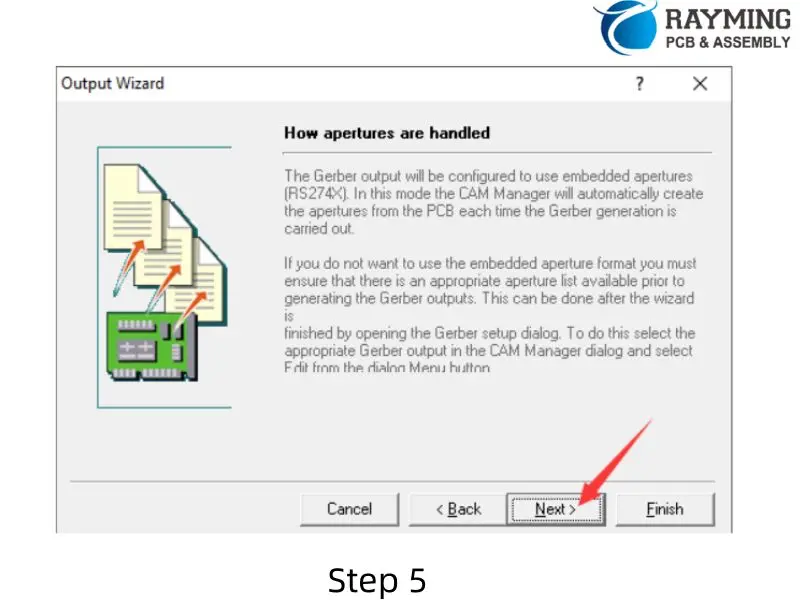
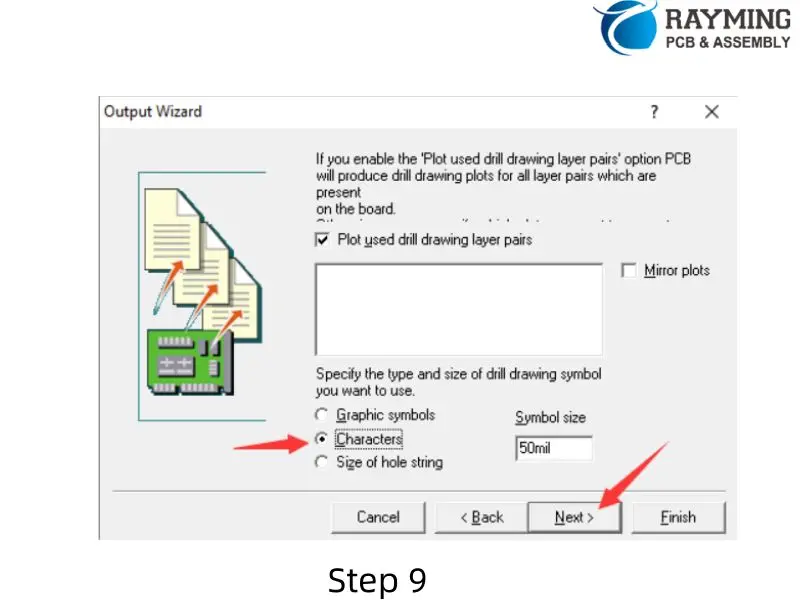
  • Select “Characters” and leave the rest of the options as their default values.
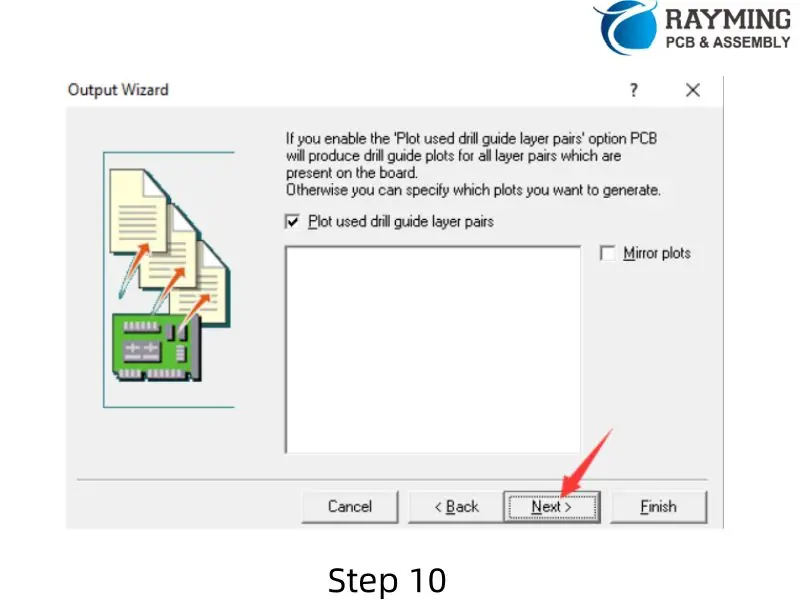
  • Click “Next” three more times, then click “Finish”.

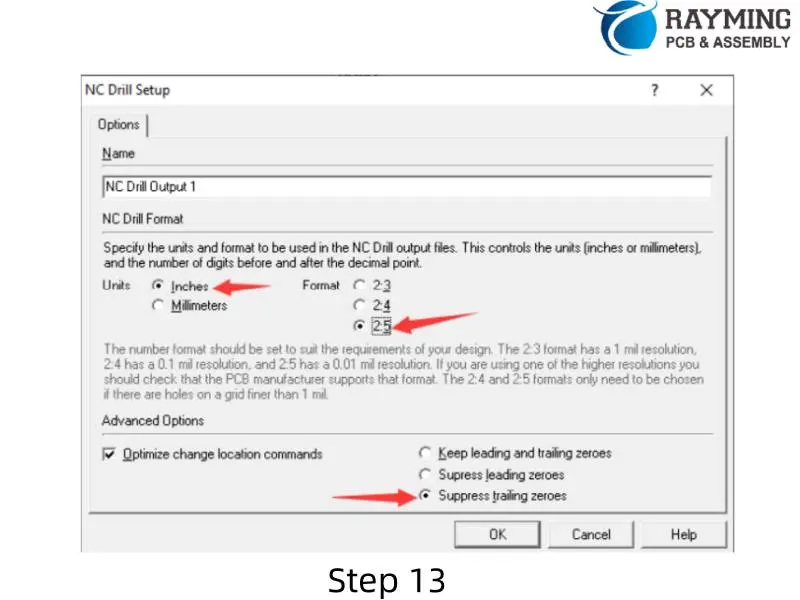
Generating Drill Files

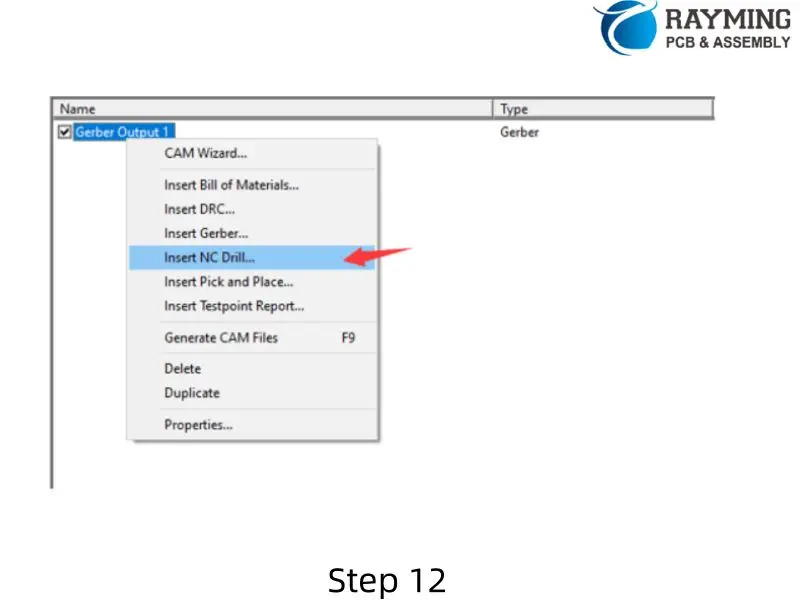
  1. Right-click in the workspace and select “Insert NC Drill…”.
  2. In the pop-up menu:
    • Set units to “Inches” (default).
    • Change the format to 2.5.
    • Keep “Optimize change location commands” checked.
    • Check “Suppress trailing zeroes”.
    • Click “OK”.

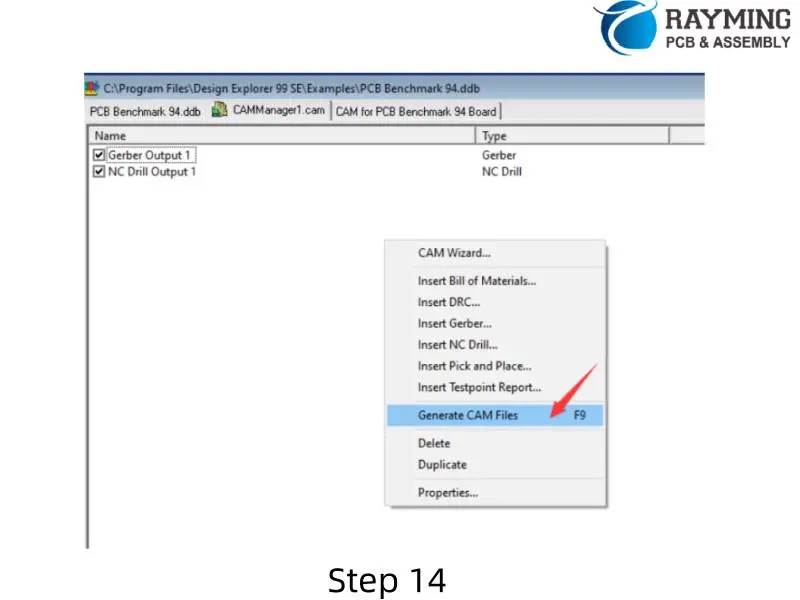
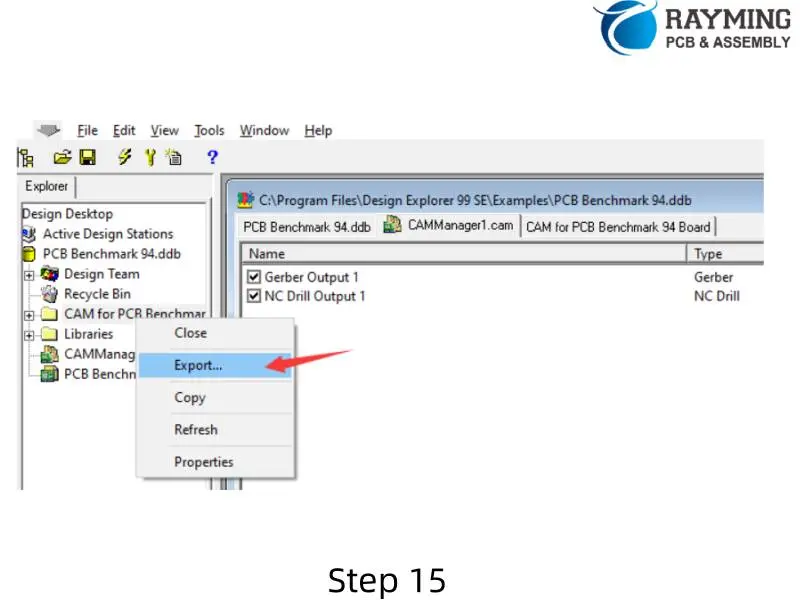
Exporting Gerber and Drill Files

  1. Right-click in the workspace and select “Generate CAM files”.
  2. A “CAM for (file name)” folder will be created in your catalog.
  3. Right-click on the created folder and choose “Export”.
  4. Select the destination where you want to export your files.
  5. Once completed, you will find your generated Gerber and drill files in the exported folder.

Important Notes

  • When selecting the format (step 3.5 in Generating Gerber Files), choose based on your design requirements. 2.5 is recommended for highest resolution.
  • Ensure that no options under “Mirror” are selected to avoid producing upside-down board layers.
  • Double-check that all necessary layers are selected for plotting to ensure a complete set of Gerber files.

Powered By EmbedPress

Understanding Rigid-Flex PCB Stackup: Multi-Layer Design and Material Considerations

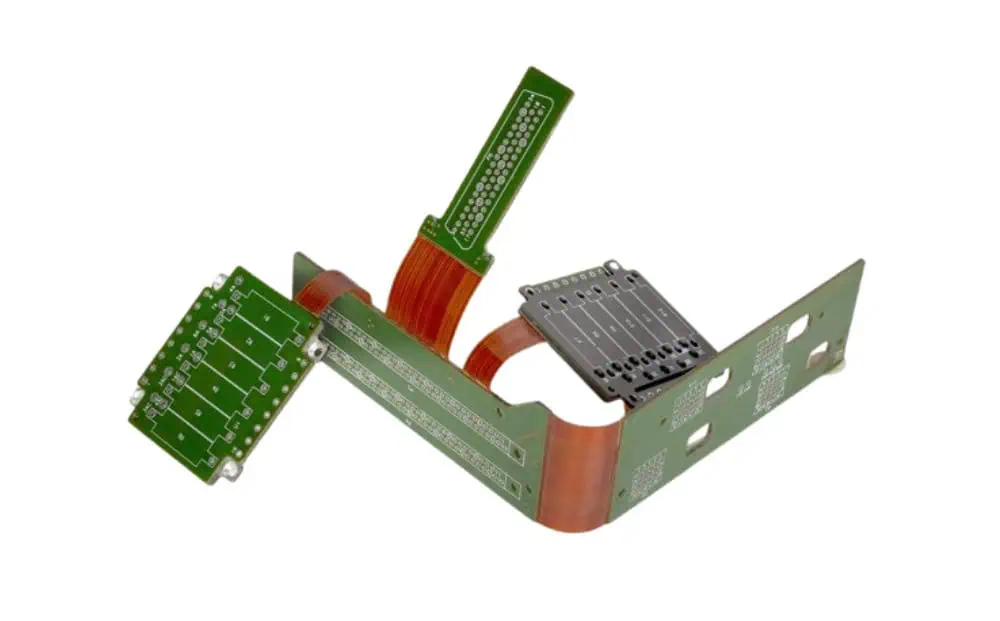
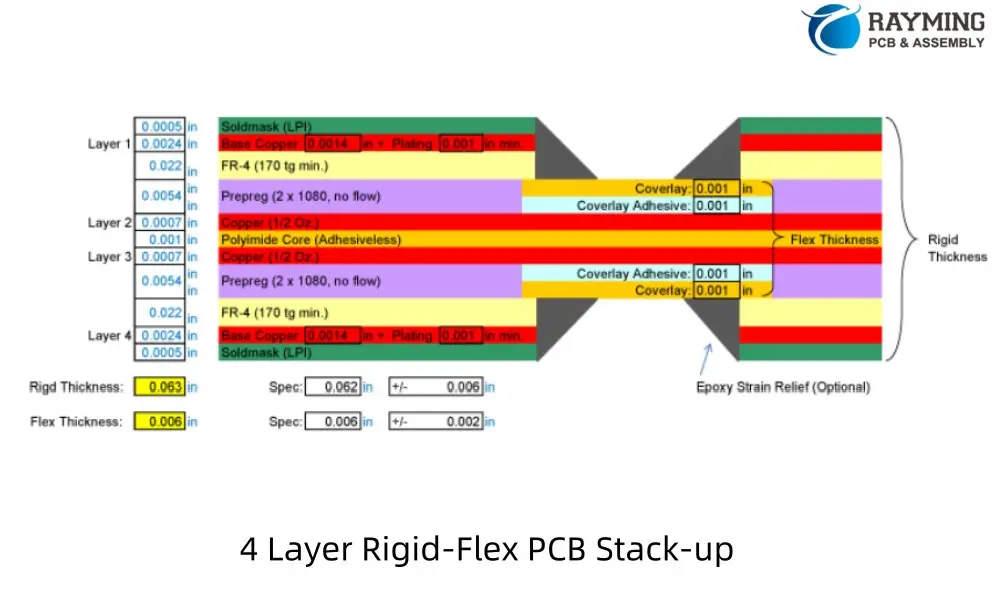
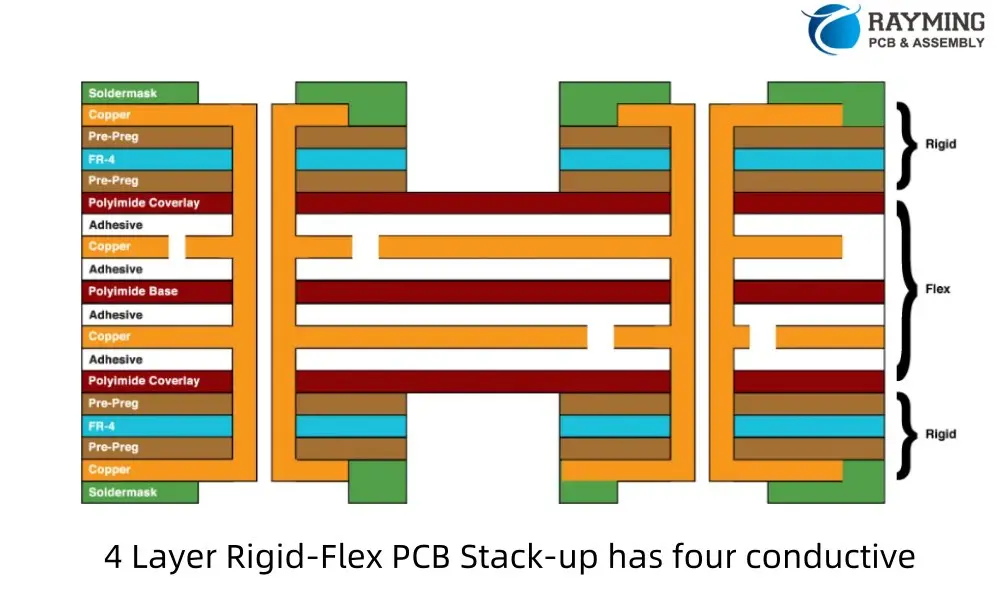
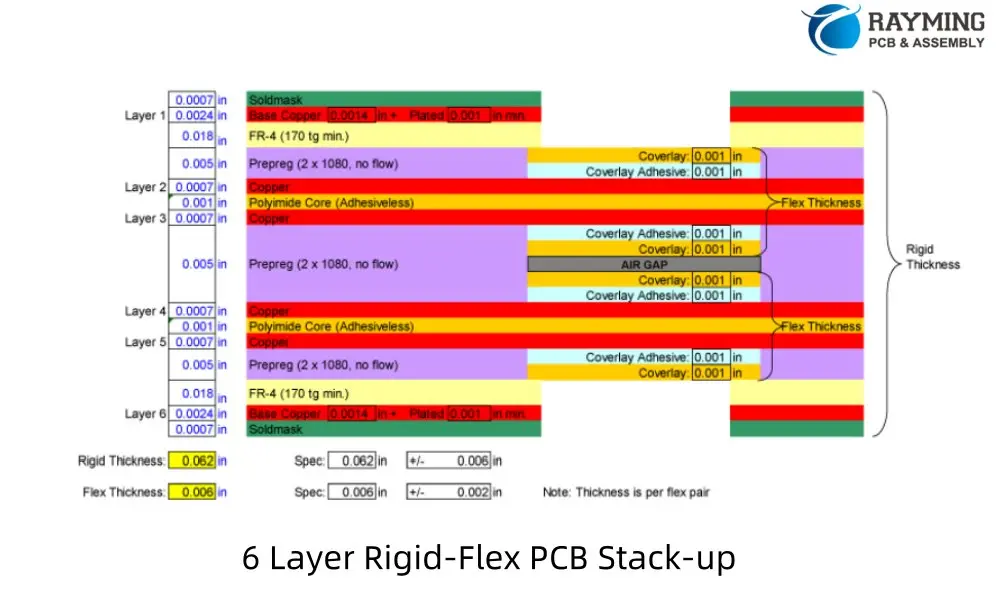
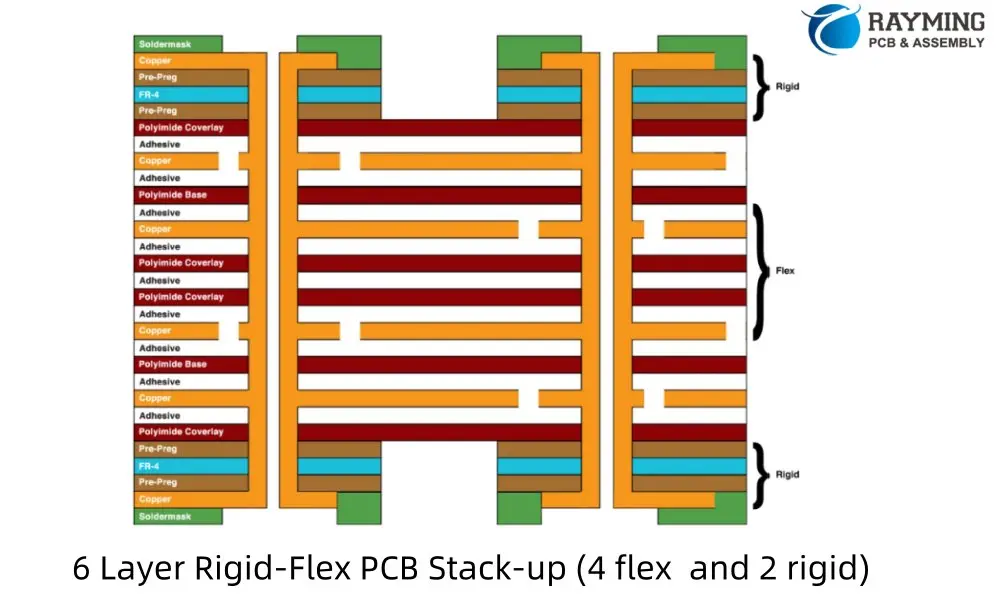
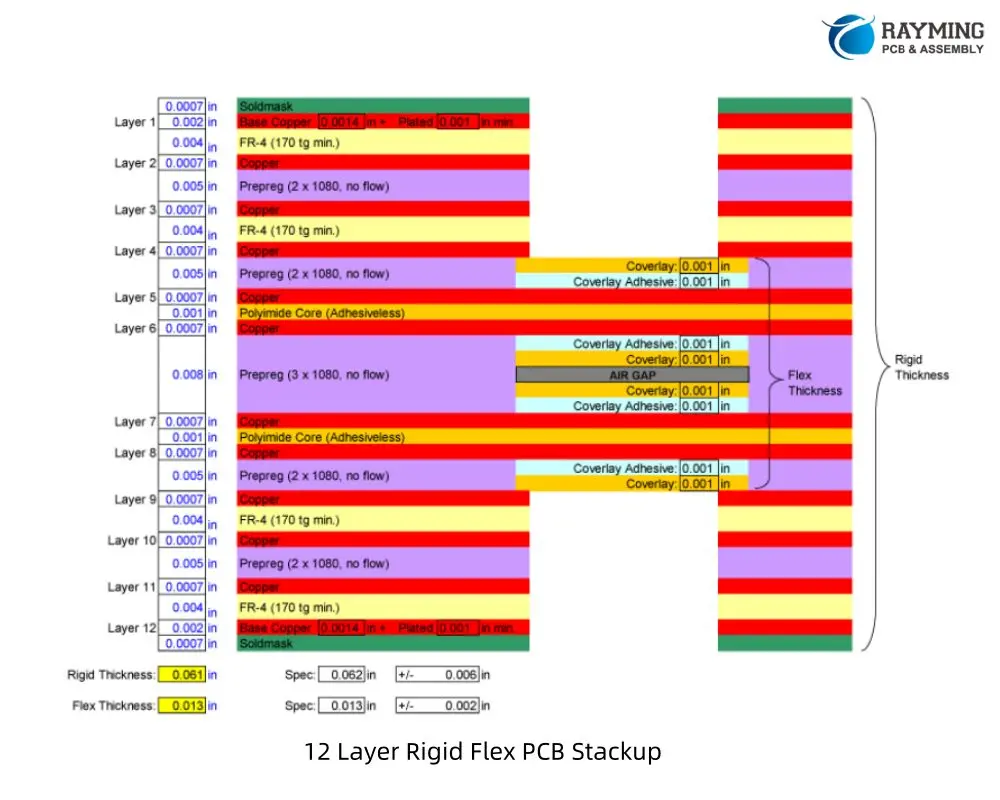
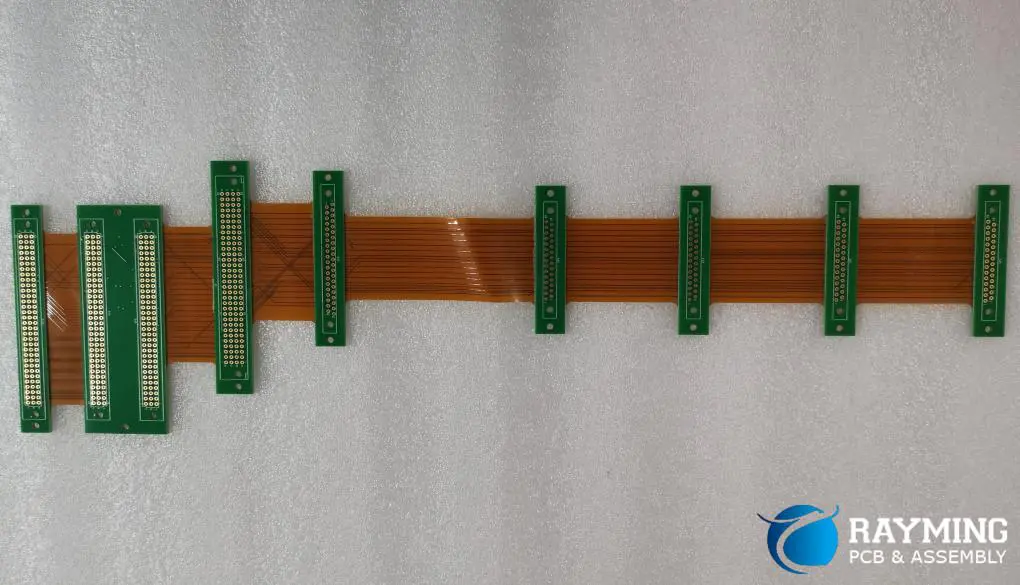
A Rigid-Flex PCB Stackup refers to the specific arrangement and composition of layers in a printed circuit board that incorporates both rigid and flexible sections. This unique construction allows for a seamless integration of traditional rigid board stability with the adaptability of flexible circuits. The proper design of a Rigid-Flex PCB Stackup is paramount in ensuring the reliability, performance, and manufacturability of advanced electronic devices.

YouTube video

As we delve deeper into this topic, we’ll explore the intricacies of Rigid-Flex PCB Stackup, addressing key challenges and uncovering the wealth of design opportunities it presents. Whether you’re an experienced PCB designer or new to the world of flexible circuits, understanding the nuances of Rigid-Flex PCB Stackup is essential for staying at the forefront of modern electronics design.

1. What Is a Rigid-Flex PCB Stackup?

Definition and Structure

A Rigid-Flex PCB Stackup is a specialized printed circuit board configuration that combines rigid and flexible circuit technologies within a single, integrated structure. This hybrid design consists of alternating layers of rigid and flexible materials, carefully arranged to meet specific mechanical and electrical requirements.

The rigid sections of the PCB provide stability and support for components, while the flexible sections allow for dynamic bending and folding. This unique combination enables designers to create complex three-dimensional layouts that can conform to tight spaces or unique form factors.

Advantages over Traditional Rigid Boards

Rigid-Flex PCB Stackups offer several significant advantages over conventional rigid PCBs:

  1. Space Optimization: By eliminating the need for connectors between separate rigid and flexible boards, Rigid-Flex designs can significantly reduce the overall size and weight of electronic assemblies.
  2. Increased Reliability: With fewer interconnection points, Rigid-Flex PCBs are less prone to connection failures, enhancing overall system reliability.
  3. Design Flexibility: The ability to bend and fold allows for creative solutions to packaging challenges, enabling designs that were previously impossible with rigid boards alone.
  4. Improved Signal Integrity: By reducing the number of connections and eliminating cables, Rigid-Flex designs can offer superior signal integrity, especially in high-frequency applications.
  5. Simplified Assembly: Rigid-Flex PCBs can reduce the complexity of assembly processes, potentially lowering manufacturing costs and improving quality control.

Typical Applications

The versatility of Rigid-Flex PCB Stackups has led to their adoption across a wide range of industries and applications:

  1. Medical Devices: Implantable devices, hearing aids, and portable diagnostic equipment benefit from the compact and flexible nature of Rigid-Flex designs.
  2. Aerospace and Defense: Satellites, aircraft avionics, and military communications systems utilize Rigid-Flex PCBs for their reliability and ability to withstand harsh environments.
  3. Consumer Electronics: Smartphones, wearable devices, and cameras leverage Rigid-Flex technology to achieve sleek, compact designs.
  4. Automotive: Advanced driver assistance systems (ADAS) and in-vehicle infotainment systems increasingly rely on Rigid-Flex PCBs to meet space constraints and reliability requirements.
  5. Industrial Equipment: Robotics, control systems, and test equipment benefit from the durability and design flexibility of Rigid-Flex stackups.

2. Key Elements of a Rigid-Flex Stackup Design

rigid flex pcb design

Designing an effective Rigid-Flex PCB Stackup requires a thorough understanding of its key elements. Each component plays a crucial role in the overall performance and reliability of the final product.

Flexible Core Materials

The flexible sections of a Rigid-Flex PCB are typically built around a core material that provides the necessary flexibility and electrical properties. The most common flexible core material is polyimide, known for its excellent mechanical and thermal stability. Key considerations for flexible core materials include:

  • Thickness: Ranging from 12.5ฮผm to 125ฮผm, depending on the required flexibility and electrical characteristics.
  • Copper Cladding: Available in various weights, typically from 1/2 oz to 2 oz per square foot.
  • Dimensional Stability: Important for maintaining consistent electrical properties across bending cycles.

Rigid Core Materials

The rigid sections of the PCB provide structural support and allow for the mounting of components. The most commonly used rigid core material is FR4, a glass-reinforced epoxy laminate. When selecting rigid core materials, consider:

  • Glass Transition Temperature (Tg): Higher Tg materials offer better thermal stability.
  • Coefficient of Thermal Expansion (CTE): Matching CTE between layers helps prevent delamination.
  • Dielectric Constant (Dk) and Loss Tangent: Critical for high-frequency applications.

Adhesives and Bonding Layers

Adhesives play a crucial role in bonding the rigid and flexible sections of the PCB. Common types include:

  • Acrylic Adhesives: Offer good flexibility and thermal resistance.
  • Epoxy Adhesives: Provide excellent bonding strength and chemical resistance.
  • No-Flow Prepregs: Used in more complex stackups to fill voids and provide insulation.

The choice of adhesive can significantly impact the overall performance and reliability of the Rigid-Flex PCB.

Coverlays vs. Solder Masks

In flexible circuit areas, coverlays are often used instead of traditional solder masks. Coverlays are typically made of polyimide film with an adhesive layer and offer several advantages:

  • Better flexibility and durability compared to liquid solder masks.
  • Improved protection against environmental factors.
  • Can be selectively applied to leave certain areas exposed for component mounting or interconnection.

In rigid sections, conventional solder masks are still used to protect copper traces and define soldering areas.

Importance of Controlled Impedance in Multilayer Designs

As Rigid-Flex PCBs often carry high-speed signals, maintaining controlled impedance throughout the design is crucial. This involves careful consideration of:

  • Trace Width and Spacing: Calculated based on the desired impedance and stackup characteristics.
  • Dielectric Thickness: Affects the capacitance between signal layers and ground planes.
  • Ground Plane Placement: Strategic positioning of ground planes helps maintain consistent impedance and reduces EMI.

Designers must work closely with manufacturers to ensure that the intended impedance values can be achieved within manufacturing tolerances.

3. Multi-Layer Rigid-Flex PCB Stackup: Design Challenges

While Rigid-Flex PCB Stackups offer numerous advantages, they also present unique design challenges that must be carefully addressed to ensure optimal performance and reliability.

Layer Count and Complexity

As the number of layers in a Rigid-Flex PCB increases, so does the complexity of the stackup design. Designers must consider:

  • Balance Between Rigid and Flex Layers: Ensuring proper distribution of rigid and flexible layers to maintain overall board stability.
  • Neutral Axis Calculation: Positioning the flex layers near the neutral axis to minimize stress during bending.
  • Transition Zones: Carefully designing the areas where rigid sections transition to flexible sections to avoid stress concentration.

Mechanical Stress and Flex Cycles

One of the primary challenges in Rigid-Flex design is managing mechanical stress, particularly in areas that undergo repeated bending. Key considerations include:

  • Bend Radius: Determining the minimum bend radius to prevent damage to copper traces and dielectric materials.
  • Flex Cycle Life: Estimating the number of flex cycles the PCB can withstand before failure.
  • Strain Relief: Implementing proper strain relief techniques to distribute stress and prevent localized failures.

Signal Integrity and EMI Concerns

Maintaining signal integrity in Rigid-Flex designs can be challenging due to the varying dielectric properties between rigid and flexible sections. Designers must address:

  • Impedance Matching: Ensuring consistent impedance across rigid and flexible sections.
  • Cross-Talk: Minimizing electromagnetic coupling between adjacent traces, especially in tightly packed flexible sections.
  • EMI Shielding: Implementing effective shielding techniques, which may differ between rigid and flexible areas.

Importance of Accurate Rigid-Flex Stackup Modeling

Given the complexity of Rigid-Flex designs, accurate modeling of the PCB stackup is crucial. This involves:

  • 3D Modeling: Using advanced CAD tools to visualize and analyze the complete 3D structure of the Rigid-Flex PCB.
  • Material Property Simulation: Incorporating accurate material properties for both rigid and flexible sections in simulation models.
  • Thermal Analysis: Predicting heat distribution and potential hotspots, especially in areas where rigid and flexible sections meet.

4. Common Rigid Flex PCB Stackup Configurations

Rigid Flex PCB stackups come in various configurations to suit different application needs:

4 Layer Rigid Flex PCB Stack-up (2 Flex Layers)

A typical 4-layer Rigid-Flex PCB stackup with 2 flex layers consists of:

  1. Top solder mask
  2. Top copper layer (rigid)
  3. Prepreg
  4. Inner copper layer (flex)
  5. Flexible core
  6. Inner copper layer (flex)
  7. Prepreg
  8. Bottom copper layer (rigid)
  9. Bottom solder mask
4 Layer Rigid-Flex PCB Stack-up (2 Flex Layers)
4 Layer Rigid-Flex PCB Stack-up has four conductive

This configuration offers a good balance between flexibility and rigidity, suitable for applications requiring moderate complexity and bendability.

6 Layer Rigid Flex PCB Stackup (4 Flex Layers, 2 Rigid Layers with Air Gap)

A 6-layer Rigid-Flex PCB stackup with 4 flex layers and an air gap typically includes:

  1. Top solder mask
  2. Top copper layer (rigid)
  3. Prepreg
  4. Inner copper layer (flex)
  5. Flexible core
  6. Inner copper layer (flex)
  7. Flexible core
  8. Inner copper layer (flex)
  9. Flexible core
  10. Inner copper layer (flex)
  11. Air gap
  12. Prepreg
  13. Bottom copper layer (rigid)
  14. Bottom solder mask
6 Layer Rigid-Flex PCB Stack-up
6 Layer Rigid-Flex PCB Stack-up (4 flex and 2 rigid)
6 Layer Rigid-Flex PCB Stack-up (2 layer flex and 4 layer rigid)

This design allows for increased circuit density in the flex portion while maintaining rigidity where needed. The air gap helps reduce overall thickness and improve flexibility.

8 Layer Rigid Flex PCB Stackup (4 Flex Layers with Air Gap, 4 Rigid Layers)

An 8-layer Rigid-Flex PCB stackup with 4 flex layers, 4 rigid layers, and an air gap typically consists of:

  1. Top solder mask
  2. Top copper layer (rigid)
  3. Prepreg
  4. Inner copper layer (rigid)
  5. Core
  6. Inner copper layer (rigid)
  7. Prepreg
  8. Inner copper layer (flex)
  9. Flexible core
  10. Inner copper layer (flex)
  11. Flexible core
  12. Inner copper layer (flex)
  13. Flexible core
  14. Inner copper layer (flex)
  15. Air gap
  16. Prepreg
  17. Inner copper layer (rigid)
  18. Bottom copper layer (rigid)
  19. Bottom solder mask
8 Layer Rigid-Flex PCB Stack-up
8 Layer Rigid Flex PCB Stackup ( 6 layer flex & 2 layer rigid)

This configuration offers high circuit density in both rigid and flex sections, suitable for complex designs requiring significant routing capabilities.

10 Layer Rigid-Flex PCB Stackup

A 10-layer Rigid-Flex PCB stackup typically includes:

  1. Top solder mask
  2. Top copper layer (rigid)
  3. Prepreg
  4. Inner copper layer (rigid)
  5. Core
  6. Inner copper layer (rigid)
  7. Prepreg
  8. Inner copper layer (rigid)
  9. Prepreg
  10. Inner copper layer (flex)
  11. Flexible core
  12. Inner copper layer (flex)
  13. Flexible core
  14. Inner copper layer (flex)
  15. Flexible core
  16. Inner copper layer (flex)
  17. Prepreg
  18. Inner copper layer (rigid)
  19. Core
  20. Inner copper layer (rigid)
  21. Bottom copper layer (rigid)
  22. Bottom solder mask
10 Layer Rigid Flex PCB Stackup

This design allows for very high circuit density and is suitable for complex applications requiring multiple ground and power planes in both rigid and flex sections.

12 Layer Rigid-Flex PCB Stackup (with Air Gap)

A 12-layer Rigid-Flex PCB stackup with an air gap might consist of:

  • Top solder mask
  • Top copper layer (rigid)
  • Prepreg
  • Inner copper layer (rigid)
  • Core
  • Inner copper layer (rigid)
  • Prepreg
  • Inner copper layer (rigid)
  • Core
  • Inner copper layer (rigid)
  • Prepreg
  • Inner copper layer (flex)
  • Flexible core
  • Inner copper layer (flex)
  • Flexible core
  • Inner copper layer (flex)
  • Flexible core
  • Inner copper layer (flex)
  • Air gap
  • Prepreg
  • Inner copper layer (rigid)
  • Core
  • Inner copper layer (rigid)
  • Prepreg
  • Inner copper layer (rigid)
  • Bottom copper layer (rigid)
  • Bottom solder mask
12 Layer Rigid Flex PCB Stackup

This configuration offers maximum circuit density and is ideal for the most complex Rigid-Flex applications. The air gap helps maintain flexibility in the flex portion despite the high layer count.

Read more about:

5. Using Altium Designer for Rigid-Flex Stackup Planning

Altium Designer is a powerful tool for creating Rigid-Flex PCB designs, offering specialized features to streamline the process. Here’s an overview of how to leverage Altium’s capabilities for effective stackup planning.

Overview of Altium Rigid-Flex Stackup Capabilities

Altium Designer provides a comprehensive set of tools for Rigid-Flex PCB design, including:

  • Layer Stack Manager: Allows detailed definition of both rigid and flexible sections.
  • Rigid-Flex Support: Enables the creation of complex board shapes with multiple rigid and flex areas.
  • 3D PCB Editor: Provides visualization of the folded PCB in its final form.

Setting Up Layer Stacks and Bending Zones

To set up a Rigid-Flex stackup in Altium:

  1. Use the Layer Stack Manager to define your base stackup.
  2. Create regions for different stackups (rigid and flex areas).
  3. Define bending lines to indicate where the board will flex.
  4. Specify bend radius and direction for each bending line.

Simulating Mechanical Bends

Altium’s 3D PCB Editor allows you to:

  • Visualize the PCB in its folded state.
  • Check for clearances and potential issues in the folded configuration.
  • Export 3D models for further analysis or integration with mechanical CAD systems.

Best Practices When Using Altium’s Rigid-Flex Tools

  1. Start with a well-planned stackup before beginning routing.
  2. Use the “Bend Region” feature to ensure proper clearances in flex areas.
  3. Leverage Altium’s Design Rule Checker to catch Rigid-Flex specific issues.
  4. Utilize the “Multi-board” feature for complex assemblies involving multiple Rigid-Flex boards.

Common Pitfalls to Avoid in Altium Designs

  1. Forgetting to define proper bend regions, leading to DRC errors.
  2. Incorrectly specifying layer functions in the stackup manager.
  3. Overlooking the need for different design rules in rigid vs. flex areas.
  4. Not utilizing the 3D viewer to check the folded configuration regularly during design.

6. Material Considerations for High-Reliability Rigid-Flex PCBs

The choice of materials plays a crucial role in the performance and longevity of Rigid-Flex PCBs, especially in high-reliability applications. Let’s explore the key material considerations.

Choosing the Right Flex Substrate

The flex substrate is the foundation of the flexible sections. Common options include:

  1. Polyimide (PI):
    • Pros: Excellent thermal stability, good chemical resistance.
    • Cons: Higher cost, can be brittle in extreme cold.
    • Best for: High-temperature applications, aerospace, and medical devices.
  2. Polyethylene Terephthalate (PET):
    • Pros: Lower cost, good flexibility.
    • Cons: Lower temperature resistance, less dimensional stability.
    • Best for: Consumer electronics, low-cost applications.
  3. Liquid Crystal Polymer (LCP):
    • Pros: Excellent electrical properties, low moisture absorption.
    • Cons: Higher cost, limited availability.
    • Best for: High-frequency applications, harsh environments.

Stiffener Materials and Placement

Stiffeners are used to provide additional support in specific areas of the flex circuit. Common materials include:

  • FR4: Compatible with rigid sections, good for component mounting areas.
  • Polyimide: Matches the flex substrate, useful for creating gradual transitions.
  • Aluminum: Provides excellent heat dissipation for high-power components.

Proper placement of stiffeners is crucial to manage stress and ensure reliability in dynamic flex applications.

Plated Through-Hole (PTH) Reliability

PTHs in flex circuits are particularly vulnerable to stress. To enhance reliability:

  • Use “via-in-pad” design where possible to reduce stress on the vias.
  • Consider buried or blind vias in rigid sections to minimize impact on flex areas.
  • Implement “anchoring” techniques to secure PTHs in flex regions.

Environmental Factors

High-reliability Rigid-Flex PCBs must withstand various environmental challenges:

  1. Temperature:
    • Choose materials with appropriate glass transition temperatures (Tg).
    • Consider coefficient of thermal expansion (CTE) matching between layers.
  2. Humidity:
    • Use moisture-resistant materials and coatings.
    • Implement proper sealing techniques for exposed flex areas.
  3. Chemicals:
    • Select materials with appropriate chemical resistance for the intended application.
    • Consider conformal coatings for additional protection.
  4. Mechanical Stress:
  • Design for the expected number of flex cycles.
  • Implement strain relief features in high-stress areas.

7. Manufacturing Insights: How Stackup Affects Fabrication

Understanding the manufacturing implications of your Rigid-Flex PCB stackup design is crucial for ensuring a successful and cost-effective production process. Let’s explore some key considerations.

Critical Manufacturing Constraints

  1. Layer Registration: As the number of layers increases, maintaining precise alignment becomes more challenging. Tight registration tolerances are essential, especially in flex areas.
  2. Material Handling: Flexible materials require special handling during manufacturing to prevent damage or distortion.
  3. Plating Processes: Achieving consistent plating across both rigid and flex areas can be challenging due to different material properties.
  4. Lamination: The lamination process must account for the different thermal and mechanical properties of rigid and flex materials.

Vias in Flex vs. Vias in Rigid Sections

Vias present unique challenges in Rigid-Flex PCBs:

  • Flex Sections: Vias in flex areas must withstand repeated bending. Laser-drilled microvias are often preferred for their smaller size and better reliability.
  • Rigid Sections: Traditional mechanical drilling is typically used, but care must be taken at the rigid-flex interface.
  • Stacked and Staggered Vias: These can be used to create reliable connections between layers while minimizing stress on the flex sections.

Panelization and Yield Considerations

Efficient panelization is crucial for optimizing yield and reducing costs:

  1. Panel Size: Consider the maximum panel size your manufacturer can handle, especially for larger flex circuits.
  2. Rigid-Flex Interface: Place rigid-flex transition areas away from panel edges to reduce stress during manufacturing.
  3. Scoring and Routing: Plan for appropriate methods to separate individual boards from the panel without damaging flex areas.
  4. Test Coupons: Include test coupons on the panel for quality control and impedance verification.

Working Closely with Your PCB Fabricator on Stackup Validation

Collaboration with your PCB manufacturer is essential for successful Rigid-Flex PCB production:

  1. Early Engagement: Involve your fabricator in the design process as early as possible to address manufacturability issues.
  2. Material Selection: Consult with your manufacturer on material availability and performance characteristics.
  3. Design Rule Verification: Ensure your design adheres to the manufacturer’s specific capabilities and limitations.
  4. Prototyping: Consider building prototypes to validate the design before moving to full production.

Conclusion

Mastering the intricacies of Rigid-Flex PCB stackup design is crucial for creating high-performance, reliable electronic products in today’s demanding markets. The ability to combine the stability of rigid boards with the flexibility of flex circuits opens up new possibilities in product design and functionality.

Key Takeaways:

  1. Precise Planning: Careful consideration of layer stackup, material selection, and mechanical design is essential for successful Rigid-Flex PCBs.
  2. Material Knowledge: Understanding the properties and interactions of various materials used in Rigid-Flex construction is crucial for optimal performance.
  3. Design Tools: Leveraging advanced PCB design software, like Altium Designer, can greatly simplify the complex task of Rigid-Flex layout and simulation.
  4. Manufacturing Awareness: Close collaboration with PCB fabricators and understanding of manufacturing constraints are vital for producing reliable Rigid-Flex boards.
  5. Continuous Learning: As technology evolves, staying updated on new materials, design techniques, and manufacturing processes is essential for innovation in Rigid-Flex PCB design.

Final Tips:

  • Prioritize early stackup planning to avoid costly redesigns later in the development process.
  • Utilize simulation tools to validate electrical and mechanical performance before committing to production.
  • Foster strong relationships with PCB manufacturers to leverage their expertise and capabilities.
  • Consider the entire product lifecycle, from assembly to field use, when making design decisions.

By embracing these principles and continuously refining your approach to Rigid-Flex PCB stackup design, you can create innovative, reliable, and high-performance electronic products that meet the demanding requirements of modern applications.

Appendix: Example Rigid-Flex Stackup Configurations

To further illustrate the concepts discussed in this article, here are some example Rigid-Flex PCB stackup configurations:

1. 4-Layer Rigid-Flex Stackup

Rigid Section:
    - Top Layer (Signal)
    - FR4 Core
    - Inner Layer 1 (Ground)
    - Flexible Polyimide Core
    - Inner Layer 2 (Power)
    - FR4 Core
    - Bottom Layer (Signal)

Flex Section:
    - Top Layer (Signal)
    - Adhesive
    - Inner Layer 1 (Ground)
    - Flexible Polyimide Core
    - Inner Layer 2 (Power)
    - Adhesive
    - Bottom Layer (Signal)

2. 6-Layer Rigid-Flex Stackup

Rigid Section:
    - Top Layer (Signal)
    - FR4 Prepreg
    - Inner Layer 1 (Signal)
    - FR4 Core
    - Inner Layer 2 (Ground)
    - Flexible Polyimide Core
    - Inner Layer 3 (Power)
    - FR4 Core
    - Inner Layer 4 (Signal)
    - FR4 Prepreg
    - Bottom Layer (Signal)

Flex Section:
    - Top Layer (Signal)
    - Adhesive
    - Inner Layer 1 (Signal)
    - Adhesive
    - Inner Layer 2 (Ground)
    - Flexible Polyimide Core
    - Inner Layer 3 (Power)
    - Adhesive
    - Inner Layer 4 (Signal)
    - Adhesive
    - Bottom Layer (Signal)

3. Complex Hybrid Stackup (8 Layers with Multiple Flex Layers)

Rigid Section:
    - Top Layer (Signal)
    - FR4 Prepreg
    - Inner Layer 1 (Signal)
    - FR4 Core
    - Inner Layer 2 (Ground)
    - Flexible Polyimide Core 1
    - Inner Layer 3 (Power)
    - Adhesive
    - Inner Layer 4 (Signal)
    - Flexible Polyimide Core 2
    - Inner Layer 5 (Ground)
    - FR4 Core
    - Inner Layer 6 (Signal)
    - FR4 Prepreg
    - Bottom Layer (Signal)

Flex Section:
    - Top Layer (Signal)
    - Adhesive
    - Inner Layer 1 (Signal)
    - Adhesive
    - Inner Layer 2 (Ground)
    - Flexible Polyimide Core 1
    - Inner Layer 3 (Power)
    - Adhesive
    - Inner Layer 4 (Signal)
    - Flexible Polyimide Core 2
    - Inner Layer 5 (Ground)
    - Adhesive
    - Inner Layer 6 (Signal)
    - Adhesive
    - Bottom Layer (Signal)

Tips for Custom Designs:

  1. Always consider the neutral bend axis when designing your stackup.
  2. Symmetry in the stackup can help reduce warping and twisting.
  3. Use thinner materials in flex areas to improve flexibility and reduce strain.
  4. Consider impedance requirements when choosing layer thicknesses and materials.
  5. Consult with your PCB manufacturer to ensure your design is feasible and cost-effective to produce.

Remember, these are general examples, and your specific design may require a custom stackup tailored to your unique requirements and constraints.

Flex PCB Stackup Design: Multi-Layer Strategies for Bendable Circuits

Flexible Printed Circuit Boards (Flex PCBs) have revolutionized electronic design, offering lightweight, space-saving solutions for various applications. Understanding the intricacies of Flex PCB stackup design is crucial for engineers and designers aiming to optimize their products. This article delves into the world of Flex PCB stackups, exploring configurations from 1 to 8 layers.

YouTube video

1. What is a Flex PCB Stackup?

Definition and Basics

A flex PCB stackup refers to the arrangement of conductive and insulating layers that make up a flexible printed circuit board. This layered structure is what allows the circuit to bend and flex while maintaining electrical integrity. The stackup design is crucial as it directly impacts the circuit’s mechanical properties, electrical performance, and overall reliability.

Differences Between Rigid, Flex, and Rigid-Flex PCB Stackups

While rigid PCBs are composed of stiff materials like FR-4, flex PCBs use flexible substrates that allow for bending and folding. The key differences are:

  1. Rigid PCBs: Typically use FR-4 or similar materials, with copper layers sandwiched between insulating layers. They’re inflexible and designed for static applications.
  2. Flex PCBs: Utilize flexible materials like polyimide for the base substrate, allowing the circuit to bend. They can have single or multiple layers.
  3. Rigid-Flex PCBs: Combine areas of rigid and flexible PCB technology on a single board, offering the best of both worlds for complex applications.

Key Materials Used in Flex PCB Stackups

The primary materials used in flex PCB stackups include:

  1. Polyimide: The most common base substrate for flex circuits, known for its excellent flexibility, heat resistance, and dimensional stability.
  2. Adhesive: Used to bond conductive layers to the substrate. Some advanced designs use adhesiveless constructions for improved flexibility and thermal performance.
  3. Coverlay: A protective layer applied over the outer copper layers, similar to solder mask on rigid PCBs but more flexible.
  4. Copper: The conductive material used for circuit traces, available in various weights to balance flexibility and current-carrying capacity.

Understanding these materials and their properties is essential for creating an optimal flex PCB stackup design.

2. Importance of Proper Flex PCB Layer Stackup

Balancing Mechanical Flexibility and Electrical Performance

One of the primary challenges in flex PCB stackup design is striking the right balance between mechanical flexibility and electrical performance. A well-designed stackup must:

  1. Allow for the required degree of flexing without damaging the circuit.
  2. Maintain signal integrity across bending regions.
  3. Provide adequate shielding and impedance control for high-speed signals.

Achieving this balance often involves careful material selection, layer ordering, and thickness considerations.

Impact on Bend Radius, Durability, and Signal Integrity

The stackup design directly affects the circuit’s minimum bend radius โ€“ the smallest curve the PCB can conform to without damage. A properly designed stackup can:

  1. Minimize stress on copper traces during flexing.
  2. Reduce the risk of delamination or cracking in dynamic applications.
  3. Maintain consistent electrical characteristics even when bent.

For instance, placing signal layers closer to the neutral axis (the center of the stackup) can reduce strain during bending, improving durability.

How Flex Circuit Stackup Affects Product Lifespan

The longevity of a flexible circuit is intrinsically tied to its stackup design. A well-engineered stackup can significantly extend a product’s lifespan by:

  1. Reducing mechanical stress on components and solder joints.
  2. Minimizing signal degradation over time due to repeated flexing.
  3. Improving resistance to environmental factors like temperature fluctuations and humidity.

3. Typical Flex PCB Stackup Structures

Flex PCB stackups refer to the arrangement of conductive layers, insulating materials, and other elements that make up a flexible circuit board. The design of these stackups is critical in determining the board’s performance, flexibility, and reliability.

1 Layer Flex PCB Stackup

The simplest form of Flex PCB, a single-layer design consists of:

  1. Coverlay (optional)
  2. Single conductive layer (usually copper)
  3. Flexible base material (e.g., Polyimide)
  4. Coverlay (optional)
1 Layer Flex PCB Stackup with FR-4 Stiffener
1 layer Flex PCB Stackup with adhesive

This configuration is ideal for simple circuits with low component density. It offers maximum flexibility and is cost-effective for basic applications.

Read more about:

2 Layer Flex PCB Stackup

A 2-layer Flex PCB stackup typically includes:

  1. Coverlay
  2. Conductive layer
  3. Flexible base material
  4. Conductive layer
  5. Coverlay
2 Layer Flex PCB Stackup with ZIP Contact fingers

This design allows for more complex circuits while maintaining good flexibility. It’s commonly used in applications requiring ground planes or power distribution.

4 Layer Flex PCB Stackup

A 4-layer Flex PCB stackup usually consists of:

  1. Coverlay
  2. Conductive layer
  3. Flexible base material
  4. Conductive layer
  5. Flexible base material
  6. Conductive layer
  7. Flexible base material
  8. Conductive layer
  9. Coverlay
4 Layer Flex PCB Stackup with adhesive

This configuration offers increased circuit density and improved signal integrity. It’s suitable for applications requiring separation of analog and digital signals or complex routing.

6 Layer Flex PCB Stackup

A typical 6-layer Flex PCB stackup includes:

  1. Coverlay
  2. Conductive layer
  3. Flexible base material
  4. Conductive layer
  5. Flexible base material
  6. Conductive layer
  7. Flexible base material
  8. Conductive layer
  9. Flexible base material
  10. Conductive layer
  11. Flexible base material
  12. Conductive layer
  13. Coverlay
6 Layer Flex PCB Stackup

This design allows for high component density and is ideal for complex circuits requiring multiple ground and power planes. It offers excellent signal integrity but with reduced flexibility compared to lower layer counts.

8 Layer Flex PCB Stackup

An 8-layer Flex PCB stackup typically consists of:

  1. Coverlay
  2. Conductive layer
  3. Flexible base material
  4. Conductive layer
  5. Flexible base material
  6. Conductive layer
  7. Flexible base material
  8. Conductive layer
  9. Flexible base material
  10. Conductive layer
  11. Flexible base material
  12. Conductive layer
  13. Flexible base material
  14. Conductive layer
  15. Flexible base material
  16. Conductive layer
  17. Coverlay
8 Layer Flex PCB Stackup

This configuration is used for the most complex flex circuits, offering maximum circuit density and signal integrity. However, it has the least flexibility among the options discussed.

4. 4 Layer Flex PCB Stackup: Advanced Designs

Common Architecture for 4 Layer Flex PCB Stackup

A typical 4 layer flex PCB stackup might be structured as follows:

  1. Top coverlay
  2. Signal layer 1
  3. Ground plane
  4. Power plane
  5. Signal layer 2
  6. Bottom coverlay

This arrangement allows for optimal signal integrity and power distribution while maintaining flexibility.

Importance of Symmetrical Stackup for Dynamic Flexing

Symmetry in the stackup design is crucial for dynamic flexing applications. A symmetrical design:

  1. Balances stress across the layers during bending
  2. Reduces the risk of warping or twisting
  3. Maintains consistent electrical properties in different flex states

To achieve symmetry, designers often mirror the stackup around the central core, using similar materials and thicknesses on both sides.

Via Management and Controlled Impedance Considerations

In 4 layer flex PCB stackups, via management becomes more complex. Some key considerations include:

  1. Minimizing via use in flex areas to maintain bendability
  2. Using buried or blind vias to increase routing density without compromising flexibility
  3. Implementing teardrops at via-to-trace connections to improve reliability

Controlled impedance is often a requirement in high-speed designs. In a 4 layer stackup, designers can:

  1. Use the inner layers for uninterrupted ground and power planes
  2. Adjust trace width and spacing on outer layers to achieve desired impedance
  3. Utilize electromagnetic field simulation tools to fine-tune impedance control

5. Special Considerations for Flex Stackup Design

How to Minimize Stress and Avoid Cracking

To ensure the longevity of flex PCBs, designers must minimize stress on the copper traces and substrate. Key strategies include:

  1. Using rolled annealed copper instead of electrodeposited copper for better flex endurance
  2. Implementing teardrop-shaped pads to reduce stress concentration
  3. Orienting traces perpendicular to the bend axis in flex areas
  4. Using smaller trace widths in areas of high stress

Coverlay vs. Soldermask Choice in Flex Stackup

While rigid PCBs typically use soldermask, flex PCBs often employ coverlay for outer layer protection. The choice between coverlay and soldermask depends on several factors:

Coverlay Advantages:

  • Better flexibility and durability
  • Excellent chemical resistance
  • Uniform thickness for improved impedance control

Soldermask Advantages:

  • Lower cost
  • Easier application in small areas
  • Better for fine-pitch components

For dynamic flex applications, coverlay is generally preferred due to its superior flexibility and durability.

Adhesiveless Constructions

Adhesiveless flex PCB constructions are gaining popularity due to several advantages:

  1. Improved flexibility and bend radius capabilities
  2. Better thermal performance
  3. Reduced overall thickness
  4. Enhanced electrical performance due to lower dielectric constant

However, adhesiveless constructions can be more challenging to manufacture and may have higher initial costs. The choice between adhesive-based and adhesiveless constructions should be based on the specific requirements of the application.

6. Tools and Resources for Flex Circuit Stackup Design

How Altium Flex Stackup Tools Assist with Design Simulation

Altium Designer, a popular PCB design software, offers powerful tools for flex PCB stackup design and simulation. Key features include:

  1. Layer Stack Manager: Allows designers to define and visualize the PCB stackup, including flex layers.
  2. Flex and Rigid-Flex Support: Enables the definition of flex and rigid regions within the same design.
  3. 3D PCB Visualization: Helps in understanding how the flex PCB will behave in its bent state.
  4. Signal Integrity Analysis: Allows for impedance calculations and signal integrity simulations specific to flex designs.

Typical Workflow: Setting Bend Parameters, Defining Flex Regions

A typical workflow for flex PCB design in Altium might include:

  1. Define the overall stackup using the Layer Stack Manager.
  2. Specify flex and rigid regions using the Rigid-Flex Editor.
  3. Set bend lines and bend parameters (e.g., bend radius, bend angle).
  4. Route traces with consideration for bend regions.
  5. Perform design rule checks specific to flex PCBs.
  6. Run signal integrity simulations to ensure performance in both flat and bent states.
  7. Generate 3D models and documentation for manufacturing.

By leveraging these tools, designers can catch potential issues early in the design process, saving time and reducing the risk of costly revisions.

7. Manufacturer-Specific Stackups: PCBWay Flex PCB Stackup Options

Overview of PCBWay Flex Stackup Capabilities

PCBWay, a leading PCB manufacturer, offers a wide range of flex PCB stackup options to cater to diverse design requirements. Their capabilities include:

  1. Single-layer to multi-layer flex PCBs (up to 8 layers)
  2. Various substrate materials, including polyimide and PET
  3. Different copper weights (0.5oz to 2oz)
  4. Adhesive-based and adhesiveless constructions
  5. Coverlay and soldermask options

PCBWay’s advanced manufacturing processes allow for:

  • Minimum trace width/spacing down to 3mil/3mil
  • Laser-drilled microvias for high-density designs
  • Selective stiffener application for hybrid flex-rigid designs

Tips on Communicating with Manufacturers about PCBWay Flex PCB Stackup Requirements

Effective communication with manufacturers like PCBWay is crucial for successful flex PCB production. Here are some tips:

  1. Provide Detailed Stackup Information:
    • Clearly specify layer count, materials, and thicknesses
    • Indicate which layers are flexible and which (if any) are rigid
  2. Define Bend Requirements:
    • Specify minimum bend radius
    • Indicate whether the flex is for dynamic or static applications
  3. Clarify Special Requirements:
    • Controlled impedance needs
    • Any specific material preferences (e.g., adhesiveless construction)
  4. Supply Detailed Documentation:
    • Provide Gerber files, drill files, and fabrication drawings
    • Include a readme file with any special instructions or requirements
  5. Discuss Prototyping Options:
    • Consider ordering prototypes before full production
    • Discuss any testing or validation requirements
  6. Leverage Manufacturer Expertise:
    • Ask for recommendations on improving manufacturability
    • Inquire about alternative materials or processes that might enhance performance or reduce cost

By following these guidelines, you can ensure that your flex PCB design intent is clearly communicated, leading to a smoother manufacturing process and a higher-quality end product.

8. Best Practices for a Reliable Flex PCB Stackup

Layer Symmetry

Maintaining symmetry in the flex PCB stackup is crucial for preventing warpage and ensuring consistent performance. Best practices include:

  1. Balancing copper weights on both sides of the core
  2. Mirroring layer structures around the central core
  3. Using an odd number of layers with a central ground plane for better EMI performance

Proper Material Selection

Choosing the right materials is fundamental to a successful flex PCB design:

  1. Substrate: Polyimide is the most common choice due to its excellent flexibility and temperature resistance. For less demanding applications, PET might be suitable.
  2. Copper Foil: Rolled annealed copper offers better flex endurance than electrodeposited copper.
  3. Adhesives: Choose adhesives that maintain flexibility over the product’s lifetime and temperature range.
  4. Coverlay: Select a coverlay material that matches the flexibility of your substrate.

Bend Area Design Rules

Optimizing the design for bend areas is critical for long-term reliability:

  1. Route traces perpendicular to the bend line whenever possible.
  2. Use smaller trace widths in bend areas to reduce stress.
  3. Avoid placing vias or components directly in bend zones.
  4. Implement teardrop-shaped pads to reduce stress concentration.
  5. Consider using curved traces instead of sharp corners in high-stress areas.

Controlled Impedance for High-Speed Signals

For high-speed applications, maintaining controlled impedance is crucial:

  1. Use continuous ground planes adjacent to signal layers.
  2. Carefully calculate and maintain consistent trace width and spacing.
  3. Consider using impedance-controlled microstrip or stripline configurations.
  4. Use electromagnetic simulation tools to verify impedance control across bend areas.

By adhering to these best practices, designers can create flex PCB stackups that offer optimal performance, reliability, and manufacturability.

9. Conclusion

The world of flexible electronics continues to expand, pushing the boundaries of what’s possible in product design and functionality. At the heart of this revolution lies the critical importance of a well-designed flex PCB stackup. As we’ve explored throughout this article, the stackup is not merely a technical specification but the foundation upon which reliable, high-performance flexible circuits are built.

From single-layer designs to complex multi-layer architectures, each flex PCB stackup presents unique challenges and opportunities. By understanding the fundamental principles of stackup design โ€“ from material selection and layer

Standard 10 Layer PCB Stack-up Design Reference

Introduction

A 10-layer PCB stack-up offers a balance between complexity and performance for advanced electronic applications. This guide provides key information on composition, advantages, considerations, and common configurations for 10-layer PCBs.

10-Layer <a href="https://www.raypcb.com/how-to-plan-multilayer-pcb-stackup/">PCB Stackup</a> Selector

10-Layer PCB Stackup Selector 10L

Configure layer thicknesses for advanced 10-layer HDI PCB designs

Quick Presets

Layer Assignment
L1 SIG
L2 GND
L3 SIG
L4 PWR
L5 SIG
L6 SIG
L7 GND
L8 SIG
L9 PWR
L10 SIG

Copper Layers

Prepreg Layers (5)

Core Layers (4)

Total Board Thickness
1.600mm
1600 ยตm
vs 1.6mm
+0 ยตm
Copper (10L)
350 ยตm
Prepreg (5L)
642 ยตm
Core (4L)
600 ยตm

Stackup Visualization

L1 – Top SignalSIG 35ยตm
Prepreg 1 (PP1) 114ยตm
L2 – GND PlaneGND 35ยตm
Core 1 (FR-4) 100ยตm
L3 – Inner SignalSIG 35ยตm
Prepreg 2 (PP2) 114ยตm
L4 – PWR PlanePWR 35ยตm
Core 2 (FR-4) 200ยตm
L5 – Inner SignalSIG 35ยตm
Prepreg 3 (PP3) – Center 185ยตm
L6 – Inner SignalSIG 35ยตm
Core 3 (FR-4) 200ยตm
L7 – GND PlaneGND 35ยตm
Prepreg 4 (PP4) 114ยตm
L8 – Inner SignalSIG 35ยตm
Core 4 (FR-4) 100ยตm
L9 – PWR PlanePWR 35ยตm
Prepreg 5 (PP5) 114ยตm
L10 – Bottom SignalSIG 35ยตm
SOLDER MASK (BOTTOM)
Outer Signal
Inner Signal
GND Plane
PWR Plane
Prepreg
Core
๐Ÿ’ก Common 10-Layer Targets
1.2mm: High-density mobile, FPGA applications
1.6mm: Standard multilayer (most common)
2.0mm: Industrial, server boards
2.4mm – 3.0mm: Backplanes, heavy copper
โšก 10-Layer Design Strategy
Symmetric Structure: L1-L5 mirrors L6-L10 for balanced warpage control.
High-Speed Routing: L3, L5, L6, L8 are stripline layers with excellent shielding.
Power Integrity: Distributed GND (L2, L7) and PWR (L4, L9) minimize loop inductance.
๐Ÿ“ Impedance Reference
L1 & L10: Microstrip (ref: L2, L9)
L3: Stripline (ref: L2 + L4)
L5 & L6: Broadside-coupled stripline
L8: Stripline (ref: L7 + L9)

Basic Structure

Typical arrangement of layers in a 10-layer stack-up PCB:

  1. Top Layer (Signal)
  2. Prepreg
  3. Signal Layer 1
  4. Core
  5. Internal Power/Ground Plane 1
  6. Prepreg
  7. Signal Layer 2
  8. Core
  9. Internal Power/Ground Plane 2
  10. Prepreg
  11. Signal Layer 3
  12. Core
  13. Internal Power/Ground Plane 3
  14. Prepreg
  15. Signal Layer 4
  16. Core
  17. Internal Power/Ground Plane 4
  18. Prepreg
  19. Bottom Layer (Signal)

Advantages of 10-Layer Stack-Ups

  • Enhanced design flexibility
  • Improved signal integrity
  • Enhanced power distribution
  • Suitable for high-density designs
  • Cost-effective compared to higher-layer configurations
YouTube video

Design Considerations

  • Signal integrity management
  • Controlled impedance requirements
  • Complex routing paths
  • Manufacturing and fabrication costs
  • Proper trace widths and layer ordering

Common 10-Layer PCB Stack-up Configurations

1 Standard Stack-Up

  • Alternating signal and power/ground layers
  • Balanced design for general-purpose applications

2 Mixed Signal Stack-Up

  • Separation of analog and digital signals
  • Improved isolation between different signal types

3 High-Speed Signal Stack-Up

  • Dedicated layers for high-speed signals
  • Enhanced signal integrity for critical paths

4 Power Integrity Stack-Up

  • Multiple power planes for improved power distribution
  • Reduced voltage drops and noise

5 Buried Capacitance Stack-Up

  • Embedded capacitance layers
  • Improved power delivery and reduced EMI

10 Layer PCB Stackup reference for different thickness:

2.0mm 10 Layer PCB Stackup
2.4mm 10 Layer PCB Stackup
1.6mm 10 Layer PCB Stackup

Design Guidelines

  1. Separate high-speed signals from noise-sensitive circuits
  2. Use ground planes adjacent to critical signal layers
  3. Implement proper via management for layer transitions
  4. Maintain consistent impedance across layers
  5. Consider crosstalk between adjacent signal layers
  6. Optimize power distribution network (PDN) design
  7. Implement proper EMI/EMC shielding techniques

Impedance Control

  • Use impedance calculation tools for accurate trace dimensions
  • Consider dielectric constant and thickness of materials
  • Maintain consistent trace widths for controlled impedance

Manufacturing Considerations

  • Verify manufacturer capabilities for 10-layer production
  • Discuss special requirements (e.g., buried vias, impedance control)
  • Consider cost implications of complex designs

Conclusion

A well-designed 10-layer PCB stack-up offers enhanced performance and flexibility for complex electronic designs. Careful consideration of signal integrity, power distribution, and EMC requirements is crucial for successful implementation. Use this guide as a starting point, and consult with PCB design experts and manufacturers for specific project requirements.

If you need stackup suggestion for your 10 layer PCB design, welcome to send email to Sales@raypcb.com .