Whatโ€™s the Difference Between SMD and NSMD in BGA Footprint?

surface mount pcb assembly

Correct PCB pad design is crucial to effectively weld components to the circuit board. For bare pad  prototype pcb assembly , there are two common welding methods โ€” SMD (Solder Mask Defined) and NSMD (Non-Solder Mask Defined), each with its own characteristics and advantages.
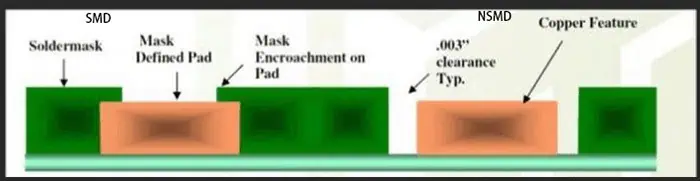
The Difference Between SMD and NSMD

SMD:

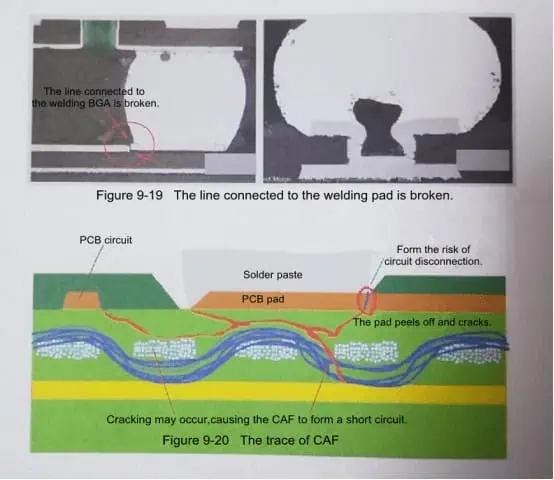
SMD refers to the resistance layer opening is less than the metal pad welding process. This process reduces the possibility of the welding plate falling off during welding or dewelding. However, the disadvantage is that the method reduces the copper surface area that can be used for solder joint connections and reduces the space between adjacent pads. This limits the thickness of the trace lines between the pads and may affect the use of through-hole.

NSMD:

NSMD refers to the welding plate process in which the opening of the resistance layer is larger than that of the welding plate. This process provides greater surface area for solder joint connections and greater clearance between solder pads (compared to SMD), allows for wider line width and more through-hole flexibility, but NSMD pads are more likely to fall off during welding and disassembly. Even so, NSMD still has a better welding firm performance and is suitable for solder joint sealing pads.

Introduction

Ball grid array (BGA) packages are widely used for integrated circuits as they provide a high density of interconnections beneath the package. BGA packages connect to the PCB through an array of solder balls that serve as the leads. When defining the PCB land patterns or footprint for the BGA package, the solder mask design requires special consideration for reliability. The solder mask can either cover the copper pad completely, known as solder mask defined (SMD), or have openings larger than the pad diameter, called non-solder mask defined (NSMD).

This article explains what SMD and NSMD BGA footprints are, their differences, key design considerations, assembly process impacts and applications.

Solder Mask Defined (SMD) BGA Footprints
YouTube video

In an SMD BGA footprint, the openings in the solder mask layer fully cover and intersect the underlying copper pads. This results in the solder mask itself defining the final land dimensions and controlling the volume of solder paste printed. Hence the name solder mask defined (SMD) footprint.

With SMD footprint, the copper pad size is typically 20 to 60 ฮผm greater than the solder mask opening based on registration tolerances. The key characteristics of SMD BGA land patterns are:

  • Solder mask opening equals the intended land diameter for the BGA balls. This controls the amount of solder.
  • Excellent registration is needed between layers to keep the pad centered in the mask opening.
  • The pad shape is not critical and there is no risk of exposed copper.
  • Allows smaller pad and pitch dimensions since solder mask dams prevent bridge formation.
  • Solder voiding can occur more easily due to smaller paste volumes.

Here is an illustration of solder mask defined (SMD) BGA footprint:

The tight alignment between copper pad and solder mask opening required for SMD footprint necessitates use of the tightest manufacturing tolerances.

Non-Solder Mask Defined (NSMD) BGA Footprints

In a non-solder mask defined (NSMD) footprint, the openings in the solder mask layer are larger than the diameter of the copper pads. This exposes the entire copper pad allowing the pad size and shape to define the final land dimensions rather than the solder mask.

In NSMD footprint, the mask openings exceed the copper pad size by at least 150 ฮผm based on registration tolerances. Key features are:

  • The pad diameter determines the solder volume. Solder mask does not restrict soldering.
  • Requires greater clearance between pads to prevent mask bridging since mask does not dam solder flow.
  • Copper pad can be dog-bone or dumbbell shaped to allow solder filleting.
  • Pad registration to mask opening is non-critical. Mask just needs to expose pad.
  • Allows larger paste deposit area so less prone to solder voids.

Here is an illustration of non-solder mask defined (NSMD) footprint:

The NSMD design provides more tolerance for pad positioning within the mask opening but demands greater spacing between adjacent pads.

Comparison Between SMD and NSMD Footprints

Here is a summary comparison of some key differences between the solder mask defined (SMD) and non-solder mask defined (NSMD) footprints for BGA packages:

ParameterSMD FootprintNSMD Footprint
Mask opening vs. padEqual to pad diameterAt least 150 ฮผm greater than pad
Solder volume controlDefined by mask openingDefined by pad diameter
Pad shapeLimited by mask openingCan use dogbone, dumbbell shapes
bridging riskLower – mask dams prevent solder spreadHigher – no mask dams so needs more spacing
Registration needsTight mask to pad registration essentialPad registration non-critical
Solder voidingHigher risk due to small volumesLower risk thanks to larger paste deposits
Design and assembly costGenerally higherLower cost

In summary, SMD design works best for fine pitch parts where the solder mask yields precise solder volumes, while NSMD is preferable for larger packages needing greater process and registration tolerances.

SMD Footprint Design Guidelines

When designing an SMD footprint for a BGA package, here are some guidelines to follow:

  • Pad diameter should be 20 to 60 ฮผm less than mask opening based on registration capabilities
  • A minimum web of 50 to 75 ฮผm is required between adjacent mask openings
  • Laser cut mechanically drilled (LCMD) vias can be placed within pad area if space is tight
  • 1:1 pad to ball ratio should be used for perimeter balls
  • Non-perimeter pads can utilize area array patterns to increase routing space
  • Pad shapes are largely non-critical since mask controls shape and volume
  • Thermal reliefs in pad are not beneficial due to small paste volumes
  • For dense footprint, use tighter mask to pad tolerances for web reduction
  • Reduce pad spacing further by shifting adjacent rows/columns by 50% pitch
  • Use thicker mask of at least 150 ฮผm to prevent tacky solder damage

NSMD Footprint Design Guidelines

For non-solder mask defined BGA footprints, following guidelines are recommended:

  • Pad diameter should be smaller than mask opening by at least 150 ฮผm
  • Minimum web of 225 ฮผm should be kept between mask openings
  • Dogbone, dumbbell pad shapes can be used to improve solder filleting
  • LCMD vias must be placed clear of extended pad edges
  • 1:1 pad assignment preferred on package perimeter
  • Thermal reliefs can be incorporated in pad shapes
  • Increased spacing required between pads due to lack of solder dams
  • Thinner solder mask down to 75 ฮผm can suffice if bridging risks are low
  • Tighter mask to pad registration not needed allowing faster assembly
  • Can shift adjacent rows/columns by 25% pitch only due to bridging risks
  • Suitable for footprint sizes above 15mm ร— 15mm

Assembly Process Impacts

The choice between SMD or NSMD footprints for a BGA package influences various aspects of the assembly process:

Stencil Design

For SMD pads, stencil openings equal the pad size as mask defines shape. For NSMD pads, stencil openings must be smaller than pad area to control solder volume.

Solder Paste Printing

NSMD pads allow larger print deposits reducing voids. SMD pads need tighter print process control to prevent solder balls.

Pad Tolerance Changes

SMD needs tight mask to pad registration. NSMD relaxes this requirement allowing cheaper PCB fabrication.

Spacing and Routing

NSMD needs more clearance between pads forcing larger pitch. This consumes more PCB area but eases routing.

Voiding Risks

The smaller paste deposits of SMD make it more prone to voids versus NSMD pads.

Bridging Risks

Lack of mask dams means NSMD has higher bridging risks requiring careful paste volume control.

Fillet Formation

NSMD allows pad shapes to improve solder side filleting. SMD shape is restricted by mask aperture.

Rework Concerns

SMD pads limit where heat can be applied during rework. Mask restricts access to NSMD pads less.

SMD vs NSMD Applications

SMD footprints are preferred for:

  • Fine pitch BGA packages โ‰ค 0.8mm pitch
  • Small BGAs with pitch โ‰ค 0.5mm
  • Packages with high pin counts
  • Portable consumer electronics where space is critical

NSMD footprints suit:

  • Lower density BGA packages with >1mm pitch
  • Larger package sizes above 15mm x 15mm
  • Automotive grade parts needing greater process tolerances
  • Corner ball cases requiring dogbone pads for sufficient solder volume
  • Boards with fewer routing layers where pad spacing is less critical
  • Applications where solder voiding risks need minimization

Summary

In summary, solder mask defined (SMD) BGA footprints provide precision solder control by limiting paste volumes but demand tight fabrication tolerances. Non-solder mask defined (NSMD) pads relax tolerances but occupy more space on the PCB unless carefully designed. Making the right choice based on pitch, pad count, size constraints and process capabilities is key to designing a reliable and manufacturable BGA footprint.

FAQs

Can SMD or NSMD be used for any BGA pitch?

SMD is preferred for fine pitch below 0.65mm due to solder control. NSMD is unsuitable below 0.5mm because of bridging risks from lack of dams.

Which provides better resistance to shock and vibration?

NSMD allows larger fillets so can withstand mechanical stresses better. SMD may crack more easily at the package edges and corners.

Is NSMD also called extended pad in some datasheets?

Yes, extended pad is another term used to indicate NSMD footprint where pad extends beyond the solder mask opening.

Does NSMD increase the risk of thermomechanical fatigue?

Slightly – the larger pad size leads to higher shear stresses at the pad periphery which must be considered in reliability testing.

Can thermal vias be incorporated in BGA pads?

For SMD pads thermal vias will reduce solder volume further increasing void risks. In NSMD thermal vias can be safely placed provided they do not infringe on the extended pad area.

How to Detect Short Circuits in SMT Soldering

pcb short circuit

Short circuits are one of the most common defects in surface-mount PCB assembly using soldering processes like reflow soldering. They can lead to field failures and impair product function. Detecting shorts early using the right inspection methods is crucial for quality and reliability.

This article discusses ways to test for and identify different types of solder-related short circuits in SMT boards. It covers shorts between pads, traces, pins, component leads/terminations as well various inline and off-line electrical testing techniques with pros and cons. Recommendations are provided for choosing the optimal inspection strategy based on defect criticality, volume and cost considerations.

Introduction to Detection of SMT Shorts

A short circuit or โ€˜shortโ€™ is an unintended electrical connection between two conductors due to the following typical defects in SMT soldering:

Bridging – Solder forms a conductive bridge between adjacent pads, traces, component leads etc. which should be isolated.

Insufficient Clearance – Very close spacing of conductors allows conduction through residues or humidity.

Excess Solder – Extra solder creates shorting paths between neighboring conductors.

Tombstoning – Partially lifted SMD component creates short post-soldering between leads.

Solder Balls – Conductive solder spheres/splatter short adjacent exposed conductors.

Short circuits can cause:

  • Increased current draw damaging circuits.
  • Unwanted activation of components.
  • incorrect logic levels and erratic circuit behavior.
  • Intermittent contacts and reduced reliability over time.

Detecting and eliminating shorts in SMT assembly is thus critical for product function and robustness.

Test Methods for Detecting SMT Solder Shorts

YouTube video

Several testing approaches allow detecting solder shorts on surface mount boards:

Automatic Optical Inspection (AOI)

  • Captures images of post-soldering PCBs and analyses using algorithms.
  • Detects visible shorts like solder bridges.
  • Limited by resolution, optics and algorithm accuracy.
  • Typical in-line inspection technique.

X-Ray Inspection

  • Radiographic images reveal hidden shorts like insufficient clearance.
  • Requires expertise for analysis.
  • Used for inspection of critical components.
  • Time consuming for whole board inspection.

Flying Probe Testing

  • Electrically probes test nodes on powered-up board using flying probe heads.
  • Detects conductivity between shorted nets.
  • Limited access to nodes in dense boards.

ICT – In-Circuit Test

  • Tests board by probing test points at component pins level.
  • Detects shorts between component leads and nodes.
  • Fixtures limit access to dense boards.
  • Significant test development effort.

Boundary Scan Testing

  • Uses on-board JTAG circuitry for interconnect testing.
  • Detects short circuits between components with boundary scan cells.
  • Needs support from components.
  • Very thorough but system level focus.

Functional Testing

  • Validates board operation under simulation of actual conditions.
  • Behavioral anomalies reveal faults like short circuits.
  • System level focus. Software-based.

SMT Defects that Can Cause Short Circuits

Solder Bridging

  • Solder forms undesired bridge between traces or pads.
  • Caused by excess solder volume, improper temperature or component spacing.
  • Bridging across multiple pins of a component especially problematic.
  • Visual inspection or x-ray detects bridging. Electrical testing confirms.

Insufficient Clearance

  • Very narrow spacing between conductors.
  • Residues or condensation allows current flow under high humidity/voltage.
  • Caused by poor board design tolerances.
  • Detectable via x-ray or environmental stress screening.

Excess Solder

  • Extra unwanted solder creates shorting paths.
  • Due to issues in solder paste volume, reflow profile or component leveling.
  • Visual inspection reveals excess solder shorts.

Tombstoning

  • SMD components lift up on one side during reflow creating shorts between terminations.
  • Due to imbalanced wetting forces from poor paste stencil/volume.
  • Easily spotted under visual inspection.

Solder Balls/Splatter

  • Airborne solder particles solidify into conductive spheres.
  • Caused by solder slumping/splash during reflow.
  • Can short pads, traces positioned above solder joints.
  • Visual inspection identifies solder ball shorts.

Solutions for Preventing SMT Solder Shorts

SMT solder shorts can be minimized by:

  • Maintaining optimum soldering temperature, ramp rates and times.
  • Using no-clean, low residue flux to avoid bridging post-reflow.
  • Having adequate spacing between conductors based on voltage levels.
  • Containing solder paste volume between 0.66 to 1.5 times pad area.
  • Making stencil apertures inner dimensions match pad sizes.
  • Having sufficient clearance between stencil apertures to avoid solder bridging.
  • Using stencils of proper thickness – 0.1 to 0.15 mm typically.
  • Matching pad shapes/orientations to paste print direction to reduce tombstoning.
  • Making any board cutouts over 30 mm edge to edge to prevent solder balling.
  • Placing heat sinks and shields to avoid solder splash on areas prone to shorts.

Recommended Inspection Methods Based on Criticality

High Criticality – Full electrical testing – ICT, boundary scan combined with AOI and x-ray inspection. Ensures all shorts detected.

Medium Criticality – Sample electrical testing along with automated optical and x-ray inspection. Provides good defect coverage.

Low Criticality – Primarily automated optical inspection of solder joints combined with periodic x-ray inspection. Balance between cost and defect detection.

Inspection Guideline Based on Volume of Production

Low volume – Emphasis on functional testing to detect faults. Optical inspection for assembly process feedback.

Medium volume – Add sample electrical testing like flying probe inspection. Use automated optical inspection.

High volume – Continuous inline AOI of all boards. Stop and repeat electrical testing on sample boards.

Field Failures from SMT Solder Shorts

Field failures from undetected solder shorts include:

Early life failures – Present immediately on power up and testing. Cause extensive rework.

Late life failures – Develop over time in operation due to factors like vibration, corrosion, moisture ingress. Cause reliability concerns.

Intermittent failures – Cause erratic behavior only under specific conditions. Hard to reproduce and diagnose.

Latent defects – Exist without issue until triggered by an event like static voltage surge. Sporadic failures.

Thorough inspection during assembly prevents field issues escaping to customers. Follow best practices based on criticality.

Conclusion

Short circuits are difficult to completely avoid in complex, dense SMT boards but can be minimized via design guidelines and controlled process. Electrical test techniques like ICT and boundary scan provide the most comprehensive defect coverage but at higher cost. They are recommended for critical boards. For high volume boards, automated optical inspection offers a good balance between cost and test coverage. The appropriate inspection methods should be applied based on criticality of product operation and constraints of volume, cost and time. This allows maximizing defect detection and elimination to ensure reliable soldering and minimal field failures due to shorts.

FAQs

Q1. What is the easiest method to check for short circuits?

The quickest way is visual inspection of solder joints under a microscope to look for visible shorts like solder bridges, tombstoning, excess solder etc. It catches obvious shorts.

Q2. Can Diagnostic X-ray find short circuits?

Yes, x-ray inspection can help reveal hidden shorts like insufficient clearance which are not visible externally. It also validates component placement and solder defects.

Q3. What type of testing finds the highest number of shorts?

In-circuit testing using test fixtures will find the most shorts by testing conductivity between component nodes which optical or x-ray inspection cannot. Boundary scan testing also catches many shorts.

Q4. When should flying probe testing be used to find shorts?

Flying probes are best for medium volume, prototype or pilot runs where failures are unacceptable but volume is not high enough for justification of custom ICT fixtures.

Q5. Does AOI always catch solder shorts?

No, AOI can miss hidden shorts or those below its resolution limit. But it is very effective at finding visible shorts like solder bridges between pads and traces if algorithm is robust.

6 Inspection Methods For Short Circuitย 

1. Open the PCB design on the computer, light up the short-circuited network, and see where the nearest is,and where the easiest connect. Pay special attention to the short circuit inside the IC.

2. if it is manual welding, it is necessary to develop good habits:

A. Visually inspect the PCB board before soldering, and use a multimeter to check whether the important circuit (especially the power supply and ground) is short-circuited or not;

B. Use a multimeter to measure whether the power supply and ground are short-circuited after each chip is soldered.

C. Do not through off the soldering iron when soldering, if the solder tin is rubbed onto the soldering feet of the chip (especially surface mount components), it is not easy to find.

PCB Assembly Manual Inspection Methods

3. It was found that there was a short circuit. Take a board to cut the circuit (especially suitable for single/double board), after each secant, each part of the function block is energized separately and gradually eliminated.

4. Using the short-circuit positioning analysis instrument.

Using the Short-circuit Positioning Analysis Instrument to Test PCB Assembly Quality

5. If there is a BGA chip, since all the solder joints are invisible by the chip cover, and it is a multi-layer pcb board (more than 4 layers), it is best to separate the power supply of each chip when designing, using magnetic beads or the resistor which is 0 ohms. so that  the power supply is shorted to the ground, the magnetic bead is cut off and is detected and it is easy to locate a certain chip. Due to the difficulty in soldering the BGA, if it is not the machineโ€™s automatic soldering, the adjacent power supply and ground solder balls will be short-circuited with a little care.

6. Small size surface mount capacitors must be careful when soldering, especially the power supply filter capacitor (103 or 104), the number is large, it is easy to cause the power supply and ground short circuit. Of course, sometimes the bad luck to come across the capacitor itself is short-circuited, so the best way is to check the capacitance before soldering.

PCB vs PCBA: Understanding the Key Differences and Applications

pcb vs pcba

Introduction

In today’s world, electronics are marvels of engineering, combining intricate components to create devices with incredible capabilities. At the heart of this technological revolution lie two crucial elements: Printed Circuit Boards (PCBs) and Printed Circuit Board Assemblies (PCBAs). These unsung heroes form the backbone of modern electronic devices, enabling the powerful performance we’ve come to expect.

For anyone working in the electronics field โ€“ whether you’re an engineer, designer, or manufacturer โ€“ understanding the differences between PCBs and PCBAs is more than just helpful; it’s essential. This knowledge is the key to making informed decisions when developing new products or improving existing ones.

YouTube video

This guide aims to demystify PCBs and PCBAs, exploring their core characteristics, various types, cutting-edge manufacturing techniques, and unique features. By delving into these topics, we’ll equip you with the insights needed to take your electronic projects to the next level.

As we explore the world of PCBs and PCBAs, you’ll gain valuable knowledge that will help you push the boundaries of what’s possible in electronics. Whether you’re a seasoned professional or just starting in the field, this guide will provide you with the tools to innovate and excel in your work.

What is a PCB?

A Printed Circuit Board (PCB) is the unsung hero of modern electronics. Imagine it as a thin, flat canvas made of insulating materials like fiberglass or epoxy resin. This canvas is adorned with intricate patterns of conductive copper traces, creating a masterpiece of electronic connectivity.

At its core, a PCB serves as a sturdy foundation for electronic components. It’s where resistors, capacitors, and integrated circuits come together to form a harmonious circuit. These components are securely attached to the board, working in concert to bring your electronic device to life.

PCBs are game-changers in electronics design for several reasons:

  1. Simplification: They transform complex wiring into neat, organized pathways.
  2. Reliability: By providing a stable platform, PCBs enhance device dependability.
  3. Compact Design: PCBs enable the creation of sleek, high-performance circuits.
  4. Easy Troubleshooting: Their organized layout makes identifying and fixing issues a breeze.
  5. Physical Support: PCBs act as a protective scaffold, keeping components aligned and secure, even in harsh conditions.

The performance of a PCB is influenced by various factors:

  • The type and thickness of the insulating material
  • The width and spacing of conductive traces
  • The quality of solder joints

These elements shape the board’s electrical properties, such as resistance, capacitance, and inductance, which in turn affect the overall device performance.

Designing an effective PCB is both an art and a science. It requires careful consideration of these factors to ensure the board – and the device it powers – performs at its best. Whether you’re creating a smartphone or a satellite, the humble PCB is what brings your electronic vision to life.

Types of PCBs and Their Main Components

4 Layer Fr4 3oz 1.0mm ENIG PCB

PCBs come in various types, each designed to meet specific needs in the world of electronics. Let’s explore the main types and then dive into the key components that make up these technological marvels.

Types of PCBs

  1. Single-sided PCBs
    • The simplest and most cost-effective option
    • One conductive layer on a single side of the insulating material
    • Ideal for basic electronics and simple control systems
    • Components attached via through-hole or surface-mount techniques
  2. Double-sided PCBs
    • Conductive traces on both sides of the board
    • Allows for more complex circuits and higher component density
    • Uses plated-through holes (PTHs) or vias for inter-layer connections
    • Common in automotive electronics, industrial controls, and communication devices
    • More versatile but slightly more expensive than single-sided PCBs
  3. Multilayer PCBs
    • Multiple layers of conductive and insulating materials
    • Can have 4 to 30+ layers
    • Uses PTHs, blind, and buried vias for inter-layer connections
    • Ideal for high-performance electronics like advanced computers and medical devices
    • Offers superior performance and space efficiency but at a higher cost

Main Components of a PCB

  1. Substrate (FR4)
    • The foundation of the PCB, typically made of fiberglass
    • Provides mechanical support and insulation
  2. Copper Layers
    • Thin sheets of copper laminated to the substrate
    • Form the conductive pathways for electrical signals
  3. Solder Mask
    • Protective layer applied over the copper
    • Usually green, but can come in various colors
    • Prevents short circuits and protects copper from external factors
  4. Silkscreen
    • Typically white layer containing text and symbols
    • Serves as a guide for component placement and orientation
  5. Edge Connectors (Gold Fingers)
    • Gold-plated terminals on the board’s edge
    • Used for interfacing with other boards or devices
  6. Vias
    • Small holes drilled through the PCB
    • Enable electrical connections between different copper layers

Choosing the right PCB type depends on factors like circuit complexity, available space, performance requirements, and budget. Understanding these PCB types and components empowers designers and engineers to make informed decisions, creating electronics that push the boundaries of what’s possible.

Whether you’re working on a simple gadget or a cutting-edge device, the right PCB can make all the difference. By mastering the intricacies of PCB types and components, you’re well-equipped to tackle any electronic challenge that comes your way.

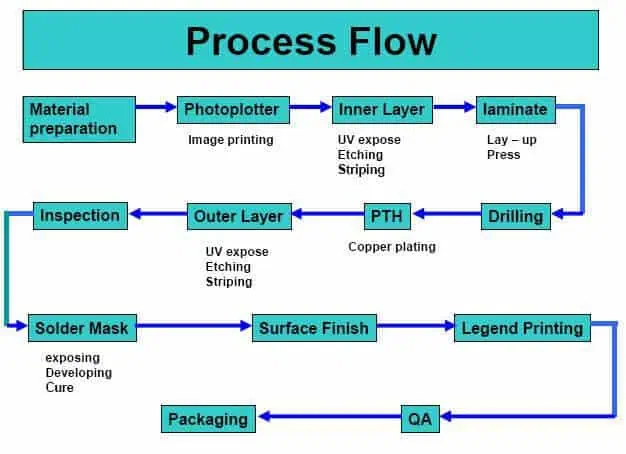
PCB Manufacturing Process: From Design to Reality

Creating a Printed Circuit Board (PCB) is like orchestrating a symphony of precision and technology. Let’s break down this fascinating process into three main acts: Design, Fabrication, and Assembly.

  1. Design: Blueprinting the Future

The journey begins in the digital realm, where Computer-Aided Design (CAD) software becomes the artist’s canvas. Here’s what happens:

  • Engineers map out component layouts and trace routes
  • They strategically place vias and plated-through holes (PTHs)
  • Materials are selected, layer structures are planned, and trace dimensions are defined
  • The final design is exported as Gerber files, the universal language of PCB manufacturing
  1. Fabrication: Bringing the Design to Life

This is where the magic happens, transforming digital designs into tangible boards:

  • Start with a copper-clad substrate (usually FR-4, a fiberglass-epoxy composite)
  • Etch the copper to create the designed trace patterns (chemically or mechanically)
  • For multilayer PCBs, individual layers are created and then fused with heat and pressure
  • Drill holes for component mounting and inter-layer connections
  • Plate the holes with copper to create PTHs and vias
  • Apply solder mask to protect the traces
  • Add silkscreen for component guidance and important information
  • Finish with surface treatments to prevent oxidation
  1. Assembly: Adding the Brains to the Board

Now it’s time to populate the PCB with electronic components:

  • Components are placed using one of two methods: a) Through-hole soldering: Component leads are inserted into pre-drilled holes and soldered b) Surface-mount technology (SMT): Components are soldered directly onto the board’s surface
  • Specialized machines precisely place components
  • Soldering techniques (like reflow or wave soldering) secure the components

Each step in this process is a delicate dance of precision and expertise. Understanding this journey helps engineers and designers make informed decisions to optimize performance, reduce costs, and enhance manufacturability.

From the initial concept to the final product, PCB manufacturing is a testament to human ingenuity and technological advancement. Whether you’re designing a simple gadget or a complex computing system, knowing these steps empowers you to create better, more efficient electronic devices.

Remember, in the world of PCBs, attention to detail isn’t just importantโ€”it’s everything!

What is a PCBA ?

Sweeping Robot PCBA

PCBA stands for Printed Circuit Board Assembly. It’s the result of attaching electronic components to a bare printed circuit board (PCB). This process transforms a simple PCB into a functional electronic circuit.

The PCB assembly process is crucial in manufacturing electronic devices. It involves carefully placing and soldering various components onto the board according to a specific design.

A PCBA serves as the foundation for electronic devices, allowing different components to work together efficiently. It ensures that the device functions as intended by:

  1. Guiding electrical signals between components
  2. Following the device’s schematic design
  3. Providing ground and voltage planes
  4. Maintaining proper impedance control for optimal electrical performance

The quality and performance of a PCBA depend on several factors:

  • The quality of the components used
  • The accuracy of the assembly process
  • The reliability of the solder joints

In essence, a PCBA is the heart of most electronic devices, enabling them to perform their intended functions.

PCBA Composition

A Printed Circuit Board Assembly (PCBA) is a complex yet unified electronic component. Here’s what makes up a PCBA:

  1. The PCB (Printed Circuit Board)

The PCB is the foundation of the PCBA. It’s a flat board made of laminate materials, often in multiple layers. The PCB provides:

  • Structural support
  • Conductive pathways for electrical signals
  1. Electronic Components

Various electronic parts are mounted on the PCB, including:

  • Passive components: resistors, capacitors, inductors
  • Active components: transistors, integrated circuits

Each component has a specific function, contributing to the overall performance of the device.

  1. Traces and Vias
  • Traces: Thin conductive paths on the PCB surface that carry electrical signals
  • Vias: Small holes connecting different layers in multi-layer PCBs, allowing signals to travel between layers
  1. Solder Paste

Solder paste is applied to the board before component placement. It consists of:

  • Fine solder particles
  • Flux

The paste ensures solid electrical and mechanical connections when heated. Proper application is crucial for the quality of the final assembly.

In summary, a PCBA is a carefully designed combination of these elements. Each part plays a vital role in creating a functional electronic circuit that powers our modern devices.

Two Main PCBA Assembly Methods

PCBA (Printed Circuit Board Assembly) refers to the process of attaching electronic components to a printed circuit board. There are two primary methods used in PCBA:

  1. Through-Hole Technology (THT)

THT is a traditional method of PCB assembly. Key features include:

  • Components have long leads inserted through holes in the PCB
  • Leads are soldered on the opposite side of the board
  • Provides strong mechanical and electrical connections

Applications of THT:

  • Aerospace equipment
  • Military hardware
  • Industrial machinery
  • Vintage electronics

THT Assembly Process: a) Drilling holes in the PCB b) Inserting component leads c) Soldering (often using wave soldering) d) Trimming excess leads and cleaning

  1. Surface-Mount Technology (SMT)

SMT is a more modern approach to PCB assembly. Key features include:

  • Components are mounted directly onto the PCB surface
  • Uses small solder pads instead of holes
  • Allows for smaller, more compact designs

Applications of SMT:

  • Smartphones
  • Tablets
  • Wearable devices

SMT Assembly Process: a) Applying solder paste using a stencil b) Placing components with pick-and-place machines c) Reflow soldering in a specialized oven d) Inspection and quality control (often using Automated Optical Inspection)

Both methods have their advantages and are chosen based on the specific requirements of the electronic device being manufactured.

PCBA Testing: Ensuring Quality and Reliability

PCBA (Printed Circuit Board Assembly) testing is a crucial step in the manufacturing process, ensuring that assembled circuit boards meet quality standards and function as intended. This process involves checking various aspects such as IC programming, power, current, voltage, and circuit continuity.

Importance of PCBA Testing:

  • Critical quality control measure
  • Ensures product functionality and reliability
  • Helps prevent defective products from reaching customers

Main PCBA Test Types:

  1. In-Circuit Test (ICT)
    • Checks circuit functionality
    • Measures current and voltage values
    • Analyzes fluctuation curves, amplitude, and noise
  2. Functional Circuit Test (FCT)
    • Simulates real-world usage
    • Identifies hardware and software issues
    • Verifies overall product functionality
  3. Flying Probe Test
    • Uses moving probes for electrical testing
    • Examines component values and characteristics
    • Ideal for low-volume or prototype boards
  4. Aging Test
    • Continuous power-on testing
    • Simulates long-term use
    • Evaluates product durability and stability
  5. Environmental Stress Test
    • Exposes PCBAs to extreme conditions
    • Tests temperature, humidity, water resistance, drop, and vibration tolerance
    • Assesses overall product reliability

Choosing the right combination of tests depends on the specific product requirements and intended use. Experienced PCBA manufacturers can efficiently conduct these tests to ensure high-quality, durable products.

PCB vs. PCBA: Understanding the Distinctions

pcb-vs-pcba
pcb-vs-pcba

While PCB (Printed Circuit Board) and PCBA (Printed Circuit Board Assembly) are closely related, they have several key differences:

  1. Definition

PCB:

  • A bare board with conductive traces on a non-conductive substrate
  • Provides the foundation for electronic circuits

PCBA:

  • A fully assembled PCB with electronic components attached
  • A functional circuit ready for use in electronic devices
  1. Manufacturing Process

PCB:

  • Involves designing the layout
  • Creating conductive pathways through etching
  • Drilling holes for component insertion

PCBA:

  • Starts with a completed PCB
  • Adds components like resistors, capacitors, and integrated circuits
  • Involves processes such as:
    • Solder paste application
    • Component placement
    • Reflow soldering
  1. Cost Considerations

PCB:

  • Generally less expensive
  • Cost mainly includes materials and fabrication

PCBA:

  • More costly overall
  • Includes PCB cost, component costs, and assembly fees

Comparison Table:

AspectPCBPCBA
StateBare boardAssembled board
FunctionalityNon-functional on its ownFunctional electronic circuit
ComponentsNoneVarious electronic parts attached
ProductionDesign and fabrication onlyIncludes component placement and soldering
CostLowerHigher
UseIntermediate productFinal product or sub-assembly

Understanding these differences is crucial for anyone involved in electronics design, manufacturing, or procurement.

Choosing Between PCB and PCBA

When to Choose PCB:

  • Early stages of product design and prototyping
  • Testing and refining board layout
  • Evaluating conductive pathways
  • When you have in-house capability for component assembly
  • If you prefer flexibility for alterations

When to Choose PCBA:

  • Need for fully operational boards
  • Direct integration into products
  • Mass production scenarios
  • Time-saving solution
  • Ensuring consistency and reducing assembly errors
  • Cost-effective at scale
  • For finished products or near-final prototypes

Applications of PCB and PCBA:

  1. Consumer Electronics: Smartphones, TVs, etc.
  2. Automotive Electronics: EVs, battery management, autonomous navigation
  3. Industrial Controls: PLCs, motor drives, sensors
  4. Medical Devices: Heart rate monitors, MRI scanners, surgical instruments
  5. Computing Devices: Servers, laptops, hosting CPUs, GPUs, RAM
  6. Telecommunications: Routers, switches, base stations
  7. Aerospace and Defense: Cockpit instrumentation, missile guidance systems
  8. Internet of Things (IoT): Smart homes, wearables, industrial sensors

RAYMING PCB Services:

Company Highlights:

  • Focus on intelligent manufacturing for small and large-scale PCBA production
  • Swift service without compromising quality
  • In-house developed management systems (CRM, MES, ERP, IoT)
  • Expertise in various sectors: industrial control, smart home, instrumentation, vehicle IoT, communication power, medical devices, automotive, and aviation
  • Rigorous testing and prototype assembly protocols

RAYMING PCB positions itself as a partner for comprehensive PCB and PCBA solutions, from design to delivery, with a focus on innovation and quality across diverse industries.

What is the difference between wave soldering and reflow soldering?

reflow soldering

Soldering is a critical process used to attach electronic components to printed circuit boards (PCB) by melting solder to form permanent electromechanical bonds. The two most common soldering methods used in PCB assembly are wave soldering and reflow soldering. Both techniques have their own advantages and disadvantages.

This article provides an in-depth comparison between wave soldering and reflow soldering processes, equipment, applications etc. to understand their key differences and help select the right approach.

Overview of Wave and Reflow Soldering

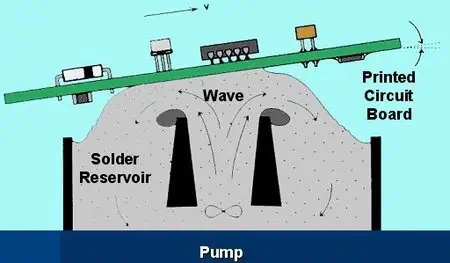
Wave Soldering involves passing the bottom side of a PCB over a pumped wave of molten solder to solder component leads. The wave solder machine maintains a continuous recirculating wave of liquid solder within a tank.

Reflow Soldering involves applying solder paste deposits to PCB pads, placing components on top and then heating the assembly in a reflow oven to melt the solder and attach components.

Wave Soldering Process

The key stages in wave soldering process are:

  • Flux application – Flux is sprayed on the bottom side of the PCB to remove oxides.
  • Preheat – PCB is preheated to about 100ยฐC to dry flux and prepare surfaces.
  • Wave contact – The PCB travels over the solder wave, contacting the wave for 1-5 seconds allowing soldering of leads.
  • Cool down – PCB passed through cool air jets to solidify solder before next processing step.

Reflow Soldering Process

The stages in a typical reflow soldering process are:

  • Paste printing – Solder paste is deposited on PCB pads using stencil.
  • Component placement – Components are accurately placed on board.
  • Reflow – The PCB passes through preheat, reflow and cool down zones to melt and solidify solder.
  • Inspection – Post reflow inspection performed.

Wave Soldering Equipment

The major equipment units in a wave soldering line are:

  • Fluxer – Applies flux on PCB bottom side by spraying or foaming.
  • Preheater – Uses IR heaters or convection heaters to warm PCB and components.
  • Solder wave – Molten solder pumped and maintained at optimum level by nitrogen or air knives.
  • Cooling section – Fans or water cooled heat sinks to solidify solder quickly.

Support mechanisms include conveyor, board supports, easy load/unload systems. Parameters like temperatures, speed are controlled by a computer.

Reflow Soldering Equipment

The primary equipment used in reflow soldering are:

  • Solder paste printer – High precision, high speed printer to deposit solder paste on PCB.
  • Pick and place machine – Automates placement of components on boards.
  • Reflow oven – Has different thermal zones to heat and cool PCB Assembly. Convection, IR, vapor phase ovens used.
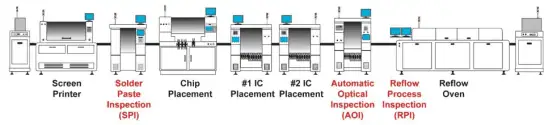
  • Post reflow inspection – AOI machines inspect quality after soldering.

The process is highly automated with conveyor belts moving PCBs between machines.

Joint Quality Comparison

Wave Soldering Advantages

  • Even solder deposition on pad surfaces.
  • No tombstoning since components not yet placed.
  • Less voiding as solder wets pads directly.
  • No head-in-pillow defects.

Reflow Soldering Advantages

  • Generally lower defects as solder paste can hold components in place.
  • Better for fine pitch components due to precise paste deposition.
  • Even heating in oven avoids thermal gradients.
  • Double-sided reflow possible.

Applicable Components

Reflow Soldering
Reflow Soldering

Wave Soldering Application

Best for:

  • Through hole components
  • Wires, connectors soldered to PCB edge
  • Single-sided PCB population

Limitations:

  • Surface mount parts cannot be wave soldered.
  • Tall components may get dislodged.
  • Shadowing can block solder flow under components.

Reflow Soldering Application

Best for:

  • Surface mount components like SMD ICs, resistors, capacitors.
  • High density boards with small components.
  • Double sided SMD boards.

Limitations:

  • Through hole components may fall out before reflow.
  • Large components and boards need customized oven profiles.

Lead-Free Compatibility

Wave Soldering

  • Lead-free solders like SAC alloy compatible but can require higher temperatures.
  • Drossing and alloy contamination can be issues.
  • Nitrogen curtains and mini-waves aid lead-free soldering.

Reflow Soldering

  • Easily adapted for lead-free solders through modified profiles.
  • Closed, controlled oven environment gives better process control.
  • Separate lead-free paste printers may be needed.

Process Speed Comparison

Wave Soldering

  • Very high throughput of upto 35,000 joints per hour.
  • Multiple boards can be processed simultaneously.
  • Continuous in-line processing minimizes non-value added time.

Reflow Soldering

  • Limited by serial nature of process steps.
  • Typical throughput of 2,500 – 6,000 joints per hour.
  • Higher automation and vision inspection add cycle time.

Floor Space Needs

Wave Soldering

  • Entire line from fluxer to cooler can fit in under 10 m length.
  • Compact footprint due to in-line arrangement.
  • Operators only needed at load/unload ends.

Reflow Soldering

  • Printer, oven, AOI require significant space between them.
  • Typically need over 25 m long line.
  • Operators required at multiple points through process.

Energy Consumption

Wave Soldering

  • High thermal efficiency as solder constantly maintained molten.
  • Preheating is only major energy need.
  • Heat recovery reduces energy usage.

Reflow Soldering

  • Repeated heating of oven and paste deposits consumes more energy.
  • Forced convection ovens consume high power.
  • Optimization of preheat and reflow profile can help reduce consumption.

Equipment Cost Comparison

Wave Soldering

  • Initial equipment cost of $50,000 to $150,000
  • Low maintenance except for periodic pump rebuilds, nozzle cleaning etc.

Reflow Soldering

  • Printer, placement machine, oven total investment of $200,000 to $500,000.
  • Higher maintenance for paste printer stencils, nozzles etc.
  • Solder paste costs extra.

Defects Comparison

Wave Soldering Defects

  • Shadowing leading to solder skips.
  • Flux residue trapping under components.
  • Bridging between leads and pads.
  • Disturbed joints due to wave turbulence.

Reflow Soldering Defects

  • Insufficient paste deposit causing poor wetting.
  • Tombstoning of small components.
  • Reflow voids due to poor paste application or profiles.
  • Head-in-pillow defects under BGAs.

Process Control Factors

SMT soldering Process

Wave Soldering Controls

  • Solder wave parameters – height, speed, temperature, dross levels.
  • Flux amount, heating levels in preheaters.
  • Conveyor speed.
  • Board supports, carriers, jigs.

Reflow Soldering Controls

  • Paste printer setup – stencil, pressure, print speed.
  • Accuracy of pick and place machines.
  • Reflow oven – zone temps, conveyor speed.
  • Paste condition and volume.

Inspection Needs

Wave Soldering Inspection

  • Visual inspection at several stages – post flux, post solder, end of line.
  • For solder defects, placement issues, residue etc.
  • ICT testing for connectivity.

Reflow Soldering Inspection

  • Main inspection after reflow by optical AOI equipment.
  • Checks for insufficient or excess solder, tombstoning etc.
  • ICT testing also required to confirm electrical integrity.

Summary Comparison

ParameterWave SolderingReflow Soldering
Process stagesFluxing, preheat, solder wave, coolingPaste print, component place, reflow, cooling
Suitable componentsThrough-hole componentsSMD components primarily
Lead-free suitabilityPossible with higher temperaturesEasily adapted through oven profiles
SpeedVery high, upto 35000 joints/hrLimited by serial steps, 2500-6000 joints/hr
Floor spaceCompact inline arrangementMore space needed between machines
Energy useHigh thermal efficiencyRepeated oven heating consumes more energy
Equipment cost$50K to $150K$200K to $500K
Defect typesShadowing, flux residue, solder bridgingInsufficient paste, tombstoning, reflow voids
Process controlWave parameters, preheat, conveyor speedPaste print, oven profile, paste volume
InspectionPost-solder visual and ICTPost-reflow AOI and ICT

Applications of Wave and Reflow Soldering

Wave Soldering Use Cases

  • High mix, medium volume PCB production
  • Automotive electronics manufacturing
  • Telecom infrastructure equipment
  • Industrial control boards

Reflow Soldering Applications

  • Low to medium volume, high mix consumer electronics
  • Cellphone and portable device manufacturing
  • High density digital boards for computing
  • Advanced driver assistance automotive electronics

Choosing the Right Process

When to use wave soldering

  • For through hole components
  • Double sided TH boards
  • Large boards
  • High production volumes
  • Low precision component placement

When to use reflow soldering

  • For surface mount components
  • Fine pitch parts below 0.5 mm
  • Dense component placement
  • Sensitive components that cannot withstand wave turbulence
  • Lower to medium production volumes

Conclusion

In summary, while both wave and reflow soldering achieve the same end goal of permanently soldering components to PCBs, they have significant differences in their process steps, equipment involved, defect modes, process control needs and applications. Selecting the right soldering technology is vital based on product requirements like component types, precision, volumes etc. Using a combination of both methods is also commonly done to leverage their respective strengths for optimal quality and throughput. With the electronics manufacturing industry moving towards greater automation, miniaturization and flexibility, innovations in soldering technologies will continue playing a key enabler role.

FAQs

Q1. Is it possible to use both wave and reflow soldering on a single PCB assembly?

Yes, it is common to use both methods in a mixed technology assembly. First the surface mount devices are soldered using reflow soldering. Then the through hole components are soldered by passing the board through the wave soldering machine.

Q2. How to decide between wave or reflow soldering for a product?

If using primarily through hole components, wave soldering is preferable. For boards with dense SMD components, fine pitch ICs below 0.5mm, BGAs etc. reflow soldering is more suitable.

Q3. What are no-clean soldering processes?

No-clean processes use solder paste and flux chemistries that do not require cleaning after soldering. This saves time and cost. They are common for reflow soldering, while wave soldering typically needs cleaning.

Q4. Does solder alloy affect the choice of process?

Yes, high temperature alloys like SAC305 may be difficult to use for wave soldering requiring higher preheat temperatures. Reflow ovens can be programmed for these alloys more easily.

Q5. How to reduce voids in reflow soldering?

Adjusting the reflow profile, using pause steps, proper ramp down, optimized paste deposit volumes and outgassing are some ways to reduce voids with reflow soldering.

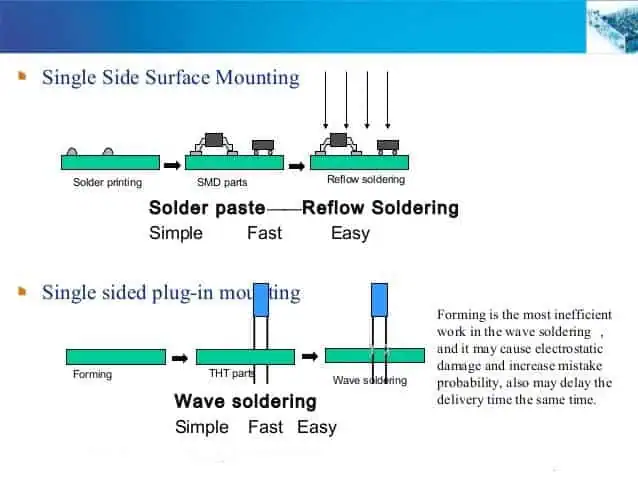
In PCBA processing, There are two common soldering methods: Reflow soldering and wave soldering.

What is the function of reflow soldering, what is the function of wave soldering, and where are their differences?

YouTube video

PCBA is Printed Circuit Board +Assembly, That is to say, the PCB board board passes through the SMT line and DIP line, the whole process we call it PCBA. This is a commonly used method in China, While the standard way of writing in Europe and America is PCBโ€™A, adding โ€ โ€˜ โ€œ, which is an official idiom.

1. Reflow soldering

Reflow soldering is a process in which a solder paste (a sticky mixture of powdered solder and flux) is used to temporarily attach one or thousands of tiny electrical components to their contact pads, after which the entire assembly is subjected to controlled heat. The solder paste reflows in a molten state, creating permanent solder joints. Heating may be accomplished by passing the assembly through a reflow oven or under an infrared lamp or by soldering individual joints [unconventionally] with a desoldering hot air pencil.

Reflow soldering process: Printing Solder Paste > Mounting Components > Reflow Soldering > Cleaning.

Reflow soldering process

2. Wave Soldering

Wave soldering
Wave Soldering

Wave soldering is a bulk pcb soldering process used in the manufacture of printed circuit boards. The circuit board is passed over a pan of molten solder in which a pump produces an upwelling of solder that looks like a standing wave. As the circuit board makes contact with this wave, the components become soldered to the board. Wave soldering is used for both through-hole printed circuit assemblies, and surface mount. In the latter case, the components are glued onto the surface of a printed circuit board (PCB) by placement equipment, before being run through the molten solder wave. Wave soldering is mainly used in soldering of through hole electronic components.

Wave soldering process: DIP > soldering flux > preheating > wave soldering > cut corners > inspection.

wave soldering process
Wave soldering process

3. The difference between wave soldering and reflow soldering

(1) Wave soldering is a solder solder that forms a solder peak to solder components;

Reflow soldering is a high temperature hot air to form a reflowed molten solder to solder components.

(2) During reflow soldering, there is solder on the pcb before the furnace, and only the coated solder paste is melted and welded after soldering;

During wave soldering, there is no solder on the pcb before the furnace, and the solder wave generated by the welder coats the solder on the pads to be soldered.

(3) Reflow soldering is suitable for SMD electronic components, and wave soldering is suitable for pin electronic components.

What is the cause of insufficient solder?

Soldering Circuit Boards

Soldering is a critical process used to mechanically and electrically join components in electronic assemblies. Insufficient solder can lead to poor quality solder joints that are unreliable both electrically and mechanically. There are several potential causes that can result in insufficient solder during the soldering process:

Poor Solderability of Parts

The solderability refers to how well the parts to be soldered can wet and adhere to solder. Following factors affect solderability:

Oxidation or Contamination

  • Metal surfaces like component leads and PCB pads get oxidized over time
  • This makes solder wetting difficult resulting in poor joints
  • Oil, grease or other residues also reduce solderability

Incompatible Materials

  • Certain metals like stainless steel and aluminum do not solder well
  • Lead-free solders have worse solderability than leaded solders
  • Mismatch between surfaces and solder alloy reduces wetting

Old Components

  • Components stored for long periods have degraded solderability
  • Moisture absorption also reduces solderability of parts

Lack of Solder Coating

  • Components without pre-applied solder coating have poorer solderability
  • Coatings like hot solder dip, ENIG, immersion tin improve wetting

Thermal Damage

  • Overheating parts during soldering destroys solderability
  • Burnt or charred surfaces will not accept solder properly

Proper handling, storage and pretinning along with protective coatings is needed to ensure good solderability of parts.

Low Soldering Temperature

Sufficient temperature is essential for proper melting and wetting of solder. Insufficient temperature causes:

  • Solder joint is formed before flux can properly activate and remove surface oxides
  • Solder does not become fully molten and evenly flow over the joint surfaces
  • Partial wetting occurs resulting in weak joints with cold solder spots

Common reasons for low soldering temperature:

  • Soldering iron tip is not properly tinned or maintained
  • Low iron power rating or large tip being used
  • Poor contact between iron tip and joint being soldered
  • Excessive heat sinking in large ground planes and leads
  • Fast motion of iron tip does not allow time for heating

Using adequate tip size, power rating, contact time/motion and re-tinning maintenance helps avoid low temperatures.

Problems with Solder Paste Deposition

For reflow soldering, insufficient solder paste deposit will lead to poor joints. Some contributing factors are:

  • Excessive gap between component and PCB pad
  • Misalignment of paste deposits with pads
  • Too little paste dispensed due to volume setting issues
  • Clogging or leaks in solder paste stencil
  • Outgassing and drying of the paste deposit before reflow
  • Slumping of paste due to high ambient temperatures

Good process controls, stencil cleaning, monitoring of paste deposits and proper storage helps avoid these issues.

Defects in PCB and Component

PCB and component defects that absorb solder and restrict flow result in insufficient solder:

PCB Defects

  • Voids in ground or thermal planes acting as heat sinks
  • Poor pad design with insufficient wetting area
  • Contamination like oils and residues on pads

Component Defects

  • Cross-talk barriers blocking flow between leads
  • Tight lead spacing preventing access to solder
  • Warped leads or gaps between lead and PCB pad

Inspecting PCBs and components and checking pad dimensions ensures such issues are avoided.

Inadequate Flux

Flux removes surface oxides enabling solder flow and wetting. Following flux related reasons reduce soldering effectiveness:

  • Too little flux applied to joint
  • Flux drying out before completing soldering
  • Weak or water-soluble flux that is too mild
  • Low activity of aged flux reducing cleaning capability
  • Baked on or burnt flux residues interfering with wetting

Adequate amount of appropriate rosin-based flux should be applied to maintain solderability.

Problems with Solder Wire

Issues with solder wire composition and condition also affect soldering:

  • Impurities and voids in solder wire reducing fluidity -Insufficient wire diameter to thermal mass of joint
  • Oxidation or contamination of solder wire surface
  • Mismatch between alloy melting point and process temperature
  • Low tin-lead percentage of alloy increasing melting point

Proper solder wire handling and selection compatible with process requirements avoids these problems.

Other Process Issues

  • Excessive heat sinking due to large ground planes
  • Jigging misalignment resulting in loss of contact between tipped iron and joint
  • Soldering for too short a duration to allow adequate heating
  • Vibration or movement disturbing solder bead formation
  • Poor fume extraction exposing joints to corrosive flux residues

Control and monitoring of process parameters is needed to counteract these effects.

Troubleshooting Insufficient Solder

  • Visually inspect joint closely under magnification to identify poor wetting, cold spots etc.
  • Use solderability testing chemicals like rosin that react when applied to oxidized/contaminated areas
  • Thermally profile temperatures at joint during soldering to check if adequate temperature is reached
  • Review process parameters like heat application duration, wire gauge, tip size etc.
  • Evaluate PCB design – thermal planes, pad dimensions, spacing etc.
  • Test flux activity and assess paste condition
  • Check for issues with solder bath contamination or dross buildup if wave soldering

Preventing Insufficient Solder

  • Use proper storage and handling of components to maintain solderability
  • Apply solderability preservatives like benzotriazole on surfaces
  • Ensure PCB and component cleanliness before soldering
  • Select the right solder alloy matched to process temperature
  • Use adequate flux and apply uniformly to joints
  • Clean and tin soldering iron tips regularly
  • Optimize soldering temperature, duration and motion
  • Inspect stencil condition and paste deposits
  • Ensure adequate fillet wicking over joint
  • Monitor the soldering process continuously and make adjustments as needed

With proper analysis of root causes and preventive steps, issues due to insufficient solder can be eliminated resulting in reliable, high quality solder joints.

FAQs

Q1. How can I identify if insufficient solder is causing poor quality joints?

Look closely under magnification for joints with dull finish, grainy structure, dark spots, non-wetting and dewetting of surfaces indicating cold solder. Probe joints for continuity issues signalling poor bonding.

Q2. What is the ideal temperature for hand soldering with lead-tin alloy?

For Sn60Pb40 solder, ideal tip temperature is around 370โ„ƒ to 400โ„ƒ. Higher temperatures above 450โ„ƒ should be avoided to prevent damage to components.

Q3. How does excess flux cause insufficient solder problems?

Too much flux can actually impede solder flow rather than helping it. It also leads to charring which deposits residues that hinder wetting. A thin uniform layer of flux should be applied.

Q4. Can inadequate solder volume be a reason for insufficient solder defects?

Yes, using too little solder wire compared to the thermal mass of the joint can lead to insufficient solder. Larger wire diameter or longer application time is required.

Q5. What is the effect of oxidation on solderability?

Metal oxide formation on surfaces interferes with solder wetting by creating a barrier layer. Flux helps remove oxides but preventing oxidation via protective coatings or oxidation inhibitors also improves solderability.

How To Repair Damaged /Missing PCB Pads ?

How To Repair Damaged /Missing PCB Pads

Introduction

Printed circuit boards (PCBs) are susceptible to pad damage either during manufacturing or rework. Pads can become damaged or lifted off entirely from the board. This can render a PCB unusable since components cannot be soldered down properly. Fortunately, there are techniques available to repair missing or damaged pads and restore a PCB.

Pad repairs allow fixing defects rather than scrapping an entire PCB. However, all pad repairs should be approached carefully as they can affect long-term reliability if not done properly. This article provides repair methods for various pad damage scenarios.

Common Causes of Pad Damage

Some of the typical causes of pad damage include:

  • Excessive heat – Too much heat during soldering or desoldering can lift pads or cause the copper to de-laminate.
  • Mechanical damage – Scratches, cracks, indentations from tools can damage bond between pad and fiberglass.
  • Manufacturing defects – Etching issues, handling damage or drill misalignment may impair pads.
  • Corrosion – Environmental exposure leading to oxidation and corrosion under pads over time.
  • Handling damage – Stresses from flexing PCBs, shock or vibration can crack pads.
  • Multiple reworks – Repeated rework on a pad can wear it out and cause pad lift off.

Careful process control is key to avoid pad damage during assembly. But when pad damage does occur, selecting the optimal repair method is important.

Repair Considerations

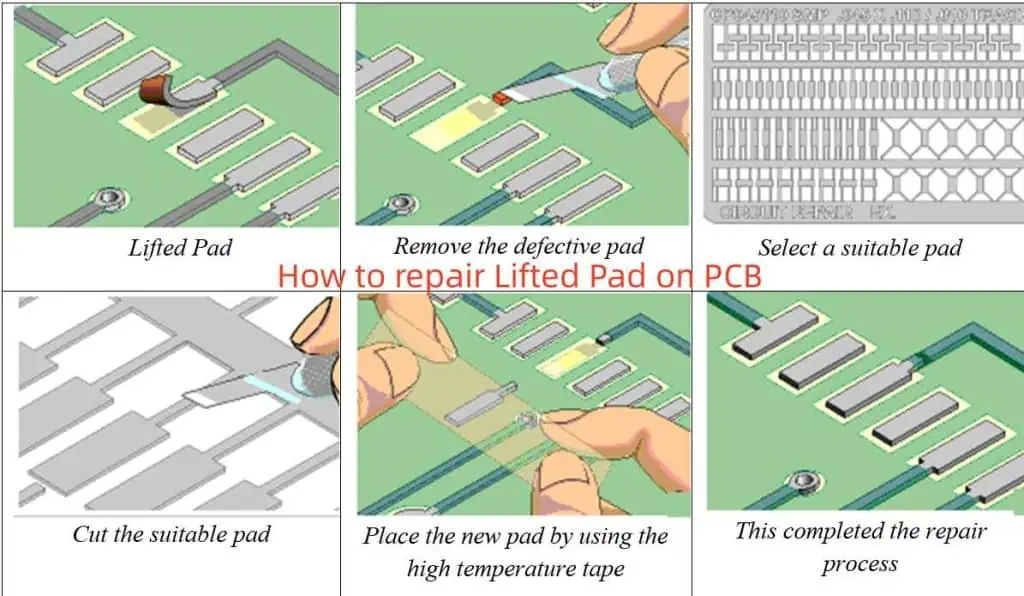
How to repair Lifted Pad on PCB

Some key factors to evaluate when planning pad repairs:

  • Type and extent of damage – Missing pad, partially lifted pad, pad with crack or indentation, etc.
  • Location – Is damaged pad on outer or inner layer? Is it reachable for repair?
  • Pad purpose – Is it for through-hole or surface mount component? High speed or high power?
  • Layer type – Can ground or power plane layers be repaired, or only signal layers?
  • Available repair area – Is there sufficient space around damaged pad for repair?
  • Component re-attachment – Will repaired pad allow reliable solder joint for component re-attachment?
  • Costs – Does chosen repair method require additional tools, materials, or testing?
  • Reliability – Will repair withstand mechanical and thermal stresses during product lifetime?
  • Rework processes – Compatibility with available PCB assembly and test capabilities.

Evaluating these parameters will guide selection of the optimal repair approach.

Pad Repair Methods

Here are some common methods used for repairing damaged or missing pads on PCBs:

1. Copper Foil Patch

  • Apply small copper foil square over damaged pad area. Secure with epoxy.
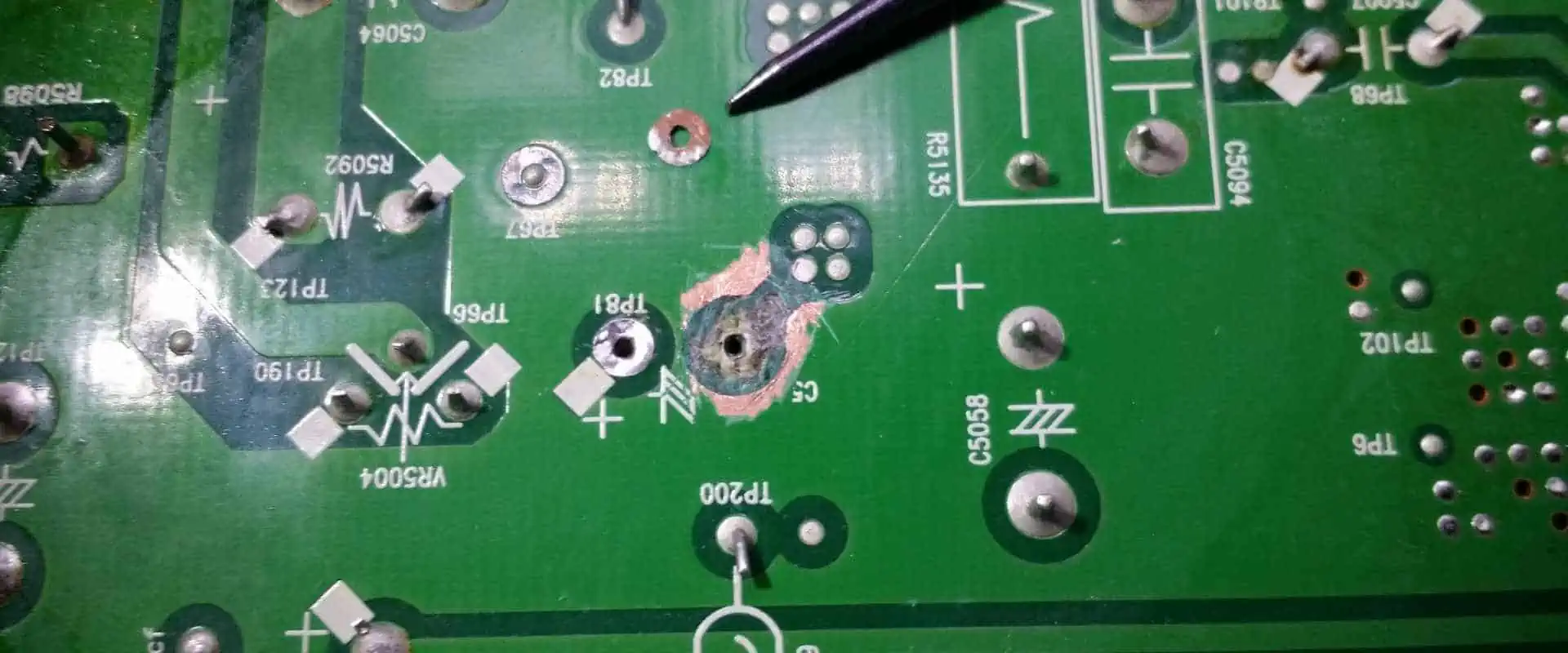
  • Suitable for outer layer pad repairs where foil patch is accessible.
  • Low cost, simple method. Reliability limited by epoxy strength.
  • Works for surface mount or through-hole pad repairs.

2. Copper Tape Patch

  • Use conductive copper tape over damaged pad site. Cover with non-conductive Kapton tape.
  • Wider tape increases reliability compared to foil. Foil may lift off during rework.
  • Easy outer layer repair method. Capable of repairing elongaged pads.
  • Limitations based on space needed for tape adhesion.

3. Circuit Frame

  • Glue insulating frame around damaged pad, then fill with conductive epoxy.
  • Provides containment for epoxy repair material.
  • Allows repair of any pad size. Handles voids under pads.
  • Requires significant space around damaged pad.

4. Conformal Coating

  • Use insulating acrylic coating over damaged pad area.
  • Coat entire PCB area under component to insulate. Then apply conductive coating to rebuild pad.
  • Allows repair when limited space around pad.
  • Conformal coatings prone to thermal damage during rework.

5. Solder Mask Bridge

  • Use solder mask to bridge the gap between disconnected pad segments.
  • For partial pad lifts. Mask reconstitutes pad electrically.
  • Requires access to solder mask artwork and selective imaging capability.
  • Provides reliable repair. Maintains original pad geometry.

6. Epoxy Fill

  • Inject conductive epoxy under the pad to re-adhere it. May also inject epoxy under component leads.
  • Allows repair without modifying pad geometry.
  • Significant process expertise needed for reliable injection. Risk of shorting under pad.
  • Repaired pad prone to re-lifting if epoxy not fully cured.

7. Trace Bridge Jumper

  • Solder thin insulated wire between disconnected pad segments.
  • Simple method to bridge small pad gaps.
  • Limited space required provided wire routing space exists.
  • Wire flexing can compromise long term reliability.

8. PC Board Rework

  • For multilayer boards, strip off layers to expose inner pad, repair pad, then rebuild board.
  • Allows access to inner layers not repairable otherwise.
  • Highly complex. Only for very expensive PCBs where re-manufacture not possible.
  • Skilled technicians and specialized tools needed.

The optimal repair technique depends on the pad type, layer location, reliability requirements, and available tools.

Process Steps for Pad Repairs

Here is an overview of the typical process sequence to execute a pad repair:

  1. Visually inspect pad damage under microscope. Check for cracks, lifting, or missing copper.
  2. Remove any residual solder or component debris from pad area with solder wick and flux.
  3. Select repair method based on pad characteristics and constraints. Gather required materials and tools.
  4. Prepare pad area – remove oxide with abrasive pad, clean pad thoroughly.
  5. Execute pad repair procedure using selected method.
  6. For multilayer boards, use ohmmeter to confirm electrical connectivity after repair.
  7. Apply flux to repaired pad area. Solder component lead or ball to pad using soldering iron.
  8. Clean repaired area. Inspect joint integrity using microscope.
  9. Perform electrical testing and any re-programming of board.
  10. Conduct X-ray inspection of repaired solder joints if required.
  11. Qualify reliability with temperature cycling, vibration, mechanical shock testing.

With careful process control, damaged PCB pads can be repaired successfully. But appropriate materials, operator skill levels, and inspection steps are vital to ensure robust, reliable repairs.

Guidelines for Reliable Pad Repairs

Follow these guidelines when repairing damaged pads to improve repair success and long-term reliability:

  • Select the optimal repair method based on damage type, pad characteristics, and PCB design constraints.
  • Remove all solder and oxides from pad area before attempting repair. Scrub with abrasives if needed.
  • Ensure repair materials are compatible with PCB and components. Conduct material testing if unknown.
  • Follow manufacturer instructions for surface prep, application procedures, cure times, etc.
  • Repair area should exceed damaged area by at least 2X for reliable adhesion.
  • Visually inspect for cracks, uneven surface, or voids after repair before rework.
  • Soldering profiles may need adjustment to avoid re-lifting repaired pad during attachment.
  • X-ray inspection of solder joints validates proper lead/pad interface.
  • Conduct environmental stress testing at temperature and load extremes expected in application.
  • Monitor initial field failures to identify any long-term reliability trends.

With careful process control and testing, PCB pads damaged during fabrication or assembly can be restored successfully.

Summary

  • Pad damage on PCBs can occur due to manufacturing issues or operational stresses. This can impair board function.
  • Assessing the pad characteristics and constraints guides optimal repair method selection.
  • Common repair techniques include copper foil or tape patching, epoxy injection, solder mask bridging, jumper wires, and full PCB rework.
  • Process steps encompass pad cleaning, material preparation, repair execution, soldering, inspection, and qualification testing.
  • Following repair guidelines will improve reliability. But evaluation under operational loads is key to validating pad repair integrity.

FAQ

What is the easiest PCB pad repair method?

The simplest repair methods are copper foil or copper tape patching. These allow quick repairs of outer layer pads, require minimal tools, and have low material costs. However, long-term reliability may be limited.

Can conformal coating be used to repair PCB pads?

Yes, a conformal coating can be applied over the damaged pad area to insulate, then a conductive coating added to rebuild the pad. This technique provides reliable repairs when space around the pad is very constrained.

Is it possible to repair inner layer PCB pads?

Yes, options like epoxy injection or full PCB rework allow access and repair of inner layer pads. But these approaches require significant expertise and are far more complex than outer layer repairs.

How do you repair a lifted PCB pad?

For partially lifted pads, epoxy injection to re-adhere the pad is an option. Solder mask bridging can also reconnect segmented pads. Completely missing pads need to be rebuilt using conformal coating or frame + epoxy methods.

Can jumper wires be used to repair PCB pads?

For small pad gaps or tears, soldering thin insulated jumper wires can bridge across and reconnect the damaged pad segments. This provides a simple way to repair pads when trace routing space permits bridging.

What is Difference Between Single-sided and Double-sided SMT Assembly

dip assembly
YouTube video

1. Single-sided SMT Process:

Incoming Inspection => Screen Solder Paste Printing(Dispense surface mount adhesives) => Surface Mounting => Drying(Solidifying) => Reflow Soldering => Clean out => VI&AOI => Rework/Repair.

Introduction About Single-sided SMT Assembly

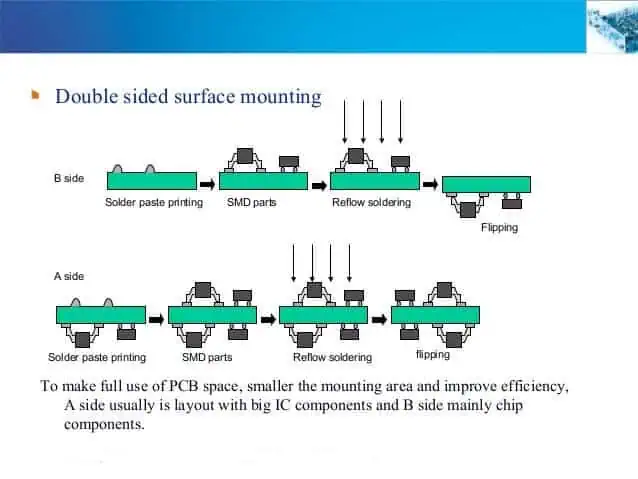
2. Double-sided SMT Process:

A. Incoming Inspection => Screen Solder Paste Printing on PCB A side (Dispense surface mount adhesives) => Screen Solder Paste Printing on PCB B side (Dispense surface mount adhesives) => Surface Mounting => Drying(Solidifying) => Reflow Soldering(Better on B side) => Clean out => VI&AOI => Rework/Repair.

B. Incoming Inspection => Screen Solder Paste Printing on PCB A side (Dispense surface mount adhesives) =>Surface Mounting => Drying (Solidifying) => Reflow Soldering on A side => Clean out => Plate Turnover => Dispense surface mount adhesives on PCB B side => Surface Mounting => Solidifying => Wave Soldering on B side => Clean out => VI&AOI => Rework/Repair.

This process is suitable for reflow soldering on the A side of the PCB and Wave Soldering on the B side. Only the pins less than the SOT or SOIC (28) in the SMD of PCB B side , then can use this process.

3. Single-sided mixed pcb assembly Process:

Incoming Inspection => Screen Solder Paste Printing on PCB A side (Dispense surface mount adhesives) => Surface Mounting => Drying(Solidifying) => Reflow Soldering => Clean out => DIP => Wave Soldering => Clean out => VI&AOI => Rework/Repair.

4. Double-sidedmixed Process:

A. Incoming Inspection =>Dispense surface mount adhesives on PCB B side => Surface Mounting => Solidifying => Plate Turnover => DIP on PCB A side => Wave Soldering => Clean out => VI&AOI => Rework/Repair.

First SMT, then DIP, suitable for SMD components more than separating components.

B. Incoming Inspection=> DIP on PCB A side(Bending Pin) => Plate Turnover => Dispense surface mount adhesives on PCB B side => Surface Mounting => Solidifying => Plate Turnover => Wave Soldering => Clean out => VI&AOI => Rework/Repair.

First DIP, then SMT, suitable for separating components more than SMD components .

double sided pcb assembly process

C. Incoming Inspection=> Screen Solder Paste Printing on PCB A side => Surface Mounting => Drying => Reflow Soldering => DIP (Bending Pins) => Plate Turnover => Dispense surface mount adhesives on PCB B side => Surface Mounting => Solidifying => Plate Turnover => Wave Soldering => Clean out => VI&AOI => Rework/Repair A side mixed, B side mounted.

D. Incoming Inspection=> Screen Solder Paste Printing on PCB B side => Surface Mounting => Solidifying => Plate Turnover => Screen Solder Paste Printing on PCB A side => Surface Mounting => Reflow Soldering on PCB A side => DIP => Wave Soldering on B side => Clean out => VI&AOI => Rework/Repair A side mixed, B side mounted.

First SMD on two side, Reflow Soldering, then DIP, Wave Soldering.

E. Incoming Inspection=> Screen Solder Paste Printing on PCB B side(Dispense surface mount adhesives) => Surface Mounting => Drying(Solidifying) => Reflow Soldering => Plate Turnover => Screen Solder Paste Printing on PCB A side => Surface Mounting => Drying => Reflow Soldering(It could be Partial welding) => DIP => Wave Soldering 2(If there are few components, you can use manual welding) => Clean out => VI&AOI => Rework/Repair A side mounted, B side mixed.

 5. Double-sided prototype PCB Assembly Process 

A. Incoming Inspection=> Screen Solder Paste Printing on PCB A side (Dispense surface mount adhesives => Surface Mounting => Drying(Solidifying) => Reflow Soldering on A side => Clean out => Plate Turnover => Screen Solder Paste Printing on PCB B side(Dispense surface mount adhesives) => Surface Mounting => Drying => Reflow Soldering(Better on B side) => Clean out => VI&AOI => Rework/Repair.

This process is suitable for mounting large SMDs on both sides of the PCB such as PLCC.

pcb assembly flow process

B. Incoming Inspection=> Screen Solder Paste Printing on PCB A side(Dispense surface mount adhesives => Surface Mounting => Drying(Solidifying) => Reflow Soldering on A side => Clean out => Plate Turnover => Screen Solder Paste Printing on PCB B side(Dispense surface mount adhesives) => Surface Mounting => Solidifying => Wave Soldering on B side => Clean out => VI&AOI => Rework/Repair.

This process is suitable for reflow on the A side of the PCB.

How to Do ESD Protection During SMT Assembly Process?

Electrostatic discharge PCB

Introduction

Electrostatic discharge (ESD) is the sudden flow of electricity between two electrically charged objects. It is one of the major reliability concerns during printed circuit board assembly using surface mount technology (SMT). ESD can potentially damage sensitive electronic components and assemblies if not controlled properly. This article provides a detailed overview on implementing effective ESD control and protection throughout the SMT assembly process.

ESD Damage Mechanisms

ESD events cause extremely fast transient spikes that can lead to multiple forms of damage in semiconductors and electronics.

Key damage mechanisms include:

  • Thermal second breakdown due to localized heating
  • Dielectric breakdown causing gate oxide punch-through
  • Metal melt and fusing
  • Charge trapping and carrier injection issues

Even voltages as low as 30V can be destructive for microelectronics. ESD failure may not be immediately apparent but manifests later as latent defects or reduced reliability.

Figure 1. Common ESD failure modes in ICs

Hence ESD prevention during manufacturing is critical.

ESD Sources During SMT Assembly

YouTube video

Electrostatic charges can build up on personnel, equipment, and materials during PCB assembly. Key ESD sources include:

People

  • Electrostatic charge accumulation on clothes and body
  • Movement and contact transferring charges
  • Improper grounding when handling ESD sensitive devices (ESDs)

Equipment

  • Automation like pick and place machines
  • Conveyors, tracks and trolleys
  • Test fixtures and handlers
  • Reflow ovens
  • Wave soldering machines
  • Hand tools

Materials

  • PCBs, metalizers and ionic contaminants
  • Packaging of components like tubes, tapes, trays
  • Solder materials
  • Cleaning chemicals
  • Workstation surfaces

Environment

  • Low humidity conditions
  • Cool and ventilated spaces

Without sufficient precautions, these sources generate electrostatic potentials that can discharge to the ESD sensitive electronics being assembled and cause damage.

ESD Standards and Models

To quantify ESD risks, some key standards and models are used:

  • HBM – Human Body Model – Charging of human body and discharge to device
  • CDM – Charged Device Model – Discharge from charged device
  • MM – Machine Model – Charging of equipment like pick-and-place

Typical ESD voltage levels:

ESD ModelVoltage Range
HBM250V to 4000V
CDM< 250V
MM200V to 1000V

Component sensitivity depends on design, size, and technology. An IC rated for 250V HBM can get damaged by a 100V CDM pulse.

Figure 2. Key ESD models used for defining component sensitivity levels.

ESD Control Plan

A comprehensive ESD control plan should be developed encompassing:

  • ESD protected areas
  • Equipment grounding
  • Personnel grounding
  • Handling procedures
  • Packaging and storage
  • Testing methods
  • Compliance verification
  • Corrective actions

This ensures every process, material, person, and equipment item is addressed from an ESD control perspective. Audits must be conducted periodically to validate effectiveness.

ESD Protected Areas

Demarcated ESD protected areas (EPAs) must be established with following provisions:

EPA Requirements

  • Warning signs to indicate entry into EPA
  • Antistatic flooring – dissipative or conductive material with ground points
  • Humidity control – Maintain 40-60% RH range
  • Air ionization for charge neutralization
  • Antistatic workstations
  • Personnel grounding equipment
  • Usage of only approved ESD safe materials
  • Ban on ordinary plastics or cardboards

Figure 3. Typical setup for an ESD Protected Area

Material Handling

  • Components stored in conductive packaging
  • Use of conductive bins, boxes and holders
  • Avoid contact with ordinary plastics
  • EPA approved carts for material movement

By controlling the environment, personnel, equipment, and handling processes, the generation and discharge of damaging ESD events can be minimized.

Personnel Grounding

Since people are a major source of electrostatic charges, proper grounding of personnel is essential.

Operators should wear:

  • Antistatic garments like apparel, coats and smocks
  • Conductive footwear with grounding straps
  • Wrist straps with cords for ground connection
  • Grounding should have resistance of 0.1 to 1M ohm range

Figure 4. Typical grounding equipment for SMT assembly personnel.

Safety Checks

  • Daily checks of wrist bands and footwear using testers
  • Display visual indicators like LEDs
  • Impedance meters to validate resistance
  • Ensure continuity from ground point to person

Proper grounding straps and garments should become a habit for every operator entering EPAs. This prevents ESD risk from human contact.

Equipment Grounding

All equipment, machines, workstations, and fixtures in the EPA must also be grounded.

Key Guidelines:

  • Single-point machine grounding to facility earth
  • Use grounding grids under machinery
  • Ground all metal chassis and covers
  • Ensure continuity from points to ground
  • No painted metal surfaces
  • Verify grounding with impedance testing
  • Periodic inspections of connectors and cabling

Other Precautions:

  • Use antistatic plastics and coatings
  • Ionized or grounded air blowers
  • Static neutralizing equipment
  • Avoid insulators like ordinary plastics

Proper grounding and equipotential bonding of everything reduces ESD risks and provides a safe path for charges to dissipate without discharge through components.

ESD Safe Handling Procedures

Strict procedures must be defined and followed when handling ESD sensitive components, PCBs and assemblies in the EPA.

Key handling guidelines:

  • Always wear grounded wrist strap before handling ESD devices. Check straps periodically.
  • Avoid direct contact with component pins/terminals/pads. Handle by edges/sides.
  • Use antistatic gloves, finger cots, vacuum pickup tools.
  • Only use EPA approved antistatic packaging and containers. No ordinary plastics or cardboards.
  • Transport PCBs in shorting or shunting trays, tubes or bags.
  • Connect boards and large components to ground during storage and waiting periods.

Figure 5. Example of ESD safe handling using wrist strap and conductive materials.

By controlling human handling steps and using only approved EPA materials, the risks of directly inducing ESD events can be minimized.

ESD Labels and Signage

Clear visual indicators must be provided on ESD sensitive items.

Typical ESD warning labels:

  • ESD warning symbol
  • Sensitivity level (e.g. HBM rating)
  • Caution note on proper handling

Signs to be displayed:

  • EPA area boundaries
  • Grounding points
  • Warnings on tools and equipment
  • ESD safe workstations
  • Antistatic material storage bins

Color coding:

  • Identify ESD safe materials with green color

This improves awareness on ESD control requirements.

ESD Safe Packaging and Storage

Components must be stored and transported in static controlled packaging within the EPA.

Key features of ESD packaging:

  • Made of conductive or static dissipative materials
  • Resistance in 108 to 1011 ohm-cm range
  • Uses antistatic plastics like polycarbonate, PET/PEN
  • Proper shielding from electric fields

Types of ESD packaging:

  • Conductive and anti-static bags, tubes and trays
  • Use of metalized shielding bags
  • Tubes/reels with built-in shorting contacts
  • Boxes and storage cabinets with ESD coatings

Labeling requirements:

  • ESD warning symbols
  • Rated voltage sensitivity level

Storage requirements:

  • First in first out (FIFO) stock rotation
  • No contact with ordinary plastics
  • Shelves have electrical grounding

Proper ESD packaging and storage ensures components are well protected before they enter the production process.

ESD Control in SMT Processes

Additional ESD precautions must be exercised during PCB assembly steps like solder pasting, component placement, reflow and test.

Solder Paste Printing

  • Use antistatic brushes, squeegee blades
  • Printer grounded to EPA common point
  • PCBs transported on shorting beds
  • Avoid ordinary plastics coming in contact

Component Placement

  • Use antistatic plastic component tapes
  • Place boards in grounded tracks or conveyors
  • Include ionization bars over conveyors
  • Pick and place machine properly grounded

Reflow Oven

  • Use proper machine grounding
  • Avoid insulators inside chambers
  • Adjust conveyor height to avoid tipping
  • Include ionization at entrance and exit

In-Circuit Testing

  • Test fixtures must be grounded
  • Use fixture shielding and isolation
  • Program simulation before live testing
  • Personnel wear wrist strap when handling boards

Conformal Coating

  • Use antistatic spray atomization
  • Ensure even and immediate spreading
  • Proper curing in grounded oven

Final Testing

  • Ground all test fixtures and handlers
  • Follow strict handler ESD certification
  • Conduct daily checks and audits

Packaging and Shipment

  • Use EPA approved ESD packing materials
  • Shorting of conductors/pads during bagging
  • Affix ESD caution labels on packaging

ESD Control Program Management

An organizational-wide ESD control program must be implemented covering:

  • ESD Coordinator responsibility
  • Written control procedures and compliance checklist
  • ESD training for staff and operators
  • Scheduled audits and corrective actions
  • Tool and equipment certification
  • ESD warning signage and visual controls
  • Measurement equipment for validation
  • Maintaining compliance with standards like ANSI/ESD S20.20

With strong program oversight and vigilance, an effective ESD control framework can be instituted.

Testing and Validation Methods

Various methods are used to validate and monitor ESD control effectiveness:

Compliance Verification

  • Voltage Probes – Check potentials on conductors
  • Resistance Measurements – Grounding continuity
  • Environmental Monitors – Humidity, temperature, ionization

Process Assessment

  • Simulated ESD events on test vehicles
  • TLP, HMM, Field Induced testing
  • Component level ESD stress tests

Product Qualification

  • ESD sensitivity testing per JS-001
  • HBM and CDM qualification levels
  • Failure analysis – SEM, deprocessing to confirm

Audits and Tracking

  • Routine ESD audit checklists
  • Material inspections – packaging, labels
  • Process monitoring like ionizer bar output
  • Incident reporting and corrective action

Conclusion

Implementing robust ESD control during SMT assembly involves strategic measures encompassing environment, people, equipment, materials, processes and compliance management. By assessing all potential sources of ESD in assembly, defining protected areas, following grounding disciplines, handling devices safely, using only certified ESD safe material, and continuous monitoring and improvements, ESD risks can be minimized. This results in improved quality, yield and reliability of electronic assemblies. Strong leadership commitment supplemented by training and audits is key to an effective ESD control program.

Frequently Asked Questions

What are some early indicators of ESD damage in assemblies?

Subtle signs of ESD damage include unexpected leaks, higher initial failures, latent defects, reliability issues like early breakdowns. Failures may trickle in over time. Robust ESD control practices during manufacturing are essential to avoid such field issues later.

How frequently should grounding equipment be tested?

Daily testing of wrist straps and footwear using impedance testers is recommended. Workstations and equipment grounding should be tested weekly. This ensures any deterioration of connections or straps is caught early.

What level of ESD control is needed for handling 1kV HBM sensitive devices?

1kV HBM sensitivity requires stringent ESD precautions like fully grounded personnel using heel straps, ESD garments, rigorous material control, ionization systems, isolated machine interfaces and handling only using safe pods or gloves. Work surfaces must be static dissipative.

How low can humidity affect ESD charge levels?

At very low humidity around 15%, electrostatic voltages can soar into the 10kV range. 15-20% is considered the critical level requiring extensive precautions. Humidity should be maintained between 40-60% RH for effective ESD control.

What is the recommended frequency of ESD audits?

Daily self-checks and testing is necessary by operators and equipment owners. But formal third-party ESD audits should occur monthly to inspect overall process compliance, material control, validations, labeling, signage, training records, etc. This ensures diligence and aids continuous improvements.

Top Reasons for PCB pad cratering in BGA Soldering

PCB epoxy resin

Introduction

Ball grid array (BGA) packages have become very popular in modern electronics due to their high density interconnection capabilities. However, soldering BGAs onto printed circuit boards (PCBs) can be quite challenging due to their fine pad pitch and solder ball grid underneath the package. One common soldering defect seen in BGAs is pad cratering, where the solder pad gets eroded away causing an uneven and unreliable joint. This article explores the major causes behind pad cratering failures in BGA soldering and provides tips to prevent them.

What is Pad Cratering?

YouTube video

Pad cratering manifests as excessive solder being drawn out of the pad metallization, leading to a โ€œcraterโ€ in the pad. This is often accompanied by solder voids. The pad may get so eroded that its circuit connection gets severed. The main mechanism behind cratering is an imbalance between the solder volume and wetting forces during reflow. The reasons for this imbalance are examined next.

Figure 1. Example of Pad Cratering Defect in BGA Solder Joint

Excessive Solder Volume

Having too much solder paste on the pad prior to reflow can lead to cratering. Excess solder exerts a high vertical force which draws out pad metal when molten.

Causes:

  • Too much paste deposition during stencil printing
  • Thick stencil aperture resulting in excess paste transfer
  • Solder balls pre-attached to BGA pads
  • Poorly optimized reflow profile

Solutions:

  • Use thinner stencil (5-6 mils thick) with optimized aperture design
  • Adjust paste printer settings for proper deposition
  • Evaluate proper solder ball volume if attaching spheres
  • Tune reflow profile for minimal solder balling

Poor Solderability

If the pad metallization doesnโ€™t wet well with solder, it can enhance cratering. The high surface tension forces the solder to ball up and scavenge pad metal.

Causes:

  • Oxidized or contaminated pad surfaces
  • Pads not properly cleaned prior to reflow
  • Low-quality pad finish like pure tin or nickel

Solutions:

  • Use Ni/Au or immersion Ag pad finish for good solderability
  • Clean pads thoroughly to remove residues
  • Use no-clean flux designed for BGA soldering

Excessive Heating Zone

Slow heating of the solder joint allows more time for pad erosion to occur. Ideally, the joint should heat rapidly through the reflow zone.

Causes:

  • Improper oven zone settings and convection
  • Small pads relative to large solder volume
  • Slow linear ramp up of temperature

Solutions:

  • Optimize reflow profile with rapid heating (~1-3ยฐC/sec)
  • Verify proper heater zones with thermal profiling
  • Use proper pad size to match BGA pitch

Voiding Under BGA

Voids under the BGA weaken the joint strength and can initiate cratering defects. They indicate poor solder paste reflow.

Causes:

  • Solder paste too thick or dried out
  • Oxides or residues on pads not removed
  • Poor pad design not allowing venting

Solutions:

  • Maintain proper paste viscosity
  • Eliminate sources of surface contamination
  • Use thermal reliefs and vias under BGA pads

Poor PCB Design

The pad design itself may contribute to cratering if not optimized for BGA soldering.

Causes:

  • Pads too thin for the solder volume
  • Lack of thermal reliefs under BGA pads
  • Insufficient number of vias under pads

Solutions:

  • Follow IPC-7351 pad design guidelines
  • Use thick 8-10 mil pads with 6-8 mil solder mask
  • Include ground pad vias and thermal spokes

Excessive Temperature Gradient

A large temperature difference between the component and board during reflow causes non-uniform solder expansion and high shear forces.

Causes:

  • Improper preheating prior to reflow
  • High mass components heating slower
  • Non-uniform oven heating

Solutions:

  • Include sufficient preheating soak zone
  • Minimize temperature gradients with profiling
  • Use thermally balanced board designs

High Joint Rigidity

Increased joint stiffness restricts solder flow and enhances cratering forces. This occurs with alloys like SAC305 that have a high melting point.

Causes:

  • Use of high liquidus temperature solder
  • Thick solder joints with limited flexibility
  • Warped components adding mechanical stress

Solutions:

  • Select lower melting point SnAgCu solder
  • Reduce paste deposition to control joint thickness
  • Improve mechanical planarity of board and components

Poor Component Placement

Bad BGA placement orientation can create unbalanced soldering forces and joint stresses.

Causes:

  • Inconsistent component placement
  • Nearby tall components obstructing airflow
  • Inadequate support for large BGAs

Solutions:

  • Standardize BGA placement orientation
  • Eliminate tall parts shadowing BGAs during reflow
  • Provide sufficient anchors/clamps for large components

Problems with Rework/Repair

Excessive heating cycles during rework lead to additional voids and cratering.

Causes:

  • Overheating while removing soldered BGA
  • Residues trapped during re-soldering
  • Damage of pads during rework process

Solutions:

  • Follow careful process control procedures during rework
  • Use new flux and solder paste when re-soldering
  • Inspect pads carefully after component removal

Summary of Solutions

To prevent pad cratering, focus on:

  1. Optimizing solder paste volume and reflow profile
  2. Ensuring good solderability with proper pad finish and flux
  3. Eliminating voids with optimized paste and thermal vias
  4. Using suitable pad dimensions based on IPC guidelines
  5. Minimizing temperature gradients in the joint
  6. Lowering solder alloy liquidus temperature
  7. Careful component placement orientation
  8. Controlling heat and residues during rework

Conclusion

Pad cratering is a serious defect in BGA soldering which can cause joint failure and reliability issues. By understanding the leading causes like paste volume imbalance, poor wetting, pad design, temperature gradients, alloy rigidity, placement stresses, and rework problems, steps can be taken to avoid cratering defects. Matching the soldering process to the board design is key. With optimization of parameters like stencil printing, reflow profile, paste and flux, BGA and pad dimensions, alloy selection, and standardizing procedures, reliable pad connections free of cratering can be achieved.

Frequently Asked Questions

How can I identify pad cratering issues?

Pad cratering can be identified visually or through x-ray inspection of BGA solder joints. Look for uneven and eroded pad surfaces with excessive solder draw. The pad thickness would be substantially reduced. There may be large voids under balls or cracked joints. Electrical tests would reveal opens/intermittents.

What is the impact of pad cratering?

Cratering weakens the mechanical shearing and tensile strength of BGA joints and increases their propensity to crack under shock/vibration. It also severely degrades thermal cycling reliability and can cause intermittent electrical failures. Rework is difficult requiring full replacement.

How can BGA rework risks be minimized?

Use dedicated BGA rework equipment with precise temperature control to avoid overheating pads. Apply new flux and use solder spheres when re-attachting BGAs. Carefully clean pads after removal of old BGAs. Follow all process instructions and maximize operator training. Minimize handling to avoid pad damage.

What BGA pad dimensions are recommended?

For a 1 mm pitch BGA, use 8 mil diameter pads with 6 mil solder mask openings per IPC-7351 guidelines. For 0.8 mm BGA pitch, use 7 mil pads and 5 mil mask openings. The pad thickness should be 1 oz copper or thicker. Include ground pad vias.

How can I determine if poor solderability is contributing to cratering?

Do solderability tests on PCB pad finishes like wetting balance or spread tests. Examine joints after reflow for excessive balling, non-wetting, or dewetting. Review pad cleaning, oxidation, and storage procedures. Check expiry and application of solder pastes. Use no-clean flux designed for BGAs.

Design Tips of Power Frequency Converter PCB

Frequency converter PCBA Circuit Board

What is Frequency converter Circuit Board  used for 

frequency changer or frequency converter is an electronic or electromechanical device that converts alternating current (AC) of one frequency to alternating current of another frequency. The device may also change the voltage, but if it does, that is incidental to its principal purpose.

How do Frequency converter device work ?

To increase the voltage, a DC to AC converter uses a electronic component called a step-up transformer. In a transformer, AC electricity flows through a coil of wire. .. The electricity from the second coil can then be used to power appliances.

Introduction

A power frequency converter (PFC) is an electronic circuit used to convert the input AC voltage to a DC voltage. It provides a stabilized DC bus voltage for the inverter stage in variable frequency drives and helps meet harmonic current requirements. Proper printed circuit board (PCB) design is crucial for optimal performance and reliability of the power frequency converter. This article provides key design tips and considerations for laying out the PFC circuit on a PCB.

PFC Topology Selection

The most common PFC topologies are:

  • Passive PFC – Uses passive components like inductors and capacitors. Simple and low cost but has poor power factor and high harmonics.
  • Active PFC – Uses active switches like MOSFETs or IGBTs. Provides high power factor and low harmonics. Commonly used topologies are:
    • Boost PFC – Most widely used thanks to its high efficiency and power factor.
    • Buck PFC – Good for applications requiring step-down voltage conversion.
    • Bridgeless PFC – Eliminates bridge rectifier to reduce losses. Complex control.

Boost PFC is usually preferred due to its simplicity and performance. The PCB design guidelines covered in this article will focus on boost PFC.

Boost PFC Design Considerations

Following are some of the key factors to consider when designing a boost PFC PCB:

Input Filtering

An input EMI filter is required to attenuate high frequency noise and prevent conducted EMI. X capacitors, Y capacitors, common mode chokes, and line filters need to be properly selected. Careful component placement and routing techniques should be adopted to minimize EMI noise coupling. Keep traces short and use ground planes for shielding.

PFC Inductor

The boost inductor is one of the key components. It’s important to select the right inductor for the design requirements and lay it out properly on the PCB. Use thick copper tracks/planes for power connections to reduce losses. Minimize parasitic trace inductance by keeping traces short and wide. Provide sufficient clearances between the inductor and other components for cooling. Use via stitching around the pads for thermal relief.

Bus Capacitor

The PFC generates a high frequency ripple on the DC bus which must be filtered. A low ESR aluminum or film capacitor is required to minimize voltage ripple. Manage its location and orientation to facilitate cooling due to its heating. Provide sufficient capacitance based on requirements. Use multiple parallel capacitors if needed. Include fusing for safety.

Power Devices

The MOSFETs or IGBTs used must be properly rated for the design. Use Kelvin connections for the power terminals to avoid measurement inaccuracies. Provide proper gate drive design with low impedance traces. Include protection circuitry against transients. Use coplanar PCB pads for the devices with adequate thermal reliefs.

Sense Resistor

YouTube video

A current sense resistor is used for measuring inductor current. Select an appropriate high power, low drift, low tolerance resistor. Use a 4-terminal Kelvin connection for maximum accuracy. Manage its PCB location to minimize coupling noise.

Driver and Control Circuitry

The PFC controller and gate driver circuits require careful layout for signal integrity. Use proper grounding, decoupling capacitors, and isolation techniques. Route gate drive traces away from power traces to prevent coupling. Minimize trace lengths for fast switching response. Follow datasheet layout recommendations.

Thermal Management

The PFC circuit generates significant heat which must be dissipated properly. Use a multilayer PCB with sufficient copper thickness and thermal vias. Ensure unobstructed airflow over hot components. Provide adequate clearances around the heat generating parts. Use proper thermal interface materials. Include temperature monitoring circuity.

Key PCB Design Guidelines

Below are some key guidelines to follow when designing the PCB layout for a boost power factor correction circuit:

Separate Power and Signal Grounds

Have separate ground planes for power ground and signal ground to prevent coupling of noise. Connect the grounds properly at a single point. Power ground should use a large lower layer plane.

Optimize Component Placement

Strategically place components to minimize current loop lengths. Group associated circuits together. Position heat generating parts for better cooling. Ensure clearance requirements are met. Follow manufacturer guidelines.

Use Multilayer PCB

A 4-layer or 6-layer PCB with solid power and ground plane layers is highly recommended. This provides shielding, noise isolation and allows handling large currents.

Route Power Traces Carefully

Use adequate trace widths for current ratings. Avoid right angle turns. Minimize length of high current traces. Use 45ยฐ angles and arcs for traces carrying high di/dt currents to reduce EMI.

Provide Shielding

Use grounded copper planes and shields between noisy circuits and sensitive analog parts. Use shielding cans over critical high frequency circuits. Provide input EMI filtering.

Include Thermal Reliefs

Use thermal reliefs/spokes and vias under pads of heat generating components. This allows the heat to dissipate into inner board layers.

Follow DFM Guidelines

Design for manufacturability ensures the PCB can be easily and correctly fabricated. Use design rules for track spacing, via sizes, annular rings, etc.

By following these guidelines, a power factor correction circuit can be implemented on a PCB optimally for performance, cooling and reliability.

Example Boost PFC PCB Layout

Below is an example PCB layout for a boost power factor correction circuit with key components highlighted:

Figure 1. Example Boost PFC PCB Layout

Layout Details

  • 4-layer PCB with complete ground plane layers for noise isolation
  • Input bridge rectifier and filter capacitors placed close to the input terminal block for short leads
  • Boost inductor placed close to the bridge output for short power loop
  • Gate driver circuitry placed close to the MOSFETs to minimize trace lengths
  • Bus capacitors distributed evenly near the MOSFETs
  • Current sense resistors positioned near the inductor for accurate measurement
  • Analog ground plane used under the control circuitry section
  • Power ground fills the bottom layer under the power components
  • EM fields contained with strategic slots in ground planes
  • Shielding partition used between power and analog sections

This example demonstrates an effective layout for a boost PFC tailored for electrical and thermal performance. The techniques shown here should be applied when designing the PCB.

Conclusion

Designing a good quality PCB for a power factor correction circuit requires careful consideration of electrical parasitics, thermal management, EMI control and signal integrity. By using proper schematic design, component selection, and following the layout techniques described in this article, a high performance and reliable PFC can be realized. Some key takeaways are:

  • Select appropriate PFC topology based on requirements
  • Use quality PFC controller IC and optimized passive components
  • Strategically place parts to minimize loop parasitics
  • Provide sufficient cooling for heat generating parts
  • Use 4-layer or 6-layer PCB with solid power/ground planes
  • Route high current traces over ground plane using 45ยฐ angles
  • Separate analog and power ground planes
  • Incorporate shielding and noise control methods
  • Follow datasheet recommendations and DFM guidelines

Using these PCB design best practices will lead to a power factor correction circuit with excellent electrical performance, thermal management, and noise immunity. This maximizes the reliability and efficiency of the complete power conversion system.

Frequently Asked Questions

What are some common issues seen with poor PFC PCB designs?

Some common issues with poor PFC PCB designs include:

  • High trace inductance due to long power loops
  • Poor cooling of heat generating components
  • High EMI noise coupling due to lack of filtering
  • Voltage spikes and transients due to uncontrolled di/dt
  • Low efficiency due to high I^2R losses
  • Unstable operation due to layout parasitic oscillations
  • Inaccurate current/voltage sensing due to layout

How can the EMI from a PFC be minimized in the design?

To minimize EMI, use proper input line filters, enclose the PFC in a shielded metal enclosure, use grounded metal planes on the PCB, prevent gaps in ground planes using slots/stitching vias, route high di/dt traces over planes, use shield cans over noisy components, keep traces short, and follow good layout practices.

What PCB layers should be used for a boost PFC design?

A 4-layer board is usually adequate, with top and bottom layers for power components, signals, and connectors. The two inner layers should be assigned as ground and power plane layers for shielding and low impedance current flow. For complex designs, a 6 or more layer board can be used.

How can voltage spikes on the DC bus be reduced?

Voltage spikes can be minimized by using a snubber circuit across the power devices, minimizing loop inductance in bus wiring, using multiple decoupling capacitors near loads, slowing down dv/dt with inductive filtering, and using TVS diodes for clamping transients.

What design factors affect the efficiency of a PFC?

PFC efficiency is impacted by factors like proper choice of topology, devices, magnetics, optimum switching frequency, use of low loss components, minimizing parasitics, managing thermal dissipation, and good PCB layout. Every effort should be made to reduce I^2R losses in wiring and devices.

Basic circuit diagram analysis of the Frequency inverter

At present, most of the general-purpose Frequency  inverters are AC-DC-AC inverters, usually the voltage converter is common, and its main circuit diagram (see Figure 1.1) is the core circuit of the inverter. (AC-DC exchange), DC filter circuit (energy-consuming circuit) and inverter circuit (straight-to-transform), of course, including finite current circuit, brake circuit, control circuit and other components.

1) Rectifier circuit

3) Inverter circuit

2) Filter circuit

1) Drive circuit

2) Protection circuit

3) Switching power supply circuit

4) Communication circuit on the main control board

5) External control circuit