Reasons Why PCB Transmission Lines are Important

pcb transmission line

Whenever you consider transmission lines, the first thing you will think of is cables. Although this isnโ€™t our focus in this article, the PCB transmission lines act in a similar way. While the regular cables will help transfer electricity between two points, the PCB variants help in transmitting signals from and to the transmitter and receiver.

However if you are not familiar with the way it works, the integration of transmission lines into the PCB layout could be a challenging process. However, we will be providing you with all the important information before you make attempts to add then into your high-speed designs. We will be discussing the types of PCB transmission lines, their significance, and more.

What Do PCB Transmission Lines Mean?

The PCB transmission line is made up of linkages useful for transmitting and receiving signals from the board.

Also, they are made of two conductors, signal trace, as well as a return path. Dielectric material, such as PP, Coverlay, and fiberglass, make up this thickness that separates these conductors.

Furthermore, PCB transmission lines carry all the I/O signals. Signals are transferred from one location to another using a reference plane and signal trace within the single ended input/output connections. However differential I/O combines two traces using the reference plane to create the transmission lines.

Which are transmission lines and which ones are not?

Transmission lines wonโ€™t be necessary if the frequency of a signal on the electrical wires remains low enough to denote that the wireโ€™s voltage at any specific time is constant over the whole length of the wire.

However, transmission lines should be used in this situation instead of just the usual connection when the traveling signal’s frequency is very high and you have a very long PCB trace length.

Whenever the interconnect is no less than 25 percent of the length of the signal’s wavelength passing through, you can refer to it as a transmission line.

Impedance-Controlled Transmission line
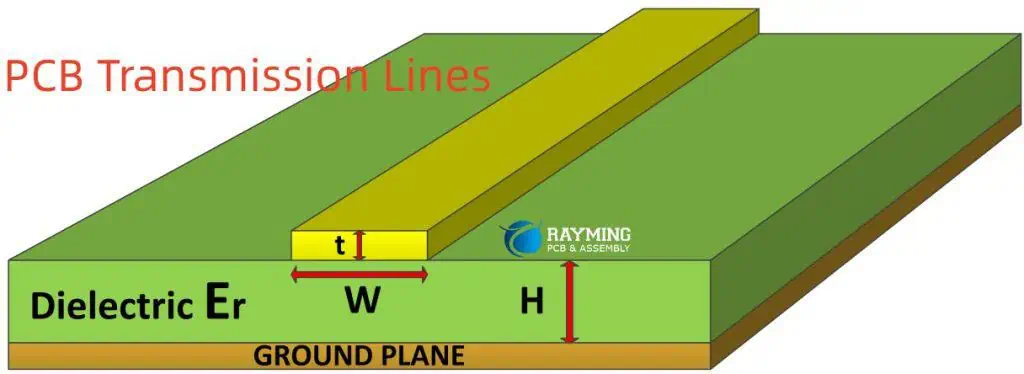
PCB Transmission Lines

A transmission line‘s alternating current features a frequency high enough to exhibit characteristics of wave propagation. The main factor affecting how electrical signals travel down transmission lines is their impedance, which exists along their entire length assuming the line maintains a constant shape.

This line is referred to as controlled impedance lines. Distortions and signal reflections occur due to non-uniform impedance. To forecast the signal’s behavior at high frequencies, the transmission lines must have a regulated impedance.

To prevent any crosstalk, signal reflections, electromagnetic noise, and other problems which may affect the signalโ€™s quality negatively and lead to mistakes, it is very important to consider the impacts of the transmission line.

While it isnโ€™t necessary for the signals to feature a reference plane, it is required for the actual implementation of the differential traces on the printed circuit boards. Transmission lines having regulated and controlled impedance are essential for maintaining great signal integrity within a printed circuit board system. The reference planes, the signal traces, as well as the shape of these traces all affects the impedance.

The presence and lack of glass within a specific lamination weave may lead to impedance variation. However this hardly causes problems outside the high-speed connections.

What Kinds of Transmission Lines Are There?

Microstrips and striplines are the two main signal transmission lines that you can find on printed circuit boards. On the topmost layer of the board, these microstrip transmission lines are made up of a single uniform trace. Also, the trace usually runs parallel to the PCBโ€™s ground plane.

What else? The traveling signal has a return route, which is provided by the ground plane. To prevent any contact between the ground and trace plane, a specific height of dielectric material would be helpful.

Contrary to this, stripline PCB transmission lines feature a single uniform trace within the inner layer of the circuit board. Additionally, parallel dielectric layers and conducting planes give a transmitted signal two return pathway. This separates the trace on either side.

Asides from the usual types, you can make use of a third category on your printed circuit board. However it’s quite uncommon. This return path and the signals trace are located on the layer of the board.

However, the signal trace, stays at the centre, with two neighboring ground planes also surrounding this trace. Additionally, the structure of the transmission line is where you may discover the dielectric substance. Coplanar structures are also an option for striplines and microstrips.

Microstrip

It consists of one uniform trace (which is designed for the signal). Also, it is parallel to the conducting ground planes on the top layer of the PCB and serves as the signal’s return path. A particular height of the PCB dielectric separates the trace from the ground planes.

Stripline

On the innermost layer of the PCB, there is a consistent trace known as a stripline that carries the signal. The parallel circuit board dielectric layer and the conducting plane are used to divide the trace on each of the sides. As a result, the two reference planes are its two return routes or paths.

Coplanar

In the coplanar waveguide setup, this conductor for the return path is on a similar layer within the printed circuit board as a signal trace. The three flat surfaces are referred to as “coplanar” because they are all on a single plane, with a signal trace in the center and the two adjacent exterior ground planes surrounding it. Underneath is where the printed circuit board dielectric is situated. Coplanar structures are possible for both striplines and microstrips.

Considerations for Transmission Line Design

FULL PCB MANUFACTURING Quote

There are a few aspects that must be taken into account when joining traces on the printed circuit board design. Below are some pointers to assist you with this.

The transmission lines comprise groups of at least two ports that serve as the receiving and generating ends of power. This is why, the majority of transmission lines are required to have conductors. Three conductors are required if your lines are three-phase. Coaxial cables or common PCB traces can also be used as lines for transmission.

When the circuit size is tiny and the wavelength is short, transmission lines operate differently. Additionally, the loop inductance all through the length of the conductor and the capacitance in-between both conductors will also affect how they function.

Although you could believe that transmission cables pass signals across various locations, there are other factors to take into account. Although that is the primary purpose, we advise carefully planning the design of the transmission line. Otherwise, the functionality of the PCB will be hampered by flaws in your transmission line and trace designs.

Importance of Transmission Lines in PCB

The transmission line in PCB plays an important role in reducing serial link loss and other associated expenses. This holds true for all high-frequency circuits since they are more likely to experience dielectric losses and signal interruptions. Therefore, during the process of design, it is essential to thoroughly consider and finalize the modeling and format of the transmission line modeling.

Thankfully, with great improvements in fabrication technology, modeling of integrated circuits, as well as higher operating frequencies, digital circuit designs may now be used for microwave and radio frequency connections. To properly connect the traces on the circuit boards, it is crucial to take into account some factors relating to the transmission line. Here are some guidelines that can be useful in this situation:

The transmission line effects in PCB is made up of a network of at least two ports which features both the power production end as well as the receiving end. Three conductors must be used for three-phase lines. Transmission lines might be made of regular PCB traces or coaxial cables. Because high-quality conductor materials or a sizable surface area within these conductors lower the resistance, the resistance needed within a PCB and the application must be taken into account. This is why there is an inverse relationship between these two variables and resistance. This holds true for lengthy circuit routes and broad wavelengths.

Fortunately, better solutions are becoming accessible as transmission lines are taken into account for uses other than resistive as well as low frequency ones.

Short wavelengths as well as small circuit sizes cause the transmission line to behave very differently. The transmission line’s loop inductance throughout its length and the capacitance between both conductors at a specific length both play a role.

Conclusion

Hope you understand what pcb transmission lines are. Impedance is a very important aspect you must consider during the construction of a PCB transmission line. Otherwise, if this impedance fails to match the length of the line, signal reflections would stop the entire process. Therefore, it is advisable that you estimate the PCB designโ€™s physical properties to manage the impedance of the trace lines. This then enables the system to keep a constant value.

Do you have any further inquiries on this article? Please reach out to us immediately; we’ll be pleased to assist you the best way we can.
The Beginners Guide to Gerber File Extensions

gerber viewer

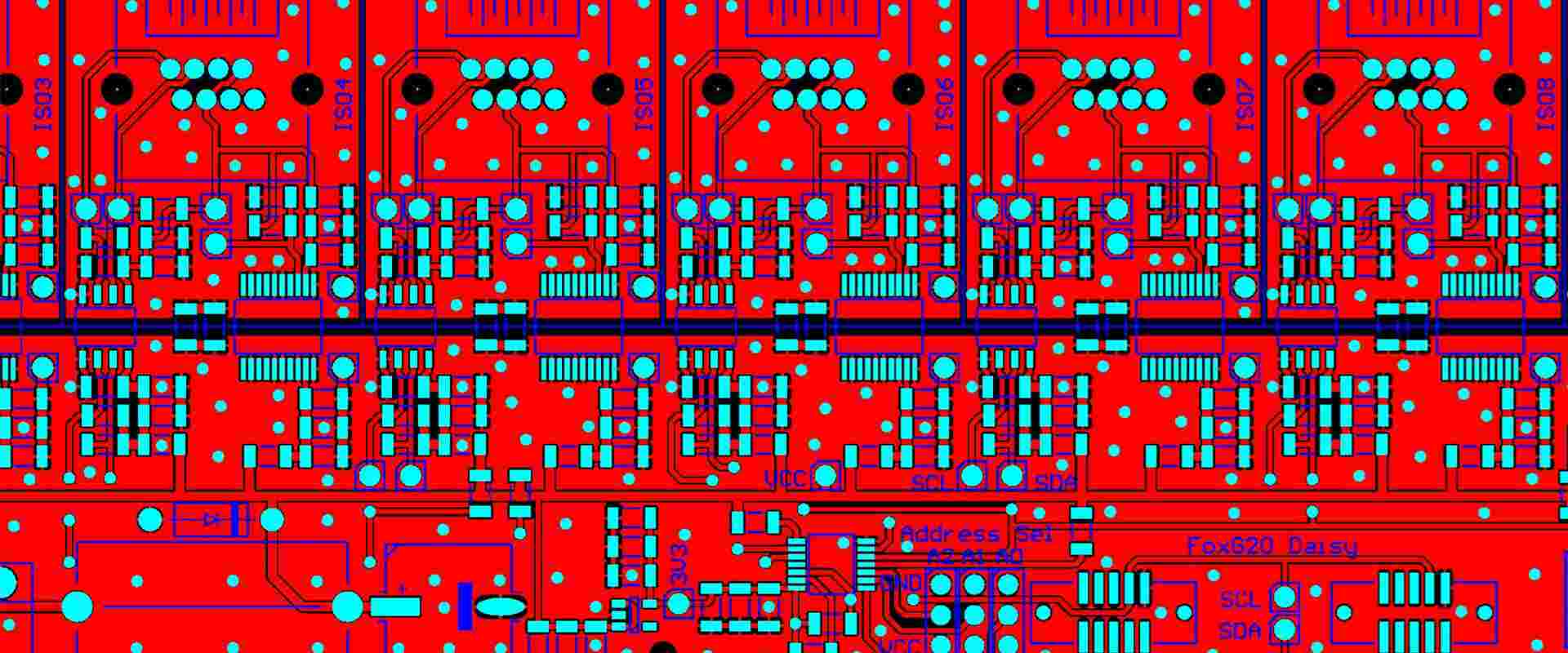
The utilization of Gerber files forms a significant section of the circuit board creation, as well as diagnostics. In this article, you will learn much regarding the Gerber file extensions. These include the software required as well as those extensions that you will need to recognize. Before we go into details regarding Gerber file extensions, we will first consider what Gerber files are.

What is a Gerber File?

The Gerber file can be described as a unique 2D diagram that represents every layer of the printed circuit board whereby different shapes and lines represent vias, tracks, and pads. Explaining further, we mean that this is a way of mechanically instructing the printing machine to help in crafting the PCB board of your choice, with respect to the information given.

This unique method for manufacturing the PCB boards can be described as the most acceptable option amongst the manufacturers and designers because it is very specific and hardly experiences errors. Furthermore, all the information regarding the circuit board like track width and length, copper amount, as well as hole spacing, will be stored inside the Gerber File. Also, this style of data collection is very important to the PCB construction in order to help it achieve its purpose. The fileโ€™s final version seems to be a digital circuit board having all components attached to it.

What Do PCB Gerber File Extensions Mean?

RS274X Gerber File
RS274X Gerber File

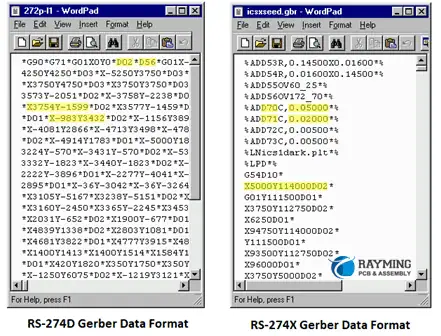
Manufacturers work with a PCB design software for creating Gerber files used in upcoming electronics. Moreover, this process has to do with the CAD tool you are making use of. Nevertheless, the machines usually fashion the Gerber files, with respect to the Gerber format (RS-274X) that superseded ineffective and ancient forms such as the Gerber standard (RS-274-D).

Also, you can note that the Gerber data doesnโ€™t need any identifying name like text files; moreover, it is usually associated with some extensions like .gbr or .gb that are also viewed as the standard PCB Gerber file extensions.

Asides from this Gerber file extensions list, there are other types of Gerber files used. This depends on the PCB design software of the manufacturer.

The Standard Gerber (RS-274-D)

This can be described as the oldest representation of gerber files. The RS-274-D was known to support basic capabilities for plotting such as drawing trucks. This didnโ€™t define margins and coordinates of drawing distinctly.

Soon, this standard gerber suddenly became unpopular, which eventually led to its revoke by developers back in 2014.

Extended Gerber (X-Gerberโ€™s RS-274)

UCAMCO introduced this Gerber in 1988. It is useful for ASCII commands that are human readable, which are combined to create 2D vector graphics. Also, X-gerber integrates the utilization of metadata for defining graphics. It associates with the .gbx and .gbr gerber file extensions.

Gerber X2

The Gerber X2 is the most recent Gerber file format. It features different improvements for the earlier file formats. Gerber X2 supports all additional vendor extensions such as โ€œ.botโ€ and โ€œ.topโ€. Also, this file format works with majority of todayโ€™s CAM software programs or applications.

How to Open a Gerber File

Below is a guide for opening a gerber file. Before you begin, thereโ€™s a need to identify the type of file. These gerber files are usually saved in ZIP or RAR format, which corresponds to the specific layer of the PCB layout. Each one comes with its own gerber file extension.

Before opening a gerber file, click on File and then open it from your menu bar. When it comes to viewing the gerber files, make use of the program called Gerber Viewer. There are viewers that require installation, some others can easily be checked or accessed online.

Whatever the case is, you have to choose a viewer which supports contemporary file formats. In addition, you must choose one, which allows the taking of precise measurements, and zooming in. This assists you in testing of the circuits as well as adjusting the board.

More Information

Also, you may have to download a unique online gerber viewer. This aids in simplifying the entire process. In addition, the most important aspect when opening the gerber file involves making sure that it works with your choice of software.

In order to ensure compatibility, thereโ€™s a need to name the file making use of a similar convention with the program. You can either regenerate or delete them when theyโ€™re incompatible. Also, to be able to locate the best possible viewer, choose or click on File, then click Open Layer(s). Here you will find numerous programs that will open as well as edit the Gerber file, some of which are free, while others are paid for.

You may make use of ViewMate and other comparable free programs. These are user-friendly applications and they also provide advanced features. Also, you will be able to view all the layers, go ahead to modify every layerโ€™s visibility, as well as measure the distance found between the components.

In addition, these programs donโ€™t allow users to save the drawings. However, they play an important role in verifying your designsโ€™ accuracy. These applications will also be useful and important for quoting.

Different CAD Softwares Used for the Gerber Files

FULL PCB MANUFACTURING Quote

Computer-Aided Design or CAD involves the designing, developing and drawing of the PCB using computer software. The programs used are called CAD Software.

There are different circuit design softwares that work to meet the requirement of the diversified layout that the manufacturers have requested for. These include the online free circuit board design software, industrial PCB softwares, as well as the free printed circuit board design software.

In this section, we will be considering some reliable CAD as well as Gerber Viewer softwares which are commonly utilized in circuit board manufacturing.

Altium

Altium features the Protel form of Gerber file extension and is known as the most comprehensive and modern CAD software globally. It was specifically designed for manufacturing PCB board and has maintained the best option among the engineers and designers all over the world.

In addition, Altium didnโ€™t just attain huge success overnight, as this current version has been able to evolve through many decades of development and innovation. Currently, Altium gerber file extensions are now at a stage whereby it has the ability of creating a unique and unified environment, which features the required tools for meeting the requirements of the design.

KiCad

This can be described as an opensource software and gbr file reader. Also, this software acts in line with the copyright agreement of the GNU. Just like the other CAD softwares. KiCad offers designers and manufacturers with a user interface that is graphical that aids in board construction.

In addition, you donโ€™t need to utilize any specialized devices when working with the KiCad software. Just the keyboard and mouse are okay. Furthermore, it works on two main operating systems, which are Linux and Windows.

As you run the software, designers would see that KiCad offers some support for schematic diagrams, PCB layouts, stable model view in 3D, viewing of the Gerber file, and lots more. Also, this application includes 3D libraries, symbols, and packages, which comes as bonus for users to download.

Eagle

Eagle features reliable functions as well as a user-friendly interface that aids in the construction of your circuitโ€™s schematic diagram. In contrast to the other products, Eagle gerber file extensions requests that users pay a fee, which is financially acceptable, before making use of its features. The truth is that the price charged is worth it because it comes with great features such as online positive and negative annotation function, batch command script files, copper cladding, and interactive follower.

Also, it is very important to note that EAGLE offers support for many platforms, which includes Mac, Windows, and Linux. Also, it comes with usable scripts, a very rich library, as well as CAM tools. All these are great options for the designers of PCB boards that have the ability of working with EAGLE gerber file extensions.

OrCAD

This program has been available since late 1980s. In fact it is almost the same age as Altium. This application is well-known among different manufacturers as a result of their simple operation, simulationโ€™s important function, and a friendly interface for the users.

Immediately the schematic diagram has been imputed, the information system of the component is included, which plays an important role in authenticating, creating, and tracking of all the PCB boardโ€™s elements.

Also, all these features combine together, making it a great and reliable option for all dedicated manufacturers. Though OrCAD isnโ€™t regarded as the most effective CAD software in the market, it comes with a great management function as well as an environment that is well-integrated.

PADS

This software is widely regarded as the boss of CAD due to the fact that it is comprehensive and user-friendly. In addition, the quality of the design is better and impressive compared to other applications such as Allegro.

Furthermore, PADS is regarded as a good choice in the marketplace, and is usually utilized by small companies. This is because it is comprehensive, affordable, and user-friendly. This software also covers different functions such as assembly files, schematic diagrams, output of the bill of material, and more.

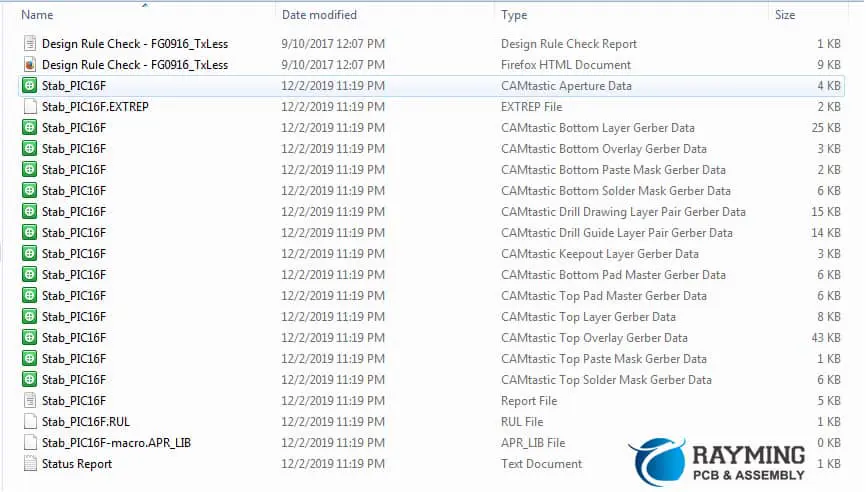
How to Convert Gerber Files to PCB Files

Figure 6 Gerber files enable and disable and extensions

 In order to convert your Gerber files into PCB, go to the Manu (Export Format) and then choose that Gerber file. Next, deactivate your โ€œSkip Options Dialog.โ€ Then, choose your PCB file and click โ€œNext.โ€

Once you are done choosing your PCB file, your Gerber file would appear in that folder containing the PCB file. Once you are done converting it, this PCB file would be available for editing. Most electronic designer export their designs to take the form of gerber files before sending them to the facility used for PCB fabrication.

These files make up the universal language for PCB design. Also, the equipment for PCB printing wonโ€™t understand the design in their absence. If you want to create PCBs, thereโ€™s a need to understand how you can generate the Gerber files. Take note that ASCII is its file format. This means that you can edit it using text editors.

From your file menu choose โ€œGerber Export.โ€ You will see all the PCB layers displayed in your PCB export tab. Also included are silkscreen, mechanical, drill template, as well as electrical template layers.

Then, select โ€œCreate Artworkโ€ for generating a printed circuit board document that contains all layers. Also, you would need to type in the PCB documentโ€™s parameters. There are many online programs, which allow users to edit their gerber files.

Choose one that offers support for different output and input file types. Also, the software permits necessary modifications into the design as well as save it in whatever format that pleases you. Furthermore, many programs offer support for different file formats. This allows users to make use pf the Gerber Converter in creating the printed circuit board, which best suits the design.

Important Features You Should Look Into For the Gerber File Viewers

In order to select a reliable gerber file viewer, there may be a need to look into the following features.

Have wider printer compatibility

The viewer for the gerber file has to be compatible with different printers. Asides from this, it must have room for different printing alternatives for different printers.

Supports precision during viewing

Great gerber viewers must add features related to precision and zooming measurements ensuring that you check through the circuits as well as rectify all errors easily.

Support Modern File Types

A reliable gerber file must have the ability of supporting well known modern files such as Excellon and HPGL/HPGL-2 among others.

Conclusion

To conclude, the Gerber file can be described as animated diagrams that represent every facet of the circuit board where different shapes and lines represent vias, tracks, and pads. In addition, the Gerber file extension comes in different forms; however, the .gbr format is regarded as the standard.

Also, creating your Gerber file will need CAD software which also functions as the gbr file reader. Every application features unique benefits. However, we hope that our article was able to clarify what Gerber file extensions are.

What is EMS PCBA?

EMS Electronics Manufacturing Companies

EMS PCBA, which is also described as the EMS PCB assembly, comes with many applications and advantages within different technology fields. This EMS denotes electronic manufacturing solutions or services, while PCBA denotes the assembly of printed circuit boards. Careful planning as well as being attentive to detail is very necessary in placing and spacing of the components, sizes of the hole and location, spacing of the component lead, components selection, as well as other considerations regarding the layout of the printed circuit board.

The EMS PCBA process deals with manufacturing many complex components and might be composed of different services like component procurement, engineering design, fabricating and assembling the PCB, functional testing, and box builds.

When handling product builds, the appropriate EMS PCBA execution reduces the whole time for manufacturing for that product, reduces the cost, and also increases the performance. You can attain a fast turnaround but this might vary depending on the PCBโ€™s complexity as well as the availability of the electronic components.

What are the Applications of EMS PCBA?

EMS PCBA is applicable to different technologies as well as different industries. Practically every product containing electronic components will be able to benefit from EMS PCBA.

EMS PCBA is also applicable to different consumer electronics like CD players, alarm clocks having AM and FM radios, digital watches, microwave ovens, home theaters, cell phones, video games (hand held), toys (remote control type), etc.

  Electronics and instrumentation for different industrial applications also make use of PCB EMS, which include weather radar and telemetry, strain gauges, network analyzers, spectrum analyzers, temperature gauges, ohm meters, environmental ovens and chambers, switcher power supply, oscilloscopes, CCD telescopes, and temperature meters. Other EMS PCBA applications include products used in many industries like medical, automotive, aerospace, and military.

What You Should Prepare For as EMS PCBA Manufacturers?

In order to have the EMS PCBA produced from a 3rd party manufacturer excluding any back and forth, you have to get these materials ready to get your quote.

Bill of Material (BOM): The BOM can be described as the component list containing all information regarding electronic components for the EMS PCBA assembly. These include the quantity, component reference, part number, footprint, name of manufacturer, etc.

Gerber: This is automatically generated from the software for PCB design after you much have completed the design. It is a compressed file containing the gerber file and drill file folders. Also, in this gerber folder, every PCB layer (circuit layer, silkscreen, substrate, and circuit layer) corresponds with a specific graphic file.

BOM and Gerber are very important materials needed from you to be delivered to the EMS PCBA manufacturer. When you provide this, the manufacturer will be able to conduct the EMS PCBA manufacturing.

3D drawing: This reveals the 3 dimensional outlooks of estimated PCB assemblies.

Assembly drawing: This reveals the estimated PCB assemblies

Pick and Place file: This lists the componentsโ€™ reference on the board, making sure that your EMS manufacturer will be able to draw comparisons with the real PCBA. In fact, the EMS manufacturer of your choice can also generate this file.

What is the Process of EMS PCBA?

FULL PCB MANUFACTURING Quote

Application of the solder paste

After fabricating the bare PCB, pads wonโ€™t have a solder mask on them for the SMT. Throughout this process, the application of solder paste will then be done on the pads before making the components to sit on them. This paste is made up of 0.5% copper, 3% silver, and 96.5% tin. Later on, they will facilitate the electrical and physical connections present between the components/devices as well as the board.

Pick-and-place

Once you are done applying the solder paste, the printed circuit board will go to the pick and place machine. The SMDs can be placed on the board very quickly with the help of a robotic device. They are usually pre programmed for every project to help them know the exact location for the components.

Today, components are becoming smaller. The pick and place machine would have the capacity even on the least size of components that they can pick. However, if you have too small components, you may need to use a special machine to handle the process.

The Reflow Soldering

ย Immediately the SMDs and solder pastes are in place, then the next step is the process of reflow soldering. As the solidification of the paste takes place, these SMDs are tightly held onto the board.

You can achieve the reflow soldering process in reflow ovens using different heaters that gradually heats the board to a temperature of 250 degrees Celsius. At this stage, the solder paste has been melted properly. After this, this PCB keeps moving through the oven then gradually cools down. This paste is then cooled and then solidified.

Quality Control and Inspection

Immediately you are done with the surface mount process, an inspection will be conducted. This examines the electrical and physical connections present between the board and the devices. Solder joints that are bad usually cause serious problems with quality.

AOI is known as a well-known form of inspection for the large PCBA batches. The AOI machine features different cameras that aid the examination of these PCBs. These cameras are also arranged at varying angles to help view the solder connections.

Functional Testing and Final Inspection

After the PTH components and SMDs are placed, thereโ€™s a final inspection, which tests the functionality of the PCB. This PCB will undergo a simulation test. Simulated and power signals would run through the circuit board so that the electrical characteristics of the PCB are shown whenever the circuit board runs in usual circumstances.

EMS PCBA Manufacturing

Printed circuit board design

โ€˜When designing the PCB, youโ€™ll draw the schematics, deign the layer number, size, and stack up, and then set the rule of the routing width, fanout control rule, routing layers rule, rules for routing via style, and rules relating to electrical clearance You will have to work with some design rules.

These include placing the main and big components first and at the center surrounding them with the small components. You should also fanout the main and big components first. Another rule here is to separate the digital and analog signals.

PCB Assembly

Theoretically, the circuit board design is feasible only in theory. However in fabrication, even the small details which werenโ€™t considered can fail your product. Before the batch EMS PCBA manufacturing, the manufacturer would first have to prototype.

PCBA Post-Assembly Stage

Some manufacturers of EMS PCBA offer the following value added services.

Conformal coating: Conformal coating can be applied on the PCBAs to be able to offer better protection as well as extend the electrical and electronic productsโ€™ lifespan.

IC programming: There are standard jigs for IC programming and the program can be transferred ontp the circuit boardโ€™s integrated circuit freely. Moreover, you have to provide this program. Also, if you wouldnโ€™t want the EMS PCBA manufacturer to gain access and download the program, you can decide to give them the cloud interface. This allows the controlling and monitoring of all the programs transferred from the cloud into the IC.

Thermal aging testing: This allows the PCB to be powered on for at least 48 hours to ensure that the electrical products function properly for long periods.

Box-built assembly: This helps in designing your mechanical box in line with the requirements as well as having them produced by Shenzhenโ€™s local factories. Later, these PCBAs are assembled with the mechanical boxes that correspond. Finally, a testing is conducted on a finished product to ensure that the box build is functioning normally. These manufacturers will then package them and ship them to you.

Choosing the Best EMS PCBA Manufacturer for You

through-hole assembly process

Choosing the best manufacturer is important for the electronic productโ€™s success. Letโ€™s consider some important factors you should work with.

Experience

When selecting any manufacturer, make sure you work with one having vast experience instead of a novice. Working with a company that has experience in a similar project will be great. They will match your project needs better.

Quality

Quality has to be your priority when choosing an EMS PCBA manufacturer. Work with a manufacturer having strict quality controls. This is because substandard products may run your business and reputation.

Cost

When choosing a manufacturer, cost is another significant factor. Though it could be tempting to work with a manufacturer offering the lowest rate, you have to look at5 the future costs of choosing a manufacturer which offer low-quality products.

Compliance

Choosing a manufacturer that conforms to the relevant standard and rules of the industry regarding compliance is important. This is very important especially when that product is subjected to some regulatory requirements.

Capacity of Production

Your manufacturer must have enough manufacturing capacity of meeting your needs, most especially high-volume projects. Their capability will tell if they will deliver your product early.

Conclusion

The process of EMS PCBA manufacturing could be hassle-free, safe, quick, and easy. This article has been able to reveal how to have the EMS PCBA produced saving energy and time.

โ€˜

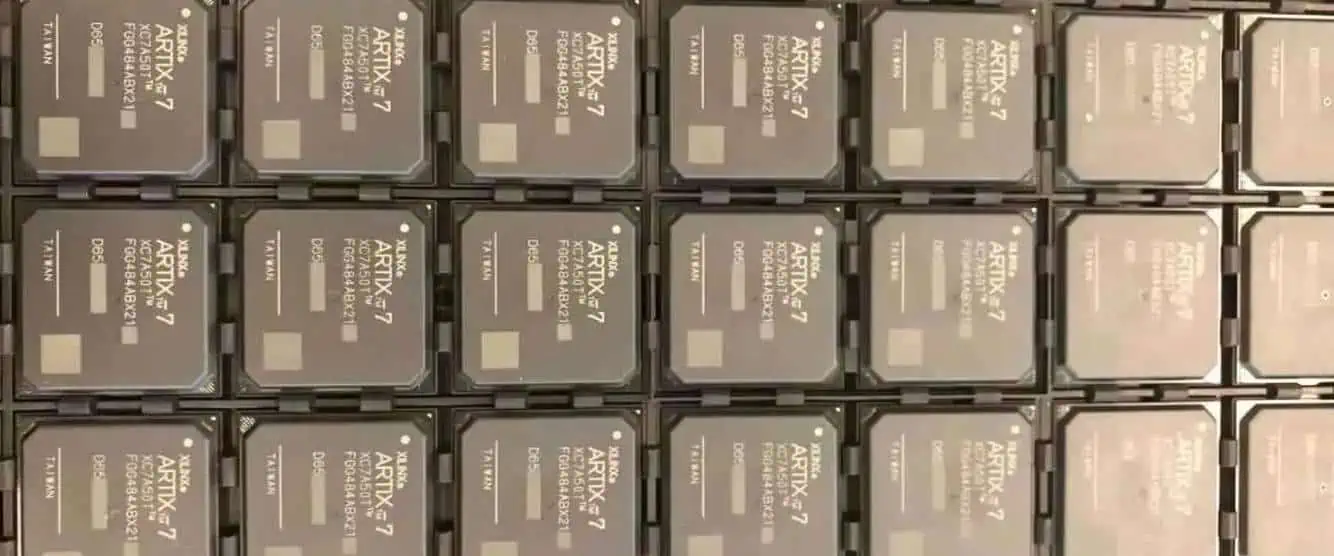
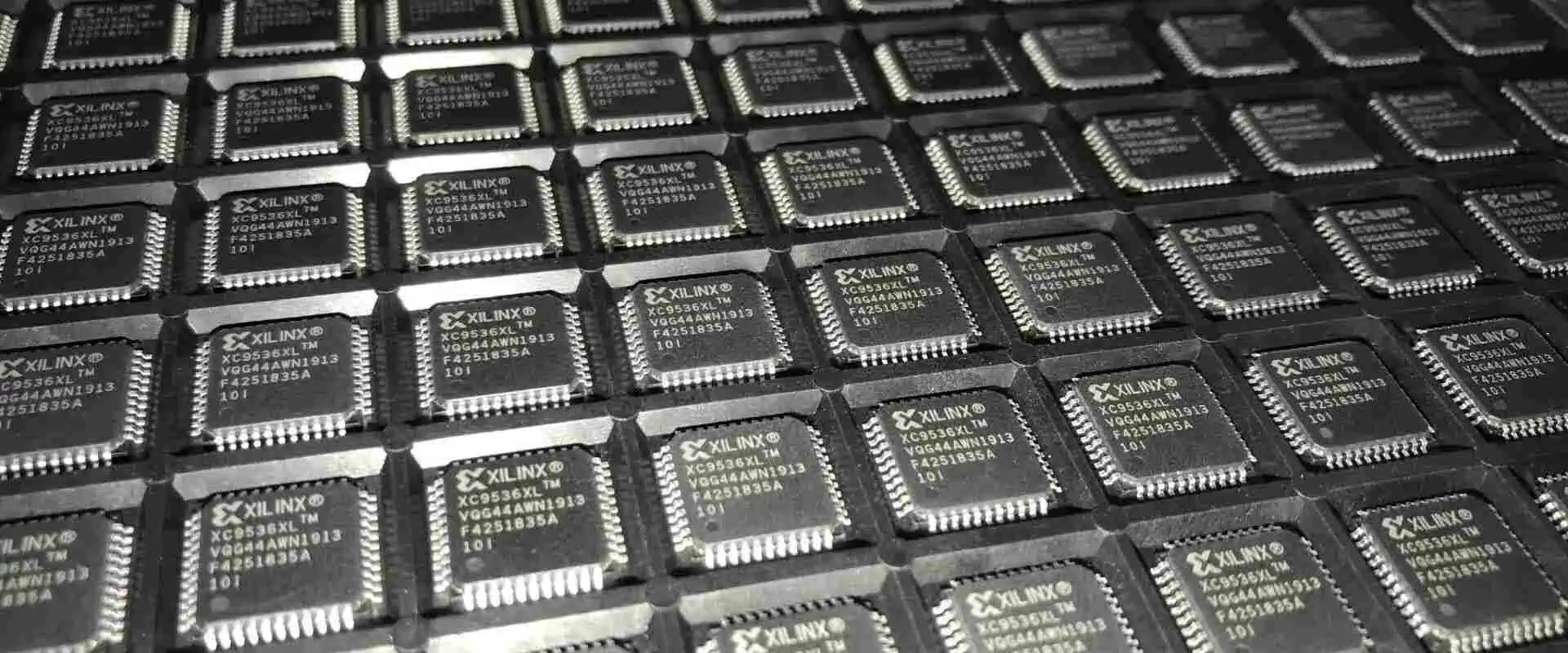
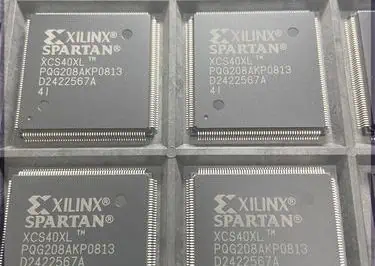
Everything You Should Know About the World of XC7Z045-2FFG676I System on the Chip

Xilinx Artix 7

If you are working with electronic circuits and FPGAs, then you may know about System on Chip, aka SoC. There are different SoC viable in the market by different manufacturers. They are made of different materials and come with other specification. XC7Z045-2FFG676I is also SoC. The following content will help you to know more about this SoC. But let’s start with the basics to know more about the SoC and its uses.

What Is the System-On-Chip SoC?

A System on Chip, aka SoC, is a kind of integrated circuit. It incorporates several electronic components or subsystems onto a single chip. Apparently, it looks simple, but actually, it can do wonders. As a result, the integration of all the essential components for a complete electronic system is easy. In addition, it includes a processor, memory, and input interfaces on a single cip. Similarly, other peripherals are also fixed into a single chip.

SoCs meet the precise demands of the system. That’s why they are made according to the system. Sometimes they are tailor-made to contain only the necessary components. As a result, it reduces the overall expenses and augments efficiency.

What Is XC7Z045-2FFG676I?

Xilinx FPGA Programming

The XC7Z045-2FFG676I is also a System on Chip, aka SoC. It is also from Xilinx. You all know that Xilinx is a quality manufacturer of such devices. XC7Z045-2FFG676I SoCs are present in a diverse range of electronic devices. It ranges from smartphones and tablets. It is also part of smart home gadgets and embedded systems. It offers presents multiple advantages over conventional electronic systems. As a result, you can decrease in power consumption. You can reduce the size and enhance the performance of the device. That’s why SoCs are extremely popular among designers and engineers.

Let’s have a closer look at their specifications.

Technical Specifications

Its technical specifications are as follows:

  • This SoC is built on a 28nm process technology. It is the latest technology and provides up-to-mark quality.
  • It features a Dual-core ARM Cortex-A9 processor with a NEON co-processor. In this way, it supports different functions.
  • The device has a modern processing system and a programmable logic section. As a result, you can do a high degree of customization.
  • It has One GB of DDR3 SDRAM memory. You can expand it up to 4 GB using external memory interfaces. In this way, you have enough data storage.
  • The XC7Z045-2FFG676I has 220 Input and Output pins. It can support various interfaces. It supports  
  • Ethernet and USB. Moreover, it supports SPI, I2C, and PCIe interfaces.
  • It has a total of 356,000 logic cells. These cells can support up to 1,080 DSP slices. That’s why it is suitable for complex digital signal processing applications.
  • The device has a maximum operating frequency of 1 GHz, providing high-speed processing capabilities.
  • It has a maximum power consumption of 15W. That’s why it is suitable for power-sensitive devices. 
  • As a result, all the devices that are compact, portable, and power-sensitive can get benefit from it.
  • The XC7Z045-2FFG676I supports multiple operating systems. It can easily integrate Linux and RTOS. In addition, it supports Android also.
  • This SoC has a secure boot. Furthermore, it has AES-256 encryption capabilities. As a result, you don’t need to worry about security and data privacy.

Alphabet And Numeric Breakdown of XC7Z045-2FFG676I

FULL PCB MANUFACTURING Quote
  • Apparently, this SoC is a set of numbers and alphabets. Actually, every alphabet and number has some significance. This code represents that it belongs to Xilinx’s particular family.
  • Here is a breakdown of the code:
  • XC indicates that the device belongs to the Xilinx 7 series family of FPGAs. Every family has special specifications. All the devices or SoCs belong to the special family and have some specific charchateristics.7Z045 is the specific model number within the 7 series family. It indicates the size and capabilities of the FPGA.
  • -2 show the speed grade of the device, with -1 being the fastest and -3 being the slowest. That’s why you can say that it has moderate speed. 
  • FFG676 refers to the package type and pin count of the device. In this case, it is a 676-ball Fine-Pitch Ball Grid Array package.
  • I indicate that the device has an optimal working temperature range is -40ยฐC to 100ยฐC.
  • Overall, the code provides important information about the specific FPGA model, including its capabilities, speed grade, package type, and temperature range.

Packaging Of XC7Z045-2FFG676I

  • Packaging plays an important role when it comes to integrated circuits and SoC. 
  • The Soc is available in an FBGA (Fine-pitch Ball Grid Array) package with 676 pins, making it easy to integrate into designs. FBGA Aka Fine-Pitch Ball Grid Array is a type of packaging technology.
  • It is used for packing integrated circuits (ICs, FPGAs, and SoC). It is a type of surface-mount packaging. In this way, the device remains intact without damage. As a results are easy to integrate into the systems. This packaging improves the size and performance of the device.

Frequently Asked Questions

Are Development Tools Necessary for XC7Z045-2FFG676I?

Xilinx offers an array of software development utilities. For example, the Vivado Design Suite is ideal, and engineers use it to configure the FPGA interlacing within the SoC Additionally, an ARM Cortex-A9 processor software development toolchain is also a necessity. As a result, you can easily do programming t of the processor. It is bit technical but not complicated.  Additionally some third party tools are also available. As a result you may have to compromise the security.

Final Words

XC7Z045-2FFG676I is an exceptional SoC. It is part of widespread applications.  It has superior architecture. This SoC is typically manufactured through advanced semiconductor fabrication technology. It is crafted through hardware description languages and other special design tools. That’s why its quality and features are so ideal to use in your next project. If you are first time using this SoC, then you take help from a community. There are several tutors and an online forum to teach you to work with this SoC. Xilinx also provides technical support.

The Importance of SPI (3D Solder Paste Inspection) Testing in PCB Assembly

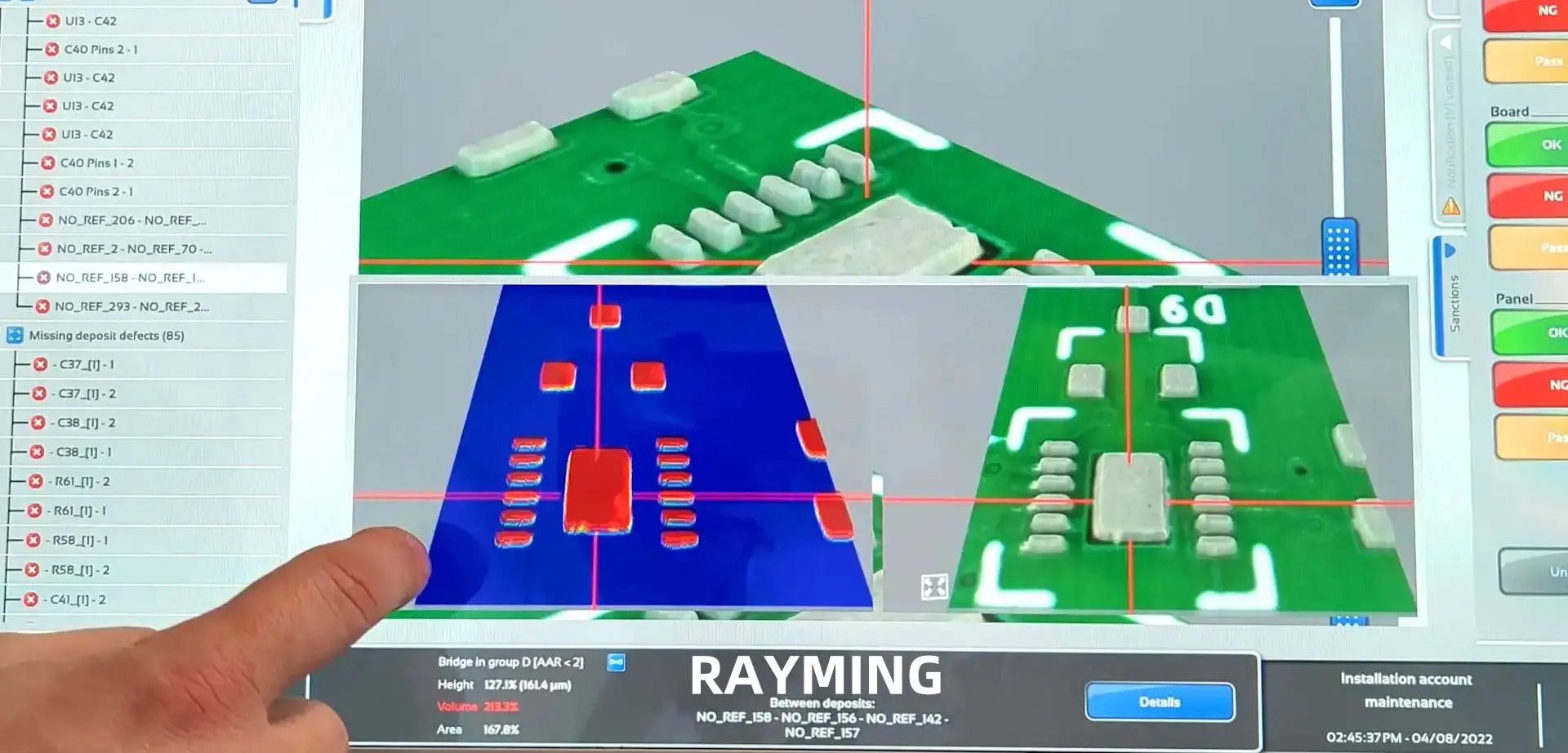
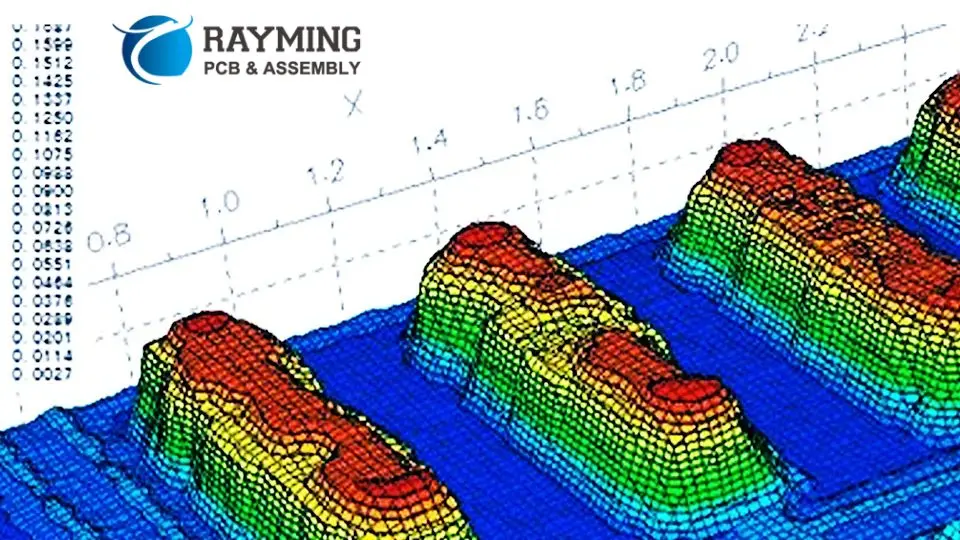
Solder paste inspection is a critical step in the production of electronic components, verifying the accuracy of the solder paste application. Utilizing 3D imaging, this process measures the alignment and volume of the solder paste, facilitating the early identification of defects. By catching issues at this stage, immediate corrective measures can be implemented before components are permanently attached, ensuring higher quality and reliability in the final product.

What is 3D Solder Paste Inspection (SPI)?

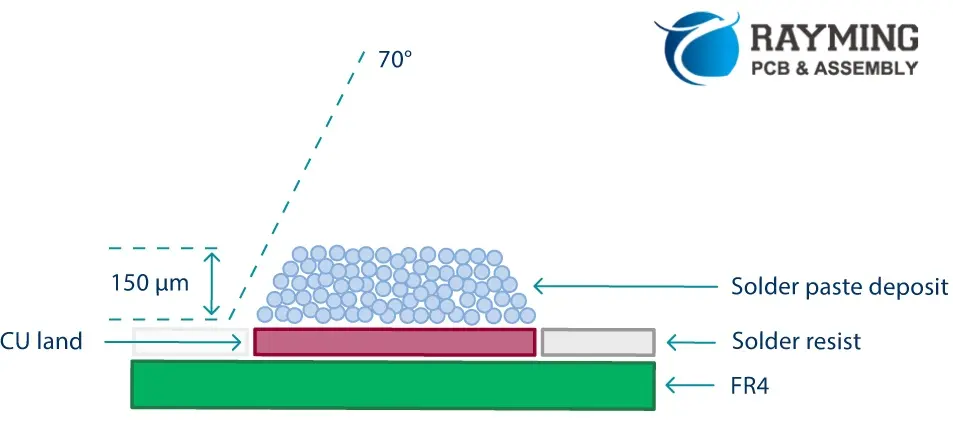
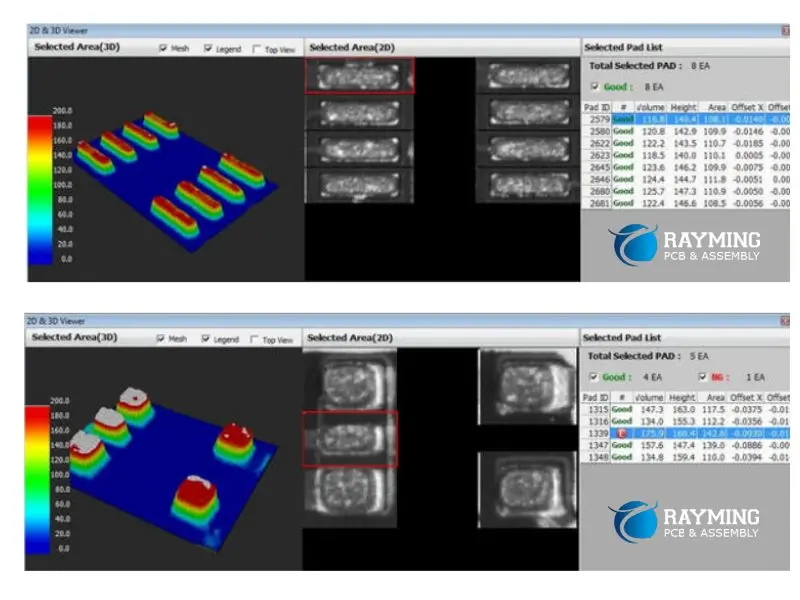
Solder Paste Inspection, commonly referred to as SPI, is a critical quality control process in PCB assembly. It involves the examination of solder paste deposits on a PCB before component placement and reflow soldering. The “3D” in 3D Solder Paste Inspection refers to the advanced technology used to measure not just the area of solder paste deposits, but also their height and volume.

3D Solder Paste Inspection is a non-contact, automated optical inspection technique that uses advanced imaging and analysis technologies to ensure that solder paste is applied correctly to PCB pads. This process is crucial because the quality of solder joints, which are fundamental to the electrical and mechanical integrity of the final product, heavily depends on the precise application of solder paste.

Key aspects of 3D Solder Paste Inspection include:

  1. Measurement of solder paste volume, area, and height
  2. Detection of common defects such as bridging, insufficient paste, or misalignment
  3. Real-time feedback for process control and optimization
  4. Data collection for statistical process control and traceability

By implementing 3D Solder Paste Inspection, manufacturers can significantly reduce defects, improve yield, and enhance the overall quality of their PCB assemblies.

Learn more about:

How Does Solder Paste Inspection Work?

Solder Paste Inspection is a sophisticated process that involves several key elements. Let’s explore how SPI works and the factors that contribute to its effectiveness:

1. Programming/Operator Training

Effective Solder Paste Inspection begins with proper programming and operator training. This involves:

  • Setting up the SPI system with the correct parameters for each PCB design
  • Defining inspection criteria, including acceptable tolerances for paste volume, area, and height
  • Training operators to understand and interpret SPI results
  • Establishing procedures for handling detected defects and process deviations

Proper programming and training ensure that the SPI system can accurately detect defects and that operators can respond appropriately to inspection results.

2. Inspection Speed/Cycle Time

In high-volume PCB assembly, inspection speed is crucial. Modern SPI systems are designed to keep pace with fast production lines. Factors affecting inspection speed include:

  • The resolution and field of view of the imaging system
  • The complexity of the PCB design
  • The number of solder paste deposits to be inspected
  • The processing power of the SPI system

Advanced SPI systems can inspect hundreds of thousands of solder paste deposits per minute, allowing for 100% inspection even in high-speed production environments.

3. Accuracy/Repeatability

The accuracy and repeatability of Solder Paste Inspection are critical for maintaining consistent quality. These factors are influenced by:

  • The resolution of the 3D imaging system
  • The precision of the measurement algorithms
  • The stability of the mechanical systems
  • Environmental factors such as vibration and temperature

High-end SPI systems can achieve measurement accuracies in the micron range, ensuring reliable detection of even minor deviations in solder paste deposits.

4. Yield Improvement

One of the primary goals of Solder Paste Inspection is to improve manufacturing yield. This is achieved through:

  • Early detection of solder paste application issues
  • Real-time feedback for process adjustment
  • Reduction of downstream defects related to solder paste problems
  • Data-driven optimization of the solder paste printing process

By catching and correcting solder paste defects early in the assembly process, SPI helps prevent costly rework and improves overall product quality.

5. Ease of Use and Understanding of Information Displayed

For Solder Paste Inspection to be effective, the information it provides must be easily understood and actionable. Modern SPI systems feature:

  • Intuitive user interfaces with clear visual representations of inspection results
  • Color-coded defect highlighting for easy identification of problem areas
  • Statistical analysis tools for tracking trends and process capability
  • Integration with factory information systems for comprehensive quality management

These features enable operators and process engineers to quickly interpret SPI results and take appropriate actions to maintain product quality.

Types of SPI Equipment

2D solder paste inspection

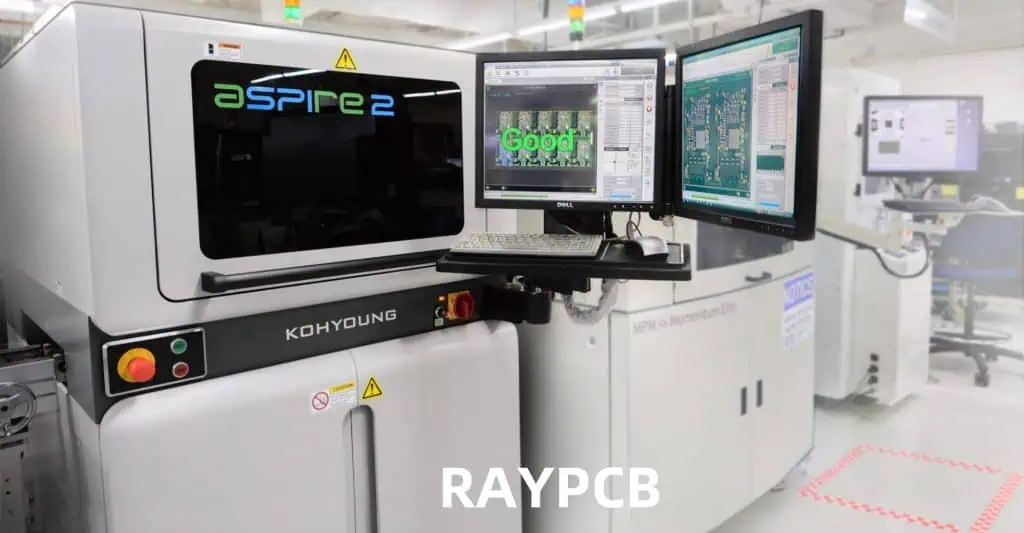
Solder Paste Inspection equipment comes in various configurations to suit different manufacturing needs. The main types of SPI equipment include:

1. In-line SPI Systems

  • Integrated directly into the production line
  • Provide real-time inspection and feedback
  • Suitable for high-volume production
  • Can be linked with other process equipment for automated control

2. Off-line SPI Systems

  • Standalone units for detailed inspection and analysis
  • Often used for process development and troubleshooting
  • Provide more flexibility in inspection parameters
  • Useful for low-volume or high-mix production environments

3. Benchtop SPI Systems

  • Compact units for small-scale production or laboratory use
  • Offer high precision for critical applications
  • Ideal for prototyping and product development stages

4. Hybrid SPI Systems

  • Combine features of in-line and off-line systems
  • Can be used both in production lines and for offline analysis
  • Offer flexibility for varying production needs

The choice of SPI equipment depends on factors such as production volume, board complexity, available space, and specific quality control requirements.

Comparison of Different SPI Technologies

3D solder paste inspection

Several technologies are used in Solder Paste Inspection, each with its own strengths and limitations. Here’s a comparison of the main SPI technologies:

1. Laser Triangulation

  • Uses laser light to measure solder paste height
  • Pros: High accuracy, fast measurement speed
  • Cons: Limited ability to measure paste volume, can be affected by reflective surfaces

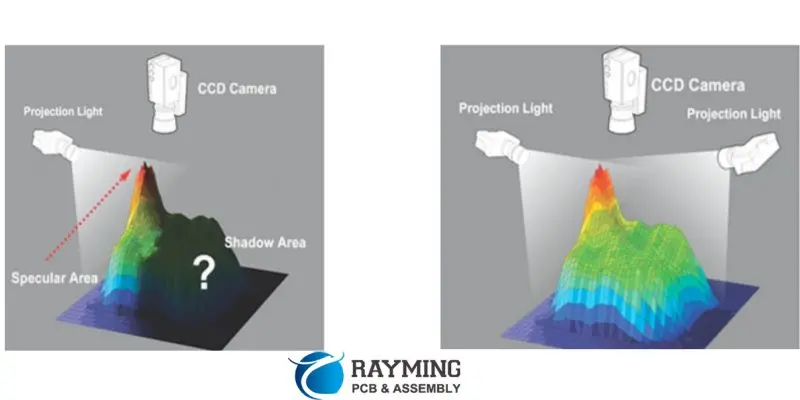
2. Structured Light Projection

  • Projects a pattern of light onto the solder paste and analyzes its deformation
  • Pros: Accurate 3D measurements, good for complex geometries
  • Cons: Can be slower than some other methods, may have difficulties with highly reflective surfaces

3. Moirรฉ Interferometry

  • Uses interference patterns of light to measure surface topography
  • Pros: High resolution, good for measuring small features
  • Cons: Can be sensitive to vibration, may have limitations in measuring steep slopes

4. Multi-Frequency Phase Shift Profilometry

  • Combines multiple light patterns to create detailed 3D profiles
  • Pros: High accuracy and resolution, good for a wide range of surface types
  • Cons: Can be more complex to set up and calibrate

5. Confocal Chromatic Sensing

  • Uses the chromatic aberration of light to measure distance
  • Pros: Very high accuracy, good for transparent or reflective surfaces
  • Cons: Can be slower than some other methods, may have limitations in measuring large areas quickly

The choice of SPI technology depends on factors such as the required accuracy, inspection speed, types of PCBs being manufactured, and budget constraints.

Advantages of 3D Solder Paste Inspection

Solder paste measurements

Implementing 3D Solder Paste Inspection in PCB assembly offers numerous advantages:

1. Enhanced Quality Control

  • Detects defects early in the assembly process
  • Provides comprehensive data on solder paste deposit quality
  • Enables 100% inspection of solder paste applications

2. Increased Yield

  • Reduces defects related to solder paste issues
  • Minimizes costly rework and scrap
  • Improves first-pass yield rates

3. Process Optimization

  • Provides real-time feedback for process adjustment
  • Enables data-driven decisions for continuous improvement
  • Helps in fine-tuning solder paste printing parameters

4. Cost Reduction

  • Prevents defects from propagating to later stages of assembly
  • Reduces the need for manual inspection
  • Lowers overall manufacturing costs through improved efficiency

5. Traceability and Compliance

  • Generates detailed inspection reports for each PCB
  • Supports compliance with industry standards and regulations
  • Facilitates root cause analysis in case of field failures

6. Flexibility

  • Adaptable to different PCB designs and components
  • Can be easily reprogrammed for new products or revisions
  • Supports both high-volume and high-mix production environments

7. Improved Reliability

  • Ensures consistent solder joint quality
  • Reduces the risk of latent defects in finished products
  • Enhances the overall reliability of electronic assemblies

By leveraging these advantages, manufacturers can significantly improve their PCB assembly processes and product quality.

SPI Testing at RAYMING PCB

3D Solder Paste Inspection process

At RAYMING PCB, we understand the critical importance of Solder Paste Inspection in ensuring the quality and reliability of PCB assemblies. Our state-of-the-art SPI testing capabilities are designed to meet the most demanding requirements of modern electronics manufacturing.

Our SPI Testing Capabilities

  1. Advanced Equipment:
    • We utilize the latest 3D SPI systems with high-resolution imaging capabilities
    • Our equipment is regularly calibrated and maintained to ensure optimal performance
  2. Comprehensive Inspection:
    • We offer 100% inspection of solder paste deposits on all PCBs
    • Our systems can detect a wide range of defects, including insufficient paste, bridging, and misalignment
  3. High-Speed Inspection:
    • Our SPI systems are integrated into our high-speed production lines
    • We can perform rapid inspections without compromising on accuracy or throughput
  4. Customized Inspection Protocols:
    • We work closely with clients to develop inspection criteria tailored to their specific needs
    • Our flexible approach ensures that critical areas receive appropriate attention
  5. Real-Time Process Control:
    • Our SPI systems provide immediate feedback for process adjustment
    • We can quickly respond to any deviations and maintain consistent quality
  6. Data Analytics and Reporting:
    • We offer detailed inspection reports for each PCB
    • Our advanced analytics help identify trends and opportunities for process improvement
  7. Expert Analysis:
    • Our team of experienced technicians provides expert interpretation of SPI results
    • We offer recommendations for optimizing solder paste application processes

Why Choose RAYMING PCB for SPI Testing?

  1. Quality Assurance: Our rigorous SPI testing processes help ensure the highest quality PCB assemblies
  2. Cost-Effectiveness: By identifying issues early, we help clients avoid costly rework and field failures
  3. Flexibility: We can accommodate various board sizes, complexities, and production volumes
  4. Cutting-Edge Technology: Our investment in advanced SPI equipment ensures top-tier inspection capabilities
  5. Expertise: Our team’s deep knowledge of PCB assembly and SPI techniques provides valuable insights
  6. Continuous Improvement: We leverage SPI data to continuously enhance our manufacturing processes
  7. Traceability: Our comprehensive reporting supports full traceability and compliance requirements

Whether you’re producing high-volume consumer electronics or specialized industrial equipment, RAYMING PCB’s SPI testing services can help ensure the quality and reliability of your PCB assemblies. Contact us today to learn more about how our Solder Paste Inspection capabilities can benefit your electronics manufacturing process.

Types of PCB Materials: Fr406 vs. 370hr

Isola 370HR pcb

PCBs are fundamental units of modern electronics and smart equipment. These devices have vast applications in different domains around us. There are several roles of PCBs that you cannot ignore. Today, electronics cannot survive without PCBs at all. 

There are also different factors that influence PCBs to a large extent. One of them is the production material used for developing PCBs. It can be a game changer for your PCB layouts if you know the art of using an appropriate material for the PCB designs. 

In this discussion, we are going to have a look at two common materials for producing PCBs. Do you want to learn the art of choosing the best PCB material? Worry not, as we are going to discuss these common PCB materials in detail for your ease! So letโ€™s get started without further ado!

Types of PCB Materials

Isola FR406N PCB

Before we start comparing these PCB materials, we need to know why even they matter in the first place. So different PCB producers have their own takes on PCB materials. But a fine quality PCB material will ensure efficient performance of PCBs. Plus, it will enhance their longevity in the long run. 

Now, letโ€™s study these common PCB materials quickly in this section!

  • FR4: It means the material you are using is fire retardant. Such a fire-resistant material comprises fiberglass and resins that give it remarkable properties for productive use. FR4 is beneficial due to exceptional dielectric characteristics. It is a lightweight material and does not overweight the PCBs at all. Plus, it has no parallel for its outstanding mechanical strength. You can rely on FR4 since it removes all the moisture from your setup. FR4 PCBs have important use cases in different fields. Such PCBs come in handy when the machines are complex and work on a high frequency. Some variants of FR4 are also available without halogen, which renders devices some extra qualities on the whole. 
  • FR406: Another irresistible PCB material is FR406. Now, this type completely comprises resins that are fruitful for the efficient functioning of PCBs. One similarity between the FR4 and FR406 materials is that they can be produced by following the same process. However, there are still more benefits of using FR406 instead of the former one because it gives extra control and thermal conductivity to the PCBs. 
  • 370HR: It is basically a lamination of FR4 material and has major significance for improving the durability and thermal functions of PCBs. Some special resins are important to produce such a fine-quality PCB material. Also, the fiberglass used for 370HR is of a special grade, normally called E-class fiberglass. 
  • Rogers 4003: It is recommendable for complex high-frequency devices. The laminates used to produce this type of PCB material are ceramic or made of hydrocarbons. Such a material comes in handy when the devices perform in extreme and critical conditions. It is a suitable option when you need more regulation on the dielectric constant. Keep in mind that it is not a PTFE-based material. Due to this reason, it does not need any sort of precise supervisory techniques at all.
  • Rogers 4350: It is another variant of the former PCB material. Rogers 4350 is beneficial for applications that involve UL-94V-0 operations. Its laminates are also of ceramic and hydrocarbons. The process of this material is also similar to that of FR4 material. It has important applications in RF electronics and high-powered complex electronics as well.  
  • Aluminum and Copper Base: You might be surprised to know this, but aluminum and copper both make useful PCB materials. Typically used for complex PCBs with multiple layers, these metals are reliable for such an application. It is because metals like copper and aluminum are extraordinary in thermal conductivity. They are also good insulators of electricity. 
  • Teflon:ย Teflon is a PTFE material that provides great qualities to PCBs. Teflon is among the best conductors of electricity and offers exceptional thermal regulation. Besides, it is a flame-resistant material and increases the durability of PCBs as well.ย 

Recap of 370HR PCB Material

FULL PCB MANUFACTURING Quote

370HR is suitable when you need your devices to perform efficiently in complex conditions. It is because this material will stabilize your devices in terms of thermal conductivity and electrical insulation. 

It means 370HR will not only prevent abrasive damage to your devices but will increase their longevity as well. Fiberglass and resins come together to produce 370HR. Also, it has flame-resistant qualities that ensure it is safe to use in extreme circumstances. 

Also, you can rely on it when the temperatures exceed their limit. It can protect itself easily from deformation due to its attributes. It means 370HR can prove to be a great asset for those devices that generate excessive heat during their operations. 

The mechanical support and dimensional stability given by 370HR eventually helps the PCBs for their fine performance in the long run. 

Benefits of Isola 370HR

There are some remarkable benefits of 370HR that you need to know:

  • The laminations of this material are good for ensuring adequate thermal conductivity even if the thermal expansion values are small.
  • The material does not afford chemical leaks and moisture; therefore, it is reliable to use instead of FR4 in some use cases. 
  • 370HR is also supportive of laser fluorescing and UV impeding, which is why it has important applications in solder mask imaging processes and optical positioning when needed. 

Isola 370HR Sequential Lamination

 There is not just one method for sequential lamination. Instead, you can choose one of the appropriate techniques for your ease. However, in most cases, technicians would use a chunk of laminate and place it on the copper layer for sequential lamination. Now we are going to have a look at some common methods to execute sequential lamination in this section! 

ยท Multiple layer count

 The part of laminate used for this process is much larger. It consists of up to 30 layers. However, the hardware present on this laminate has two portions. The vias are completely covered for this process that renders different qualities to the final product.  

ยท Blind via boards 

In this method, you will join the laminates together. However, you need to insert an external small piece to make sure the chunks are at sufficient distances from each other. Now, you can easily connect these chunks by making a hole for completing the assembly of PCBs.  

ยท Standard HDI

ย Keep in mind that the center of Isola PCBs is always thin. The layers are only four for this process. But it is possible that the core of the PCBs can have 2-3 circuits on each side. It is because there have been different cases that produced such PCBs. The standard HDI is among the most viable and common sequential lamination methods used by far.ย 

Applications of Isola 370HR

Isola PCBs that consist of 370HR are highly important for the following applications:

  • Consumer electronics and hardware equipment
  • Processing tools along with storage devices
  • Machinery for defense and aerospace
  • Networking systems and communication networks

How to create holes in Isola 370HR?

There is no doubt that 370HR has exceptional thermal stability. Due to the resins present in this material, it has remarkable modulus features. One best part about these PCBs is that they give off much less waste when you drill them during the process.

It does not happen with other forms of PCB materials at all. The removal of such debris from PCBs is a complicated process. Special helix equipment is important to make sure the PCBs are free of debris. Now it makes sense why 370HR is a reliable option for usage as it is a cost-efficient solution on all counts.ย 

Recap of FR4 PCB Material

Ventec vt47 pcb
Ventec vt47 pcb

FR4 is the most basic and easily accessible PCB material for producers. The constituents of FR4 are similar to others. These are fiberglass and resins. The best part about FR4 material is that it is an affordable option.

 It means the producers can easily rely on FR4 because of such features. FR4 is not just affordable but also offers good mechanical strength. It is important when you are designing simple and complex PCBs. 

Properties of FR4 PCB Material

You might be thinking, as of now, what makes FR4 material so important for the producers? Well, it’s all about the properties of this material. It fits well with UL94V-0 standards. It means it also features plastic-inflammability features.

The standard we are talking about here distinguishes a material on the basis of some features. FR4 meets this standard because it does not spark electrical fires. Now the question is why FR4 is resistant to flames and electrical fires. The answer is quite simple!

It is because brome is a special constituent of FR4. Bromine itself is a fire-resistant halogen. Due to the presence of bromine, FR4 has exceptional resistance to electrical fires. Moreover, this material is highly effective for glass transitions. 

The glass transition when using FR4 must be within a certain range of temperature. Now you should know that FR4 has different variants. Some variants use copper, while others don’t. It means the type of lamination of FR4 mainly depends on the temperature changes. 

It is the thickness of FR4 that has great importance in producing PCBs. Owing to this, you need to make sure that you are choosing an appropriate FR4 based on its thickness and other factors. So what are these factors?

  • How much compatible is FR4 with PCB parts?
  • Does it save enough space on your PCBs?
  • Is this FR4 flexible enough?
  • Is the design accurate for your projects?
  • What type of connections do you need for this FR4 material?

Benefits of an RF-4 Material

If you will ask for one major benefit of this material, then it would be its affordable nature. Unlike some PCB materials that go vanish from the market. FR4 is always available to meet the needs of PCB manufacturers. Due to this, producers can use it for PCB fabrication.ย ย 

Comparison of 370HR and FR4 PCB Materials

Now, we are going to compare 370HR and FR4 materials based on their pros and cons. If you consider, this section is the most important of all in this post. The strong and weak points of these exceptional materials would clear all the ambiguities about them for you. 

In this way, you would be able to choose the best type of material for your requirements! So letโ€™s not waste time and unlock these down below!

For 370HR:

  • It is better for the thermal stabilization of your setup
  • It can sustain its performance during extreme temperature changes
  • Heat-sensitive devices can take benefit from 370HR because it maintains its shape under stressful conditions 
  • It is way much better than FR4 when you need electrical insulation for your projects

For FR4:

  • It is much more affordable than 370HR
  • It is always available in the market

The End Note

It is hard to make a choice between 370HR and FR4 when it comes to producing PCBs. There is no doubt that 370HR exceeds your expectations in some areas than FR4. But it does not mean that you can consider using both materials. 

The sole purpose of every PCB producer is to make suitable PCBs that are specific for different applications. The specificity of PCBs is all due to their components. Similarly, the materials used for the production of PCBs are specific to the type of PCBs you want to use them for. 

Complications occur when producers and individual engineers fail to keep some considerations in mind while using PCB materials. In case of negligence, if they are using an expensive PCB material and it goes to waste, it will just increase the production cost for them. 

In this post, you will get a vivid idea about the weak points of both materials. Also, make sure the application you are using these materials is appropriate. Otherwise, these materials will fail to give you desired results. 

Hopefully, this post was useful for your future projects. You can take as much help as needed from this detailed guide on 370HR vs. FR4. See you in the next post with something more fascinating from the PCB industry! 

How to Attach a Thermocouple to PCB Circuit Board and MOSFETS

Thermocouple PCB

PCB assemblers are becoming more aware of the importance of process monitoring and as such, there is an increase in the thermal profilingโ€™s frequency. In the surface mount technology industry, soldering of thermocouples using high temperature is common. This soldering method is a reliable means to attach PCB thermocouples for thermal profiling.

However, soldering thermocouples with the use of high temperature is a time consuming process which damages the circuit board. Due to the limitations of this method, there is an alternative to thermocouple attachment; particularly those that donโ€™t need any sacrificial circuit board can reduce the stress associated with thermal profiling. You need to get familiar with how thermocouples work.

YouTube video

What is a PCB Thermocouple?

A PCB thermocouple is a sensor designed for measuring temperature. This element is made of two types of metals which are joined at one end. There is voltage when the joint part of the two metals is cooled or heated. A thermocouple is usually used in a PCB as it is a cost-effective and simple way to contribute to a boardโ€™s performance.

There is a current flow in the thermoelectric circuit when two wires that comprise dissimilar metals are welded at both ends and heated. Thermocouples have their usefulness in circuit boards. This temperature sensor has a wide range of detecting temperatures. Therefore, they are ideal for use in circuit boards.

Thermocouples come in different metal combinations. The โ€œBase Metalโ€ thermocouples are the most common. There must be a direct thermal contact between the thermocouple junction and the PCB surface to achieve reliable data from a thermocouple PCB.  Thermocouples function in a different way. They function in a different way from other temperature sensors as they generate voltage from two different metals welded together.

Therefore, this helps in measuring from zero to more than the melting point of steel and iron. Also, thermocouples donโ€™t easily break like other sensors. Although thermocouples canโ€™t offer as much accuracy as a resistance temperature detector, they are accurate enough for printed circuit boards.

Ways to Attach a Thermocouple to PCB and MOSFETS

esp iot
esp iot

There are several ways of attaching a thermocouple to a circuit board and MOSFET.  These methods include high-temperature solder, aluminum tape, epoxy, and polyimide Kapton tape.  MOSFET denotes metal oxide semiconductor field effect transistor. This transistor serves switching purposes.

High temperature soldering

High temperature soldering is the most reliable way of attaching thermocouples to PCB. When it is well performed, it forms a Golden Board which can be integrated between five and thirty profiles. Also, high temperature soldering can take time and also requires a high temperature soldering iron. When this method is being used, it can be very hard to achieve an excellent thermally conductive solder joint.

Unsoldering and soldering the thermocouple joint can cause damage to the circuit board. If such a circuit board is being integrated for multiple runs, you will have to scrape it.

Aluminum tape

This is another ideal method for attaching a thermocouple to a circuit board. The combination of Aluminum tape with Kapton tap offers excellent thermal conductivity and a secure connection. This process involves cutting the aluminum tape with scissors to a size of about 1/8 x 1/8 inch. Also, it can attach the thermocouple to the PCB firmly. After which you need to overlay the aluminum tape connection using a ยผ piece of Kapton tape to avoid any form of lifting.

It is very easy to apply the aluminum tape and as well remove it. This tape doesnโ€™t damage your circuit board and leaves no residuals or dents after it has been removed.

Epoxy

Epoxy is a common method of attaching a thermocouple to a circuit board. There is a popular adhesive system used for this. This adhesive system comprises two  parts which are accelerator and instant adhesive. The PCB manufacturer drops the instant adhesive over the thermocouple after which he sprays the accelerator over the adhesive. After a few seconds, the wire is attached firmly.

Kapton tape

This is an electrical tape that features excellent thermal conductivity. You need to use scissors to cut this tape to about 1/8 x 1/8 inch. This tape will attach the thermocouple to the circuit board firmly. However, Kapton tape can get loose when it gets to an extremely high temperature. Therefore, attaching the thermocouple to the PCB surface can be quite challenging.

How Reliable and Accurate are these Alternative Methods

FULL PCB MANUFACTURING Quote

Asides from high temperature soldering, there are alternative methods of attaching thermocouple to PCBs. These methods are reliable and accurate. However, it is important to have an idea of each method’s level of accuracy and reliability. The aluminum tape performs well when combined with Kapton Tape. Also, this tape is non-destructive.

The Kapton tape is the least expensive way of attaching thermocouple to circuit boards. This method isnโ€™t only cost-effective, it is simple. During profiling, all thermocouples are attached using Kapton tape lifts. Therefore, this method of attaching thermocouple to a circuit board is unreliable.

Well, another inexpensive method of fixing thermocouple is the conductive epoxy. This method is suitable in cases where tape canโ€™t be used in tight locations. However, conductive epoxy can break down after a profiling run.

When attaching thermocouples to circuit boards and MOSFETs, you donโ€™t need to consider thermal conductivity. This is because thermocouples arenโ€™t designed to act as heat sinks.

Importance of Thermocouple PCB

Thermocouple PCBs are very crucial in electronic devices. The integration of thermocouple in a circuit board helps to ensure proper functioning. It is crucial to monitor temperature during the process of SMT reflow, particularly for LEAD-free processes. This is because the components can experience thermal shock easily. You can attach a thermocouple to a printed circuit board in order to achieve thermal-time data.

Therefore, to achieve reliable data from a thermocouple, ensure the thermocouple junction has a direct thermal contact with the circuit board surface. If this isnโ€™t done, the thermocouple will measure only hot air temperature where there is about 100C difference with the actual temperature of the board.

Thermocouple PCBs have found their use in several applications. Although thermocouples are very easy to integrate, they need a particular amount of observation and experimentation. Thermocouples are of great importance in space exploration since they produce electricity from temperature.

What are the Types of Thermocouple?

There are different types of thermocouples. This includes K type, E type, S type, B type, M type, J type, E type, D type, N type, G type.  The nickel-alloy category are the K, N, E, T, M, and J types. However, the S, B, and R types are Noble Metal thermocouples.

The last category includes the G, D, and C types. This category comprises rhenium/tungsten alloys. However, the K-type thermocouple is the most common type.

How to Choose a Thermocouple

Since thermocouple are available in different forms and shapes, it is crucial to have a good understanding of how to choose the right sensor. The temperature range is the best criterion for choosing a thermocouple. However, there are other criteria include vibration and abrasion resistance, chemical resistance, and a temperature range.

There are various kinds of thermocouple. However, all kinds function according to the Seeback effect. This explains how a conductorโ€™s electric potential builds up when a conductor goes through a temperature gradient from the end of a conductor to another.

Another criterion for selecting thermocouple is installation requirement. This will determine the type of thermocouple to choose. Thermocouples are available in different types and as such their applications vary. When there is a need for high response times, you will need an exposed thermocouple. However, in corrosive environments, an ungrounded thermocouple is a better choice.

Asides from the performance of a thermocouple, there are other factors you should put into consideration to ensure a high level of accuracy. Furthermore, you need to make use of the biggest wire diameter for the thermocouple.

More Facts about Thermocouple PCB

QR CODE PCB
QR CODE PCB

Thermocouple PCBs have found their use in several applications. Although thermocouples are very easy to integrate, they need a particular amount of observation and experimentation. Thermocouples are of great importance in space exploration since they produce electricity from temperature. Also, thermocouple PCBs are ideal for use in home appliances, automotive systems, combustion analysis, and aircraft engines.

High temperature soldering is the most effective and best way of attaching thermocouples to PCB. When it is well performed, it forms a Golden Board which can be integrated between five and thirty profiles. Also, high temperature soldering can take time and also requires a high temperature soldering iron. When this method is being used, it can be very hard to achieve an excellent thermally conductive solder joint.

Conclusion

There are different methods of attaching thermocouples to circuit boards. The best method is the high temperature solder. However, other methods proved to be useful. The repeatability and reliability of aluminum tape made it a great choice in some applications. The integration of aluminum tapes is a non-destructive and inexpensive way of attaching thermocouples to circuit boards. These aluminum tapes minimize the effort and expense needed to achieve an accurate thermal profile.

What are the Applications of Suntak PCB?

Automotive PCB Manufacturers

Shenzhen Suntak Technology Ltd is simply a PCB service enterprise. Their products are applicable in industrial control, communication, security electronics, medical instrument, aerospace, power electronics, etc. More than 80 percent of Suntak PCBs get exported to Europe, to America, as well as the other parts of Asia.

What Does Suntak PCB Manufacturing Mean?

The Process of PCB manufacturing needs a complex procedure. This ensures that the completed product offers great performance. Although circuit boards could be multilayered, double, or single, the processes of fabrication used will only differ after manufacturing the initial layer. As a result of differences in the PCB structure, some may need at least 20 steps during the manufacturing.

The required number of steps for manufacturing PCBs usually correlated with the complexity. If you cut back or skip any step during the procedure, it could impact the circuit boardโ€™s performance negatively. Moreover, when it is completed successfully, the printed circuit boards have to perform each task properly as the main electronic components.

This process begins with the design and the review stages, making use of PCB design CAD tools. It then goes through the board manufacturing. In order to facilitate speed and prevent human errors, many of these steps are machine-driven and computer-guided.

This is important so as to prevent incomplete circuits and short circuits. To ensure quality assurance, these boards are also subjected to some strict testing. This takes place at different points during the fabrication and then finally as completed boards, just before packaging them and shipping them for delivery.

Main Parts of the Suntak PCB

Rogers RO4533

Suntak PCB comes in four major parts.

The Substrate: This is the most important, which is usually manufactured from fiberglass. The use of fiberglass is because it offers the PCB its core strength as well as resists breakage. Just consider the substrate as the skeleton of the PCB.

Copper Layer: With respect to the type of board, the layer can be full-on copper coat or copper foil. Regardless of the approach used, the copper point remains the same. It carries the electrical signals to the PCB and from it. This is more like the nervous system carrying signals in-between your brain and muscles.

The Solder Mask: Solder mask is the 3d piece of a printed circuit board, which can be described as a polymer later which offers protection to the copper ensuring that short-circuit donโ€™t happen or have contact with its environment. With this feature, we can say that t5he solder mask is the skin of the PCB.

Silkscreen: The silkscreen is the last part of the printed circuit board. It is usually found on the boardโ€™s component side. It is used for showing the logos, test points, component reference, symbol switch setting, and part numbers. You can also refer to the silkscreen as nomenclature or legend.

What are the Applications of Suntak PCB?

Due to the versatility of Suntak PCBs, they are useful in different electronic devices as well as across many industries. Below are some of the applications of the Suntak PCB.

Consumer electronics

IoT devices, computers, and Smartphones are some of the common devices that require PCBs. Also household electronics like refrigerators and microwaves also rely on printed circuit boards.

As devices are becoming IoT compatible, theyโ€™ll have to use PCBs. PCBs utilized in devices like home assistants and smartphones have to be small, having high connection density. This is because of the complex demands and wide range of the devices.

Automotive Components

The cars of today rely more on the electronic process which older models also did. To ensure this system functions effectively, they utilize different PCBs. The automotive PCBs are useful for proximity and parking sensors, video and audio systems, navigation, fuel regulators, resource management and monitoring, and engine management systems.

Furthermore, modern cars have many sophisticated and interconnected sensors which cannot function unless there is a presence of many advanced high-frequency PCBs. As development continues in the industry, most importantly with advancement in electric vehicles, the demand for printed circuit boards will be higher.

LEDs

This refers to lighting technology across different sectors as a result of their longevity, energy efficiency, and compact size. Automotive displays, electronic signs, smart bulbs, and the laptop screen all make use of LEDs.

Also, PCBs are useful with the LED technology to help in transferring heat from bulbs. If this is not done, it can reduce the lifespan of the LED. The PCBs here are usually aluminum-made, which helps in transferring heat very effectively compared to other metals.

Medical Devices

FULL PCB MANUFACTURING Quote

Printed circuit boards come with different applications in healthcare. They are useful in the medical imaging systems like CAT, CT, and ultrasonic scanners, monitor technology for the vitals like heart rate, blood pressure, internal devices and implants like pacemakers. For these applications, printed circuit boards are HDI models. This is because they have to be extremely small and meet some strict sanitation regulations.

Aerospace

Flexible printed circuit boards are very important for the aerospace technology. The aerospace vessels usually experience huge turbulence during flights and the rigid PCBs can get damaged easily. However, the flexible PCBs are designed light and are resistant to possible vibration damage.

These precise and high-functioning PCBs are useful for different aerospace applications like communications equipment, power supplies, and monitoring equipment.

Industrial Equipment

These equipment like high-powered presses and drills functions making use of PCB electronics, as with equipment used in measuring and controlling variables like temperature and pressure during the process of manufacturing.

Also, PCB come in different types and are necessary for different industrial equipment. This depends on the specific application. Many PCBs must be durable so as to withstand harsh conditions like intense machinery vibration, exposure to any harsh chemicals, electrical circuits of high voltage, and extreme temperatures.

Conclusion

PCB or Printed circuit boards offer electrical and mechanical support for the electrical devices. Also, they are useful for connecting the electronic components making use of signal traces and conductive pathways from the copper sheets that are laminated on the non-conductive substrate. Any questions, please reach out to us.

What Are XC6SLX9-2TQG144I FPGA And Its Advantages?

wholesale Xilinx FPGA

Nowadays, you cannot expect any device without FPGA. FPGAs are an integral part of every electronic device nowadays. You can find several FPGAs in the market with different specifications. The manufacturer of the XC6SLX9-2TQG144I is Xilinx. This FPGA belongs to the Spartan-6 family of FPGAs developed by Xilinx. The Spartan-6 family of FPGAs is known for its low power consumption and high performance. In addition to its flexibility, making it suitable for a wide range of applications in industries such as automotive, telecommunications, industrial, and consumer electronics. Let’s have a close look at its specifications.

Specifications of XC6SLX9-2TQG144I

The XC6SLX9-2TQG144I has the following specifications that make it stand out among all FPGAs.

1. Logic Cells

Logic cells are the basic building blocks. You can’t expect any FPGA without these logic cells. Moreover, these logic cells are essential for all basic functions. The XC6SLX9-2TQG144I contains 9,152 logic cells.

2. DSP Slices

Digital signal processing is possible due to these slices. The XC6SLX9-2TQG144I contains 576 simple slices. These Slices are groups of logic cells that are interconnected. Asa result, you can perform more complex functions. They are particularly useful for different applications. Digital signal processing and image processing are examples. This FPGA has 48A1 DSP slices. These are enough to perform the necessary functions. You can program the XC7A15T-1CSG324C using these DSP Slices.

3. Block RAM

Block RAM, AKA BRAM, is great for data storage. Block RAM typically consists of multiple RAM blocks. That’s why they are configured and connected to the FPGA fabric to meet specific needs. The XC6SLX9-2TQG144I contains 180 block RAMs. Block RAMs are helpful for storing data in the FPGA.

4. Clock Management Tiles

The XC6SLX9-2TQG144I contains 4 clock management tiles. Clock management tiles help to generate and distribute clock signals within the FPGA. Every FPGA has a different clock management system.

5. Maximum Frequency

The XC6SLX9-2TQG144I can operate at a maximum frequency of 250 MHz. It is the ideal frequency.

Input and output Pins

The XC6SLX9-2TQG144I contains 92 Input and output pins. Input and out pins are used to connect the FPGA to the external world.

Power Specifications of Operating Voltage

Xilinx Spartan
Xilinx Spartan
  • The FPGA operates at a voltage range of 1.14V to 1.26V. It is quite a normal voltage.
  • The maximum power consumption of the device is 1.0 watts when operating at its maximum frequency.
  • The FPGA supports advanced power management features. For example, programmable voltage scaling and dynamic power management support power management. These systems also help with power-optimized configurations.

It is important to note that these power specifications are based on typical operating conditions and may vary depending on the specific application and usage scenario.

Alphanumeric Breakdown Of FPGA

If you don’t know much about the FPGAs, then you may consider it just number and alphabet. Alpha Numeric Break Down of XC6SLX9-2TQG144I provides basic information regarding FPGA.

  • XC6 indicates that the FPGA belongs to the Spartan-6 family.
  • S indicates that the FPGA is a high-speed grade.
  • L indicates that the FPGA has a low-power mode.
  • X9 indicates that the FPGA has 9,152 logic cells.
  • 2T indicates that the FPGA has 2 DCM tiles.
  • QG144 indicates that the FPGA comes in a TQG144 package.
  • I that the FPGA is industrial grade.

 Advantages of XC6SLX9-2TQG144I

 This FPGA provides the following advantages.

ยท High-Performance Computing and Processing

One of the most impressive features of XC6SLX9-2TQG144I is its high-performance computing capabilities. This FPGA offers up to 250 MHz high speed. That’s why this FPGA is capable of handling complex computing tasks. It is an idea for applications that require real-time data processing and analysis.

The XC6SLX9-2TQG144I features a range of versatile input and output interfaces, including high-speed serial interfaces. For example, SATA and PCI Express, Ethernet ports, and USB interface. It can easily connect the device to a variety of different systems.  

That’s why it is ideal for use in a wide range of applications and fields. As a result, all hi-tech devices have this FPGA as the main component.

ยท Low-Power Design for Efficient Energy Management

Power management is necessary for the ideal working of a device or system. Despite its impressive computing capabilities, the XC6SLX9-2TQG144I is designed to be energy-efficient. Its low-power design helps to minimize power consumption and extend battery life. This makes it ideal for use in hi-tech portable devices; similarly, it is ideal for battery-powered devices. It is also ideal for applications where power management is a critical issue. Above all, it is an ideal FPGA.

ยท Built In Memory for Data Storage

FULL PCB MANUFACTURING Quote

The XC6SLX9-2TQG144I also features built-in memory. It has up to 180 Mb of block RAM. Moreover, up to thirty-six Mb of distributed RAM is icing on the cake. This makes it easy to store and access data on the device itself. It also reduces the need for external memory. As a result, it simplifies the design of complex systems.

ยท Package Type

 Package type is very important when it comes to FPGAs. The XC6SLX9-2TQG144I comes in a TQG144 package. The TQG144 package is a type of packaging for integrated circuits and FPGAs. In addition, the package is a plastic quad flat pack (PQFP). It contains a total of 144 pins arranged in a grid pattern with a 0.5mm pin pitch. As a result, product remains intact. That’s why The TQG144 package is used for several FPGA families. For example, Xilinx Spartan-6 and Altera MAX II are the families that use this TQG144 package.

Final Words

The XC6SLX9-2TQG144I is a cost-optimized FPGA. As a result, it provides high performance and low power consumption. Its specification and alphanumeric breakdown have been discussed in detail in this article. Lastly, with its large capacity, the XC6SLX9-2TQG144I FPGA can handle complex designs and processes. As a result, it is a versatile solution for a wide range of applications. Moreover, from industrial control systems to telecommunications equipment, you have this FPGA in systems. In addition, the technical advantages of the XC6SLX9-2TQG144I FPGA make it a powerful and flexible solution. That’s why if you are looking for cutting-edge technology-based FPGA, then go for it. It will not disappoint you at all. 

What Is HMC349MS8GETR? Detailed Overview of Its Specifications.

pic programming Vs. microcontroller programming

An FPGA is made up of a large number of configurable logic blocks and interconnected programmable routing channels. These blocks and channels are easy to reconfigure. You can use different software tools for this purpose. It allows users to implement complex digital circuits on a single chip. HMC349MS8GETR is a bit different from typical FPGA or typically integrated circuits. Let’s dig deeper to know more about this HMC349MS8GETR.

 What Is HMC349MS8GETR?

The HMC349MS8GETR is a monolithic Gas MMIC SPDT switch.  Moreover it is suitable for high-performance applications from DC to thirteen GHz. It is ideal due to its practical features, such as low insertion loss, high isolation, and high linearity. That’s why it is ideal for use in RF and microwave systems. Suppose you list its applications.  As a result you will have a long list.

Features And Specifications

The HMC349MS8GETR is a versatile device. That’s why it is used in different devices. Some of the key specifications are following

  • It has an optimal Operating frequency range from DC to 13 GHz.
  • Insertion loss for this device is 0.3 dB at 1 GHz, 0.5 dB at 10 GHz. However you can overcome this loss. As result you have better performance of FPGA.
  • Isolation for HMC349MS8GETR: 48 dB at 1 GHz, 30 dB at 10 GHz.
  • Input IP3 is 60 dBm at 1 GHz, 50 dBm at 10 GHz.
  • Supply voltage range from 3 V to 8 V for this device.
  • Power consumption is typically 20 mW. As a result it is ideal for wireless applications.

These specifications make the HMC349MS8GETR highly capable of doing versatile functions. It can easily switch between RF and microwave systems. It offers low insertion loss, high isolation, and high linearity.ย ย 

Clock And Reset Specifications

FULL PCB MANUFACTURING Quote

 Accurate timing signals to operate correctly and the HMC349MS8GETR is no exception. Here is some of the clock and reset specifications for this device:

  • Input clock levels for HMC349MS8GETR are LVDS, LVPECL, CML, SSTL, HCSL, etc
  • The input frequency range for the clock signal is 5 to 10 GHz for HMC349MS8GETR
  • The input power range for the clock signal is -5 to 10 dBm for HMC349MS8GETR
  • The conversion loss for the HMC349MS8GETR is typically 7 dB. It can vary according to the voltage
  • The input impedance for the clock signal is 50 ohms, and phase noise for the HMC349MS8GETR is typically -135 dBc/Hz at 100 kHz offset

Reset Specifications for HMC349MS8GETR

The reset specifications for the HMC349MS8GETR are as follows. These specifications are simple, and designers can easily understand them.

Input Pulse Width

  • The input pulse width for the reset signal is 100 ns with a power range of 5 to 10 dBm.
  • The output pulse width for the reset signal is 1 ยตs, with rise and fall times for the reset signal being 10 ns.

Gain For HMC349MS8GETR

The HMC349MS8GETR has a gain of up to 19 dB. You can adjust this gain by using external resistors. In addition, the gain flatness of the is typically ยฑ1.5 dB. But still, there is a chance to improve it. Similarly, it differs from FPGA to FPGA.

Noise Figure for HMC349MS8GETR

 Noise management is important to work with HMC349MS8GETR. The HMC349MS8GETR has a typical noise figure of 2.2 dB. You can control or reduce the noise figure by increasing the gain of the amplifier.

Input And Output Impedance for HMC349MS8GETR

 You can neglect impedance when working with HMC349MS8GETR. The HMC349MS8GETR has a typical input impedance of fifty ohms. As a result, it is important to control the input and output impedance. Moreover, you can adjust impedance by using external matching networks. There are some other ways to control this impedance.

Biasing The HMC349MS8GETR

 Braising is one of the basic requirements of the HMC349MS8GETR. That’s why The HMC349MS8GETR requires a supply voltage of three volts. Similarly, it consumes a maximum of 85 mA of current, but it depends upon the requirement.  

Ideal Operating Temperature

ย As you know, the ideal temperature varies from device to device. Ideal or optimum temperature means at which the device can work efficiently. The HMC349MS8GETR can operate at temperatures ranging from -40ยฐC to 85ยฐC. It is the optimal temperature for the best functioning. If the temperature is less than -40ยฐC, then it will affect its functioning.

Applications Of HMC349MS8GETR

 You can use The HMC349MS8GETR in a variety of high-frequency applications.

ยท Wireless Infrastructure

Designers always look for a versatile IC when they design any wireless infrastructure.

The HMC349MS8GETR is suitable for use in wireless infrastructure applications, including base stations and repeaters.

ยท Test And Measurement Applications

The HMC349MS8GETR is also suitable for use in test and measurement equipment. For example, spectrum analyzers and signal generators have wide use of this HMC349MS8GETR.

ยท Mobile Radio And 4G Infrastructure

This HMC349MS8GETR is a logic device and is great to incorporate into 4G infrastructures. That’s why its demand is increasing day by day. It is easy to integrate and bring fruitful results; as a result 4G infrastructure provides better results. Similarly mobile radio also has a special place for it. 

Frequently Asked Questions

ยท What Is the Frequency Range of the HMC349MS8 ETR?

The HMC349MS8GETR has a frequency range of 0.1 GHz to 40 GHz. The frequency range varies from device to device. How do designers integrate this HMC349MS8GETR in their systems or in different applications? That’s why it is important to keep different technical aspects while using HMC349MS8GETR.

ยท What Is the Packaging of HMC349MS8GETR?

 HMC349MS8GETR comes in an 8-lead MSOP package. As a result this packaging is a Lead-free, RoHS-compliant package. That’s why it is easy to integrate into systems.  Furthermore, it operates from a single positive voltage. It also consumes low power, and that’s why it is suitable for battery-powered applications.

Final Thoughts

HMC349MS8GETR is modern FPGA. By understanding the input/output specifications of the HMC349MS8GETR, you can easily utilize it in different applications.  Thatโ€™s why Designers can make informed decisions and avoid loss. As a result, they can creatively use it in their designs and applications. That’s why we consider it a versatile device. Now it is up to the designers and engineers how they use it so perfectly.