Online PCB Prototyping Quotes with Full Self-service

PCB prototype assembly suppliers

The evolution of PCB manufacturing has led to the development of sophisticated online quoting systems that provide engineers and designers with immediate pricing and ordering capabilities. This comprehensive guide explores the self-service PCB prototyping quote system, its features, and how to effectively utilize it for your project needs.

Self-service Quote System Overview

Core Features

Feature Description Benefit
Real-time Pricing Instant cost calculation based on specifications Immediate budget planning
DFM Check Automated design rule checking Reduces manufacturing errors
File Upload Support Multiple format compatibility Design flexibility
Specification Editor Interactive parameter adjustment Custom requirements
Price Optimization Automatic cost-saving suggestions Budget efficiency

Supported File Formats

Format Type Extension Version Support
Gerber .gbr, .gbl, .gtl RS-274X
CAD .brd, .sch Eagle, Altium
ODB++ .tgz, .zip 7.0+
Excellon .drl, .txt 1.1, 2.0

PCB Specifications and Options

Board Parameters

Base Materials

Material Type Tg Value Available Thickness Price Factor
FR4 130-140ยฐC 0.4-3.2mm 1.0x
High Tg FR4 170-180ยฐC 0.6-3.2mm 1.3x
Rogers 200ยฐC+ 0.254-3.175mm 3.5x
Aluminum N/A 1.0-3.0mm 2.0x

Layer Count Options

Layer Count Turn Time Min Trace Width Min Space
1-2 24h 4mil 4mil
4-6 48h 4mil 4mil
8-10 72h 5mil 5mil
12+ 96h 5mil 5mil

Surface Finish Options

Finish Type Thickness Shelf Life Price Factor
HASL Lead-Free 1-40ฮผin 12 months 1.0x
ENIG 3-6ฮผin 12 months 1.5x
Immersion Silver 8-16ฮผin 6 months 1.3x
OSP 0.2-0.5ฮผm 3 months 0.9x

Pricing Structure

Base Price Factors

Factor Impact Calculation Method
Board Size Primary Area in sq. inches ร— base rate
Layer Count Primary Base ร— layer multiplier
Material Secondary Base ร— material factor
Quantity Variable Sliding scale discount

Quantity Discount Structure

Quantity Range Discount Level Lead Time Impact
1-5 Standard Price Standard
6-20 10% off +0 days
21-50 15% off +1 day
51-100 20% off +2 days
101-500 25% off +3 days

Special Features Pricing

Feature Additional Cost Time Impact
Controlled Impedance 15% +1 day
Blind/Buried Vias 30% +2 days
Rush Order 50% -50% time
Advanced DFM 10% +1 day

Order Process and Timeline

Standard Process Flow

Stage Duration Key Activities
Quote Generation Instant Specification input, file upload
DFM Review 2-4 hours Automated + manual check
Manufacturing 24-96 hours Based on specifications
Testing 4-8 hours Electrical + visual inspection
Shipping 1-5 days Based on method

Order Tracking Milestones

Milestone Notification Action Required
Order Placed Email + SMS Payment confirmation
DFM Complete Email Review and approve
Production Start Email None
Testing Complete Email None
Shipping Email + SMS None

Quality Assurance

Prototype PCB Assembly

Testing Procedures

Test Type Parameters Standard Coverage
Electrical Continuity, shorts IPC-9252 100%
Visual Surface defects IPC-A-600 100%
Impedance ยฑ10% tolerance IPC-2141 Sample
Solderability Wetting J-STD-003 Sample

Quality Metrics

Metric Target Measurement Method
First Pass Yield >98% Production statistics
Customer Satisfaction >95% Survey results
On-time Delivery >97% Shipping records
DFM Accuracy >99% Issue tracking

Frequently Asked Questions

Q1: How accurate are the online quotes compared to final pricing?

A1: Online quotes are 100% accurate for standard specifications. Additional costs may only apply if specifications are changed after the quote or if DFM review identifies necessary modifications. Any potential changes are communicated before production begins.

Q2: What is the minimum order quantity for PCB prototypes?

A2: There is no minimum order quantity. You can order as little as one piece. However, due to setup costs, the per-unit price decreases significantly with larger quantities. See our quantity discount structure table for detailed pricing breaks.

Q3: How are design files protected during the online quoting process?

A3: All uploaded files are protected through:

  • 256-bit SSL encryption during transfer
  • Secure cloud storage with encryption at rest
  • Automated file deletion after 30 days
  • Non-disclosure agreement coverage
  • Access restricted to essential personnel only

Q4: What happens if the automated DFM check finds issues?

A4: If the automated DFM check identifies issues:

  1. You receive an immediate notification with detailed report
  2. Suggested modifications are provided
  3. You can either update your design or approve production with acknowledged risks
  4. Technical support is available for consultation

Q5: Can rush orders be accommodated through the self-service system?

A5: Yes, rush orders can be processed through the self-service system with:

  • 50% expedite fee for half standard lead time
  • Available for boards up to 8 layers
  • Automatic availability check based on current capacity
  • Priority handling at all stages

Conclusion

The self-service PCB prototyping quote system represents a significant advancement in PCB manufacturing accessibility and efficiency. Through automated processes, comprehensive specification options, and transparent pricing, it enables designers and engineers to quickly obtain accurate quotes and proceed with manufacturing. The system’s integration of DFM checks, quality assurance, and tracking capabilities ensures a smooth and reliable production process from quote to delivery.

Audited PCB Fabrication Equipment by RAYMING

RAYMING’s commitment to excellence in PCB fabrication is exemplified through its comprehensive suite of audited manufacturing equipment. This article provides an in-depth examination of the state-of-the-art machinery and systems employed in their production facilities, ensuring the highest quality printed circuit boards for various applications.

Core PCB Manufacturing Equipment

Drilling Systems

RAYMING’s drilling equipment represents the cornerstone of precise PCB fabrication. The following table outlines the key specifications of their drilling systems:

System TypeTemperature RangeMax PressureCycle TimeLayer Capacity
Vacuum Press20-400ยฐC600 PSI45-180 minUp to 48 layers
Hot Oil Press20-350ยฐC500 PSI30-150 minUp to 32 layers
Sequential Press20-380ยฐC550 PSI40-160 minUp to 40 layers

Lamination Systems

The lamination process requires precise control of temperature, pressure, and timing. RAYMING’s lamination equipment includes:

FeatureSpecification
ResolutionDown to 25ฮผm
Alignment Accuracyยฑ7.5ฮผm
ThroughputUp to 240 sides/hour
Field Size24″ x 30″ maximum

Exposure Systems

Direct Imaging Systems

Modern direct imaging systems ensure precise pattern transfer with the following specifications:

FeatureSpecification
ResolutionDown to 25ฮผm
Alignment Accuracyยฑ7.5ฮผm
ThroughputUp to 240 sides/hour
Field Size24″ x 30″ maximum

UV Exposure Units

Traditional UV exposure units maintain their importance for specific applications:

TypeExposure AreaWavelengthPower
LED UV30″ x 36″365-405nm5000W
Mercury Arc24″ x 30″350-420nm6000W

Quality Control and Testing Equipment

Automated Optical Inspection (AOI)

RAYMING’s AOI systems provide comprehensive defect detection:

CapabilitySpecification
Resolution5ฮผm pixel size
Scan Speed50 cmยฒ/second
False Call Rate<1%
Defect Categories32 types

Electrical Testing Equipment

Flying Probe Testers

FeatureSpecification
Test PointsUp to 200,000
Accuracyยฑ25ฮผm
Test Speed160 points/second
Probe Types4-8 flying probes

Advanced PCB Processing Systems

Surface Treatment Equipment

Process TypeCapabilityTreatment TimeUniformity
ENIG2-3 ฮผin gold45-60 minยฑ10%
HASLLead-free20-30 secยฑ15%
OSP0.2-0.5ฮผm2-3 minยฑ8%

Etching Systems

System TypeEtch RateLine Width CapabilityChemistry
Spray Etcher35ฮผm/minDown to 75ฮผmAlkaline
Bubble Etcher30ฮผm/minDown to 100ฮผmAcid

Safety and Environmental Protection Equipment

Waste Treatment Systems

System TypeCapacityTreatment MethodEfficiency
Water Treatment50,000 L/dayMulti-stage filtration99.90%
Air Purification10,000 m้ฒ/hourActivated carbon99.50%
Chemical Recycling5,000 L/dayDistillation95%

Safety Monitoring Equipment

Equipment TypeParameters MonitoredAlert ThresholdResponse Time
Gas DetectorsVOCs, acid fumes10 ppm<3 seconds
Temperature SensorsProcess heatยฑ2ยฐC variationReal-time
Pressure MonitorsSystem pressureยฑ5% variationImmediate

Industry Standards and Compliance

Certification Requirements

StandardScopeAudit FrequencyKey Requirements
ISO 9001:2015Quality ManagementAnnualProcess control
IPC-6012PCB PerformanceBi-annualReliability specs
UL 796Safety StandardsAnnualMaterial testing

Equipment Maintenance Protocols

Equipment TypeMaintenance IntervalCalibration FrequencyDocumentation
CNC MachinesWeeklyMonthlyDigital logs
Testing EquipmentDailyQuarterlyCalibration certificates
Process ControlsMonthlySemi-annualMaintenance records

Frequently Asked Questions

Q1: What is the maximum PCB layer count that RAYMING’s equipment can handle?

A1: RAYMING’s lamination systems can process PCBs with up to 48 layers using the vacuum press system. However, optimal production efficiency is achieved with 32-layer boards using the hot oil press system.

Q2: How often is the manufacturing equipment calibrated?

A2: Critical equipment undergoes regular calibration based on usage and type:

  • Testing equipment: Quarterly calibration
  • CNC machines: Monthly calibration
  • Process control equipment: Semi-annual calibration All calibrations are documented and traceable to national standards.

Q3: What are the minimum feature sizes achievable with RAYMING’s equipment?

A3: The current equipment capabilities allow for:

  • Minimum trace width: 75ฮผm
  • Minimum hole size: 0.1mm
  • Registration accuracy: ยฑ0.025mm

Q4: How does RAYMING ensure environmental compliance in their manufacturing process?

A4: Environmental compliance is maintained through:

  • Advanced water treatment systems processing 50,000 L/day
  • Air purification systems handling 10,000 mยณ/hour
  • Chemical recycling systems processing 5,000 L/day All systems are monitored real-time and maintain compliance with local and international environmental standards.

Q5: What quality control measures are in place for PCB production?

A5: Quality control is maintained through multiple systems:

  • Automated Optical Inspection with 5ฮผm resolution
  • Flying probe testing with 160 points/second capability
  • Regular equipment calibration and maintenance
  • Comprehensive documentation and traceability systems

Conclusion

RAYMING’s audited PCB fabrication equipment represents a comprehensive and modern manufacturing capability. The combination of precise machinery, rigorous quality control systems, and commitment to environmental protection ensures the production of high-quality PCBs that meet or exceed industry standards. Regular audits and maintenance protocols maintain the equipment’s optimal performance, while advanced testing and inspection systems guarantee product quality. This investment in technology and quality control positions RAYMING as a reliable partner for complex PCB manufacturing requirements.

Working with SV Microwave Solderless Compression Connectors for RF PCBs

In the world of radio frequency (RF) electronics, the choice of connectors plays a crucial role in maintaining signal integrity and ensuring optimal performance. SV Microwave Solderless Compression Connectors have emerged as a game-changing solution for RF printed circuit boards (PCBs), offering numerous advantages over traditional soldered connections. This comprehensive guide will explore the intricacies of working with these innovative connectors, their benefits, installation techniques, and best practices for achieving superior RF performance.

Understanding SV Microwave Solderless Compression Connectors


What Are Solderless Compression Connectors?

Solderless compression connectors, as the name suggests, are RF connectors that do not require soldering for installation. Instead, they utilize mechanical pressure to establish a secure and reliable electrical connection between the connector and the PCB. SV Microwave, a leading manufacturer in the RF industry, has developed a line of high-performance solderless compression connectors designed specifically for RF applications.

Key Features and Benefits

SV Microwave Solderless Compression Connectors offer several advantages over traditional soldered connectors:

  1. Quick and Easy Installation: The solderless design allows for faster assembly and reduced production time.
  2. Improved Reliability: Eliminates the risk of cold solder joints and thermal stress on components.
  3. Consistent Performance: Mechanical compression ensures uniform contact pressure across all connections.
  4. Reworkability: Connectors can be easily removed and replaced without damaging the PCB.
  5. Enhanced RF Performance: Optimized design for superior electrical performance at high frequencies.
  6. Thermal Management: Reduced heat exposure during installation helps protect sensitive components.

Types of SV Microwave Solderless Compression Connectors

SV Microwave offers a variety of solderless compression connectors to suit different RF applications:

Connector Type Frequency Range Impedance Common Applications
SMA DC – 18 GHz 50 Ohm General RF, Test & Measurement
2.92mm DC – 40 GHz 50 Ohm High-frequency RF, Millimeter-wave
2.4mm DC – 50 GHz 50 Ohm Microwave, Satellite Communications
1.85mm DC – 65 GHz 50 Ohm Millimeter-wave, 5G
1.0mm DC – 110 GHz 50 Ohm Extremely high-frequency applications

Designing RF PCBs for Solderless Compression Connectors

PCB Layout Considerations

When designing RF PCBs for use with SV Microwave Solderless Compression Connectors, several factors must be taken into account:

  1. Footprint Design: Ensure that the PCB footprint matches the specific connector model’s requirements.
  2. Trace Impedance: Maintain consistent impedance throughout the signal path, including the transition to the connector.
  3. Ground Plane: Implement a solid ground plane beneath the signal traces to minimize signal loss and interference.
  4. Clearance: Provide adequate clearance around the connector for proper tool access during installation.

Material Selection

The choice of PCB material is critical for optimal RF performance:

Material Dielectric Constant (ฮตr) Loss Tangent Suitable Frequency Range
FR-4 4.3 – 4.7 0.02 – 0.03 Up to 4 GHz
Rogers 4350B 3.48 0.0037 Up to 10 GHz
Rogers 5880 2.2 0.0009 Up to 77 GHz
PTFE 2.1 0.0002 Up to 110 GHz

Select a material that balances performance requirements with cost considerations for your specific application.

Installation Process for SV Microwave Solderless Compression Connectors

Preparation

Before installing the connectors, ensure you have the following:

  1. Clean work surface
  2. ESD-safe environment
  3. Appropriate compression tool
  4. Connector-specific installation fixtures (if required)
  5. Torque wrench (for securing the connector body)
  6. Cleaning supplies (isopropyl alcohol, lint-free cloth)

Step-by-Step Installation Guide

  1. Inspect the PCB: Ensure the PCB footprint matches the connector specifications and is free from defects.

  2. Clean the PCB: Use isopropyl alcohol and a lint-free cloth to remove any contaminants from the connection area.

  3. Align the Connector: Carefully position the connector on the PCB, ensuring proper alignment with the footprint.

  4. Apply Compression: Using the appropriate compression tool, apply even pressure to secure the connector to the PCB.

  5. Verify Connection: Inspect the connection visually and electrically to ensure proper contact and alignment.

  6. Secure the Connector Body: If applicable, use a torque wrench to tighten the connector body to the specified torque value.

  7. Final Inspection: Perform a final visual and electrical inspection to confirm the installation’s quality.

Common Installation Pitfalls and How to Avoid Them

  1. Misalignment: Use alignment fixtures or guides to ensure precise positioning of the connector.
  2. Over-compression: Follow manufacturer guidelines for compression force to avoid damaging the connector or PCB.
  3. Contamination: Maintain a clean work environment and handle components with care to prevent contamination.
  4. Improper Tools: Use only tools specifically designed for SV Microwave Solderless Compression Connectors.

Testing and Verification

Electrical Testing

After installation, perform the following electrical tests to verify proper connection and performance:

  1. Continuity Test: Ensure electrical continuity between the connector and PCB traces.
  2. Isolation Test: Verify that there are no short circuits between signal and ground.
  3. Insertion Loss Measurement: Measure the signal loss across the connector-PCB interface.
  4. Return Loss / VSWR Measurement: Evaluate the impedance matching quality of the connection.
  5. Time Domain Reflectometry (TDR): Analyze the connector-PCB transition for impedance discontinuities.

Mechanical Testing

Perform these mechanical tests to ensure the connector’s physical integrity:

  1. Pull Test: Apply a specified axial force to verify the connector’s mechanical strength.
  2. Torque Test: For threaded connectors, verify that they can withstand the specified mating torque.
  3. Vibration Test: Subject the assembly to vibration to ensure the connection remains stable.

Maintaining RF Performance

Best Practices for Optimal Performance

  1. Proper Grounding: Implement a comprehensive grounding strategy to minimize noise and interference.
  2. Signal Integrity: Use appropriate PCB design techniques to maintain signal quality, such as controlled impedance traces and minimizing vias.
  3. Shielding: Incorporate effective shielding measures to protect sensitive RF circuits from external interference.
  4. Thermal Management: Consider the thermal impact of high-frequency operation and implement appropriate cooling solutions.

Troubleshooting Common Issues

Issue Possible Causes Solutions
High Insertion Loss Poor contact, contamination Re-clean and re-compress the connection
Intermittent Connection Insufficient compression, PCB warpage Verify compression force, check PCB flatness
Frequency Response Deviation Impedance mismatch, improper grounding Review PCB layout, improve grounding
Mechanical Instability Over-torquing, improper fixture use Follow torque specifications, use correct tools

Advanced Applications and Future Trends

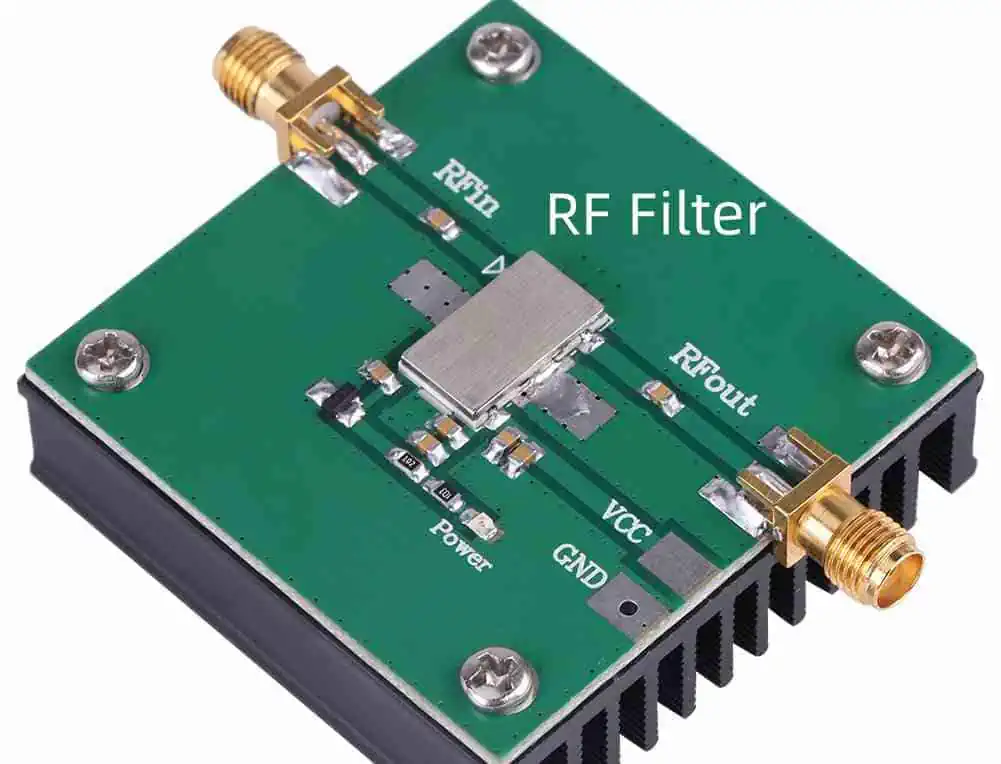
RF Filter
RF Filter

High-Speed Digital Applications

As data rates continue to increase, SV Microwave Solderless Compression Connectors are finding applications in high-speed digital systems:

  1. Data Centers: High-density, high-bandwidth interconnects
  2. 5G Infrastructure: Millimeter-wave frequency support for next-generation networks
  3. Automotive Radar: Precision connectors for advanced driver assistance systems (ADAS)

Emerging Technologies

SV Microwave continues to innovate in the field of solderless compression connectors:

  1. Higher Frequency Support: Development of connectors for sub-THz and THz applications
  2. Miniaturization: Smaller form factors for dense PCB layouts and portable devices
  3. Multi-port Connectors: Integrated solutions for complex RF systems
  4. Smart Connectors: Incorporation of built-in diagnostics and monitoring capabilities

Conclusion

SV Microwave Solderless Compression Connectors represent a significant advancement in RF PCB technology, offering improved performance, reliability, and ease of assembly. By understanding the design considerations, installation processes, and best practices outlined in this guide, engineers and technicians can leverage these innovative connectors to create high-performance RF systems for a wide range of applications.

As the demand for higher frequency and more compact RF solutions continues to grow, SV Microwave Solderless Compression Connectors are well-positioned to meet the challenges of next-generation wireless technologies and beyond.

Frequently Asked Questions (FAQ)

  1. Q: What is the maximum frequency range for SV Microwave Solderless Compression Connectors? A: SV Microwave offers solderless compression connectors that can support frequencies up to 110 GHz, such as their 1.0mm connector series.

  2. Q: Are special tools required for installing these connectors? A: Yes, SV Microwave provides specific compression tools and fixtures for proper installation of their solderless compression connectors. Using the correct tools is crucial for achieving optimal performance and reliability.

  3. Q: Can SV Microwave Solderless Compression Connectors be reused? A: While these connectors are designed for reworkability, repeated compression and decompression may affect their performance. It’s best to consult the manufacturer’s guidelines for specific reuse recommendations.

  4. Q: How do I ensure proper alignment when installing the connectors? A: Use alignment fixtures provided by SV Microwave, carefully follow the PCB footprint guidelines, and visually inspect the alignment before and after compression.

  5. Q: Are there any environmental considerations for using these connectors in extreme conditions? A: SV Microwave offers connectors designed for various environmental conditions. Consider factors such as temperature range, humidity, and vibration when selecting the appropriate connector series for your application. Always refer to the product specifications for detailed environmental ratings.

Mouse Bites PCB – Breakaway Tabs – V Groove PCB

Mouse Bites PCB

In PCB manufacturing, the need to separate individual boards from a larger panel efficiently and cleanly is crucial. Three primary methods have emerged as industry standards: Mouse Bites, Breakaway Tabs, and V-Grooves. Each method offers unique advantages and considerations for different production scenarios and requirements.

Mouse Bites in PCB Manufacturing

Definition and Characteristics

Mouse bites are small, perforated holes arranged in a line that allow for easy separation of PCBs from panels.

Technical Specifications

Parameter Typical Range Optimal Value Impact on Separation
Hole Diameter 0.5-1.0mm 0.7mm High
Hole Spacing 0.5-1.5mm 1.0mm Critical
Bridge Width 0.3-0.7mm 0.5mm High
Number of Holes 3-8 per inch 5 per inch Medium

Advantages and Applications

Benefits Table

Benefit Description Application Scenario
Clean Break Minimal edge roughness High-precision electronics
Easy Separation Manual separation possible Low-volume production
Cost-effective No special tools required Prototype development
Space-efficient Minimal border required Dense panel layouts

Design Considerations

Layout Parameters

Factor Recommendation Critical Concerns
Edge Distance โ‰ฅ 2mm from components Structural integrity
Panel Rigidity 2-3mm thickness Handling stability
Corner Design Rounded preferred Stress distribution
Support Points Every 50-75mm Panel stability

Breakaway Tabs

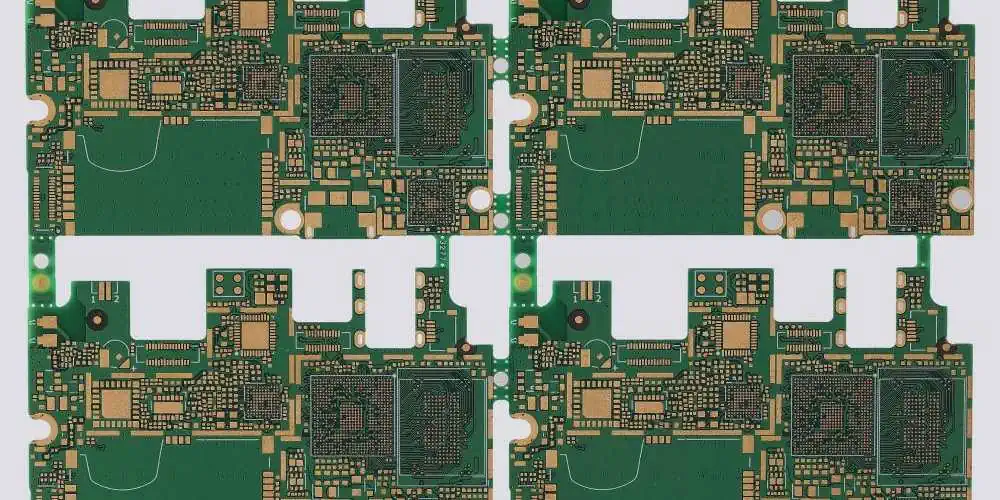
portable pcb

Structure and Design

Breakaway tabs are solid sections of PCB material that connect individual boards to the panel frame.

Tab Specifications

Dimension Range Optimal Size Usage Case
Width 2-5mm 3mm Standard boards
Length 3-8mm 5mm Medium weight
Thickness Same as PCB 1.6mm Most common
Spacing 50-100mm 75mm Balance point

Manufacturing Process

Production Parameters

Process Step Control Point Quality Impact
Routing Speed control Edge quality
Tab Placement Strategic locations Board support
Material Selection FR4 grade Break strength
Tool Selection Carbide endmills Cut precision

Strength Considerations

Board Size Min Tabs Tab Width Tab Spacing
Small (<50cmยฒ) 2 2mm 75mm
Medium (50-150cmยฒ) 3 3mm 100mm
Large (>150cmยฒ) 4+ 4mm 125mm

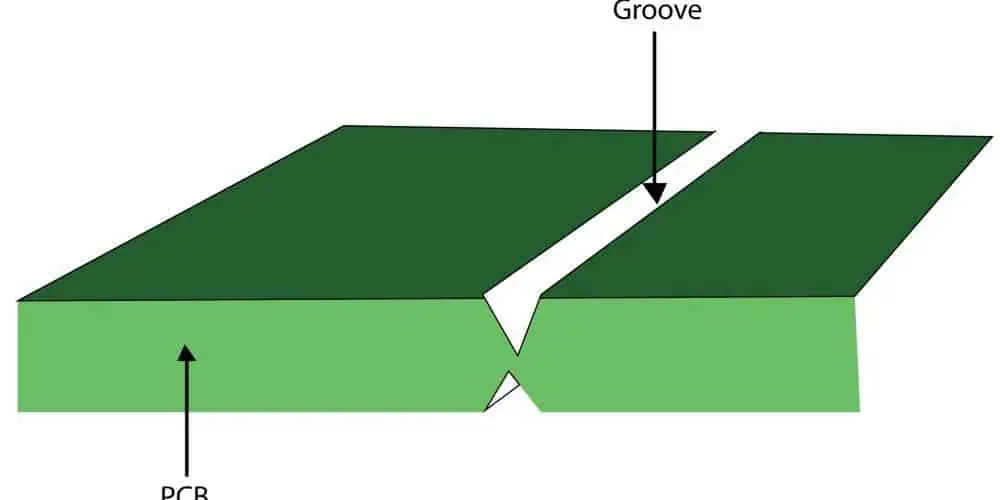
V-Groove PCB

Technical Specifications

Groove Parameters

Parameter Standard Value Tolerance Critical Factor
Depth 1/3 board thickness ยฑ0.1mm Break control
Angle 30-45 degrees ยฑ2ยฐ Separation ease
Width 0.6-0.8mm ยฑ0.05mm Material strength
Spacing Board edge aligned ยฑ0.1mm Layout efficiency

Manufacturing Process

Production Requirements

Equipment Precision Level Maintenance Frequency
V-Score Machine ยฑ0.025mm Weekly
Cutting Bits 30ยฐ or 45ยฐ 1000 boards
Guide System ยฑ0.01mm Monthly
Cooling System Temperature ยฑ2ยฐC Daily

Applications and Limitations

Usage Scenarios

Board Type Suitability Limitations
Rigid PCB Excellent None significant
Flex PCB Poor Not recommended
Rigid-Flex Limited Partial use only
Heavy Copper Good Requires special tools

Comparison of Methods

Performance Metrics

Criteria Mouse Bites Breakaway Tabs V-Groove
Cost Low Medium High
Speed Medium Slow Fast
Edge Quality Good Fair Excellent
Automation Limited Manual Full
Tool Life Long Medium Short

Application Recommendations

Production Volume Considerations

Production Level Recommended Method Alternative
Prototype Mouse Bites Breakaway Tabs
Small Series Breakaway Tabs Mouse Bites
Mass Production V-Groove None
Mixed Production Mouse Bites V-Groove

Quality Control

Inspection Criteria

Method Inspection Points Acceptance Criteria
Mouse Bites Hole alignment ยฑ0.1mm
Breakaway Tabs Tab uniformity ยฑ0.2mm
V-Groove Groove depth ยฑ0.05mm

Common Defects

Defect Analysis

Defect Type Cause Prevention
Rough Edges Tool wear Regular maintenance
Uneven Break Poor design Design optimization
Stress Marks Excessive force Process control
Material Damage Improper handling Training

Cost Analysis

Equipment Investment

Method Initial Cost Maintenance Cost Lifespan
Mouse Bites $5,000-10,000 Low 5-7 years
Breakaway Tabs $2,000-5,000 Medium 3-5 years
V-Groove $15,000-25,000 High 8-10 years

Operating Costs

Factor Mouse Bites Breakaway Tabs V-Groove
Labor Medium High Low
Tools Low Medium High
Training Basic Basic Advanced
Maintenance Minimal Low Regular

Future Trends

Technology Development

Innovation Impact Timeline
Laser Separation High 2024-2025
Smart Routing Medium 2023-2024
Automated Break High 2024-2025
AI-Guided Design Medium 2025-2026

Frequently Asked Questions (FAQ)

Q1: Which separation method is best for prototype PCB production?

A: For prototype production, Mouse Bites are typically the best choice because:

  • Lower tooling costs
  • Easy manual separation
  • Minimal equipment requirements
  • Good flexibility for design changes
  • Suitable for small quantities

Q2: What are the key factors in choosing between these three methods?

A: The main factors to consider are:

  • Production volume
  • Board thickness and size
  • Edge quality requirements
  • Available equipment
  • Cost constraints
  • Automation needs

Q3: How does board thickness affect the choice of separation method?

A: Board thickness impacts method selection as follows:

  • Thin boards (<0.8mm): V-Groove preferred
  • Standard boards (1.6mm): All methods suitable
  • Thick boards (>2.4mm): Breakaway tabs or modified mouse bites
  • Very thick boards (>3.2mm): Special considerations required

Q4: What are the typical failure modes for each method?

A: Common failure modes include:

  • Mouse Bites: Irregular breaking, residual protrusions
  • Breakaway Tabs: Board damage during separation, uneven breaks
  • V-Groove: Incorrect depth, premature separation Each requires specific preventive measures and quality control.

Q5: How do environmental conditions affect the separation process?

A: Environmental factors impact separation as follows:

  • Temperature: Affects material brittleness
  • Humidity: Influences FR4 properties
  • Storage conditions: Can affect board integrity
  • Handling environment: Impacts separation quality

Conclusion

The choice between Mouse Bites, Breakaway Tabs, and V-Groove methods depends on various factors including production volume, quality requirements, and cost considerations. Each method has its distinct advantages and limitations, making them suitable for different applications. Understanding these differences enables manufacturers to select the most appropriate method for their specific needs, ensuring efficient and high-quality PCB production.

Three Issues of Etching in Multilayer PCB Manufacturing

Strip film etching line

Etching is a critical process in multilayer PCB manufacturing that directly impacts the quality and reliability of the final product. While the process has been refined over decades, three major issues continue to challenge manufacturers: underetching, overetching, and uneven etching. Understanding these problems, their causes, and solutions is crucial for maintaining high-quality PCB production standards.

Overview of PCB Etching Process

Basic Principles

Etching in PCB manufacturing involves selectively removing copper from the board surface to create circuit patterns. The process uses chemical solutions to dissolve unwanted copper while protecting the desired circuit traces.

Standard Parameters

ParameterOptimal RangeCritical ValueImpact on Quality
Temperature30-40ยฐC35ยฐCHigh
pH Level7.8-8.28Critical
Etchant Concentration120-150 g/L135 g/LHigh
Conveyor Speed0.8-1.2 m/min1.0 m/minMedium

Issue 1: Underetching

Etching Solution for PCB

Definition and Characteristics

Underetching occurs when insufficient copper is removed during the etching process, leading to potential short circuits and other defects.

Common Symptoms

SymptomDescriptionDetection Method
Copper ResidueVisible copper between tracesVisual inspection
Short CircuitsElectrical connection between isolated tracesElectrical testing
Thick TracesTraces wider than designedDimensional inspection
Poor DefinitionUnclear trace boundariesMicroscopic examination

Causes of Underetching

Primary Factors

FactorImpact LevelPrevention Method
Low Etchant ConcentrationHighRegular chemical analysis
Insufficient TimeHighProcess monitoring
Low TemperatureMediumTemperature control
Contaminated SolutionHighRegular maintenance

Solutions and Prevention

  1. Chemical Monitoring
  2. Temperature Control
  3. Process Time Adjustment
  4. Equipment Maintenance

Issue 2: Overetching

Definition and Characteristics

Overetching results in excessive copper removal, leading to broken circuits or weakened connections.

Impact Assessment

FeatureNormal RangeOveretched ConditionQuality Impact
Trace Widthยฑ10% of nominal>15% reductionCritical
Copper Thickness35ฮผm ยฑ5%>10% reductionHigh
Edge Definition90ยฐ ยฑ5ยฐ>15ยฐ deviationMedium
Surface RoughnessRa โ‰ค 0.5ฮผmRa > 1.0ฮผmHigh

Causes of Overetching

Environmental Factors

FactorRisk LevelControl Method
High TemperatureCriticalCooling system
Extended ExposureHighTimer control
Strong EtchantHighConcentration monitoring
Agitation SpeedMediumSpeed regulation

Prevention Strategies

  1. Process Control
  2. Equipment Calibration
  3. Chemical Management
  4. Operator Training

Issue 3: Uneven Etching

Definition and Characteristics

Uneven etching results in inconsistent copper removal across the board surface.

Pattern Analysis

Pattern TypeSensitivityCommon Issues
Fine LinesHighWidth variation
Large AreasMediumCenter etching
Mixed DensityHighLocal variations
Edge AreasMediumOver/under etching

Technical Factors

Equipment Considerations

ComponentImpactMaintenance Frequency
Spray NozzlesCriticalWeekly
Conveyor SystemHighMonthly
Tank CirculationHighDaily
Filtration SystemMediumBi-weekly

Quality Control Measures

Testing Methods

MethodDetection CapabilityImplementation Cost
Visual InspectionMediumLow
Electrical TestingHighMedium
X-ray InspectionVery HighHigh
Cross-section AnalysisHighestVery High

Process Control Parameters

Critical Measurements

ParameterMeasurement FrequencyAcceptable Range
Etch RateHourly35-45 ฮผm/min
Line WidthPer Boardยฑ10% nominal
Surface FinishPer BatchRa โ‰ค 0.5ฮผm
Layer RegistrationPer Boardยฑ75ฮผm

Cost Impact Analysis

Financial Implications

Issue TypeScrap RateRework CostProduction Loss
Underetching5-8%$150/board2-3 hours
Overetching8-12%$200/board3-4 hours
Uneven Etching6-10%$175/board2.5-3.5 hours

Prevention Costs

MeasureImplementation CostAnnual SavingsROI Period
Advanced Control System$50,000 $120,000 5 months
Chemical Analysis Equipment$30,000 $80,000 4.5 months
Staff Training$15,000 $45,000 4 months

Best Practices for Issue Prevention

Process Optimization

Control Measures

AreaActionFrequencyResponsibility
Chemical AnalysisTestingDailyLab Technician
Temperature ControlMonitoringHourlyOperator
Equipment MaintenanceInspectionWeeklyMaintenance Team
Quality ChecksTestingPer BatchQC Team

Staff Training Requirements

LevelTraining TypeDurationUpdate Frequency
OperatorBasic Process40 hours6 months
SupervisorAdvanced Control80 hours12 months
EngineerTechnical Expert120 hours18 months

Future Developments

Emerging Technologies

TechnologyExpected ImpactImplementation Timeline
AI Control SystemsHigh2024-2025
Real-time MonitoringVery High2023-2024
Advanced ChemistryMedium2024-2025
Automated CorrectionHigh2025-2026

Frequently Asked Questions (FAQ)

Q1: What are the most common indicators of etching problems?

A: The most common indicators include:

  • Trace width variations
  • Copper residue between traces
  • Broken or interrupted circuits
  • Surface roughness changes
  • Color variations in etched areas

Q2: How often should etching parameters be checked during production?

A: Critical parameters should be monitored at the following intervals:

  • Temperature: Every hour
  • Chemical concentration: Every 4 hours
  • pH level: Every 2 hours
  • Etch rate: Every new batch
  • Solution level: Every shift

Q3: What is the typical recovery process for overetched boards?

A: Recovery options depend on the severity of overetching:

  • Minor: Copper plating adjustment
  • Moderate: Circuit repair techniques
  • Severe: Board replacement Note: Not all overetched boards can be salvaged.

Q4: How do different copper weights affect etching parameters?

A: Different copper weights require specific parameter adjustments:

  • 0.5 oz: 25-30% shorter etch time
  • 1 oz: Standard parameters
  • 2 oz: 40-50% longer etch time
  • 3 oz: Double etch time, may require multiple passes

Q5: What preventive maintenance steps are most critical?

A: Critical preventive maintenance includes:

  • Daily nozzle inspection and cleaning
  • Weekly solution analysis and adjustment
  • Monthly equipment calibration
  • Quarterly major system maintenance
  • Annual comprehensive overhaul

Conclusion

Understanding and addressing the three major etching issues in multilayer PCB manufacturing is crucial for maintaining product quality and production efficiency. Through proper monitoring, maintenance, and process control, manufacturers can minimize these issues and their impact on production. Continuous training and adoption of new technologies will further improve the etching process and reduce defect rates in the future.

Laser Exposure Machine Makes PCB More Efficient

The evolution of Printed Circuit Board (PCB) manufacturing has seen significant advancement with the introduction of laser exposure technology. This revolutionary approach has transformed the traditional PCB production process, offering enhanced precision, improved efficiency, and superior quality output. This comprehensive article explores how laser exposure machines are revolutionizing the PCB industry and making the manufacturing process more efficient.

Understanding Laser Exposure Technology

Basic Principles

Laser exposure technology utilizes precise laser beams to directly image circuit patterns onto photoresist-coated PCB substrates. This technology eliminates the need for traditional photomasks and significantly reduces the complexity of the exposure process.

Key Components

ComponentFunctionImpact on Efficiency
Laser SourcePattern generationHigh precision, fast processing
Optical SystemBeam focusing and steeringAccurate pattern placement
Control SystemProcess managementAutomated operation
Scanning SystemPattern distributionUniform exposure
Cooling SystemTemperature regulationStable operation

Advantages of Laser Exposure in PCB Manufacturing

Technical Benefits

1. Precision and Accuracy

ParameterTraditional MethodLaser ExposureImprovement
Line Widthยฑ25ฮผmยฑ5ฮผm80% better
Registrationยฑ50ฮผmยฑ10ฮผm80% better
Edge Definitionยฑ15ฮผmยฑ3ฮผm80% better
Layer Alignmentยฑ30ฮผmยฑ7ฮผm77% better

2. Production Speed

Board SizeTraditional ExposureLaser ExposureTime Saved
Small (4″x6″)45 seconds15 seconds67%
Medium (8″x10″)90 seconds25 seconds72%
Large (12″x18″)180 seconds40 seconds78%

Economic Benefits

Process Optimization

Workflow Improvements

  1. Digital workflow integration
  2. Reduced manual intervention
  3. Real-time quality control
  4. Automated correction systems

Production Parameters

ParameterSetting RangeOptimal ValueImpact on Quality
Laser Power1-5W3WHigh
Scan Speed100-500mm/s300mm/sMedium
Focus Distance10-30mm20mmCritical
Resolution1200-4800dpi2400dpiHigh

Advanced Features and Capabilities

Multi-layer Processing

Layer TypeSpecial RequirementsProcessing Time
Inner LayerHigh registration20-30 seconds
Outer LayerFine line capability25-35 seconds
Solder MaskPrecise alignment30-40 seconds
LegendHigh contrast15-25 seconds

Automation Features

Smart Functions

  1. Auto-alignment
  2. Pattern recognition
  3. Error detection
  4. Real-time adjustment

Quality Control and Monitoring

Quality Metrics

MetricStandard RangeAcceptable Deviation
Pattern Accuracyยฑ5ฮผmยฑ2ฮผm
Surface Uniformity95-100%-2%
Edge Quality90-95%-3%
Registrationยฑ7ฮผmยฑ3ฮผm

Process Monitoring

Real-time Parameters

multilayer pcb design
ParameterMonitoring MethodUpdate Frequency
Laser PowerDirect measurementEvery 0.1s
Beam PositionOptical sensorsEvery 0.05s
TemperatureThermal sensorsEvery 1s
Air QualityParticle countersEvery 5s

Environmental Impact

Energy Efficiency

Process StageTraditional Power UsageLaser System Power UsageSavings
Startup5000W2000W60%
Operation3500W1500W57%
Standby1000W300W70%

Material Conservation

Reduced Waste

Material TypeTraditional WasteLaser System WasteReduction
Photoresist15-20%5-8%60%
Chemistry25-30%10-12%60%
Film10-15%0%100%

Cost Analysis

Investment Comparison

FactorTraditional SystemLaser SystemLong-term Benefit
Initial Cost$50,000 $150,000 Higher ROI
Operating Cost$5,000/month$2,000/month60% savings
Maintenance$10,000/year$15,000/yearBetter reliability
Training$2,000/operator$5,000/operatorHigher efficiency

Return on Investment

Cost Recovery Timeline

Production VolumeBreak-even PeriodAnnual Savings
Low (500 boards/month)24 months$36,000 
Medium (2000 boards/month)18 months$72,000 
High (5000 boards/month)12 months$180,000 

Future Developments

Emerging Technologies

TechnologyExpected ImplementationImpact
AI Integration2024-2025Enhanced automation
Quantum Lasers2025-2026Higher precision
Smart Materials2024-2025Better quality
IoT Integration2023-2024Improved monitoring

Maintenance and Support

Preventive Maintenance Schedule

ComponentFrequencyDurationImpact
Laser SourceQuarterly4 hoursCritical
Optical SystemMonthly2 hoursHigh
Cooling SystemWeekly1 hourMedium
Control SystemSemi-annual6 hoursHigh

Frequently Asked Questions (FAQ)

Q1: What is the typical ROI period for a laser exposure machine?

A: The Return on Investment (ROI) period typically ranges from 12-24 months, depending on production volume and utilization rate. Factors affecting ROI include:

  • Daily production volume
  • Operating shifts
  • Material costs
  • Labor savings
  • Quality improvement benefits

Q2: How does laser exposure improve PCB quality?

A: Laser exposure significantly improves PCB quality through:

  • Higher precision (ยฑ5ฮผm vs ยฑ25ฮผm with traditional methods)
  • Better edge definition
  • Improved layer registration
  • More consistent pattern transfer
  • Reduced defect rates

Q3: What maintenance requirements does a laser exposure machine have?

A: Key maintenance requirements include:

  • Daily cleaning and inspection
  • Weekly system calibration
  • Monthly optical system maintenance
  • Quarterly laser source check
  • Annual comprehensive service

Q4: Can laser exposure machines handle all types of PCB materials?

A: Modern laser exposure machines can handle most common PCB materials, including:

  • FR-4
  • High-frequency materials
  • Flexible circuits
  • Ceramic substrates However, some specialized materials may require specific laser parameters or pre-treatment.

Q5: What are the environmental benefits of laser exposure systems?

A: Environmental benefits include:

  • 60% reduction in energy consumption
  • Zero film waste
  • Reduced chemical usage
  • Lower water consumption
  • Smaller carbon footprint

Conclusion

Laser exposure machines represent a significant advancement in PCB manufacturing technology, offering substantial improvements in efficiency, quality, and environmental impact. While the initial investment may be higher than traditional systems, the long-term benefits in terms of reduced operating costs, improved quality, and increased productivity make them an invaluable asset for modern PCB manufacturing facilities. As technology continues to evolve, laser exposure systems will likely become even more sophisticated, further enhancing their capabilities and benefits for PCB production.

What is Brown PCB ?

The Spectrum of PCB Colors

PCBs come in various colors, each serving specific purposes or preferences:

Color Characteristics Common Applications
Green Most common, good contrast General-purpose electronics
Blue Good for high-frequency applications Aerospace, medical devices
Red Heat-resistant, good for high temperatures Automotive, power electronics
Black Sleek appearance, good heat dissipation Consumer electronics, automotive
White Reflects heat, good for LED applications LED lighting, optical devices
Yellow Used for flexible PCBs Wearable technology, flexible electronics
Brown Unique aesthetic, specific applications Vintage electronics, specialized industries

Introducing Brown Color PCBs

Brown color PCBs represent a niche but significant segment in the PCB market. Their unique color offers both aesthetic and functional properties that make them suitable for specific applications.

What Makes a PCB Brown?

A brown PCB is created by applying a brown-colored solder mask to the board’s surface. The solder mask is a thin layer of polymer that is screen-printed onto the PCB and then cured, typically through heat treatment.

Advantages of Brown Color PCBs

Brown color PCBs offer several advantages that make them suitable for specific applications:

1. Unique Aesthetic Appeal

The brown color provides a distinctive look that can be desirable in certain product designs, particularly those aiming for a vintage or earthy appearance.

2. Reduced Eye Strain

In some lighting conditions, the brown color may be less harsh on the eyes compared to brighter colors like white or yellow, potentially reducing eye strain for workers during assembly or inspection.

3. Camouflage Properties

In certain military or outdoor applications, brown PCBs might offer better camouflage properties compared to more vibrant colors.

4. Thermal Properties

While not as effective as black in heat dissipation, brown PCBs may offer slightly better thermal properties compared to lighter colored boards.

5. Contrast for Certain Components

The brown background can provide good contrast for gold-plated components or copper traces, aiding in visual inspection.

Applications of Brown Color PCBs

Brown color PCBs find applications in various industries and product types:

Vintage Electronics

Brown PCBs are often used in the reproduction or repair of vintage electronic equipment to maintain an authentic appearance.

Military and Outdoor Equipment

The subdued color of brown PCBs can be advantageous in military applications or outdoor equipment where camouflage is desired.

Specialized Industrial Equipment

Some industrial applications prefer brown PCBs for their unique aesthetic or potential benefits in specific operating environments.

Consumer Electronics

Certain consumer electronic products may use brown PCBs as a design choice to create a distinct look or brand identity.

Audio Equipment

Some high-end audio equipment manufacturers choose brown PCBs for their aesthetic appeal in open-design products.

Manufacturing Process of Brown Color PCBs

The manufacturing process of brown color PCBs is similar to that of other PCBs, with the main difference being the color of the solder mask applied:

1. Base Material Preparation

The process begins with the selection of the base material, typically FR-4 (Flame Retardant 4) or a similar substrate.

2. Copper Layering

Copper foil is bonded to the substrate. For multi-layer boards, this process is repeated with insulating layers between copper layers.

3. Photoresist Application

A layer of photoresist is applied to the copper surface.

4. Image Transfer

The circuit pattern is transferred onto the photoresist using UV light.

5. Etching

Unwanted copper is removed through chemical etching, leaving only the desired circuit pattern.

6. Solder Mask Application

This is where the brown color is introduced. A brown-colored solder mask is applied to the board.

7. Curing

The board is cured, usually through heat treatment, to set the brown solder mask.

8. Surface Finish

A surface finish is applied to protect exposed copper and facilitate soldering.

9. Silkscreen

If required, a silkscreen layer is added, usually in white or other light colors for contrast against the brown background.

Comparison: Brown vs. Traditional PCB Colors

Let’s compare brown PCBs with other common PCB colors across various parameters:

Parameter Brown PCBs Green PCBs Black PCBs
Aesthetic Appeal Unique, vintage look Traditional, professional Modern, sleek
Contrast Good with gold components Excellent with white silkscreen Excellent with white silkscreen
Heat Dissipation Moderate Standard Good
Eye Strain Potentially reduced Standard Can be high in bright environments
Availability Limited Widely available Increasingly common
Cost Can be higher due to lower demand Standard Slightly higher than green
Camouflage Properties Good for certain environments Poor Good for dark environments

Challenges and Considerations

While brown color PCBs offer unique advantages, there are some challenges and considerations to keep in mind:

1. Limited Availability

Brown PCBs are less common than traditional colors, which might limit manufacturing options and potentially increase lead times.

2. Cost

Due to lower demand and potentially smaller production runs, brown PCBs might be more expensive than standard green boards.

3. Color Consistency

Achieving consistent color across different production batches can be challenging, especially with a less common color like brown.

4. Industry Familiarity

Some PCB designers and manufacturers may be less familiar with working with brown PCBs, which could lead to potential issues in design or production.

5. Contrast for Inspection

While brown can provide good contrast for certain components, it may not be ideal for all types of visual inspection processes.

Future Trends

The use of brown color PCBs, while niche, is part of a broader trend towards more diverse and application-specific PCB finishes. We might see:

  1. Development of different shades of brown for various applications
  2. Improved brown solder mask formulations for enhanced durability and consistency
  3. Increased adoption in specialized industries or for specific product lines
  4. Combination of brown PCBs with other emerging PCB technologies

Environmental Considerations

As with all PCB manufacturing, environmental concerns are important when producing brown color PCBs:

  1. Compliance with RoHS (Restriction of Hazardous Substances) directives
  2. Proper handling and disposal of chemicals used in the manufacturing process
  3. Exploration of more environmentally friendly solder mask options
  4. Consideration of the entire lifecycle of the PCB, including end-of-life recycling

Choosing Brown Color PCBs

When deciding whether to use brown color PCBs for a project, consider the following factors:

Factor Considerations for Brown PCBs
Aesthetic Requirements Desire for unique or vintage look
Application Environment Need for camouflage or subdued appearance
Component Contrast Use of gold-plated or copper components
Manufacturing Availability Check with PCB manufacturers
Cost Sensitivity Budget for potentially higher costs
Thermal Requirements Moderate heat dissipation needs
Industry Standards Any color restrictions in your industry

Conclusion

Brown color PCBs represent a unique niche in the world of printed circuit boards. While they may not be as common as traditional green or modern black PCBs, they offer distinct advantages for specific applications. Their unique aesthetic appeal, potential for reduced eye strain, and camouflage properties make them an interesting option for designers and engineers working on specialized projects.

As with any technological choice, the decision to use brown color PCBs should be based on a careful consideration of the specific requirements of each project. While they may present some challenges in terms of availability and cost, brown PCBs can provide a distinctive solution for products that benefit from their unique properties.

As the electronics industry continues to evolve, we may see increased adoption and development of brown and other non-traditional PCB colors. This diversity in PCB options allows for greater customization and optimization of circuit boards for specific applications, contributing to the ongoing advancement of electronic design and manufacturing.

FAQ

1. Are brown color PCBs more expensive than traditional green PCBs?

Brown color PCBs can be more expensive than traditional green PCBs due to lower demand and potentially smaller production runs. However, the price difference can vary depending on the manufacturer and order quantity.

2. Do brown PCBs affect the electrical performance of the circuit?

Generally, the color of the PCB does not significantly affect its electrical performance. The brown color is primarily a cosmetic feature of the solder mask and doesn’t interfere with the circuit’s operation.

3. Can all PCB designs be manufactured in brown color?

In theory, most PCB designs can be manufactured with a brown solder mask. However, not all manufacturers may offer this option as a standard choice. It’s best to consult with your PCB manufacturer about the feasibility of using a brown color for your specific design.

4. How does the durability of brown PCBs compare to other colors?

The durability of a PCB is primarily determined by the quality of the base material and manufacturing process, not the color. Brown PCBs should be as durable as any other color PCB, assuming they are manufactured to the same standards.

5. Are there any special handling or assembly considerations for brown PCBs?

Generally, brown PCBs can be handled and assembled using the same processes as other color PCBs. However, if the brown color affects visual inspection processes in your assembly line, you may need to adjust lighting or inspection procedures accordingly.

What Is Matte Green PCB ?

What is a PCB?

A Printed Circuit Board (PCB) is a fundamental component in electronic devices. It serves as a platform for mounting and connecting electronic components using conductive pathways, tracks, or signal traces etched from copper sheets laminated onto a non-conductive substrate.

Traditional PCB Colors

PCBs come in various colors, each serving specific purposes:

Color Characteristics Common Applications
Green Most common, good contrast General-purpose electronics
Blue Good for high-frequency applications Aerospace, medical devices
Red Heat-resistant, good for high temperatures Automotive, power electronics
Black Sleek appearance, good heat dissipation Consumer electronics, automotive
White Reflects heat, good for LED applications LED lighting, optical devices
Yellow Used for flexible PCBs Wearable technology, flexible electronics

Introducing Matte Green PCBs

Matte green PCBs are a variation of the traditional glossy green PCBs that have been a staple in the electronics industry for decades. The matte finish provides a unique set of characteristics that can be advantageous in certain applications.

What Makes a PCB Matte Green?

A matte green PCB is created by applying a special solder mask with a non-reflective, matte finish to the board’s surface. This solder mask is formulated to have a subdued, non-glossy appearance while maintaining the familiar green color associated with PCBs.

Advantages of Matte Green PCBs

Matte green PCBs offer several advantages over their glossy counterparts:

1. Reduced Glare

The matte finish significantly reduces light reflection, which can be beneficial in environments where glare needs to be minimized.

2. Improved Readability

The non-reflective surface makes it easier to read component labels and circuit traces, especially under bright lights.

3. Enhanced Aesthetics

The subdued appearance of matte green PCBs can be more visually appealing in certain applications, particularly where the PCB is visible in the final product.

4. Better Photographic Documentation

The reduced glare makes it easier to photograph matte green PCBs for documentation or quality control purposes.

5. Improved Solder Mask Adhesion

Some manufacturers claim that the matte finish can provide better adhesion for the solder mask, potentially improving durability.

Applications of Matte Green PCBs

Matte green PCBs find applications in various industries and product types:

Consumer Electronics

Many consumer electronic devices use matte green PCBs for their aesthetic appeal and readability.

Industrial Equipment

The improved readability of matte green PCBs can be advantageous in industrial settings where quick visual inspections are necessary.

Automotive Electronics

The reduced glare can be beneficial in automotive applications where PCBs might be exposed to varying light conditions.

Medical Devices

The clear visibility of components and traces on matte green PCBs can be crucial in medical equipment where precision is paramount.

Aerospace and Defense

The matte finish can reduce unwanted reflections in sensitive optical or sensor-based systems used in aerospace and defense applications.

Manufacturing Process of Matte Green PCBs

The manufacturing process of matte green PCBs is similar to that of traditional PCBs, with a few key differences:

1. Base Material Preparation

The process begins with the selection of the base material, typically FR-4 (Flame Retardant 4) or a similar substrate.

2. Copper Layering

Copper foil is bonded to the substrate. For multi-layer boards, this process is repeated with insulating layers between copper layers.

3. Photoresist Application

A layer of photoresist is applied to the copper surface.

4. Image Transfer

The circuit pattern is transferred onto the photoresist using UV light.

5. Etching

Unwanted copper is removed through chemical etching, leaving only the desired circuit pattern.

6. Solder Mask Application

This is where the matte green PCB process differs. A specially formulated matte green solder mask is applied to the board.

7. Curing

The board is cured, usually through heat treatment, to set the matte green solder mask.

8. Surface Finish

A surface finish is applied to protect exposed copper and facilitate soldering.

9. Silkscreen

If required, a silkscreen layer is added, usually in white for maximum contrast against the matte green background.

Comparison: Matte Green vs. Glossy Green PCBs

Let’s compare matte green PCBs with traditional glossy green PCBs across various parameters:

Parameter Matte Green PCBs Glossy Green PCBs
Light Reflection Low High
Readability Excellent Good (can be affected by glare)
Aesthetic Appeal Modern, subdued Traditional, professional
Photographic Quality Better Can be challenging due to reflections
Solder Mask Adhesion Potentially improved Standard
Cost Slightly higher Standard
Availability Less common Widely available
Tradition/Familiarity Newer option Industry standard

Challenges and Considerations

While matte green PCBs offer numerous advantages, there are some challenges and considerations to keep in mind:

1. Cost

The specialized solder mask and potentially lower production volumes can make matte green PCBs slightly more expensive than traditional glossy options.

2. Availability

Not all PCB manufacturers offer matte green as a standard option, which might limit sourcing choices.

3. Color Consistency

Achieving consistent color across different production batches can be more challenging with matte finishes.

4. Durability Concerns

Some users report that matte finishes might be more prone to showing wear or scratches over time, although this can vary depending on the specific formulation and application.

5. Industry Familiarity

As a relatively newer option, some professionals may be less familiar with working with matte green PCBs compared to traditional glossy boards.

Future Trends

The popularity of matte green PCBs is part of a broader trend towards more diverse and application-specific PCB finishes. We can expect to see:

  1. Development of matte finishes in other colors
  2. Improved matte solder mask formulations for enhanced durability
  3. Integration of matte finishes with other PCB technologies (e.g., flexible PCBs)
  4. Increased adoption in industries where glare reduction is critical

Environmental Considerations

As with all PCB manufacturing, environmental concerns are paramount. The production of matte green PCBs should adhere to the same environmental standards and regulations as traditional PCBs. This includes:

  1. Proper handling and disposal of chemicals used in the manufacturing process
  2. Compliance with RoHS (Restriction of Hazardous Substances) directives
  3. Exploration of more environmentally friendly solder mask options
  4. Consideration of the entire lifecycle of the PCB, including end-of-life recycling

Choosing Between Matte and Glossy Green PCBs

When deciding between matte and glossy green PCBs for a project, consider the following factors:

Factor Matte Green Glossy Green
Application Setting High-glare environments Standard lighting conditions
Visual Inspection Frequent or critical Standard
Photographic Needs High Low to moderate
Cost Sensitivity Moderate High
Aesthetic Preference Modern, subdued Traditional, professional
Availability Check with manufacturers Widely available

Conclusion

Matte green PCBs represent an exciting development in the world of electronics manufacturing. They offer a unique combination of aesthetic appeal and functional benefits, making them an attractive option for a wide range of applications. While they come with some challenges and considerations, their growing popularity suggests that matte green PCBs are carving out a significant niche in the industry.

As with any technological choice, the decision to use matte green PCBs should be based on a careful consideration of the specific requirements of each project. Whether for their reduced glare, improved readability, or modern aesthetics, matte green PCBs are proving to be a valuable option in the diverse world of electronic circuit boards.

FAQ

1. Are matte green PCBs more expensive than traditional glossy green PCBs?

Matte green PCBs can be slightly more expensive than traditional glossy green PCBs due to the specialized solder mask and potentially lower production volumes. However, the price difference is often minimal, especially for larger orders.

2. Do matte green PCBs affect the electrical performance of the circuit?

Generally, the finish of the PCB does not significantly affect its electrical performance. The matte green finish is primarily a cosmetic and functional surface treatment that doesn’t interfere with the circuit’s operation.

3. Can all PCB designs be manufactured with a matte green finish?

In theory, most PCB designs can be manufactured with a matte green finish. However, some very complex or specialized designs might require specific considerations. It’s always best to consult with your PCB manufacturer about the feasibility of using a matte green finish for your specific design.

4. How does the durability of matte green PCBs compare to glossy green PCBs?

The durability of matte green PCBs is generally comparable to that of glossy green PCBs. However, some users report that matte finishes might show wear or scratches more easily. The actual durability can vary depending on the specific solder mask formulation and the conditions in which the PCB is used.

5. Can I use the same assembly and soldering processes with matte green PCBs as I do with glossy green PCBs?

Yes, in most cases, you can use the same assembly and soldering processes for matte green PCBs as you would for glossy green PCBs. However, it’s always a good idea to consult with your PCB manufacturer and assembly house to ensure compatibility and optimal results with your specific design and requirements.

What is Matte Black PCB ?

Matte Black PCB

In the ever-evolving world of electronics and circuit board manufacturing, aesthetics and functionality often go hand in hand. One of the latest trends in this field is the rise of matte black PCBs (Printed Circuit Boards). These sleek, dark boards are not just a feast for the eyes but also offer several practical benefits. In this comprehensive guide, we’ll delve into the world of matte black PCBs, exploring their characteristics, advantages, applications, and manufacturing process.

Understanding PCBs

Before we dive into the specifics of matte black PCBs, let’s briefly review what PCBs are and their importance in electronics.

What is a PCB?

A Printed Circuit Board (PCB) is a fundamental component in electronic devices. It serves as a platform for mounting and connecting electronic components using conductive pathways, tracks, or signal traces etched from copper sheets laminated onto a non-conductive substrate.

Traditional PCB Colors

Traditionally, PCBs have come in various colors, each serving specific purposes:

Color Characteristics Common Applications
Green Most common, good contrast General-purpose electronics
Blue Good for high-frequency applications Aerospace, medical devices
Red Heat-resistant, good for high temperatures Automotive, power electronics
White Reflects heat, good for LED applications LED lighting, optical devices
Yellow Used for flexible PCBs Wearable technology, flexible electronics

Introducing Matte Black PCBs

Matte black PCBs are a relatively new addition to the PCB color palette. They offer a unique combination of aesthetic appeal and functional benefits.

What Makes a PCB Matte Black?

A matte black PCB is created by applying a special black solder mask to the board’s surface. This solder mask is formulated to have a non-reflective, matte finish, which gives the PCB its distinctive appearance.

Advantages of Matte Black PCBs

Matte black PCBs offer several advantages over traditional PCB colors:

1. Aesthetic Appeal

The sleek, modern look of matte black PCBs makes them particularly attractive for products where the circuit board is visible, such as in transparent or open-case designs.

2. Heat Dissipation

Black surfaces are known to emit heat more effectively than lighter colors. This property can contribute to better thermal management in electronic devices.

3. Reduced Light Reflection

The matte finish reduces light reflection, which can be beneficial in optical applications or in environments where glare needs to be minimized.

4. Contrast for Assembly

The dark background provides excellent contrast for component placement and soldering, potentially improving assembly accuracy and quality control.

5. Stealth and Security

In some applications, the dark color can help conceal circuit details, adding a layer of visual security to proprietary designs.

Applications of Matte Black PCBs

Matte black PCBs find applications in various industries and product types:

Consumer Electronics

Many high-end consumer electronics, particularly those with transparent or open designs, use matte black PCBs for their aesthetic appeal.

Automotive Industry

The heat-dissipating properties and sleek look make matte black PCBs suitable for automotive electronics, especially in luxury vehicles.

Aerospace and Defense

The reduced reflectivity can be advantageous in certain aerospace and defense applications where minimizing light reflection is crucial.

LED Lighting

The dark background of matte black PCBs can enhance the visual impact of LED displays and lighting systems.

Audio Equipment

High-end audio equipment often incorporates matte black PCBs for both their aesthetic and potential noise-reduction properties.

Manufacturing Process of Matte Black PCBs

The manufacturing process of matte black PCBs is similar to that of traditional PCBs, with a few key differences:

1. Base Material Preparation

The process begins with the selection of the base material, typically FR-4 (Flame Retardant 4) or a similar substrate.

2. Copper Layering

Copper foil is bonded to the substrate. For multi-layer boards, this process is repeated with insulating layers between copper layers.

3. Photoresist Application

A layer of photoresist is applied to the copper surface.

4. Image Transfer

The circuit pattern is transferred onto the photoresist using UV light.

5. Etching

Unwanted copper is removed through chemical etching, leaving only the desired circuit pattern.

6. Solder Mask Application

This is where the matte black PCB process differs significantly. A specially formulated black solder mask is applied to the board.

7. Curing

The board is cured, usually through heat treatment, to set the matte black solder mask.

8. Surface Finish

A surface finish is applied to protect exposed copper and facilitate soldering.

9. Silkscreen

If required, a silkscreen layer is added, usually in white or other light colors for contrast.

Comparison: Matte Black vs. Traditional PCBs

Let’s compare matte black PCBs with traditional PCB colors across various parameters:

Parameter Matte Black PCBs Traditional PCBs (e.g., Green)
Aesthetic Appeal High Moderate
Heat Dissipation Better Good
Light Reflection Low Moderate to High
Assembly Contrast Excellent Good
Visual Security High Moderate
Cost Slightly Higher Standard
Availability Limited Widely Available
Tradition/Familiarity New, Less Common Well-established

Challenges and Considerations

While matte black PCBs offer numerous advantages, there are some challenges and considerations to keep in mind:

1. Cost

The specialized solder mask and potentially lower production volumes can make matte black PCBs slightly more expensive than traditional options.

2. Availability

Not all PCB manufacturers offer matte black as a standard option, which might limit sourcing choices.

3. Inspection Challenges

The dark color can make visual inspection more challenging in some cases, particularly for solder joint quality assessment.

4. Heat Considerations

While black surfaces can emit heat more effectively, they also absorb more heat. This dual nature needs to be considered in thermal design.

5. Novelty Factor

As a relatively new option, there’s less long-term data on the performance and durability of matte black PCBs in various applications.

Future Trends

The popularity of matte black PCBs is part of a broader trend towards more aesthetically pleasing and functionally diverse circuit board options. We can expect to see:

  1. More color options with specialized properties
  2. Advanced surface treatments for enhanced performance
  3. Integration of aesthetic considerations into early-stage PCB design
  4. Development of eco-friendly PCB materials and processes

Conclusion

Matte black PCBs represent an exciting development in the world of electronics manufacturing. They offer a unique combination of aesthetic appeal and functional benefits, making them an attractive option for a wide range of applications. While they come with some challenges and considerations, their growing popularity suggests that matte black PCBs are more than just a passing trend.

As with any technological choice, the decision to use matte black PCBs should be based on a careful consideration of the specific requirements of each project. Whether for their sleek appearance, thermal properties, or reduced reflectivity, matte black PCBs are certainly leaving their mark on the electronics industry.

FAQ

1. Are matte black PCBs more expensive than traditional PCBs?

Matte black PCBs can be slightly more expensive than traditional PCBs due to the specialized solder mask and potentially lower production volumes. However, the price difference is often minimal, especially for larger orders.

2. Do matte black PCBs affect the electrical performance of the circuit?

Generally, the color of the PCB does not significantly affect its electrical performance. The matte black finish is primarily a cosmetic and functional surface treatment that doesn’t interfere with the circuit’s operation.

3. Can all PCB designs be manufactured in matte black?

In theory, most PCB designs can be manufactured in matte black. However, some very complex or specialized designs might require specific considerations. It’s always best to consult with your PCB manufacturer about the feasibility of using a matte black finish for your specific design.

4. Are matte black PCBs more heat-resistant than traditional PCBs?

While the black color can help with heat dissipation through better emission, it doesn’t necessarily make the PCB more heat-resistant. The heat resistance of a PCB is primarily determined by its base material and overall design, not its color.

5. Can I use regular white silkscreen on a matte black PCB?

Yes, white silkscreen can be used on matte black PCBs and often provides excellent contrast for labels and markings. However, other light colors can also be used effectively, depending on the specific aesthetic and functional requirements of your design.

What is Image Transfer in PCB Manufacturing?

Image transfer in PCB (Printed Circuit Board) manufacturing is a crucial step that determines the quality and accuracy of the final circuit board. This process involves transferring the circuit design pattern onto the copper-clad board, which serves as the foundation for subsequent manufacturing steps. Understanding this process is essential for anyone involved in PCB production, design, or quality control.

The Fundamentals of PCB Image Transfer

Basic Principles

Image transfer in PCB manufacturing refers to the process of accurately reproducing the circuit design onto the copper surface of the board. This process is fundamental to creating the conductive pathways that will eventually form the functional circuit. The transfer must be precise, as even minor imperfections can lead to circuit failures or reliability issues.

Types of Image Transfer Methods

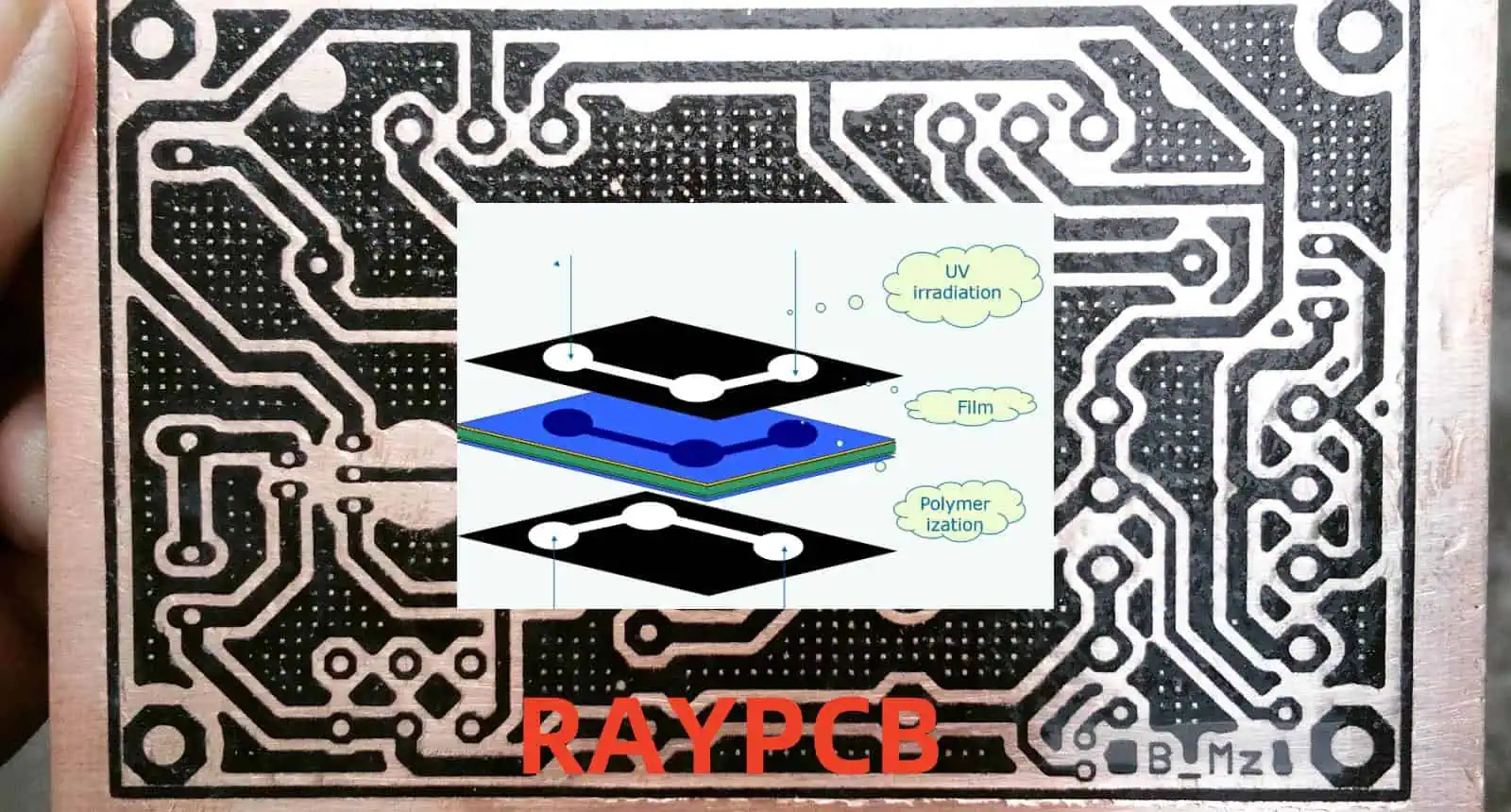
1. Photolithography

Toner Transfer
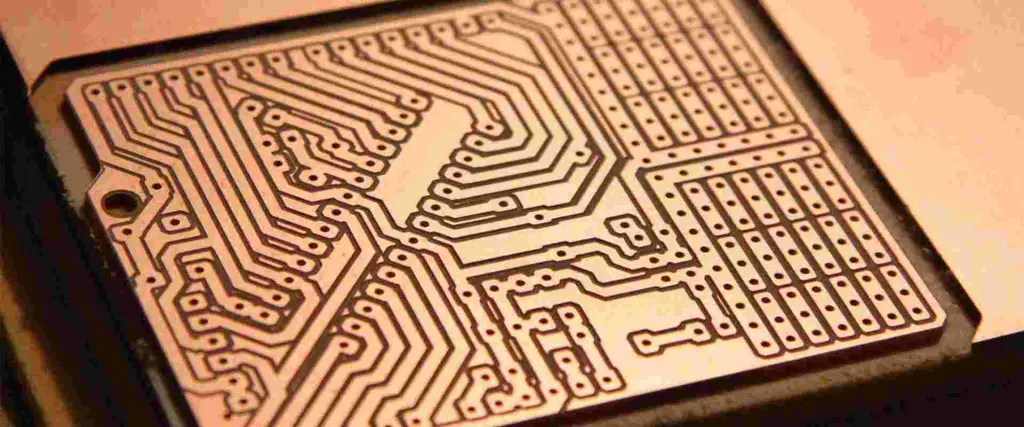
Toner Transfer

Photolithography remains the most widely used method in professional PCB manufacturing. This process involves:

  • Application of photoresist
  • Exposure to UV light
  • Development of the image
  • Etching of exposed copper

2. Direct Imaging

Direct imaging is a modern approach that eliminates the need for phototools. Benefits include:

  • Higher accuracy
  • Reduced environmental impact
  • Faster turnaround time
  • Better fine-line capability

3. Screen Printing

Screen printing is often used for:

  • Prototype development
  • Small-scale production
  • Specific applications requiring thick conductor deposits

Materials and Equipment

Essential Materials

Material Purpose Key Characteristics
Photoresist Image formation UV-sensitive, chemical resistant
Developer solution Pattern development Specific to resist type
Cleaning solutions Surface preparation Non-residue forming
Protective films Layer protection Clear, uniform thickness

Required Equipment

Equipment Type Function Precision Level
UV exposure unit Pattern exposure ยฑ10 microns
Direct imaging system Digital pattern transfer ยฑ5 microns
Screen printer Manual pattern transfer ยฑ25 microns
Clean room facilities Environmental control Class 100-1000

The Image Transfer Process

Step 1: Surface Preparation

Before image transfer can begin, the copper surface must be properly prepared:

  1. Cleaning and degreasing
  2. Mechanical or chemical roughening
  3. Anti-oxidation treatment
  4. Quality inspection

Step 2: Resist Application

The application of photoresist is critical and can be done through:

Method Advantages Disadvantages
Liquid resist coating Cost-effective, flexible Thickness variation
Dry film lamination Uniform thickness, clean Higher material cost
Electrophoretic coating Excellent coverage Complex process

Step 3: Exposure

Exposure Methods

Method Resolution Cost Production Speed
Contact printing Good Low Medium
Projection printing Better Medium High
Direct imaging Best High Very high

Step 4: Development

The development process reveals the circuit pattern:

  1. Chemical development
  2. Mechanical development
  3. Quality control inspection
  4. Pattern verification

Quality Control in Image Transfer

Critical Parameters

Parameter Acceptable Range Impact on Quality
Line width ยฑ10% of nominal Circuit performance
Registration ยฑ0.075mm Layer alignment
Edge definition 90ยฐ ยฑ5ยฐ Signal integrity
Surface roughness Ra โ‰ค 0.5ฮผm Adhesion quality

Common Defects

Visual Defects

  1. Under-exposure
  2. Over-exposure
  3. Poor adhesion
  4. Incomplete development

Electrical Defects

  1. Short circuits
  2. Open circuits
  3. Incorrect impedance
  4. Poor conductivity

Advanced Technologies

Latest Developments

  1. LED-based direct imaging
  2. Laser direct imaging (LDI)
  3. Inkjet printing technology
  4. Digital light processing (DLP)

Future Trends

Technology Expected Impact Timeline
AI-powered imaging Enhanced accuracy 2024-2025
Nano-resolution Finer features 2025-2026
Green processes Reduced waste 2023-2024
Smart automation Higher efficiency 2024-2025

Environmental Considerations

Waste Management

  1. Chemical disposal
  2. Water treatment
  3. Air filtration
  4. Material recycling

Sustainable Practices

Practice Environmental Benefit Implementation Cost
Water recycling 40% reduction in usage Medium
Energy efficiency 30% power savings High
Green chemistry 50% less toxic waste Medium
Material recovery 25% material savings Low

Cost Analysis

Cost Factors

Factor Percentage of Total Cost Control Methods
Materials 35-40% Bulk purchasing
Equipment 25-30% Preventive maintenance
Labor 20-25% Training and automation
Utilities 10-15% Energy efficiency

Frequently Asked Questions (FAQ)

Q1: What is the minimum line width achievable with modern image transfer methods?

A: Modern direct imaging systems can achieve line widths as small as 25 microns (0.001 inches) with high reliability. However, standard production typically works with 75-100 micron lines for better yield and cost-effectiveness.

Q2: How long does the image transfer process typically take?

A: The complete image transfer process, including preparation and quality control, typically takes 30-60 minutes per board. However, this can vary significantly based on:

  • Board complexity
  • Production volume
  • Equipment capability
  • Quality requirements

Q3: What are the main factors affecting image transfer quality?

A: The main factors include:

  • Material cleanliness
  • Environmental conditions
  • Equipment calibration
  • Operator skill
  • Process parameters

Q4: How often should image transfer equipment be calibrated?

A: Professional equipment should be calibrated:

  • Daily for basic parameters
  • Weekly for comprehensive checks
  • Monthly for full system calibration
  • Annually for certified calibration

Q5: What are the advantages of direct imaging over traditional photolithography?

A: Direct imaging offers several advantages:

  • Higher accuracy and resolution
  • Faster turnaround time
  • No need for phototools
  • Better environmental profile
  • Reduced material waste

Conclusion

Image transfer in PCB manufacturing is a complex process that requires careful attention to detail, proper equipment, and skilled operators. As technology advances, new methods and improvements continue to emerge, making the process more efficient and environmentally friendly. Understanding and optimizing this crucial step in PCB manufacturing is essential for producing high-quality prototype circuit boards assembly that meet modern electronic requirements.