
RAYPCB / Buyer resources
RAYPCB / BUYING & ENGINEERING
Online PCB prototyping quotes: release the right files
Keep the quoted design, exported files and next experiment aligned.
A prototype quote needs a defined build objective, quantity and coherent release package. Compare fabrication and assembly revisions before authorizing the build.
Compare the release identifiers
RAYPCB ENGINEERING
Quote and Evidence WorkbenchesPrototype release labels
Loading Prototype release labels…
Optional worksheet. No files are uploaded and no enquiry is sent. The guide and examples remain readable without JavaScript.
| Deliverable | Bare PCB | PCB assembly |
|---|---|---|
| Fabrication images, drills and specification | Required as appropriate | Required as appropriate |
| BOM and placement data | Not an assembly deliverable | Aligned with the released design |
| Test and programming instructions | State any bare-board requirements | Define product-specific responsibilities |
| Release manifest | Identifies accepted file set | Connects all fabrication and assembly revisions |
A prototype quote needs a defined experiment
An online PCB prototyping quote is most useful when it describes what the next build must prove. A first power-up board, a radio evaluation board and a mechanical fit prototype can require different construction and assembly decisions even when their outlines look similar. State the purpose of the build before selecting a delivery date or reducing a specification to fit a standard online configuration.
Self-service entry can make a request easier to prepare, but it does not remove the need for engineering decisions. Someone still owns the board release, component choices, test expectations and responses to manufacturing questions. This guide focuses on that handoff. It does not claim that RAYPCB offers unattended file approval, guaranteed automated DFM accuracy, automatic material purchasing or an immediate production release from this page.
For a commercial request, use the PCB and assembly quote route. For broader construction choices, see PCB prototype manufacturing. The worksheet here compares the release labels you enter for different documents. It cannot inspect the content of those documents. Its purpose is to make a common administrative mismatch visible before the files are sent, while the surrounding checklist addresses the engineering questions that a label comparison cannot answer.
Build a release manifest, not a miscellaneous ZIP
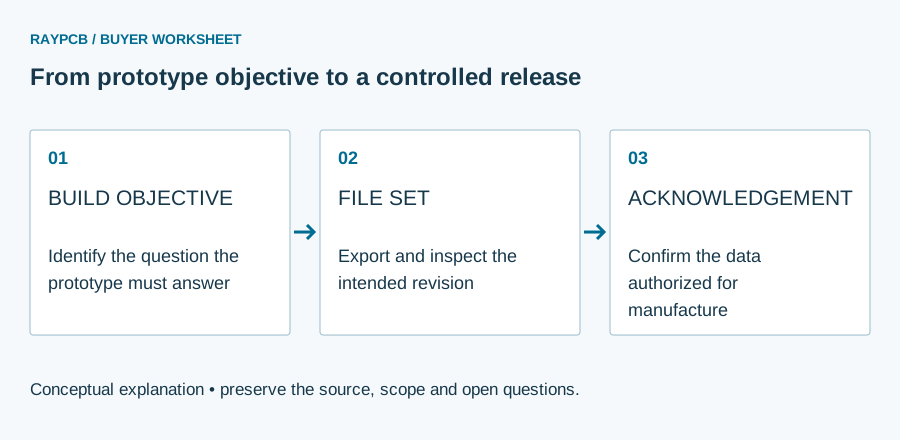
A release manifest is a short index connecting the requested build to the files that define it. Include a project identifier, release identifier, build scope, quantity and a list of the fabrication and assembly deliverables. Record whether each item is released, provisional or not applicable. A folder called final is less useful than an explicit revision that the customer and supplier can reference consistently.
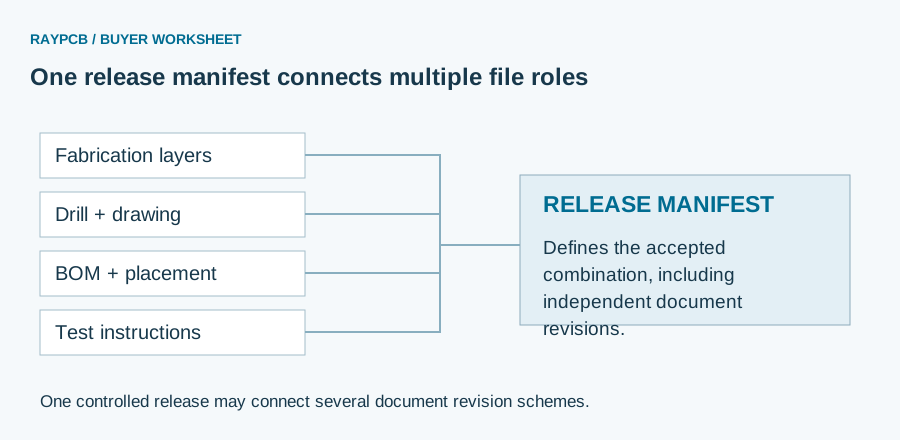
Keep superseded exports outside the manufacturing archive. If two outlines, two drill sets or two BOMs are present without an explanation, the recipient must decide which one controls. That decision belongs to the design owner. Where independent document revision schemes are intentional, the manifest should state the accepted combination; a fabrication revision B and a drawing revision 07 are not necessarily inconsistent if the approved release record connects them.
Use clear file names, but do not rely on names as proof of matching content. A file can be renamed without changing its geometry. The worksheet flags differences in the identifiers that you type; it does not hash files, inspect timestamps or compare copper layers. Review the actual exports using the appropriate CAD or fabrication viewer. The PCB file-format guide explains the different roles of image, drill, native design and assembly data.
Check the fabrication package as a set
Review copper layers, mask, legend, board outline and drill information together. Confirm that the origin, orientation and physical dimensions are coherent. A drill file viewed alone may not reveal that its coordinate interpretation differs from the copper data. Similarly, an apparently correct outline can conceal duplicated contours or unintended internal features when it is not reviewed with the complete package.
Describe the intended stackup, finished thickness, copper requirements, material and finish in the appropriate fabrication specification. Ucamco's Gerber Job format can carry fabrication attributes alongside Gerber images, but the recipient's support for those attributes must be confirmed. A file format's ability to represent information does not prove that every export or receiving workflow has populated and interpreted it correctly.
Separate fabrication constraints from the experiment's measurements. If a prototype is intended to validate a controlled-impedance route, define the relevant stackup and verification expectations before ordering. If it is intended to validate enclosure fit, dimensions and mechanical tolerances deserve explicit attention. The PCB DFM guide provides a route for manufacturing questions; a quote request should identify the unresolved items rather than implying that an upload has already resolved them.
Source context: Ucamco — Gerber Job and fabrication attributes, Ucamco — official file formats.
Add the assembly package when components are included
An assembled prototype requires more than bare-board fabrication data. Prepare a BOM with unambiguous component identities, quantities and designators, together with placement data and assembly documentation. Identify fitted and not-fitted variants. Explain any approved alternatives rather than allowing a generic value description to stand in for a required manufacturer part number. This matters particularly for connectors, polarized parts and components whose package options are easily confused.
Confirm the placement coordinate convention, side information and rotation basis with the assembly workflow. The same numeric rotation can be interpreted differently between library conventions, so a placement file is not a substitute for footprint and orientation review. Include the drawings or notes needed to resolve ambiguous cases. A prototype should reveal design behavior, not consume its entire schedule correcting a preventable interpretation mismatch.
Define programming and test responsibilities. State whether firmware, programming instructions, test fixtures and acceptance limits will be supplied by the customer or developed as separate work. A general assembly quotation does not imply a product-specific functional test. Use the required PCBA files guide when preparing this package and prototype PCB assembly for the build service. Check the agreed test scope before treating assembled quantity as validated product quantity.
Compare a quotation with the release you will send
The price may have been prepared against a configuration that has since changed. Before authorizing manufacture, compare the quotation's board revision, construction, quantity and services with the current manifest. Identify modifications that affect the manufacturing route, component sourcing, assembly setup or inspection. A change does not need to alter the board outline to have a meaningful cost or schedule consequence.
Create a compact change note. Describe the affected files and the reason for the change, then ask which parts of the quotation remain valid. For example, adding a connector may alter the BOM and placement data as well as the copper layout and enclosure clearance. Sending only a new Gerber archive while leaving the old BOM attached creates an incomplete release, even if both files individually open without errors.
Do not silently replace a quoted file after approval. Retain the superseded release in your internal records and clearly identify the replacement. Ask for acknowledgement that the new package is the one to be manufactured. The single-quote interpretation page helps check the commercial basis, while this workflow checks the relationship between that basis and the released engineering data. Both are needed before a meaningful purchase approval.
A practical revision-mismatch example
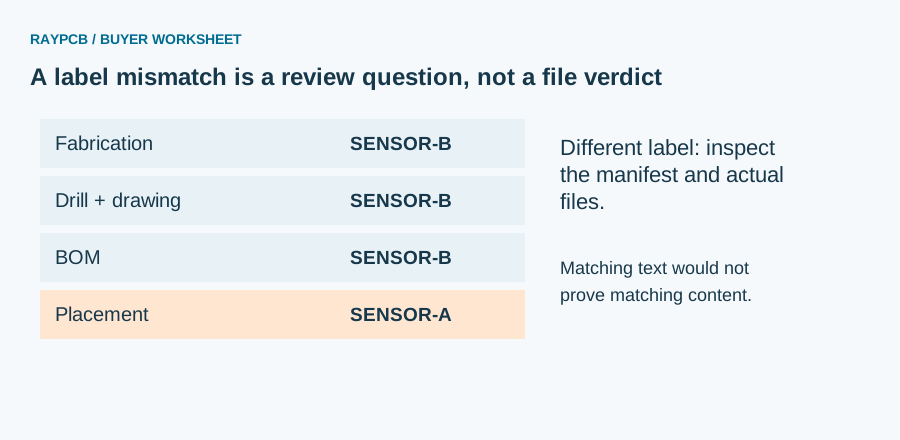
Consider an illustrative sensor board whose fabrication package, drill set and drawing belong to release SENSOR-B. The BOM also identifies SENSOR-B, but the placement file still identifies SENSOR-A. The worksheet reports a label difference. It cannot determine whether the older placement file is electrically equivalent, whether a component moved or whether the team deliberately retains independent document revisions.
The correct response is to inspect the release record and actual design changes. If release B moved a connector, regenerate and review the placement export from the intended CAD revision. If the placement data is intentionally unchanged and approved, document that relationship in the manifest rather than simply renaming the file to make the warning disappear. Matching labels are an administrative convenience, not engineering evidence.
Now reverse the situation: all labels match, but a drill file was exported before the last via edit. The worksheet cannot detect this. A combined fabrication review and a controlled export process are still necessary. This example explains why the tool reports label comparison, not release approval. A useful online worksheet should make its boundary clear enough that an engineer knows which independent checks remain after a green-looking result.
Plan prototype rounds and delivery milestones
Define how many prototype rounds the development plan is likely to need and which decisions each round will support. A small first build may answer a specific electrical question without requiring every final mechanical feature. Another project may need a production-representative stackup from the first round because signal integrity or assembly behavior is central to the experiment. Choose scope according to the test objective, not a universal rule that prototypes should always be cheaper or faster.
State the requested quantity of bare boards, assembled boards and any units needed for destructive or environmental testing. Keep those quantities distinct. If several assembly variants share one bare board, identify the population differences and the required count for each variant. This avoids a quotation that appears complete while leaving the actual assembly mix undefined.
Allow time for engineering questions, component decisions and your own review of the supplier's response. A production duration is only one part of the prototype cycle. Shipping and laboratory availability may matter just as much to the date on which useful test results become available. Ask for the start event behind any lead-time statement and confirm how a revision after release will be handled. The next round should begin with recorded learning, not an unexplained copy of the previous order.
Send a concise enquiry that can be answered
A useful enquiry names the release, defines the intended experiment and states the build scope. Attach or identify the fabrication package, and include assembly files when needed. List open engineering questions separately from fixed requirements. If material choice is still under discussion, say so; if the design mandates a specific grade, make that requirement explicit rather than leaving it in an unrelated email.
Use the worksheet as an optional final administrative check. Load the example to understand its behavior, clear the fields before entering your own release labels, and download the resulting note if it is useful. Inputs stay in the worksheet. There is no file upload, automatic enquiry transmission or unattended manufacturing release attached to this function. Attach the note manually through the communication method agreed with the supplier.
For a RAYPCB project, contact the team with the release package and the decision you need. You do not have to complete every planning step before asking a question. The aim is a coherent conversation that distinguishes known requirements, provisional assumptions and missing evidence. That gives the quotation a useful engineering context and reduces the chance that the prototype you receive answers a different question from the one your team intended to test.