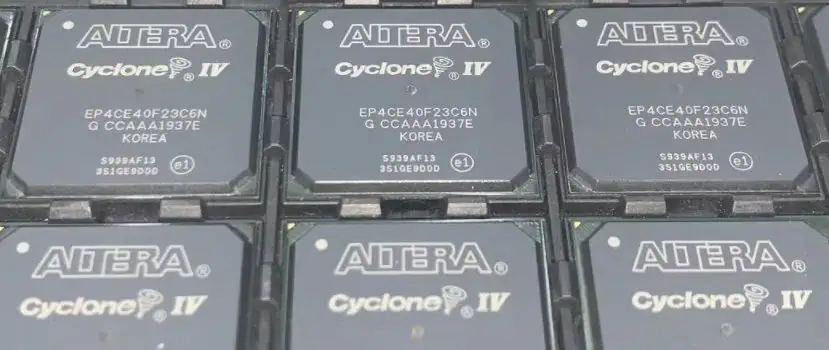
If you are a designer and currently working on a project that requires an FPGA, then what would you choose? You need FPGA with unwavering potency and dependability. The EP4CE40F23I7N presents itself as a top-notch option. This FPGA, hailing from Altera, boasts exceptional performance and remarkable adaptability. That’s why it is suitable for a wide array of uses. In the following content, we shall elucidate the technical specifications of the EP4CE40F23I7N and the configuration process.
Technical Specifications
This FPGA EP4CE40F23I7N belongs to the Cyclone IV E family.
This FPGA EP4CE40F23I7N contains l39, 600 logic elements.
It contains 1,386 Kbits number memory elements
EP4CE40F23I7N contains 4 Phase-Locked Loops
It contains 484f user Input and output pins
2V is the maximum operating voltage for it at speed grade 7
Maximum operating frequency for FPGA EP4CE40F23I7N 462MHz
Let’s dig deeper into its specifications.
This FPGA belongs to the Cyclone IV E family. This family is famous for providing a low-cost, low-power solution for various applications. The EP4CE40F23I7N is a mid-range FPGA that offers a good balance between performance and cost-effectiveness. It has a large number of logic elements, which makes it suitable for implementing complex digital circuits. It also has a significant amount of memory elements.
The EP4CE40F23I7N has a total of 39,600 logic elements. An LE is the smallest building and basic building block of an FPGA. As a result, it is easy to implement logic functions. You can see that these logic blocks are the bricks of the FPGA building.
Memory Storage
The EP4CE40F23I7N 1,122 embedded memory blocks. These are used to store data in the FPGA. That’s why you can use it for various purposes, such as buffering. Moreover, it is supportive of storing configuration data.
Best Digital Signal Processing
Better signal processing is important when it comes to FPGA. That’s why This FPGA has Two hundred sixty-six embedded 18 x 18 multipliers. As a result, these are helpful for multiplying two numbers together. Moreover, these are useful in a variety of applications, such as digital signal processing.
Stable Clock Signals
4-phase locked loops help to generate stable clock signals, which are essential for the proper operation of the FPGA. That’s why its signal processing is at its best. It also has many other supportive features to support clock signaling.
Input And Output Pins
It has Up to 622 user input and output pins. As a result, connectivity and integration are so easy.
That’s why it can adjust multiple interfaces. As a result, this FPGA can go to other devices and can be configured as inputs or outputs. Support for a range of interfaces, including DDR3 PCIe and Gigabit Ethernet. These are commonly used communication protocols and interfaces. As a result, this FPGA can communicate with other devices and systems.
Configuration Scheme for the EP4CE40F23I7N
EP4CE40F23I7N FPGA is easy to reprogram. It is manufactured by Intel (previously known as Altera). The configuration scheme for this FPGA is comprised of loading configuration data into the configuration memory.
For this particular FPGA, the configuration scheme involves utilizing a 1.8V configuration device. For example, an EPCS128 or EPCS64 serial configuration device can retain the configuration data. The connection between the FPGA and the configuration device is easy to establish through the Joint Test Action Group interface. As a result, it is easy to transfer configuration data from the device to the FPGA.
The programming object file stores the configuration data. Quartus Prime software is helpful in POF file generation. The POF file has the configuration device with the use of a programming tool, such as the Quartus Programmer or the USB-Blaster.
When the configuration process is underway, the configuration device moves the configuration data into the configuration memory of the FPGA. Once the configuration is complete, the FPGA is ready to execute the design of the user.
It’s worth noting that the specific design requirements and programming tools can alter the configuration scheme. That’s why it is necessary to consult the device datasheet and the documentation for the programming tools. As a result, you can acquire specific details about the configuration.
Finally, the FPGA is configured using an SRAM-based configuration scheme. Moreover, it allows for easy reprogramming of the device. That’s why it is suitable for applications where the functionality of the circuit needs frequent change. Overall, it is a simple but tricky process.
Break Down of Alphanumeric Coding of FPGA EP4CE40F23I7N,
This code is actually a part number or model number for an electronic component. Here’s what each part of the code represents, but if you have a bit of knowledge of FPGA coding, then you can easily understand the coding.
EP shows Altera Cyclone IV E, which is the family of FPGAs that this particular FPGA belongs to.
4CE refers to the specific Cyclone IV E device. The 4 indicates that it is a fourth-generation device, and “CE” is part of the code name for the Cyclone IV E family.
40 indicates the number of thousands of logic elements in the device. In this case, the chip has 40,000 LEs.
I7 is the temperature grade of the device. I indicate the ideal temperature is between -40°C to 100°C.
7 indicates the year of the product introduction.
N indicates that the device does not have any additional special features.
F23 represents the package type and speed grade of the device. In this case, F2 means that the chip is in a 484-pin fine-line BGA (Ball Grid Array) package. That’s why it has a maximum speed of 230 MHz.
To Conclude
I hope now to have a better understanding of this FPGA. What are its specifications, and what numbers are indicated? I tried my best to explain each and everything in detail. Above all, this is a cost-efficient FPGA, and it can easily integrate into different applications and systems. That’s why if you are looking for an ideal FPGA for your next project, then you must go for EP4CE40F23I7N FPGA.
Polytetrafluoroethylene, which is also known as PTFE, is one of the commonly used materials for producing printed circuit boards. This material has its unique electrical and dielectric properties which makes it an ideal choice for PCBs. It has got stable electrical properties which are stable in terms of temperature and frequency.
PTFE has mechanical, thermal, dielectric, and electric properties. However, we are majorly looking at the dielectric properties of PTFE, particularly the dielectric constant.
What is PTFE?
Polytetrafluoroethylene (PTFE) is a plastic material that comprises carbon atoms with fluorine atoms attached to each carbon. This plastic material is a high-performance fluoropolymer used in the production of printed circuit boards. As the second most popular PCB material, PTFE offers stable and consistent dielectric properties at a higher CTE.
Due to the properties if PTFE , it is widely used in higher-frequency and higher-speed applications. The microwave technology is one of the application areas of PTFE. PTFE is a form of polymerized tetrafluoroethylene. The combination of fluorspar, chloroform, and hydrochloric acid is what produces Polymerized tetrafluoroethylene. Tetrafluoroethylene (TFE) goes through pressure which is then stored in a liquid state. This usually occurs before the production of PTFE.
Asides from being used in the production of printed circuit boards, PTFE is widely used in industries like chemical processing, construction, oil & gas, electronic, and more. This material is resistant to light, heat, and chemical. In kitchen cookware, PTFE serves as a non-stick coating.
Without any doubt, fluoropolymer belongs to a class of plastics. It offers various properties. The emergence of fluoropolymers was revolutionized due to the discovery of Polytetrafluoroethylene. These days, the applications of PTFE range from non-stick frying pan surfaces to exotic medical and hospital uses such as test equipment, implants, and surgical instruments. Also, you will find its use in firefighting equipment and a lot more.
Out of many plastic materials, PTFE features the best dielectric property. This material is widely used in several applications due to its dielectric and electrical properties. Teflon dielectric constant also means Teflon relative permittivity.
The dielectric constant of PTFE is 2.02. PTFE has a low dielectric constant that remains stable in response to changes in frequency and temperature. The dielectric constant is an important dielectric property which measures the capability of a material to store electrical energy when it is in an electric field.
It could also be defined as the ratio of a material’s permittivity to a free space’s permittivity. Due to PTFE low dielectric constant, this material is much better than standard FR4. Also, the dielectric constant of PTFE makes it suitable for overcoming the limitation of FR-4.
Polytetrafluoroethylene is used as a base material for printed circuit board. Also, the PTFE dielectric constant makes it suitable for high-frequency applications. PTFE is known to be a poor conductor of electricity since it has a low dielectric constant.
Since PTFE is a non-polymer with one polarization mechanism, it has a low dielectric constant. Teflon dielectric constant is a indicator that this material is a good insulator. Therefore, it is ideal for high-frequency microwave substrates.
Also, PTFE can reduce the loss of electric power when used in printed circuit boards.
Applications of PTFE
Due to the excellent dielectric properties of PTFE, this plastic material has found its use in a wide range of applications. PTFE is widely used in various applications. This material is suitable for making liners or tubes where corrosive chemicals are stored. However, you can as well use this material to coat screws or bearing in order to extend the life span of these tools.
You will also find them in medical applications such as the production of life-saving equipment like syringes and catheters.
Polytetrafluoroethylene is a material used in the production of medical devices. Due to its inertness and biological adaptability, PTFE doesn’t have any physiological side effects. Also, expanded PTFE isn’t rejected in the body. Therefore, this material is ideal for use in different rehabilitation solutions such as patches for soft tissue regeneration, plastic surgery, and artificial blood vessels.
Electronic devices
Due to PTFE dielectric constant and low loss, this plastic material can be transformed into enameled wire for control devices, and micro motors. The PTFE film is a great material for producing radio insulation limes, transformers, radio insulation liner, and more.
PTFE has also gained popularity in the automotive industry due to its thermal stability and low dielectric constant. This material maintains thermal stability when used for engine parts and vehicle exteriors. Also, PTFE provides leak-proof technologies with more reliability at high temperatures and speeds. Also, PTFE found its use in the automotive industry as a result of its resistance to corrosion.
Polytetrafluoroethylene can resist flames and as such, it is more useful in equipment used under very extreme conditions. This material is water resistant and as such it is great for the glass windshields and wiper blades in vehicles.
Due to the non-stick nature of PTFE coatings, it is mostly used in applications like commercial bakeware. This bakeware is usually easy to clean. PTFE is capable of repelling oil and water and as such a PTFE-coated screw can resist corrosion. This screw can be lubricated to work perfectly into any surface you intend to fasten it to.
PTFE surfaces are oleophobic and don’t get readily wet. Due to its self-cleaning property, it is widely used in the semiconductor industry. Its self-cleaning and hydrophobic property is crucial for running off all chemical media. When PTFE coatings offer non-stick or release properties when applied to a component.
Also, PTFE coating helps in preventing cold and hot products from sticking to the substrate. Therefore, this form of coating is ideal for use in bakery and confectionery industries. You will also find out that PTFE coatings are suitable for non-stick in the aerospace, moulding, pharmaceutical, and packaging industries.
PTFE has non-wetting capability which helps in minimizing cleaning of equipment. Also, this material is environmentally safe. It is certified by the FDA and considered safe for humans. This material has no toxicity and as such it is considered a green material for printed circuit board manufacturing. Teflon relative permittivity makes it a great option for various applications
Properties of PTFE
PTFE features excellent properties which make them a unique plastic material for some applications.
Excellent electrical properties
PTFE features excellent dielectric strength, high surface resistivity, and a low dissipation factor. Therefore, this materials offers protection when used in several electrical applications. Also, PTFE can become conductive and serve as an antistatic coating. This material is an efficient electrical insulator and as such it is usually used in electrical cables and PCBs.
Temperature resistance
One of the main properties of PTFE is temperature resistance. PTFE coatings can be used in devices or items that are exposed to extreme temperatures. The temperature of these coatings can be stable at elevated temperature of +260 degrees Celsius. Also, PTFE can serve as extrusion dies of elastomers where they can be clogging or degradation of molten materials due to other treatments. Also, PTFE coatings can remain stable even at -270 degrees Celsius.
Chemical and corrosion resistance
PTFE can withstand corrosion and chemical. It can resist most chemicals. When PTFE is combined with fluoropolymers, it improves the life of components. Also, when PTFE is applied to a surface, the resistance of a component to corrosion will increase. You can as well enhance PTFE by using primers and other pre-treatments like phosphating.
Low dielectric constant
Teflon dielectric constant is 2.02. PTFE has a low dielectric constant that remains stable in response to changes in frequency and temperature.
Abrasion resistance and low friction
PTFE can minimize friction and as such can help in achieving low friction coefficients ranging from 0.04 to 0.15. In cases where grease and oil respond to high temperatures, PTFE is stable. Therefore, PTFE is suitable for moving mechanisms, shafts, fasteners, and stud bolts. You can reinforce PTFE coating by adding fillers and combine a metal sprayed base layer. This helps in improving the wear life and abrasion resistance of PTFE. Also, adding fillers to PTFE can serve as a reinforcement.
Anti-galling
This is a unique property of PTFE coatings. PTFE coatings offer great bearing properties and as such prevent galling. These coatings are beneficial to rotating parts and mating surfaces. Also, they can offer low maintenance downtime.
PTFE has its disadvantages despite the benefits it offers. However, the disadvantages of PTFE depend on the application. As a great material, PTFE is ideal for use in different applications. The disadvantages of this material can rule out the use of PTFE in some applications.
PTFE can’t be welded
This material has the ability to change shape when it is under pressure
Mass production of PTFE isn’t easy
PTFE isn’t a low-cost polymer
Conclusion
PTFE is a common material used in PCB production. It offers great electrical and dielectric properties which make it stand out among other plastic materials. Due to PTFE excellent properties, this material is mostly used in applications which range from food coverings to cooking equipment, temperature sensor, and conveyor belt rollers. T
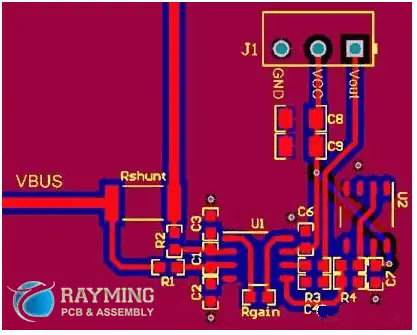
No PCB design can be perfect without paying attention to the trace width. If you want to come up with a flawless PCB design, you need to maintain the trace width on all counts.
In this pursuit, you can seek help from some factors that make determining accurate trace width easier. It is important to understand what trace width is and its functionality before jumping on its determining factors.
In this post, we are going to have an insightful look at trace width for you! So let’s get started!
What is PCB Trace Width?
The purpose of trace width is to combine signals from one part to the other. It is also useful for stabilizing these signals to avoid any problems. Now, these parts can be anything.
From pins to junctions and wires, smooth signaling happens only if you set an accurate trace width. Due to this reason, trace width is an important factor to consider when designing PCBs.
It will also help in protecting the PCBs in case the temperature exceeds the limit. A PCB trace is like a wire that has great durability to handle large amounts of current and electrical loads.
The heat dissipates when a large amount of current passes through a system. For this, trace width comes in handy. If not handled carefully, insufficient trace width can lead to irreversible damage to the PCBs.
Traces do not need any kind of resistance to function properly. They can join the PCB parts without any external assistance. To ensure everything is in place, you must determine the current, resistance, and amount of temperature when designing a specific PCB.
A trace wish calculator can prove to be useful in this aspect. It functions to measure the PCB’s width precisely. It is a complex device that uses programming languages to make sure the reading is accurate.
Trace width is important for developing flawless PCBs, and for an accurate trace width, you need to rely on a trace width calculating device.
One major benefit of using trace width is that it regulates the temperature of PCBs when large currents pass through the critical components inside.
Let’s check out other upsides of using a trace width calculator:
It is useful to get multiple readings like voltage changes, temperature changes, power loss, and amount of current/resistance.
Such a calculator can also read the amount in amperes, making it easier when you are designing PCBs.
When you are taking reading in amperes, you must know that it can vary as per the length of the current path. In case you don’t determine such parameters before using the calculator, you cannot get an accurate reading in amperes at all.
The calculator works on your pre-determined factors. The trace width will then protect the PCBs and will regulate the current flow without letting it damage the board itself.
Internal layers of the boards have a large amount of trace width than those present outside. The trace width directly relates to the heat produced, and internal layers generate more heat since their trace width is higher than the external ones.
To ensure 100% security of the PCBs, it is important to pay great attention to trace width of internal layers. It is because they bear excessive load during the working of PCBs.
Applications of PCB trace resistance calculator
The margin of error when you use a trace width calculator, becomes less. No PCB can guarantee perfect performance if you don’t calculate its trace width in the first place. There are some key applications of this calculator that you need to know when it comes to designing excellent PCBs.
Such a calculating device can measure small to large trace widths easily without interfering with the current path.
You can also determine the factors to take precise readings with the least hustle when using this calculator.
You can rely on this calculator to take readings for internal and external layers of PCBs.
The trace width measured by a calculator is helpful when it comes to power tracing, and power signal uses cases.
Types of PCB trace resistance calculator in the Electronics Industry
You must be wondering if there is only a single terrace width calculator available. That’s not true. There are many types of calculators available that you need to choose from as per your requirements.
These are state-of-the-art calculators that meet all the industry standards. However, we are going to discuss two typical calculators in this section.
IPC 2221 PCB trace resistance calculator
The IPC 2221 functions on a mathematical equation and uses a graph to record the readings. The calculator uses the I=kΔTbAc equation to get you proper readings.
The amount of K for the visible and internal traces differs when you follow this equation. The equation also shows the temperature changes as per the area for which the calculator is recording the reading.
When using this calculator, you need to add perfect values for the equation. The current must be up to 35 amperes. Keep the temperature changes between 10oC and 100oC. In case you don’t pay heed to these values, the results won’t be accurate at all.
IPC 2152 PCB trace resistance calculator
Now this is another type of trace width calculator. The calculator works on a similar equation as described before. Experts believe that this variant is more precise than the former one for recording trace widths for PCBs.
There are different factors to keep in mind while using this device.
Following are the factors that you should determine to get the best results from this calculator:
Every system or device has a set of guidelines that you must follow to procure the desired results. Similarly, when you are using a trace width calculator, there are some rules that will make this process much easier for you every time. Thus, you will be able to save a lot of time as well.
The trace width depends on the type of PCB design and the amount of current going through the tracks.
Keep the traceroute up to 10 mm/A at least.
Use the copper planes of 1.0 oz/ft2 if you are following the traceroute as mentioned above.
Make sure to determine the thickness, temperature, and unit in which you are going to record the trace width.
These values are important to receive accurate input ranges.
Now this input data will get you an output figure which is basically the trace width.
Bear in mind that the input figures have to be accurate, or else the calculator will mess up the final data later. It is better to use a magnifying glass to double-check the input data if your PCB is small when it comes to getting precise trace width calculations.
It is clear that trace widths of PCBs can create a negative impact on their performance in case of errors. There are some factors that help in excluding the slightest chance of faults and ensure accurate results.
1. Signal integrity
The digital routing for almost all the PCBs has a set of pre-determined data for their trace widths. However, this data can vary as per the size of the boards. Consider impedance nets.
You need to record their trace width as per the layer stack-up of PCBs. On the other hand, if you are considering analog routing, its trace widths are always different. Try to lower the trace width in congested spaces to get the best reading later.
2. PCB fabrication
Sometimes you need to fabricate the PCB. It is much easier when you give enough room to its trace width. It also leads to effortless etching when there is more space, and the trace wires are separate.
So always keep the traces broad when you want to fabricate PCBs without any hustle. If a trace is long, it will provide more tolerance than a short trace.
3. Power & grounding routing
Traces have major applications in power and ground routing. In this case, traces have to be long so that these wires can allow large currents to pass through. Thin traces are more sensitive, and heat can easily damage them, leading to future problems.
Also, traces for the internal layers need to be large so that they can help in more dissipation of heat. When used in power supply, trace wires must be broad enough to allow large currents to pass through without any interference.
The Final Say
A PCB trace calculator is a huge asset when it comes to designing PCBs. It gives accurate readings on temperature shifts, voltage changes, power changes, and much more.
You now have a vivid idea about why trace widths are important for PCB designing and how you can maintain them through a calculating device for PCBs and other applications.
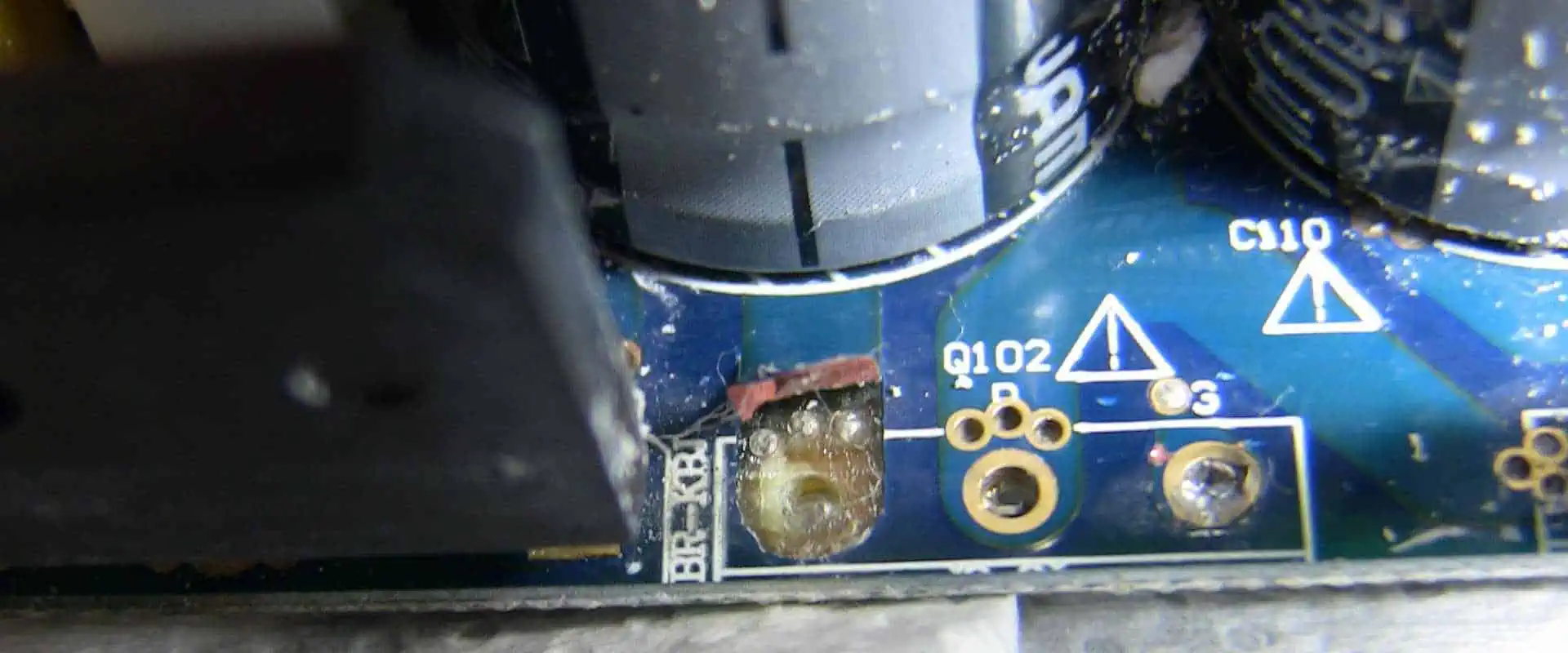
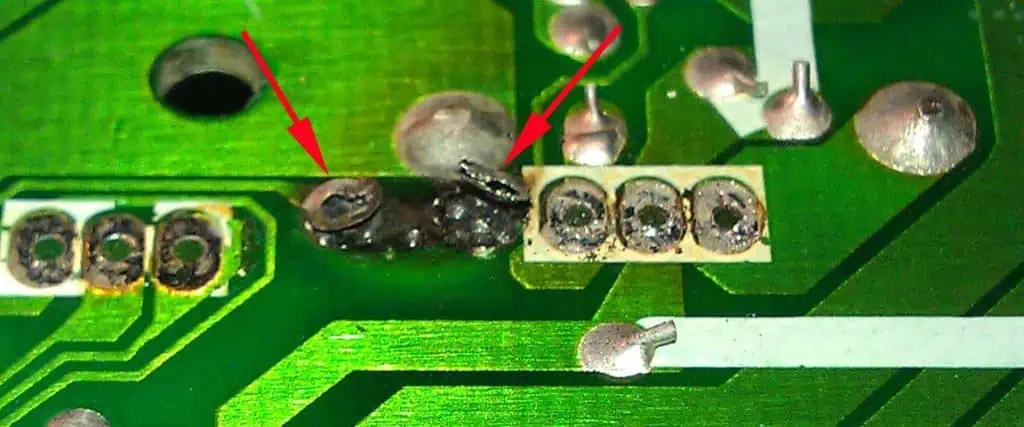
Circuit board pads serve the purpose of creating a connection between the pins of components and the plates of copper. However, if PCB possesses lifted pads, then pins cannot make a proper and clean connection which damages the electrical components of the PCB.
Pad lifting is mostly seen in the assembly of single-layered PCB. Moreover, pads will not occur mostly in through-hole PCBs. Sometimes, it may occur rarely. Pad lifting seems considerable, mostly in situations where you face high pressure and high temperature in the assembly process.
Causes Of Lifted Pad On PCB
After the process of wave soldering, mostly in single-layered PCB, the surface of the board heats up, which lowers copper adhesion. Therefore, any time of force or pressure over the electrical components leads to lifting. Hence, consider two different aspects. The physical and thermal aspects. Any additional heat during the assembly of the wave soldering process and additional force to handle the circuit makes components loose and creates pad lifting.
However, a question arise whether there is any solution that may help in avoiding pad lifting in circuit boards. Thus, one can prevent the board from pad lifting with a thermal factor. Try to utilize adhesive or epoxy that has high heat resistance. But this seems unavoidable and high capacity and long-lasting heat may minimize the adhesion.
Another way is to utilize through-hole circuits. This makes components and pads stronger and helps them to prevent lifting.
One may possess a greater ability to control the mechanical factors of PCBs pad lifting. However, to prevent the PCB from pad lifting, make sure to remove the single-layer board from the pallet or the conveyor. Also, ensure that manufacturers do not utilize large electrical components like grips. Generally, always give extra concern and care to Circuit boards if you see the slightest chance of component pad lifting.
Fixing the PCBs With Loose PADS
If one doesn’t like to wreck the PCB and begin with a fresh one, then you can give a try to many things.
For instance
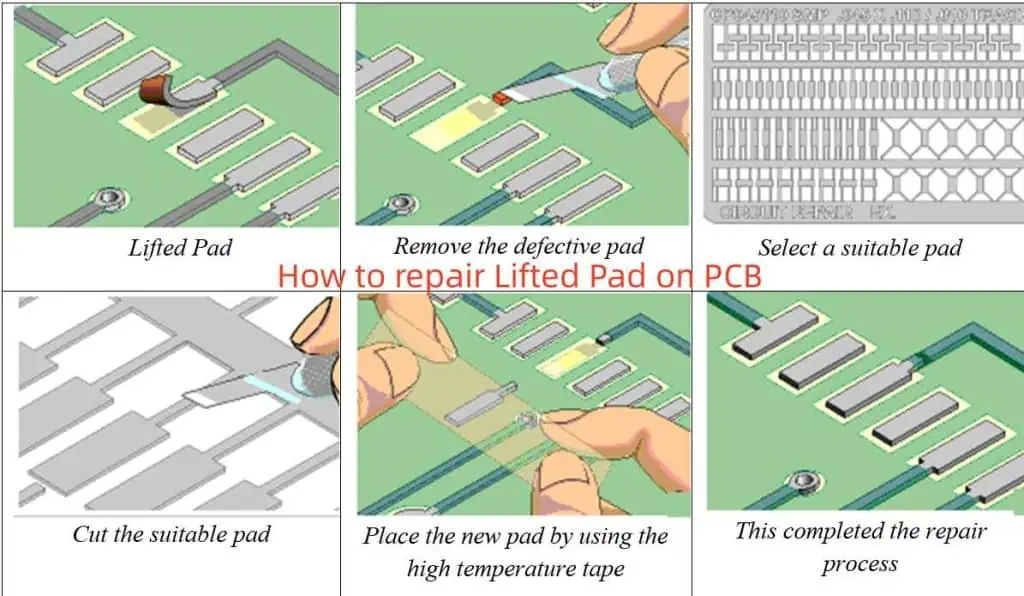
Find the trace where the protectors lifted from beginning to extinction, then operate wires to each unlinked end. However, the protector that has raised sticks to the element through the void and mends the wire to the element’s leg.
Stick the protector rear to the PCB with powerful epoxy.
Turn the element that points to change the route where the united protectors raised and should mend it instantly to the route that always has a relationship to the PCB. Furthermore, if the pointer is short, mend an attachment into the pointer and then proceed.
Is It Worth It To Fix Pad Lifting On A PCB?
All these approaches affect only when you wish to resell your PCB or wish to resell the device with the PCB in it. But sometimes, it does not act as effectively and may lead to the failure of the device or the PCB. If you have enough confidence and skill to work along the pad lifting issue, or you won’t have any issue in repairing the device if it fails, then you may choose one of the above approaches. Whereas, if you have concerns about repairing the PCB of a sold device again, then you may have to discard this type of PCB once and for all and begin with a new PCB.
In simple words, if your PCB vendor continuously provides you Circuit boards with the same pad lifting issue or they lift just right after simple use, particularly in through-hole circuits, then change your PCB vendor right away.
Importance Of Lifted Pad Designs Guidelines For Printed Circuit Board
Firstly, let’s see the exact definition of a pad. A pad is also termed land, which is basically the exposed metal surface of a PCB that enables the electrical components to solder. Nonetheless, a PCB uses various pads to make the land pattern or footprint of components over the surface of the PCB.
For the components with a through-hole, the pad comes in a round shape and goes through plating for the hole, which allows leads to pass for inserting the components and solder within. Whereas, for Surface-mounted components, the pad comes in various shapes and sizes based on the soldered electrical components. Sometimes, the pads come in unusual shapes and sizes for mechanical and thermal issues. Small pads in round shape are mostly used for alignment and registration with automatic optical machines.
After many years of PCB layout tools and software introduction, these tools and software lack automation which needs design engineers to make their pads manually. They draw the shapes of pads in the layout software, the datasheet for required data, and formulas of generic pad shapes and sizes.
However, the process may result in errors because the specifications of the manufacturer do not always match with the same inserted formula. This enables the designers to use the wrong shapes and sizes in a pad. Thus these wrong pad shapes and sizes cause severe issues during the process of PCB manufacturing. These include:
1. Through-hole breakout
Pads with through-hole possess a firm annular vulnerability ring. It’s basically a metal sheet between the pad’s external parameter and wall hope. The annular PCB ring is specially designed big enough to enable the desired drill amount to roam from the hole’s center. However, the too-small pad allows the PCB annular ring to break out. At the same time, greater breakout ends up in broken, incomplete, and improper circuits and soldering.
2. Insufficient Solder Joints
Too small or thin SMT components soldered with pads may not get the appropriate filet of solder while manufacturing. Therefore, inefficient and inappropriate solder filler weakens the solder joint and breaks it.
3. Floating Parts
Too large or big SMT components soldered with pads results in lifting off the location during the reflow of solder. This may cause issues with other components or may result in short circuits.
4. Tombstoning Parts
Two small pinned SMT components like capacitors and resistors can face soldering issues if both have different sizes of pads. This results in heating one pad faster as compared to another. Thus making the melting solder pull that specific area up and put them away from the second pad and stick it together in the form of a tombstone.
5. Shorts To Other Metals
Too small and thin pads enable surface traces to get close to the soldered electrical components on them. This creates a shorter metal potential area. On the contrary to this, too large or thick pads restrict the routing process of traces which makes them difficult to route over the surface of the board.
However, all these issues force manufacturers of PCBs to switch the assembly process from an automatic to a manual system. This allows them to resolve the issues with greater rework time and inspection. Therefore, it’s important to make pads of PCB in an appropriate shape and size to avoid lifting and other associated issues.
Printed Circuit Board developers have multiple choices for making accurate protector sizes. There we found various statements for protector sizes like IPC-7351 that attribute to the protector statements that Printed Circuit Board manufacturers have utilized. Furthermore, manufacturers have these aids at their removal.
· Pad and land pattern generators
Mostly Printed Circuit Board layout equipment has library generators and wizards. This type of software trait has paired with IPC criteria and will mechanically make the shape and size protector which you require for your elements.
· PCB design CAD vendor libraries
Similarly, CAD equipment dealers commonly have libraries of protectors and land designs that you can use by downloading. These are commonly available to users’ maintenance agreements for the equipment.
· Third-party CAD library vendors
Manufacturers can compute protectors and land designs from third-party Printed Circuit Board library component dealers for the expense. However, you may discover the land designs and pad. You require the protector from the elementary dealer, which means they have created a part for it.
· Pad and land pattern calculators
You can find various pad and land design calculators online now. You can protect the time that you can use for library innovation by using parts of industry-standard that are mechanically induced by equipment and available online.
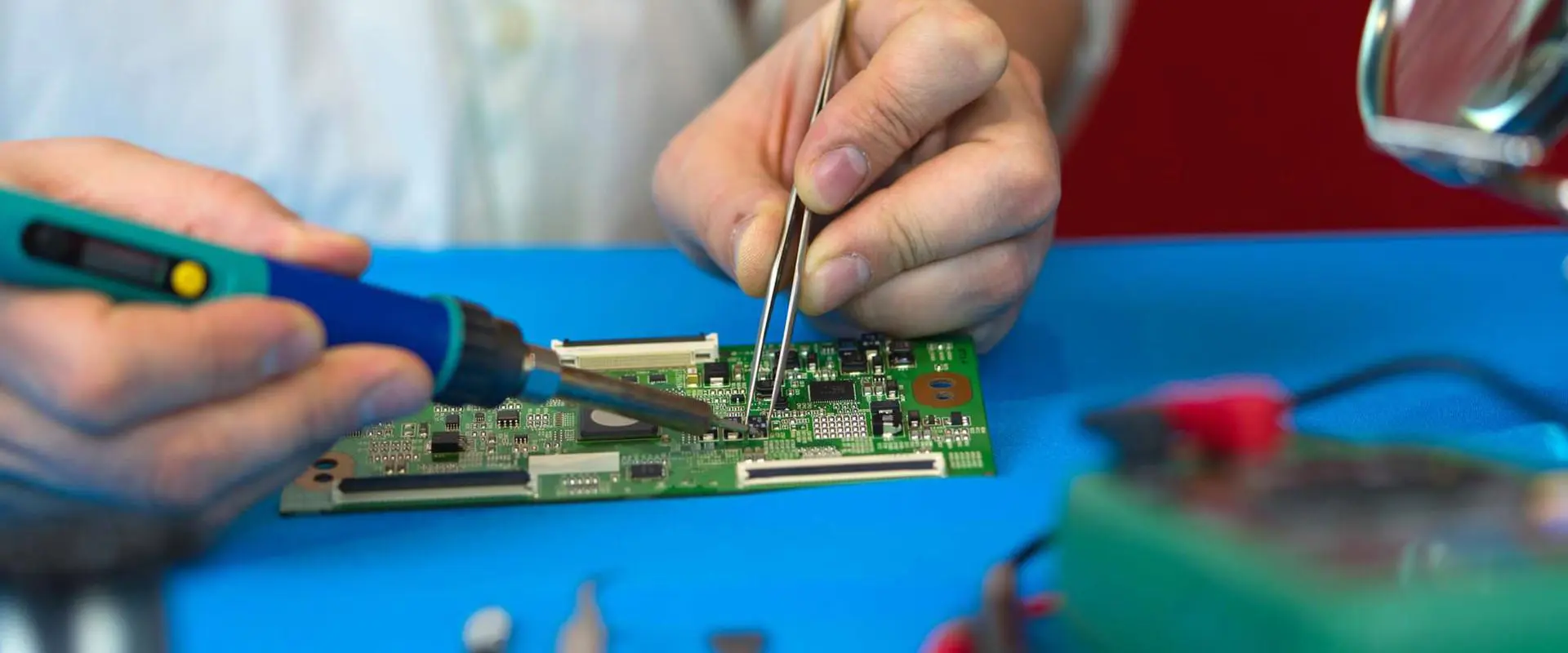
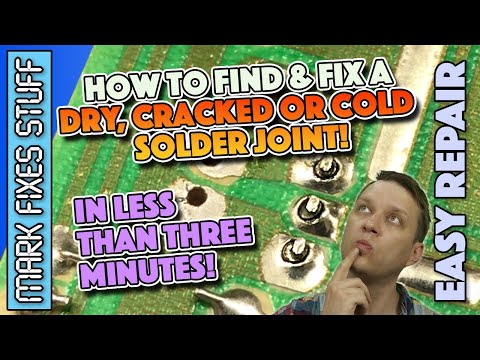
Soldering forms a significant part of the manufacturing as well as assembly of a PCB. A cold joint solder is one of the most known issues during soldering. These solder joint types affect the PCB’s performance to a very large extent. Asides from this, the cold joints will increase the cost of your PCB assembly.
What Does PCB Soldering Mean?
PCB Soldering Involves the process, which forms electrical and mechanical connections on a PCB. Normally, manufacturers make use of a combination of Lead and Tin for binding all electronic components that should be placed on a PCB surface.
What Does Cold Solder Joint Mean?
Cold joint solders usually occur whenever solder doesn’t melt completely to form proper joints. This wrongly formed joint or cold solder joint could cause reliability issues for any electronic assembly. With a cold solder joint, there will be an increase in the solder joints’ electrical resistance. This then reduces the solder joints’ reliability.
Below are some of the factors, which could result in cold solder joints.
Improper wetting, reflow, or melting of a joint’s solder
Disturbances like vibrations whenever the solder cools down
Too high process temperature results in the premature breakdown of the flux
Too low process temperature of solder joints can result in incomplete wetting
You can detect a cold solder joint using magnifying glass or through visual checking. Cold solder joints may look deformed, convex, whitish, and dull, which is much different from the normal solder joint.
What Type of Cold Solder Joints are There?
You can classify this bad solder joint into different types. Each has its own specific behavior and causes. The main types include:
Dry solder joints can be described as joints that are soldered, but not with enough solder. Whenever molten solder gets inside or flows in the joints, the whole connection will wet, so that whenever it solidifies, there’ll be a reliable electrical connection established.
Dry solder also lacks enough metal, which in several cases, causes a circuit that is completely open. For other cases, this joint might have intermittent high resistance and electrical conductivity. This causes noise during operation. Also, a dry solder joint has a matt or dull finish that is easily identifiable.
Cracked solder joints
From the name, cracked solder joints are caused from stressed solder joints which yields forming a crack. Immediately the crack begins to set in, its pin gets detached partially from its board causing it to move freely. The movement could break or close the electrical connection; this depends on the crack’s profile.
This electrical connection stops and start will result in the failing or the working of that specific appliance on random occasions. Vertically mounted heavy components are the components that are most susceptible due to gravity. When the boards flip or move constantly, this issue becomes exaggerated as this crack widens.
The cracked solder joint is usually an issue when CRT monitors are on transit. Usually, these monitors are placed in padded boxes by manufacturers to help reduce vibrations as well as the chances of cracked solder joints happening.
Cold Solder Joints
Generally, cold solder connection joints could be both cracked and dry. Nevertheless all the cracked solder joints aren’t cold joints. However, this doesn’t stop the fact that cracked solder joints would be a problem at some point, if it isn’t attended to.
Factors that Could Lead to Cold Solder Joints
The major cause of a cold solder joint can be seen in this section.
Insufficient Solder Application
Weak solder condition is known whenever solder spots lack enough tin during the tinning of the board. Also, there are other possible cold solder joint causes; however, the one that is most frequent is inadequate heat provided throughout the process. Also, inadequate application of solder could lead to poor connection. This could also cause electrical shorts.
Insufficient heat
One soldering error which causes cold solder joints isn’t heating the two surfaces all at once, or the inability to heat them sufficiently. It happens whenever the soldering iron stands at a very low temperature or whenever you place the soldering iron on component pins for less time. You need reheating for this situation.
There’s another instance where the pin of the components isn’t heated even whenever the tip of the soldering iron is touching as well as heating the circuit board pad. Because of this, solder bonds properly to the circuit board pad and not the component’s pin. Also, this could happen another way, leading to the bonding of the solder to the component pin but not with the circuit board pad.
Poor Cleaning
At times, while trying to rush through the process of soldering and not being attentive to detail, the solder joint could come in contact with dirt. Also, contaminants like metal oxide, grease, and grime might prevent good soldered joints from happening. Normally, it becomes noticeable whenever the solder doesn’t bond with dirty surfaces due to the formation of globules or beads. In addition, this interference could make this solder to take so much time to wet this joint, which results in cold solder joint causes.
Asides from what we have already discussed, there are other predisposing factors that cold solder joints possess. The factors include:
At present, freelancers that meet tight deadlines usually get majority of electrical projects assigned to them. This freelancer will have to be very fast, in order not to mess the timelines of the client. More often, this quick results in the cold solder joint might be too difficult to notice during soldering.
Immediately the board is completed, this electrical engineer will then go ahead to handle the issue of the board not working. First, conduct tests. But how can you achieve this?
Visual Checking
The solder joints of printed circuit boards are usually tiny. This is why you will need a spotlight and magnifying lens. First, check the joints’ color, As mentioned earlier, dry solder joints are dull.
Next check the solder joint’s shape. It is deformed or lacks a concave shape, then the solder alloy failed to melt sufficiently as a result of improper heating. It could cause cracking and will eventually detach from the board whenever the joint is heated up by resistance.
Next, make use of a magnifying lens and torch to see whether light is passing through any of the joints. If light truly passes, then the joint is inadequately bonded.
Lastly, tilt this board and check if the joint detaches partially from the board’s base. Also, you may check for any overspills top make sure that short circuits were not created. This is because they can ruin this board completely.
Check using a multimeter
Multimeter helps in checking the continuity and resistance across joints. By this, you will be able to know if there is something wrong about the joint.
Testing for the resistance
On resistance mode, set your multimeter to 1000. To be sure your device is functioning effectively, try to interconnect this testing probe. You ought to get a reading of zero. Connect a testing terminal on one of the joints to the second terminal through another component.
When this component isn’t a resistor, you will get a reading of zero all the time. Once your reading is higher than zero, then there’s a high chance that there’s a cold joint.
Testing the Device’s continuity
Here, you will switch the device to the continuity mode. This is to test the functionality of your device through connection of the test terminals. Normally, this gives a beep sound. Now, connect both test terminals to any of the solder joint’s ends. It you don’t get a beep, then there is need for rework on that joint.
Repairing the Cold Solder Joint
The most common type of cold solder joints are the disturbed and normal cold solder joints.
Normal Cold Solder Joint
The two major causes of cold solder joints is the inadequate heating of the soldering iron as well as contaminated soldering tips. Before use, ensure that the tip of the soldering iron is very clean. After use, make sure the tool is stored in a box. This is to prevent particles of dust from getting to the tip.
Furthermore, make sure that the tip of the soldering iron is well heated before use. You can even use any soldering station having a working temperature that is easy for you to regulate. Once you are able to achieve the ideal heat, reheat this solder and mount it. Also, if you discover that the soldering iron is cooling fast, make use of the SN96 lead-free solder alloy. The alloy will melt at lower temperature as well as exhibit plastic time of transition.
In addition, the cold solder joint feature high resistance. This is happening due to the solder iron not melting completely. This high resistance could lead to excessive heating, which could ruin the board or the component immediately or later on. It will also lead to high consumption of power.
Disturbed Cold Solder Joint
They usually happen whenever the soldered components or board is moved before the sufficient solidification of the solder. Here, the most important feature is its concave shape as well as a tilted pin within a solder spool. In order to prevent this problem, the board has to be soldered on tightly fixed tables or wall-mounted soldering vices where space could be an issue.
Ways you can Prevent Cold Solder for Electrical Connections
There are some simple strategies to work with to avoid and prevent cold solder for electrical connections. These include:
Pay attention
During the application of solder, take time and pay attention to whatever joint you will be manipulating. Ensure this solder has melted sufficiently as you apply it carefully to your desi8red location. Also, ensure that you’re working with flat surfaces. With this setup, you will be able to reduce runoff as well as prevent the dripping of the solder onto the other areas of your component.
Work with high-quality equipment
Just like all other devices, as they age, the solders could be prone to experiencing failure, and therefore may not heat the filler material efficiently. Also, devices not function effectively have a higher chance of producing cold solder joints. This is why it is important to work with high quality equipment. Also, if the soldering equipment isn’t functioning the way it should be, then replace it quickly.
Attend some certification classes
To become an expert at soldering as well as reduce the possibility of creating any co9ld solder joint, there is a need to attend some certification classes. While attending these classes, you’ll learn and understand those soldering techniques which will assist you in creating solder joints of high quality, which will also help in improving the outlook of your career.
Adequate Application of Heat
Cold Joint results whenever the solder applied don’t melt completely. One reliable way of preventing this is to make sure that your soldering iron has been properly pre-heated with enough power. This is to achieve the best possible soldering temperature. Its peak temperature has to be kept at a minimum of 15 degrees Celsius above the melting point of alloy for a minimum of 45 seconds. By so doing, you will be able to avoid any unreliable solder.
Conclusion
Cold solder joints results due to the improper execution of the soldering process of the PCB components. As we have already explained in our article, the cold solder joint can increase the solder joint’s electrical resistance, which will affect the solder joint’s reliability adversely.
Advanced semiconductor devices exist today only due to the major advances their packaging gives. Heterogeneously incorporated components depend on the physical structure, which is known as an interposer. It offers electrical connections among the various components of a package and dies. These types of structures are reliable for circuit boards as they offer a substrate material for making connections between various components of one package. As regards design, an interposer gives more freedom than a PCB.
Nevertheless, interposer provides packaging designers with a certain kind of flexibility in the process of arranging and connecting 2.5 and 3D incorporated electrical components. They give restrictions over what one can do with an interposer. EDA software tools for PCB designs and ICs do not automate the necessary design tasks of interposer completely. This happens because the interposer does not have any characterized standard, and it keeps growing day by day.
Advanced packages of components need custom-designed interposers to accommodate the substrate of the package and particular chip packages. This makes the interposers most likely similar to bare PCBs. As they offer a complete platform for assembling the full package. However, all sorts of interposers have specially designed three main roles, which include:
To give a surface mounted for a semiconductor die inside the incorporated heterogeneous components.
Thus, to allow a connection to create between the dies of the semiconductor.
To create a connection of the whole stack to the substrate of packaging.
This structure consists of small pada and small via to create a connection to the dies of the semiconductor within the package. However, the interposer then connects again with the substrate of a package. This provides routing between the package’s external side and the components. The substrates’ lower side encompasses a solder balls array that can easily be put on the ground pattern of the surface of a PCB.
Moreover, between micro bumps which present on the interposer top layer and the TSV area, there is RDL or a redistribution surface. The layer consists of the primary horizontal interfacial link that offers a connection between the dies of components over the interposer top layer. Though, the interconnected structure in the redistribution later looks similar to buried or blind microbial of an HDI PCB.
Furthermore, Interposer uses three materials. This includes an organic substrate, glass, or silicone. Interposer produces at main founders, which includes the horizontal interconnection and TSVs that connect semiconductor dies and substrate of package. The interposer has two different types of functions: as a passive or an active device.
Active & Passive Interposer PCB
STM32 PDB Design
Passive interposer works simply with the main function. It creates connections between the component dies, which are present over the interposer top layer. Apart from conductive trails, these electrical components do not have any type of electrical circuit. They only provide structure to support the conductive routes for signals.
Moreover, glass and organic materials are substrate materials for insulation. Therefore, this enables them to work only in the form of passive interposers, especially for conductive interconnects across the package. As silicon acts as a semiconductor, it helps in creating an active interposer. This consists of devices incorporated in the structure of silicone. These types of interposers must possess TSVs’ lower density because of the location of keep-outs inside the structure. Inactive interposers, a typical device includes input-output interface controllers.
or DC-DC converter.
Packaging Substrate
The substrate of the package refers to another significant part of the package. However, if you focus on the bottom substrate’s cross-section area, then you may find it resembling the PCB internal layers. Moreover, the interposer creates connections using the substrate with its connections of mini solder balls. Then substrates take these connections among the component dies placed over the interposer. Thus, the electrical connections eventually come to the lower surface, where these connections create further links with the ball array present in the package of BGA.
Interposer PCB-Based Components In Electronics Assembly
Interposer serves as an important structure. It helps in driving advanced innovations with high-tech packaging and constant incorporation of great features in a compact space. But all packages of chips seem worthless unless they are incorporated in the assembly of PCB along with other electronic components. For HD interposer-based electrical components, PCB designers must understand how to route and place a BGA package with escape and fanout routing specifications.
However, before routing or placing these components or BGA footprint, keep the following points in mind:
Stackup design creates specific requirements of routing, like impedance-controlled signals trace width.
The via restricts the available area for signal escape routing. Therefore, via-in-pad is needed in this situation.
Ensure the house requirements of your fabrication. This helps in understanding the compatibility of design of via and stack up along with capabilities.
Amazing Benefits of Interposer PCB
Many PCB manufacturers tend to use interposer PCBs. It helps in creating an interface or connection that supports the eliminated electrical components on the surface of the board that does not redesign. This may happen because of manufacturing specifications, or it may be more affordable and practical to use than the one you have.
With time, the popularity of interposer usage in the package of IC chips keeps growing. Though, many regulators and manufacturers keep pushing businesses to not use lead-based electrical components in the device. Moreover, these components may limit the new PCB’s ability to work along with the old techniques and equipment.
This enhances the significance of 9f manufacturers and vendors of IC substrates such as MCL. We will assist you in working for your board with the existing equipment and techniques to get the most out of the investment every time.
Silicon Interposer PCB – Challenges
Silicon interposers prove a growing and successful achievement in the technology of IC packaging. This advanced technology soon superseded the conventional methods of designing chips. Attaching distinct memory and functional blocks in the same IC package enhances the performance and offers high speed for advanced technology of design. However, imposters with new features arise unfamiliar challenges for the designers, so they must understand the thermal integrity, signal integrity, and power integrity intercar between the dies of the chipset, the package, and the interposer. Simulation of the system becomes a vital factor for the desired functionality of an IC package.
The interposer also serves as a passive element layer along with a thermal expansion coefficient that matches the chipsets. This describes the fame of silicon for the interposers. Although, it will not obsolete the joule heating and therm hot points problems in a design. However, an interposer with a distinct coefficient of thermal expansion on the surface of the ordinary substrate. This enhances the interposer warpage and mechanical stress. This is the point where a designer must be worried about the system’s ability. Because this stress can easily break thousands of micropump links.
Moreover, silicone interposer offers significantly dense input/output connectivity. This allows better usage of die area and higher bandwidth. But multiple IPs of the same package need multiple sources of power, which makes a complex network of power delivery inside a single package. The PDN goes through the whole package and becomes sensitive to the noise of power. This leads to problems of power integrity. Evaluating the current signature and voltage distribution of each chip inside the interposer ensures power integrity. Furthermore, a considerable power amount across the vertical links between components makes more power integrity problems. This may include C4 bumps, TSVs, hybrid bonding links, and tiny micro-bumps. Lastly, various signals with high speed routed between interposers and chips can easily create problems of electromagnetic crosstalk and coupling.
Ensure to put signal integrity for digital signals with high speed in your list while designing the IC package with an interposer. Also, this technology consists of a high-density, power-efficient approach and cost-effectiveness. Yet, it is still sensitive to thermal, EM interference, power, and signal integrity problems.
Power proves the most essential factor for any design of an IC package. However, chip power consumption drives everything across the design of the package inside the package IC. 3ach chip requires different types of power. This leads to the specifications of the delivery network of power. Moreover, The PDN also plays an important role in managing the integrity of power within the IC package by reducing the IR drop or voltage drop.
Therefore, to maintain the network of power delivery, simulate the fluctuating current over each connection of IC along with a passive element parasitic that is set up to the PDN. The interposer makes it more complicated as chips are linked across the interposer. Ground and power trails that route across the interposer give new challenges while evaluating the power integrity.
However, this does not seem to be a signal issue. It creates PI problems along with electromigration issues. Make sure that the density of the current at each geometry piece must mold and keep it below the max limit. However, wires and micro bumps joule heating directly impacts the max limit of current density. This allows the thermal simulation degree for max precision.
Signal Integrity
In the package of IC, signals with high-speed transfer from one component die to the other using interposer at high rates. However, the signal is compact with a long space. This enables them to be sensitive to electromagnetic coupling and interface. Although, digital designers must follow design with high-speed guidelines to keep the Signal integrity. This is the only method to manage the EMI or EMC faster. An electromagnetic solver with high capacity extracts the EMC, which includes chipsets, the coupling effect of the system, and signal routing with an interposer. You can easily analyze all th3 factors in one large model and be able to get desired results of a clear eye graph. Ansys Q3D and HFSS also help in extracting the RLC parasitics and offer electromagnetic field visualization, and get up the extraction of system level far from the interposer.
The demand for PCBs is growing at a rapid pace in different domains. Over the years, consumers have been more inclined towards PCB-integrated smart devices and electronics.
It means that PCBs are the fundamental blocks of electronics and devices. There should be no error in the configuration of PCBs at all. It is because if a PCB is not performing properly, it will hamper the device’s performance as well.
Therefore, it is important that manufacturers pass their PCBs through extreme quality check methods. It will rule out errors and defects in these PCBs to ensure fine performance.
The complex nature of PCBs is inevitable for futuristic devices, but it increases risks as well. Today, PCBs are at their finest, and the quality control methods for them need to be accurate at the same time.
Speaking of which, there is not just one PCB inspection method. You can select from multiple techniques as per your requirements and PCB variant.
Now, we are going to take an insightful look at the importance of PCB inspection and quality control.
When you design PCBs, it is important to check the final product. It makes sure that everything is in place. Defective PCBs can lead to irreversible damage to the devices in the future.
The PCB inspection methods detect the problems so that you can fix them in time. Sometimes issues with PCBs are not visible, and you might overlook them. Now if these issues show up in the future, it will complicate the PCB’s performance.
When you pass your PCBs through strict quality control methods, you can point out hidden and unseen defects easily. Faulty PCBs are a big threat to the manufacturer’s reputation, and this is how.
If a manufacturer does not make sure that its PCBs are ready for use, it can disappoint its clients. If you need to make your customers happy with your PCBs, never compromise on their quality.
Defective PCBs can cause electrical glitches and current leaks and can also leave bare wires that can give shocks to the users. A faulty PCB integrated into an electronic device can even lead to fatal consequences for the users.
Now, you know why inspecting PCBs before handing them over to your customers is significant to ensure consumer security and longevity of electronics.
Inspection Methods for Printed Circuit Boards
You can define PCB inspection as a method to detect possible faults in PCBs, re-check the positioning of PCB parts and verify the quality of individual components after the production process.
There are different ways of inspecting PCBs. Some manufacturers use high-end quality control equipment and inspection machinery for this purpose. At the same time, others use automated testing methods for completely inspecting PCBs for defects.
However, for small and less complex PCBs, there is no need for such measures. Workers can easily manually inspect them for faults.
It’s time to consider manual inspection and its importance for different PCB producers in the next section!
Manual Visual Inspection
Manual visual inspection of PCBs is a basic and simplest checking method. Workers mostly visualize PCBs themselves or might use a magnifying glass or a microscope for this purpose.
It mostly comes in handy when PCBs are small and not too complex. The technicians will double-check the details of the design of PCBs for the final product so that they can verify whether the final product matches these details or not.
The workers can manually inspect PCBs whenever they feel to. There is no thumb rule for this type of inspection at all. However, it is better to know what factors you should inspect while performing MVI. These factors would be:
The width of the PCBs should be accurate. The texture of their surface needs to be appropriate as well.
The sizes of the PCB components should be suitable, and the electrical connectors also need to be of appropriate sizes to not make the area congested.
The conductive components of PCBs should be standard. Make sure the solder is in suitable amounts. There should be no gaps left on PCBs in terms of soldering at all.
The surface of PCBs should be free of holes, impressions, and ridges.
Make sure the wiring is in place and they are in optimum condition.
The pad plating should also be working at its finest, and to make sure of this, there should be no extra roughness and rigidness.
The quality of the coating should be flawless, and for this, you need to verify its amount of flux and placement.
· Now, let’s have a look at some benefits of using MVI for PCB manufacturers:
It is not a complex method, and workers can perform it easily
It is affordable and does not disturb a manufacturer’s budget at all
MVI does not work with complex futuristic quality control tools
The technicians can perform MVI at different intervals of the production process
Benefits
The only thing that you should keep in mind for executing MVI is the eligible workers. Skillful technicians that know how to get along with MVI come in handy. They will help in precisely detecting the problems with PCBs without using any tools and equipment.
Drawbacks
It does not detect hidden defects of PCBs
It is not viable to use for complex PCBs
There are more chances of overlooking possible defects of PCBs due to MVI
MVI is a simple inspection method, but it does not guarantee positive results. There is still a margin left for human error. However, one remarkable inspecting technique called automated optical inspection of PCBs can save you from errors.
The process involves a video camera and lights to ensure 100% quality of PCBs. The purpose of the lights is to emphasize PCBs to easily detect their faults. Light from all directions helps in identifying the flaws in them.
After this, the cameras will film the PCBs and take images as well. In this way, the technicians will match this final product with the design requirements in the end. The process uses high-end equipment that includes 3d and 2d cameras.
You can even use colored lights from different directions for this purpose. AOI is the latest technique that can prove to be a great alternative to MVI in the near future.
Automatic Laser Test Measurement
In case the former methods were not of use to you, try Automatic later test inspection of PCBs.
The purpose of ALT is to verify the sizes of solder joints of PCBs and their parts. The process involves different industrial-grade lasers that help to detect the assembly of PCB parts.
The worker will reflect the light on the components to check their positioning and detect any faults in them. The process is useful and works on different calculations to see if the PCB is of quality or not. You can ALT, especially when there is a need to apply solder paste on the PCB parts every time.
Not only this, there are other benefits of using ALT. Have a look at them below:
Helps with the PCB parts assembly
Detects the viscosity
Identifies the component cleanliness
It also assists with the printing of solder paste when needed
It is an insightful method and gives output data in the form of analysis and stats
Drawbacks
The final data given by ALT is always correct; however, factors like interference and shielding can change the values if not controlled before or during the process.
What Is Via Filling?
No PCB design can work in an optimal environment without its vias. These are an integral part of PCBs that give them different features to perform naturally. The role of PCB vias is to transfer signals within all the layers of PCBs precisely.
Vias in the PBs are to make sure that each layer is sending and receiving signals without any disturbance. These vias are just small holes packed with copper. These vias also join the layers with each other.
The copper in the vias should leave no space in order to achieve positive results. However, the filling of copper should be controlled since overfilling can make the PCB layers hefty. An extra copper filling will also overweight the PCBs.
Today, small and portable PCBs are common, and the vias for these are also small. Sometimes regulating everything in a small area becomes troublesome; however, a seasoned PCB manufacturer will perform this challenging task efficiently.
The PCBs with via fillings are more promising than those without vias. These PCBs collectively benefit your electronics in many ways. We are going to see why via-fill PCBs are crucial.
The components of such PCBs offer great surface mounting when needed.
The via-fill PCBs never stop liquids and air from escaping from the system, which makes them more reliable than other forms of PCBs
The PCB assembly will be free of defects making it dependable in the long run for the users.
Copper-Filled and VS Copper-Plated Via
The two types of vias for PCB designs are either copper-filled or copper plated. Now, don’t get excited to know this because there are different applications of these types. We are going to discuss the benefits of copper-filled vias in detail for you.
Such vias are important for boosting thermal conductivity due to the presence of copper.
Copper vias are also beneficial in enhancing the performance of PCBs when it comes to handling hot temperature conditions.
Copper can absorb large amounts of heat and leaves enough space for other components to stay cool in the case when the temperature exceeds
The heat can flow from one portion to the other, which reduces the chances of defects due to copper vias.
Benefits of Copper over Gold for a Via Fill PCB
You might be wondering, at this point, why not use gold for via-fill PCBs? Well, it’s shocking to know that different PCB manufacturers will use epoxy resins and gold as fillings in place of copper for such PCBs.
However, at the end of the day, you will get positive results from these fillings. For this purpose, copper gives the best output as compared to resins and gold.
Below are some facts that will make you realize why using copper for via-fill PCBs is recommendable:
Gold has less potential for thermal conductivity and electrical transmission than copper
Copper enhances the longevity of PCBs for users
Copper is much more affordable than gold which makes it a reliable option to use via fill PCBs
Different analysis shows that copper via fill PCBs are more reliable
High-powered electronics and smart gadgets can hugely benefit from copper vias instead of using gold and resins
Summary
Humans always get confused when making their choice between two options. To save you from such frustration, we are giving you some factors that will help you weigh down via filling options easily.
Consider your application: Get to know about your purpose completely. The purpose you are going to use via filling entirely depends on the application.
Keep in mind the price: Some via fillings, like gold fillings, are too expensive to waste in errors, so make sure you are using an affordable via filling for your PCBs
Aim to make the design as straightforward as possible: Complicating your PCBs will not set you apart from other manufacturers; instead, always keep the designs basic which will help in ruling out errors in them as well.
The End Note
Via Fill PCBs have a bright future because of their vast applications for users. In this post, you have learned about the role, significance, and benefits of using copper via fill PCBs for your future projects.
However, in case you have any queries in mind, consult a seasoned PCB producer near you. They will clear your mind and also can assist you with cost-efficient via-fill options for your PCBs.
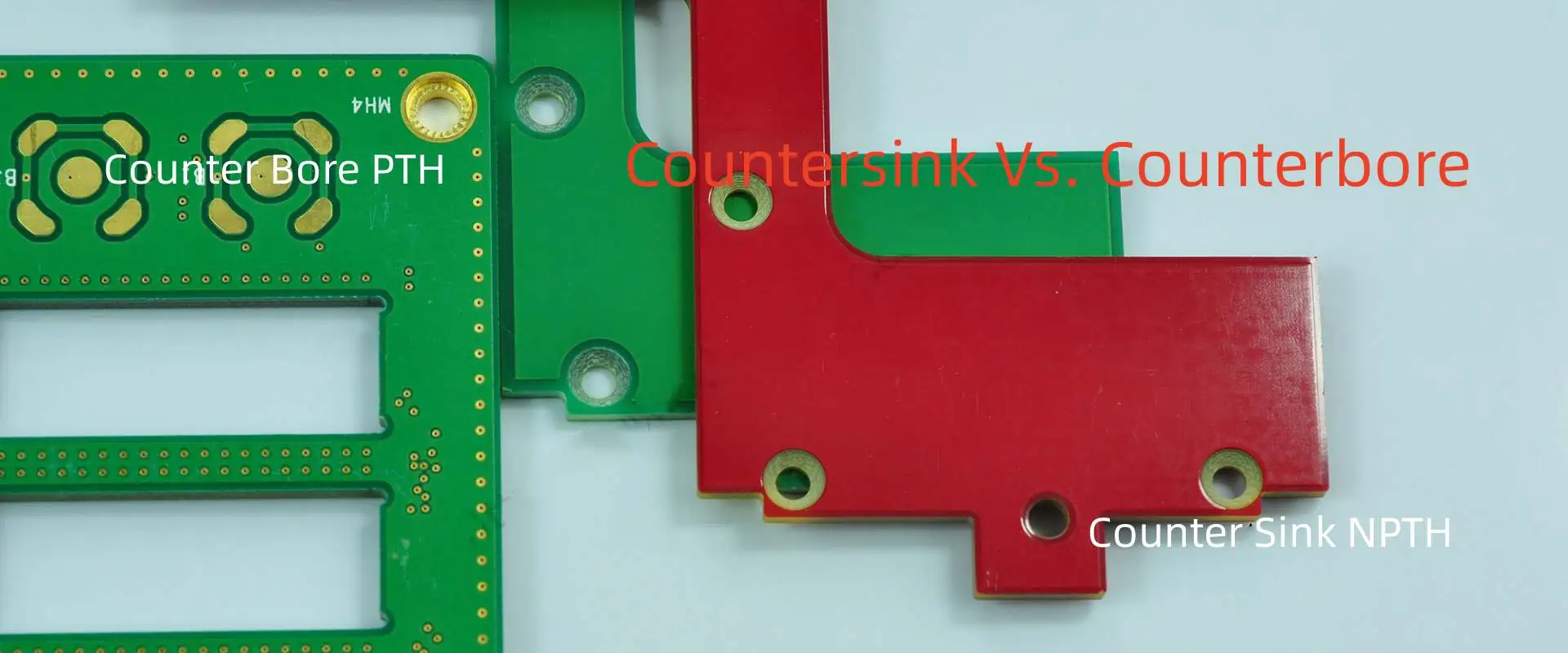
Circuit boards or PCBs have various distinct features which directly affect their functionality and physical structure. You can think about some features normally, like the type of material used in PCB and the number of layers one can have in a board. However, there are a few elements that get less concern. This includes the number of holes, their type, and the drilling process. Particularly, some PCBs need screw holes to meet the board requirement; how these screw holes drill into the board matters here the most. Thus, there are two basic methods of drilling holes in a board. Countersink and Counterbore. Each screw call demands distinct types of holes. The type of screws depicts which method you are going to use for drilling holes. Countersink holes, Counterbore holes, or maybe both.
What is Countersink for PCB?
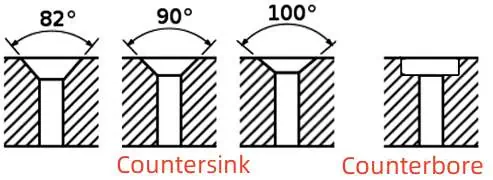
A countersink represents a hole-type drill into a PCB or circuit board. It gives the shape of the cone, which allows the screw or fastener to fit perfectly inside the PCB. Also, these countersink holes have a variety of angle dimensions. The standard countersink hole size ranges the angle between 60, 82, and 90 degrees.
This does not stop here; you may also drill these countersink holes in different sizes at different angles of 100, 110, and 120 degrees. Moreover, Chamber angles countersink holes with 82, 90, and 100 become popular around the industry.
Counterbore is also a type of hole bore in a PCB or Circuit board. It comes in a cylindrical form with a flat surface. This shape allows giving enough space for the hex head or socket head screw. If your board needs these types of screws for fastening, then a counterbore hole is what you need.
Counterbore holes can only drill at one angle, zero degrees which also needs to keep hole efficiency in mind. This also means that one can only use counterbore holes for solely one purpose. Whereas, unlike counterbore holes, countersink holes utilize for different applications with a variety of angles.
Similarities And Differences Between Countersink Vs. Counterbore For PCB
Countersinking is a process of drilling countersink holes in a PCB. Countersink holes come in a variety of sizes with different angles. The standard angle size includes 90, 82, and 60 degrees, while the less popular size includes 120, 110, and 100 degrees. Well, the most well-known angle sizes include 100, 90, and 82. Whereas, unlike countersink holes, the counterbore hole only has one standard angle size, zero degrees. It acts and affects in the same manner, just like a countersink hole.
You must work efficiently while drilling holes in the wooden surface boards. If by any chance you forget to drill the countersink hole, but later on, force the screw or fastener into a wooden surface. This not only affects the strength and stability of the wood but also affects its look and makes it miserable. This is because the fibers of wood get damaged and cracked easily. However, drilling a counterbore on the surface of wood seems like a good idea as it does not need accuracy and precision in the sizes of angles.
Moreover, all counterbore holes require a socket or flat bottom screw that can suit the surface easily. Counterbores typically serve a sole purpose, whereas countersinks serve various purposes due to a wide variety of angle sizes.
A counterbore hole looks for a tiny coaxial hole opening, whereas a countersink hole looks like a conical shape. This comes in handy when you don’t need a screw or fixture’s head into the surface of HDI. Furthermore, countersink holes can also have various styles and shapes due to their various angles. But countersink holes give the same depth to all the screws.
Countersink Vs. Counterbore Symbol
In design and drawing, the symbol represents the actual technique or material. These symbols provide a space for specification tolerance and dimensional consistency. However, writing symbols or signs of a quantity or material is an easier and faster way than spelling out the complete name. It not only breaks the drawing standards but also makes the work messy.
Symbols indicated the standard protocols in mathematics, design, and drawing. In various projects like a blueprint of a house or drawing, symbols help in conveying information faster. That is why both counterbore and countersink holes have symbols. It mostly writes along with the symbol of diameter and has a figure value.
Symbol of Countersink
The symbol of the countersink hole indicates the alphabet V. The countersunk hole resembles the alphabet V when you look at it from a side posture.
Symbol of Counterbore Symbol
The counterbore hole symbol resembles an unfinished square with a top opening. The symbol comes by taking a look at both counterbore and countersink holes. Both symbols come in handy in the designs of drilling. The emblem of diameter represents the deepness and wideness of a hole in a board. A designer depicts these values based on data provided in such designs. The symbol of counterbore defines the operation of counterboring, while the symbol of countersink defines the fastening operation of countersinking.
You can drill many holes with the drill bit. Based on the material thickness and the desired diameter. Both the countersink and counterbore use hole drills to commence the process. At the same time, drill bits are used to create countersink and counterbore holes inside a PCB or the material. Both drill bit holes use a distinct type of material for manufacturing. Basically, their main goal is to fit the fastener or the screw into the workpiece of the washer.
One cannot ignore the axis and the length of the crew or the fastener in the counterbore or countersink hole. Different materials are utilized for fabrication due to the cavity distinction of both types of holes. A type of cylindrical hole bores inside the surface of the material for counterboring. This hole contains a small diameter at the bottom and a large one at the top.
The main goal of the hole is to hold both surfaces firmly so that they won’t separate from each other. The head of the fastener goes into the larger edge while the shaft goes into the smaller side. Therefore, drill bits of countersink come in a variety of sizes and styles to adjust various projects at different angles. There are four basic types of drill bits for the countersink. This includes flip-style, rocker pro, cross-hole, and fluted bits countersink.
When to use Countersink Drill Bits?
Make sure to match the size of the drill to the screw while using drill bits of countersink. A too-large countersink hole swallows the fastener or screw head. At the same time, a tiny hole doesn’t allow the screw head to fit into the board. This leads to an unfit mount. However, a question arises, what if you put the screw inside the hole forcefully? Undoubtedly, if you try to drive the screw forcefully into the hole, it may damage the material surrounding it. This happens with both wooden and HDI surfaces.
Same as if the hole is too wide, the screw will get shallow, while if the hole is too shallow, it will not allow the screw to fit inside the surface. Therefore, measurements play an essential role in the whole drilling process. To get perfect measurements, adjust the setting of the countersink. The setting includes the size of the countersink, the depth of the drill bit, and the stop location of the center. However, it’s still recommended to first practice these measurements over the piece of scrap material. So that you adjust the setting beforehand if something goes wrong.
Furthermore, never drill faster to prevent chattering. As it leads to uneven design on the surface of the material. Also, it does not allow the fastener to fit, which makes your board or material messy and unusable.
Using Countersink & Counterbore In PCB
With an understanding of the basics of both countersink and counterbore holes, let’s dive into their usage in the PCB. However, both types of holes are mainly used in wooden and metal surfaces, but they will also go well for a PCB. PCB also has holes that use drilling techniques, and each hole in the PCB counts and matters. Some use screw holes. It helps in attaching the Device with a PCB. The type of screws you want to drill determines the types of holes you will use in the PCB. A counterbore or a countersink hole.
· Limited Space & Mounting Security
The Countersink hole plays a vital role in your PCB having compact or less space. It helps in adding additional features like enhancing the flexibility of the device. This conical-shaped countersink hole is a typical type of flat-head screw that requires greater precision and accuracy as compared to counterbore holes. Once the fastener or screw fits into the board, later it becomes easy to adjust the circuit inside the device. The device may include a watch or a smartphone. A counterbore is easy to drill. However, it does not fall into an ideal choice for most PCBs.
Countersink holes do not affect the surface of the board and keep it smooth if drilled correctly. Also, it does not disturb the arrangement of a PCB. However, counterbore holes come in if you need secure mounting in a PCB beside a smoother surface or converse space. These holes provide enough space to fit the socket fixture. Therefore, these holes and screws make stronger connections. But if you need to conserve surface, then use countersink holes.
Applications of Countersink Vs. Counterbore
A PCB use is mounted through a screw into a hole. Therefore, both counterbore and countersink holes can use for stronger and safer installation. Engineers use automated equipment manually to commence this process. A counterbore hole is drilled with a grub fastener or screw. This gives an ideal base for a screw to fit perfectly inside the hole.
Countersink Vs. Counterbore – Uses
In PCBs, countersink holes provide perfect fitting and smooth installation into compact devices. PCB countersink mostly includes small wearables and smartphones. A counterbore hole provides a tight fit to a screw in a cylindrical manner. Due to its flat bottom, it uses a socket cap-type screw. This socket screw contains a hex head which needs safe and secure mounting in a PCB. The application of this type of PCB includes electronic devices, like washers which need secure and tight fitting.
Dimensioning plays a vital role in the design process. This allows the designer to convert the drawing into real life. Dimensioning mainly depicts the type, size, and material texture used during fabrication and construction. Dimensioning methods express counterbore and countersink holes in a chart or a design through various dimension abbreviations and symbols. These depict the type of surface and provide zero restriction over the fabrication method. However, these dimensions typically refer to the note and are followed by hole size.
How To Dimension A Countersink & A Counterbore?
The angular edges in a countersink process go through the recession to provide a fit to flathead fixtures head which can be rivets, screws, or bolts. During drawing, it provides the diameter of the surface, its angle, drilled hole, its diameter, rise, and depth. The cylindrical part and flat bottom of a counterbore allow the head of the fastener to fit in a recessed part.
During drawing, it provides the depth, diameter, and radius of the corner. In some scenarios, the remaining shaft thickness can also be dimensioned in the center. Both countersink and counterbore holes dimension in a polar and rectangular coordinate form.
Conclusion
Both countersink and counterbore holes use different types of screws in distinct types of materials. However, both work in a similar manner in a PCB. A countersink makes a cone-shaped hole, whereas a counterbore makes a cylindrical shape hole. This article briefly explains the definition, similarities, differences, and working principles of both countersink and counterbore holes.
The screw types that fit in countersink and counterbore holes refer as countersinks and counterbore. Both use different types of drill bits for distinct types of materials. Also, this article shows how and when to use these drill bits in a PCB according to their usage and application.
Moreover, it also describes its symbols, different types of dimensioning techniques, and their applications.
The surfaces of Printed Circuit Boards (PCBs) are protected with parylene coating because of the excellent protective features of the coating. As a conformal coating process, it is one of the ways you can keep the circuit board components safer.
In this article, we let you into some of the protective capabilities of the parylene c coating process.
What is PCB Coating?
Let us start by understanding the meaning of coating. When a PCB is said to be “coated,” it means that it has had some thin, protective materials applied to the surface. These materials are responsible for preventing a direct contact between the PCB components and the environment. To this end, important parts like the exposed metal, component leads and solder joints are protected with the help of the coating.
What is Parylene Coating?
It is one of the different types of coating options you can explore to protect the circuit board’s components.
Parylene coating is defined as a conformal coating comprising of a thin film coating technology, which is used to improve the capabilities of devices. You can also use parylene coating to integrate excellent moisture and chemical protection on these devices.
The steps to coating a device or a Printed Circuit Board (PCB) with the parylene coating is divided into four processes.
Each of these processes are important and when followed to the latter; helps to bolster the device or PCB component’s protection.
1. Adhesion Process
This is the initial process and it entails the solidification of the bond between the underlying substrate and the parylene.
2. The Masking Process
The creation of a mask is for two purposes. The first is to demarcate or create a space between the protected areas on the PCB and the other areas that were not coated. The second purpose is to prevent the extension of the parylene to the areas or surfaces that needed to be kept free of the coating.
3. The Coating Process
The main coating process starts after the mask has been applied. It is preceded by the placement of the PCB components or parts on a fixture. This fixture is then loaded into the vacuum deposition chamber.
The following are some of the techniques used in the parylene coating process:
The Chemical Vapor Deposition (CVD) process is used for the coating. The deposition method includes the vaporization of the parts up to 150-degree Celsius, followed by the pyrolyzed process of up to 650-degree Celsius. It is to be followed by the use of up to 22-degree Celsius of vapor-deposition into the parts.
Room temperature must be used during the coating process.
A specialized vacuum deposition equipment should be used too.
4. Post-Coating Processes
This refers to the different implementations to be made after the PCB components have been coated.
The post-coating processes include, but are not limited to:
Parylene Coating Thickness Measurement: the thickness of the parylene films is to be measured. The measurement process requires the direct placement of spectral reflectance on the PCB parts.
Remove the Mask: when the parylene coating thickness’ measurement is completed, you can then remove the mask. Take care not to fracture the coating’s fixture while at it.
Inspection: after the parylene coating removal, the PCB parts would then be inspected. The inspection is carried out for a wide range of reasons, such as validating the presence of the quality attributes and the meeting up with the client’s requirements. Some of the quality attributes specify the adhesion-testing, coating thickness and area of coverage.
Product Labeling: the completion of the microscopic-inspection of the components ushers-in the packaging of the parts. Proper labeling, as per the client’s requirements must be followed.
Shipping: we can help ship your parylene-coated PCBs in real-time. Depending on the volume or quantity, you should expect to have the parts in a couple of days.
There are a couple of things you need to know about how the deposition of parylene conformal coating is done.
1. Temperature Consideration
The deposition process is done at ambient temperature. For this purpose, a specialized vacuum deposition equipment or specialized vacuum system is used.
2. Molecular Level Basis
The deposition process takes place at a molecular level, which signifies the deposition or placement of molecules on each of the parts placed in the vacuum chamber.
The molecular deposition process is also significant for the following reasons:
It leads to the creation of an even conformal coating that covers the sharp points, grooves, gaps and crevices on the parts.
The molecular deposition process also aids the excellent control of the thickness.
It also bolsters the growth of the films, a molecule at a time.
3. The Parylene Deposition Process
The steps involved in placing the molecules via the deposition include:
Parts’ Fixture: the parts are fixed into a vacuum coating chamber.
Dimer Heating: “dimer” refers to the solid, granular/powdery material, which is used for the process. It is placed inside the vaporizer, and heated at a higher temperature. The process leads to the losing of the “double-molecule structure,” and the outcome is the reduction to a “single molecule vapor.” The heating process leads to the turning of the dimer from the solid state to a dimeric gas.
Vapor Polymerization: the gas is then pyrolized to cleave the dimer to its “monomeric form.” It is important to mention that the process typically requires the flow of the dimer into the pyrolysis furnace, where additional heat is added to the dimer. This is what leads to the conversion to monomer vapor.
Gas Deposition: it is then time to deposit the gas or monomer gas onto the PCB parts’ surface. It is first moved into a room-temperature deposition chamber, where the vapor polymerizes onto the substrate. The deposition is in the form of thin, transparent and uniform polymer film.
Types of Parylene Coating
Up to four (4) different types are available for parylene coating PCB. They include:
1. Parylene C
It is a type of parylene coating comprising of a combination of carbon and hydrogen. This is why it features both the dielectric and barrier properties.
The composition of an atom of chlorine in place of one hydrogen atom per molecule is the reason why it features low permeability. Some of the characteristics are:
Higher moisture resistance.
Support for thicker layer application.
It offers better protection from corrosive gases and chemicals.
Parylene C has cost and processing advantages, especially due to the less machine time.
2. Parylene D
Although it is much like Parylene C, the Parylene D coating type use two atoms of chlorine in place of two hydrogen atoms. It also features a slightly higher temperature tolerance and up to 100-degree Celsius of assembly protection.
The benefits of choosing it include:
It holds high when exposed to higher temperatures.
It features improved electrical properties and physical strength characteristics.
3. Parylene F
This type of parylene coating comes in handy for the applications where the Parylene D don’t hold up. For example, it is more resistant to Ultraviolet (UV) light exposure than the Parylene D.
The properties include but are not limited to:
The formation of four (4) fluorine atoms on the aromatic carbons.
It has good crevice penetration.
It is capable of operating at higher temperatures.
Note: it is better to use the Parylene F coating for the medical device applications, especially those requiring higher temperatures. On the flipside, the raw materials are quite expensive and it has a slower deposition time.
4. Parylene N
As one of the most popular parylene coating types, Parylene N has a linear structure and has a carbon-hydrogen combination on each of the molecules. It is often considered to be the basic structure of the Parylene coating types, due to the following properties:
Low dielectric constant that doesn’t change due to frequency discrepancies or changes.
During the deposition process, it becomes more molecular-active.
Low dissipation factor.
The increased crevice penetration prepares the way for the coating’s penetration into smaller openings and tubes.
It is typically used with applications or devices requiring higher frequencies.
The melting point is up to 788˚F or 420-degree Celsius.
There are two (2) major coating processes for Printed Circuit Boards (PCBs). These are the conformal and the non-conformal processes.
For the conformal, which is what the parylene coating process is all about, it entails the application of a non-conductive material on a thin coating over the PCB’s surface. Some of the covered surfaces are the components, substrate, solder joints and exposed metal.
On the other hand, the non-conformal coating process requires a thicker coating procedure that covers the entirety of the board.
Thus, the difference between the two is that the parylene coating process covers only specific surfaces, while the non-conformal coating procedure covers most of the board’s surfaces.
Conclusion: Work with Parylene Coating Companies
The process of applying a parylene coating on the board’s surface requires precision and the technical know-how. This is why working with RayPCB is a step in the right direction. We are one of the few companies you can trust on to apply the thin conductive material all over the required surfaces on your PCB, while making sure that the material conforms to the board area’s contours.
Contact us today with your requirements to get started.
Electronic engineers integrate various types of electronic components called surface-mount devices in their everyday work. Electronic components are a crucial part of electronic devices. There are different types of SMD packages. SMD packages are a certain kind of equipment or component contained within a single packaging. These packages function as component groups that make it much easier to identify their physical qualities. The physical size and characteristics of SMD packages define them.
This article aims to provide the engineers interested in sourcing electronic components in their various sectors well-detailed information about surface mount package sizes, types, and applicable standards.
What Does Surface Mount Package Mean?
SMT components, which use surface mount technology, are available in various types of packaging. There has been reduction in sizes of different packages due to the improvement of surface mount technology. A range of other SMT packages are also available for the integrated circuits, however, this depends on the level of interconnection needed, the technology that is being employed, and a number of other considerations.
There is a wide selection of different SMD packages. A special circuit board with a matching copper design on which they are soldered is usually needed to work with surface-mount boxes. Since there are a various SMD packages, a customer may choose one of these packages according to how convenient an electrical component is for them.
Surface Mount Package Requirements
Most SMT component sizes adhere to the industry standards, of which a large percentage is the JEDEC requirements, to ensure some level of standardization.
Certainly, various SMT packages were utilized for various component types, however the existence of standards makes tasks like PCB design much simpler. Moreover, production is made easier and faster by using packages of standardized sizes. Since pick and place machines may integrate standard feed for SMT components, this will likely streamline the process and as well reduce costs.
There are standardized packaging for each of the component types, and the various SMT packages may be divided into those categories.
Passive rectangular component
This SMT component comprises capacitors and resistors, which amounts for the majority of the total number of parts utilized. Since technology has made it possible to produce and utilize smaller components, various sizes have been minimized.
For semiconductors like diodes, transistors, as well as integrated circuits, you can integrate various surface mount packaging. The broad variance in the needed amount of interconnection is the cause of the huge diversity of SMT packages used for the integrated circuits. Some important packages are listed below.
Packages for transistors and diodes
These packages are frequently integrated for SMD diodes and transistors. Diodes usually feature two electrodes; the package having three electrodes makes it feasible and easy to choose the orientation accurately.
SMD Diode on the Printed Circuit
Although there are other SMT transistor as well as diode packages available, we will be discussing the well-known ones.
SOT-23 – The Small Outline Transistors: This SMT package contains three terminals strictly for the transistor diode. Its dimensions are 3 mm by 1.75 mm by 1.3 mm.
SOT-223 – The Small Outline Transistors: This package can be utilized for applications where higher power is a concern. Its dimensions are 6.7 mm by 3.7 mm by 1.8 mm.
SMD Packages for Integrated Circuits
SMD ICs can be packaged in a variety of ways. Despite the wide variety, each of them has its own use. Small Outline Integrated Circuits: This SMD package includes gull wing lead that features a 1.27 mm pin spacing as well as the dual in line layout.
Small Outline Packaging
There are many iterations of this particular SMD package. These include:
TSOP, or Thin Small Outline Packaging, is a thinner SMD package than the small outline integrated circuit SOIC with 0.5 mm pin spacing.
Shrink Small Outline Packaging (SSOP) – This features a pin spacing of 0.635 mm.
TSSOP – This is the Thin Shrink Small Outline Packages:
Quarter-sized Small Outline Packaging: The pin spacing is 0.635 mm.
Very Small Outline Packaging (VSOP): This is a smaller version of the QSOP and features pin spacing of 0.65, 0.5, or 0.4 mm.
There is a general term that represents a flat container for IC. This term is known as QFP, or quad flat pack, is a general term for a flat container used for ICs. This is a list of the various variations. Low profile quad flat pack also known as LQFP has pins across all its four sides. Its height is 1.4 mm, although the spacing of this pin may vary based on the integrated circuit.
PQFP – The Plastic Quad Flat Packs: The square plastic packaging has an equal number of pins in the shape of gull wings on every side. Usually with at least 44 pins and a narrow spacing.
CQFP – The Ceramic Quad Flat Packs: This is the ceramic variant of a PQFP.
TQFP: This is a smaller variant of the PQFP is the TQFP, or Thin Quad Flat Packs.
BGA: The ball grid array is an integrated circuit package which enables electrical contact with a printed circuit board through pads that are beneath the package. This terminology was coined from the fact that the pads look like solder balls before the process of soldering.
PCB manufacturers integrating these package pads may place them beneath package; this offers solutions to some of the problems associated with the extremely thin leads required for quad flat packages. When it comes to BGAs, the spacing of the ball is exactly 1.27 mm.
Most printed circuit board design manufactured in various quantities integrates surface mount packages. There could be a level of uniformity despite having a wide array of diverse packages. This level of uniformity can still be achieved. In any case, this usually results from the variation in the performance and functioning of these components.
SMD or SMT?
People always confuse SMT with SMD. They interchange these two terminologies. However, there is a difference between the two. So, what is the difference between SMD and SMT? The main difference between surface mount technology and surface mount device is that SMD is an electronic component usually installed on a printed circuit board. On the other hand, SMT is a technique in which these electronic components are mounted on the bare circuit board. A bare circuit board has no surface mount device on it.
The SMD device
One thing you need to know is that lead-based components differ from the build-up components. The surface mount device (SMD) parts are designed in such a way that they are soldered to a board instead of linking between two locations.
In conventional leaded components, the leads don’t always go via the holes in the circuit board. There are different kinds of components. Therefore, there are various ways of packaging these components. Among the packaging styles, you can distinguish three different broad types. These types of SMD component packages are passive components, diodes and transistors, and also integrated circuits. We are discussing these types of SMD below:
Passive SMDs
The passive SMDs require the use of various packaging options. However, it should be noted that most passive SMDs are SMD capacitors or SMD resistors. In this case, the package sizes will be extremely defined. Crystals, coils, and other components commonly have more unique needs. Therefore, these components always come with their own containers.
Furthermore, capacitors and resistors are available in a wide range of package sizes. These resistors or capacitors have the identifiers 0201, 0402, 0603, 0805, 1206, and 1812. These measurements are in centimeters and are indicated by the numerals. This means that the 1206 has a dimension of 12 by 6 hundredths of the inch. The bigger sizes, like 1206 and 1812, were among the first utilized.
Diodes and Transistors
Manufacturers make use of small plastic packages to package SMD transistors and SMD diodes. The cables are bent to ensure they maintain a contact with the circuit board when they are removed from the box are used to make the connections.
Integrated Circuits
When it comes to packaging ICs, various types of packaging is used. A particular package is usually integrated. However, this depends on the level of interconnectivity needed. While certain circuit boards, like basic logic chips, might just require about 16 or 14 pins. VLSI processors and related chips, may require a minimum of 200 pins. There are many distinct packages available due to the huge range of needs.
Small outline integrated circuit can be used to package smaller chips. These are essentially the SMT versions of the popular Dual In Line (DIL) packaging utilized by the popular 74 series logical chips. Also, there are other smaller variants that can be used. This includes the thin Small Outline Packages and Shrink Small Outline Packages.
Devices with a surface mount include resistors, transistors, capacitors, and more. It is important to note that SMD component packages are usually available in various sizes. You will find these sizes marked on these SMD components. This helps in distinguishing the sizes from one another. This 0201 SMD packages also has dimensions of 0.024″ by 0.012″, or 0.6 by 0.3 mm.
This 0201 SMD is specifically designed to increase dependability in applications where spacing is a top priority. Portable electronics like tablets and cellphones are one of these use cases. It should be noted that careful handling is required when assembling these 0201 SMD parts.
Understanding the Imperial and Metric codes for the 0201 SMD
There are two distinct ways to express SMD component sizes. Finding these methods might be quite difficult for component purchasers.
It can be confusing to differentiate how imperial or metric codes are used. However, these codes are quite easy to understand if you pay attention. The numerical code represents the size of the components.
Also, you can express imperial code in inches. For example, the 0201 imperial codes indicates a component is 0.02 x 0.01 inches in size. Metric codes are measured in millimeters. For instance, using 0201 SMD metric codes denotes a component which has a size of 0.2 x 0.1 mm.
The thin film and the thick film are the two types of surface mount resistor.
The Thick Film Surface – mounted Resistors: Rather than deposit the resistive films on circular cores like axial resistors, the SMD is made by the screening ruthenium dioxide-based paste and perhaps a comparable substance on high-purity, flat alumina substrate surfaces.
Thin Film Resistors: They are built on the ceramic substrates with a protective covering, sometimes known as the glass coating, and have silver coated as thick film pastes on a ceramic substrate present on these terminators.
This resistor seems to have a resistive layer having protective coating on one side as well as white base layer on the other. Hence it is easy to differentiate capacitors and resistors based on their external appearance.
Ceramic Capacitors for Surface Mount
When you are in need of an SMD packaging ideal for high-frequency circuits, you need to consider the surface mount capacitor. You can position this below the container somewhat on the opposite side of the circuit board. This application SMT capacitors serve as decoupling applications including frequency control.
LCCC – Leadless Ceramic Chip Carriers
The castellation terminations on the LCCC are groove-shaped, gold-plated terminations which provide shorter signal routes and more operating frequencies.
However, it is possible to categorize the leadless ceramic chip carriers in many families based on its specific package pitch. 50 mil leaded ceramic chip carrier groups are very popular. However, there are other families which 20, 25, and 40 mil.
Conclusion
Over the past years, there has been a huge development on the production of printed circuit boards. The sizes of these boards have been reduced due to the introduction of integrated circuits. These tiny boards are capable of holding several components. However, it is of utmost importance to ensure components and wires on the PCB are well installed. This is because improper installation can result in short circuits and other problems. Therefore, you need to pay precise attention when choosing surface mount devices and components.