Augmented Reality (AR) and Virtual Reality (VR) are revolutionizing the way we interact with digital content and our physical environment. As these technologies continue to evolve, understanding the principles and trends in AR/VR design becomes crucial for designers, developers, and businesses alike.
Defining AR and VR
- Augmented Reality (AR): Overlays digital content onto the real world, enhancing our perception of reality.
- Virtual Reality (VR): Creates a fully immersive digital environment, separate from the physical world.

The Importance of Design in AR/VR
Effective design in AR/VR is essential for:
- Creating immersive and engaging user experiences
- Ensuring usability and accessibility
- Minimizing discomfort and motion sickness
- Maximizing the potential of the technology
The Evolution of AR/VR Technology
Historical Timeline
| Year | Milestone |
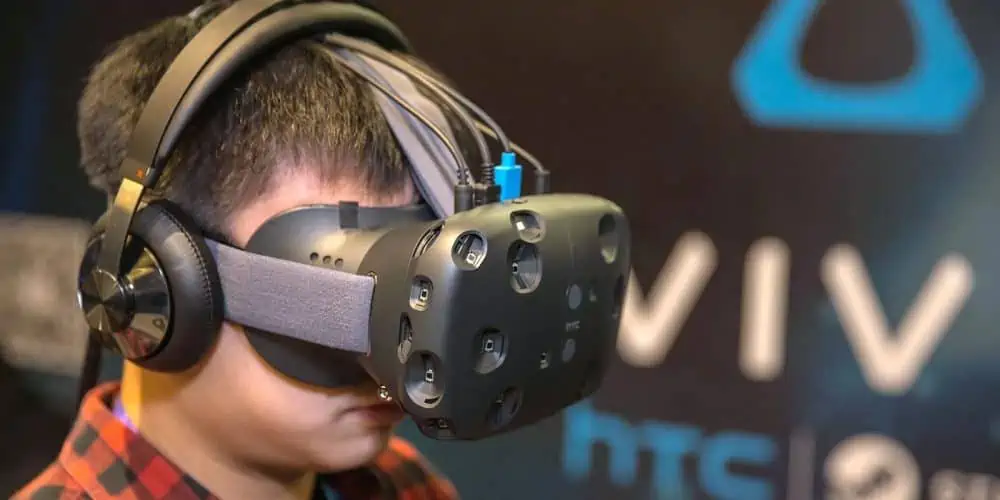
| 1960s | Ivan Sutherland creates the first head-mounted display |
| 1990s | Virtual Reality Modeling Language (VRML) is developed |
| 2012 | Oculus Rift Kickstarter campaign launches |
| 2016 | Pokémon GO popularizes mobile AR |
| 2019 | Standalone VR headsets like Oculus Quest are introduced |
| 2020s | AR glasses and advanced haptics emerge |
Current State of AR/VR
- Improved hardware capabilities
- Growing adoption in various industries
- Increased focus on user-centric design
- Integration with AI and IoT technologies
Key Principles of AR/VR Design
1. Immersion
Creating a sense of presence and engagement within the virtual or augmented environment.
2. Intuitive Interactions
Designing natural and easy-to-understand ways for users to interact with digital content.
3. Spatial Awareness
Considering the three-dimensional space and how users perceive and navigate within it.
4. Context-Awareness
Adapting the experience based on the user’s environment and situation.
5. Comfort and Safety
Minimizing physical and cognitive strain to ensure a comfortable and safe experience.
User Interface (UI) Design for AR/VR
Spatial UI Elements
- Diegetic interfaces: UI elements that exist within the virtual world
- Non-diegetic interfaces: Overlay UI elements that are separate from the virtual environment
Visual Design Considerations
- Color and Contrast: Ensuring visibility in various lighting conditions
- Typography: Using legible fonts and appropriate text sizes
- Depth and Layering: Creating a sense of hierarchy and space
AR-Specific UI Design
- Contextual overlays
- Anchoring digital elements to real-world objects
- Responsive design for various environments
VR-Specific UI Design
- 360-degree spatial layouts
- Curved interfaces for improved readability
- Gaze-based selection and interaction
User Experience (UX) Considerations in AR/VR
Onboarding and Tutorial Design
- Introducing users to new interaction paradigms
- Gradually increasing complexity
- Providing contextual help and guidance
Navigation and Wayfinding
- Clear spatial cues and landmarks
- Intuitive movement controls
- Teleportation vs. continuous movement
Accessibility in AR/VR
- Designing for users with varying physical abilities
- Providing alternative input methods
- Considering visual, auditory, and haptic feedback
Performance Optimization
- Maintaining high frame rates
- Reducing latency
- Optimizing content for smooth rendering
Immersive Storytelling and Content Creation
Narrative Techniques in AR/VR
- Environmental Storytelling: Using the virtual environment to convey narrative elements
- Interactive Narratives: Allowing users to influence the story through their actions
- Spatial Audio: Enhancing immersion through 3D sound design
Creating Compelling AR/VR Experiences
- Balancing realism and stylization
- Leveraging unique AR/VR capabilities
- Encouraging exploration and discovery
Content Types for AR/VR
| Content Type | Description | Examples |
| 360° Video | Immersive video content | Virtual tours, documentaries |
| 3D Models | Interactive virtual objects | Product visualizations, architectural models |
| Mixed Reality | Blending digital and physical elements | AR furniture placement, interactive museum exhibits |
| Virtual Environments | Fully immersive 3D spaces | VR games, training simulations |
Hardware Considerations in AR/VR Design

Designing for Different Devices
- Head-mounted displays (HMDs)
- Smartphones and tablets
- AR glasses and smart lenses
- Haptic feedback devices
Field of View (FOV) Considerations
- Adapting designs for varying FOV across devices
- Ensuring important elements are within the user’s view
Input Methods
- Controllers: Designing for hand-held devices with buttons and triggers
- Hand Tracking: Creating natural gesture-based interactions
- Eye Tracking: Implementing gaze-based selection and focus
- Voice Commands: Integrating speech recognition for hands-free control
Interaction Design for AR/VR
Gesture-based Interactions
- Defining a consistent gesture vocabulary
- Considering ergonomics and user comfort
- Providing visual feedback for gesture recognition
Gaze-based Interactions
- Implementing dwell-time selections
- Designing for precise and comfortable eye movements
- Combining gaze with other input methods for confirmation
Spatial Interactions
- Object manipulation (grabbing, scaling, rotating)
- Spatial menus and controls
- Physics-based interactions
Multimodal Interactions
Combining multiple input methods for more natural and efficient interactions:
- Gaze + voice
- Gesture + controller
- Eye tracking + hand tracking
AR/VR Design Tools and Software
3D Modeling and Animation
- Autodesk Maya
- Blender
- Cinema 4D
AR/VR Development Platforms
- Unity
- Unreal Engine
- ARKit (iOS)
- ARCore (Android)
Prototyping and Interaction Design
- Sketch + VR plugins
- Adobe XD
- Figma + AR/VR kits
Specialized AR/VR Design Tools
- Google Tilt Brush
- Oculus Medium
- Gravity Sketch
Future Trends in AR/VR Design
1. Artificial Intelligence Integration
- AI-powered personalization of AR/VR experiences
- Intelligent virtual assistants and NPCs
- Procedural content generation
2. Haptic Feedback Advancements
- Full-body haptic suits
- Advanced force feedback devices
- Thermal and texture simulation
3. Brain-Computer Interfaces (BCIs)
- Direct neural control of AR/VR interfaces
- Emotion and intention recognition
- Enhanced immersion through neural feedback
4. Photorealistic Rendering
- Real-time ray tracing in VR
- Advanced materials and lighting simulation
- Indistinguishable virtual humans
5. Social VR and Shared Experiences
- Virtual collaboration spaces
- Immersive social media platforms
- Multiplayer AR games and experiences
Challenges and Ethical Considerations
Technical Challenges
- Performance Optimization: Balancing visual fidelity with frame rate requirements
- Cross-platform Compatibility: Designing for various devices and operating systems
- Battery Life: Optimizing experiences for mobile AR devices
User Adoption Barriers
- High cost of premium AR/VR devices
- Lack of compelling content for mainstream users
- Physical discomfort and motion sickness
Privacy and Security Concerns
- Data collection in AR environments
- Protecting user information in shared virtual spaces
- Preventing unauthorized access to AR/VR systems
Ethical Design Considerations
- Avoiding addictive design patterns
- Ensuring inclusivity and accessibility
- Mitigating potential negative psychological effects
Frequently Asked Questions
- Q: What are the key differences between designing for AR and VR? A: While AR and VR share some design principles, they have distinct differences:
- AR integrates digital content with the real world, requiring designs that complement and enhance the physical environment. VR creates fully immersive digital environments, allowing for more control over the user’s experience.
- AR often uses mobile devices or smart glasses, necessitating designs that work in various lighting conditions and physical spaces. VR typically uses head-mounted displays, allowing for more immersive and controlled environments.
- AR interactions often involve manipulating virtual objects in real space, while VR can utilize a wider range of spatial interactions within a fully virtual environment.
- AR designs need to consider real-world context and safety, ensuring users remain aware of their surroundings. VR designs focus more on creating a sense of presence within the virtual world.
- Q: How can designers address motion sickness and discomfort in VR experiences? A: Designers can minimize motion sickness and discomfort in VR through several strategies:
- Maintain high and consistent frame rates (ideally 90 fps or higher)
- Implement comfortable locomotion methods, such as teleportation or snap turning
- Avoid rapid acceleration and deceleration in virtual movement
- Provide a static reference point or horizon line to help users maintain orientation
- Use vignetting or field-of-view reduction during intense motion
- Allow users to customize comfort settings, such as movement speed and turning sensitivity
- Design experiences that encourage physical movement in sync with virtual movement
- Conduct extensive user testing to identify and address potential sources of discomfort
- Q: What are some best practices for creating accessible AR/VR experiences? A: To create accessible AR/VR experiences, consider the following best practices:
- Provide multiple input options (e.g., gaze, voice, controller) to accommodate different abilities
- Implement customizable text size, contrast, and color options
- Use spatial audio cues to help users with visual impairments navigate virtual environments
- Design interfaces that can be used with one hand or limited mobility
- Include subtitle and audio description options for all content
- Allow users to adjust the speed of interactions and animations
- Provide clear, high-contrast visual feedback for all interactions
- Test with diverse user groups, including those with various disabilities
- Follow established accessibility guidelines (e.g., WCAG) and adapt them for AR/VR contexts
- Q: How is storytelling different in AR/VR compared to traditional media? A: Storytelling in AR/VR differs from traditional media in several key ways:
- Immersion: AR/VR allows for a more immersive experience, placing the user within the story rather than as an outside observer.
- Interactivity: Users can actively participate in and influence the narrative, creating a more personalized experience.
- Spatial narratives: Stories can unfold in three-dimensional space, allowing for non-linear exploration and discovery.
- Multi-sensory engagement: AR/VR can engage multiple senses simultaneously, enhancing the emotional impact of the story.
- User agency: Designers must balance giving users freedom to explore with guiding them through the intended narrative.
- Environmental storytelling: The virtual environment itself can convey narrative elements, reducing the need for explicit exposition.
- Time and pacing: Users have more control over the pacing of the story, requiring careful design of triggers and events.
- Q: What are some emerging trends in AR/VR interaction design? A: Several exciting trends are shaping the future of AR/VR interaction design:
- Hand tracking and gesture control: More natural and intuitive interactions without the need for controllers.
- Eye tracking: Enabling gaze-based selection and foveated rendering for improved performance.
- Brain-computer interfaces (BCIs): Direct neural control of AR/VR interfaces, though still in early stages.
- Haptic feedback: Advanced tactile sensations for more immersive and realistic interactions.
- Voice and natural language processing: Improved voice commands and conversations with virtual entities.
- Spatial computing: Seamlessly blending digital and physical interactions in AR environments.
- AI-assisted interactions: Intelligent systems that adapt to user behavior and preferences.
- Cross-device experiences: Designing interactions that span multiple AR/VR devices and traditional screens.
- Social and collaborative interactions: New paradigms for shared virtual spaces and multi-user experiences.
These emerging trends offer exciting possibilities for creating more intuitive, immersive, and engaging AR/VR experiences in the future.