
The Internet of Things (IoT) has revolutionized how we collect, process, and analyze data from connected devices. For makers and developers working with Arduino platforms, integrating sensor data with robust storage and analytics solutions can significantly enhance project capabilities. The Arduino Yun, with its unique combination of microcontroller and Linux-based system, paired with QNAP’s QIoT Suite Lite, creates a powerful IoT ecosystem that enables seamless data collection, storage, and visualization.
Understanding the Components
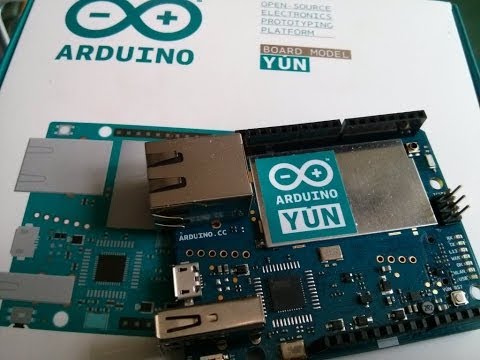
The Arduino Yun represents a significant evolution in the Arduino family, featuring both an ATmega32u4 microcontroller and an Atheros AR9331 processor running OpenWrt Linux. This dual-processor architecture allows the device to handle sensor interfacing on the microcontroller side while managing network communications and data processing through the Linux environment. The built-in WiFi and Ethernet connectivity make it ideal for IoT applications requiring reliable network communication.
QNAP’s QIoT Suite Lite transforms compatible QNAP NAS devices into comprehensive IoT platforms. This software suite provides MQTT broker functionality, data visualization through dashboards, rule engine capabilities, and robust data storage options. The integration eliminates the need for separate cloud services while maintaining complete control over your data infrastructure.
Prerequisites and Setup Requirements
Before beginning the integration process, ensure you have the necessary hardware and software components. You’ll need an Arduino Yun with the latest firmware, a compatible QNAP NAS device running QTS 4.3.0 or later, and stable network connectivity for both devices. The QNAP NAS should have QIoT Suite Lite installed and configured, which can be downloaded from the QNAP App Center.
Network configuration plays a crucial role in successful integration. Both the Arduino Yun and QNAP NAS should be connected to the same local network, whether through WiFi or Ethernet connections. Document the IP addresses of both devices, as these will be essential for establishing communication protocols.
Installing and Configuring QIoT Suite Lite
Begin by accessing your QNAP NAS through the web interface and navigate to the App Center. Search for QIoT Suite Lite and install the application. Once installed, launch QIoT Suite Lite and complete the initial configuration wizard. This process includes setting up the MQTT broker, which serves as the communication hub between your Arduino Yun and the NAS.
During MQTT broker configuration, you’ll establish connection parameters including port numbers, authentication credentials, and security settings. The default MQTT port is 1883, but you can modify this based on your network requirements. Create dedicated user accounts for your Arduino devices to maintain security and enable proper access control.
Configure the data storage settings within QIoT Suite Lite to determine how sensor data will be stored and retained. The suite supports various storage options, including time-series databases optimized for IoT data patterns. Set appropriate retention policies based on your project requirements and available storage capacity.
Preparing the Arduino Yun
The Arduino Yun requires specific libraries and configurations to communicate effectively with QIoT Suite Lite. Install the necessary MQTT libraries through the Arduino IDE Library Manager, including PubSubClient for MQTT communication and Bridge library for Arduino-Linux communication.
Configure the network settings on your Arduino Yun to ensure reliable connectivity. This involves setting up WiFi credentials or Ethernet configuration depending on your preferred connection method. Test the network connectivity using simple ping commands or web requests to verify proper communication.
Develop a basic sketch that initializes the MQTT connection and establishes communication with the QIoT Suite Lite broker. The sketch should include connection retry logic to handle temporary network interruptions and maintain reliable data transmission.
Establishing MQTT Communication
MQTT (Message Queuing Telemetry Transport) serves as the primary communication protocol between the Arduino Yun and QIoT Suite Lite. This lightweight, publish-subscribe protocol is ideal for IoT applications due to its efficiency and reliability in low-bandwidth environments.
Create MQTT topics that organize your sensor data logically. Use hierarchical topic structures such as “home/sensors/temperature” or “greenhouse/humidity/sensor1” to enable easy data filtering and routing. Consistent topic naming conventions facilitate dashboard creation and data analysis within QIoT Suite Lite.
Implement proper error handling and connection management in your Arduino code. Include functions to detect connection failures, attempt reconnections, and buffer data during temporary outages. This ensures data integrity and minimizes information loss during network disruptions.
Sensor Integration and Data Collection
With the communication framework established, integrate various sensors with your Arduino Yun to collect meaningful environmental data. Common sensors include temperature and humidity sensors (DHT22), light sensors (LDR), motion detectors (PIR), and air quality sensors. Each sensor requires appropriate libraries and calibration procedures to ensure accurate readings.
Structure your sensor data in JSON format for transmission to QIoT Suite Lite. This standardized format enables easy parsing and processing within the NAS environment. Include timestamps, sensor identifiers, and measurement units to provide context for the collected data.
Implement sampling strategies that balance data frequency with network efficiency. High-frequency sampling may overwhelm network resources, while low-frequency sampling might miss critical events. Consider implementing adaptive sampling rates based on data variability or threshold-triggered reporting for optimal performance.
Creating Dashboards and Visualizations
QIoT Suite Lite provides powerful dashboard creation tools that transform raw sensor data into meaningful visualizations. Access the dashboard builder through the web interface and create custom widgets displaying real-time and historical data from your Arduino Yun sensors.
Configure various chart types including line graphs for temperature trends, gauge displays for current readings, and alert indicators for threshold violations. Customize time ranges, data aggregation methods, and visual styling to create professional-looking dashboards suitable for monitoring and analysis.
Implement automated alerting systems that notify administrators when sensor readings exceed predetermined thresholds. Configure email notifications, SMS alerts, or webhook integrations to ensure prompt response to critical conditions.
Advanced Features and Automation
Leverage QIoT Suite Lite’s rule engine to create automated responses based on sensor data patterns. Develop rules that trigger actions when specific conditions are met, such as activating ventilation systems when temperature exceeds limits or sending alerts during security breaches.
Implement data analytics functions that identify trends, anomalies, and correlations within your sensor data. Use built-in statistical functions or export data to external analytics platforms for advanced processing and machine learning applications.
Configure data backup and synchronization features to protect against data loss and enable remote access to historical information. Set up automated backup schedules and configure cloud synchronization if required for off-site data protection.
Troubleshooting and Optimization
Common connectivity issues include network configuration problems, MQTT authentication failures, and firewall restrictions. Develop systematic troubleshooting procedures that verify network connectivity, test MQTT connections independently, and validate authentication credentials.
Monitor system performance metrics including network bandwidth utilization, storage consumption, and processing loads. Optimize data transmission frequencies and compression settings to maintain efficient operation while preserving data quality.
Implement logging and monitoring systems that track system health and identify potential issues before they impact data collection. Use QIoT Suite Lite’s built-in monitoring tools alongside custom logging solutions for comprehensive system oversight.
Security Considerations and Best Practices
Implement robust security measures to protect your IoT infrastructure from unauthorized access and data breaches. Use strong authentication credentials, enable SSL/TLS encryption for MQTT communications, and regularly update firmware on all connected devices.
Configure network segmentation to isolate IoT devices from critical network infrastructure. Implement firewall rules that restrict unnecessary network access while maintaining required communication paths between the Arduino Yun and QNAP NAS.
Establish regular maintenance schedules that include security updates, credential rotation, and system health checks. Document all configuration changes and maintain backup copies of critical settings to enable rapid recovery from system failures.
The integration of Arduino Yun with QNAP’s QIoT Suite Lite creates a powerful, self-contained IoT platform that enables sophisticated sensor data collection, storage, and analysis. This combination provides the flexibility of Arduino development with the robustness of enterprise-grade storage and analytics capabilities, making it ideal for both educational projects and professional IoT deployments.

