
The utilization of Gerber files forms a significant section of the circuit board creation, as well as diagnostics. In this article, you will learn much regarding the Gerber file extensions. These include the software required as well as those extensions that you will need to recognize. Before we go into details regarding Gerber file extensions, we will first consider what Gerber files are.
What is a Gerber File?
The Gerber file can be described as a unique 2D diagram that represents every layer of the printed circuit board whereby different shapes and lines represent vias, tracks, and pads. Explaining further, we mean that this is a way of mechanically instructing the printing machine to help in crafting the PCB board of your choice, with respect to the information given.
This unique method for manufacturing the PCB boards can be described as the most acceptable option amongst the manufacturers and designers because it is very specific and hardly experiences errors. Furthermore, all the information regarding the circuit board like track width and length, copper amount, as well as hole spacing, will be stored inside the Gerber File. Also, this style of data collection is very important to the PCB construction in order to help it achieve its purpose. The file’s final version seems to be a digital circuit board having all components attached to it.
What Do PCB Gerber File Extensions Mean?
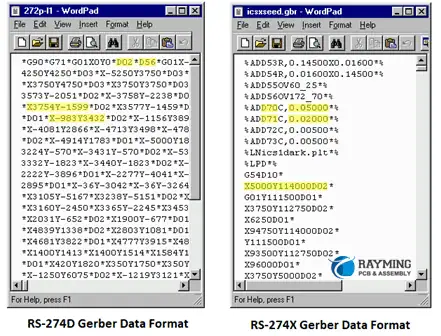
Manufacturers work with a PCB design software for creating Gerber files used in upcoming electronics. Moreover, this process has to do with the CAD tool you are making use of. Nevertheless, the machines usually fashion the Gerber files, with respect to the Gerber format (RS-274X) that superseded ineffective and ancient forms such as the Gerber standard (RS-274-D).
Also, you can note that the Gerber data doesn’t need any identifying name like text files; moreover, it is usually associated with some extensions like .gbr or .gb that are also viewed as the standard PCB Gerber file extensions.
Asides from this Gerber file extensions list, there are other types of Gerber files used. This depends on the PCB design software of the manufacturer.
The Standard Gerber (RS-274-D)
This can be described as the oldest representation of gerber files. The RS-274-D was known to support basic capabilities for plotting such as drawing trucks. This didn’t define margins and coordinates of drawing distinctly.
Soon, this standard gerber suddenly became unpopular, which eventually led to its revoke by developers back in 2014.
Extended Gerber (X-Gerber’s RS-274)
UCAMCO introduced this Gerber in 1988. It is useful for ASCII commands that are human readable, which are combined to create 2D vector graphics. Also, X-gerber integrates the utilization of metadata for defining graphics. It associates with the .gbx and .gbr gerber file extensions.
Gerber X2
The Gerber X2 is the most recent Gerber file format. It features different improvements for the earlier file formats. Gerber X2 supports all additional vendor extensions such as “.bot” and “.top”. Also, this file format works with majority of today’s CAM software programs or applications.
How to Open a Gerber File
Below is a guide for opening a gerber file. Before you begin, there’s a need to identify the type of file. These gerber files are usually saved in ZIP or RAR format, which corresponds to the specific layer of the PCB layout. Each one comes with its own gerber file extension.
Before opening a gerber file, click on File and then open it from your menu bar. When it comes to viewing the gerber files, make use of the program called Gerber Viewer. There are viewers that require installation, some others can easily be checked or accessed online.
Whatever the case is, you have to choose a viewer which supports contemporary file formats. In addition, you must choose one, which allows the taking of precise measurements, and zooming in. This assists you in testing of the circuits as well as adjusting the board.
More Information
Also, you may have to download a unique online gerber viewer. This aids in simplifying the entire process. In addition, the most important aspect when opening the gerber file involves making sure that it works with your choice of software.
In order to ensure compatibility, there’s a need to name the file making use of a similar convention with the program. You can either regenerate or delete them when they’re incompatible. Also, to be able to locate the best possible viewer, choose or click on File, then click Open Layer(s). Here you will find numerous programs that will open as well as edit the Gerber file, some of which are free, while others are paid for.
You may make use of ViewMate and other comparable free programs. These are user-friendly applications and they also provide advanced features. Also, you will be able to view all the layers, go ahead to modify every layer’s visibility, as well as measure the distance found between the components.
In addition, these programs don’t allow users to save the drawings. However, they play an important role in verifying your designs’ accuracy. These applications will also be useful and important for quoting.
Different CAD Softwares Used for the Gerber Files

Computer-Aided Design or CAD involves the designing, developing and drawing of the PCB using computer software. The programs used are called CAD Software.
There are different circuit design softwares that work to meet the requirement of the diversified layout that the manufacturers have requested for. These include the online free circuit board design software, industrial PCB softwares, as well as the free printed circuit board design software.
In this section, we will be considering some reliable CAD as well as Gerber Viewer softwares which are commonly utilized in circuit board manufacturing.
Altium
Altium features the Protel form of Gerber file extension and is known as the most comprehensive and modern CAD software globally. It was specifically designed for manufacturing PCB board and has maintained the best option among the engineers and designers all over the world.
In addition, Altium didn’t just attain huge success overnight, as this current version has been able to evolve through many decades of development and innovation. Currently, Altium gerber file extensions are now at a stage whereby it has the ability of creating a unique and unified environment, which features the required tools for meeting the requirements of the design.
KiCad
This can be described as an opensource software and gbr file reader. Also, this software acts in line with the copyright agreement of the GNU. Just like the other CAD softwares. KiCad offers designers and manufacturers with a user interface that is graphical that aids in board construction.
In addition, you don’t need to utilize any specialized devices when working with the KiCad software. Just the keyboard and mouse are okay. Furthermore, it works on two main operating systems, which are Linux and Windows.
As you run the software, designers would see that KiCad offers some support for schematic diagrams, PCB layouts, stable model view in 3D, viewing of the Gerber file, and lots more. Also, this application includes 3D libraries, symbols, and packages, which comes as bonus for users to download.
Eagle
Eagle features reliable functions as well as a user-friendly interface that aids in the construction of your circuit’s schematic diagram. In contrast to the other products, Eagle gerber file extensions requests that users pay a fee, which is financially acceptable, before making use of its features. The truth is that the price charged is worth it because it comes with great features such as online positive and negative annotation function, batch command script files, copper cladding, and interactive follower.
Also, it is very important to note that EAGLE offers support for many platforms, which includes Mac, Windows, and Linux. Also, it comes with usable scripts, a very rich library, as well as CAM tools. All these are great options for the designers of PCB boards that have the ability of working with EAGLE gerber file extensions.
OrCAD
This program has been available since late 1980s. In fact it is almost the same age as Altium. This application is well-known among different manufacturers as a result of their simple operation, simulation’s important function, and a friendly interface for the users.
Immediately the schematic diagram has been imputed, the information system of the component is included, which plays an important role in authenticating, creating, and tracking of all the PCB board’s elements.
Also, all these features combine together, making it a great and reliable option for all dedicated manufacturers. Though OrCAD isn’t regarded as the most effective CAD software in the market, it comes with a great management function as well as an environment that is well-integrated.
PADS
This software is widely regarded as the boss of CAD due to the fact that it is comprehensive and user-friendly. In addition, the quality of the design is better and impressive compared to other applications such as Allegro.
Furthermore, PADS is regarded as a good choice in the marketplace, and is usually utilized by small companies. This is because it is comprehensive, affordable, and user-friendly. This software also covers different functions such as assembly files, schematic diagrams, output of the bill of material, and more.
How to Convert Gerber Files to PCB Files
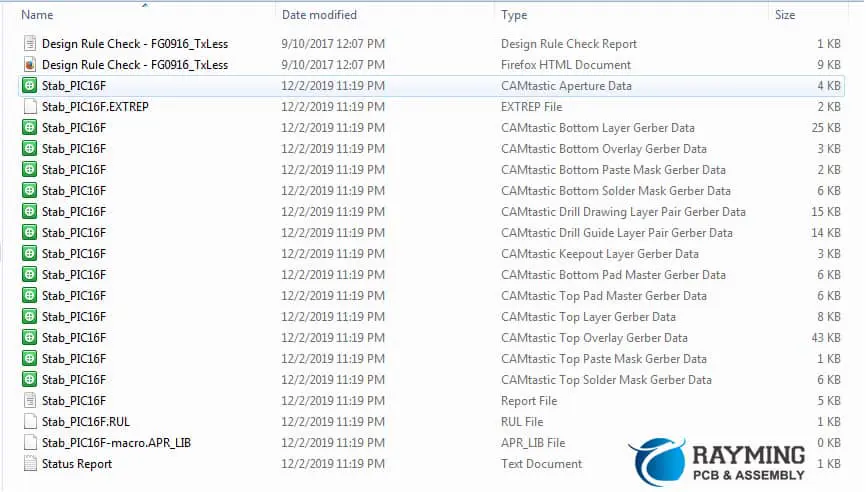
In order to convert your Gerber files into PCB, go to the Manu (Export Format) and then choose that Gerber file. Next, deactivate your “Skip Options Dialog.” Then, choose your PCB file and click “Next.”
Once you are done choosing your PCB file, your Gerber file would appear in that folder containing the PCB file. Once you are done converting it, this PCB file would be available for editing. Most electronic designer export their designs to take the form of gerber files before sending them to the facility used for PCB fabrication.
These files make up the universal language for PCB design. Also, the equipment for PCB printing won’t understand the design in their absence. If you want to create PCBs, there’s a need to understand how you can generate the Gerber files. Take note that ASCII is its file format. This means that you can edit it using text editors.
From your file menu choose “Gerber Export.” You will see all the PCB layers displayed in your PCB export tab. Also included are silkscreen, mechanical, drill template, as well as electrical template layers.
Then, select “Create Artwork” for generating a printed circuit board document that contains all layers. Also, you would need to type in the PCB document’s parameters. There are many online programs, which allow users to edit their gerber files.
Choose one that offers support for different output and input file types. Also, the software permits necessary modifications into the design as well as save it in whatever format that pleases you. Furthermore, many programs offer support for different file formats. This allows users to make use pf the Gerber Converter in creating the printed circuit board, which best suits the design.
Important Features You Should Look Into For the Gerber File Viewers
In order to select a reliable gerber file viewer, there may be a need to look into the following features.
Have wider printer compatibility
The viewer for the gerber file has to be compatible with different printers. Asides from this, it must have room for different printing alternatives for different printers.
Supports precision during viewing
Great gerber viewers must add features related to precision and zooming measurements ensuring that you check through the circuits as well as rectify all errors easily.
Support Modern File Types
A reliable gerber file must have the ability of supporting well known modern files such as Excellon and HPGL/HPGL-2 among others.
Conclusion
To conclude, the Gerber file can be described as animated diagrams that represent every facet of the circuit board where different shapes and lines represent vias, tracks, and pads. In addition, the Gerber file extension comes in different forms; however, the .gbr format is regarded as the standard.
Also, creating your Gerber file will need CAD software which also functions as the gbr file reader. Every application features unique benefits. However, we hope that our article was able to clarify what Gerber file extensions are.

